
1.Start with FMZ platform
Thanks for using our platform. This is a basic instruction for beginners, for a full version of our API documentation, check on FMZ API. There are many obvious specs that aren't covered in this tutorial left for you to discover.
After learning the entire tutorial, you will know how FMZ works and be able to write some basic strategies.
1.1 About FMZ platform
What is FMZ platform?
FMZ is an automated trading platform for cryptocurrency traders with support for many bitcoin/eth/altcoin exchange markets.
What can FMZ do for you?
You can learn how to write your bots(strategies) from our strategies’ square which contains lots of open source code, share your strategy’s code with others, ask for professional help any time, run your strategy on many exchanges, control your bot on website with computer or cellphone, sell your strategies if you want, communicate with many other auto-trading lovers in our group . In a word, FMZ is a perfect platform for those who want to do automated trading.
Which Cryptocurrency exchanges does FMZ support?
FMZ supports almost all exchanges that are popular, such as Binance, Bitfinex, Bitstamp, OKEX, Huobi, Poloniex, etc. you can also trade futures on OKEX and BitMEX. Check the full support list on API. You only need to write one strategy and run it on all exchanges without any changes.
What programming languages does FMZ support?
FMZ supports JavaScript, Python, C++ (JavaScript and Python are recommended) for coding your strategies. Benefiting from the completed languages supporting(not a custom language only can be used for one platform), you can improve your programming skills as well as learn to write strategies.
Is your API KEY safe?
Indeed. your API-KEYs are saved after encryption. Here is how it works.
- You need to input the FMZ password When adding the key. Web-browser will encrypt your API key and pass the encrypted key to FMZ server using
https. - You need to input the FMZ password when you run the docker on your server or computer.
- FMZ will send the encrypted key to your docker using https when you start a bot. The docker will decrypt to get the key.
- FMZ don't save your password(only password Hash). So even we don't know your API key.
- You need to protect your own password and docker server. It is best to use a second verification login FMZ.
Current feature list:
- 1.Cross-platform, supports for all major cryptocurrency exchanges — more coming soon
- 2.Supports for the simulated exchange. https://wex.app/
- 3.Has an effective simulate backtesting system.
- 4.Supports for sending e-mails, pushing messages to your telegram account.
- 5.Web-based control that can be accessed through your phone.
- 6.Supports for Python\C++\JavaScript programming.
- 7.The cost is extremely low. 0.125 RMB per hour, about 0.018 dollars.
- 8.No API-KEY or passwords are saved on our server. FMZ has been running for more than four years without any security issues.
1.2 A quick start to use FMZ platform
To run a bot, you need to have a strategy, add an exchange, deploy a docker first. the docker is your strategy’s executor running on your own computer or server.
A quick look of the main page
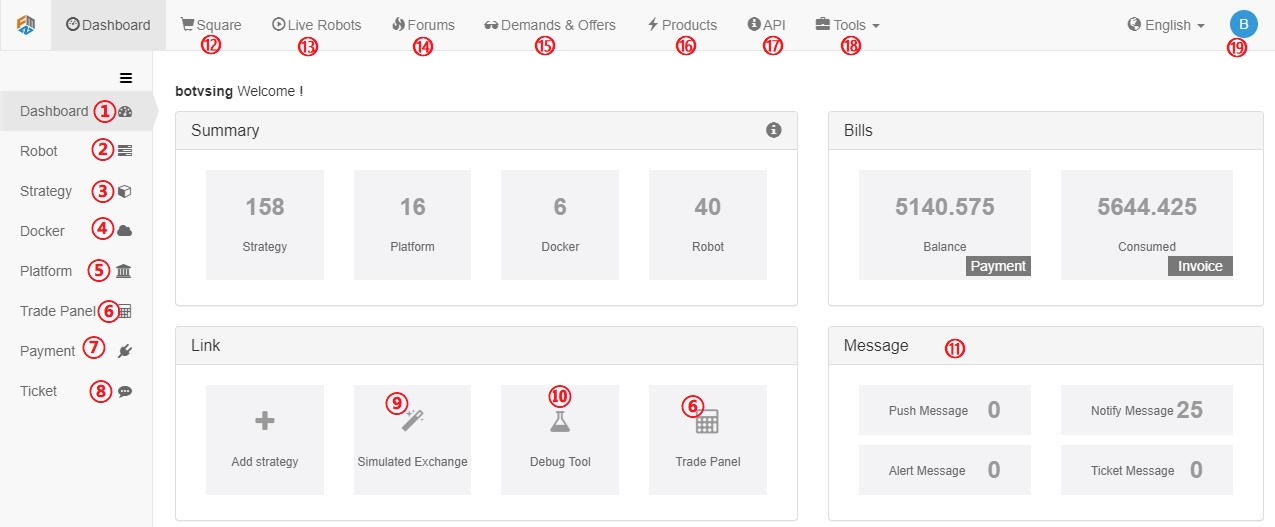
- 1.Your main control page
- 2.Manage all your bots (start,stop,delete,open,etc)
- 3.Manage all your strategies' code
- 4.Deploy and manage your docker
- 5.Add new exchanges
- 6.Manual trading on the exchanges you added
- 7.Pay your bill
- 8.Ask any question here
- 9.FMZ's simulated exchange
- 10.Debug tool where you can run a block of code without start a bot.
- 11.All kinds of message
- 12.Strategy square where open-source and charging strategies are listed
- 13.Live Robots where all live-running bots are listed.
- 14.Forums where you can post a post to discuss any question related.
- 15.Ask for someone to write code for you or provide this service for others.
- 16.Products for exchanges and agencies.
- 17.API documentation.
- 18.Some useful tools, check for yourself.
- 19.Your account information.
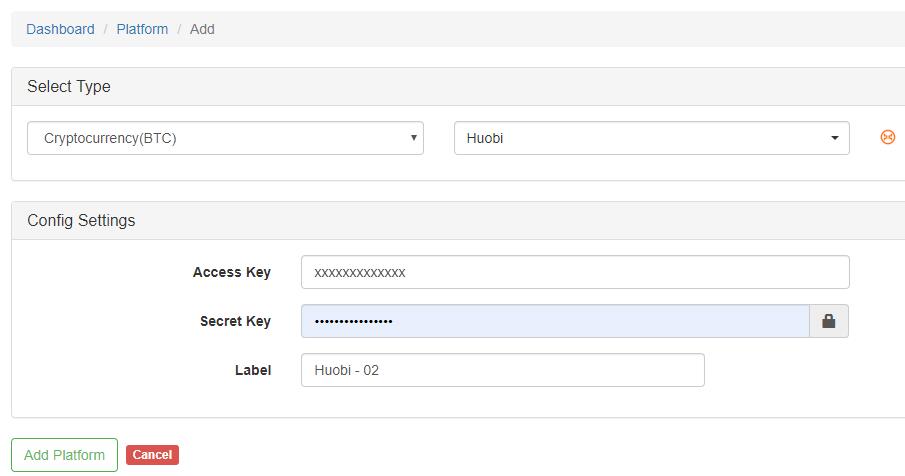
Add an exchange
Add at https://www.fmz.com/m/add-platform, or click Platform label.
Your access key and secret key can be applied at the cryptocurrency exchange. API-KEY is used to trade and get the private information from the exchange. We don't save any API-KEY or passwords on our server.
You can register on FMZ's simulated exchange and add it for testing.
deploy a docker
FMZ doesn't run bots for you, you need to deploy a docker by yourself as the executor, which is more flexible and safe since our service doesn't participate in running your bots. Although we also provide public docker, it should only be used for testing.
For windows, it's quite easy, just follow the instruction on https://www.fmz.com/m/add-node
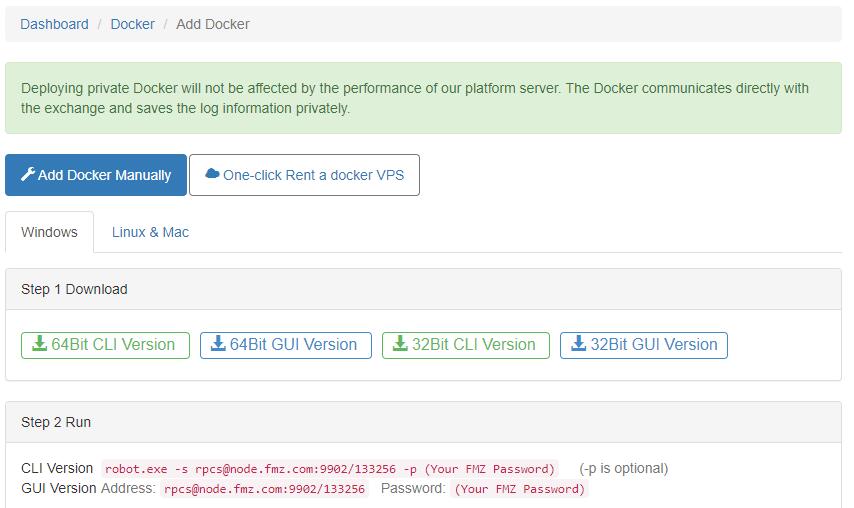
For Linux, you can rent a VPS on our website, which will deploy the docker automatically. Here are the steps to deploy on your own Linux server (recommended):
- 1.Buy a cloud server (VPS) from Amazon or Google, the lowest and cheapest configuration is enough. you may often have a free try out for a long time.
- 2.Login your server, follow the instruction from your server provider or Google it.
- 3.Chose the docker that match your system version, most of the time, it is 64Bit.
- 4.For centos, run
wget www.fmz.com/dist/robot_linux_amd64.tar.gz, command not found? install firstyum install wget -y. - 5.Run
tar -xzvf robot_linux_amd64.tar.gzto unzip. - 6.Run
./robot -s node.fmz.com/xxxxx -p -p yourFMZpassword, you should see something like2018/07/05 05:04:10 Login OK, SID: 62086, PID: 7226, Name: host.localdomain, which means everything is worked.
node.fmz.com/xxxxxis unique to every user, find your own on https://www.fmz.com/m/add-node. - 7.Now the docker isn’t run in the background, if you close the SHH client, the docker will stop.
Pressctrl + Cto stop the docker. - 8.Run
nohup ./robot -s node.fmz.com/xxxxx -p yourFMZpassword &to run in the background. this step can also be done byScreencommand. - 9.Check on https://www.fmz.com/m/nodes, if everything is OK, you can find the docker deployed there.
Write a strategy
You should write your own strategy or buy from the square. Here we will use a simple JavaScript strategy as a demo to show how to use edit page. The strategy can be copied from https://www.fmz.com/strategy/125482.
This tutorial will not cover how to use JavaScript as you can find plenty of tutorials online.
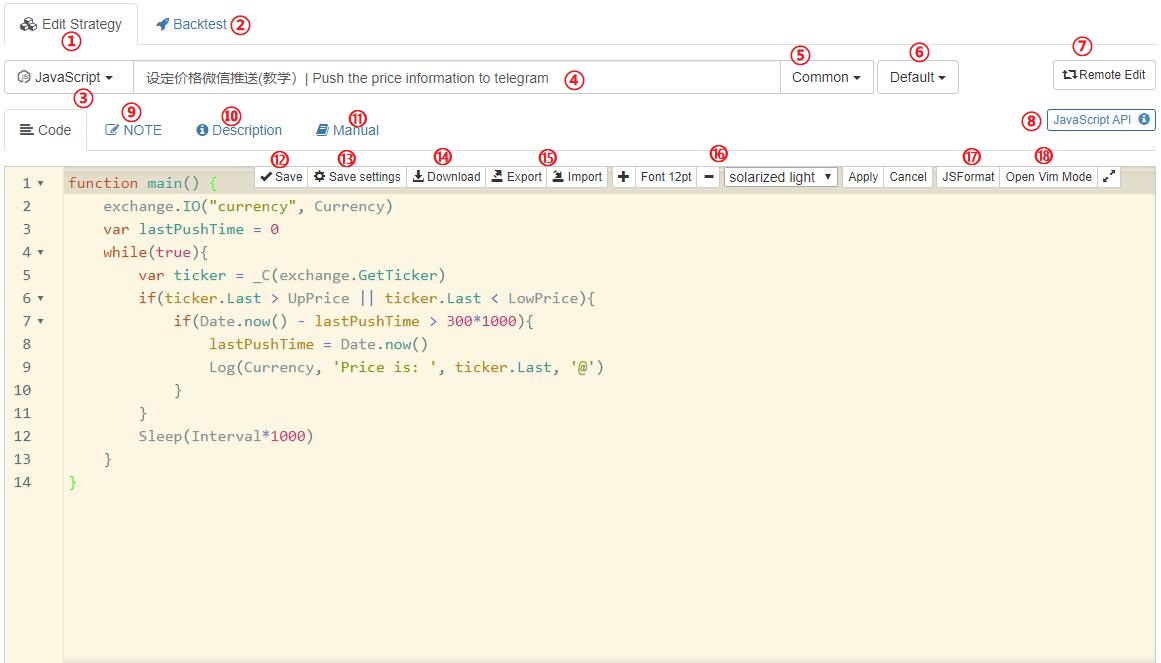
- 1.Edit your code
- 2.Backtesting, we will cover this part on an intermediate tutorial
- 3.The programer language of your code, JavaScript was used in this demo
- 4.The title, "|" splits Chinese and English title, which one will be showed is decided by the language of FMZ website
- 5.The type of your strategy, the default is common
- 6.The category of your strategy. You can divide your strategies into different categories if you have too many
- 7.Remote editing your code from your own IDE instead of our website
- 8.A link to the API doc
- 9.Notes of the strategy(only be seen by yourself). you can record the thoughts here.
- 10.Descriptions of the strategy. Others will see the descriptions if you share or sell your strategy on Square.
- 11.Manual of the strategy, can only be seen when someone bought your strategy.
- 12.Save your code, or
Ctrl+Son edit mode. - 13.Save the backtesting config on the code.
- 14.Download the strategy file
- 15.Export and import the strategy while keeping all the parameters
- 16.Change the font size and edit the theme
- 17.Format the code automatically
- 18.Use VIM mode to edit.
Below is the full explanation of the strategy. In order to push the message to your phone, you need to bind the telegram to your account at https://www.fmz.com/m/account
/*
This strategy will send a message to your telegram when the price is higher or lower than
the set price.
All strategies must have a main function as the entrance.
*/
function main() {
//change symbol,will cover the default symbol which was set when start a bot.Currency is a strategy arguments
exchange.IO("currency", Currency)
var lastPushTime = 0 //the variable of last push timestamp.
while(true){ //run a infinite loop, which is the basic structure
//_C() function can retry the request automatically after failure. not necessary. var ticker = exchange.GetTicker() is ok.
var ticker = _C(exchange.GetTicker) // for information about GetTicker, check on https://fmz-docs.readthedocs.io/en/latest/code_Instruction/Market%20API.html#getticker
if(ticker.Last > UpPrice || ticker.Last < LowPrice){ //ticker.Last represents the last deal price
if(Date.now() - lastPushTime > 300*1000){ //only push once in 5 mins, Date.now() return ms.
lastPushTime = Date.now() //update lastPushTime
Log(Currency, 'Price is: ', ticker.Last, '@') //Log the price on the bot's page and sent the message. '@' in the end means push message
}
}
Log(Currency, 'Price is: ', ticker.Last) //just log the price
Sleep(Interval*1000) //check the last price again after Interval seconds
}
}
Run the bot
Finally, it's time to run a bot.
On the Robot page, click Add robot, or visit https://www.fmz.com/m/add-robot directly to add a bot.
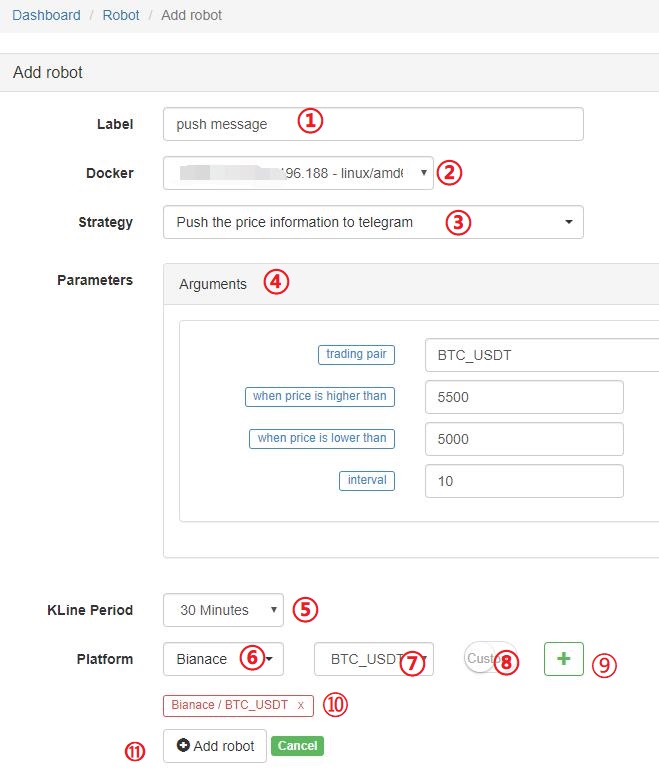
- 1.Bot's name
- 2.The docker to run this bot
- 3.The strategy to run
- 4.The parameters, the default value can be changed.
- 5.Default Kline period when use exchange.GetRecords()
- 6.Exchange
- 7.Trading symbol or pairs
- 8.If the trading symbol you need is not on the list, you can just type it by yourself.
- 9.Click to add the exchange
- 10.The exchange added already. Multiple exchanges can be added at one bot, access by
exchanges[0],exchanges[1] - 11.Click to run the bot!
Manage the bot
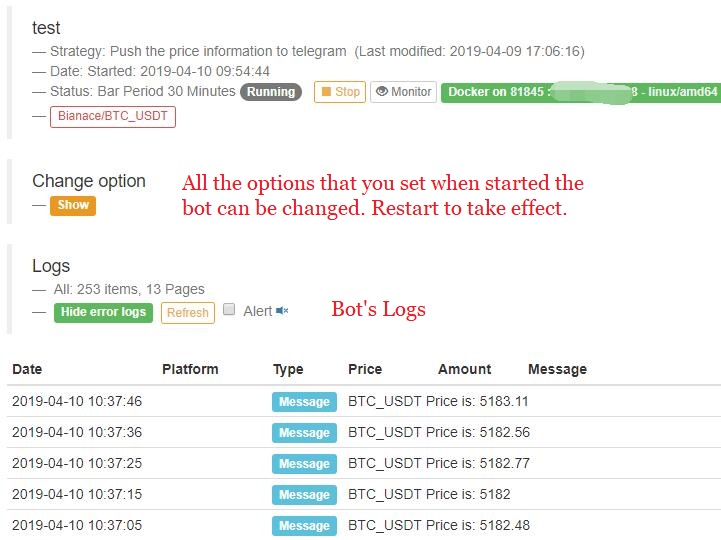
On the Robot page, you can see the bot is running.

- 1.Bot's name, click here to bot page.
- 2.Strategy that run by the bot, click here to strategy page.
- 3.Bot's status. can be running, stopped, error.
- 4.Bot's profit, passed by
LogProfit(), can be any number you want. - 5.Created date, can be changed to lastest communication time。
- 6.Monitor the bot. FMZ will send you a message when the bot was stopped accidentally
- 7.Stop the bot.
Click the bot's name to the bot page for more information:
2.The most commonly used API introduction
This part will introduce some most commonly used API, for a full version of our API documentation, check on FMZ API.
It is highly recommended for beginners to run the demo code on Debug page.
2.1 Log
Use : Log(msg)
Parameters : strings or numbers
Description : Log a message to robot log page.
Return : None
Demo:
            function main() {
    var msg = 'msg string'
    Log(msg)
    Log('hello', 'world', 123)
    Log("red color message", "#FF0000")
    Log("push this message to telegram!@") // won't push on debug page
}
2.2 GetTicker
Use : exchange.GetTicker()
Parameters : None
Description : Get the current market's ticker.
Return :
{"Info:{}, "High":5226.69, "Low":5086.37,"Sell":5210.63, "Buy":5208.5, "Last":5208.51, "Volume":1703.1245, "OpenInterest":0, "Time":1554884195976}
Demo:
            function main() {
    var ticker = exchange.GetTicker()
    Log(ticker)
    Log('Last Price: ',ticker.Last, 'Bid Price: ', ticker.Buy)
}
2.3 GetDepth
Use : exchange.GetDepth()
Parameters : None
Description : Get the current market's order book.
Return :
            {
    "Info":null,
    "Asks":[
        {"Price":5866.38,"Amount":0.068644},
        {"Price":5866.39,"Amount":0.263985},
        {"Price":5866.73,"Amount":0.05},
        {"Price":5866.77,"Amount":0.05},
        {"Price":5867.01,"Amount":0.15},
        {"Price":5875.89,"Amount":0.05},
        ......
        ]
    "Bids":[
        {"Price":5865.13,"Amount":0.001898},
        {"Price":5865,"Amount":0.085575},
        {"Price":5864.15,"Amount":0.013053},
        {"Price":5863.65,"Amount":0.016727},
        {"Price":5863.51,"Amount":0.128906},
        {"Price":5863.15,"Amount":0.2}
        ......
        ],
    "Time":1530241857399
}
Demo:
            function main() {
    var depth = exchange.GetDepth()
    Log(depth)
    Log('Bid one: ', depth.Bids[0].Price, 'Ask one: ', depth.Asks[0].Price)
}
2.4 GetRecords
Use : exchange.GetRecords(), exchange.GetRecords(Period)
Parameters :
| Name | Type | Mandatory | Description |
|---|---|---|---|
| Period | global varble | No | Kline's cycle, Optional Parameters, default K line cycle is set when start the robot. |
All possible parameters:PERIOD_M1:1 minute,PERIOD_M5:5mins,PERIOD_M15:15mins,PERIOD_M30:30mins,PERIOD_H1:1h,PERIOD_D1:1d.
Description : Get Kline/candlestick bars for current market.
Return :
            [
    {"Time":1526616000000,"Open":7995,"High":8067.65,"Low":7986.6,"Close":8027.22,"Volume":9444676.27669432},
    {"Time":1526619600000,"Open":8019.03,"High":8049.99,"Low":7982.78,"Close":8027,"Volume":5354251.80804935},
    {"Time":1526623200000,"Open":8027.01,"High":8036.41,"Low":7955.24,"Close":7955.39,"Volume":6659842.42025361},
    ......
]
Demo:
            //A useful JavaScript example using Records to get a close array:
function main(){
    var close = []
    var records = exchange.GetRecords(PERIOD_H1)
    Log('total bars: ', records.length)
    for(var i=0;i<records.length;i++){
        close.push(records[i].Close)
    }
    return close
}
2.5 GetAccount
Use : exchange.GetAccount()
Parameters : None
Description : Get account information
Return :
            {
    "Stocks":0.38594816,// free base asset
    "FrozenStocks":0,    //locked base asset
    "Balance":542.858308,//free quote asset
    "FrozenBalance":0     //locked quote asset
    "Info":{} //the raw data
}
Demo:
            //A useful JavaScript example of Log your account value for a certain trading pair:
function main(){
    while(true){
        var ticker = exchange.GetTicker()
        var account = exchange.GetAccount()
        var price = ticker.Buy
        var stocks = account.Stocks + account.FrozenStocks
        var balance = account.Balance + account.FrozenBalance
        var value = stocks*price + balance
        Log('Account value is: ', value)
        LogProfit(value)
        Sleep(3000)//sleep 3000ms(3s), A loop must has a sleep, or the rate-limit of the exchange will be exceed
        //when run in debug tool, add a break here
    }
}
2.6 Buy
Use : exchange.Buy(Price, Amount), exchange.Buy(Price, Amount, Msg)
Parameters :
| Name | Type | Mandatory | Description |
|---|---|---|---|
| Price | Number | Yes | Buy price of limit order |
| Amount | Number | Yes | Buy amount of limit order |
| Msg | String | No | Add an extra message on Log page |
Description : Send a buy order and a buy log at bot's page
Return : return the OrderID if success, null if not.
Demo:
            //A useful JavaScript example of Buy for buy certain amount of bitcoin at a certain price:
function main(){
    while(true){
        var ticker = exchange.GetTicker()
        var price = ticker.Sell
        if(price >= 7000){
            exchange.Buy(price+5, 1, 'BTC-USDT')
        }
        Sleep(3000)//Sleep 3000ms
    }
}
2.7 Sell
Use : exchange.Sell(Price, Amount), exchange.Sell(Price, Amount, Msg)
Parameters :
| Name | Type | Mandatory | Description |
|---|---|---|---|
| Price | Number | Yes | Sell price of limit order |
| Amount | Number | Yes | sell amount of limit order |
| Msg | String | No | Add an extra message on Log page |
Description : Send a sell order and a sell log at bot's page
Return : return the OrderID if success, null if not.
Demo:
            //A useful JavaScript example of Buy for buy certain amount of bitcoin at a certain price:
function main(){
    while(true){
        var ticker = exchange.GetTicker()
        var price = ticker.Buy
        if(price >= 7000){
            var id = exchange.Sell(price-5, 1, 'BTC-USDT')
            Log('OrderId: ', id)
        }
        Sleep(3000)
    }
}
2.8 GetOrder
Use : exchange.GetOrder(OrderId)
Parameters :
| Name | Type | Mandatory | Description |
|---|---|---|---|
| OrderId | Number | Yes | Order Id |
Description : Get order details by order id.
Return :
            {
    "Id":125723661,
    "Amount":0.01,
    "Price":7000,
    "DealAmount":0,
    "AvgPrice":0,
    "Status":0, // 0:Not filled, 1:Filled, 2:Canceled
    "Type":1,// 0:Buy, 1:Sell
    "ContractType":"",//just for futures contract orders
    "Info":{} //raw info from exchange
    }
}
Demo:
            //A JavaScript example of using this API, which will buy until your account has 5 coins:
function main(){
    while(true){
        var amount = exchange.GetAccount().Stocks
        var ticker = exchange.GetTicker()
        var id = null
        if(5-amount>0.01){
            id = exchange.Buy(ticker.Sell, Math.min(10-amount,0.2))
        }else{
            Log('Job completed')
            return //return the main function, bot will stop
        }
        Sleep(3000) //Sleep 3000ms
        if(id){
            var status = exchange.GetOrder(id).Status
            if(Status == 0){
                exchange.CancelOrder(id)
            }
        }
    }
}
2.9 GetOrders
Use : exchange.GetOrders()
Parameters : None
Description : Get all open orders for your trading symbols.
Return : A list of open orders, the result has the same meanning as GetOrder()
            [
    {
        "Info":{},
        "Id":16387538,
        "Amount":1123,
        "Price":0.00012826,
        "DealAmount":0,
        "AvgPrice":0,
        "Status":0,
        "Type":1,
        "ContractType":""
    }
]
Demo:
            //A JavaScript example of using this API, which will cancel all open orders for trading symbol:
fuction CancelAll(){
    var orders = exchange.GetOrders()
    for(var i=0;i<orders.length,i++){
        exchange.CancelOrder(orders[[i].Id) // cancel order by orderID
    }
}
function main(){
    CancelAll()
    while(true){
        //do something
        Sleep(10000)
    }
}
2.10 CancelOrder
Use : exchange.CancelOrder(OrderId)
Parameters :
| Name | Type | Mandatory | Description |
|---|---|---|---|
| OrderId | Number | Yes | Order Id |
Description : Cancel an order by order id.
Return : bool type, true means that the cancellation of the order request was successful. false means cancellation of the order request failed.
2.11 SetContractType
Use : exchange.SetContractType(ContractType)
Parameters :
| Name | Type | Mandatory | Description |
|---|---|---|---|
| ContractType | String | Yes | ContractType |
Description : Set contract type for futures trade. must be set first before using other private API.
Return : None
Demo:
            exchange.SetContractType("this_week") //OKEX future has “this_week”, “next_week”, “quarter” , "swap"
exchange.SetContractType("XBTUSD") //BitMEX future has "XBTUSD","XBTM19",etc
2.12 GetPosition
Use : exchange.GetPosition()
Parameters : None
Description : Get the current position information, only for futures trade.
Return : A List of Positions, will return empty list if the account has no position.
Demo:
            // Note: GetPosition function obtains all positions.
function main(){
    exchange.SetContractType("this_week") //for OKEX future
    var position = exchange.GetPosition()
    if(position.length>0){
        Log("Amount:", position[0].Amount, "FrozenAmount:", position[0].FrozenAmount, "Price:",
            position[0].Price, "Profit:", position[0].Profit, "Type:", position[0].Type, "ContractType:",                     position[0].ContractType)
    }
}
2.13 SetDirection
Use : exchange.SetDirection(Direction)
Parameters :
| Name | Type | Mandatory | Description |
|---|---|---|---|
| Direction | String | Yes | can be buy, closebuy, sell, closesell. |
Description : Set Buy or Sell Order Types, only for Futures trade.
Return : None
Demo:
            function main(){
    exchange.SetContractType("this_week");
    exchange.SetMarginLevel(5) // Set the leverage to 5 times
    exchange.SetDirection("buy") // Set the order type to buy long
    exchange.Buy(5000, 2) //buy long at the price 1000, quantity of 2
    exchange.SetDirection("closebuy")
    exchange.Sell(4999, 2) //close long position
}
2.14 Other commonly used function:
Check more details about those functions on FMZ API Docs
| Name | Description | Example |
|---|---|---|
LogStatus | Log a message or tables on bot's status bar,will refresh every time | LogStatus('msg') |
_C | Retry function | _C(exchange.GetRecords,PERIOD_H1),_C(exchange.GetTicker) |
_N | Position function | _N(4001.512,2),_N(num,0) |
_G | Global dictionary that can be saved after restart robot. | _G('initValue', 1000);_G('initValue') |
_D | Returns the timestamp | _D(), _D(1478570053241) |
TA | TA-Lib Indicator Library. support MACD, EMA, KDJetc… | TA.MACD(records) |
Math | Supprot math fucntion,check on https://mathjs.org/ | Math.min(1,2), Math.sqrt(2) |
3.Two complete real strategy
There are lots of teaching strategy in https://www.fmz.com/square/s:tag:Study/1 , which is simple and easy for beginers.
3.1 High frequency marketmaker spot strategy
This is a simple but powerful strategy that used to earn hundreds of times in real BTC spot markets. It can’t ve run on exchanges that have high trade fee.
            var floatAmountBuy = 20
var floatAmountSell = 20
var diffPrice = 3
var Interval = 3000

function CancelPendingOrders() {
    var orders = _C(exchange.GetOrders);
    for (var j = 0; j < orders.length; j++) {
        exchange.CancelOrder(orders[j].Id, orders[j])
    }
}

function GetPrice(depth) {
    var price = {buy:0, sell:0}
    var askAmount = 0
    var bidAmount = 0
    for(var i=0; i<depth.Bids.length; i++){
        askAmount += depth.Asks[i].Amount
        bidAmount += depth.Bids[i].Amount
        if(askAmount >= floatAmountBuy && !price.buy){
            price.buy = depth.Asks[i].Price
        }
        if(bidAmount >= floatAmountSell && !price.sell){
            price.sell = depth.Bids[i].Price
        }
    }
    if(!price.buy || !price.sell){
        price = {buy:depth.Asks[depth.Asks.length-1].Price, sell:depth.Bids[depth.Bids.length-1].Price}
    }
    return price
}

function onTick() {
    var price = GetPrice(_C(exchange.GetDepth))
    var buyPrice = price.buy + 0.01
    var sellPrice = price.sell - 0.01
    if ((sellPrice - buyPrice) <= diffPrice){
        buyPrice -= 10
        sellPrice += 10
    }
    CancelPendingOrders()
    var account = _C(exchange.GetAccount)
    var amountBuy = _N((account.Balance / buyPrice-0.01), 2)
    var amountSell = _N((account.Stocks), 2)
    if (amountSell > 0.02) {
        exchange.Sell(sellPrice, amountSell)
    }
    if (amountBuy > 0.02) {
        exchange.Buy(buyPrice, amountBuy)
    }
}

function main() {
    while (true) {
        onTick()
        Sleep(Interval)
    }
}
3.2 Dual Thrust OKEX feature
A classic breakout strategy, Check on https://www.fmz.com/strategy/103247 for configs.
You can learn how to trade features and draw charts from the source code.
            var ChartCfg = {
    __isStock: true,
    title: {
        text: 'Dual Thrust Up-Down Track'
    },
    yAxis: {
        plotLines: [{value: 0,
            color: 'red',
            width: 2,
            label: {
                text: 'Up Track',
                align: 'center'}
                },
            {value: 0,
            color: 'green',
            width: 2,
            label: {
                text: 'Down Track',
                align: 'center'},
            }
        ]
    },
    series: [{type: 'candlestick',
        name: 'current cycle',
        id: 'primary',
        data: []
        },
        {type: 'flags',
        onSeries: 'primary',
        data: [],
        }
    ]
};

var STATE_IDLE = 0;
var STATE_LONG = 1;
var STATE_SHORT = 2;
var State = STATE_IDLE;

var LastBarTime = 0;
var UpTrack = 0;
var BottomTrack = 0;
var chart = null;
var InitAccount = null;
var LastAccount = null;
var Counter = {
    w: 0,
    l: 0
};

function GetPosition(posType) {
    var positions = exchange.GetPosition();
    for (var i = 0; i < positions.length; i++) {
        if (positions[i].Type === posType) {
            return [positions[i].Price, positions[i].Amount];
        }
    }
    return [0, 0];
}

function CancelPendingOrders() {
    while (true) {
        var orders = exchange.GetOrders();
        for (var i = 0; i < orders.length; i++) {
            exchange.CancelOrder(orders[i].Id);
            Sleep(Interval);
        }
        if (orders.length === 0) {
            break;
        }
    }
}

function Trade(currentState, nextState) {
    var pfn = nextState === STATE_LONG ? exchange.Buy : exchange.Sell;
    if (currentState !== STATE_IDLE) {
        exchange.SetDirection(currentState === STATE_LONG ? "closebuy" : "closesell");
        while (true) {
            var amount = GetPosition(currentState === STATE_LONG ? PD_LONG : PD_SHORT)[1];
            if (amount === 0) {
                break;
            }
            // pfn(amount);
            pfn(nextState === STATE_LONG ? _C(exchange.GetTicker).Sell * 1.001 : _C(exchange.GetTicker).Buy * 0.999, amount);
            Sleep(Interval);
            CancelPendingOrders();
        }
        var account = exchange.GetAccount();

        if (account.Stocks > LastAccount.Stocks) {
            Counter.w++;
        } else {
            Counter.l++;
        }

        LogProfit(_N(account.Stocks - InitAccount.Stocks), "Profit rate:", _N((account.Stocks - InitAccount.Stocks) * 100 / InitAccount.Stocks) + '%');
        LastAccount = account;
    }
    exchange.SetDirection(nextState === STATE_LONG ? "buy" : "sell");
    while (true) {
        var pos = GetPosition(nextState === STATE_LONG ? PD_LONG : PD_SHORT);
        if (pos[1] >= AmountOP) {
            Log("Average Price", pos[0], "amount:", pos[1]);
            break;
        }
        // pfn(AmountOP-pos[1]);
        pfn(nextState === STATE_LONG ? _C(exchange.GetTicker).Sell * 1.001 : _C(exchange.GetTicker).Buy * 0.999, AmountOP-pos[1]);
        Sleep(Interval);
        CancelPendingOrders();
    }
}

function onTick(exchange) {
    var records = exchange.GetRecords();
    if (!records || records.length <= NPeriod) {
        return;
    }
    var Bar = records[records.length - 1];
    if (LastBarTime !== Bar.Time) {
        var HH = TA.Highest(records, NPeriod, 'High');
        var HC = TA.Highest(records, NPeriod, 'Close');
        var LL = TA.Lowest(records, NPeriod, 'Low');
        var LC = TA.Lowest(records, NPeriod, 'Close');

        var Range = Math.max(HH - LC, HC - LL);

        UpTrack = _N(Bar.Open + (Ks * Range));
        DownTrack = _N(Bar.Open - (Kx * Range));
        if (LastBarTime > 0) {
            var PreBar = records[records.length - 2];
            chart.add(0, [PreBar.Time, PreBar.Open, PreBar.High, PreBar.Low, PreBar.Close], -1);
        } else {
            for (var i = Math.min(records.length, NPeriod * 3); i > 1; i--) {
                var b = records[records.length - i];
                chart.add(0, [b.Time, b.Open, b.High, b.Low, b.Close]);
            }
        }
        chart.add(0, [Bar.Time, Bar.Open, Bar.High, Bar.Low, Bar.Close]);
        ChartCfg.yAxis.plotLines[0].value = UpTrack;
        ChartCfg.yAxis.plotLines[1].value = DownTrack;
        ChartCfg.subtitle = {
            text: 'Up Track: ' + UpTrack + '  Down Track: ' + DownTrack
        };
        chart.update(ChartCfg);
        chart.reset(PeriodShow);

        LastBarTime = Bar.Time;
    } else {
        chart.add(0, [Bar.Time, Bar.Open, Bar.High, Bar.Low, Bar.Close], -1);
    }

    LogStatus("Price:", Bar.Close, "Up:", UpTrack, "Down:", DownTrack, "Wins: ", Counter.w, "Losses:", Counter.l, "Date:", new Date());
    var msg;
    if (State === STATE_IDLE || State === STATE_SHORT) {
        if (Bar.Close >= UpTrack) {
            msg  = 'Long Price: ' + Bar.Close + ' Up Track:' + UpTrack;
            Log(msg);
            Trade(State, STATE_LONG);
            State = STATE_LONG;
            chart.add(1, {x:Bar.Time, color: 'red', shape: 'flag', title: 'Long', text: msg});
        }
    }

    if (State === STATE_IDLE || State === STATE_LONG) {
        if (Bar.Close <= DownTrack) {
            msg = 'Short Price: ' + Bar.Close + ' Down Track:' + DownTrack;
            Log(msg);
            Trade(State, STATE_SHORT);
            chart.add(1, {x:Bar.Time, color: 'green', shape: 'circlepin', title: 'Short', text: msg});
            State = STATE_SHORT;
        }
    }
}

function onexit() {
    var pos = exchange.GetPosition();
    if (pos.length > 0) {
        Log("Warning, has positions when exiting", pos);
    }
}

function main() {
    if (exchange.GetName() !== 'Futures_OKCoin') {
        throw "Only support OKEX features";
    }
    exchange.SetRate(1);
    exchange.SetContractType(["this_week", "next_week", "quarter"][ContractTypeIdx]);
    exchange.SetMarginLevel([10, 20][MarginLevelIdx]);

    if (exchange.GetPosition().length > 0) {
        throw "Can't have Positions when start.";}

    CancelPendingOrders();

    InitAccount = LastAccount = exchange.GetAccount();
    LoopInterval = Math.min(1, LoopInterval);
    Log('Exchange Name:', exchange.GetName(), InitAccount);
    LogStatus("Ready...");

    LogProfitReset();
    chart = Chart(ChartCfg);
    chart.reset();

    LoopInterval = Math.max(LoopInterval, 1);
    while (true) {
        onTick(exchange);
        Sleep(LoopInterval * 1000);
    }
}
- 1