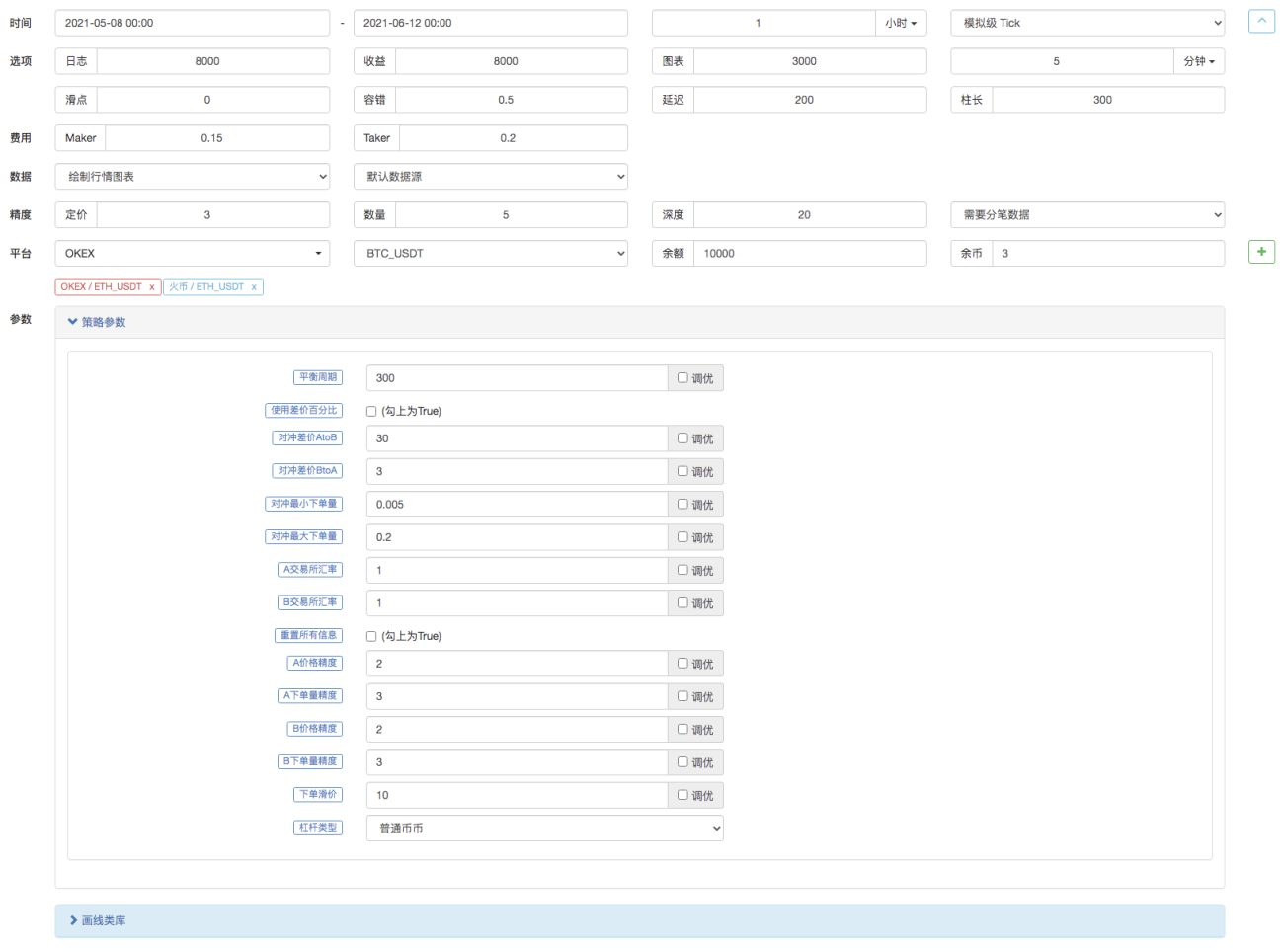
数字货币现货对冲策略设计(2)
上一篇文章中我们一起实现了一个简单的对冲策略,接下来我们学习如何升级这个策略。
策略改动并不会很大,不过改动的细节需要注意。代码中有些地方的定义和之前有变动,需要重点理解。
升级这个策略的需求
- 切换现货交易所对象杠杆模式
这个改动只与实盘有关,有些现货交易所有现货杠杆接口,FMZ上也封装了这些接口。对于在FMZ上直接封装过并且支持现货杠杆的交易所对象直接切换模式即可。 - 增加差价图表显示
增加差价图表显示,因为只是画A交易所->B交易所,B交易所->A交易所的差价线,画触发差价的水平线。我们直接使用画线类库来处理,好处就是简单易用,这里我们也一起学习如何使用FMZ的模版类库功能。 - 单边对冲功能
这个改动可谓比较大,因为在具体对冲交易时两个交易所的差价很难做到完全翻转。大部分时间是一个交易所的价格持续比另一交易所的价格高。这个时候如果我们的资产已经全部对冲过(即币都在价格低的交易所,钱都在价格高的交易所)。对冲就停滞了,无法再依赖差价的波动盈利。这个时候就需要让策略做到可以亏一点点钱把币对冲回来(让币再次在价格高的交易所存在),待到差价再次变大可以继续对冲盈利。 - 交互修改对冲差价线等参数
给策略增加交互功能,可以实时修改差价触发线。 - 整理状态栏信息,使用表格形式显示
规整一下需要显示的数据,便于观察。
接下来让我们逐一实现这些设计。
切换现货交易所对象杠杆模式
以币安现货实盘为例,切换为现货杠杆模式使用代码exchanges[i].IO,传入参数trade_normal切换为杠杆逐仓,传入trade_super_margin切换为杠杆全仓,回测不支持。这个仅仅是在实盘时使用。
在main函数开头的准备阶段增加:
// 切换杠杆模式
for (var i = 0 ; i < exchanges.length ; i++) { // 遍历检测所有添加的交易所对象
if (exchanges[i].GetName() == "Binance" && marginType != 0) { // 如果当前i索引代表的交易所对象是币安现货,并且策略界面参数marginType选择的不是「普通币币」选项,执行切换
if (marginType == 1) {
Log(exchanges[i].GetName(), "设置为杠杆逐仓")
exchanges[i].IO("trade_normal")
} else if (marginType == 2) {
Log(exchanges[i].GetName(), "设置为杠杆全仓")
exchanges[i].IO("trade_super_margin")
}
}
}
这里策略中仅仅增加了币安现货的切换币币杠杆模式的代码,所以策略参数上设置切换也只对币安现货有效。
增加差价图表显示
使用已经封装好的画图模版就非常简单。我们使用的这个模版名称为画线类库。可以直接在FMZ平台策略广场上搜索获取。
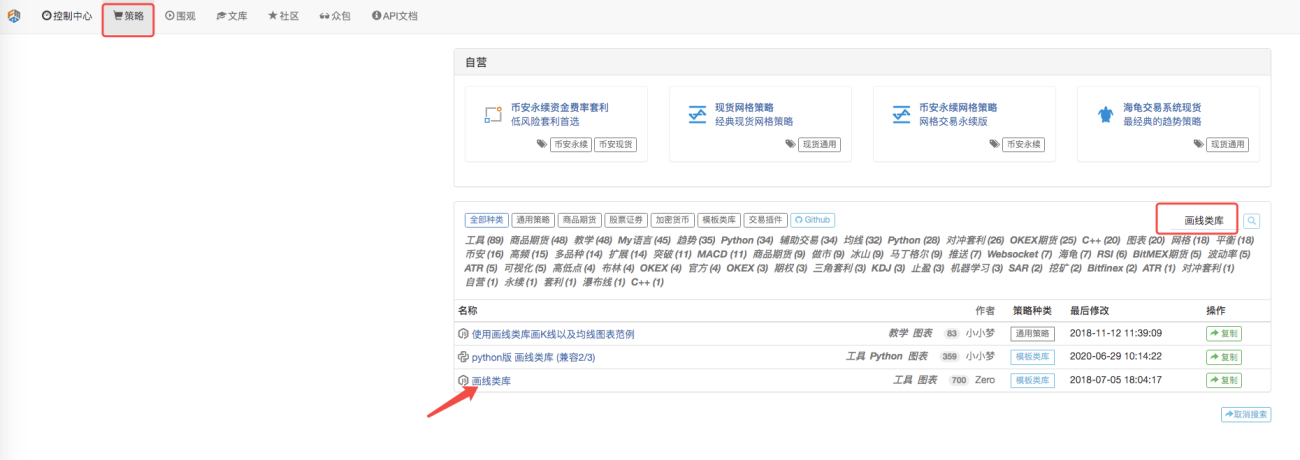
或者直接点击链接:https://www.fmz.com/strategy/27293 跳转到这个模版的复制页面。
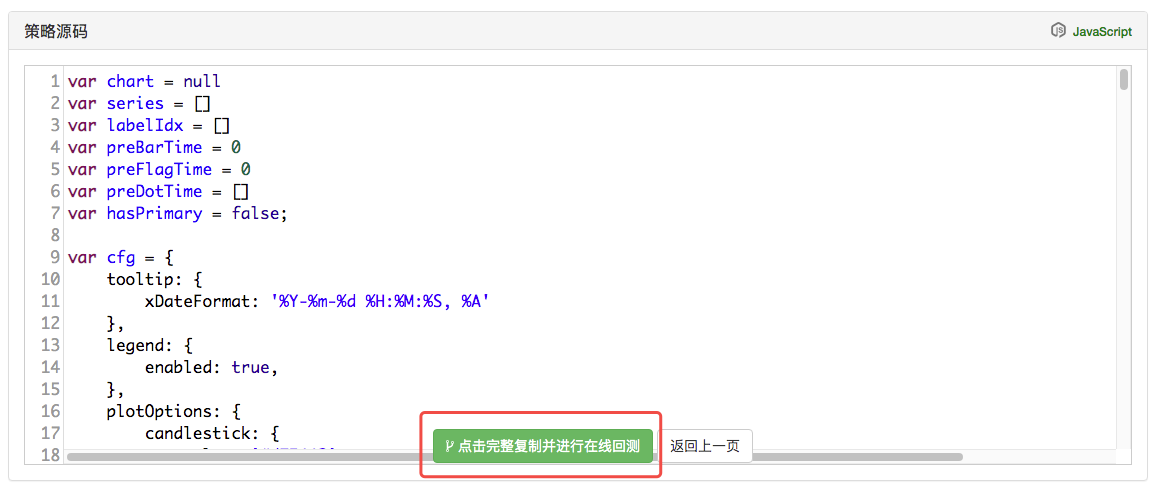
点击按钮即可把这个模版类库复制到自己的策略库中。
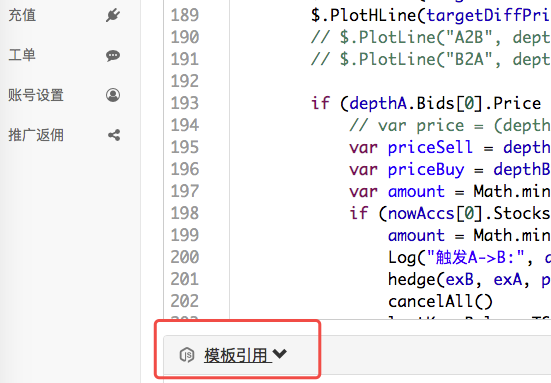
然后在策略编辑页面中,模版栏中就可以勾选需要用的模版类库。勾选上之后保存策略,这个策略就引用这个模版了。这里只是简单说明模版类库的使用,本策略已经引用了这个模版所以不必重复操作。当你在策略广场复制了本策略之后在策略编辑页面的模版栏中就能看到画线类库已经被引用上了。
我们主要来学习下怎么使用画线类库的函数来画图。
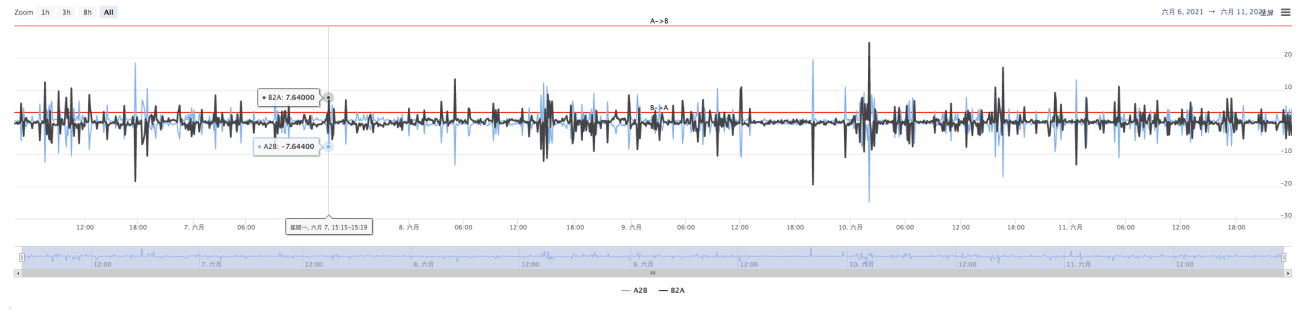
我们是计划把A->B的差价、B->A的差价、差价触发线都画出来。需要画两条曲线(当前A到B,B到A的差价),两条水平线(触发差价线),如上图一般。
因为我们要设计上单边对冲,A->B和B->A的触发线就不一样了。不能用上篇文章中的设计了。
上篇文章中:
                  var targetDiffPrice = hedgeDiffPrice
      if (diffAsPercentage) {
          targetDiffPrice = (depthA.Bids[0].Price + depthB.Asks[0].Price + depthB.Bids[0].Price + depthA.Asks[0].Price) / 4 * hedgeDiffPercentage
      }
只有一个触发差价targetDiffPrice。
所以这里我们要改造一下代码,首先改造参数。
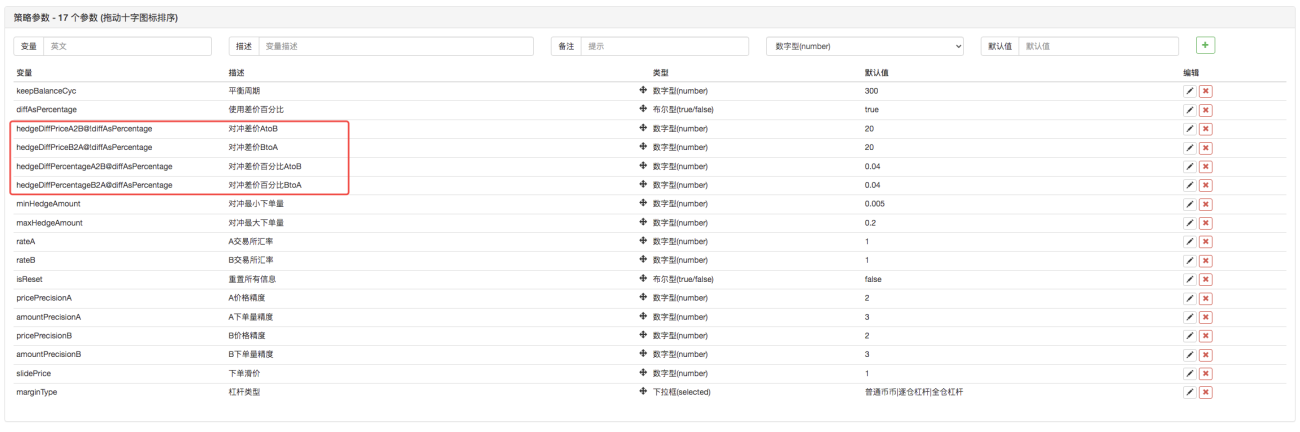
然后修改代码:
                    var targetDiffPriceA2B = hedgeDiffPriceA2B
        var targetDiffPriceB2A = hedgeDiffPriceB2A
        if (diffAsPercentage) {
            targetDiffPriceA2B = (depthA.Bids[0].Price + depthB.Asks[0].Price + depthB.Bids[0].Price + depthA.Asks[0].Price) / 4 * hedgeDiffPercentageA2B
            targetDiffPriceB2A = (depthA.Bids[0].Price + depthB.Asks[0].Price + depthB.Bids[0].Price + depthA.Asks[0].Price) / 4 * hedgeDiffPercentageB2A
        }
这样差价触发线就从之前的targetDiffPrice一条,变成了两条targetDiffPriceA2B、targetDiffPriceB2A。
接下来就可以使用画线类库的画线函数,在图表上画出这个数据了。
                    // 画图
        $.PlotHLine(targetDiffPriceA2B, "A->B")  // 该函数第一个参数是水平线在Y轴方向上的值,第二个参数是显示文本
        $.PlotHLine(targetDiffPriceB2A, "B->A")
策略运行起来就有这样的图表显示了。
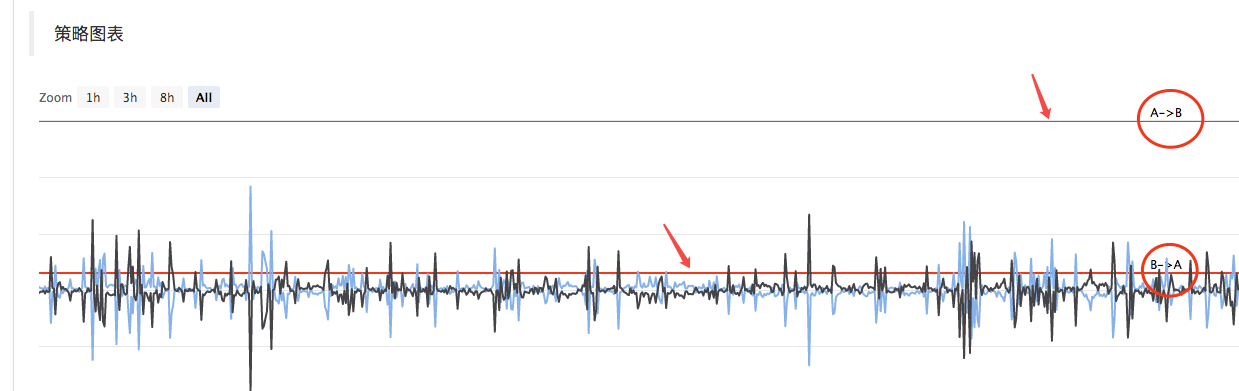
接下来画实时差价曲线,为了避免过度画线。把实时差价数据画曲线的代码放在平衡检测中。
                    if (ts - lastKeepBalanceTS > keepBalanceCyc * 1000) {
            nowAccs = _C(updateAccs, exchanges)
            var isBalance = keepBalance(initAccs, nowAccs, [depthA, depthB])
            cancelAll()
            if (isBalance) {
                lastKeepBalanceTS = ts
                if (isTrade) {
                    var nowBalance = _.reduce(nowAccs, function(sumBalance, acc) {return sumBalance + acc.Balance}, 0)
                    var initBalance = _.reduce(initAccs, function(sumBalance, acc) {return sumBalance + acc.Balance}, 0)
                    LogProfit(nowBalance - initBalance, nowBalance, initBalance, nowAccs)
                    isTrade = false
                }
            }

            $.PlotLine("A2B", depthA.Bids[0].Price - depthB.Asks[0].Price)  // 画实时差价曲线
            $.PlotLine("B2A", depthB.Bids[0].Price - depthA.Asks[0].Price)  // 第一个参数是曲线名称,第二个参数是曲线当前时刻的值,即当前时刻Y轴方向上的值
        }
这样画图代码仅仅4行,就让策略在运行时有图表显示了。
单边对冲功能
上文中提到了差价触发线已经改造成两条,分别控制A->B的对冲触发、B->A的对冲触发。这样就不能使用之前的下单价格算法了,改用了盘口价格加滑价的方式。
                    if (depthA.Bids[0].Price - depthB.Asks[0].Price > targetDiffPriceA2B && Math.min(depthA.Bids[0].Amount, depthB.Asks[0].Amount) >= minHedgeAmount) {          // A -> B 盘口条件满足
            var priceSell = depthA.Bids[0].Price - slidePrice
            var priceBuy = depthB.Asks[0].Price + slidePrice
            var amount = Math.min(depthA.Bids[0].Amount, depthB.Asks[0].Amount)
            if (nowAccs[0].Stocks > minHedgeAmount && nowAccs[1].Balance * 0.8 / priceSell > minHedgeAmount) {
                amount = Math.min(amount, nowAccs[0].Stocks, nowAccs[1].Balance * 0.8 / priceSell, maxHedgeAmount)
                Log("触发A->B:", depthA.Bids[0].Price - depthB.Asks[0].Price, priceBuy, priceSell, amount, nowAccs[1].Balance * 0.8 / priceSell, nowAccs[0].Stocks)  // 提示信息
                hedge(exB, exA, priceBuy, priceSell, amount)
                cancelAll()
                lastKeepBalanceTS = 0
                isTrade = true
            }
        } else if (depthB.Bids[0].Price - depthA.Asks[0].Price > targetDiffPriceB2A && Math.min(depthB.Bids[0].Amount, depthA.Asks[0].Amount) >= minHedgeAmount) {   // B -> A 盘口条件满足
            var priceBuy = depthA.Asks[0].Price + slidePrice
            var priceSell = depthB.Bids[0].Price - slidePrice
            var amount = Math.min(depthB.Bids[0].Amount, depthA.Asks[0].Amount)
            if (nowAccs[1].Stocks > minHedgeAmount && nowAccs[0].Balance * 0.8 / priceBuy > minHedgeAmount) {
                amount = Math.min(amount, nowAccs[1].Stocks, nowAccs[0].Balance * 0.8 / priceBuy, maxHedgeAmount)
                Log("触发B->A:", depthB.Bids[0].Price - depthA.Asks[0].Price, priceBuy, priceSell, amount, nowAccs[0].Balance * 0.8 / priceBuy, nowAccs[1].Stocks)  // 提示信息
                hedge(exA, exB, priceBuy, priceSell, amount)
                cancelAll()
                lastKeepBalanceTS = 0
                isTrade = true
            }
        }
由于买卖价格分开为两个数据了,所以对于对冲函数hedge也需要修改。
            function hedge(buyEx, sellEx, priceBuy, priceSell, amount) {
    var buyRoutine = buyEx.Go("Buy", priceBuy, amount)
    var sellRoutine = sellEx.Go("Sell", priceSell, amount)
    Sleep(500)
    buyRoutine.wait()
    sellRoutine.wait()
}
还有一些基于这些改动导致的细微调整,这里不在赘述,可以具体看代码。
交互修改对冲差价线等参数
给策略增加交互,让策略可以实时修改差价触发线。这个是一个半自动的策略的设计需求,这里也一并实现作为教学示范。
策略交互设计也非常简单,首先在策略编辑页面给策略增加交互控件。

添加了两个控件,一个叫A2B,一个叫B2A。当在控件输入框里输入数值后,点击输入框右侧的按钮。立即就会给策略发送一个指令,例如:输入框中输入数值123,点击A2B这个按钮,立即会向策略发送指令。
A2B:123
在策略代码中设计上交互检测、处理代码。
                    // 交互
        var cmd = GetCommand()   // 每次循环执行到这里时,都检测有没有交互指令过来,没有则返回空字符串
        if (cmd) {               // 检测到有交互指令,例如:A2B:123
            Log("接收到命令:", cmd)
            var arr = cmd.split(":")   // 拆分出交互控件名称和输入框中的值,arr[0]就是A2B,arr[1]就是123
            if (arr[0] == "A2B") {     // 判断触发的交互控件是不是A2B
                Log("修改A2B的参数,", diffAsPercentage ? "参数为差价百分比" : "参数为差价:", arr[1])
                if (diffAsPercentage) {
                    hedgeDiffPercentageB2A = parseFloat(arr[1])     // 修改触发差价线
                } else {
                    hedgeDiffPriceA2B = parseFloat(arr[1])          // 修改触发差价线
                }
            } else if (arr[0] == "B2A") {           // 检测到触发的控件是B2A
                Log("修改B2A的参数,", diffAsPercentage ? "参数为差价百分比" : "参数为差价:", arr[1])
                if (diffAsPercentage) {
                    hedgeDiffPercentageA2B = parseFloat(arr[1])
                } else {
                    hedgeDiffPriceB2A = parseFloat(arr[1])
                }
            }
        }
整理状态栏信息,使用表格形式显示
让状态栏数据显示的更加有条例、易于观察。
                    var tbl = {
            "type" : "table",
            "title" : "数据",
            "cols" : ["交易所", "币", "冻结币", "计价币", "冻结计价币", "触发差价", "当前差价"],
            "rows" : [],
        }
        tbl.rows.push(["A:" + exA.GetName(), nowAccs[0].Stocks, nowAccs[0].FrozenStocks, nowAccs[0].Balance, nowAccs[0].FrozenBalance, "A->B:" + targetDiffPriceA2B, "A->B:" + (depthA.Bids[0].Price - depthB.Asks[0].Price)])
        tbl.rows.push(["B:" + exB.GetName(), nowAccs[1].Stocks, nowAccs[1].FrozenStocks, nowAccs[1].Balance, nowAccs[1].FrozenBalance, "B->A:" + targetDiffPriceB2A, "B->A:" + (depthB.Bids[0].Price - depthA.Asks[0].Price)])

        LogStatus(_D(), "\n", "`" + JSON.stringify(tbl) + "`")

回测
回测仅仅是测试策略,初步检测功能,很多BUG在回测阶段其实是可以测试出来的。不必要太在意回测结果,最终策略还是需要真枪实弹的在真实环境中检测的。