 Zero
Zero
FMZ API Instructions
 0
15687
0
15687
}
```Python
def main():
    LogReset(10)
void main() {
    LogReset(10);
}
LogVacuum()
The reason is that ```SQLite``` does not reclaim the occupied space when deleting data, so you need to perform ```VACUUM``` to clean up the table, and release the space. When this function is called, the file move operation will occur with a large delay. It is recommended to call it at an appropriate time interval.

### Market Quotes API
The main market interface functions:

|Function Name|Description|
|-|-|
|GetTicker|[Get tick quotes data](#exchange.getticker)|
|GetRecords|[Get K-line data](#exchange.getrecords)|
|GetDepth|[Get order book data (order depth data)](#exchange.getdepth)|
|GetTrades|[Get the latest trading records in the market](#exchange.gettrades)|

The following functions can be called through ```exchange``` or ```exchanges[0]``` objects; for example: functions, like```exchange.GetTicker();``` or ```exchanges[0].GetTicker();```, return the market quotes of the current trading pairs and setting contracts.

**Important tips for calling API functions with network access:**
When calling any API function that accesses a platform interface (such as ```exchange.GetTicker()```, ```exchange.Buy(Price, Amount)```, ```exchange.CancelOrder(Id)```, etc.), the failure of access is probably caused by various reasons. Therefore, we must do fault-tolerant processing for the call of these functions. For example: the ```exchange.GetTicker()``` function for obtaining market data may, due to platform server problems and network transmission problems, etc., cause result that the return value of the ```exchange.GetTicker()``` function is ```null```. Then, the return value of ```exchange.GetTicker()``` must be dealt with by fault-tolerant processing.

The data returned by the ```exchange.GetTicker()``` function in the following code is assigned to the ```ticker``` variable, and we need to deal with fault tolerance before using the ```ticker``` variable.
```js
function main() {
    var ticker = exchange.GetTicker()
    if(!ticker){
        // Recall once, or use other processing logic
        ticker = exchange.GetTicker()
    }
}
def main():
    ticker = exchange.GetTicker()
    if not ticker:
        ticker = exchange.GetTicker()
void main() {
    auto ticker = exchange.GetTicker();
    if(!ticker.Valid) {
        ticker = exchange.GetTicker();
        Log("Test");
    }
}
In addition, for the fault-tolerant performance testing of the strategy, FMZ has specifically added a unique fault-tolerant mode backtest. The backtest system can randomly return some API calls that will occur when the network is accessed according to the set parameters, and return the return values of some failed calls. You can quickly test the robustness of the program in the bot. Switch to the backtest system page on the strategy editing page, click the inverted triangle drop-down control on the right side of the “Start Backtest” button, and the “Backtest Fault Tolerant” button will pop up.
exchange.GetTicker()
In the backtest system, the ```Ticker``` data returned by the ```exchange.GetTicker()``` function, where ```High``` and ```Low``` are simulated values, taken from current time of "sell 1" and "buy 1" in the bot. The cryptocurrency in the real running is the highest price and the lowest price in a certain period defined by the exchange ```Tick``` interface.

- [```Ticker``` structure](#Ticker)

```js
function main(){
    var ticker = exchange.GetTicker()
    /*
        The platform interface may not be accessible due to network problems (even if the device's docker program can open the platform website, the API may not be accessible)
        At this time, ticker is null, when accessing ticker. When it is "High", it will cause an error; so when testing, ensure that you can access the platform interface
    */
    Log("High:", ticker.High, "Low:", ticker.Low, "Sell:", ticker.Sell, "Buy:", ticker.Buy, "Last:", ticker.Last, "Volume:", ticker.Volume)
}
def main():
    ticker = exchange.GetTicker()
    Log("High:", ticker["High"], "Low:", ticker["Low"], "Sell:", ticker["Sell"], "Buy:", ticker["Buy"], "Last:", ticker["Last"], "Volume:", ticker["Volume"])
void main() {
    auto ticker = exchange.GetTicker();
    Log("High:", ticker.High, "Low:", ticker.Low, "Sell:", ticker.Sell, "Buy:", ticker.Buy, "Last:", ticker.Last, "Volume:", ticker.Volume);
}
In the real bot (not backtest), the Info attribute in the return value of the exchange.GetTicker() function stores the original data returned when the interface is called.
exchange.GetDepth()
```Depth``` structure contains two arrays of structures, namely ```Asks[]``` and ```Bids[]```, ```Asks``` and ```Bids``` contain the following structure variables:

|Data Type|Variable Name|Description|
|-|-|-|
|number|Price|price|
|number|Amount|amount|

- [```Depth``` structure](#Depth)

For example, if I want to get the current sell second price, I can write the code like this:

```js
function main(){
    var depth = exchange.GetDepth()
    /*
       The platform interface may not be accessible due to network reasons (even if the device's docker program can open the platform website, the API may not be accessible)
       At this time, depth is null. When accessing depth.Asks[1].Price, it will cause an error; so when testing, ensure that you can access the platform interface
    */
    var price = depth.Asks[1].Price
    Log("Sell 2 price is:", price)
}
def main():
    depth = exchange.GetDepth()
    price = depth["Asks"][1]["Price"]
    Log("Sell 2 price is:", price)
void main() {
    auto depth = exchange.GetDepth();
    auto price = depth.Asks[1].Price;
    Log("Sell 2 price is:", price);
}
exchange.GetTrades()
The returned data is an array, where the time sequence of each element is the same as the return data sequence of the ```exchange.GetRecords``` function, that is, the last element of the array is the data closest to the current time.

- [```Trade``` structure](#Trade)

```js
// In the simulated backtest, the data is empty; to have a trading history, there must be a real bot running
function main(){
    var trades = exchange.GetTrades()
    /*
        The platform interface may not be accessible due to network reasons (even if the device's docker program can open the platform website, the API may not be accessible)
        At this time, "trades" is null. When accessing trades[0].Id, it will cause an error; so when testing, ensure that you can access the platform interface
    */
    Log("id:", trades[0].Id, "time:", trades[0].Time, "Price:", trades[0].Price, "Amount:", trades[0].Amount, "type:", trades[0].Type)
}
def main():
    trades = exchange.GetTrades()
    Log("id:", trades[0]["Id"], "time:", trades[0]["Time"], "Price:", trades[0]["Price"], "Amount:", trades[0]["Amount"], "type:", trades[0]["Type"])
void main() {
    auto trades = exchange.GetTrades();
    Log("id:", trades[0].Id, "time:", trades[0].Time, "Price:", trades[0].Price, "Amount:", trades[0].Amount, "type:", trades[0].Type);
}
exchange.GetRecords()
Parameter ```Period```:
- **PERIOD_M1**: refers to 1 minute
- **PERIOD_M5**: refers to 5 minutes
- **PERIOD_M15**: refers to 15 minutes
- **PERIOD_M30**: refers to 30 minutes
- **PERIOD_H1**: refers to 1 hour
- **PERIOD_D1**: refers to 1 day
The parameter value of ```Period```  only can pass the standard periods defined above, but also can pass numbers, in the unit of second.

The return value of ```exchange.GetRecords(Period)``` function:
The return value is an array of ```Record``` structures, the returned K-line data will be accumulated over time, the upper limit of the accumulated K-line bars is affected by the [exchange.SetMaxBarLen](https://www.fmz.com/api#exchange.setmaxbarlenlen) function setting. The default upper limit is 5000 K-line bars when it is not set. When the K-Line data reaches the K-Line bar accumulation limit, it will be updated by adding a K-Line bar and deleting the earliest K-Line bar (e.g. queue in/out). Some exchanges do not provide a K-line interface, then the docker collects the market transaction record data in real time to generate K-lines.

Number of K-line bars fetched when the ```GetRecords``` function is initially called.
- The first 1000 K-line bars at the starting moment of the backtesting period are taken in advance in the backtesting system as the initial K-line data.
- The specific number of K-line bars to be acquired during real bot is based on the maximum amount of data that can be acquired by the K-line interface of the exchange.


For the ```exchange.GetRecords(Period)``` function, the bot and backtest of **cryptocurrency** both support custom periods, and the parameter ```Period``` is the number of seconds. For example:

```js
function main() {
    // Print K-line data with a K-line period of 120 seconds (2 minutes)
    Log(exchange.GetRecords(60 * 2))
    // Print K-line data with a K-line period of 5 minutes
    Log(exchange.GetRecords(PERIOD_M5))
}
def main():
    Log(exchange.GetRecords(60 * 2))
    Log(exchange.GetRecords(PERIOD_M5))
void main() {
    Log(exchange.GetRecords(60 * 2)[0]);
    Log(exchange.GetRecords(PERIOD_M5)[0]);
}
Setting Period parameter to 5 is to request K-line data with a period of 5 seconds.
If the Period parameter is not evenly divided by 60 (that is, the period represented is a period of unavailable minutes), the bottom layer of the system uses the relevant interface of GetTrades to obtain trading record data and synthesize the required K-line data.
If the Period parameter is evenly divided by 60, then the required K-line data is synthesized by using a minimum of 1-minute K-line data (using a larger period to synthesize the required K-line data if possible).
function main(){
    var records = exchange.GetRecords(PERIOD_H1)
    /*
        The platform interface may not be accessible due to network reasons (even if the device's docker program can open the platform website, the API may not be accessible)
        At this time, "records" is null. When accessing records[0].Time, it will cause an error; so when testing, ensure that you can access the platform interface
    */
    Log("The first k-line data is, Time:", records[0].Time, "Open:", records[0].Open, "High:", records[0].High)
    Log("The second k-line data is, Time:", records[1].Time ,"Close:", records[1].Close)
    Log("Current K-line (latest)", records[records.length-1], "Current K-line (latest)", records[records.length-2])
}
def main():
    records = exchange.GetRecords(PERIOD_H1)
    Log("The first k-line data is, Time:", records[0]["Time"], "Open:", records[0]["Open"], "High:", records[0]["High"])
    Log("The second k-line data is, Time:", records[1]["Time"], "Close:", records[1]["Close"])
    Log("Current K-line (latest)", records[-1], "Current K-line (latest)", records[-2])
void main() {
    auto records = exchange.GetRecords(PERIOD_H1);
    Log("The first k-line data is, Time:", records[0].Time, "Open:", records[0].Open, "High:", records[0].High);
    Log("The second k-line data is, Time:", records[1].Time, "Close:", records[1].Close);
    Log("Current K-line (latest)", records[records.size() - 1], "Current K-line (latest)", records[records.size() - 2]);
}
- The exchange provides a K-line data interface. In this case, the acquired data is the data directly returned by the exchange.

- The exchange does not provide a K-line data interface. The FMZ docker program obtains the latest trading records of the exchange each time the strategy program calls ```exchange.GetRecords()```, that is, it calls the ```exchange.GetTrades()``` function to obtain data and synthesize K-line data.

The simulation-level backtest in the system needs to set the **underlying K-line period** (when the backtesting system simulates the level of back-testing, the corresponding K-line data is used to generate tick data according to the set **underlying K-line period**); it should be noted that the period of the K-line data obtained in the strategy cannot be less than **the underlying K-line period**. Because in the simulation-level backtest, the K-line data of each period is synthesized by the K-line data corresponding to the underlying K-line periods in the backtest system.

In ```cpp``` language, if you need to construct your own K-line data, there are the following code examples:

```cpp
#include <sstream>
void main() {
    Records r;
    r.Valid = true;
    for (auto i = 0; i < 10; i++) {
        Record ele;
        ele.Time = i * 100000;
        ele.High = i * 10000;
        ele.Low = i * 1000;
        ele.Close = i * 100;
        ele.Open = i * 10;
        ele.Volume = i * 1;
        r.push_back(ele);
    }
    // Output display: Records[10]
    Log(r);
    auto ma = TA.MA(r,10);
    // Output display: [nan,nan,nan,nan,nan,nan,nan,nan,nan,450]
    Log(ma);
}
exchange.GetPeriod()
The exchange.GetPeriod() function returns the K-line period set on the FMZ platform website page when running strategies in backtest and bot. The return value is an integer in the unit of second. Return value: numeric type.
function main() {
    // For example, in the backtest and bot, set the K-line period on the website page of FMZ platform to 1 hour
    var period = exchange.GetPeriod()
    Log("K-line period:", period / (60 * 60), "hour")
}
def main():
    period = exchange.GetPeriod()
    Log("K-line period:", period / (60 * 60), "hour")
void main() {
    auto period = exchange.GetPeriod();
    Log("K-line period:", period / (60 * 60.0), "hour");
}
exchange.SetMaxBarLen(Len)
The exchange.SetMaxBarLen(Len) function affects two aspects during the runtime of the cryptocurrency strategy:
- Affecting the number of K-line bars (BAR) obtained for the first time.
- Affecting the upper limit of K-line bars (BAR).
function main() {
    exchange.SetMaxBarLen(50)
    var records = exchange.GetRecords()
    Log(records.length, records)
}
def main():
    exchange.SetMaxBarLen(50)
    r = exchange.GetRecords()
    Log(len(r), r)
void main() {
    exchange.SetMaxBarLen(50);
    auto r = exchange.GetRecords();
    Log(r.size(), r[0]);
}
exchange.GetRawJSON()
Strategies in ```cpp``` language do not support the function.

```js
function main(){
    exchange.GetAccount();
    var obj = JSON.parse(exchange.GetRawJSON());
    Log(obj);
}
import json
def main():
    exchange.GetAccount()
    obj = json.loads(exchange.GetRawJSON())
    Log(obj)
void main() {
    auto obj = exchange.GetAccount();
    // C++ doe not support "GetRawJSON" function
    Log(obj);
}
exchange.GetRate()
Note:
* If ```exchange.SetRate()``` has not been called to set exchange rate, the exchange rate value returned by ```exchange.GetRate()``` is 1 by default, that is, the exchange rate conversion currently displayed has not been exchanged.
* If the ```exchange.SetRate()``` has been used to set an exchange rate value, such as, ```exchange.SetRate(7)```, then all price information of the current exchange object representing the circulating currency of the trading platform, such as quotes, depth, order prices, etc., will be multiplied by the previously set exchange rate 7 for conversion.
* If the ```exchange``` corresponds to an exchange with USD as the pricing currency, after calling ```exchange.SetRate(7)```, all prices of the bot will be converted to prices close to CNY by multiplying by 7. At this time, the exchange rate value obtained by using ```exchange.GetRate()``` is 7.

#### exchange.GetUSDCNY()

```exchange.GetUSDCNY()``` returns the latest exchange rate of the US dollar (data source provided by ```yahoo```). The return value: numeric type.

#### exchange.SetData(Key, Value)

The ```exchange.SetData(Key, Value)``` function is used to set the data loaded at the time when the strategy is running, which can be any economic indicator, industry data, relevant index, etc. It can be used to quantify all quantifiable information for trading strategies and also support using in the backtest system.

Calling method of ```exchange.SetData(Key, Value)``` function:

- Write data directly into the strategy
  The data format is required as the ```data``` variable in the following example.

  ```js
  /*backtest
  start: 2020-01-21 00:00:00
  end: 2020-02-12 00:00:00
  period: 1d
  basePeriod: 1d
  exchanges: [{"eid":"Bitfinex","currency":"BTC_USD"}]
  */
  function main() {
      var data = [
          [1579536000000, "abc"],
          [1579622400000, 123],
          [1579708800000, {"price": 123}],
          [1579795200000, ["abc", 123, {"price": 123}]]
      ]
      exchange.SetData("test", data)
      while(true) {
          Log(exchange.GetData("test"))
          Sleep(1000)
      }
  }
  '''backtest
  start: 2020-01-21 00:00:00
  end: 2020-02-12 00:00:00
  period: 1d
  basePeriod: 1d
  exchanges: [{"eid":"Bitfinex","currency":"BTC_USD"}]
  '''

  def main():
      data = [
          [1579536000000, "abc"],
          [1579622400000, 123],
          [1579708800000, {"price": 123}],
          [1579795200000, ["abc", 123, {"price": 123}]]
      ]
      exchange.SetData("test", data)
      while True:
          Log(exchange.GetData("test"))
          Sleep(1000)
  /*backtest
  start: 2020-01-21 00:00:00
  end: 2020-02-12 00:00:00
  period: 1d
  basePeriod: 1d
  exchanges: [{"eid":"Bitfinex","currency":"BTC_USD"}]
  */

  void main() {
      json data = R"([
          [1579536000000, "abc"],
          [1579622400000, 123],
          [1579708800000, {"price": 123}],
          [1579795200000, ["abc", 123, {"price": 123}]]
      ])"_json;

      exchange.SetData("test", data);
      while(true) {
          Log(exchange.GetData("test"));
          Sleep(1000);
      }
  }
When the above test code is run, the corresponding data will be obtained at the corresponding time, as shown in the figure:
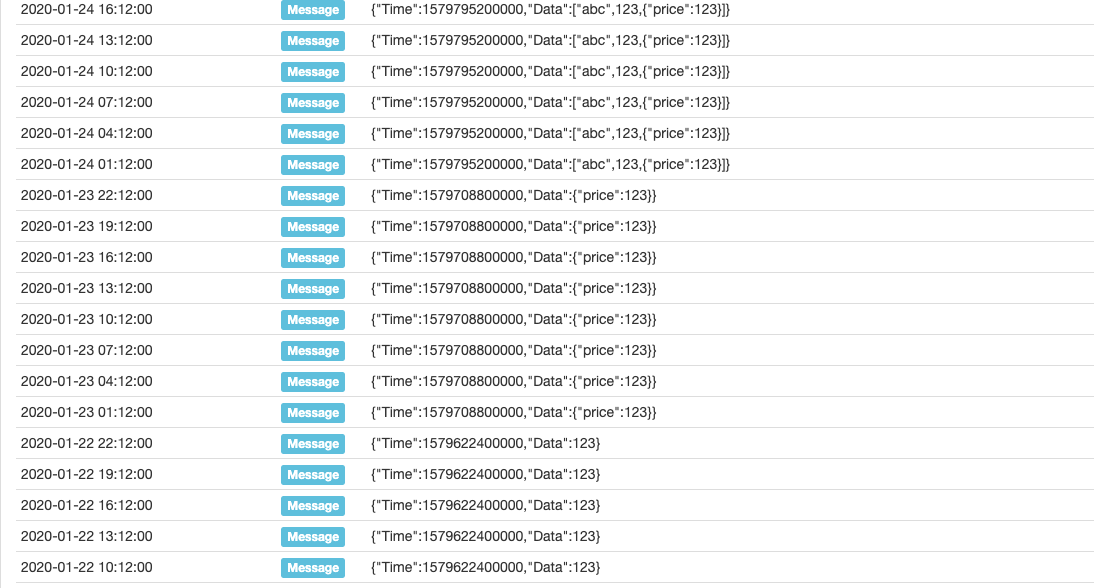
As we can see, the corresponding time of timestamp 1579622400000 is 2020-01-22 00: 00: 00; when the strategy program runs after this time, before the next data timestamp 1579708800000, that is, before the time of 2020-01-23 00: 00: 00, call the exchange.GetData(Source) function to get the data. All obtained is the content of [1579622400000, 123]. As the program continues to run and time changes, obtain data piece by piece data like this.
- Request data through external links
Requested data format
  {
      "schema":["time","data"],
      "data":[
          [1579536000000, "abc"],
          [1579622400000, 123],
          [1579708800000, {"price": 123}],
          [1579795200000, ["abc", 123, {"price": 123}]]
      ]
  }
Where schema is the data format of each record in the main body of the loaded data, the format is fixed as ["time", "data"], corresponding to the data attribute format of the data one by one. The data attribute stores the main body of the data, and each piece of the data is composed of millisecond-level timestamps and data content (the data content can be any JSON encoded data).
The service program for testing is written in Go language:
  package main
  import (
      "fmt"
      "net/http"
      "encoding/json"
  )

  func Handle (w http.ResponseWriter, r *http.Request) {
      defer func() {
          fmt.Println("req:", *r)
          ret := map[string]interface{}{
              "schema": []string{"time","data"},
              "data": []interface{}{
                  []interface{}{1579536000000, "abc"},
                  []interface{}{1579622400000, 123},
                  []interface{}{1579708800000, map[string]interface{}{"price":123}},
                  []interface{}{1579795200000, []interface{}{"abc", 123, map[string]interface{}{"price":123}}},
              },
          }
          b, _ := json.Marshal(ret)
          w.Write(b)
      }()
  }

  func main () {
      fmt.Println("listen http://localhost:9090")
      http.HandleFunc("/data", Handle)
      http.ListenAndServe(":9090", nil)
  }
After receiving the request, the program responds to the data:
  {
      "schema":["time","data"],
      "data":[
          [1579536000000, "abc"],
          [1579622400000, 123],
          [1579708800000, {"price": 123}],
          [1579795200000, ["abc", 123, {"price": 123}]]
      ]
  }
Test strategy code:
  /*backtest
  start: 2020-01-21 00:00:00
  end: 2020-02-12 00:00:00
  period: 1d
  basePeriod: 1d
  exchanges: [{"eid":"Bitfinex","currency":"BTC_USD"}]
  */
  function main() {
      while(true) {
          Log(exchange.GetData("http://xxx.xx.x.xx:9090/data"))
          Sleep(1000)
      }
  }
  '''backtest
  start: 2020-01-21 00:00:00
  end: 2020-02-12 00:00:00
  period: 1d
  basePeriod: 1d
  exchanges: [{"eid":"Bitfinex","currency":"BTC_USD"}]
  '''

  def main():
      while True:
          Log(exchange.GetData("http://xxx.xx.x.xx:9090/data"))
          Sleep(1000)
  /*backtest
  start: 2020-01-21 00:00:00
  end: 2020-02-12 00:00:00
  period: 1d
  basePeriod: 1d
  exchanges: [{"eid":"Bitfinex","currency":"BTC_USD"}]
  */

  void main() {
      while(true) {
          Log(exchange.GetData("http://xxx.xx.x.xx:9090/data"));
          Sleep(1000);
      }
  }
exchange.GetData(Source)
The exchange.GetData(Source) function is used to get the data loaded by the exchange.SetData(Key, Value) function or the data provided by the external link, it can be used in the backtest system. The data is obtained at one time during the backtest, and the data is cached for one minute during the actual trading.
- Obtaining the calling method of data written directly
/*backtest
start: 2020-01-21 00:00:00
end: 2020-02-12 00:00:00
period: 1d
basePeriod: 1d
exchanges: [{"eid":"Bitfinex","currency":"BTC_USD"}]
*/
function main() {
  exchange.SetData("test", [[1579536000000, _D(1579536000000)], [1579622400000, _D(1579622400000)], [1579708800000, _D(1579708800000)]])
  while(true) {
      Log(exchange.GetData("test"))
      Sleep(1000 * 60 * 60 * 24)
  }
}
  '''backtest
  start: 2020-01-21 00:00:00
  end: 2020-02-12 00:00:00
  period: 1d
  basePeriod: 1d
  exchanges: [{"eid":"Bitfinex","currency":"BTC_USD"}]
  '''
  def main():
      exchange.SetData("test", [[1579536000000, _D(1579536000000/1000)], [1579622400000, _D(1579622400000/1000)], [1579708800000, _D(1579708800000/1000)]])
      while True:
          Log(exchange.GetData("test"))
          Sleep(1000 * 60 * 60 * 24)
  /*backtest
  start: 2020-01-21 00:00:00
  end: 2020-02-12 00:00:00
  period: 1d
  basePeriod: 1d
  exchanges: [{"eid":"Bitfinex","currency":"BTC_USD"}]
  */
  void main() {
      json arr = R"([[1579536000000, ""], [1579622400000, ""], [1579708800000, ""]])"_json;
      arr[0][1] = _D(1579536000000);
      arr[1][1] = _D(1579622400000);
      arr[2][1] = _D(1579708800000);
      exchange.SetData("test", arr);
      while(true) {
          Log(exchange.GetData("test"));
          Sleep(1000 * 60 * 60 * 24);
      }
  }
- Method of calling data from external links
  function main() {
      Log(exchange.GetData("http://xxx.xx.x.xx:9090/data"))
      Log(exchange.GetData("https://www.fmz.com/upload/asset/32bf73a69fc12d36e76.json"))
  }
  def main():
      Log(exchange.GetData("http://xxx.xx.x.xx:9090/data"))
      Log(exchange.GetData("https://www.fmz.com/upload/asset/32bf73a69fc12d36e76.json"))
  void main() {
      Log(exchange.GetData("http://xxx.xx.x.xx:9090/data"));
      Log(exchange.GetData("https://www.fmz.com/upload/asset/32bf73a69fc12d36e76.json"));
  }
- Use the fundamental data of the platform data center
Use the
exchange.GetData(Source)function to get Fundamental Data.
When calling the exchange.GetData(Source) function, you can pass in the second parameter to set the cache timeout in milliseconds. The default is one-minute cache timeout in real bot. In the backtest system, when using the access interface to request data, the backtest system will add parameters “from” (timestamp seconds), to (timestamp seconds), period (underlying K-line period, timestamp milliseconds) and other parameters automatically to the request, to determine the time range of the data to be obtained.
Trading API
The following functions can be called through the exchange or exchanges[0] object. For example: exchange.Sell(100, 1); indicates the next order is a sell order with a price of 100 and a quantity of 1 on the exchange.
exchange.Buy(Price, Amount)
The returned order number can be used to query order information and cancel orders.

```js
function main() {
    var id = exchange.Buy(100, 1);
    Log("id:", id);
}
def main():
    id = exchange.Buy(100, 1)
    Log("id:", id)
void main() {
    auto id = exchange.Buy(100, 1);
    Log("id:", id);
}
- Futures orders
When placing orders for futures, we must pay attention to whether the trading direction is set correctly. If the trading direction and trading function do not match, an error will be reported. The number of orders placed on a cryptocurrency futures exchange is the number of contracts unless otherwise specified. For example:
  // The following is the wrong call
  function main() {
      exchange.SetContractType("quarter")

      // Set short direction
      exchange.SetDirection("sell")
      // Place a buy order, and you will get an error, so you can only sell short
      var id = exchange.Buy(50, 1)

      // Set short direction
      exchange.SetDirection("buy")
      // Place a sell order, and you will get an error, so you can only buy long
      var id2 = exchange.Sell(60, 1)

      // Set close long position direction
      exchange.SetDirection("closebuy")
      // Place a buy order, and you will get an error, so you can only sell short
      var id3 = exchange.Buy(-1, 1)

      // Set close short position direction
      exchange.SetDirection("closesell")
      // Place a sell order, and you will get an error, so you can only buy long
      var id4 = exchange.Sell(-1, 1)
  }
  # The following is the wrong call
  def main():
      exchange.SetContractType("quarter")
      exchange.SetDirection("sell")
      id = exchange.Buy(50, 1)
      exchange.SetDirection("buy")
      id2 = exchange.Sell(60, 1)
      exchange.SetDirection("closebuy")
      id3 = exchange.Buy(-1, 1)
      exchange.SetDirection("closesell")
      id4 = exchange.Sell(-1, 1)
  // The following is the wrong call
  void main() {
      exchange.SetContractType("quarter");
      exchange.SetDirection("sell");
      auto id = exchange.Buy(50, 1);
      exchange.SetDirection("buy");
      auto id2 = exchange.Sell(60, 1);
      exchange.SetDirection("closebuy");
      auto id3 = exchange.Buy(-1, 1);
      exchange.SetDirection("closesell");
      auto id4 = exchange.Sell(-1, 1);
  }
Error messages:
  direction is sell, invalid order type Buy
  direction is buy, invalid order type Sell
  direction is closebuy, invalid order type Buy
  direction is closesell, invalid order type Sell
- Market order
Note: The exchange order interface is required to support market orders (when the order type is a buy order, the order amount parameter is the amount in quote currency), and the market order method of cryptocurrency futures is used to place orders, and the unit of the quantity parameter is the number of contracts. A few live trading exchanges for digital currencies do not support market order interfaces.
  // For example, trading pairs: ETH_BTC, bought in by market order
  function main() {
      // Buy a market order, and buy ETH coins equal to 0.1 BTC (quote currency)
      exchange.Buy(-1, 0.1)
  }
  def main():
      exchange.Buy(-1, 0.1)
  void main() {
      exchange.Buy(-1, 0.1);
  }
exchange.Sell(Price, Amount)
Returned order number, which can be used to query order information and cancel orders.

```js
function main(){
    var id = exchange.Sell(100, 1)
    Log("id:", id)
}
def main():
    id = exchange.Sell(100, 1)
    Log("id:", id)
void main() {
    auto id = exchange.Sell(100, 1);
    Log("id:", id);
}
- Futures orders
When placing orders for futures, you must pay attention to whether the trading direction is set correctly. If the trading direction and trading function do not match, an error will be reported. The order amount of cryptocurrency futures platforms is the number of contracts unless otherwise specified.
- Market orders
Note: platform order placement interface is required to support market orders. (When the order type is a sell order, the order amount parameter is the number of operating coins sold), and cryptocurrency futures place orders by market orders form, and the order amount parameter unit is the number of contracts. A few digital currency exchanges in real trading do not support market order interfaces.
  // For example, trading pairs: ETH_BTC, sold out by market order
  function main() {
      // Note: Sell by a market order, and sell 0.2 ETH coins
      exchange.Sell(-1, 0.2)
  }
  def main():
      exchange.Sell(-1, 0.2)
  void main() {
      exchange.Sell(-1, 0.2);
  }
exchange.CancelOrder(Id)
Return the operation result; ```true``` means that the order cancellation request was sent successfully; ```false``` means that the cancel order request fails to send (the return value only indicates whether sending request is successful or not, so it is best to call ```exchange.GetOrders()``` to check if the platform cancels the order).

```js
function main(){
    var id = exchange.Sell(99999, 1)
    exchange.CancelOrder(id)
}
def main():
    id = exchange.Sell(99999, 1)
    exchange.CancelOrder(id)
void main() {
    auto id = exchange.Sell(99999, 1);
    exchange.CancelOrder(id);
}
The API function of FMZ, which can generate log output functions, such as Log(...), exchange.Buy(Price, Amount) and exchange.CancelOrder(Id). You can follow the necessary parameters with some additional output parameters, such as exchange.CancelOrder(orders[j].Id, orders[j]). In this way, it is canceling orders[j] order that is accompanied by the output of this order information, namely the Order structure of orders[j].
function main() {
    Log("data1", "data2", "data3", "...")
    var data2 = 200
    var id = exchange.Sell(100000, 0.1, "Incidental data1", data2, "...")
    exchange.CancelOrder(id, "Incidental data1", data2, "...")
    LogProfit(100, "Incidental data1", data2, "...")
}
def main():
    Log("data1", "data2", "data3", "...")
    data2 = 200
    id = exchange.Sell(100000, 0.1, "Incidental data1", data2, "...")
    exchange.CancelOrder(id, "Incidental data1", data2, "...")
    LogProfit(100, "Incidental data1", data2, "...")
void main() {
    Log("data1", "data2", "data3", "...");
    int data2 = 200;
    auto id = exchange.Sell(100000, 0.1, "Incidental data1", data2, "...");
    exchange.CancelOrder(id, "Incidental data1", data2, "...");
    LogProfit(100, "Incidental data1", data2, "...");
}
exchange.GetOrder(Id)
(Not supported by some exchanges)

- ```Order``` structure
- ```AvgPrice``` indicates average executed price (some exchanges do not support this field; set it to 0 if they do not support).

```js
function main(){
    var id = exchange.Sell(1000, 1)
    // The parameter id is the order number, you need to fill in the number of the order you want to query
    var order = exchange.GetOrder(id)
    Log("Id:", order.Id, "Price:", order.Price, "Amount:", order.Amount, "DealAmount:",
        order.DealAmount, "Status:", order.Status, "Type:", order.Type)
}
def main():
    id = exchange.Sell(1000, 1)
    order = exchange.GetOrder(id)
    Log("Id:", order["Id"], "Price:", order["Price"], "Amount:", order["Amount"], "DealAmount:",
        order["DealAmount"], "Status:", order["Status"], "Type:", order["Type"])
void main() {
    auto id = exchange.Sell(1000, 1);
    auto order = exchange.GetOrder(id);
    Log("Id:", order.Id, "Price:", order.Price, "Amount:", order.Amount, "DealAmount:",
        order.DealAmount, "Status:", order.Status, "Type:", order.Type);
}
exchange.GetOrders()
For ```Order``` structure, please refer to ```exchange.GetOrder()``` function description. When the account represented by the exchange object ```exchange``` has no pending orders, call ```exchange.GetOrders()``` to return an empty array, namely: ```[]```.

```js
function main(){
    exchange.Sell(1000, 1)
    exchange.Sell(1000, 1)
    var orders = exchange.GetOrders()
    Log("Information for unfinished order 1, ID:", orders[0].Id, "Price:", orders[0].Price, "Amount:", orders[0].Amount,
        "DealAmount:", orders[0].DealAmount, "type:", orders[0].Type)
    Log("Information for unfinished order 2, ID:", orders[1].Id, "Price:", orders[1].Price, "Amount:", orders[1].Amount,
        "DealAmount:", orders[1].DealAmount, "type:", orders[1].Type)
}
def main():
    exchange.Sell(1000, 1)
    exchange.Sell(1000, 1)
    orders = exchange.GetOrders()
    Log("Information for unfinished order 1, ID:", orders[0]["Id"], "Price:", orders[0]["Price"], "Amount:", orders[0]["Amount"],
        "DealAmount:", orders[0]["DealAmount"], "type:", orders[0]["Type"])
    Log("Information for unfinished order 2, ID:", orders[1]["Id"], "Price:", orders[1]["Price"], "Amount:", orders[1]["Amount"],
        "DealAmount:", orders[1]["DealAmount"], "type:", orders[1]["Type"])
void main() {
    exchange.Sell(1000, 1);
    exchange.Sell(1000, 1);
    auto orders = exchange.GetOrders();
    Log("Information for unfinished order 1, ID:", orders[0].Id, "Price:", orders[0].Price, "Amount:", orders[0].Amount,
        "DealAmount:", orders[0].DealAmount, "type:", orders[0].Type);
    Log("Information for unfinished order 2, ID:", orders[1].Id, "Price:", orders[1].Price, "Amount:", orders[1].Amount,
        "DealAmount:", orders[1].DealAmount, "type:", orders[1].Type);
}
The exchange.GetOrders() function obtains the unfinished order information of the currently set trading pair. It should be noted that the cryptocurrency futures have differences between not only trading pairs but also contract codes.
// Test OKX contract tradings, to know whether "GetOrders" gets all unfinished contract orders
function main(){
    // The next weekly buy order; the price of the order minus 50 guarantees no execution; pending orders
    exchange.SetContractType("this_week")
    exchange.SetDirection("buy")
    var ticker = exchange.GetTicker()
    Log(ticker)
    exchange.Buy(ticker.Last - 50, 1)

    // The next quarterly sell order; the price plus 50 guarantees that it will not be executed, and the pending order has been switched to a quarterly contract
    exchange.SetContractType("quarter")
    exchange.SetDirection("sell")
    ticker = exchange.GetTicker()
    Log(ticker)
    exchange.Sell(ticker.Last + 50, 1)

    // Get the unfinished orders
    Log("orders", exchange.GetOrders())
}
def main():
    exchange.SetContractType("this_week")
    exchange.SetDirection("buy")
    ticker = exchange.GetTicker()
    Log(ticker)
    exchange.Buy(ticker["Last"] - 50, 1)

    exchange.SetContractType("quarter")
    exchange.SetDirection("sell")
    ticker = exchange.GetTicker()
    Log(ticker)
    exchange.Sell(ticker["Last"] + 50, 1)

    Log("orders", exchange.GetOrders())
void main() {
    exchange.SetContractType("this_week");
    exchange.SetDirection("buy");
    auto ticker = exchange.GetTicker();
    Log(ticker);
    exchange.Buy(ticker.Last - 50, 1);

    exchange.SetContractType("quarter");
    exchange.SetDirection("sell");
    ticker = exchange.GetTicker();
    Log(ticker);
    exchange.Sell(ticker.Last + 50, 1);

    Log("orders", exchange.GetOrders());
}
The obtained unfinished order information:
[{"Id":17116430886,"Amount":1,"Price":808.4,"DealAmount":0,"AvgPrice":0,"Status":0,"Type":1,"ContractType":"quarter"}]
It can be seen that in cryptocurrency trading, the orders obtained by exchange.GetOrders() are only the unfinished orders of the currently set contract.
exchange.SetPrecision(…)
```js
function main(){
    // Set the decimal precision of the price to 2 digits, and set the precision of the quantity of the symbol order to 3 digits
    exchange.SetPrecision(2, 3)
}
def main():
    exchange.SetPrecision(2, 3)
void main() {
    exchange.SetPrecision(2, 3);
}
exchange.SetRate(Rate)
```js
function main(){
    Log(exchange.GetTicker())
    // Set the exchange rate conversion
    exchange.SetRate(7)
    Log(exchange.GetTicker())
    // Set to 1, without conversion
    exchange.SetRate(1)
}
def main():
    Log(exchange.GetTicker())
    exchange.SetRate(7)
    Log(exchange.GetTicker())
    exchange.SetRate(1)
void main() {
    Log(exchange.GetTicker());
    exchange.SetRate(7);
    Log(exchange.GetTicker());
    exchange.SetRate(1);
}
Note:
* If you have set an exchange rate value by using exchange.SetRate(Rate), such as 7, then, all price information, including the current market price, depth, and order price, of the circulation currency represented by the current exchange objects, will be multiplied by the set exchange rate of 7 for conversion.
- For example,
exchangeis an exchange rate denominated in US dollars. Afterexchange.SetRate(7)is called, all prices of the real trading will be multiplied by 7 and converted to prices close to CNY.
exchange.IO(…)
For the example of OKX batch order, use the parameter ```raw``` to pass order parameters:

```js
function main() {
    var arrOrders = [
        {"instId":"BTC-USDT-SWAP","tdMode":"cross","side":"buy","ordType":"limit","px":"16000","sz":"1","posSide":"long"},
        {"instId":"BTC-USDT-SWAP","tdMode":"cross","side":"buy","ordType":"limit","px":"16000","sz":"2","posSide":"long"}
    ]

    // Call exchange.IO to directly access the platform batch ordering interface
    var ret = exchange.IO("api", "POST", "/api/v5/trade/batch-orders", "", JSON.stringify(arrOrders))
    Log(ret)
}
import json
def main():
    arrOrders = [
        {"instId":"BTC-USDT-SWAP","tdMode":"cross","side":"buy","ordType":"limit","px":"16000","sz":"1","posSide":"long"},
        {"instId":"BTC-USDT-SWAP","tdMode":"cross","side":"buy","ordType":"limit","px":"16000","sz":"2","posSide":"long"}
    ]
    ret = exchange.IO("api", "POST", "/api/v5/trade/batch-orders", "", json.dumps(arrOrders))
    Log(ret)
void main() {
    json arrOrders = R"([
        {"instId":"BTC-USDT-SWAP","tdMode":"cross","side":"buy","ordType":"limit","px":"16000","sz":"1","posSide":"long"},
        {"instId":"BTC-USDT-SWAP","tdMode":"cross","side":"buy","ordType":"limit","px":"16000","sz":"2","posSide":"long"}
    ])"_json;
    auto ret = exchange.IO("api", "POST", "/api/v5/trade/batch-orders", "", arrOrders.dump());
    Log(ret);
}
To use this function, you need to go to the exchange to understand the API interface of the exchange to extend the functions that FMZ has not added (you do not have to worry about the process of parameter encryption, signature and verification when you submit a POST request. FMZ has processed completely at the bottom layer, so you only need to fill in the corresponding parameters).
Note:
If the key value in the params parameter (that is, the Http request parameter) is a string, it needs to be wrapped with single quotes (symbol') on both sides of the parameter value.
For example: bitfinex exchange.
var amount = 1
var price = 10
var basecurrency = "ltc"
function main () {
    // Notice that amount.toString() and price.toString() both have a ' character on the left and right
    var message = "symbol=" + basecurrency + "&amount='" + amount.toString() + "'&price='" + price.toString() + "'&side=buy" + "&type=limit"
    var id = exchange.IO("api", "POST", "/v1/order/new", message)
}
amount = 1
price = 10
basecurrency = "ltc"
def main():
    message = "symbol=" + basecurrency + "&amount='" + str(amount) + "'&price='" + str(price) + "'&side=buy" + "&type=limit"
    id = exchange.IO("api", "POST", "/v1/order/new", message)
void main() {
    auto amount = 1.0;
    auto price = 10.0;
    auto basecurrency = "ltc";
    string message = format("symbol=%s&amount=\"%.1f\"&price=\"%.1f\"&side=buy&type=limit", basecurrency, amount, price);
    auto id = exchange.IO("api", "POST", "/v1/order/new", message);
}
Example of accessing OKX interface:
function main(){
    var ret = exchange.IO("api", "GET", "/api/v5/trade/orders-pending", "instType=SPOT")
    Log(ret)
}
def main():
    ret = exchange.IO("api", "GET", "/api/v5/trade/orders-pending", "instType=SPOT")
    Log(ret)
void main() {
    auto ret = exchange.IO("api", "GET", "/api/v5/trade/orders-pending", "instType=SPOT");
    Log(ret);
}
Returned data during testing:
{"code":"0","data":[],"msg":""}
Other settings of the exchange.IO function:
- Switch the trading pairs of the current exchange
  ```js
  function main() {
      // For example, set the current trading pair of the exchange object on the bot to BTC_USDT, and print the current trading pair market
      Log(exchange.GetTicker())
      // Switch trading pair to LTC_BTC
      exchange.IO("currency", "LTC_BTC")
      Log(exchange.GetTicker())
  }
  def main():
      Log(exchange.GetTicker())
      exchange.IO("currency", "LTC_BTC")
      Log(exchange.GetTicker())
  void main() {
      Log(exchange.GetTicker());
      exchange.IO("currency", "LTC_BTC");
      Log(exchange.GetTicker());
  }
In this way, the trading pairs configured when the bot is added or the backtest is run will be switched through the codes.
Note:
* 1. The backtest system now supports switching trading pairs (only the spot exchange objects of cryptocurrency). During backtest, it should be noted that only trading pairs of the same quote currency can be switched. For example, the current trading pair is ETH_BTC, which can only be switched to LTC_BTC, not LTC_USDT.
* 2. If the websocket protocol mode is switched on the Huobi spot exchange objects, you cannot use exchange.IO("currency", "XXX_YYY") to switch currencies.
* 3. For cryptocurrency futures exchanges, if the trading pairs are switched, you need to set up the contract again to determine which contract you want to trade with.
* 4. You can also use the new exchange.SetCurrency(Symbol) function to switch trading pairs, and use exchange.IO("currency","XXX_YYY") method to keep compatibility.
exchange.IOfunction switch the exchange API base address (RESET contract; some exchanges do not support that). Now the use ofexchange.SetBase(Base)function has been supported to switch the exchange API base address, and useexchange.IO("base","https://xxx.xxx.xxx")method to keep compatibility.
For example: When the exchange object is encapsulated, the default base address is https://api.huobipro.com, to switch to: https://api.huobi.pro, use the following code.
  function main () {
      // exchanges[0] is the first exchange object added when the bot is added
      exchanges[0].IO("base", "https://api.huobi.pro")
  }
  def main():
      exchanges[0].IO("base", "https://api.huobi.pro")
  void main() {
      exchanges[0].IO("base", "https://api.huobi.pro");
  }
Switch the base address back to:https://api.huobipro.com.
  function main () {
      exchanges[0].IO("base", "https://api.huobipro.com")
  }
  def main():
      exchanges[0].IO("base", "https://api.huobipro.com")
”`cpp void main() { exchanges[0].IO(“base”, “https
- 有没有日内分时图中结合macd的例子
- 请问各路大神,币交易所的API网络情况!
- huobi合约报错
- 灵机一动,托管者可以部署在免费的IBM cloud foundry上吗
- 如何在托管者安装pandas数据库
- 使用 exchange.IO 跑回测报错
- 关于my语言中bk,sk等指令下单数量的问题
- 布林带指标问题
- 遇到订单参数错误怎么调试?
- 用自定义回测数据报错
- 托管者的ip被墙,会影响正常的运行么?
- 为啥这几天OKex期货的K线好像都只能获取49根呢?
- 关于第一项怎么赋值的问题
- 为啥没法获取到币安的K线数据?
- 回测自定义数据源能否支持其它交易所
- 自己写的RSI指标公式,有个错误的地方,请大家指导
- 数字货币委托单成交时有没有事件被触发?
- 币安大赛历史数据
- 回测时能否在init()函数中动态设置账户 币 与 额的数量?
- 无法使用永续合约