
Preface
In the previous article Discussion on External Signal Reception of FMZ Platform: Extended API vs. Strategy Built-in HTTP Service , we compared two different ways of receiving external signals for programmatic trading and analyzed the details. The solution of using FMZ platform extended API to receive external signals has a complete strategy in the platform strategy library. In this article, let's implement a complete solution of using strategy built-in Http service to receive signals.
Strategy Implementation
Following the previous strategy of using the FMZ extension API to access Trading View signals, we use the previous message format, message processing method, etc. and make simple modifications to the strategy.
Because the built-in services in the strategy can use Http or HTTPS, for a simple demonstration, we use the Http protocol, add IP whitelist verification, and add password verification. If there is a need to further increase security, the built-in service in the strategy can be designed as an Https service.
javascript
//Signal structure
var Template = {
Flag: "45M103Buy", // Logo, can be specified at will
Exchange: 1, // Designated exchange trading pairs
Currency: "BTC_USDT", // Trading pairs
ContractType: "spot", // Contract type, swap, quarter, next_quarter, spot fill in spot
Price: "{{close}}", // Opening or closing price, -1 is the market price
Action: "buy", // Transaction type [buy: spot buy, sell: spot sell, long: futures long, short: futures short, closesell: futures buy to close short, closebuy: futures sell to close long]
Amount: "1", // Trading volume
}
var Success = "#5cb85c" // Success color
var Danger = "#ff0000" // Danger color
var Warning = "#f0ad4e" // Warning color
var buffSignal = []
// Http service
function serverFunc(ctx, ipWhiteList, passPhrase) {
var path = ctx.path()
if (path == "/CommandRobot") {
// Verify IP address
var fromIP = ctx.remoteAddr().split(":")[0]
if (ipWhiteList && ipWhiteList.length > 0) {
var ipList = ipWhiteList.split(",")
if (!ipList.includes(fromIP)) {
ctx.setStatus(500)
ctx.write("IP address not in white list")
Log("500 Error: IP address not in white list", "#FF0000")
return
}
}
// Verify password
var pass = ctx.rawQuery().length > 0 ? ctx.query("passPhrase") : ""
if (passPhrase && passPhrase.length > 0) {
if (pass != passPhrase) {
ctx.setStatus(500)
ctx.write("Authentication failed")
Log("500 Error: Authentication failed", "#FF0000")
return
}
}
var body = JSON.parse(ctx.body())
threading.mainThread().postMessage(JSON.stringify(body))
ctx.write("OK")
// 200
} else {
ctx.setStatus(404)
}
}
// Check signal message format
function DiffObject(object1, object2) {
const keys1 = Object.keys(object1)
const keys2 = Object.keys(object2)
if (keys1.length !== keys2.length) {
return false
}
for (let i = 0; i < keys1.length; i++) {
if (keys1[i] !== keys2[i]) {
return false
}
}
return true
}
function CheckSignal(Signal) {
Signal.Price = parseFloat(Signal.Price)
Signal.Amount = parseFloat(Signal.Amount)
if (Signal.Exchange <= 0 || !Number.isInteger(Signal.Exchange)) {
Log("The minimum exchange number is 1 and is an integer.", Danger)
return
}
if (Signal.Amount <= 0 || typeof(Signal.Amount) != "number") {
Log("The trading volume cannot be less than 0 and must be a numeric type.", typeof(Signal.Amount), Danger)
return
}
if (typeof(Signal.Price) != "number") {
Log("Price must be a numeric value", Danger)
return
}
if (Signal.ContractType == "spot" && Signal.Action != "buy" && Signal.Action != "sell") {
Log("The instruction is to operate spot goods, and the Action is wrong, Action:", Signal.Action, Danger)
return
}
if (Signal.ContractType != "spot" && Signal.Action != "long" && Signal.Action != "short" && Signal.Action != "closesell" && Signal.Action != "closebuy") {
Log("The instruction is to operate futures, and the Action is wrong, Action:", Signal.Action, Danger)
return
}
return true
}
// Signal processing object
function createManager() {
var self = {}
self.tasks = []
self.process = function() {
var processed = 0
if (self.tasks.length > 0) {
_.each(self.tasks, function(task) {
if (!task.finished) {
processed++
self.pollTask(task)
}
})
if (processed == 0) {
self.tasks = []
}
}
}
self.newTask = function(signal) {
// {"Flag":"45M103Buy","Exchange":1,"Currency":"BTC_USDT","ContractType":"swap","Price":"10000","Action":"buy","Amount":"0"}
var task = {}
task.Flag = signal["Flag"]
task.Exchange = signal["Exchange"]
task.Currency = signal["Currency"]
task.ContractType = signal["ContractType"]
task.Price = signal["Price"]
task.Action = signal["Action"]
task.Amount = signal["Amount"]
task.exchangeIdx = signal["Exchange"] - 1
task.pricePrecision = null
task.amountPrecision = null
task.error = null
task.exchangeLabel = exchanges[task.exchangeIdx].GetLabel()
task.finished = false
Log("Create a task:", task)
self.tasks.push(task)
}
self.getPrecision = function(n) {
var precision = null
var arr = n.toString().split(".")
if (arr.length == 1) {
precision = 0
} else if (arr.length == 2) {
precision = arr[1].length
}
return precision
}
self.pollTask = function(task) {
var e = exchanges[task.exchangeIdx]
var name = e.GetName()
var isFutures = true
e.SetCurrency(task.Currency)
if (task.ContractType != "spot" && name.indexOf("Futures_") != -1) {
// If it is not spot, set up a contract
e.SetContractType(task.ContractType)
} else if (task.ContractType == "spot" && name.indexOf("Futures_") == -1) {
isFutures = false
} else {
task.error = "The ContractType in the instruction does not match the configured exchange object type"
return
}
var depth = e.GetDepth()
if (!depth || !depth.Bids || !depth.Asks) {
task.error = "Abnormal order book data"
return
}
if (depth.Bids.length == 0 && depth.Asks.length == 0) {
task.error = "No orders on the market"
return
}
_.each([depth.Bids, depth.Asks], function(arr) {
_.each(arr, function(order) {
var pricePrecision = self.getPrecision(order.Price)
var amountPrecision = self.getPrecision(order.Amount)
if (Number.isInteger(pricePrecision) && !Number.isInteger(self.pricePrecision)) {
self.pricePrecision = pricePrecision
} else if (Number.isInteger(self.pricePrecision) && Number.isInteger(pricePrecision) && pricePrecision > self.pricePrecision) {
self.pricePrecision = pricePrecision
}
if (Number.isInteger(amountPrecision) && !Number.isInteger(self.amountPrecision)) {
self.amountPrecision = amountPrecision
} else if (Number.isInteger(self.amountPrecision) && Number.isInteger(amountPrecision) && amountPrecision > self.amountPrecision) {
self.amountPrecision = amountPrecision
}
})
})
if (!Number.isInteger(self.pricePrecision) || !Number.isInteger(self.amountPrecision)) {
task.err = "Failed to get precision"
return
}
e.SetPrecision(self.pricePrecision, self.amountPrecision)
// buy: spot purchase, sell: spot sell, long: futures long, short: futures short, closesell: futures buy to close short, closebuy: futures sell to close long
var direction = null
var tradeFunc = null
if (isFutures) {
switch (task.Action) {
case "long":
direction = "buy"
tradeFunc = e.Buy
break
case "short":
direction = "sell"
tradeFunc = e.Sell
break
case "closesell":
direction = "closesell"
tradeFunc = e.Buy
break
case "closebuy":
direction = "closebuy"
tradeFunc = e.Sell
break
}
if (!direction || !tradeFunc) {
task.error = "Wrong transaction direction:" + task.Action
return
}
e.SetDirection(direction)
} else {
if (task.Action == "buy") {
tradeFunc = e.Buy
} else if (task.Action == "sell") {
tradeFunc = e.Sell
} else {
task.error = "Wrong transaction direction:" + task.Action
return
}
}
var id = tradeFunc(task.Price, task.Amount)
if (!id) {
task.error = "Order failed"
}
task.finished = true
}
return self
}
function main() {
// Reset log information
if (isResetLog) {
LogReset(1)
}
Log("Transaction type [buy: spot buy, sell: spot sell, long: futures long, short: futures short, closesell: futures buy to close short, closebuy: futures sell to close long]", Danger)
Log("Instruction templates:", JSON.stringify(Template), Danger)
if (!passPhrase || passPhrase.length == 0) {
Log("webhook url:", `http://${serverIP}:${port}/CommandRobot`)
} else {
Log("webhook url:", `http://${serverIP}:${port}/CommandRobot?passPhrase=${passPhrase}`)
}
// Creating an Http built-in service
__Serve("http://0.0.0.0:" + port, serverFunc, ipWhiteList, passPhrase)
// Initialize the code to execute
if (initCode && initCode.length > 0) {
try {
Log("Execute the initialization code:", initCode)
eval(initCode)
} catch(error) {
Log("e.name:", error.name, "e.stack:", error.stack, "e.message:", error.message)
}
}
// Create a signal management object
var manager = createManager()
while (true) {
try {
// Detect interactive controls for testing
var cmd = GetCommand()
if (cmd) {
// Send Http request, simulate test
var arrCmd = cmd.split(":", 2)
if (arrCmd[0] == "TestSignal") {
// {"Flag":"TestSignal","Exchange":1,"Currency":"BTC_USDT","ContractType":"swap","Price":"10000","Action":"long","Amount":"1"}
var signal = cmd.replace("TestSignal:", "")
if (!passPhrase || passPhrase.length == 0) {
var ret = HttpQuery(`http://${serverIP}:${port}/CommandRobot`, {"method": "POST", "body": JSON.stringify(signal)})
Log("Test request response:", ret)
} else {
var ret = HttpQuery(`http://${serverIP}:${port}/CommandRobot?passPhrase=${passPhrase}`, {"method": "POST", "body": JSON.stringify(signal)})
Log("Test request response:", ret)
}
}
}
// Detect the message that the built-in Http service notifies the main thread after receiving the request, and writes it to the task queue of the manager object
var msg = threading.mainThread().peekMessage(-1)
if (msg) {
Log("Receive message msg:", msg)
var objSignal = JSON.parse(msg)
if (DiffObject(Template, objSignal)) {
Log("Receive trading signal instructions:", objSignal)
buffSignal.push(objSignal)
// Check trading volume, exchange ID
if (!CheckSignal(objSignal)) {
continue
}
// Create a task
if (objSignal["Flag"] == "TestSignal") {
Log("Received test message:", JSON.stringify(objSignal))
} else {
manager.newTask(objSignal)
}
} else {
Log("Command not recognized", signal)
}
} else {
Sleep(1000 * SleepInterval)
}
// Processing tasks
manager.process()
// Status bar displays signal
if (buffSignal.length > maxBuffSignalRowDisplay) {
buffSignal.shift()
}
var buffSignalTbl = {
"type" : "table",
"title" : "Signal recording",
"cols" : ["Flag", "Exchange", "Currency", "ContractType", "Price", "Action", "Amount"],
"rows" : []
}
for (var i = buffSignal.length - 1 ; i >= 0 ; i--) {
buffSignalTbl.rows.push([buffSignal[i].Flag, buffSignal[i].Exchange, buffSignal[i].Currency, buffSignal[i].ContractType, buffSignal[i].Price, buffSignal[i].Action, buffSignal[i].Amount])
}
LogStatus(_D(), "\n", "`" + JSON.stringify(buffSignalTbl) + "`")
} catch (error) {
Log("e.name:", error.name, "e.stack:", error.stack, "e.message:", error.message)
}
}
}
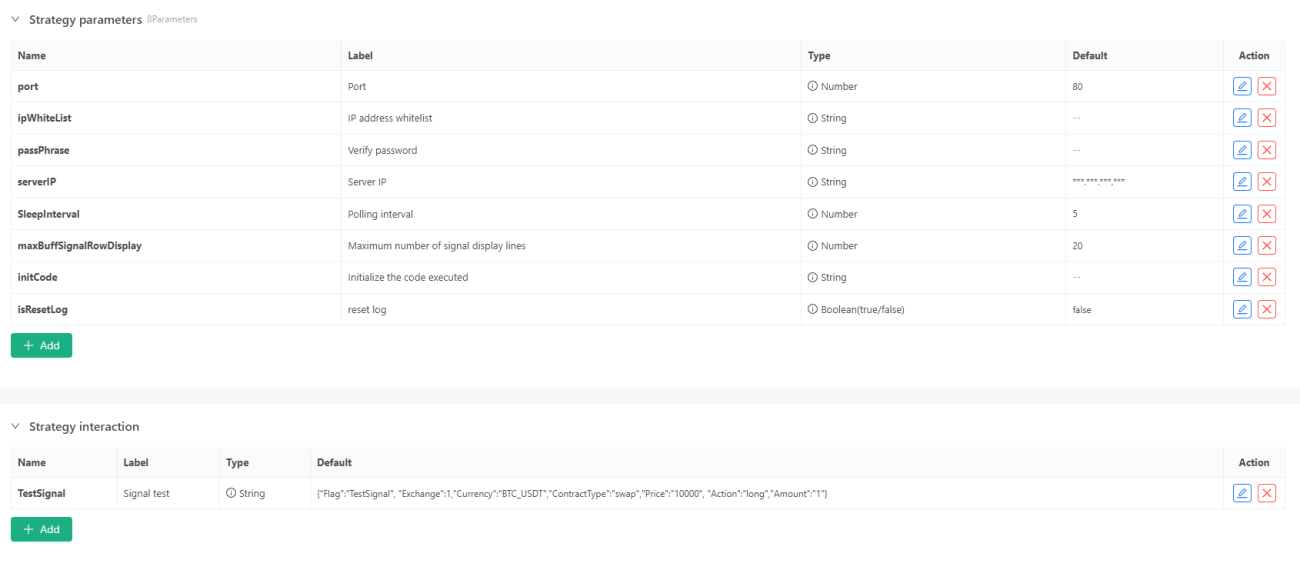
- port parameter: If you use the Http protocol, you can only set port 80 on Trading View.
- serverIP parameter: Enter the public IP address of the server.
- initCode parameter: It can be used to switch the base address for testing in the exchange test environment.
Compared with the strategy of using the extended API to access external signals, the strategy does not change a lot. It only adds an serverFunc Http service processing function and uses the multi-threaded message passing method newly added by the FMZ platform: postMessage / peekMessage. The other codes are almost unchanged.
IP Whitelist
Since the requests from Trading View's webhook are only sent from the following IP addresses:
            text

            52.89.214.238
34.212.75.30
54.218.53.128
52.32.178.7
Therefore, we add a parameter ipWhiteList to the strategy to set the IP whitelist. All requests that are not in the IP address whitelist will be ignored.
            javascript

                    // Verify IP address
        var fromIP = ctx.remoteAddr().split(":")[0]
        if (ipWhiteList && ipWhiteList.length > 0) {
            var ipList = ipWhiteList.split(",")
            if (!ipList.includes(fromIP)) {
                ctx.setStatus(500)
                ctx.write("IP address not in white list")
                Log("500 Error: IP address not in white list", "#FF0000")
                return
            }
        }
Verify password
Add a parameter passPhrase to the strategy to set the verification password. This password is configured in the Webhook url settings on Trading View. Requests that do not match the verification password will be ignored.
For example, we set: test123456.
            javascript

                    // Verify password
        var pass = ctx.rawQuery().length > 0 ? ctx.query("passPhrase") : ""
        if (passPhrase && passPhrase.length > 0) {
            if (pass != passPhrase) {
                ctx.setStatus(500)
                ctx.write("Authentication failed")
                Log("500 Error: Authentication failed", "#FF0000")
                return
            }
        }
External Signal
Use the PINE script of the Trading View platform as the external signal trigger source, and select one of the PINE scripts randomly released by Trading View officially:
            pine

            //@version=6
strategy("MovingAvg Cross", overlay=true)
length = input(9)
confirmBars = input(1)
price = close
ma = ta.sma(price, length)
bcond = price > ma
bcount = 0
bcount := bcond ? nz(bcount[1]) + 1 : 0
if (bcount == confirmBars)
	strategy.entry("MACrossLE", strategy.long, comment="long")
scond = price < ma
scount = 0
scount := scond ? nz(scount[1]) + 1 : 0
if (scount == confirmBars)
	strategy.entry("MACrossSE", strategy.short, comment="short")
Of course, you can also run PINE scripts directly on the FMZ platform to execute live tradings, but if you want the Trading View platform to run PINE scripts to send signals, you can only use the solutions we discussed.
We need to focus on the order placing function of this script. In order to adapt this PINE script to the message in our webhook request, we need to modify the trading function comment, which we will mention later in the article.
WebhookUrl and Request body Settings
The settings of WebhookUrl and request body are basically the same as the previous extended API method to access external signals. The same parts will not be repeated in this article. You can refer to the previous article.
Webhook Url
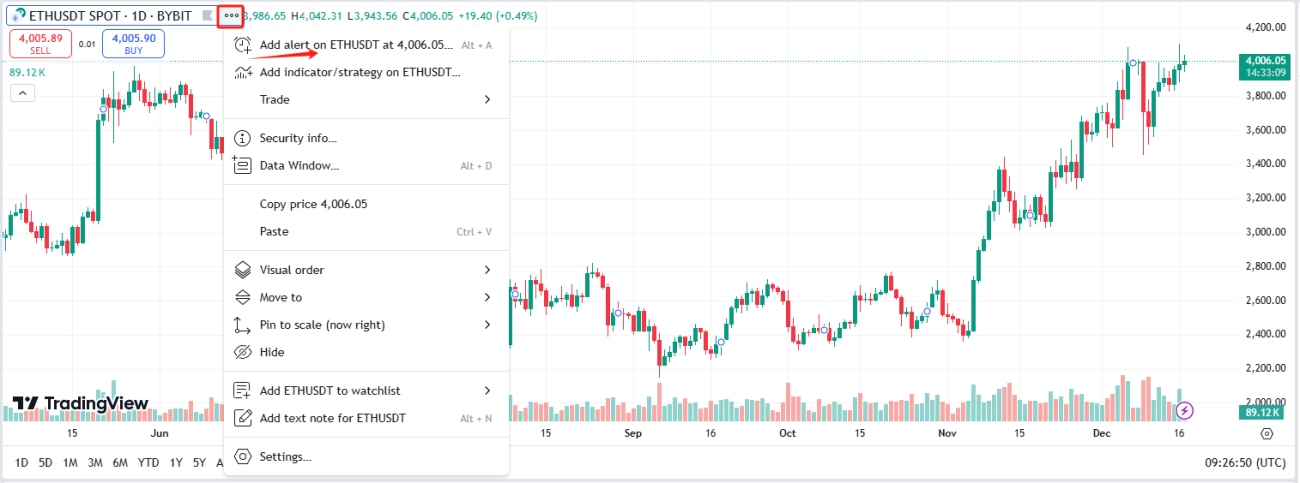
After we added this PINE script to a chart of a market (we choose Binance's ETH_USDT perpetual contract market for testing) on Trading View, we can see that the script has started to work. Then we add an alert to the script as shown in the screenshot.
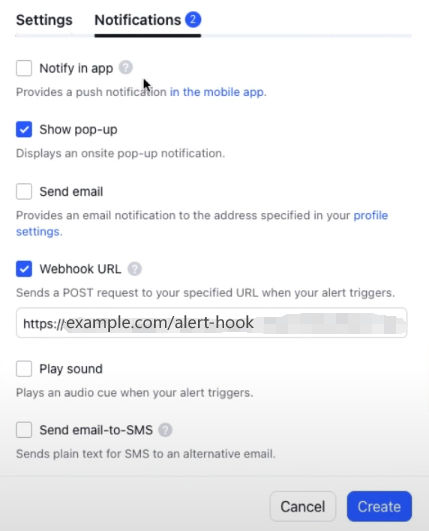
Webhook URL settings:
The stratey code has been designed to generate the webhook URL automatically. We only need to copy it from the log at the beginning of the strategy operation.

            text

            http://xxx.xxx.xxx.xxx:80/CommandRobot?passPhrase=test123456
Trading View stipulates that the Webhook URL can only use port 80 for Http requests, so we also set the port parameter to 80 in the strategy, so we can see that the link port of the Webhook URL generated by the strategy is also 80.
Body message
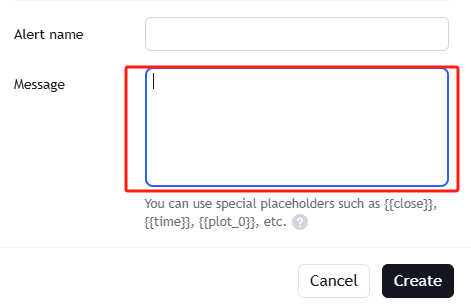
Then we set the request body message in the "Settings" tab as shown in the screenshot.
            text

            {
    "Flag":"{{strategy.order.id}}",
    "Exchange":1,
    "Currency":"ETH_USDT",
    "ContractType":"swap",
    "Price":"-1",
    "Action":"{{strategy.order.comment}}",
    "Amount":"{{strategy.order.contracts}}"
}
Do you remember the order placing code in the PINE script we just talked about? Let's take the long position opening code as an example:
            pine

            strategy.entry("MACrossLE", strategy.long, comment="long")
"MACrossLE" is the content filled in "{{ strategy.order.id }}" when the alert is triggered in the future .
"long" is the content filled in "{{strategy.order.comment}}" when the alert is triggered in the future. The signal identified in the strategy is (screenshot below):

So the settings must be consistent. Here we set "long" and "short" for the order function, indicating the signals of opening long and opening short.
The PINE script does not specify the order quantity for each order, so when Trading View sends an alert message, it uses the default order quantity to fill the "{{strategy.order.contracts}}" part.
Live trading Test
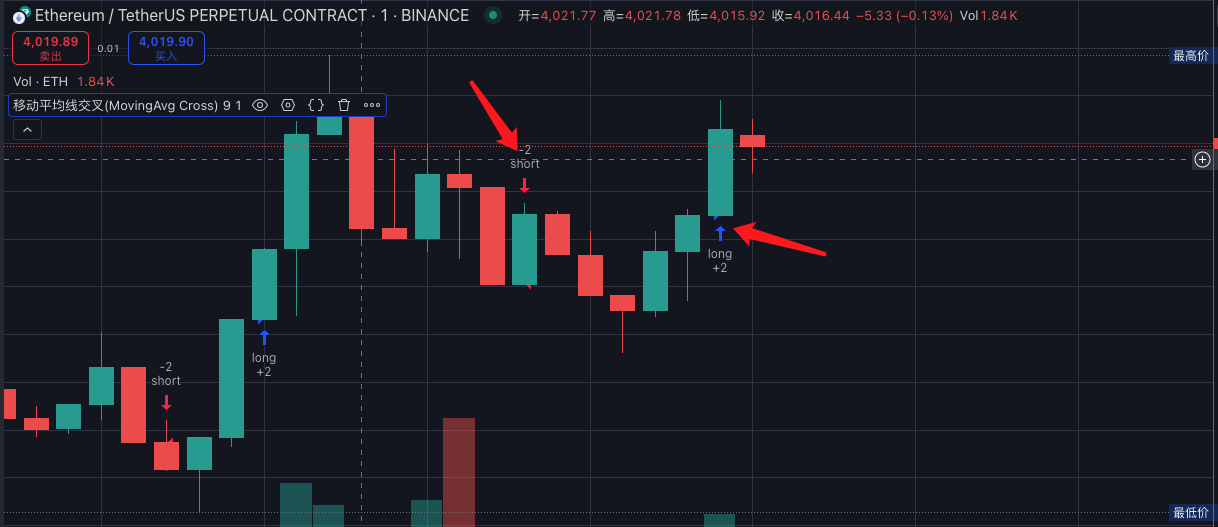

When the PINE script running on Trading View executes the trading function, because we have set the Webhook URL alert, the Trading View platform will send a POST request to the built-in Http service of our strategy. This request query contains a password parameter passPhrase for verification. The actual request body received is similar to this:
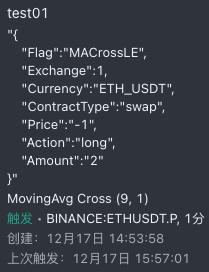
Then our strategy executes the corresponding trading operations based on the message in this body.
It can be seen that the strategy performs synchronized signal trading in the OKX simulation environment according to the PINE script on Trading View.
Strategy Address
Thank you for your attention to FMZ Quant, and thank you for reading.
- 1