

The easiest way to get carried away chasing meme coins is when you never intended to buy one in the first place. Someone drops a contract address into a group chat. You open it and see that the price has already multiplied dozens of times. Back in the chat, people are calculating how much they will make if the market cap hits $100 million. So you take the plunge, go all in—and become a bagholder again.
Since you are already stuck holding it, why not provide liquidity and collect some fees while waiting for a recovery? You set the lower end of your liquidity range 50% below the current price, figuring that should be enough. Then the price falls right through it. Now you are no longer earning fees, and you own even more of the token that has lost its value.
The recent BSC token 牛逼 (Niubi, roughly “freaking awesome” in Chinese)—I will call it NiuX here to keep the slang a little cleaner—grew out of a post in which Musk used the expression. Someone promptly turned it into a token. It later appeared on MEXC, LBank, and KuCoin Alpha too. The excitement lasted only a few days. With one unexpected market shock after another, its market cap fell back to around $1 million. On-chain market data · MEXC · LBank · KuCoin Alpha
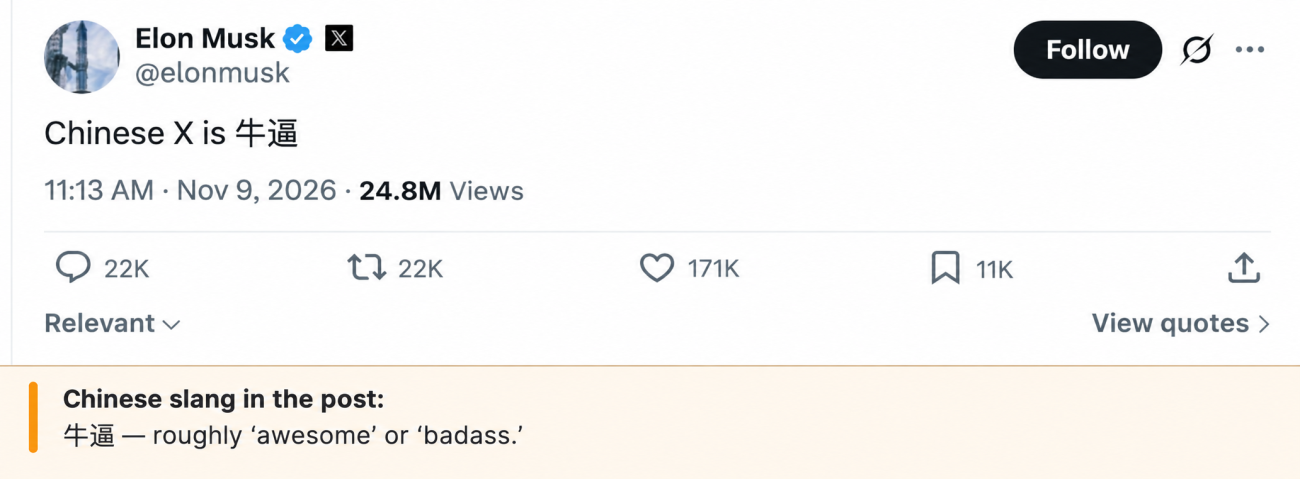
Watching this token, I could not quite let it go. It had fallen so far, yet it was still bouncing around near the lows, with some fairly substantial rebounds. Buying felt like throwing money away, but I wanted to try a small position: just 10U, meaning 10 USDT. Sell into a rebound, then buy back after a pullback if the price makes sense. Would it ever recover? I had no idea. Capturing one of those round trips would be enough.
In other words, I wanted to be a “10U warrior” for once. Spot only, with no leverage, so a price decline would not trigger a leveraged liquidation. If nobody wanted the token anymore and that 10U went to zero, I could accept it. A small impulse with a budget to match.
How Do You Place a Resting Order on a DEX?
This setup uses 1inch Orderbook. FMZ's OneInch exchange object handles quotes and swaps. The limit price passed to CreateOrder applies only to that particular swap. To leave an order resting and wait for a fill, you need to submit a signed order to the Orderbook. FMZ OneInch interface · 1inch Orderbook documentation
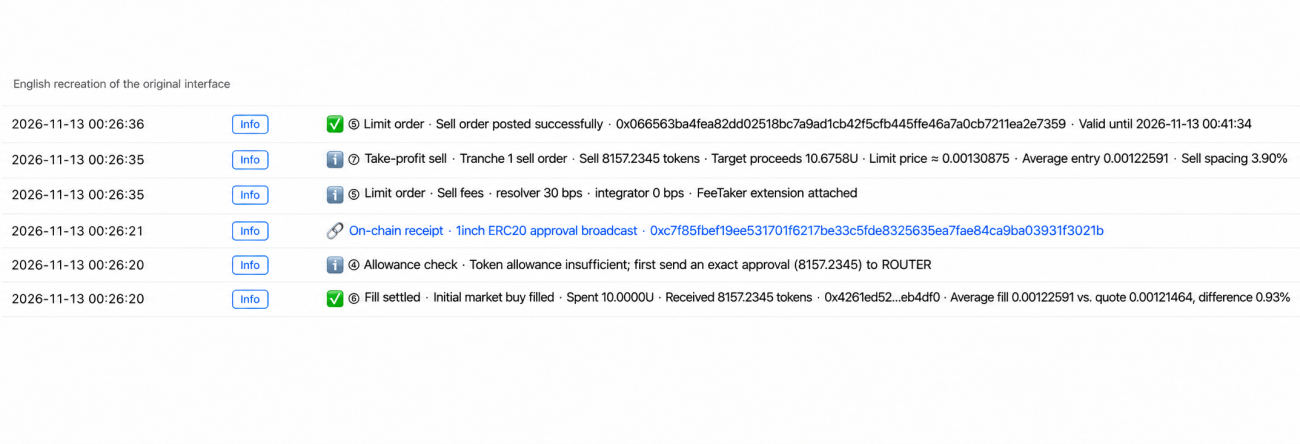
Take the first sell order. I held 8,157.2345 NiuX tokens and wanted to receive 10.6758 USDT, with the order valid for 15 minutes. The order specifies how many tokens I will give and how much USDT I want in return. Dividing the two gives an order price of approximately 0.00130875 USDT per token. A buy order reverses the assets: USDT goes out, and NiuX comes in.
The bot first checks whether the wallet has enough tokens and sufficient allowance. If the allowance is insufficient, it submits an on-chain approval transaction and waits for confirmation before placing the order. It then uses the wallet to sign the order with EIP-712 and sends the order data, signature, and order hash to POST /orderbook/v4.1/56. The final 56 is BSC's chain ID. Signing and submitting the resting order happen off-chain; granting additional allowance requires an on-chain transaction and gas. 1inch limit-order quick start · Order submission endpoint
Below are two excerpts from the live strategy's sell-order flow. In these snippets, maker is the quantity of tokens to sell, and taker is the amount of USDT to receive. Both use the respective token's smallest unit. The complete strategy includes the signing-field construction and submission retry logic.
javascript
// placeSell: check balance and allowance; save the signed order before submitting
if (!funded(BASE, maker, lot)) return;
lot.order = signedOrder("sell", maker, taker, pSellTtl, finalBlock);
save();
post(lot.order);
// post(o): submit the signed order to 1inch Orderbook
var r = book("", {
orderHash: o.hash,
signature: o.signature,
data: Object.assign({ extension: o.extension }, o.data)
});
Once 1inch accepts the order, it is listed, but the tokens remain in my wallet. An execution party must be willing to take the order on its stated terms and submit it on-chain, where the contract completes the exchange. So even if a candle touches the order price, the order may remain unfilled. The bot uses on-chain receipts to confirm how much was sold and how much USDT was actually received. If some tokens remain unsold at expiry, it first reconciles the old order's fills, then places another order for the remaining position. How 1inch limit orders are executed
Where do you get an API key? Sign in to the 1inch Business Portal, create an application under Applications, and find the API key inside that application. You can start with the free allowance and follow any verification prompts in the portal. The Swap API and Orderbook API can use the same key. 1inch Business Portal · Official setup instructions
Enter that key in two places in FMZ. For the OneInch exchange object, select BNB Chain and enter it in 1inch Api Key for quotes and swaps. Enter it again in the bot parameter pOrderbookKey for Orderbook order submission and queries; the book() function above adds the Authorization: Bearer ... header. Enter the wallet's private key in the exchange object's Private Key field for signing orders. Set the bot parameter pRpc to a BSC HTTPS RPC URL for checking on-chain state and transaction receipts. FMZ OneInch configuration · 1inch API authentication
Now that the bot can place orders, it still needs to do the math. How far should the price fall before buying, and how far must it rebound afterward to make selling worthwhile?
How Is the Grid Set Up?
My first thought was to lay out a few fixed grid levels and call it done. But when the token barely moves for hours, wide spacing can leave every order untouched. Move the levels closer together, though, and a 2% move on 10U is only 0.20U before fees.
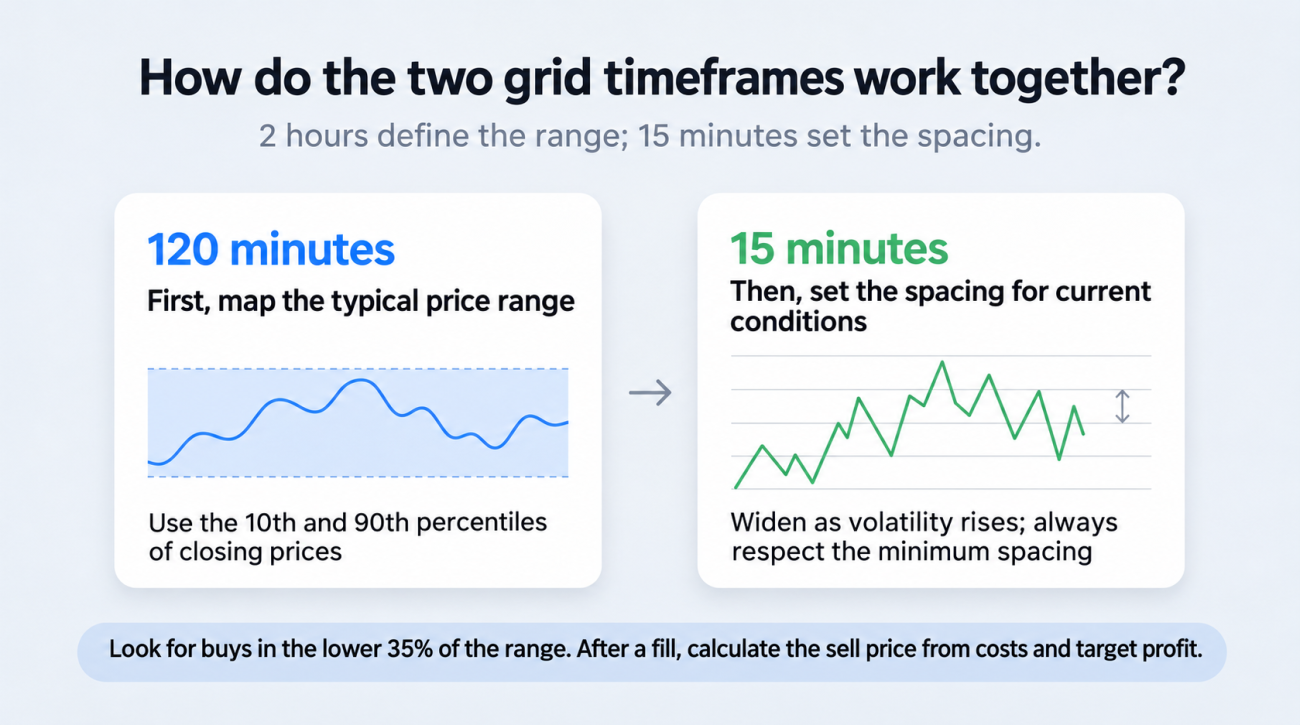
I previously discussed a dual-timeframe grid for ANT spread arbitrage. This time, the underlying series is the token price rather than a spread, but the basic idea remains. You do not need to have read that article: imagine you are looking for a place to put one 10U lot to work. First, you need to know the price range the token has usually occupied. Then you need to know how far its recent swings have tended to travel. Those questions use different windows of market data.
- Use the longer, 120-minute window to define the range. Sort the closing prices and use the 10th and 90th percentiles as the lower and upper boundaries. An occasional extreme move is less likely to drag the range far away.
- Use the shorter, 15-minute window to calculate spacing. When recent moves are larger, spread the levels out. When trading becomes quieter, they can move closer together, while retaining at least the configured minimum spacing between buy levels. Fees and the profit target are included in the sell order after a buy fills. Each recalculation updates the range and spacing using the latest data.
Suppose the calculated range for the past two hours is 100–110. The strategy first looks at the lower 35% of that range: 100–103.5. If the reference buy price is still 108, the first buy order is placed at 103.5 to wait for a pullback. If the reference buy price has already fallen to 102 and the short-window buy spacing is 2%, the first level is placed a little lower, at 102 ÷ 1.02—approximately 100.
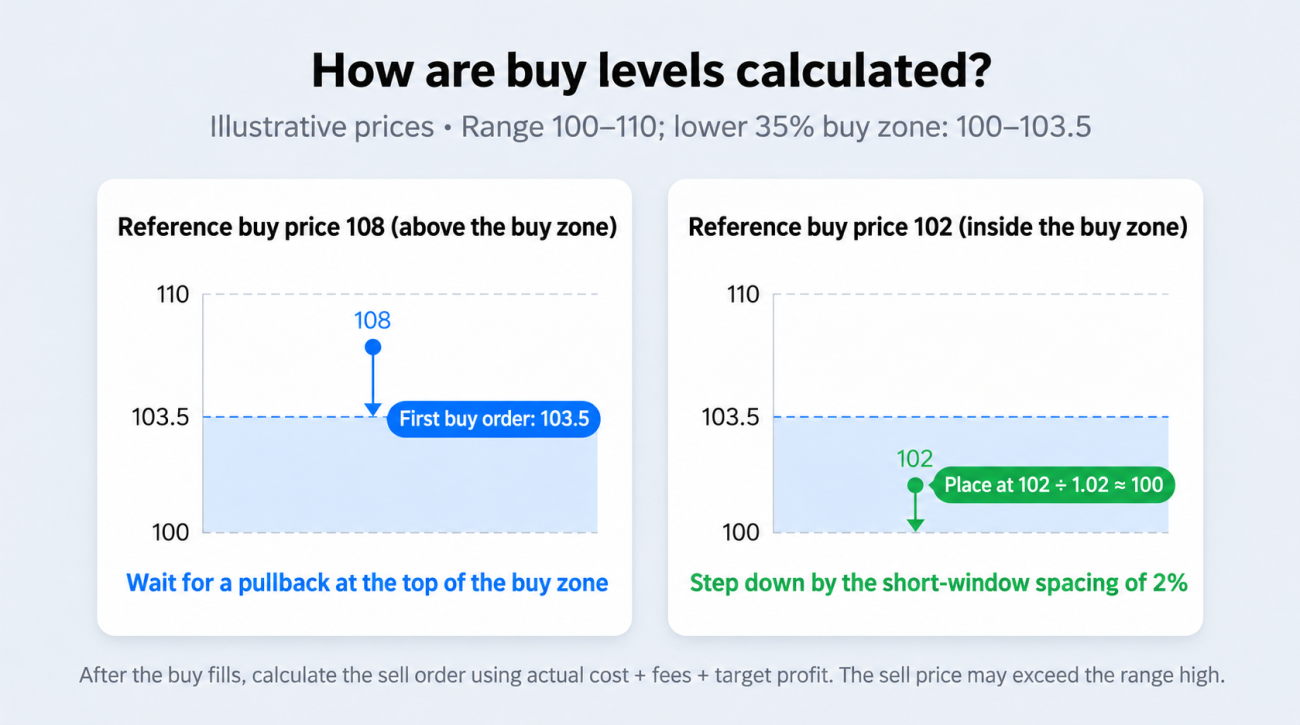
The excerpt below calculates the first level. It uses the buy-side quote as the reference price when available, falling back to the current price otherwise. When the current price rises above the upper boundary, the strategy shifts the range upward. If the calculated first level is too low, it also adjusts it against a boundary near the lower edge. When the budget supports multiple lots, subsequent buy levels are spaced downward from the first one.
            javascript

            var gap = Math.max(pMinGapBps / 10000, m.buyGap);
// lo and hi are the adjusted range boundaries for this round
var buyCeiling = lo + (hi - lo) * 0.35;
var refBuy = m.buyPrice > 0 ? m.buyPrice : m.price;
var first = refBuy <= buyCeiling ? refBuy / (1 + gap) : buyCeiling;
Once a buy actually fills, the sell order is calculated from the amount spent. I set a target of 0.50U net profit for each lot. The first buy cost 10U. After including costs already incurred and allowing for further costs, the sell order targeted proceeds of 10.6758U. Even on a position of just 10U, capturing that 0.50U requires a meaningful rebound. The resulting sell price can be above the upper boundary of the current range.
How Does the 10U Compound?
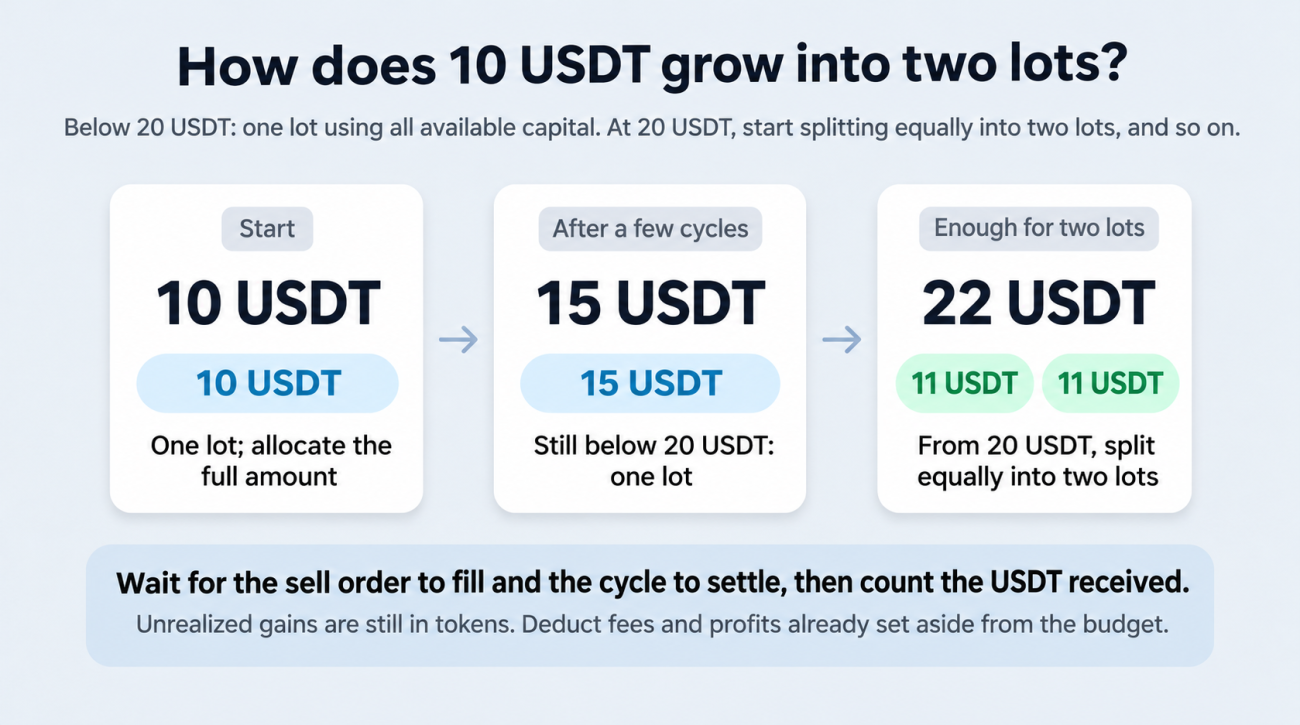
I bought the first lot immediately. While its sell order is resting, the capital is held in tokens. Even if the position shows an unrealized gain, the bot waits until that round's inventory and orders have all been dealt with before planning the next round using the USDT actually received. For example, if the 10U trade ends with a net profit of 0.50U, the next round has 10.50U available. It still uses a single lot, putting the full 10.50U to work.
As trading continues, an available budget between 10U and 19.99U still funds one lot using the entire amount. At 20U, the budget is automatically split into two lots of 10U at two price levels. At 22U, it becomes two lots of 11U. At 30U, it funds three lots, and so on. Each full increment of the starting lot size adds another planned level, with the available budget divided evenly among the lots.
I also planned for what happens after the strategy has earned more. Once cumulative realized net profit exceeds 10U, each new profit high locks away 30% of the new gain above the applicable threshold. For example, moving from a realized-profit high of 10U to 11U locks away 0.30U. That amount is excluded from subsequent orders. Both the number of lots the next round can support and the amount allocated to each lot are calculated from available funds after deducting the locked amount.
At 00:26 on November 13, the live bot spent 10U to buy 8,157.2345 NiuX tokens at an average price of 0.00122591 USDT. The sell order was placed at approximately 0.00130875 USDT and would be renewed if it expired without filling.
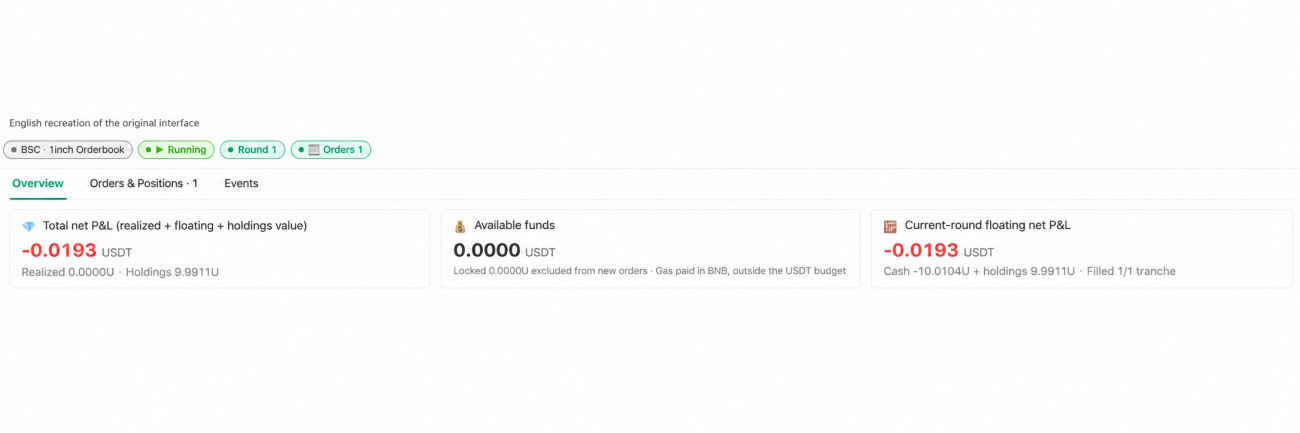
Will this small position catch the rebound? The buy is done. Now it is a matter of waiting for that move.
Solana traders can also place resting orders through Jupiter Trigger, which FMZ supports as well. FMZ Jupiter limit-grid example
Honestly, this is just a starting point. The strategy is public, so feel free to modify it. If you have another trading idea, you can discuss it with AI, build a version, and try it out. If you come up with something interesting, bring it back to the community.
Strategy source code: Live Meme Coin Compounding Grid
- 1