बोलिंगर बैंड चैनल पर आधारित ब्रेकआउट रिवर्जन रणनीति

अवलोकन
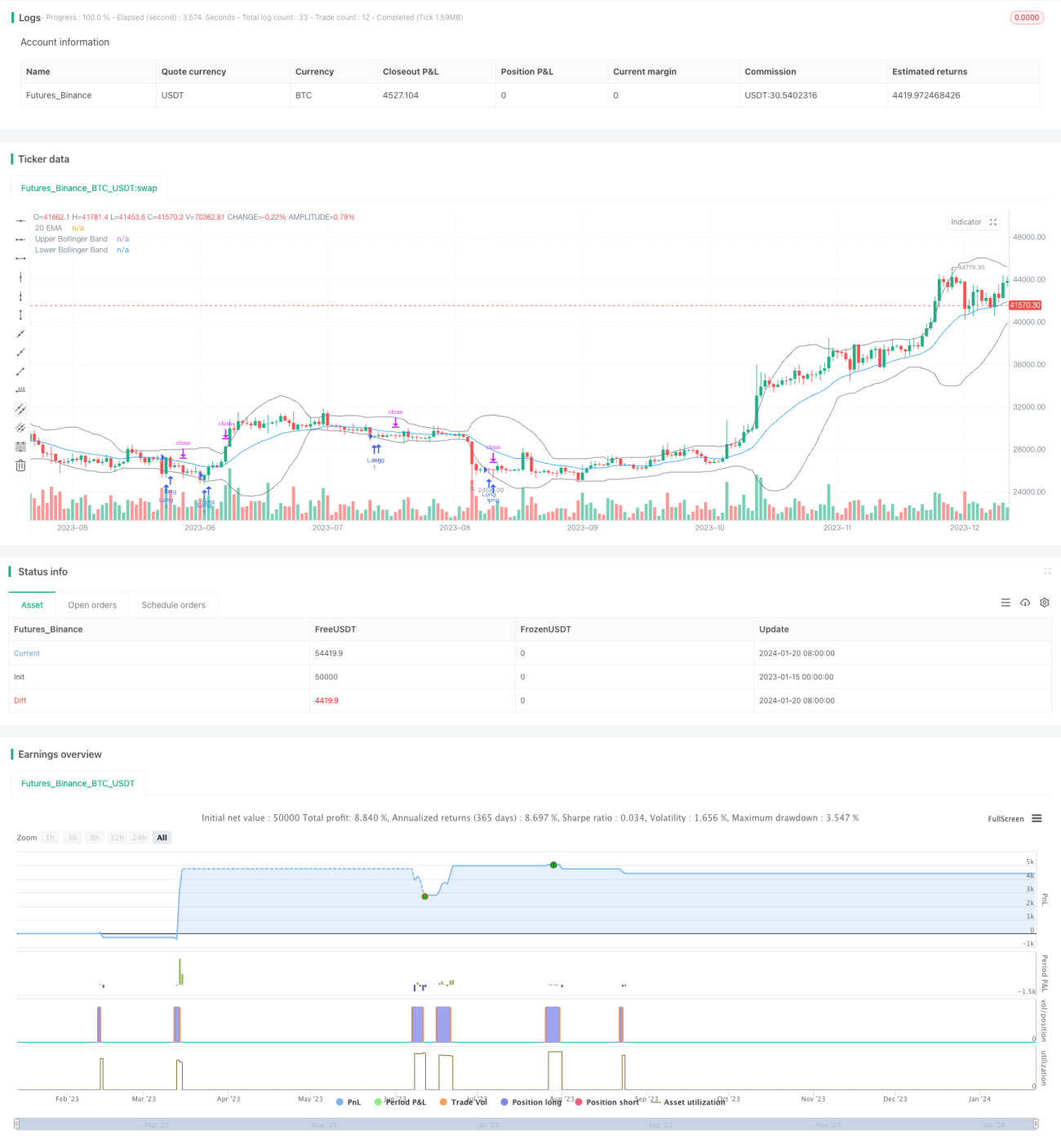
यह रणनीति बोलिंजर बैंड चैनल पर आधारित रिग्रेशन ब्रेकआउट रणनीति है। जब कीमत बोलिंजर बैंड के निचले बैंड से नीचे गिरती है, तो लॉन्ग पोजीशन में प्रवेश किया जाता है। स्टॉप-लॉस कीमत प्रवेश ब्रेकआउट बिंदु की सबसे निचली कीमत पर निर्धारित की जाती है। टेक-प्रॉफिट लक्ष्य बोलिंजर अपर बैंड है।
रणनीति का सिद्धांत
यह रणनीति 20-अवधि के बोलिंजर बैंड चैनल का उपयोग करती है। बोलिंजर बैंड चैनल मध्य बैंड, ऊपरी बैंड और निचले बैंड से बना होता है। मध्य बैंड 20-अवधि का सरल मूविंग औसत है, ऊपरी बैंड मध्य बैंड में मानक विचलन के 2 गुना जोड़कर बनता है, और निचला बैंड मध्य बैंड से मानक विचलन के 2 गुना घटाकर बनता है।
जब कीमत निचले बैंड से नीचे टूटती है, तो यह संकेत देता है कि कीमत ओवरसोल्ड स्थिति में प्रवेश कर गई है, और तब लॉन्ग पोजीशन में प्रवेश किया जाता है। प्रवेश के बाद, स्टॉप-लॉस कीमत उस कैंडल की सबसे निचली कीमत पर सेट की जाती है जिस पर प्रवेश हुआ था, और टेक-प्रॉफिट लक्ष्य बोलिंजर ऊपरी बैंड होता है। इस प्रकार, रणनीति कीमत के ओवरसोल्ड स्थिति से मूविंग औसत की ओर वापसी की प्रक्रिया का पीछा करती है, जिससे लाभ प्राप्त होता है।
रणनीति के लाभों का विश्लेषण
इस रणनीति के निम्नलिखित लाभ हैं:
- बोलिंजर बैंड का उपयोग करके बाजार की ओवरबॉट/ओवरसोल्ड स्थिति का निर्धारण करती है, जो कुछ हद तक समयबद्ध है।
- यह रिग्रेशन ट्रेडिंग रणनीति है, जो ऊंचाई पर खरीदने और गहराई पर बेचने से बचाती है।
- स्टॉप-लॉस और टेक-प्रॉफिट बिंदु उचित रूप से निर्धारित किए गए हैं, जो जोखिम नियंत्रण के लिए अनुकूल हैं।
जोखिम विश्लेषण
इस रणनीति में कुछ जोखिम भी हैं:
- बोलिंजर बैंड कीमत के रुझान को पूरी तरह से निर्धारित नहीं कर सकता; निचले बैंड के टूटने के बाद कीमत का रिबाउंड होना आवश्यक नहीं है।
- जब बाजार लगातार गिर रहा हो, तो फ्लोटिंग P/L पहले स्टॉप-लॉस को ट्रिगर कर सकता है।
- टेक-प्रॉफिट बिंदु ऊपरी बैंड के करीब है, जिससे टेक-प्रॉफिट लागत अधिक होने का जोखिम है।
रणनीति अनुकूलन दिशा
इस रणनीति को निम्नलिखित पहलुओं से अनुकूलित किया जा सकता है:
- बोलिंजर बैंड के मापदंडों को अनुकूलित करें, सर्वोत्तम पैरामीटर संयोजन खोजें।
- अन्य संकेतक जोड़कर सिग्नल को फ़िल्टर करें, प्रवेश सटीकता में सुधार करें।
- टेक-प्रॉफिट और स्टॉप-लॉस रणनीति को अनुकूलित करें, लाभ-हानि अनुपात में सुधार करें।
सारांश
इस रणनीति की समग्र सोच स्पष्ट है और इसमें कुछ हद तक कार्यक्षमता है। हालांकि, बोलिंजर बैंड का उपयोग करके ओवरबॉट/ओवरसोल्ड का निर्धारण करने की समयबद्धता अधिक नहीं है, और यह कीमत के रुझान को पूरी तरह से निर्धारित नहीं कर सकती। इसके अलावा, स्टॉप-लॉस और टेक-प्रॉफिट तंत्र में भी सुधार की आवश्यकता है। भविष्य में, अधिक सटीक संकेतक चुनने, मापदंडों को अनुकूलित करने और स्टॉप-लॉस/टेक-प्रॉफिट तंत्र में सुधार करके रणनीति की लाभप्रदता बढ़ाई जा सकती है।
- 1