적응형 볼린저 그리드 트레이딩 전략

BB SMA GRID stdev
생성 날짜: 2025-02-21 11:52:10 마지막으로 수정됨: 2025-02-27 17:04:20
복사: 3 클릭수: 691
avatar of ianzeng123 ianzeng123
2
집중하다
319
수행원

적응형 볼린저 그리드 트레이딩 전략 적응형 볼린저 그리드 트레이딩 전략

개요

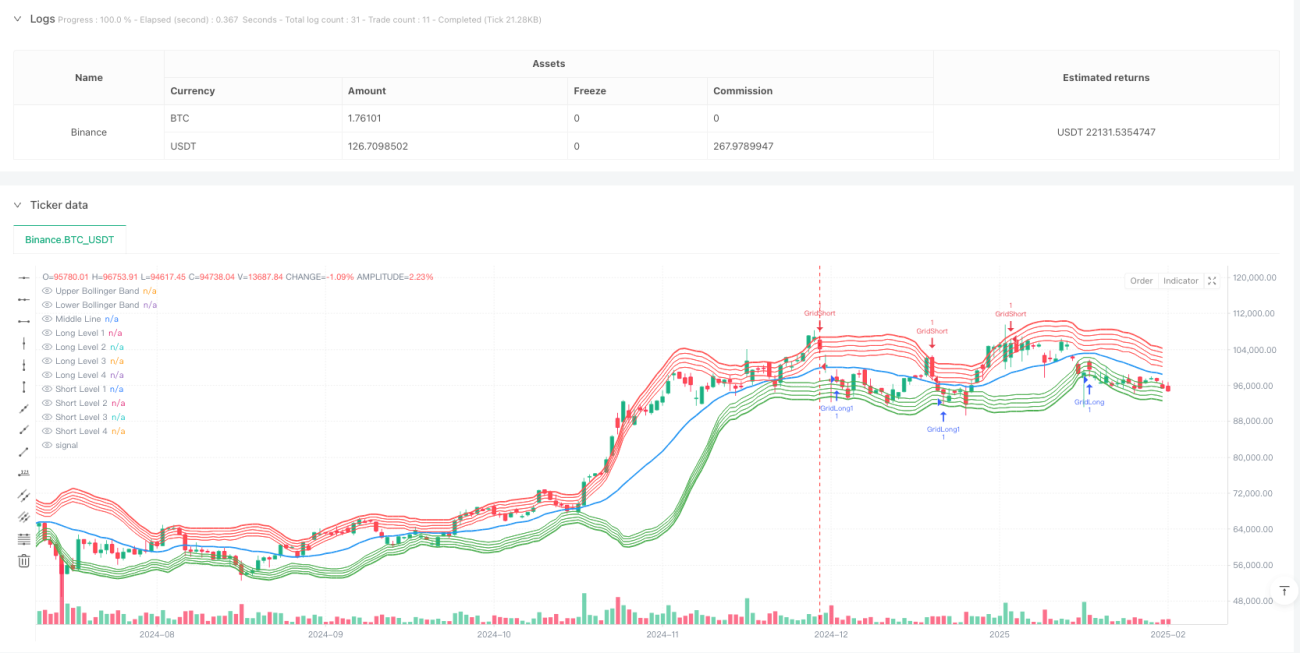
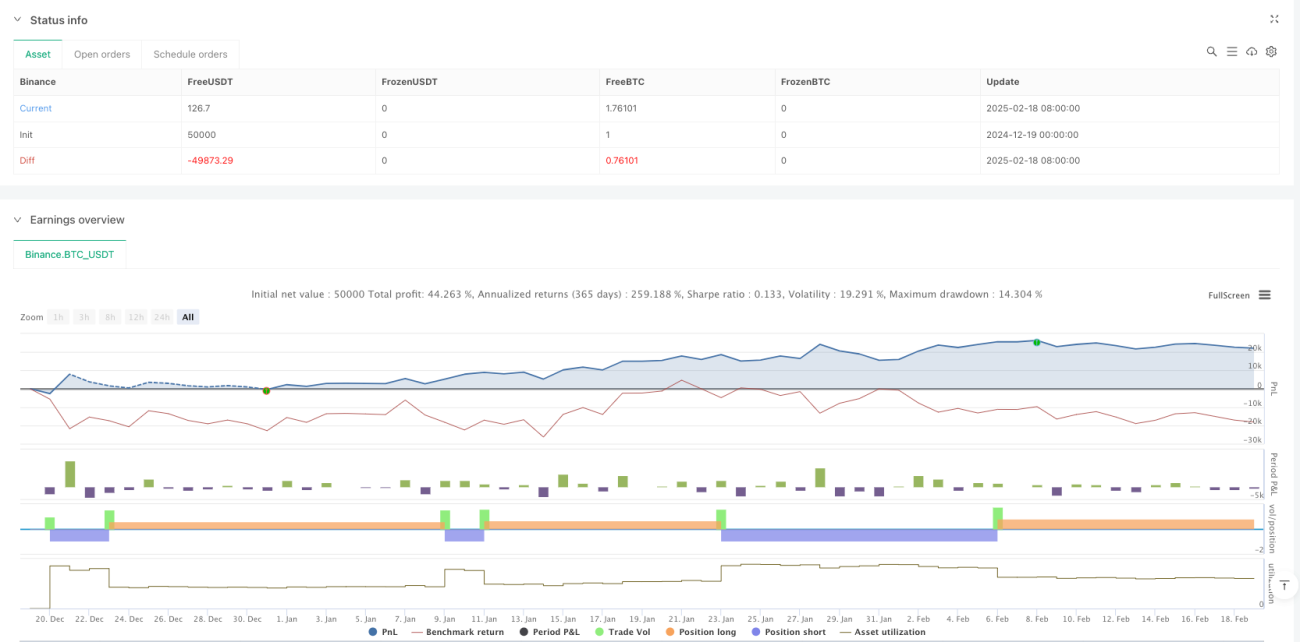
이것은 부린 띠 지표에 기반한 고급 격자 거래 전략이다. 이 전략은 부린 띠의 위아래와 중간에 있는 격자 역동성을 통해 격자의 위치를 결정하고, 시장의 변동성에 따라 자동으로 격자 간격을 조정한다. 시스템은 가격이 격자선을 돌파할 때 그에 따른 다중 격자 거래를 수행하여 완전히 자동화된 격자 거래를 실현한다.

전략 원칙

이 전략은 20주기의 이동 평균을 브린띠의 중간 궤도로, 2배의 표준 차이를 대역폭으로 사용한다. 브린띠 기반에서, 전략은 위아래 궤도 사이에 4개의 격자 계층을 설정하고, 격자 간격은 1%이다. 가격이 위아래로 어떤 격자선을 돌파할 때, 시스템은 여러 작업을 수행한다. 가격이 하향으로 어떤 격자선을 돌파할 때, 시스템은 공백 작업을 수행한다. 이 디자인은 전략이 흔들리는 시장에서 지속적으로 수익을 올릴 수 있도록 한다.

전략적 이점

  1. 동적 조정 - 격자 위치가 브린 테이프와 함께 이동하여 전략이 다른 시장 환경에 적응할 수 있도록합니다.
  2. 위험 통제 - 부린 띠를 통해 거래 범위를 제한하여 극단적인 상황에서 과도한 포지션을 피하십시오.
  3. 고도의 자동화 - 시스템 자동으로 거래, 인적 개입이 필요하지 않습니다.
  4. 양방향 거래 - 상승과 하락에서 수익을 얻을 수 있습니다.
  5. 매개 변수 조정 가능 - 격자 간격과 계층 수를 필요에 따라 유연하게 조정할 수 있습니다

전략적 위험

  1. 동향시장 위험 - 단방향 동향시장에서 큰 회전이 발생할 수 있습니다.
  2. 재원 관리 위험 - 여러 개의 격자 동시 발동으로 과도한 포지션이 발생할 수 있습니다.
  3. 슬라이드 포인트 위험 - 시장의 급격한 변동으로 거래가격이 격자 가격에서 벗어날 수 있습니다.
  4. 기술 위험 - 브린 벨트에서 가짜 침입 신호가 발생할 수 있습니다.

해결책:

  • 포지션 제한을 설정
  • 트렌드 필터를 도입합니다.
  • 주문 실행 메커니즘을 최적화
  • 확인 신호 필터를 추가

전략 최적화 방향

  1. 자율적인 격자 간격 - 격자 간격이 변동률에 따라 동적으로 조정됩니다.
  2. 양 가격 관계를 도입 - 합성 양 지표 최적화 입시 시점
  3. 손해 방지 제도를 최적화 - 더 유연한 손해 방지 제도를 설계
  4. 자금 관리 최적화 - 리스크 기반 포지션 관리를 구현
  5. 다중 시간 주기 연동 - 다중 주기 신호 확인 메커니즘을 도입

요약하다

이 전략은 브린띠와 격자 거래의 결합을 통해 유연성과 안정성을 겸비한 자동화 거래 시스템을 구현한다. 전략의 핵심 장점은 다양한 시장 환경에 적응할 수 있다는 점과 동시에 매개 변수를 조정하여 위험을 통제하는 데 있다. 일부 고유한 위험이 존재하지만, 지속적인 최적화와 개선을 통해 더욱 안정적인 거래 시스템을 구축할 수 있다.

전략 소스 코드
/*backtest
start: 2024-12-19 00:00:00
end: 2025-02-19 08:00:00
period: 1d
basePeriod: 1d
exchanges: [{"eid":"Binance","currency":"BTC_USDT"}]
*/

//@version=6
strategy("Grid Bot based on Bollinger Bands with Adjustable Levels", overlay=true)

// Settings
source = close
length = input.int(20, minval=1, title="Bollinger Bands Length")
mult = input.float(2.0, minval=0.001, maxval=50, title="Bollinger Bands Multiplier")
gridDistancePercent = input.float(1.0, title="Distance Between Levels (%)") / 100 // Distance between grid levels in percentage
gridSize = input.int(4, title="Number of Grid Levels") // Number of grid levels

// Bollinger Bands Calculation
basis = ta.sma(source, length)
dev = mult * ta.stdev(source, length)
upper = basis + dev
lower = basis - dev

// Middle line between the upper and lower Bollinger Bands
middle = (upper + lower) / 2

// Levels for long and short positions
var float[] longLevels = array.new_float(gridSize)
var float[] shortLevels = array.new_float(gridSize)

// Filling levels for long and short positions
for i = 0 to gridSize - 1
    array.set(longLevels, i, lower * (1 + gridDistancePercent * (i + 1))) // For longs, increase the lower band
    array.set(shortLevels, i, upper * (1 - gridDistancePercent * (i + 1))) // For shorts, decrease the upper band

// Logic for entering a long position (buy) at the first level crossover
longCondition = ta.crossover(source, array.get(longLevels, 0)) // Condition for buying — crossover with the first long level
if longCondition
    strategy.entry("GridLong", strategy.long, comment="GridLong")

// Logic for entering a short position (sell) at the first level crossunder
shortCondition = ta.crossunder(source, array.get(shortLevels, 0)) // Condition for selling — crossunder with the first short level
if shortCondition
    strategy.entry("GridShort", strategy.short, comment="GridShort")

// Logic for additional buys/sells when reaching subsequent levels
// For longs:
for i = 1 to gridSize - 1
    if ta.crossover(source, array.get(longLevels, i))
        strategy.entry("GridLong" + str.tostring(i), strategy.long, comment="GridLong")

// For shorts:
for i = 1 to gridSize - 1
    if ta.crossunder(source, array.get(shortLevels, i))
        strategy.entry("GridShort" + str.tostring(i), strategy.short, comment="GridShort")

// Visualization of the levels
plot(upper, color=color.red, linewidth=2, title="Upper Bollinger Band")
plot(lower, color=color.green, linewidth=2, title="Lower Bollinger Band")
plot(middle, color=color.blue, linewidth=2, title="Middle Line")

// Display additional grid levels (fixed titles)
plot(array.get(longLevels, 0), color=color.green, linewidth=1, title="Long Level 1") // For the 1st long level
plot(array.get(longLevels, 1), color=color.green, linewidth=1, title="Long Level 2") // For the 2nd long level
plot(array.get(longLevels, 2), color=color.green, linewidth=1, title="Long Level 3") // For the 3rd long level
plot(array.get(longLevels, 3), color=color.green, linewidth=1, title="Long Level 4") // For the 4th long level

plot(array.get(shortLevels, 0), color=color.red, linewidth=1, title="Short Level 1") // For the 1st short level
plot(array.get(shortLevels, 1), color=color.red, linewidth=1, title="Short Level 2") // For the 2nd short level
plot(array.get(shortLevels, 2), color=color.red, linewidth=1, title="Short Level 3") // For the 3rd short level
plot(array.get(shortLevels, 3), color=color.red, linewidth=1, title="Short Level 4") // For the 4th short level