다이나믹 스톱로스 전략과 결합된 다중 채널 적응형 거북이 거래 전략

DC Donchian Channel ATR Turtle-trading
생성 날짜: 2025-03-04 10:15:33 마지막으로 수정됨: 2025-03-04 10:16:07
복사: 0 클릭수: 866
avatar of ianzeng123 ianzeng123
2
집중하다
319
수행원

다이나믹 스톱로스 전략과 결합된 다중 채널 적응형 거북이 거래 전략 다이나믹 스톱로스 전략과 결합된 다중 채널 적응형 거북이 거래 전략

개요

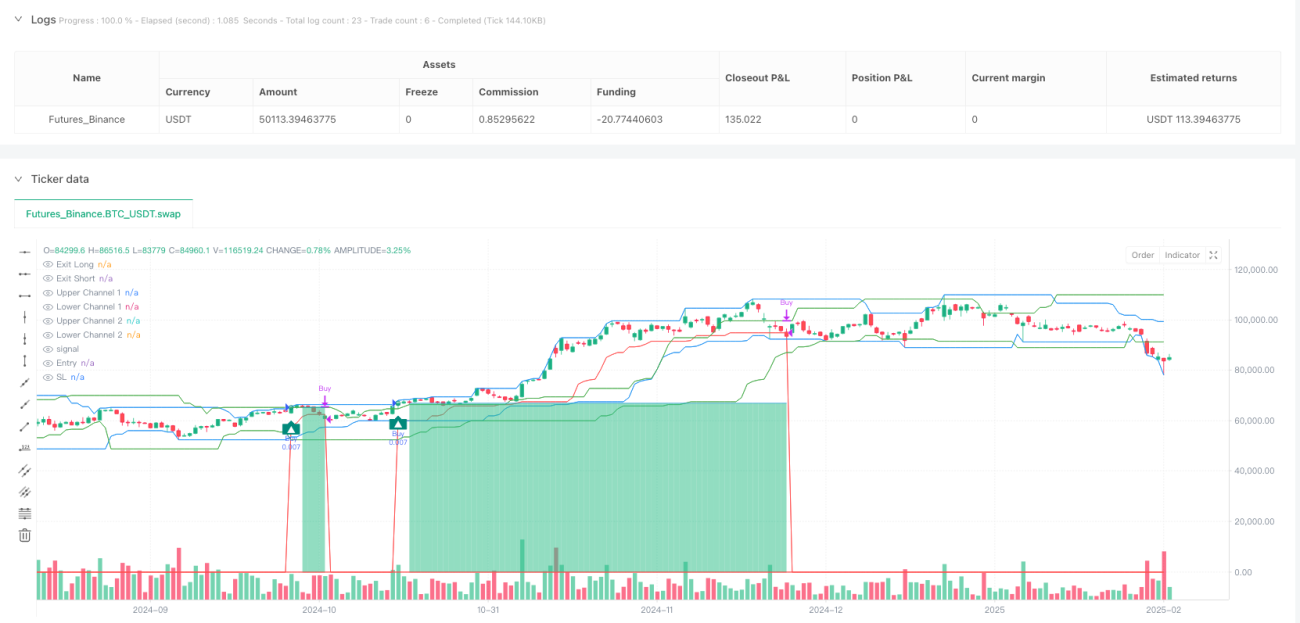
다중 채널 자율적 해파리 거래 전략은 고전적인 해파리 거래법에 기반하여 전체적으로 최적화되고 확장된 현대적인 트렌드 추적 시스템이다. 이 전략의 핵심은 시장의 돌파구를 식별하기 위해 쌍방 도치안 채널 (Donchian Channels) 시스템을 사용하고, 동적으로 조정된 탈퇴 통로를 통해 정확한 중단 위치를 제공합니다. 이 전략은 쌍방향 확인 메커니즘을 설계합니다.

전략 원칙

이 전략은 고전적 인 해양 거래 시스템의 핵심 원칙에 기반하지만 현대적인 2 채널 확인 메커니즘과 동적 인 손실 시스템을 추가합니다.

  1. 두 경로 뚫고 확인 시스템

    • 채널 1 (기본 20주기): 특정 주기의 최고 가격과 최저 가격을 계산하여 상하 경계를 형성한다.
    • 채널 2 ((기본 20주기, 편향량 20): 두 번째 계층 확인으로, 오른쪽 편향을 통해 거짓 신호를 줄인다.
    • 1 채널의 경계를 넘어서 2 채널에서 확인되면 유효한 신호가 생성됩니다.
  2. 역동적인 탈퇴

    • 더 짧은 주기 (기본 10) 의 동치안 통로를 동적 상쇄로 사용한다.
    • 다중 헤드 포지션의 경우, 탈퇴 지점은 통로의 최저 지점; 빈 헤드 포지션의 경우, 탈퇴 지점은 통로의 최고 지점이다.
    • 가격 잡음으로 인한 조기 퇴출을 피하기 위해 K선 종결 확인이 필요합니다.
  3. 출입 및 출퇴근 논리

    • 다중 입점: 종결 가격이 채널 1의 이전 최고 가격을 돌파하고 채널 2의 이전 최고 가격보다 높습니다.
    • 공허 입시: 폐장 가격이 채널 1의 이전 최저 가격보다 떨어지고 채널 2의 이전 최저 가격보다 낮을 때.
    • 다중 출전: 가격이 출구 통로의 최저 가격을 넘어섰거나, 선택 가능한 정지 비율을 달성했다.
    • 공짜 출구: 가격이 출구 통로의 최고 가격을 돌파하거나 선택 가능한 정지 비율을 달성한다.
  4. 자금 관리

    • 기본은 거래 당 계좌 자금의 1%이며, 테스트 결과에 따라 조정할 수 있습니다.
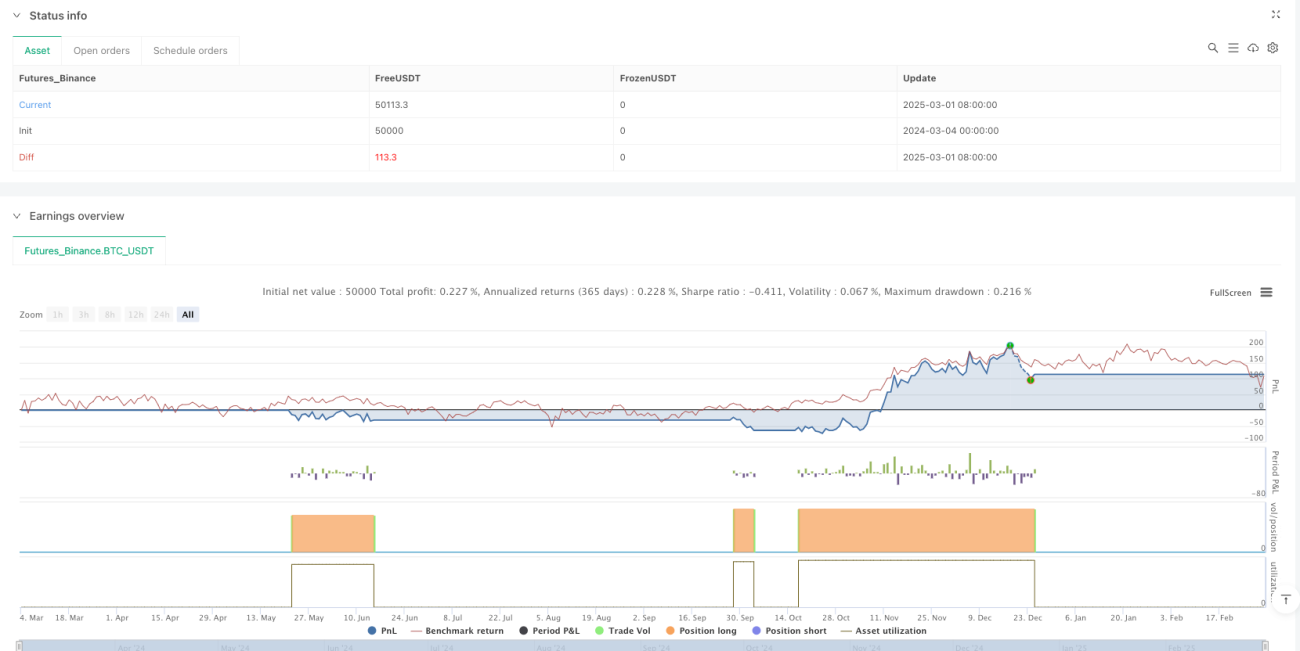
    • 최대 인출이 10%를 넘지 않도록 보장하여 위험을 통제하십시오.
    • 수수료 (설정 0.1%) 와 슬라이드 (설정 5점) 를 고려하여 실제 거래 환경에 가깝게 조정합니다.

전략적 이점

  1. 개선된 신호 품질: 이중 채널 확인 메커니즘은 가짜 돌파구를 크게 줄이고 신호 품질과 정확도를 향상시킵니다.buy = buy_fast and close > upper_slow[1]그리고sel = sel_fast and close < lower_slow[1]이 디자인을 구현하는 것.

  2. 동적 위험 관리: 전략은 적응적 인 출구 통로를 사용하여 시장 구조의 역동성에 따라 중지 위치를 조정합니다. 시장이 유리하게 움직일 때, 중지 위치가 자동으로 따라와 수익의 일부를 잠금합니다. 이것은 코드에서 통과됩니다.exit_buy_level:= math.max(nz(exit_buy_level,10e-10), lower_exit)성취하다.

  3. 완벽한 재무 관리 시스템이 전략은 전문적인 자금 관리 규칙을 내장하고 있으며, 각 거래의 리스크 틈을 통제하는 비율 분배 시스템을 사용합니다.

  4. 시각화 거래 관리전략: 입시점, 중단점, 중단점을 차트에 명확하게 표시하여 거래자의 거래 논리와 위험 범위를 직관적으로 이해할 수 있도록 도와줍니다.

전략적 위험

  1. 시장의 부진: 트렌드 추적 전략으로, 수평 정리 단계에서 연속적인 가짜 신호를 생성할 수 있다. 분석 코드는 쌍용 채널 시스템이 잘못된 신호를 줄였음에도 불구하고, 명확한 트렌드가 없는 시장에서 작은 손실 거래가 반복되는 것을 보여줍니다.

  2. 매개변수 민감도: 전략 성능은 채널 사이클과 오차량 설정에 크게 의존한다. 다른 시장과 시간 프레임은 다양한 파라미터 조합을 필요로하며 충분한 회수와 최적화를 요구한다. 코드에서 입력된 파라미터_period_dc1_period_dc2그리고_period_off이 모든 중요한 변수들을 제어하기 위해서죠.

  3. 지연 위험: 동적 정지 통로는 급격한 변동 시장에서 충분히 빠르게 반응하지 않을 수 있으며, 특히 K 라인 종결 확인을 요구합니다.barstate.isconfirmed), 높은 변동성 환경에서 가장 좋은 탈퇴 시간을 놓칠 수 있다.

  4. 과도한 역사적 모델 의존전략은 역사적인 돌파구 모형이 미래에 계속 유효할 것이라고 가정하지만, 시장 특성은 시간이 지남에 따라 변화하여 전략의 성과에 영향을 미칠 수 있다.

전략 최적화 방향

  1. 트렌드 필터 추가: 코드 분석에 따르면, 현재 전략은 전체 시장의 추세에 대한 판단이 부족합니다. 이동 평균, ADX 또는 MACD와 같은 추세 지표를 추가하여 강한 추세 환경에서 전략을 활성화하고 약한 추세 또는 흔들리는 시장에서 감수성을 줄이는 것이 좋습니다.

  2. 통로 주기 적응현재 전략은 고정 주기 값을 사용한다. 최적화 방향은 ATR 또는 시장의 변동률에 기반한 적응 통로 주기를 도입하는 것으로, 전략이 다른 시장 환경에 더 잘 적응할 수 있도록 한다. 이것은 수정할 수 있다._period_dc1그리고_period_dc2계산하는 방법:

  3. 탈퇴 메커니즘을 최적화: 코드의 탈퇴 논리는 단양 통로에만 의존한다. 일정 수익을 달성한 후 일부 포지션을 평형화하고 나머지 부분에 대해 더 느슨한 후속 손실을 설정하는 것과 같은 단계적 탈퇴 전략을 시행하는 것이 좋습니다.

  4. 시간 필터거래 시간 필터를 추가하여 시장의 유동성이 낮거나 변동성이 높은 시기를 피하십시오. 특히 24 시간 거래하는 암호화폐 시장에서는 특정 시기가 거래를 수행하는 데 더 적합 할 수 있습니다.

  5. 감정 지표 통합: 거래량, 변동률 또는 자본 흐름과 같은 시장 감정 지표를 통합하여 입출출 결정을 강화합니다. 예를 들어, 거래량이 높은 돌파 신호에 무게를 더하거나 비정상적으로 낮은 변동률 환경에서 거래 빈도를 줄입니다.

요약하다

다중 채널 자율적 해수욕 거래 전략은 현대적이고 포괄적인 트렌드 추적 시스템으로, 쌍방 채널 확인 메커니즘과 동적 스톱로드를 통해 전통적인 해수욕 거래 규칙에 직면한 많은 도전을 해결합니다. 이 전략은 중장기 트렌드 트레이더에게 특히 적합하며, H4 또는 일선과 같은 더 높은 시간 프레임에서 더 안정적입니다. 전략의 3Commas 통합 성공은 자동화 된 거래에 대한 이상적인 선택으로 만들 수 있습니다.

불안정한 시장에서 부진한 성능을 보일 수 있지만 적절한 변수 최적화와 추가 트렌드 필터를 사용하면 전체 성능을 크게 향상시킬 수 있습니다. 전략의 자금 관리 모듈은 위험을 효과적으로 제어하는 것을 보장하고, 동적 인 손해 방지 시스템은 이미 얻은 이익을 보호하는 데 도움이됩니다.

다양한 시장 조건에서 트렌드를 포착하려는 거래자에게는 고려해야 할 전략입니다. 특히 다른 시장 분석 도구와 함께 사용 할 때 그렇습니다. 기억하십시오. 모든 전략은 개인의 위험 수용 능력과 거래 목표에 맞게 조정되어야하며 실제 자금을 투입하기 전에 충분한 회귀와 시뮬레이션 거래가 필요합니다.

전략 소스 코드
/*backtest
start: 2024-03-04 00:00:00
end: 2025-03-02 08:00:00
period: 1d
basePeriod: 1d
exchanges: [{"eid":"Futures_Binance","currency":"BTC_USDT"}]
*/

// This Pine Script™ code is subject to the terms of the Mozilla Public License 2.0 at https://mozilla.org/MPL/2.0/
// © 3Commas

//@version=6
// Strategy configuration: sets properties for the strategy like title, overlay, pyramiding, calculation mode, and risk parameters.
strategy(title                        = "[3Commas] Turtle Strategy"
       , overlay                      = true
       , pyramiding                   = 0  
       , calc_on_order_fills          = false
       , calc_on_every_tick           = true
       , default_qty_type             = strategy.percent_of_equity
       , default_qty_value            = 1
       , initial_capital              = 10000
       , slippage                     = 5
       , commission_type              = strategy.commission.percent
       , commission_value             = 0.1
       , use_bar_magnifier            = true
       , fill_orders_on_standard_ohlc = true
     )

// ――――――――――――――――――――――――――――――――――――――――――――――――――――――――――――――――――――――――――――――――――――――――――――――――――――――――――――――――――――
// 🟦 Inputs
// ――――――――――――――――――――――――――――――――――――――――――――――――――――――――――――――――――――――――――――――――――――――――――――――――――――――――――――――――――――

// Define menu options for strategy testing
var menu_buy       = "🟢 Long"
var menu_sel       = "🔴 Short"
var menu_buy_sell  = "🟢 Long & 🔴 Short"  
var menu_none      = "🟤 None"
var group_settings = '🟦 Settings'
var group_test     = '🟦 Strategy Tester'

// Input parameters for the channels and exit period
_period_dc1  = input.int(20, "Period Channel 1"    , group = group_settings, inline = '' , display = display.none, tooltip ='Channel 1 Period.')
_period_dc2  = input.int(20, "Period Channel 2    ", group = group_settings, inline = '2', display = display.none, tooltip ='Channel 2 Period and offset to the right.')
_period_off  = input.int(20, "Offset"              , group = group_settings, inline = '2', display = display.none)
_period_exit = input.int(10, "Period Exit"         , group = group_settings, inline = '' , display = display.none, tooltip ='Exit Period (Trailing).')

// Input parameters for strategy testing options
_test_pos_type  = input.string(       title= 'Strategy          '    , group=group_test, inline = 'o' , defval  = menu_buy_sell, options=[menu_buy_sell, menu_buy, menu_sel, menu_none], tooltip = 'Order Type direction in which trades are executed.')
_tp_use         = input.bool  (false, title= "Take Profit %"         , group=group_test, inline = 'tp', tooltip = 'When activated, the entered value will be used as the Take Profit in percentage from the entry price level.')
_tp_percent     = input.float (20   , title= ""                      , group=group_test, inline = 'tp', display = display.none)


// ――――――――――――――――――――――――――――――――――――――――――――――――――――――――――――――――――――――――――――――――――――――――――――――――――――――――――――――――――――
// 🟦 Logic
// ――――――――――――――――――――――――――――――――――――――――――――――――――――――――――――――――――――――――――――――――――――――――――――――――――――――――――――――――――――

// Calculate take profit levels if enabled; otherwise set to not available (na)
tp_buy = _tp_use?close * (1 + _tp_percent / 100) : na 
tp_sel = _tp_use?close * (1 - _tp_percent / 100) : na

// Calculate fast and slow channel extremes and exit levels
upper_fast = ta.highest(high, _period_dc1)
lower_fast = ta.lowest (low , _period_dc1)
upper_slow = ta.highest(high, _period_dc2)[_period_off]
lower_slow = ta.lowest (low , _period_dc2)[_period_off]
upper_exit = ta.highest(high, _period_exit)
lower_exit = ta.lowest (low , _period_exit)

// Determine if there is a crossover or crossunder for fast and slow channels
buy_fast = ta.crossover (close, upper_fast[1]) and barstate.isconfirmed
sel_fast = ta.crossunder(close, lower_fast[1]) and barstate.isconfirmed
buy_slow = ta.crossover (close, upper_slow[1]) and barstate.isconfirmed
sel_slow = ta.crossunder(close, lower_slow[1]) and barstate.isconfirmed

// Initialize variables to track if we are in a long or short position
var inbuy  = false
var insel  = false

// Conditions to enter long or short positions based on fast signals and slow channel confirmation
buy  = buy_fast and close>upper_slow[1] and not inbuy
sel  = sel_fast and close<lower_slow[1] and not insel

// Update position flags if a trade is executed
inbuy := buy? true:inbuy
insel := sel? true:insel

// Plot shapes on the chart for long and short signals using circles and labels
plotshape(buy ?close:na, title="Label Long" , style=shape.circle   , location= location.absolute, color=color.new(color.teal, 0), text='' , textcolor=color.white, size= size.auto, offset=0, editable=true)
plotshape(sel ?close:na, title="Label Short", style=shape.circle   , location= location.absolute, color=color.new(color.red , 0), text='' , textcolor=color.white, size= size.auto, offset=0, editable=true)
plotshape(buy ?close:na, title="Label Long" , style=shape.labelup  , location= location.belowbar, color=color.new(color.teal, 0), text='▲', textcolor=color.white, size= size.auto, offset=0, editable=true)
plotshape(sel ?close:na, title="Label Short", style=shape.labeldown, location= location.abovebar, color=color.new(color.red , 0), text='▼', textcolor=color.white, size= size.auto, offset=0, editable=true)

// Initialize take profit, stop loss, and exit levels for both long and short positions
var tp = float(na)
var sl = float(na)
var exit_buy_level = float(na)
var exit_sel_level = float(na)

// Set take profit levels when a new long or short signal is triggered
if buy
    tp := tp_buy

if sel
    tp := tp_sel

// For long positions, update the exit level based on the lowest exit channel
if inbuy
    exit_buy_level:= math.max(nz(exit_buy_level,10e-10), lower_exit)
    sl:= exit_buy_level

// For short positions, update the exit level based on the highest exit channel
if insel 
    exit_sel_level:= math.min(nz(exit_sel_level,10e+10), upper_exit)
    sl:= exit_sel_level    

// Check for exit conditions when price crosses the exit levels
exit_buy_pos = ta.crossunder(close,exit_buy_level) 
exit_sel_pos = ta.crossover (close,exit_sel_level)        

// Confirm exit conditions when in a position
exit_buy_close = inbuy and exit_buy_pos and barstate.isconfirmed
exit_sel_close = insel and exit_sel_pos and barstate.isconfirmed

// Check for take profit exit conditions for long and short positions
buy_tp_exit = (inbuy[1]  and high>= tp and not buy)
sel_tp_exit = (insel[1]  and low <= tp and not sel)

// Plot channel bands and exit levels on the chart (set to not display by default)
plot(upper_fast    , title="Upper Channel 1", color=color.blue , display = display.none)
plot(lower_fast    , title="Lower Channel 1", color=color.blue , display = display.none)
plot(upper_slow    , title="Upper Channel 2", color=color.green, display = display.none)
plot(lower_slow    , title="Lower Channel 2", color=color.green, display = display.none)
plot(exit_buy_level, title="Exit Long"      , color=color.red  , display = display.none, style = plot.style_linebr)
plot(exit_sel_level, title="Exit Short"     , color=color.red  , display = display.none, style = plot.style_linebr)

// ――――――――――――――――――――――――――――――――――――――――――――――――――――――――――――――――――――――――――――――――――――――――――――――――――――――――――――――――――――
// 🟦 Strategy Tester
// ――――――――――――――――――――――――――――――――――――――――――――――――――――――――――――――――――――――――――――――――――――――――――――――――――――――――――――――――――――


// Conditions for testing buy and sell signals
test_buy =  buy
test_sel = sel
test_tp  = tp
test_sl  = sl

// Track the average entry price for the current position
test_en = strategy.position_avg_price

// Determine if the stop loss should be adjusted based on the current position and entry price
savestop = (strategy.position_size>0 and test_sl>test_en) or (strategy.position_size<0 and test_sl<test_en)

// Execute strategy entries based on the test conditions and selected position type
if test_buy and _test_pos_type != menu_sel and _test_pos_type != menu_none
    strategy.entry ("Buy" , strategy.long)
if test_sel and _test_pos_type != menu_buy and _test_pos_type != menu_none
    strategy.entry ("Sell", strategy.short)

// Close positions based on exit signals
if exit_buy_close
    strategy.close("Buy") 

if exit_sel_close
    strategy.close("Sell")

// Set strategy exits using take profit conditions; stop loss is not used in these exits
strategy.exit("Exit Buy" , "Buy" , limit= test_tp, stop = na)
strategy.exit("Exit Sell", "Sell", limit= test_tp, stop = na)

// Define colors for plotting stop loss lines based on the savestop condition
test_sl_col = savestop?color.new(color.teal,50 ):color.new(color.red ,50)
// Check if there is no trade, based on changes in entry price or if entry price is not available
notrade = test_en!=test_en[1] or na(test_en)

// Plot entry price, stop loss, and take profit on the chart
plot_en = plot(notrade?na:test_en, title = 'Entry', color = color.new(color.blue,50 ), style = plot.style_linebr)
plot_sl = plot(notrade?na:test_sl, title = 'SL'   , color = test_sl_col                , style = plot.style_linebr)
plot_tp = plot(notrade?na:test_tp, title = 'TP'   , color = color.new(color.teal,100), style = plot.style_linebr)

// Fill the background between the take profit and entry lines
fill(plot_tp, plot_en, test_tp, test_en, notrade?na:color.new(color.teal,50 ), notrade?na:color.new(color.teal,100), fillgaps = false, title = 'Trade Background')
// Fill the background between the entry and stop loss lines
fill(plot_en, plot_sl, test_en, test_sl, notrade?na:savestop?color.new(color.teal ,100):color.new(color.red ,100), notrade?na:savestop?color.new(color.teal ,50):color.new(color.red ,50 ), fillgaps = false, title = 'Trade Background')

// Reset variables when an exit condition is met for a long position
if exit_buy_close or buy_tp_exit
    exit_buy_level:= float(na)
    tp            := float(na)
    sl            := float(na) 
    inbuy         := false

// Reset variables when an exit condition is met for a short position
if exit_sel_close or sel_tp_exit
    exit_sel_level:= float(na)
    tp            := float(na)
    sl            := float(na) 
    insel         := false  

// ――――――――――――――――――――――――――――――――――――――――――――――――――――――――――――――――――――――――――――――――――――――――――――――――――――――――――――――――――――
// 🟦 3Commas Integration  
// ――――――――――――――――――――――――――――――――――――――――――――――――――――――――――――――――――――――――――――――――――――――――――――――――――――――――――――――――――――

// This section integrates the strategy with 3Commas DCA Bot signals.

// Tutorial text for integration instructions
var c3_tuto =  "Here you can enable the table to review the messages to be sent to the bot, as well as change the background color and text color."
              +'\n\n🤖 𝗛𝗼𝘄 𝘁𝗼 𝘂𝘀𝗲 𝗗𝗖𝗔 𝗕𝗼𝘁 𝗦𝗶𝗴𝗻𝗮𝗹𝘀'
              +'\n      ¯¯¯¯¯¯¯¯¯¯¯¯¯¯¯¯¯¯¯¯¯¯¯¯'
              +  '\n🔹Verify Messages: Ensure the message matches the one specified by the DCA Bot.'
              +'\n\n🔹Multi-Pair Configuration: For multi-pair setups, enable the option to add the symbol in the correct format.'
              +'\n\n🔹Signal Settings: Enable whether you want to receive long or short signals (Entry | TP | SL), copy and paste the the messages for the DCA Bots configured in 3Commas.'        
              +'\n\n🔹Alert Setup:'         
              +'\n\n- When creating an alert, set the condition to the indicator and choose "alert() function call only."'                  
              +'\n\n- Enter any desired Alert Name.'                                           
              +'\n\n- Open the Notifications tab, enable Webhook URL, and paste the Webhook URL from 3Commas.'                         
              +'\n\n- For more details, refer to the 3Commas section: "How to use TradingView Custom Signals."'  
              +"\n\n🔹Finalize Alerts: Click Create, you're done! Alerts will now be sent automatically in the correct format to 3Commas."

// Predefined JSON messages for bot signals for both entry and exit in long and short positions
var c3_text_buy_entry = '{  "message_type": "bot",  "bot_id": 15743097,  "email_token": "b9ed9d7d-7777-42ed-a0a6-608f4ecedf82",  "delay_seconds": 0}'
var c3_text_sel_entry = '{  "message_type": "bot",  "bot_id": 15743017,  "email_token": "b9ed9d7d-7777-42ed-a0a6-608f4ecedf82",  "delay_seconds": 0}'
var c3_text_buy_exit  = '{  "action": "close_at_market_price",  "message_type": "bot",  "bot_id": 15743097,  "email_token": "b9ed9d7d-7777-42ed-a0a6-608f4ecedf82",  "delay_seconds": 0}'
var c3_text_sel_exit  = '{  "action": "close_at_market_price",  "message_type": "bot",  "bot_id": 15743017,  "email_token": "b9ed9d7d-7777-42ed-a0a6-608f4ecedf82",  "delay_seconds": 0}'

// Define emojis for visual signals
var emog  = '🟢'
var emor  = '🔴'
var emof  = '🏁'
var read = 'Check Messages, Please Read 👉'

// Input settings for the integration table and signal customization
group_c3            = '🟦 DCA Bot Signals'  
_c3_tuto            = input.bool  (false            , title=  read                    , group=group_c3, inline='h', display = display.none, tooltip = c3_tuto)
_c3_size            = input.string('Normal'         , title= ' ↳ Size'                , group=group_c3, inline='' , display = display.none, options=['Tiny','Small','Normal','Large','Huge'])
_c3_pos             = input.string('Bottom Center'  , title= ' ↳ Position'            , group=group_c3, inline='' , display = display.none, options=['Top Left','Top Center','Top Right','Middle Left','Middle Center','Middle Right','Bottom Left','Bottom Center','Bottom Right'])
_c3_col1            = input.color(#1F1F1F         , title= ' ↳ Colors    '          , group=group_c3, inline='c', display = display.none)
_c3_col2            = input.color(color.white     , title= ''                       , group=group_c3, inline='c', display = display.none)
_c3_buy_entry       = input.bool  (true             , title= emog+' Buy Entry       ' , group=group_c3, inline='b', display = display.none, tooltip= 'Enable this options to send Buy Entry, Take Profit (TP), and Stop Loss (SL) signals to 3Commas.')
_c3_buy_tp          = input.bool  (true             , title=      'TP'                , group=group_c3, inline='b', display = display.none)
_c3_buy_sl          = input.bool  (true             , title=      'SL'                , group=group_c3, inline='b', display = display.none)
_c3_text_buy_entry  = input.string(c3_text_buy_entry, title= ' ↳ Deal Entry'          , group=group_c3, inline= '', display = display.none, tooltip= 'Long DCA Bot: Copy and paste the message for the deal start signal of the DCA Bot you created in 3Commas.')
_c3_text_buy_exit   = input.string(c3_text_buy_exit , title= ' ↳ Deal Exit'           , group=group_c3, inline= '', display = display.none, tooltip= 'Long DCA Bot: Copy and paste the message to close order at Market Price of the DCA Bot you created in 3Commas.')
_c3_sel_entry       = input.bool  (true             , title= emor+' Sell Entry       ', group=group_c3, inline='s', display = display.none, tooltip= 'Enable this options to send Sell Entry, Take Profit (TP), and Stop Loss (SL) signals to 3Commas.')
_c3_sel_tp          = input.bool  (true             , title=      'TP'                , group=group_c3, inline='s', display = display.none)
_c3_sel_sl          = input.bool  (true             , title=      'SL'                , group=group_c3, inline='s', display = display.none)
_c3_text_sel_entry  = input.string(c3_text_sel_entry, title= ' ↳ Deal Entry'          , group=group_c3, inline= '', display = display.none, tooltip= 'Short DCA Bot: Copy and paste the message for the deal start signal of the DCA Bot you created in 3Commas.')
_c3_text_sel_exit   = input.string(c3_text_sel_exit , title= ' ↳ Deal Exit'           , group=group_c3, inline= '', display = display.none, tooltip= 'Short DCA Bot: Copy and paste the message to close order at Market Price of the DCA Bot you created in 3Commas.')
_c3_entry_bot_use   = input.bool  (false            , title= 'DCA Bot Multi-Pair'     , group=group_c3, inline= '', display = display.none, tooltip = 'You must activate it if you want to use the signals in a DCA Bot Multi-pair \n\nIn the text box you must enter (using the 3Commas format) the symbol in which you are creating the alert, you can check the format of each symbol when you create the bot.\n\nBefore creating the alert, verify that the message is the same as the one specified in the DCA bot, using the summary option.')
_c3_entry_bot_mult  = input.string('USDT_BTC'       , title= ' ↳ Symbol'              , group=group_c3, inline= '', display = display.none)

// Function to determine label size based on the selected menu option
LabelSize (size_menu_)=>
    switch size_menu_
        'Auto'   => size.auto
        'Tiny'   => size.tiny
        'Small'  => size.small
        'Normal' => size.normal
        'Large'  => size.large
        'Huge'   => size.huge

// Function to determine table position based on the selected menu option
TablePosition (pos_menu_)=>
    switch pos_menu_ 
        'Top Left'      => position.top_left      
        'Top Center'    => position.top_center    
        'Top Right'     => position.top_right     
        'Middle Left'   => position.middle_left   
        'Middle Center' => position.middle_center 
        'Middle Right'  => position.middle_right  
        'Bottom Left'   => position.bottom_left    
        'Bottom Center' => position.bottom_center  
        'Bottom Right'  => position.bottom_right

// Function to trim the JSON message and add the pair if multi-pair is enabled
TrimPair(txt_, multipair_, pair_) =>
    trim  = txt_
    check =  str.contains(trim,'delay_seconds') and 
             str.contains(trim,'email_token'  ) and 
             str.contains(trim,'bot_id'       ) and 
             str.contains(trim,'message_type' )
    if check
        del   = array.get(str.split(trim, '"delay_seconds": 0'), 1)
        trim := str.replace(trim, del, '', 0)
        pair  = ', "pair": '+ '"' + str.replace_all(pair_, ' ', '')+ '"'
        trim := trim + (multipair_? pair: '') + '}'  
    trim 

// Function to format JSON for a nicer display by adding new lines and spacing
JsonFormat(json_)=>
    nice  = json_
    check =  str.contains(nice,'delay_seconds') and 
             str.contains(nice,'email_token'  ) and 
             str.contains(nice,'bot_id'       ) and 
             str.contains(nice,'message_type' )
    if check 
        nice := str.replace_all(nice, ' ', ''    )
        nice := str.replace_all(nice, ',', ',\n ')
        nice := str.replace_all(nice, '{', '{\n ')
        nice := str.replace_all(nice, '}', '\n}' )
        nice := str.replace_all(nice, ':', ': '  )
    nice    

// Define conditions to send signals based on entry and exit signals
c3_en_buy =  _c3_buy_entry and buy
c3_ex_buy = (_c3_buy_tp and buy_tp_exit) or (_c3_buy_sl and exit_buy_close)

c3_en_sel =  _c3_sel_entry and sel
c3_ex_sel = (_c3_sel_tp and sel_tp_exit) or (_c3_sel_sl and exit_sel_close)

// Format the messages for both entry and exit, applying multi-pair configuration if enabled
var c3_buy_dealstart   = JsonFormat(TrimPair(_c3_text_buy_entry, _c3_entry_bot_use, _c3_entry_bot_mult))
var c3_buy_closemarket = JsonFormat(TrimPair(_c3_text_buy_exit , _c3_entry_bot_use, _c3_entry_bot_mult))
var c3_sel_dealstart   = JsonFormat(TrimPair(_c3_text_sel_entry, _c3_entry_bot_use, _c3_entry_bot_mult))
var c3_sel_closemarket = JsonFormat(TrimPair(_c3_text_sel_exit , _c3_entry_bot_use, _c3_entry_bot_mult))

// Send alerts for buy and sell entries and exits based on conditions
switch
    c3_en_buy => alert(c3_buy_dealstart  , alert.freq_once_per_bar)
    c3_ex_buy => alert(c3_buy_closemarket, alert.freq_once_per_bar)

switch
    c3_en_sel => alert(c3_sel_dealstart  , alert.freq_once_per_bar)
    c3_ex_sel => alert(c3_sel_closemarket, alert.freq_once_per_bar)  
 
// Create a table with the signal messages for user review
if barstate.isfirst and _c3_tuto 
    var bg =  _c3_col1
    var tx =  _c3_col2
    var gr = color.green
    var re = color.red 
    var hw = 'How to use 3Commas DCA Bot Signals 🤖'
    var ms = '🤖 DCA Bot Signals Messages '
    var ds = 'Deal start signal'
    var me = 'Close order at Market Price'
    var c3_table = table.new(TablePosition (_c3_pos), 6, 6, border_width=1, frame_width=1,border_color = color.new(color.black,0), frame_color = color.new(color.black,0))  
    table.cell(c3_table, 1, 1, ms                  , text_color=tx, text_halign=text.align_center, text_size = LabelSize(_c3_size), bgcolor = bg)
    table.cell(c3_table, 1, 2, ds                  , text_color=tx, text_halign=text.align_center, text_size = LabelSize(_c3_size), bgcolor = bg, width=0)
    table.cell(c3_table, 1, 3, me                  , text_color=tx, text_halign=text.align_center, text_size = LabelSize(_c3_size), bgcolor = bg, width=0)
    table.cell(c3_table, 2, 1, 'Long Bot Messages' , text_color=gr, text_halign=text.align_center, text_size = LabelSize(_c3_size), bgcolor = bg)
    table.cell(c3_table, 2, 2, c3_buy_dealstart    , text_color=tx, text_halign=text.align_left  , text_size = LabelSize(_c3_size), bgcolor = bg, text_font_family= font.family_monospace)
    table.cell(c3_table, 2, 3, c3_buy_closemarket  , text_color=tx, text_halign=text.align_left  , text_size = LabelSize(_c3_size), bgcolor = bg, text_font_family= font.family_monospace)
    table.cell(c3_table, 3, 1, 'Short Bot Messages', text_color=re, text_halign=text.align_center, text_size = LabelSize(_c3_size), bgcolor = bg)
    table.cell(c3_table, 3, 2, c3_sel_dealstart    , text_color=tx, text_halign=text.align_left  , text_size = LabelSize(_c3_size), bgcolor = bg, text_font_family= font.family_monospace)
    table.cell(c3_table, 3, 3, c3_sel_closemarket  , text_color=tx, text_halign=text.align_left  , text_size = LabelSize(_c3_size), bgcolor = bg, text_font_family= font.family_monospace)