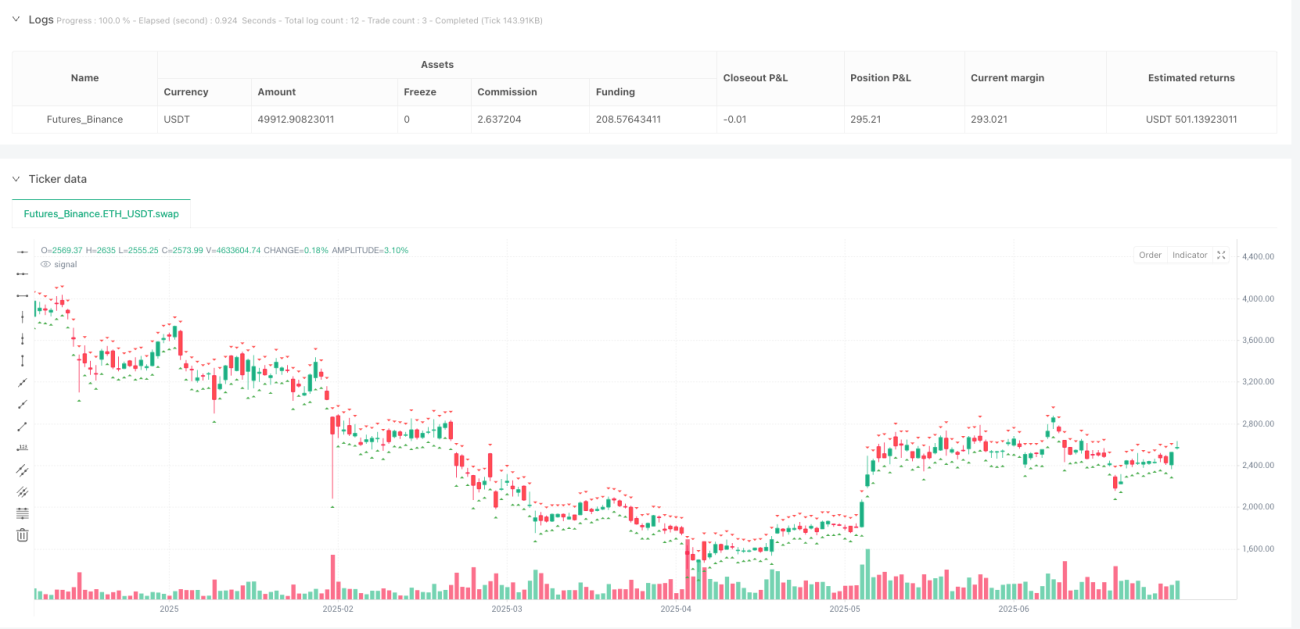
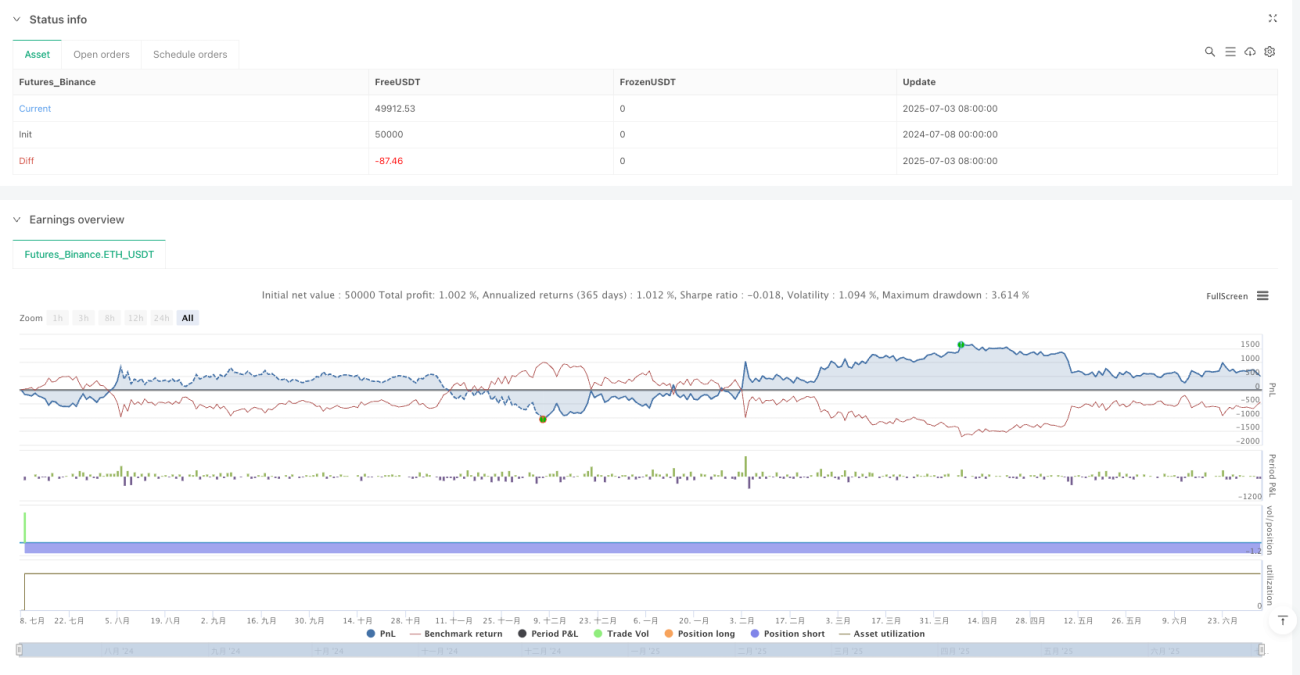
멀티 소스 확인 지표 피드백 프레임 워크는 사용자 정의 지표와 거래 신호를 평가하기 위해 설계된 전문 수준의 정량 거래 테스트 시스템입니다. 이 프레임 워크는 여러 가지 신호 탐지 방법, 고급 확인 필터 시스템 및 전문 위험 관리 기능을 통합하여 거래자가 거래 전략을 완전히 테스트 할 수 있습니다. 시스템의 핵심 장점은 사용자의 유연성이며 사용자 정의 지표 또는 내장 연구를 연결하여 값 변화, 교차점 및 하락 트리거를 포함한 여러 가지 방법으로 신호를 감지 할 수 있습니다.
이 전략의 핵심 원칙은 거래자가 다양한 지표의 유효성을 평가할 수 있도록 포괄적인 테스트 환경을 제공하는 것입니다. 코드는 다음과 같은 중요한 기능을 구현합니다.
다양한 신호 검출 방법전략: detectLongSignal () 와 detectShortSignal () 함수를 통해 다섯 가지 다른 신호 검출 방법을 구현합니다.
확인 시스템:longConfirmation() 및 shortConfirmation() 함수를 통해 거래 신호가 지정된 회귀 기간 내에 추가 조건을 충족하도록 요구하는 다중 소스 확인 시스템을 구현한다. 이 기능은 가짜 신호를 현저하게 감소시킨다.
출입 및 출퇴근 논리: 전략은 strategy.entry 및 strategy.exit 기능을 사용하여 거래의 입출구를 관리한다. 입출구는 신호 탐지 및 확인 시스템에서 공동으로 결정되며, 출구는 여러 가지 방법으로 이루어질 수 있다:
파본 논리: 거래가 지정된 브레이크 이브의 수를 달성하면, 전략은 자동으로 중지 손실을 입시 가격으로 이동하여 이미 얻은 이익을 보호합니다. 이것은 현재 가격과 입시 가격의 차이를 감지하고, breakEvenTrigger의 설정된 포인트를 달성하면 중지 손실 수준을 수정함으로써 이루어집니다.
시각화 및 감시전략: 플롯셰이프 함수를 사용하여 모든 입력 및 출력 신호를 도표에 표시하고 table.new를 통해 현재 전략 설정 및 거래 상태를 보여주는 실시간 상태 테이블을 만듭니다.
높은 유연성: 전략은 어떤 지표도 신호 소스로 연결할 수 있게 해 다양한 거래 스타일과 시장 조건에 적용한다. 사용자는 입력 소스를 간단하게 변경하여 다양한 지표 조합을 테스트할 수 있다.
다층 필터링 시스템확인 필터를 통해, 전략은 거래가 실행되기 전에 동시에 여러 조건을 충족하도록 요구할 수 있으며, 오류 신호를 크게 줄일 수 있습니다. 이 다중 소스 확인 방법은 거래 결정을 내리기 전에 여러 지표의 일치성을 추구하는 전문 거래자의 관행을 모방합니다.
전체적인 위험 관리이 전략은 전문적인 수준의 위험 관리 기능을 내장하고 있습니다.
실시간 피드백과 모니터링: 신호 표기 및 상태 표를 통해 거래자는 전략의 작동 상태와 성능을 직관적으로 알 수 있으며, 디비팅 및 최적화를 용이하게 할 수 있습니다.
호환성전략: Pine Script v6이 호환되며, 이 버전을 지원하는 모든 거래 플랫폼에서 실행할 수 있으며, 트레이더들이 역사적인 성과를 평가할 수 있도록 리포트 기능을 지원한다.
신호 탐지 의존성전략의 효과는 선택된 신호 검출 방법과 값 설정에 크게 의존한다. 부적절한 구성은 과도한 가짜 신호 또는 중요한 거래 기회를 놓칠 수 있다. 거래자는 다양한 시장 조건에서 다양한 설정 조합을 테스트하여 특정 지표에 가장 적합한 신호 검출 방법을 찾도록 권장한다.
시스템 필터링 위험 확인: 여러 소스 확인 시스템은 가짜 신호를 줄일 수 있지만, 수익성있는 거래 기회를 놓치게 할 수도 있습니다. 너무 엄격한 확인 요구 사항은 빠르게 발전하는 시장 움직임을 놓칠 수 있습니다. 해결책은 확인 시스템의 엄격성을 균형 잡거나 다른 시장 상태에 대한 다른 확인 기준을 설계하는 것입니다.
고정 차단/파괴의 제한: 고정 점수를 사용하는 스톱/스트로프는 모든 시장 조건에 적합하지 않을 수 있으며, 특히 변동성이 큰 시장에서 스톱/스트로프 점수를 시장 변동성 지표 (ATR와 같은) 와 연결하는 것이 좋습니다.
리드 디스크와의 차이점: 모든 회귀 결과는 실물 거래와 차이가 발생할 수 있는 위험이 있습니다. 회귀는 슬라이드, 거래 비용 및 유동성 문제를 완전히 시뮬레이트 할 수 없기 때문입니다. 거래자는 실물 거래 전에 시뮬레이션 환경에서 전략 성능을 검증해야합니다.
코드 복잡성: 정책의 복잡성은 디부팅과 유지보수를 증가시킬 수 있다. 상세한 코멘트와 모듈 디자인은 이러한 복잡성을 관리하고 코드의 유지보수를 보장하는 데 도움을 줄 수 있다.
동적 위험 관리: 현재 전략은 고정 점수의 스톱/로스를 사용하며, 시장의 변동성에 기반한 동적 리스크 관리 시스템으로 최적화할 수 있다. 예를 들어, 스톱/로스 지점을 ATR (Average True Range) 에 연결하여, 변동성이 증가할 때 스톱/로스 범위를 확장하고, 변동성이 감소할 때 스톱/로스 범위를 축소한다. 이렇게 다양한 시장 조건에 더 잘 적응할 수 있다.
강화된 인증 시스템: 현재 확인 시스템은 시간 필터 ((특정 시장 시간에 거래하는 것을 피하기 위해), 변동성 필터 ((낮은 변동성 환경에서 거래하는 것을 피하기 위해) 또는 추세 필터 ((주류 추세와 일치하는 방향으로만 거래하기 위해)) 와 같은 더 많은 필터 조건을 포함하도록 확장 할 수 있습니다. 이것은 가짜 신호를 더욱 줄이고 전략의 안정성을 향상시킬 것입니다.
일부 포지션 관리: 전략은 일부 포지션 관리 기능을 추가할 수 있으며, 한 번에 포지션 전체를 열거나 매장하지 않고, 입금과 퇴출을 허용합니다. 이 방법은 단일 입금 / 퇴출의 위험을 줄일 수 있으며, 전체 전략의 성능을 향상시킬 수 있습니다.
기계 학습 최적화: 기계 학습 알고리즘을 도입하여 신호 파라미터와 위험 설정을 최적화하고, 역사 데이터에 따라 전략 파라미터를 자동으로 조정하여 다른 시장 환경에 맞게 조정할 수 있습니다.
성능 지표를 추가전략은 기본적인 상태 모니터링을 제공하지만, 더 많은 성능 지표, 예를 들어, 샤프 비율, 최대 회수, 적자 비율 등이 더 포괄적인 전략 평가를 제공하기 위해 추가 될 수 있습니다. 이러한 지표는 상태 표에 표시되어 거래자가 전략 성능을 더 잘 평가 할 수 있습니다.
멀티 소스 확인 지표 피드백 프레임 워크는 다중 신호 탐지 방법, 다중 계 확인 시스템 및 전문적인 위험 관리 기능을 통합하여 거래자에게 거래 전략을 평가하고 최적화 할 수있는 강력한 도구를 제공하는 기능이있는 전체 기능의 정량 거래 테스트 시스템입니다. 프레임 워크의 주요 장점은 거의 모든 유형의 지표 조합과 신호 생성 방법을 테스트 할 수 있는 유연성과 사용자 정의입니다.
신호 탐지 의존성 및 고정 위험 매개 변수의 한계와 같은 일부 고유한 위험과 제한이 있음에도 불구하고, 이러한 문제는 다이내믹 리스크 관리를 구현하고, 확인 시스템을 강화하고, 부분 포지션 관리를 도입하는 것과 같은 제안된 최적화 방향에 의해 해결 될 수 있습니다. 이러한 최적화를 통해, 이 프레임 워크는 더욱 더 효과적이고 적응성을 향상시킬 수 있으며, 거래자의 무기고에서 귀중한 도구가 될 수 있습니다.
요약하자면, 다중 출처 확인 지표 피드백 프레임 워크는 단순한 신호 생성을 넘어 성공적인 거래 시스템의 중요한 구성 요소인 위험 관리 및 다중 계층 확인을 포함하는 거래 전략을 테스트하고 평가하는 전문적이고 체계적인 방법을 나타냅니다. 이 프레임 워크는 사용자 정의 거래 전략을 구축하고 테스트하려는 거래자에게 포괄적인 솔루션을 제공합니다.
/*backtest
start: 2024-07-08 00:00:00
end: 2025-07-04 08:00:00
period: 1d
basePeriod: 1d
exchanges: [{"eid":"Futures_Binance","currency":"ETH_USDT"}]
*/
//@version=6
strategy("FULLY FUNCTIONAL INDICATOR TESTER", overlay=true, margin_long=100, margin_short=100)
// Entry/Exit Signal Inputs
longEntry = input.source(close, 'Long Entry Trigger', 'Source for long signal (connect your indicator here)')
shortEntry = input.source(close, 'Short Entry Trigger', 'Source for short signal (connect your indicator here)')
activateLongExit = input.bool(false, 'Activate Long Exit Signals')
longExit = input.source(high, 'Long Exit Trigger', 'Source for long exit signal')
activateShortExit = input.bool(false, 'Activate Short Exit Signals')
shortExit = input.source(low, 'Short Exit Trigger', 'Source for short exit signal')
// Signal Detection Method
signalMethod = input.string('Value Change', 'Signal Detection Method', options=['Value Change', 'Crossover Above', 'Crossover Below', 'Value Above Threshold', 'Value Below Threshold'])
signalThreshold = input.float(0, 'Signal Threshold', tooltip='Threshold value for signal detection methods')
// Take Profit and Stop Loss
fixedTp = input.int(0, 'Static TP (in ticks)', 0, tooltip='0 = disabled')
initialSL = input.int(0, 'Initial SL (in ticks)', 0, tooltip='0 = disabled')
// Break Even Settings
breakEvenTrigger = input.int(0, 'Break Even Trigger (in ticks)', 0, tooltip='Move SL to break even after this many ticks profit. 0 = disabled')
// Confluence Settings
useConfluence = input.bool(false, 'Use Confluence Filter', 'Activate confluence filter for entries')
longConfluence = input.source(high, 'Long Signal Confluence', 'Source for long confluence filter')
longConfluenceTrigger = input.source(low, 'Long Confluence Trigger', 'Value that must be below confluence source for long entry')
shortConfluence = input.source(high, 'Short Signal Confluence', 'Source for short confluence filter')
shortConfluenceTrigger = input.source(low, 'Short Confluence Trigger', 'Value that must be above confluence source for short entry')
confluenceLookback = input.int(0, 'Confluence Lookback Period', 0, 10, 1, 'Number of candles to look back for confluence')
// Variables to track entry prices for break-even
var float longEntryPrice = na
var float shortEntryPrice = na
// Signal Detection Functions
detectLongSignal() =>
switch signalMethod
'Value Change' => longEntry != longEntry[1] and longEntry > 0
'Crossover Above' => ta.crossover(longEntry, signalThreshold)
'Crossover Below' => ta.crossunder(longEntry, signalThreshold)
'Value Above Threshold' => longEntry > signalThreshold and longEntry[1] <= signalThreshold
'Value Below Threshold' => longEntry < signalThreshold and longEntry[1] >= signalThreshold
=> false
detectShortSignal() =>
switch signalMethod
'Value Change' => shortEntry != shortEntry[1] and shortEntry > 0
'Crossover Above' => ta.crossover(shortEntry, signalThreshold)
'Crossover Below' => ta.crossunder(shortEntry, signalThreshold)
'Value Above Threshold' => shortEntry > signalThreshold and shortEntry[1] <= signalThreshold
'Value Below Threshold' => shortEntry < signalThreshold and shortEntry[1] >= signalThreshold
=> false
detectLongExit() =>
switch signalMethod
'Value Change' => longExit != longExit[1] and longExit > 0
'Crossover Above' => ta.crossover(longExit, signalThreshold)
'Crossover Below' => ta.crossunder(longExit, signalThreshold)
'Value Above Threshold' => longExit > signalThreshold and longExit[1] <= signalThreshold
'Value Below Threshold' => longExit < signalThreshold and longExit[1] >= signalThreshold
=> false
detectShortExit() =>
switch signalMethod
'Value Change' => shortExit != shortExit[1] and shortExit > 0
'Crossover Above' => ta.crossover(shortExit, signalThreshold)
'Crossover Below' => ta.crossunder(shortExit, signalThreshold)
'Value Above Threshold' => shortExit > signalThreshold and shortExit[1] <= signalThreshold
'Value Below Threshold' => shortExit < signalThreshold and shortExit[1] >= signalThreshold
=> false
// Confluence confirmation functions
longConfirmation() =>
confirmation = false
if confluenceLookback == 0
confirmation := longConfluenceTrigger < longConfluence
else
for x = 0 to confluenceLookback
if longConfluenceTrigger[x] < longConfluence[x]
confirmation := true
break
confirmation
shortConfirmation() =>
confirmation = false
if confluenceLookback == 0
confirmation := shortConfluenceTrigger > shortConfluence
else
for x = 0 to confluenceLookback
if shortConfluenceTrigger[x] > shortConfluence[x]
confirmation := true
break
confirmation
// Entry conditions
longConfirmed = useConfluence ? longConfirmation() : true
shortConfirmed = useConfluence ? shortConfirmation() : true
longCondition = detectLongSignal() and longConfirmed
shortCondition = detectShortSignal() and shortConfirmed
// Entry logic
if (longCondition and strategy.opentrades == 0)
strategy.entry('Long', strategy.long)
longEntryPrice := close
// Set initial exit orders
if fixedTp > 0 or initialSL > 0
strategy.exit('Long Exit', 'Long',
profit = fixedTp > 0 ? fixedTp : na,
loss = initialSL > 0 ? initialSL : na,
comment_profit = 'TP Hit',
comment_loss = 'SL Hit')
if (shortCondition and strategy.opentrades == 0)
strategy.entry('Short', strategy.short)
shortEntryPrice := close
// Set initial exit orders
if fixedTp > 0 or initialSL > 0
strategy.exit('Short Exit', 'Short',
profit = fixedTp > 0 ? fixedTp : na,
loss = initialSL > 0 ? initialSL : na,
comment_profit = 'TP Hit',
comment_loss = 'SL Hit')
// Custom exit signal logic
if (activateLongExit and detectLongExit() and strategy.position_size > 0)
strategy.close('Long', 'Custom Long Exit')
if (activateShortExit and detectShortExit() and strategy.position_size < 0)
strategy.close('Short', 'Custom Short Exit')
// Break-even logic
if (breakEvenTrigger > 0)
// Long position break-even
if (strategy.position_size > 0 and not na(longEntryPrice))
ticksProfit = math.round((high - longEntryPrice) / syminfo.mintick)
if (ticksProfit >= breakEvenTrigger)
strategy.exit('Long Exit', 'Long', stop = longEntryPrice, comment_loss = 'Break Even')
// Short position break-even
if (strategy.position_size < 0 and not na(shortEntryPrice))
ticksProfit = math.round((shortEntryPrice - low) / syminfo.mintick)
if (ticksProfit >= breakEvenTrigger)
strategy.exit('Short Exit', 'Short', stop = shortEntryPrice, comment_loss = 'Break Even')
// Reset entry prices when no position
if (strategy.position_size == 0)
longEntryPrice := na
shortEntryPrice := na
// Plot signals for debugging
plotshape(longCondition, title='Long Signal', location=location.belowbar, color=color.green, style=shape.triangleup, size=size.small)
plotshape(shortCondition, title='Short Signal', location=location.abovebar, color=color.red, style=shape.triangledown, size=size.small)
plotshape(activateLongExit and detectLongExit() and strategy.position_size > 0, title='Long Exit', location=location.abovebar, color=color.orange, style=shape.xcross, size=size.small)
plotshape(activateShortExit and detectShortExit() and strategy.position_size < 0, title='Short Exit', location=location.belowbar, color=color.orange, style=shape.xcross, size=size.small)
// Display current settings in a table for easy reference
if barstate.islast
var table infoTable = table.new(position.top_right, 2, 8, bgcolor=color.white, border_width=1)
table.cell(infoTable, 0, 0, "Signal Method:", text_color=color.black, bgcolor=color.gray)
table.cell(infoTable, 1, 0, signalMethod, text_color=color.black)
table.cell(infoTable, 0, 1, "Threshold:", text_color=color.black, bgcolor=color.gray)
table.cell(infoTable, 1, 1, str.tostring(signalThreshold), text_color=color.black)
table.cell(infoTable, 0, 2, "TP (ticks):", text_color=color.black, bgcolor=color.gray)
table.cell(infoTable, 1, 2, str.tostring(fixedTp), text_color=color.black)
table.cell(infoTable, 0, 3, "SL (ticks):", text_color=color.black, bgcolor=color.gray)
table.cell(infoTable, 1, 3, str.tostring(initialSL), text_color=color.black)
table.cell(infoTable, 0, 4, "Break Even:", text_color=color.black, bgcolor=color.gray)
table.cell(infoTable, 1, 4, str.tostring(breakEvenTrigger), text_color=color.black)
table.cell(infoTable, 0, 5, "Confluence:", text_color=color.black, bgcolor=color.gray)
table.cell(infoTable, 1, 5, useConfluence ? "ON" : "OFF", text_color=color.black)
table.cell(infoTable, 0, 6, "Position:", text_color=color.black, bgcolor=color.gray)
table.cell(infoTable, 1, 6, strategy.position_size > 0 ? "LONG" : strategy.position_size < 0 ? "SHORT" : "FLAT", text_color=color.black)
table.cell(infoTable, 0, 7, "Status:", text_color=color.black, bgcolor=color.gray)
table.cell(infoTable, 1, 7, "FULLY FUNCTIONAL", text_color=color.green)