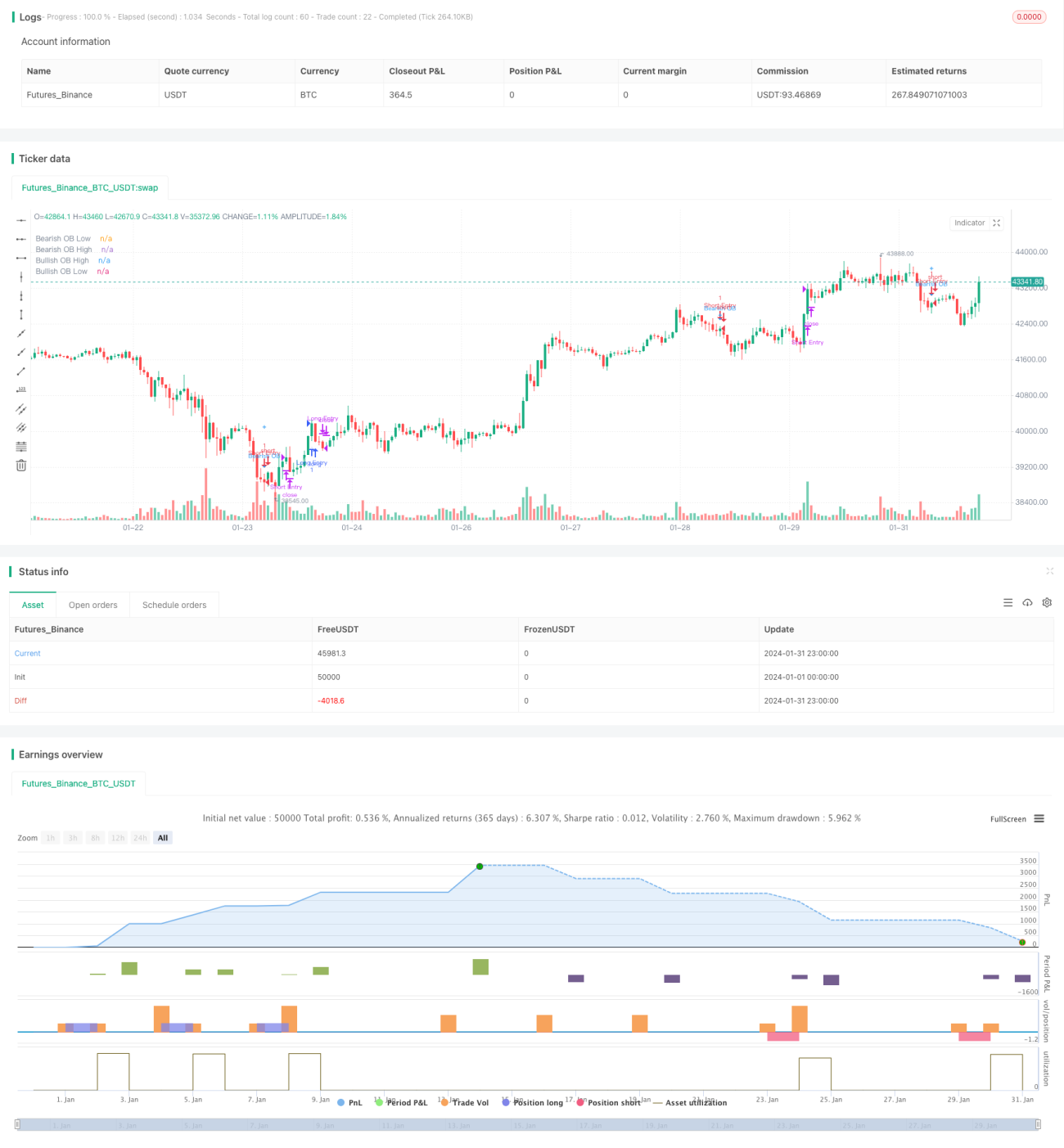
A estratégia identifica blocos de pedidos em preços para encontrar intervalos de preços com um impulso de ruptura e entrar no mercado quando um sinal de compra e venda é apresentado. Os blocos de pedidos marcam as áreas em que as instituições estão envolvidas, o que representa uma maior força do mercado. Portanto, quando o sinal de blocos de pedidos é apresentado, há uma maior probabilidade de ocorrência de mudanças de preços tendenciais.
Os blocos de pedidos são divididos em blocos de pedidos múltiplos e blocos de pedidos em branco. Os blocos de pedidos múltiplos são definidos como uma linha descendente K (linha K vermelha) seguida por uma linha ascendente K (linha K verde). Os blocos de pedidos em branco são definidos como uma linha ascendente K (linha K verde) seguida por uma linha descendente K (linha K vermelha).
Para identificar um bloco de pedidos, é necessário atender simultaneamente às seguintes condições:
Mudança de cor da linha K: uma mudança de cor da linha K anterior para a linha K atual (por exemplo, de vermelho para verde, ou de verde para vermelho). Isso indica que a tendência pode terminar antes que a instituição esteja pronta para iniciar uma nova tendência.
As K-linhas subsequentes são de cor consistente: após atingir o número de raízes especificado pelo parâmetro periodes, as K-linhas subsequentes mantêm a mesma direção de cor ((por exemplo, os blocos de pedidos de múltiplos cabeças são todos K-linhas verdes). Isso indica que a nova tendência é reforçada e confirmada.
Aumento ou queda acima do limiar: O aumento ou queda do preço de abertura do bloco de pedidos para o preço de fechamento da linha K subsequente excede o limite definido para o parâmetro ((default 0)). Isso garante que a nova tendência tenha força e influência suficientes.
Um sinal de bloco de pedidos pode ser identificado quando as três condições acima são satisfeitas simultaneamente.
Quando se identifica um bloco de pedidos com várias cabeças, gera-se um sinal de compra; quando se identifica um bloco de pedidos sem cabeça, gera-se um sinal de venda.
Considerando a incerteza do sinal de bloco de pedidos e o possível teste novamente, a estratégia não entra diretamente no mercado quando o sinal de bloco de pedidos aparece, mas avisa o comerciante por meio de linhas de desenho, alarmes, etc. O comerciante pode optar por implantar o preço de limite apropriadamente perto da área de preço do bloco de pedidos e esperar que o preço aumente para entrar na tendência.
Os blocos de pedidos marcam a participação de fundos institucionais e um grande volume de transações, representando a transformação da força do mercado. Assim, os sinais de blocos de pedidos têm uma certa previsibilidade e precisão, podendo capturar antecipadamente a direção de potenciais rupturas. Isso fornece um posicionamento e uma oportunidade favoráveis para a captação de tendências.
Os parâmetros da estratégia, incluindo o número de linhas K históricas, a amplitude da dinâmica de ruptura, etc., podem ser ajustados por meio de parâmetros, o que permite a otimização de diferentes ambientes de mercado e estilos de comerciantes, aumentando a adaptabilidade da estratégia.
A estratégia não entra no mercado quando o sinal do bloco de pedidos aparece, mas configura um alarme e constrói posições por meio de uma lista de limites fora do campo. Esta maneira permite que o comerciante controle o ponto de entrada e o risco específicos. Mesmo se o sinal do bloco de pedidos for errado, isso só levará ao fato de que a lista de limites não será acionada, o risco é controlado.
Uma vez que o bloco de pedidos é marcado por um intervalo, a probabilidade de um retorno do preço subsequente para esse intervalo é maior. Portanto, o sinal de bloco de pedidos não pode ser usado como um sinal de entrada padrão, mas como uma mensagem de alerta, o que requer que o próprio comerciante julgue ainda mais o momento da entrada.
A configuração de parâmetros do bloco de pedidos (número de linhas K históricas, desvalorização de amplitude, etc.) se for inadequada, pode facilmente gerar falsos sinais no intervalo Sideways normal. Isso requer que o comerciante tenha uma certa sensibilidade e julgamento para o mercado e evite a otimização cega dos parâmetros.
Como os sinais de bloco de pedidos não são 100% confiáveis, os comerciantes precisam de uma análise mais aprofundada para determinar a credibilidade do sinal atual, o que aumenta um certo volume de trabalho manual. Diferentes julgamentos sobre a qualidade do sinal também podem causar diferenças no desempenho das negociações.
Pode ser combinado com outros indicadores para julgar a direção e a força da tendência, por exemplo, em combinação com o MACD, RSI, etc., filtrando os sinais errados causados pela configuração de parâmetros, melhorando a precisão do sinal.
Diferentes mercados e diferentes variedades de negociação podem testar e otimizar parâmetros, como o número de linhas K, o valor de queda e queda, etc., para que eles estejam mais em sintonia com o ambiente atual do mercado. Também pode ser configurado o recurso de auto-adaptação dos parâmetros, ajustando-se automaticamente de acordo com a volatilidade do mercado e as preferências de risco.
Atualmente, a estratégia serve apenas como uma ferramenta de indicação de sinais, e os traders precisam decidir por si mesmos quando entrar. Podemos desenvolver um mecanismo de pedido automático para a faixa de preço do bloco de pedidos, que entra automaticamente quando certas condições são atendidas; e combinar métodos como o stop loss para definir a lógica de saída, reduzir a necessidade de julgamento manual e aumentar o grau de automação da estratégia.
A estratégia de bloco de pedidos tem uma certa capacidade de identificação de cabeça e iniciativa em comparação com os métodos de simples rastreamento de tendências. Quando usado em combinação com o método de otimização de parâmetros e controle de vento, pode ser uma estratégia de tendências eficaz. Mas o comerciante precisa estar alerta para a produção de sinais errados e julgar a qualidade dos sinais.
/*backtest
start: 2024-01-01 00:00:00
end: 2024-01-31 23:59:59
period: 1h
basePeriod: 15m
exchanges: [{"eid":"Futures_Binance","currency":"BTC_USDT"}]
*/
// This source code is subject to the terms of the Mozilla Public License 2.0 at https://mozilla.org/MPL/2.0/
// © TradingSecrets and wugamlo
// This experimental Indicator helps identifying instituational Order Blocks.
// Often these blocks signal the beginning of a strong move, but there is a significant probability that these price levels will be revisited at a later point in time again.
// Therefore these are interesting levels to place limit orders (Buy Orders for Bullish OB / Sell Orders for Bearish OB).
//
// A Bullish Order block is defined as the last down candle before a sequence of up candles. (Relevant price range "Open" to "Low" is marked) / Optionally full range "High" to "Low"
// A Bearish Order Block is defined as the last up candle before a sequence of down candles. (Relevant price range "Open" to "High" is marked) / Optionally full range "High" to "Low"
//
// In the settings the number of required sequential candles can be adjusted.
// Furthermore a %-threshold can be entered. It defines which %-change the sequential move needs to achieve in order to identify a relevant Order Block.
// Channels for the last Bullish/Bearish Block can be shown/hidden.
//
// In addition to the upper/lower limits of each Order Block, also the equlibrium (average value) is marked as this is an interesting area for price interaction.
//
// Alerts added: Alerts fire when an Order Block is detected. The delay is based on the "Relevant Periods" input. Means with the default setting "5" the alert will trigger after the
// number of consecutive candles is reached.
//@version=4
strategy("[Backtest] Order Block Finder", overlay = true)
colors = input(title = "Color Scheme", defval="DARK", options=["DARK", "BRIGHT"])
periods = input(5, "Relevant Periods to identify OB") // Required number of subsequent candles in the same direction to identify Order Block
threshold = input(0.0, "Min. Percent move to identify OB", step = 0.1) // Required minimum % move (from potential OB close to last subsequent candle to identify Order Block)
usewicks = input(false, "Use whole range [High/Low] for OB marking?" ) // Display High/Low range for each OB instead of Open/Low for Bullish / Open/High for Bearish
showbull = input(false, "Show latest Bullish Channel?") // Show Channel for latest Bullish OB?
showbear = input(false, "Show latest Bearish Channel?") // Show Channel for latest Bearish OB?
showdocu = input(false, "Show Label for documentation tooltip?") // Show Label which shows documentation as tooltip?
info_pan = input(false, "Show Latest OB Panel?") // Show Info Panel with latest OB Stats
//strategy inputs
plot_offset = input( type=input.bool,defval = false, title = 'Plot Offset?')
stoploss_percent = input(type=input.float, defval = 1, title = 'Stop Loss [%]')
takeprofit_percent = input(type=input.float, defval = 2, title = 'Take Profit [%]')
pyramiding = input( type=input.bool,defval = true, title = 'Pyramiding')
ob_period = periods + 1 // Identify location of relevant Order Block candle
absmove = ((abs(close[ob_period] - close[1]))/close[ob_period]) * 100 // Calculate absolute percent move from potential OB to last candle of subsequent candles
relmove = absmove >= threshold // Identify "Relevant move" by comparing the absolute move to the threshold
// Color Scheme
bullcolor = colors == "DARK"? color.white : color.green
bearcolor = colors == "DARK"? color.blue : color.red
// Bullish Order Block Identification
bullishOB = close[ob_period] < open[ob_period] // Determine potential Bullish OB candle (red candle)
int upcandles = 0
for i = 1 to periods
upcandles := upcandles + (close[i] > open[i]? 1 : 0) // Determine color of subsequent candles (must all be green to identify a valid Bearish OB)
OB_bull = bullishOB and (upcandles == (periods)) and relmove // Identification logic (red OB candle & subsequent green candles)
OB_bull_high = OB_bull? usewicks? high[ob_period] : open[ob_period] : na // Determine OB upper limit (Open or High depending on input)
OB_bull_low = OB_bull? low[ob_period] : na // Determine OB lower limit (Low)
OB_bull_avg = (OB_bull_high + OB_bull_low)/2 // Determine OB middle line
// Bearish Order Block Identification
bearishOB = close[ob_period] > open[ob_period] // Determine potential Bearish OB candle (green candle)
int downcandles = 0
for i = 1 to periods
downcandles := downcandles + (close[i] < open[i]? 1 : 0) // Determine color of subsequent candles (must all be red to identify a valid Bearish OB)
OB_bear = bearishOB and (downcandles == (periods)) and relmove // Identification logic (green OB candle & subsequent green candles)
OB_bear_high = OB_bear? high[ob_period] : na // Determine OB upper limit (High)
OB_bear_low = OB_bear? usewicks? low[ob_period] : open[ob_period] : na // Determine OB lower limit (Open or Low depending on input)
OB_bear_avg = (OB_bear_low + OB_bear_high)/2 // Determine OB middle line
//@TradingSecrets: Option to disable the offset in order to allign signals with Backtest
if not plot_offset
ob_period := 0
// Plotting
plotshape(OB_bull, title="Bullish OB", style = shape.triangleup, color = bullcolor, textcolor = bullcolor, size = size.tiny, location = location.belowbar, offset = -ob_period, text = "Bullish OB") // Bullish OB Indicator
bull1 = plot(OB_bull_high, title="Bullish OB High", style = plot.style_linebr, color = bullcolor, offset = -ob_period, linewidth = 3) // Bullish OB Upper Limit
bull2 = plot(OB_bull_low, title="Bullish OB Low", style = plot.style_linebr, color = bullcolor, offset = -ob_period, linewidth = 3) // Bullish OB Lower Limit
fill(bull1, bull2, color=bullcolor, transp = 0, title = "Bullish OB fill") // Fill Bullish OB
plotshape(OB_bull_avg, title="Bullish OB Average", style = shape.cross, color = bullcolor, size = size.normal, location = location.absolute, offset = -ob_period) // Bullish OB Average
plotshape(OB_bear, title="Bearish OB", style = shape.triangledown, color = bearcolor, textcolor = bearcolor, size = size.tiny, location = location.abovebar, offset = -ob_period, text = "Bearish OB") // Bearish OB Indicator
bear1 = plot(OB_bear_low, title="Bearish OB Low", style = plot.style_linebr, color = bearcolor, offset = -ob_period, linewidth = 3) // Bearish OB Lower Limit
bear2 = plot(OB_bear_high, title="Bearish OB High", style = plot.style_linebr, color = bearcolor, offset = -ob_period, linewidth = 3) // Bearish OB Upper Limit
fill(bear1, bear2, color=bearcolor, transp = 0, title = "Bearish OB fill") // Fill Bearish OB
plotshape(OB_bear_avg, title="Bearish OB Average", style = shape.cross, color = bearcolor, size = size.normal, location = location.absolute, offset = -ob_period) // Bullish OB Average
var line linebull1 = na // Bullish OB average
var line linebull2 = na // Bullish OB open
var line linebull3 = na // Bullish OB low
var line linebear1 = na // Bearish OB average
var line linebear2 = na // Bearish OB high
var line linebear3 = na // Bearish OB open
if OB_bull and showbull
line.delete(linebull1)
linebull1 := line.new(x1 = bar_index, y1 = OB_bull_avg, x2 = bar_index - 1, y2 = OB_bull_avg, extend = extend.left, color = bullcolor, style = line.style_solid, width = 1)
line.delete(linebull2)
linebull2 := line.new(x1 = bar_index, y1 = OB_bull_high, x2 = bar_index - 1, y2 = OB_bull_high, extend = extend.left, color = bullcolor, style = line.style_dashed, width = 1)
line.delete(linebull3)
linebull3 := line.new(x1 = bar_index, y1 = OB_bull_low, x2 = bar_index - 1, y2 = OB_bull_low, extend = extend.left, color = bullcolor, style = line.style_dashed, width = 1)
if OB_bear and showbear
line.delete(linebear1)
linebear1 := line.new(x1 = bar_index, y1 = OB_bear_avg, x2 = bar_index - 1, y2 = OB_bear_avg, extend = extend.left, color = bearcolor, style = line.style_solid, width = 1)
line.delete(linebear2)
linebear2 := line.new(x1 = bar_index, y1 = OB_bear_high, x2 = bar_index - 1, y2 = OB_bear_high, extend = extend.left, color = bearcolor, style = line.style_dashed, width = 1)
line.delete(linebear3)
linebear3 := line.new(x1 = bar_index, y1 = OB_bear_low, x2 = bar_index - 1, y2 = OB_bear_low, extend = extend.left, color = bearcolor, style = line.style_dashed, width = 1)
// Alerts for Order Blocks Detection
alertcondition(OB_bull, title='New Bullish OB detected', message='New Bullish OB detected - This is NOT a BUY signal!')
alertcondition(OB_bear, title='New Bearish OB detected', message='New Bearish OB detected - This is NOT a SELL signal!')
// Print latest Order Blocks in Data Window
var latest_bull_high = 0.0 // Variable to keep latest Bull OB high
var latest_bull_avg = 0.0 // Variable to keep latest Bull OB average
var latest_bull_low = 0.0 // Variable to keep latest Bull OB low
var latest_bear_high = 0.0 // Variable to keep latest Bear OB high
var latest_bear_avg = 0.0 // Variable to keep latest Bear OB average
var latest_bear_low = 0.0 // Variable to keep latest Bear OB low
// Assign latest values to variables
if OB_bull_high > 0
latest_bull_high := OB_bull_high
if OB_bull_avg > 0
latest_bull_avg := OB_bull_avg
if OB_bull_low > 0
latest_bull_low := OB_bull_low
if OB_bear_high > 0
latest_bear_high := OB_bear_high
if OB_bear_avg > 0
latest_bear_avg := OB_bear_avg
if OB_bear_low > 0
latest_bear_low := OB_bear_low
// Plot invisible characters to be able to show the values in the Data Window
plotchar(latest_bull_high, char = ' ', location = location.abovebar, color = #777777, transp = 100, size = size.tiny, title = "Latest Bull High")
plotchar(latest_bull_avg, char = ' ', location = location.abovebar, color = #777777, transp = 100, size = size.tiny, title = "Latest Bull Avg")
plotchar(latest_bull_low, char = ' ', location = location.abovebar, color = #777777, transp = 100, size = size.tiny, title = "Latest Bull Low")
plotchar(latest_bear_high, char = ' ', location = location.abovebar, color = #777777, transp = 100, size = size.tiny, title = "Latest Bear High")
plotchar(latest_bear_avg, char = ' ', location = location.abovebar, color = #777777, transp = 100, size = size.tiny, title = "Latest Bear Avg")
plotchar(latest_bear_low, char = ' ', location = location.abovebar, color = #777777, transp = 100, size = size.tiny, title = "Latest Bear Low")
//InfoPanel for latest Order Blocks
draw_InfoPanel(_text, _x, _y, font_size)=>
var label la_panel = na
label.delete(la_panel)
la_panel := label.new(
x=_x, y=_y,
text=_text, xloc=xloc.bar_time, yloc=yloc.price,
color=color.new(#383838, 5), style=label.style_label_left, textcolor=color.white, size=font_size)
info_panel_x = time_close + round(change(time) * 100)
info_panel_y = close
title = "LATEST ORDER BLOCKS"
row0 = "-----------------------------------------------------"
row1 = ' Bullish - High: ' + tostring(latest_bull_high, '#.##')
row2 = ' Bullish - Avg: ' + tostring(latest_bull_avg, '#.##')
row3 = ' Bullish - Low: ' + tostring(latest_bull_low, '#.##')
row4 = "-----------------------------------------------------"
row5 = ' Bearish - High: ' + tostring(latest_bear_high, '#.##')
row6 = ' Bearish - Avg: ' + tostring(latest_bear_avg, '#.##')
row7 = ' Bearish - Low: ' + tostring(latest_bear_low, '#.##')
panel_text = '\n' + title + '\n' + row0 + '\n' + row1 + '\n' + row2 + '\n' + row3 + '\n' + row4 + '\n\n' + row5 + '\n' + row6 + '\n' + row7 + '\n'
if info_pan
draw_InfoPanel(panel_text, info_panel_x, info_panel_y, size.normal)
// === Label for Documentation/Tooltip ===
chper = time - time[1]
chper := change(chper) > 0 ? chper[1] : chper
// === Tooltip text ===
var vartooltip = "Indicator to help identifying instituational Order Blocks. Often these blocks signal the beginning of a strong move, but there is a high probability, that these prices will be revisited at a later point in time again and therefore are interesting levels to place limit orders. \nBullish Order block is the last down candle before a sequence of up candles. \nBearish Order Block is the last up candle before a sequence of down candles. \nIn the settings the number of required sequential candles can be adjusted. \nFurthermore a %-threshold can be entered which the sequential move needs to achieve in order to validate a relevant Order Block. \nChannels for the last Bullish/Bearish Block can be shown/hidden."
// === Print Label ===
var label l_docu = na
label.delete(l_docu)
if showdocu
l_docu := label.new(x = time + chper * 35, y = close, text = "DOCU OB", color=color.gray, textcolor=color.white, style=label.style_label_center, xloc = xloc.bar_time, yloc=yloc.price, size=size.tiny, textalign = text.align_left, tooltip = vartooltip)
// @TradingSecrets: Generate entry and exit orders based on the signals
entryLongSignal = OB_bull
entryShortSignal = OB_bear
if not pyramiding
entryLongSignal := entryLongSignal and not strategy.position_size
entryShortSignal := entryShortSignal and not strategy.position_size
if entryLongSignal
strategy.entry("Long Entry", strategy.long)
//strategy.exit("Long Exit Loss", "Long Entry", stop = close * (1 - stoploss_percent*0.01))
if entryShortSignal
strategy.entry("Short Entry", strategy.short)
//strategy.exit("Short Exit Loss", "Short Entry", stop = close * (1 + stoploss_percent*0.01))
strategy.initial_capital = 50000
//Close Position by market order
if strategy.position_size > 0 and strategy.openprofit/nz(strategy.initial_capital + strategy.netprofit) >= takeprofit_percent*0.01
//If I m in a long position and my take profit got hit close it by market order
strategy.close("Long Entry", comment = "Long Exit Profit")
if strategy.position_size < 0 and strategy.openprofit/nz(strategy.initial_capital + strategy.netprofit) >= takeprofit_percent*0.01
strategy.close("Short Entry", comment = "Short Exit Profit")
if strategy.position_size > 0 and strategy.openprofit/nz(strategy.initial_capital + strategy.netprofit) <= -stoploss_percent*0.01
//If I m in a long position and my take profit got hit close it by market order
strategy.close("Long Entry", comment = "Long Exit Loss")
if strategy.position_size < 0 and strategy.openprofit/nz(strategy.initial_capital + strategy.netprofit) <= -stoploss_percent*0.01
strategy.close("Short Entry", comment = "Short Exit Loss")