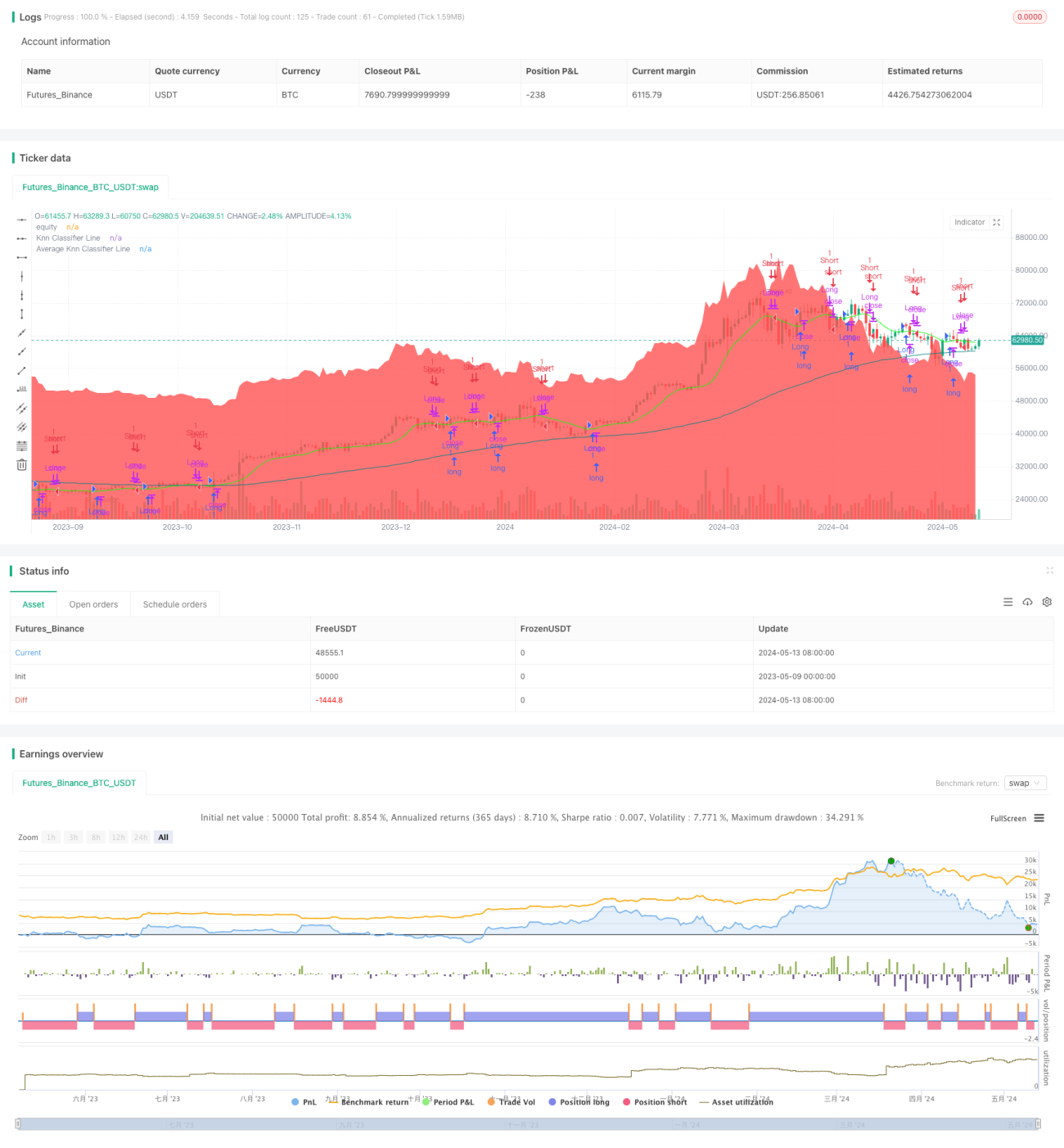
اس حکمت عملی میں قیمتوں کے رجحانات کی پیش گوئی کرنے کے لئے K قریب ترین قریبی ((KNN) مشین لرننگ الگورتھم کا استعمال کیا گیا ہے۔ مختلف قیمتوں کے حساب کتاب کے طریقوں کو منتخب کرکے (جیسے HL2 ، VWAP ، SMA وغیرہ) ان پٹ ویلیو کے طور پر ، اور مختلف ہدف کی اقدار کو منتخب کرکے (جیسے قیمتوں کی نقل و حرکت ، VWAP ، اتار چڑھاؤ ، وغیرہ) کے طور پر جائزہ لینے کے لئے ، KNN الگورتھم کا استعمال کرتے ہوئے K کے تاریخی اعداد و شمار کے پوائنٹس کو تلاش کریں جو موجودہ مارکیٹ کی حالت سے قریب ترین ہیں ، اور K کے اعداد و شمار کے رجحان کی سمت کی بنیاد پر کثیر جہتی پیش گوئی کریں۔ اس کے ساتھ ہی ، حکمت عملی میں پیش گوئی کے نتائج کو ہموار کرنے کے لئے ایک چلتی اوسط کا استعمال بھی کیا گیا ہے ، تاکہ پیش گوئی کی استحکام کو بہتر بنایا جاسکے۔ آخر کار ، پیش گوئی کے نتائج کے مطابق تجارتی فیصلے کیے جائیں ، اور پس منظر کے رنگ میں تبدیلی کے ساتھ موجودہ مارکیٹ کے رجحانات کی پیش گوئی
اس حکمت عملی میں KNN مشین لرننگ الگورتھم کو قیمت کے رجحانات کی پیش گوئی پر لاگو کیا گیا ہے ، جس سے یہ ظاہر ہوتا ہے کہ مارکیٹ کے رجحانات کو سمجھنے اور تجارتی سگنل پیدا کرنے کے لئے تاریخی اعداد و شمار اور شماریاتی طریقوں کا استعمال کیسے کیا جاسکتا ہے۔ حکمت عملی کی طاقت اس کی لچک اور لچک میں ہے ، جس میں پیرامیٹرز کو ایڈجسٹ کرکے کارکردگی کو بہتر بنانے اور مارکیٹ کی مختلف صورتحال کے مطابق ڈھالنے کی صلاحیت ہے۔ تاہم ، حکمت عملی کا خطرہ بنیادی طور پر تاریخی اعداد و شمار کے معیار اور نمائندگی ، اور پیرامیٹرز کی ترتیب کی معقولیت سے آتا ہے۔ مستقبل میں ، حکمت عملی کی استحکام اور منافع بخش صلاحیت کو مزید بڑھانے کے لئے مزید اشارے ، خود کار طریقے سے موافقت کے طریقہ کار اور خطرے کے انتظام کے اقدامات کو متعارف کرانے پر غور کیا جاسکتا ہے۔
/*backtest
start: 2023-05-09 00:00:00
end: 2024-05-14 00:00:00
period: 1d
basePeriod: 1h
exchanges: [{"eid":"Futures_Binance","currency":"BTC_USDT"}]
*/
// This work is licensed under a Attribution-NonCommercial-ShareAlike 4.0 International (CC BY-NC-SA 4.0) https://creativecommons.org/licenses/by-nc-sa/4.0/
// © Blake_22 {
//@version=5
strategy('money printer part 1', overlay=true)
// ~~ Tooltips {
t1 ="PriceValue selects the method of price computation. \n\nSets the smoothing period for the PriceValue. \n\nAdjusting these settings will change the input values for the K-Nearest Neighbors algorithm, influencing how the trend is calculated."
t2 = "TargetValue specifies the target to evaluate. \n\nSets the smoothing period for the TargetValue."
t3 ="numberOfClosestValues sets the number of closest values that are considered when calculating the KNN Moving Average. Adjusting this number will affect the sensitivity of the trend line, with a higher value leading to a smoother line and a lower value resulting in a line that is more responsive to recent price changes."
t4 ="smoothingPeriod sets the period for the moving average applied to the KNN classifier. Adjusting the smoothing period will affect how rapidly the trend line responds to price changes, with a larger smoothing period leading to a smoother line that may lag recent price movements, and a smaller smoothing period resulting in a line that more closely tracks recent changes."
t5 ="This option controls the background color for the trend prediction. Enabling it will change the background color based on the prediction, providing visual cues on the direction of the trend. A green color indicates a positive prediction, while red indicates a negative prediction."
//~~~~~~~~~~~~~~~~~~~~~~~~~~~~~~~~~~~~~~~~~~~~~~~~~~~~~~~~~~~~~~~~~~~~~~~~~~~~~~~~~~~~~~~~~~~~~~~~~~~~~~~~~~~~~~~~~~~~~}
// ~~ Inputs {
PriceValue = input.string("hl2", options = ["hl2","VWAP", "sma", "wma", "ema", "hma"], group="", inline="Value")
maLen = input.int(5, minval=2, maxval=200, title="", group="", inline="Value", tooltip=t1)
TargetValue = input.string("Price Action", options = ["Price Action","VWAP", "Volatility", "sma", "wma", "ema", "hma"], group="", inline="Target")
maLen_ = input.int(5, minval=2, maxval=200, title="", group="", inline="Target", tooltip=t2)
// Input parameters for the KNN Moving Average
numberOfClosestValues = input.int(3, "Number of Closest Values", 2, 200, tooltip=t3)
smoothingPeriod = input.int(50, "Smoothing Period", 2, 500, tooltip=t4)
windowSize = math.max(numberOfClosestValues, 30)
// knn Color
Upknn_col = input.color(color.lime, title="", group="KNN Color", inline="knn col")
Dnknn_col = input.color(color.red, title="", group="KNN Color", inline="knn col")
Neuknn_col = input.color(color.orange, title="", group="KNN Color", inline="knn col")
// MA knn Color
Maknn_col = input.color(color.teal, title="", group="MA KNN Color", inline="MA knn col")
// BG Color
bgcolor = input.bool(false, title="Trend Prediction Color", group="BG Color", inline="bg", tooltip=t5)
Up_col = input.color(color.lime, title="", group="BG Color", inline="bg")
Dn_col = input.color(color.red, title="", group="BG Color", inline="bg")
//~~~~~~~~~~~~~~~~~~~~~~~~~~~~~~~~~~~~~~~~~~~~~~~~~~~~~~~~~~~~~~~~~~~~~~~~~~~~~~~~~~~~~~~~~~~~~~~~~~~~~~~~~~~~~~~~~~~~~}
// ~~ kNN Classifier {
value_in = switch PriceValue
"hl2" => ta.sma(hl2,maLen)
"VWAP" => ta.vwap(close[maLen])
"sma" => ta.sma(close,maLen)
"wma" => ta.wma(close,maLen)
"ema" => ta.ema(close,maLen)
"hma" => ta.hma(close,maLen)
meanOfKClosest(value_,target_) =>
closestDistances = array.new_float(numberOfClosestValues, 1e10)
closestValues = array.new_float(numberOfClosestValues, 0.0)
for i = 1 to windowSize
value = value_[i]
distance = math.abs(target_ - value)
maxDistIndex = 0
maxDistValue = closestDistances.get(0)
for j = 1 to numberOfClosestValues - 1
if closestDistances.get(j) > maxDistValue
maxDistIndex := j
maxDistValue := closestDistances.get(j)
if distance < maxDistValue
closestDistances.set(maxDistIndex, distance)
closestValues.set(maxDistIndex, value)
closestValues.sum() / numberOfClosestValues
// Choose the target input based on user selection
target_in = switch TargetValue
"Price Action" => ta.rma(close,maLen_)
"VWAP" => ta.vwap(close[maLen_])
"Volatility" => ta.atr(14)
"sma" => ta.sma(close,maLen_)
"wma" => ta.wma(close,maLen_)
"ema" => ta.ema(close,maLen_)
"hma" => ta.hma(close,maLen_)
knnMA = meanOfKClosest(value_in,target_in)
//~~~~~~~~~~~~~~~~~~~~~~~~~~~~~~~~~~~~~~~~~~~~~~~~~~~~~~~~~~~~~~~~~~~~~~~~~~~~~~~~~~~~~~~~~~~~~~~~~~~~~~~~~~~~~~~~~~~~~}
// ~~ kNN Prediction {
// Function to calculate KNN Classifier
price = math.avg(knnMA, close)
c = ta.rma(knnMA[1], smoothingPeriod)
o = ta.rma(knnMA, smoothingPeriod)
// Defines KNN function to perform classification
knn(price) =>
Pos_count = 0
Neg_count = 0
min_distance = 10e10
nearest_index = 0
for j = 1 to 10
distance = math.sqrt(math.pow(price[j] - price, 2))
if distance < min_distance
min_distance := distance
nearest_index := j
Neg = c[nearest_index] > o[nearest_index]
Pos = c[nearest_index] < o[nearest_index]
if Pos
Pos_count += 1
if Neg
Neg_count += 1
output = Pos_count>Neg_count?1:-1
// Calls KNN function and smooths the prediction
knn_prediction_raw = knn(price)
knn_prediction = ta.wma(knn_prediction_raw, 3)
//~~~~~~~~~~~~~~~~~~~~~~~~~~~~~~~~~~~~~~~~~~~~~~~~~~~~~~~~~~~~~~~~~~~~~~~~~~~~~~~~~~~~~~~~~~~~~~~~~~~~~~~~~~~~~~~~~~~~~}
// ~~ Plots {
// Plots for display on the chart
knnMA_ = ta.wma(knnMA,5)
knnMA_col = knnMA_>knnMA_[1]?Upknn_col:knnMA_<knnMA_[1]?Dnknn_col:Neuknn_col
Classifier_Line = plot(knnMA_,"Knn Classifier Line", knnMA_col)
MAknn_ = ta.rma(knnMA, smoothingPeriod)
plot(MAknn_,"Average Knn Classifier Line" ,Maknn_col)
green = knn_prediction < 0.5
red = knn_prediction > -0.5
bgcolor( green and bgcolor? color.new(Dn_col,80) :
red and bgcolor ? color.new(Up_col,80) : na)
//~~~~~~~~~~~~~~~~~~~~~~~~~~~~~~~~~~~~~~~~~~~~~~~~~~~~~~~~~~~~~~~~~~~~~~~~~~~~~~~~~~~~~~~~~~~~~~~~~~~~~~~~~~~~~~~~~~~~~}
// ~~ Alerts {
knnMA_cross_Over_Ma = ta.crossover(knnMA_,MAknn_)
knnMA_cross_Under_Ma = ta.crossunder(knnMA_,MAknn_)
knnMA_cross_Over_Close = ta.crossover(knnMA_,close)
knnMA_cross_Under_Close = ta.crossunder(knnMA_,close)
knnMA_Switch_Up = knnMA_[1]<knnMA_ and knnMA_[1]<=knnMA_[2]
knnMA_Switch_Dn = knnMA_[1]>knnMA_ and knnMA_[1]>=knnMA_[2]
knnMA_Neutral = knnMA_col==Neuknn_col and knnMA_col[1]!=Neuknn_col
greenBG = green and not green[1]
redBG = red and not red[1]
alertcondition(knnMA_cross_Over_Ma, title = "Knn Crossover Average Knn", message = "Knn Crossover Average Knn")
alertcondition(knnMA_cross_Under_Ma, title = "Knn Crossunder Average Knn", message = "Knn Crossunder Average Knn")
alertcondition(knnMA_cross_Over_Close, title = "Knn Crossover Close", message = "Knn Crossover Close")
alertcondition(knnMA_cross_Under_Close, title = "Knn Crossunder Close", message = "Knn Crossunder Close")
alertcondition(knnMA_Switch_Up, title = "Knn Switch Up", message = "Knn Switch Up")
alertcondition(knnMA_Switch_Dn, title = "Knn Switch Dn", message = "Knn Switch Dn")
alertcondition(knnMA_Neutral, title = "Knn is Neutral", message = "Knn is Neutral")
alertcondition(greenBG, title = "Positive Prediction", message = "Positive Prediction")
alertcondition(redBG, title = "Negative Prediction", message = "Negative Prediction")
//~~~~~~~~~~~~~~~~~~~~~~~~~~~~~~~~~~~~~~~~~~~~~~~~~~~~~~~~~~~~~~~~~~~~~~~~~~~~~~~~~~~~~~~~~~~~~~~~~~~~~~~~~~~~~~~~~~~~~}
//~~Trenddilo {
//~~~~~~~~~~~~~~~~~~~~~~~~~~~~~~~~~~~~~~~~~~~~~~~~~~~~~~~~~~~~~~~~~~~~~~~~~~~~~~~~~~~~~~~~~~~~~~~~~~~~~~~~~~~~~~~~~~~~~}
//~~ strategy { 1
LongCondtion = knnMA_[1]<knnMA_ and knnMA_[1]<=knnMA_[2]
ShortCondtion = knnMA_[1]>knnMA_ and knnMA_[1]>=knnMA_[2]
//SecondaryLongCondtion = col == color.lime
//SecondaryShortCondtion = col == color.red
strategy.entry("Long", strategy.long, when = LongCondtion)
strategy.close("Long", when =ShortCondtion)
strategy.entry("Short", strategy.short, when =ShortCondtion)
strategy.close("short", when =LongCondtion)
plot(strategy.equity, title="equity", color=color.red, linewidth=2, style=plot.style_areabr)
//~~~~~~~~~~~~~~~~~~~~~~~~~~~~~~~~~~~~~~~~~~~~~~~~~~~~~~~~~~~~~~~~~~~~~~~~~~~~~~~~~~~~~~~~~~~~~~~~~~~~~~~~~~~~~~~~~~~~~}