Chiến lược kích hoạt xu hướng lịch sử

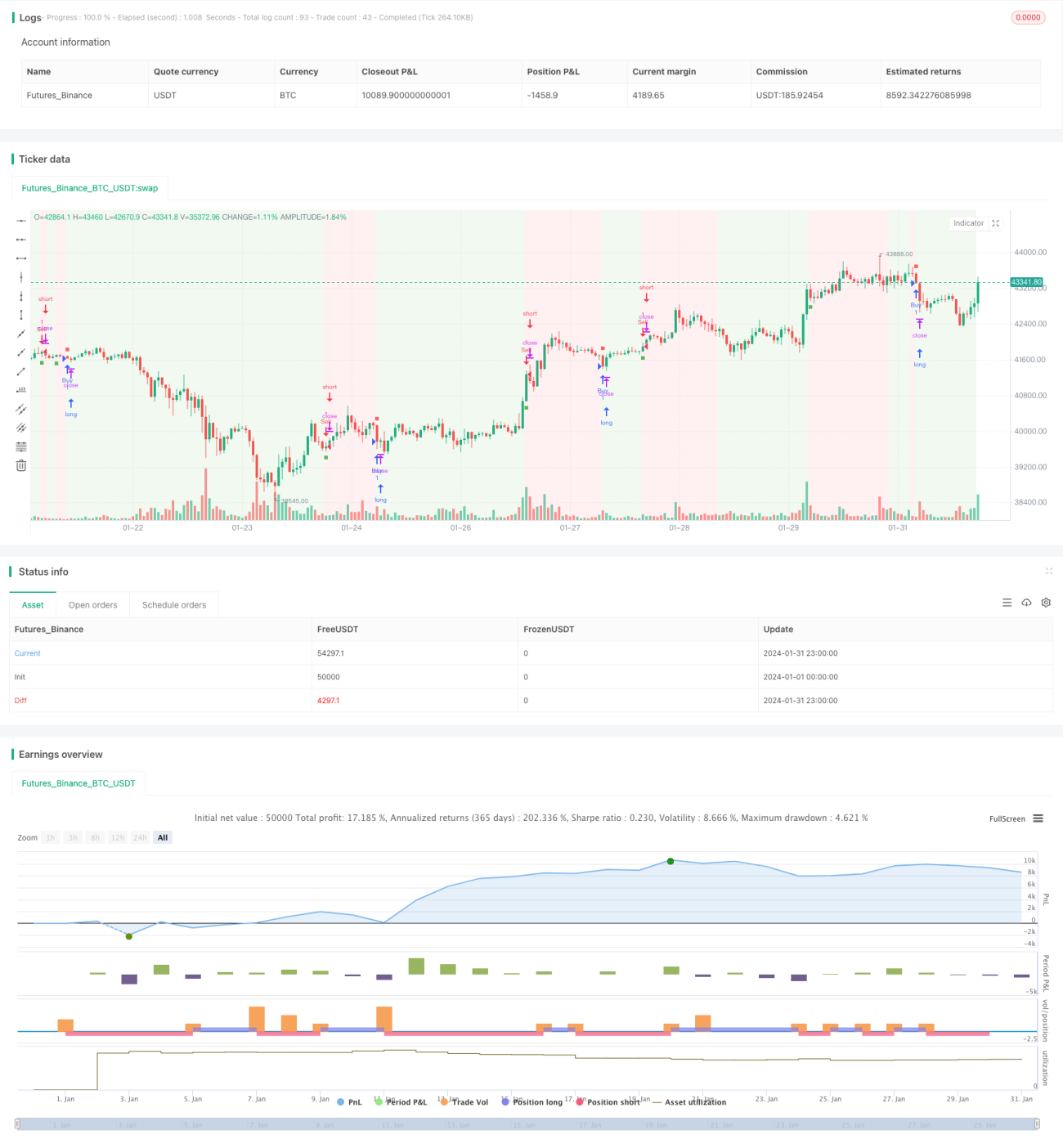
Tổng quan
Chiến lược biến đổi lịch sử giá sử dụng chỉ báo Vortex để xác định các điểm đảo chiều xu hướng thị trường, kết hợp với đường trung bình động hàm mũ để tạo ra tín hiệu giao dịch, nhằm mục đích bắt kịp các diễn biến thuận lợi. Chiến lược này kết hợp khéo léo ưu điểm của chỉ báo Vortex và đường trung bình động, có thể đánh giá hiệu quả xu hướng thị trường và cung cấp hướng dẫn giao dịch.
Nguyên lý phân tích
-
Chỉ báo Vortex - Phân tích chuyển động tích cực và tiêu cực của giá để xác định hướng và cường độ xu hướng. Các tham số chính bao gồm độ dài chu kỳ, hệ số nhân và ngưỡng.
-
Đường trung bình động hàm mũ (EMA) - Làm mịn hàm mũ giá đóng cửa, cung cấp đánh giá xu hướng mượt mà hơn. Chu kỳ đường trung bình động càng dài, đánh giá xu hướng càng ổn định.
Chiến lược này sử dụng chỉ báo Vortex để xác định hướng chính của xu hướng thị trường, tạo tín hiệu giao dịch khi đường chỉ báo vượt qua ngưỡng. Kết hợp với đường trung bình động để lọc, tránh các tín hiệu sai. Cụ thể, khi chỉ báo Vortex vượt lên trên đường ngưỡng và giá cao hơn đường trung bình động, tín hiệu mua được tạo ra; khi chỉ báo Vortex vượt xuống dưới đường ngưỡng và giá thấp hơn đường trung bình động, tín hiệu bán được tạo ra.
Ưu điểm
- Tận dụng khả năng nhận diện đảo chiều của chỉ báo Vortex, có thể kịp thời nắm bắt các cơ hội đảo chiều xu hướng tiềm năng.
- Kết hợp đường trung bình động để lọc tín hiệu, tránh các giao dịch sai trong thị trường dao động.
- Có thể điều chỉnh độ nhạy của chiến lược thông qua tối ưu hóa tham số, phù hợp với các môi trường thị trường khác nhau.
- Giao diện trực quan và tín hiệu giao dịch rõ ràng, thuận tiện cho giao dịch thực tế.
Phân tích rủi ro
- Cần cảnh giác với rủi ro hệ thống do các sự kiện bất ngờ làm mất hiệu lực của chỉ báo.
- Trong thị trường dao động có thể xuất hiện nhiều tín hiệu sai.
- Cài đặt tham số không phù hợp có thể dẫn đến quá tích cực hoặc quá thận trọng.
- Cần kết hợp với lệnh cắt lỗ thích hợp để kiểm soát tổn thất từng giao dịch.
Để đối phó với các rủi ro, có thể thêm bộ lọc bổ sung, kết hợp đánh giá nhiều chỉ báo, tối ưu hóa cài đặt tham số và thiết lập lệnh cắt lỗ phù hợp.
Hướng tối ưu hóa
- Thử nghiệm các loại đường trung bình động khác nhau để tìm tổ hợp phù hợp nhất.
- Điều chỉnh tham số của chỉ báo Vortex và đường trung bình động để đạt tỷ suất lợi nhuận tối ưu.
- Kiểm tra tính ổn định của chiến lược trên nhiều khung thời gian.
- Thêm các chỉ báo như Dải Bollinger để lọc tín hiệu.
- Tinh chỉnh tham số cho các loại tài sản cụ thể.
Kết luận
Chiến lược biến đổi lịch sử giá nhìn chung khá vững chắc, vừa nắm bắt được các đảo chiều xu hướng tiềm năng vừa có khả năng lọc nhất định. Với sự hỗ trợ của tối ưu hóa tham số và quản lý rủi ro, chiến lược này có thể đạt được tỷ suất lợi nhuận khả quan. Khuyến nghị các nhà giao dịch kiểm tra toàn diện trong môi trường mô phỏng, và cũng có thể thử nghiệm mở rộng sáng tạo dựa trên chiến lược này.
/*backtest
start: 2024-01-01 00:00:00
end: 2024-01-31 23:59:59
period: 1h
basePeriod: 15m
exchanges: [{"eid":"Futures_Binance","currency":"BTC_USDT"}]
*/

// This work is licensed under a Attribution-NonCommercial-ShareAlike 4.0 International (CC BY-NC-SA 4.0) https://creativecommons.org/licenses/by-nc-sa/4.0/
// © AstroHub

//@version=5- 1