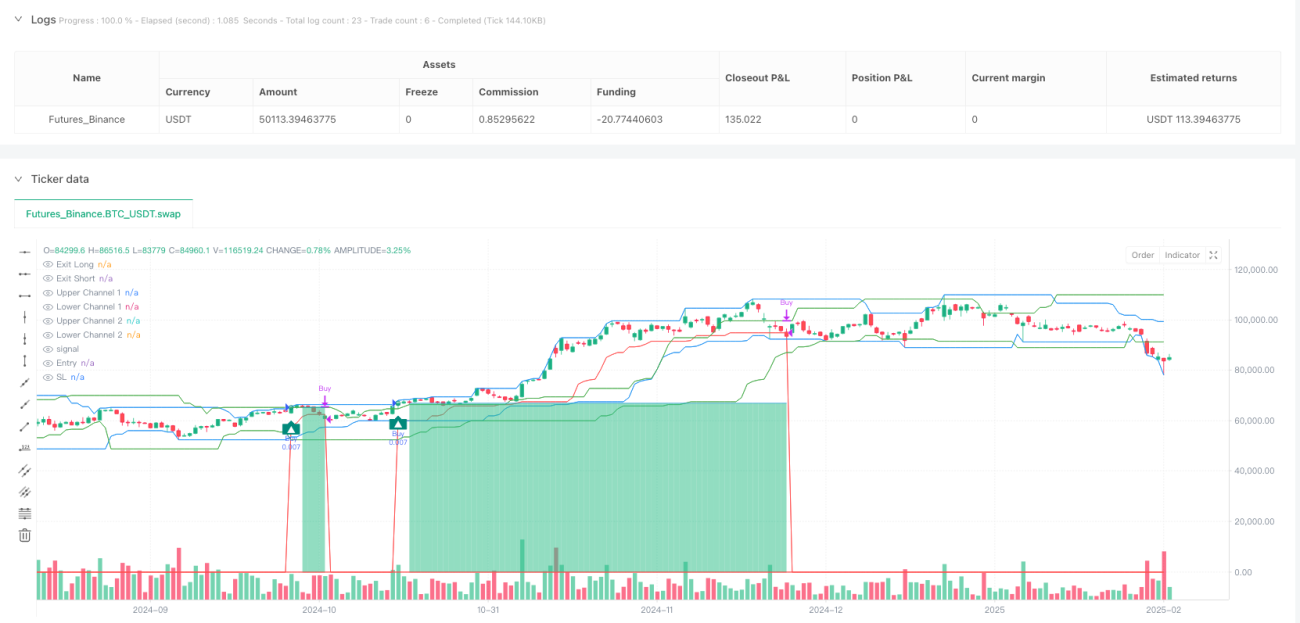
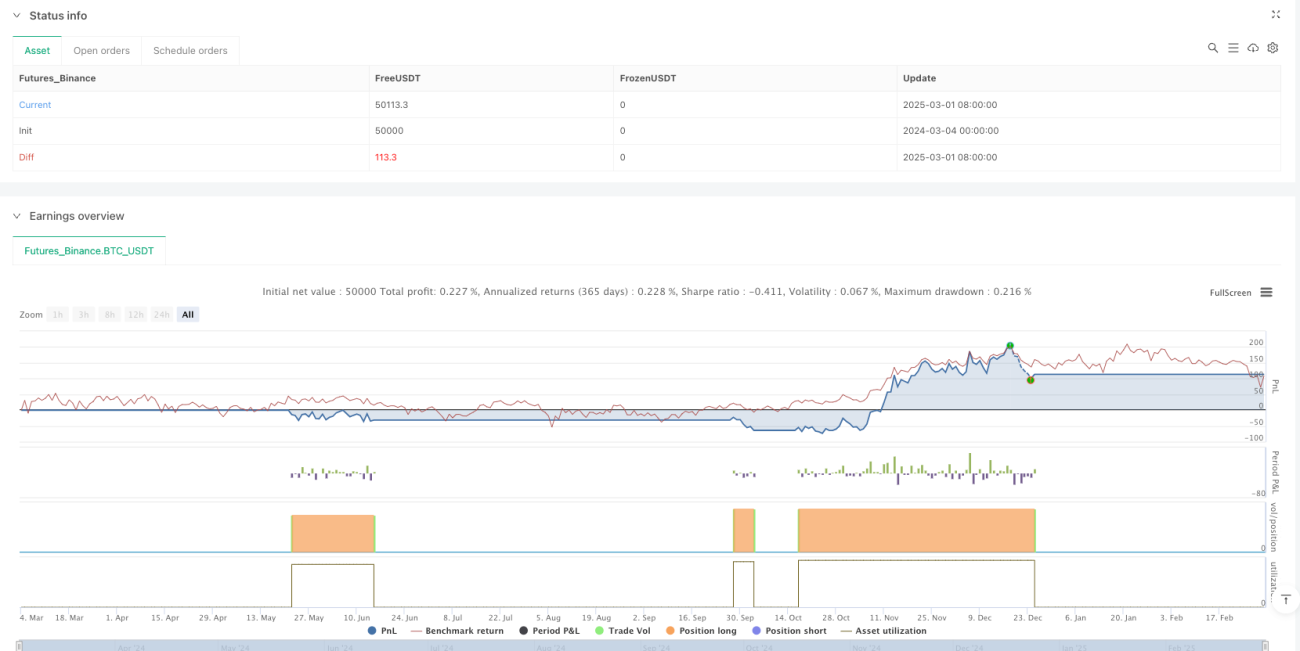
Chiến lược giao dịch tự thích ứng với nhiều kênh là một hệ thống theo dõi xu hướng hiện đại, được tối ưu hóa và mở rộng dựa trên các quy tắc giao dịch biển cổ điển. Cốt lõi của chiến lược là sử dụng hệ thống kênh Donchian kép để xác định điểm đột phá của thị trường và cung cấp vị trí dừng chính xác thông qua các kênh thoát được điều chỉnh động. Chiến lược được thiết kế với cơ chế xác nhận kép: kênh 1 được sử dụng để nắm bắt đột phá giá ngắn hạn, kênh 2 là bộ lọc xác nhận để giảm tín hiệu giả. Ngoài ra, chiến lược tích hợp giao diện robot giao dịch 3Commas, hỗ trợ thực hiện giao dịch hoàn toàn tự động, phù hợp cho các nhà giao dịch muốn nắm bắt xu hướng dài hạn trong thị trường biến động.
Chiến lược này dựa trên các nguyên tắc cốt lõi của hệ thống giao dịch biển cổ điển, nhưng thêm vào cơ chế xác nhận hai kênh hiện đại và hệ thống dừng lỗ động:
Hệ thống xác nhận đột phá hai kênh:
Động lực thoát ra khỏi kênh:
Nhập và ra khỏi logic:
Quản lý tài chính:
Chất lượng tín hiệu được cải thiện: Cơ chế xác nhận hai kênh giảm đáng kể đột phá giả và cải thiện chất lượng và độ chính xác của tín hiệu.buy = buy_fast and close > upper_slow[1]Vàsel = sel_fast and close < lower_slow[1]Đây là một trong những thiết kế nổi bật nhất của Việt Nam.
Quản lý rủi ro độngChiến lược sử dụng lối thoát thích ứng, điều chỉnh vị trí dừng lỗ theo động thái cấu trúc thị trường. Khi thị trường di chuyển thuận lợi, vị trí dừng lỗ sẽ tự động theo dõi và khóa một phần lợi nhuận. Điều này được thực hiện trong mãexit_buy_level:= math.max(nz(exit_buy_level,10e-10), lower_exit)hoàn thành.
Hệ thống quản lý tài chính đầy đủChiến lược này đã xây dựng các quy tắc quản lý tài chính chuyên nghiệp, kiểm soát các lỗ hổng rủi ro cho mỗi giao dịch thông qua hệ thống phân bổ phần trăm.
Quản lý giao dịch trực quanChiến lược: Đánh dấu rõ ràng điểm vào, điểm dừng và điểm dừng trên biểu đồ, giúp thương nhân hiểu trực quan về logic giao dịch và phạm vi rủi ro.
Thị trường bị chấn động: Là một chiến lược theo dõi xu hướng, có thể tạo ra các tín hiệu giả liên tục trong giai đoạn sắp xếp ngang. Mã phân tích cho thấy, mặc dù hệ thống hai kênh đã giảm báo cáo sai, nhưng vẫn sẽ kích hoạt nhiều giao dịch thua lỗ nhỏ trong thị trường không có xu hướng rõ ràng.
Độ nhạy tham sốTính năng của chiến lược phụ thuộc rất nhiều vào các thiết lập về chu kỳ và độ lệch của kênh. Các thị trường và khung thời gian khác nhau đòi hỏi các tổ hợp tham số khác nhau, yêu cầu phản hồi và tối ưu hóa đầy đủ. Các tham số được nhập vào trong mã_period_dc1、_period_dc2Và_period_offĐể kiểm soát những biến số quan trọng này.
Rủi ro của sự chậm trễ: Động lực dừng lỗ kênh có thể phản ứng không đủ nhanh chóng trong thị trường biến động mạnh, dẫn đến rút lui mở rộng.barstate.isconfirmedCó thể bỏ lỡ thời gian rút lui tốt nhất trong môi trường biến động cao.
Sự phụ thuộc quá mức vào mô hình lịch sửChiến lược giả định rằng mô hình đột phá lịch sử sẽ tiếp tục có hiệu lực trong tương lai, nhưng đặc điểm thị trường có thể thay đổi theo thời gian và ảnh hưởng đến hiệu suất của chiến lược.
Thêm bộ lọc xu hướng: Phân tích mã cho thấy rằng chiến lược hiện tại thiếu sự phán đoán về xu hướng thị trường tổng thể. Khuyến nghị tăng các chỉ số xu hướng như đường trung bình di chuyển, ADX hoặc MACD, kích hoạt chiến lược trong môi trường xu hướng mạnh và giảm độ nhạy trong thị trường xu hướng yếu hoặc chấn động.
Chu kỳ chuyển tiếp tự điều chỉnhChiến lược hiện nay sử dụng giá trị chu kỳ cố định. Đường hướng tối ưu hóa là giới thiệu chu kỳ kênh thích ứng dựa trên ATR hoặc biến động thị trường, để chiến lược có thể thích ứng tốt hơn với các môi trường thị trường khác nhau. Điều này có thể được sửa đổi_period_dc1Và_period_dc2Một cách tính toán thực hiện.
Tối ưu hóa cơ chế rút lui: Lập logic thoát ra trong mã chỉ dựa vào kênh Dongxian. Đề nghị thực hiện chiến lược thoát ra theo giai đoạn, chẳng hạn như tháo một phần vị trí sau khi đạt được một số lợi nhuận và thiết lập một lỗ hổng theo dõi thoải mái hơn cho phần còn lại.
Bộ lọc thời gianThêm bộ lọc thời gian giao dịch, tránh thời gian thị trường có tính thanh khoản thấp hoặc biến động cao. Đặc biệt đối với thị trường tiền điện tử giao dịch 24 giờ, một số thời gian có thể phù hợp hơn để thực hiện giao dịch.
Chỉ số cảm xúc tích hợpTích hợp các chỉ số cảm xúc thị trường như khối lượng giao dịch, tỷ lệ biến động hoặc dòng tiền để tăng cường quyết định vào và ra. Ví dụ: tăng trọng lượng trên tín hiệu đột phá với khối lượng giao dịch cao hoặc giảm tần suất giao dịch trong môi trường biến động thấp bất thường.
Chiến lược giao dịch tự điều chỉnh nhiều kênh là một hệ thống theo dõi xu hướng hiện đại, toàn diện, giải quyết nhiều thách thức của các quy tắc giao dịch xu hướng truyền thống thông qua cơ chế xác nhận hai kênh và dừng động. Chiến lược này đặc biệt phù hợp với các nhà giao dịch xu hướng trung và dài hạn, hoạt động ổn định hơn trên các khung thời gian cao hơn như H4 hoặc ngày. Sự tích hợp thành công của 3 Commas trong chiến lược làm cho nó trở thành lựa chọn lý tưởng cho giao dịch tự động, giảm nhiễu cảm xúc do con người gây ra.
Mặc dù có thể không hoạt động tốt trong thị trường xung đột, nhưng có thể cải thiện đáng kể hiệu suất tổng thể của nó bằng cách tối ưu hóa tham số thích hợp và bộ lọc xu hướng bổ sung. Mô-đun quản lý tiền của chiến lược đảm bảo rủi ro được kiểm soát hiệu quả, trong khi hệ thống dừng lỗ động giúp bảo vệ lợi nhuận đã đạt được.
Đây là một chiến lược đáng xem xét cho các nhà giao dịch muốn nắm bắt xu hướng trong nhiều điều kiện thị trường khác nhau, đặc biệt là khi sử dụng với các công cụ phân tích thị trường khác. Hãy nhớ rằng bất kỳ chiến lược nào cũng cần phải được điều chỉnh để phù hợp với khả năng chịu rủi ro cá nhân và mục tiêu giao dịch, và được phản hồi đầy đủ và mô phỏng giao dịch trước khi đưa tiền vào thực tế.
/*backtest
start: 2024-03-04 00:00:00
end: 2025-03-02 08:00:00
period: 1d
basePeriod: 1d
exchanges: [{"eid":"Futures_Binance","currency":"BTC_USDT"}]
*/
// This Pine Script™ code is subject to the terms of the Mozilla Public License 2.0 at https://mozilla.org/MPL/2.0/
// © 3Commas
//@version=6
// Strategy configuration: sets properties for the strategy like title, overlay, pyramiding, calculation mode, and risk parameters.
strategy(title = "[3Commas] Turtle Strategy"
, overlay = true
, pyramiding = 0
, calc_on_order_fills = false
, calc_on_every_tick = true
, default_qty_type = strategy.percent_of_equity
, default_qty_value = 1
, initial_capital = 10000
, slippage = 5
, commission_type = strategy.commission.percent
, commission_value = 0.1
, use_bar_magnifier = true
, fill_orders_on_standard_ohlc = true
)
// ――――――――――――――――――――――――――――――――――――――――――――――――――――――――――――――――――――――――――――――――――――――――――――――――――――――――――――――――――――
// 🟦 Inputs
// ――――――――――――――――――――――――――――――――――――――――――――――――――――――――――――――――――――――――――――――――――――――――――――――――――――――――――――――――――――
// Define menu options for strategy testing
var menu_buy = "🟢 Long"
var menu_sel = "🔴 Short"
var menu_buy_sell = "🟢 Long & 🔴 Short"
var menu_none = "🟤 None"
var group_settings = '🟦 Settings'
var group_test = '🟦 Strategy Tester'
// Input parameters for the channels and exit period
_period_dc1 = input.int(20, "Period Channel 1" , group = group_settings, inline = '' , display = display.none, tooltip ='Channel 1 Period.')
_period_dc2 = input.int(20, "Period Channel 2 ", group = group_settings, inline = '2', display = display.none, tooltip ='Channel 2 Period and offset to the right.')
_period_off = input.int(20, "Offset" , group = group_settings, inline = '2', display = display.none)
_period_exit = input.int(10, "Period Exit" , group = group_settings, inline = '' , display = display.none, tooltip ='Exit Period (Trailing).')
// Input parameters for strategy testing options
_test_pos_type = input.string( title= 'Strategy ' , group=group_test, inline = 'o' , defval = menu_buy_sell, options=[menu_buy_sell, menu_buy, menu_sel, menu_none], tooltip = 'Order Type direction in which trades are executed.')
_tp_use = input.bool (false, title= "Take Profit %" , group=group_test, inline = 'tp', tooltip = 'When activated, the entered value will be used as the Take Profit in percentage from the entry price level.')
_tp_percent = input.float (20 , title= "" , group=group_test, inline = 'tp', display = display.none)
// ――――――――――――――――――――――――――――――――――――――――――――――――――――――――――――――――――――――――――――――――――――――――――――――――――――――――――――――――――――
// 🟦 Logic
// ――――――――――――――――――――――――――――――――――――――――――――――――――――――――――――――――――――――――――――――――――――――――――――――――――――――――――――――――――――
// Calculate take profit levels if enabled; otherwise set to not available (na)
tp_buy = _tp_use?close * (1 + _tp_percent / 100) : na
tp_sel = _tp_use?close * (1 - _tp_percent / 100) : na
// Calculate fast and slow channel extremes and exit levels
upper_fast = ta.highest(high, _period_dc1)
lower_fast = ta.lowest (low , _period_dc1)
upper_slow = ta.highest(high, _period_dc2)[_period_off]
lower_slow = ta.lowest (low , _period_dc2)[_period_off]
upper_exit = ta.highest(high, _period_exit)
lower_exit = ta.lowest (low , _period_exit)
// Determine if there is a crossover or crossunder for fast and slow channels
buy_fast = ta.crossover (close, upper_fast[1]) and barstate.isconfirmed
sel_fast = ta.crossunder(close, lower_fast[1]) and barstate.isconfirmed
buy_slow = ta.crossover (close, upper_slow[1]) and barstate.isconfirmed
sel_slow = ta.crossunder(close, lower_slow[1]) and barstate.isconfirmed
// Initialize variables to track if we are in a long or short position
var inbuy = false
var insel = false
// Conditions to enter long or short positions based on fast signals and slow channel confirmation
buy = buy_fast and close>upper_slow[1] and not inbuy
sel = sel_fast and close<lower_slow[1] and not insel
// Update position flags if a trade is executed
inbuy := buy? true:inbuy
insel := sel? true:insel
// Plot shapes on the chart for long and short signals using circles and labels
plotshape(buy ?close:na, title="Label Long" , style=shape.circle , location= location.absolute, color=color.new(color.teal, 0), text='' , textcolor=color.white, size= size.auto, offset=0, editable=true)
plotshape(sel ?close:na, title="Label Short", style=shape.circle , location= location.absolute, color=color.new(color.red , 0), text='' , textcolor=color.white, size= size.auto, offset=0, editable=true)
plotshape(buy ?close:na, title="Label Long" , style=shape.labelup , location= location.belowbar, color=color.new(color.teal, 0), text='▲', textcolor=color.white, size= size.auto, offset=0, editable=true)
plotshape(sel ?close:na, title="Label Short", style=shape.labeldown, location= location.abovebar, color=color.new(color.red , 0), text='▼', textcolor=color.white, size= size.auto, offset=0, editable=true)
// Initialize take profit, stop loss, and exit levels for both long and short positions
var tp = float(na)
var sl = float(na)
var exit_buy_level = float(na)
var exit_sel_level = float(na)
// Set take profit levels when a new long or short signal is triggered
if buy
tp := tp_buy
if sel
tp := tp_sel
// For long positions, update the exit level based on the lowest exit channel
if inbuy
exit_buy_level:= math.max(nz(exit_buy_level,10e-10), lower_exit)
sl:= exit_buy_level
// For short positions, update the exit level based on the highest exit channel
if insel
exit_sel_level:= math.min(nz(exit_sel_level,10e+10), upper_exit)
sl:= exit_sel_level
// Check for exit conditions when price crosses the exit levels
exit_buy_pos = ta.crossunder(close,exit_buy_level)
exit_sel_pos = ta.crossover (close,exit_sel_level)
// Confirm exit conditions when in a position
exit_buy_close = inbuy and exit_buy_pos and barstate.isconfirmed
exit_sel_close = insel and exit_sel_pos and barstate.isconfirmed
// Check for take profit exit conditions for long and short positions
buy_tp_exit = (inbuy[1] and high>= tp and not buy)
sel_tp_exit = (insel[1] and low <= tp and not sel)
// Plot channel bands and exit levels on the chart (set to not display by default)
plot(upper_fast , title="Upper Channel 1", color=color.blue , display = display.none)
plot(lower_fast , title="Lower Channel 1", color=color.blue , display = display.none)
plot(upper_slow , title="Upper Channel 2", color=color.green, display = display.none)
plot(lower_slow , title="Lower Channel 2", color=color.green, display = display.none)
plot(exit_buy_level, title="Exit Long" , color=color.red , display = display.none, style = plot.style_linebr)
plot(exit_sel_level, title="Exit Short" , color=color.red , display = display.none, style = plot.style_linebr)
// ――――――――――――――――――――――――――――――――――――――――――――――――――――――――――――――――――――――――――――――――――――――――――――――――――――――――――――――――――――
// 🟦 Strategy Tester
// ――――――――――――――――――――――――――――――――――――――――――――――――――――――――――――――――――――――――――――――――――――――――――――――――――――――――――――――――――――
// Conditions for testing buy and sell signals
test_buy = buy
test_sel = sel
test_tp = tp
test_sl = sl
// Track the average entry price for the current position
test_en = strategy.position_avg_price
// Determine if the stop loss should be adjusted based on the current position and entry price
savestop = (strategy.position_size>0 and test_sl>test_en) or (strategy.position_size<0 and test_sl<test_en)
// Execute strategy entries based on the test conditions and selected position type
if test_buy and _test_pos_type != menu_sel and _test_pos_type != menu_none
strategy.entry ("Buy" , strategy.long)
if test_sel and _test_pos_type != menu_buy and _test_pos_type != menu_none
strategy.entry ("Sell", strategy.short)
// Close positions based on exit signals
if exit_buy_close
strategy.close("Buy")
if exit_sel_close
strategy.close("Sell")
// Set strategy exits using take profit conditions; stop loss is not used in these exits
strategy.exit("Exit Buy" , "Buy" , limit= test_tp, stop = na)
strategy.exit("Exit Sell", "Sell", limit= test_tp, stop = na)
// Define colors for plotting stop loss lines based on the savestop condition
test_sl_col = savestop?color.new(color.teal,50 ):color.new(color.red ,50)
// Check if there is no trade, based on changes in entry price or if entry price is not available
notrade = test_en!=test_en[1] or na(test_en)
// Plot entry price, stop loss, and take profit on the chart
plot_en = plot(notrade?na:test_en, title = 'Entry', color = color.new(color.blue,50 ), style = plot.style_linebr)
plot_sl = plot(notrade?na:test_sl, title = 'SL' , color = test_sl_col , style = plot.style_linebr)
plot_tp = plot(notrade?na:test_tp, title = 'TP' , color = color.new(color.teal,100), style = plot.style_linebr)
// Fill the background between the take profit and entry lines
fill(plot_tp, plot_en, test_tp, test_en, notrade?na:color.new(color.teal,50 ), notrade?na:color.new(color.teal,100), fillgaps = false, title = 'Trade Background')
// Fill the background between the entry and stop loss lines
fill(plot_en, plot_sl, test_en, test_sl, notrade?na:savestop?color.new(color.teal ,100):color.new(color.red ,100), notrade?na:savestop?color.new(color.teal ,50):color.new(color.red ,50 ), fillgaps = false, title = 'Trade Background')
// Reset variables when an exit condition is met for a long position
if exit_buy_close or buy_tp_exit
exit_buy_level:= float(na)
tp := float(na)
sl := float(na)
inbuy := false
// Reset variables when an exit condition is met for a short position
if exit_sel_close or sel_tp_exit
exit_sel_level:= float(na)
tp := float(na)
sl := float(na)
insel := false
// ――――――――――――――――――――――――――――――――――――――――――――――――――――――――――――――――――――――――――――――――――――――――――――――――――――――――――――――――――――
// 🟦 3Commas Integration
// ――――――――――――――――――――――――――――――――――――――――――――――――――――――――――――――――――――――――――――――――――――――――――――――――――――――――――――――――――――
// This section integrates the strategy with 3Commas DCA Bot signals.
// Tutorial text for integration instructions
var c3_tuto = "Here you can enable the table to review the messages to be sent to the bot, as well as change the background color and text color."
+'\n\n🤖 𝗛𝗼𝘄 𝘁𝗼 𝘂𝘀𝗲 𝗗𝗖𝗔 𝗕𝗼𝘁 𝗦𝗶𝗴𝗻𝗮𝗹𝘀'
+'\n ¯¯¯¯¯¯¯¯¯¯¯¯¯¯¯¯¯¯¯¯¯¯¯¯'
+ '\n🔹Verify Messages: Ensure the message matches the one specified by the DCA Bot.'
+'\n\n🔹Multi-Pair Configuration: For multi-pair setups, enable the option to add the symbol in the correct format.'
+'\n\n🔹Signal Settings: Enable whether you want to receive long or short signals (Entry | TP | SL), copy and paste the the messages for the DCA Bots configured in 3Commas.'
+'\n\n🔹Alert Setup:'
+'\n\n- When creating an alert, set the condition to the indicator and choose "alert() function call only."'
+'\n\n- Enter any desired Alert Name.'
+'\n\n- Open the Notifications tab, enable Webhook URL, and paste the Webhook URL from 3Commas.'
+'\n\n- For more details, refer to the 3Commas section: "How to use TradingView Custom Signals."'
+"\n\n🔹Finalize Alerts: Click Create, you're done! Alerts will now be sent automatically in the correct format to 3Commas."
// Predefined JSON messages for bot signals for both entry and exit in long and short positions
var c3_text_buy_entry = '{ "message_type": "bot", "bot_id": 15743097, "email_token": "b9ed9d7d-7777-42ed-a0a6-608f4ecedf82", "delay_seconds": 0}'
var c3_text_sel_entry = '{ "message_type": "bot", "bot_id": 15743017, "email_token": "b9ed9d7d-7777-42ed-a0a6-608f4ecedf82", "delay_seconds": 0}'
var c3_text_buy_exit = '{ "action": "close_at_market_price", "message_type": "bot", "bot_id": 15743097, "email_token": "b9ed9d7d-7777-42ed-a0a6-608f4ecedf82", "delay_seconds": 0}'
var c3_text_sel_exit = '{ "action": "close_at_market_price", "message_type": "bot", "bot_id": 15743017, "email_token": "b9ed9d7d-7777-42ed-a0a6-608f4ecedf82", "delay_seconds": 0}'
// Define emojis for visual signals
var emog = '🟢'
var emor = '🔴'
var emof = '🏁'
var read = 'Check Messages, Please Read 👉'
// Input settings for the integration table and signal customization
group_c3 = '🟦 DCA Bot Signals'
_c3_tuto = input.bool (false , title= read , group=group_c3, inline='h', display = display.none, tooltip = c3_tuto)
_c3_size = input.string('Normal' , title= ' ↳ Size' , group=group_c3, inline='' , display = display.none, options=['Tiny','Small','Normal','Large','Huge'])
_c3_pos = input.string('Bottom Center' , title= ' ↳ Position' , group=group_c3, inline='' , display = display.none, options=['Top Left','Top Center','Top Right','Middle Left','Middle Center','Middle Right','Bottom Left','Bottom Center','Bottom Right'])
_c3_col1 = input.color(#1F1F1F , title= ' ↳ Colors ' , group=group_c3, inline='c', display = display.none)
_c3_col2 = input.color(color.white , title= '' , group=group_c3, inline='c', display = display.none)
_c3_buy_entry = input.bool (true , title= emog+' Buy Entry ' , group=group_c3, inline='b', display = display.none, tooltip= 'Enable this options to send Buy Entry, Take Profit (TP), and Stop Loss (SL) signals to 3Commas.')
_c3_buy_tp = input.bool (true , title= 'TP' , group=group_c3, inline='b', display = display.none)
_c3_buy_sl = input.bool (true , title= 'SL' , group=group_c3, inline='b', display = display.none)
_c3_text_buy_entry = input.string(c3_text_buy_entry, title= ' ↳ Deal Entry' , group=group_c3, inline= '', display = display.none, tooltip= 'Long DCA Bot: Copy and paste the message for the deal start signal of the DCA Bot you created in 3Commas.')
_c3_text_buy_exit = input.string(c3_text_buy_exit , title= ' ↳ Deal Exit' , group=group_c3, inline= '', display = display.none, tooltip= 'Long DCA Bot: Copy and paste the message to close order at Market Price of the DCA Bot you created in 3Commas.')
_c3_sel_entry = input.bool (true , title= emor+' Sell Entry ', group=group_c3, inline='s', display = display.none, tooltip= 'Enable this options to send Sell Entry, Take Profit (TP), and Stop Loss (SL) signals to 3Commas.')
_c3_sel_tp = input.bool (true , title= 'TP' , group=group_c3, inline='s', display = display.none)
_c3_sel_sl = input.bool (true , title= 'SL' , group=group_c3, inline='s', display = display.none)
_c3_text_sel_entry = input.string(c3_text_sel_entry, title= ' ↳ Deal Entry' , group=group_c3, inline= '', display = display.none, tooltip= 'Short DCA Bot: Copy and paste the message for the deal start signal of the DCA Bot you created in 3Commas.')
_c3_text_sel_exit = input.string(c3_text_sel_exit , title= ' ↳ Deal Exit' , group=group_c3, inline= '', display = display.none, tooltip= 'Short DCA Bot: Copy and paste the message to close order at Market Price of the DCA Bot you created in 3Commas.')
_c3_entry_bot_use = input.bool (false , title= 'DCA Bot Multi-Pair' , group=group_c3, inline= '', display = display.none, tooltip = 'You must activate it if you want to use the signals in a DCA Bot Multi-pair \n\nIn the text box you must enter (using the 3Commas format) the symbol in which you are creating the alert, you can check the format of each symbol when you create the bot.\n\nBefore creating the alert, verify that the message is the same as the one specified in the DCA bot, using the summary option.')
_c3_entry_bot_mult = input.string('USDT_BTC' , title= ' ↳ Symbol' , group=group_c3, inline= '', display = display.none)
// Function to determine label size based on the selected menu option
LabelSize (size_menu_)=>
switch size_menu_
'Auto' => size.auto
'Tiny' => size.tiny
'Small' => size.small
'Normal' => size.normal
'Large' => size.large
'Huge' => size.huge
// Function to determine table position based on the selected menu option
TablePosition (pos_menu_)=>
switch pos_menu_
'Top Left' => position.top_left
'Top Center' => position.top_center
'Top Right' => position.top_right
'Middle Left' => position.middle_left
'Middle Center' => position.middle_center
'Middle Right' => position.middle_right
'Bottom Left' => position.bottom_left
'Bottom Center' => position.bottom_center
'Bottom Right' => position.bottom_right
// Function to trim the JSON message and add the pair if multi-pair is enabled
TrimPair(txt_, multipair_, pair_) =>
trim = txt_
check = str.contains(trim,'delay_seconds') and
str.contains(trim,'email_token' ) and
str.contains(trim,'bot_id' ) and
str.contains(trim,'message_type' )
if check
del = array.get(str.split(trim, '"delay_seconds": 0'), 1)
trim := str.replace(trim, del, '', 0)
pair = ', "pair": '+ '"' + str.replace_all(pair_, ' ', '')+ '"'
trim := trim + (multipair_? pair: '') + '}'
trim
// Function to format JSON for a nicer display by adding new lines and spacing
JsonFormat(json_)=>
nice = json_
check = str.contains(nice,'delay_seconds') and
str.contains(nice,'email_token' ) and
str.contains(nice,'bot_id' ) and
str.contains(nice,'message_type' )
if check
nice := str.replace_all(nice, ' ', '' )
nice := str.replace_all(nice, ',', ',\n ')
nice := str.replace_all(nice, '{', '{\n ')
nice := str.replace_all(nice, '}', '\n}' )
nice := str.replace_all(nice, ':', ': ' )
nice
// Define conditions to send signals based on entry and exit signals
c3_en_buy = _c3_buy_entry and buy
c3_ex_buy = (_c3_buy_tp and buy_tp_exit) or (_c3_buy_sl and exit_buy_close)
c3_en_sel = _c3_sel_entry and sel
c3_ex_sel = (_c3_sel_tp and sel_tp_exit) or (_c3_sel_sl and exit_sel_close)
// Format the messages for both entry and exit, applying multi-pair configuration if enabled
var c3_buy_dealstart = JsonFormat(TrimPair(_c3_text_buy_entry, _c3_entry_bot_use, _c3_entry_bot_mult))
var c3_buy_closemarket = JsonFormat(TrimPair(_c3_text_buy_exit , _c3_entry_bot_use, _c3_entry_bot_mult))
var c3_sel_dealstart = JsonFormat(TrimPair(_c3_text_sel_entry, _c3_entry_bot_use, _c3_entry_bot_mult))
var c3_sel_closemarket = JsonFormat(TrimPair(_c3_text_sel_exit , _c3_entry_bot_use, _c3_entry_bot_mult))
// Send alerts for buy and sell entries and exits based on conditions
switch
c3_en_buy => alert(c3_buy_dealstart , alert.freq_once_per_bar)
c3_ex_buy => alert(c3_buy_closemarket, alert.freq_once_per_bar)
switch
c3_en_sel => alert(c3_sel_dealstart , alert.freq_once_per_bar)
c3_ex_sel => alert(c3_sel_closemarket, alert.freq_once_per_bar)
// Create a table with the signal messages for user review
if barstate.isfirst and _c3_tuto
var bg = _c3_col1
var tx = _c3_col2
var gr = color.green
var re = color.red
var hw = 'How to use 3Commas DCA Bot Signals 🤖'
var ms = '🤖 DCA Bot Signals Messages '
var ds = 'Deal start signal'
var me = 'Close order at Market Price'
var c3_table = table.new(TablePosition (_c3_pos), 6, 6, border_width=1, frame_width=1,border_color = color.new(color.black,0), frame_color = color.new(color.black,0))
table.cell(c3_table, 1, 1, ms , text_color=tx, text_halign=text.align_center, text_size = LabelSize(_c3_size), bgcolor = bg)
table.cell(c3_table, 1, 2, ds , text_color=tx, text_halign=text.align_center, text_size = LabelSize(_c3_size), bgcolor = bg, width=0)
table.cell(c3_table, 1, 3, me , text_color=tx, text_halign=text.align_center, text_size = LabelSize(_c3_size), bgcolor = bg, width=0)
table.cell(c3_table, 2, 1, 'Long Bot Messages' , text_color=gr, text_halign=text.align_center, text_size = LabelSize(_c3_size), bgcolor = bg)
table.cell(c3_table, 2, 2, c3_buy_dealstart , text_color=tx, text_halign=text.align_left , text_size = LabelSize(_c3_size), bgcolor = bg, text_font_family= font.family_monospace)
table.cell(c3_table, 2, 3, c3_buy_closemarket , text_color=tx, text_halign=text.align_left , text_size = LabelSize(_c3_size), bgcolor = bg, text_font_family= font.family_monospace)
table.cell(c3_table, 3, 1, 'Short Bot Messages', text_color=re, text_halign=text.align_center, text_size = LabelSize(_c3_size), bgcolor = bg)
table.cell(c3_table, 3, 2, c3_sel_dealstart , text_color=tx, text_halign=text.align_left , text_size = LabelSize(_c3_size), bgcolor = bg, text_font_family= font.family_monospace)
table.cell(c3_table, 3, 3, c3_sel_closemarket , text_color=tx, text_halign=text.align_left , text_size = LabelSize(_c3_size), bgcolor = bg, text_font_family= font.family_monospace)