
前言
平台文库中有几篇关于对接Trading View webhook的文章,可以让策略以外部系统的信号驱动交易,当时平台还没有支持JavaScript语言的内置http服务功能。使用的是平台的扩展API接口:CommandRobot,简单说就是外部信号的http/https请求发送到FMZ平台,平台中转信号,作为策略交互消息通知到策略程序。
随着平台发展、迭代,升级更新了很多新功能。接收外部信号也有了新的方案。各种方案都有各自的优点,本篇我们就一起来探讨这个主题。
使用FMZ平台扩展API接口
使用这种方式对接外部系统,优点就是比较简单、安全性强、依赖于平台的扩展API接口稳定性高。
接收外部信号的过程:
外部系统(Trading View webhook)--> FMZ扩展API服务 --> 策略实盘
1、外部系统(Trading View webhook):例如Trading View 上跑的PINE脚本,可以设置报警,触发后会向设置的webhook url地址发送http请求,作为信号。
2、FMZ扩展API服务:访问该接口成功后,平台转发信息,作为交互消息发送给策略实盘。
3、策略实盘:策略实盘中可以设计GetCommand函数监听交互消息,检测到消息后执行既定操作。
相对于使用内置Http服务直接创建服务接收信号来说,中间多了一个步骤(平台中转)。
策略内置Http服务
平台支持了JavaScript语言的内置Http服务功能后,可以直接创建一个并发的服务监听外部信号。优点是:创建的Http服务是单独线程,并不会影响主函数逻辑,可以类似GetCommand函数一样监听消息,直接监听外部信号,相较于使用扩展API方案,省去了中转环节。
接收外部信号的过程:
外部系统(Trading View webhook) --> 策略实盘
1、外部系统(Trading View webhook): 例如Trading View 上跑的PINE脚本,可以设置报警,触发后会向设置的webhook url地址发送http请求,作为信号。
2、策略实盘:策略并发运行起来一个Http服务,直接接收外部信号。
这种方案省去了一个步骤,但是为了提高安全性,最好是配置https服务,需要折腾一下。相较于使用扩展API的方案麻烦一点。
测试代码
测试两种方案,以下策略会每轮循环并发发送10个Http/Https请求,用来模拟外部信号。然后策略监听「交互消息」和「Http服务线程推送的消息」。然后策略程序一一匹配外部信号消息和收到的信号、检测有无信号丢失,计算耗时。
javascript
var httpUrl = "http://123.123.123.123:8088/CommandRobot"
var accessKey = ""
var secretKey = ""
function serverFunc(ctx) {
var path = ctx.path()
if (path == "/CommandRobot") {
var body = ctx.body()
threading.mainThread().postMessage(body)
ctx.write("OK")
// 200
} else {
ctx.setStatus(404)
}
}
function createMsgTester(accessKey, secretKey, httpUrl) {
var tester = {}
tester.currentRobotId = _G()
tester.arrSendMsgByAPI = []
tester.arrSendMsgByHttp = []
tester.arrEchoMsgByAPI = []
tester.arrEchoMsgByHttp = []
tester.idByAPI = 0
tester.idByHttp = 0
var sendMsgByAPI = function(msgByAPI, robotId, accessKey, secretKey) {
var headers = {
"User-Agent": "Mozilla/5.0 (Macintosh; Intel Mac OS X 10_9_3) AppleWebKit/537.36 (KHTML, like Gecko) Chrome/35.0.1916.153 Safari/537.36",
"Content-Type": "application/json"
}
// HttpQuery(`https://www.fmz.com/api/v1?access_key=${accessKey}&secret_key=${secretKey}&method=CommandRobot&args=[${robotId},+""]`, {"method": "POST", "body": JSON.stringify(msgByAPI), "headers": headers})
HttpQuery(`https://www.fmz.com/api/v1?access_key=${accessKey}&secret_key=${secretKey}&method=CommandRobot&args=%5B${robotId}%2C+%22%22%5D`, {"method": "POST", "body": JSON.stringify(msgByAPI), "headers": headers})
}
var sendMsgByHttp = function(msgByHttp, httpUrl) {
HttpQuery(httpUrl, {"method": "POST", "body": JSON.stringify(msgByHttp)})
}
tester.run = function() {
var robotId = tester.currentRobotId
for (var i = 0; i < 10; i++) {
var msgByAPI = {"ts": new Date().getTime(), "id": tester.idByAPI, "way": "ByAPI"}
tester.arrSendMsgByAPI.push(msgByAPI)
tester.idByAPI++
threading.Thread(sendMsgByAPI, msgByAPI, robotId, accessKey, secretKey)
var msgByHttp = {"ts": new Date().getTime(), "id": tester.idByHttp, "way": "ByHttp"}
tester.arrSendMsgByHttp.push(msgByHttp)
tester.idByHttp++
threading.Thread(sendMsgByHttp, msgByHttp, httpUrl)
}
}
tester.getEcho =function(msg) {
if (msg["way"] == "ByAPI") {
tester.arrEchoMsgByAPI.push(msg)
} else {
tester.arrEchoMsgByHttp.push(msg)
}
}
tester.deal = function() {
var tbls = []
for (var pair of [[tester.arrEchoMsgByHttp, tester.arrSendMsgByHttp, "ByHttp"], [tester.arrEchoMsgByAPI, tester.arrSendMsgByAPI, "ByAPI"]]) {
var receivedMessages = pair[0]
var sentMessages = pair[1]
var testType = pair[2]
var receivedMap = new Map()
receivedMessages.forEach(message => {
receivedMap.set(message["id"], message)
})
var matchedPairs = []
var timeDifferences = []
for (var sentMessage of sentMessages) {
var receivedMessage = receivedMap.get(sentMessage["id"])
if (receivedMessage) {
matchedPairs.push([JSON.stringify(sentMessage), JSON.stringify(receivedMessage), receivedMessage["ts"] - sentMessage["ts"]])
timeDifferences.push(receivedMessage["ts"] - sentMessage["ts"])
} else {
Log("no matched sentMessage:", sentMessage, "#FF0000")
}
}
var averageTimeDifference = timeDifferences.reduce((sum, diff) => sum + diff, 0) / timeDifferences.length
var tbl = {
"type": "table",
"title": testType + " / averageTimeDifference:" + averageTimeDifference,
"cols": ["send", "received", "ts diff"],
"rows": []
}
for (var pair of matchedPairs) {
tbl["rows"].push(pair)
}
tbls.push(tbl)
Log(testType, ", averageTimeDifference:", averageTimeDifference, "ms")
}
tester.arrSendMsgByAPI = []
tester.arrSendMsgByHttp = []
tester.arrEchoMsgByAPI = []
tester.arrEchoMsgByHttp = []
return tbls
}
return tester
}
function main() {
__Serve("http://0.0.0.0:8088", serverFunc)
var t = createMsgTester(accessKey, secretKey, httpUrl)
while (true) {
Log("测试开始...", "#FF0000")
t.run()
var beginTS = new Date().getTime()
while (new Date().getTime() - beginTS < 60 * 1000) {
var cmd = GetCommand()
if (cmd) {
try {
var obj = JSON.parse(cmd)
obj["ts"] = new Date().getTime()
t.getEcho(obj)
} catch (e) {
Log(e)
}
}
var msg = threading.mainThread().peekMessage(-1)
if (msg) {
try {
var obj = JSON.parse(msg)
obj["ts"] = new Date().getTime()
t.getEcho(obj)
} catch (e) {
Log(e)
}
}
}
Log("等待结束...", "#FF0000")
var tbls = t.deal()
LogStatus(_D(), "\n`" + JSON.stringify(tbls) + "`")
Sleep(20000)
}
}
如果测试,需要填写具体的服务器IP地址,FMZ平台的扩展API KEY。
            javascript

            var httpUrl = "http://123.123.123.123:8088/CommandRobot"
var accessKey = "xxx"
var secretKey = "xxx"
1、serverFunc函数创建一个并发的Http服务,用来监听外部信号。对于扩展API接口收到的外部消息,则是使用GetCommand函数监听。
-
Http服务线程推送的消息:
由var msg = threading.mainThread().peekMessage(-1)监听。 -
扩展API接口转发的交互消息:
由var cmd = GetCommand()监听。
2、发送信号和接收信号过程都是非阻塞的,平台优化了底层多线程资源回收机制,对于Thread或者exchange.Go并发函数,不用再显式等待并发任务完成(例如join函数、wait函数等),系统底层会自动处理资源回收(需要最新版本的托管者才支持)。
            javascript

                // 摘录代码片段,发送信号
    tester.run = function() {
        var robotId = tester.currentRobotId

        for (var i = 0; i < 10; i++) {
            var msgByAPI = {"ts": new Date().getTime(), "id": tester.idByAPI, "way": "ByAPI"}
            tester.arrSendMsgByAPI.push(msgByAPI)
            tester.idByAPI++
            threading.Thread(sendMsgByAPI, msgByAPI, robotId, accessKey, secretKey)   // 并发调用,非阻塞

            var msgByHttp = {"ts": new Date().getTime(), "id": tester.idByHttp, "way": "ByHttp"}
            tester.arrSendMsgByHttp.push(msgByHttp)
            tester.idByHttp++
            threading.Thread(sendMsgByHttp, msgByHttp, httpUrl)                       // 并发调用,非阻塞
        }
    }

    // 摘录代码片段,接收信号
    var cmd = GetCommand()                              // 监听来自扩展API的消息,非阻塞
    var msg = threading.mainThread().peekMessage(-1)    // 监听来自自建Http服务的消息,使用了参数-1,非阻塞
接下来我们看下这个测试流程,说明信息直接注释在代码上了:
            javascript

            function main() {
    __Serve("http://0.0.0.0:8088", serverFunc)      // 在当前策略实例中,创建一个并发的http服务

    var t = createMsgTester(accessKey, secretKey, httpUrl)   // 创建一个用于测试管理的对象
    while (true) {                                           // 策略主循环开始
        Log("测试开始...", "#FF0000")
        t.run()                                              // 每次循环开始,调用测试管理对象的run函数,使用两种方式(1、通过扩展API发送信号,2、直接向当前策略创建的Http服务发送信号),每种方式并发发送10个请求

        var beginTS = new Date().getTime()
        while (new Date().getTime() - beginTS < 60 * 1000) {   // 循环检测来自扩展API的交互消息,循环检测来自自建Http服务的消息
            var cmd = GetCommand()
            if (cmd) {
                try {
                    var obj = JSON.parse(cmd)
                    obj["ts"] = new Date().getTime()        // 检测到交互消息,记录消息,更新时间为收到时间
                    t.getEcho(obj)                          // 记录到对应数组
                } catch (e) {
                    Log(e)
                }
            }

            var msg = threading.mainThread().peekMessage(-1)
            if (msg) {
                try {
                    var obj = JSON.parse(msg)
                    obj["ts"] = new Date().getTime()        // 检测到自建的Http服务收到的消息,更新时间为收到时间
                    t.getEcho(obj)                          // ...
                } catch (e) {
                    Log(e)
                }
            }
        }
        Log("等待结束...", "#FF0000")

        var tbls = t.deal()                                  // 根据记录的消息,配对,检查是否有未配对的消息,如果有说明有信号丢失
        LogStatus(_D(), "\n`" + JSON.stringify(tbls) + "`")
        Sleep(20000)
    }
}
测试结果
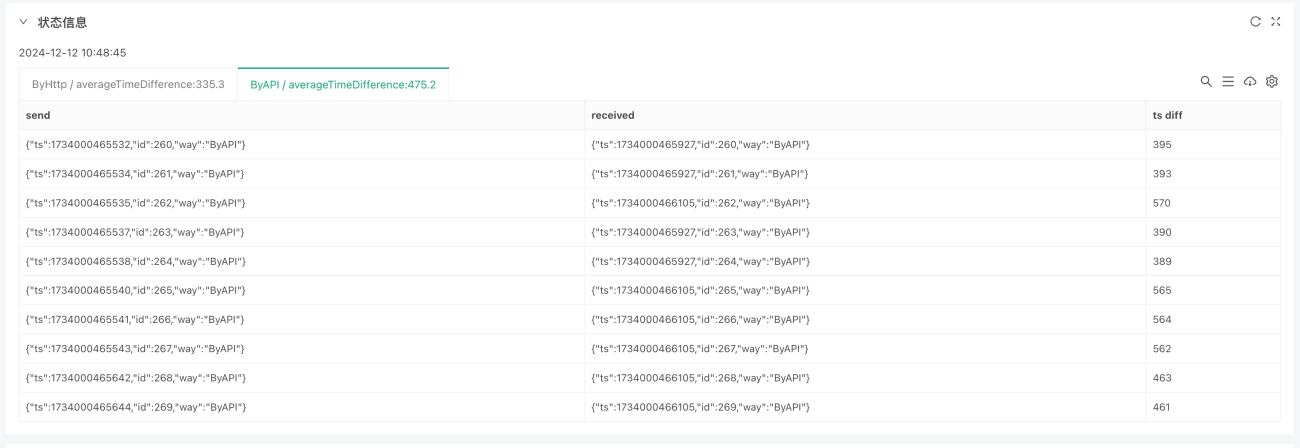
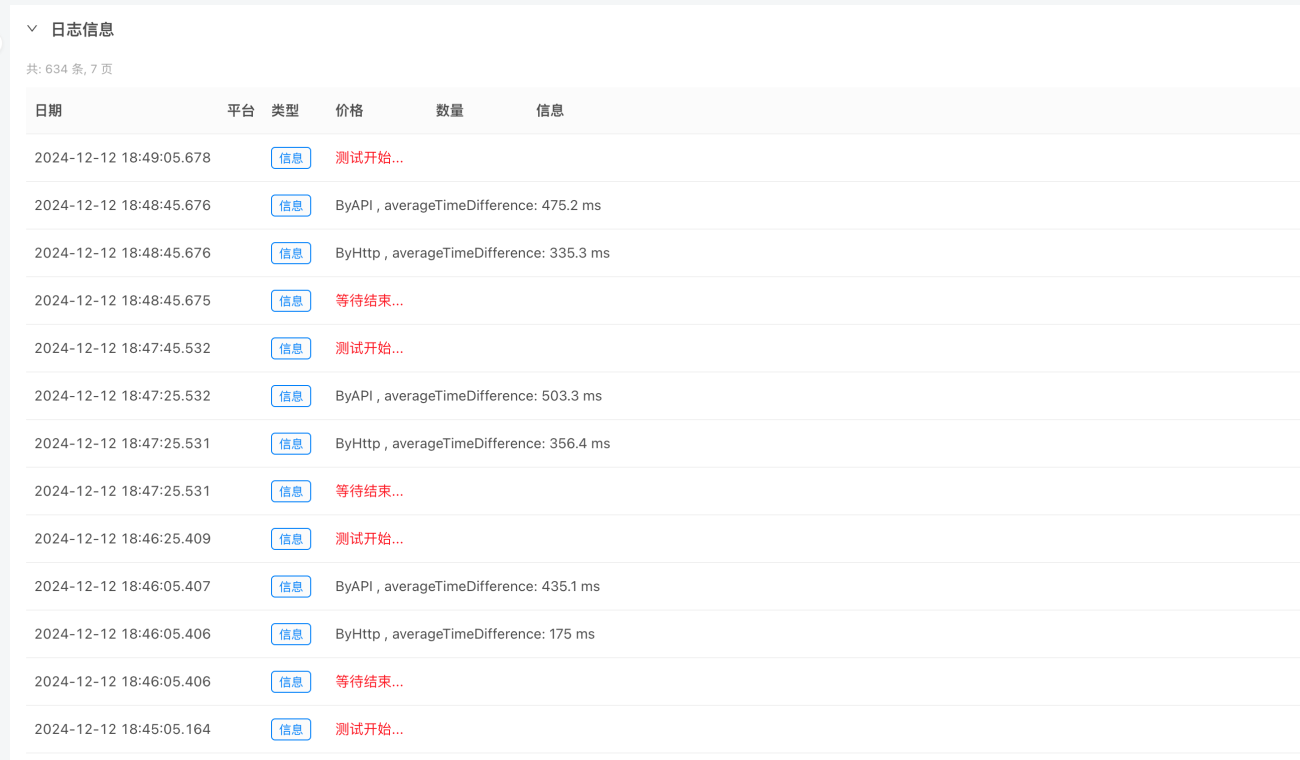
通过一段时间的测试可以观察出,Http方式比API方式平均耗时少一点。
策略内置Http服务接收信号,此种测试方式并不是很严谨,请求应该来自于外部。为了简单理解起见,可以忽略这一点因素。对于两种方式的信号获取,策略内建Http服务毕竟减少了一个环节,应该是响应速度更快一点。对于信号稳定性,比较重要的是信号不能丢失、错过。测试结果可以看到,FMZ平台的扩展API同样稳定,测试中没有看到信号丢失,但是不排除网络等各个方面的因素导致信号问题,使用内建的Http服务直接接收外部信号也是一种比较好的方案。
本篇抛砖引玉,文中代码的内置Http服务没有做校验,并且只是简单的接收消息数据,下一篇我们一起完整实现一个可用的内建Http服务用于接收外部Trading View信号的模板,欢迎讨论,感谢阅读。
- 1