
0
Follow
20
Followers
FMZ Launched Python Local Backtest Engine
Created 2022-03-30 10:01:05 Updated 2022-03-30 11:13:37
0
1044
FMZ Has Launched Python Local Backtest Engine
FMZ backtest engine python package
supports python2 and python3; supports Windows, Linux, Mac OS systems.
Install
Enter the following command in the command line:
pip install https://github.com/fmzquant/backtest_python/archive/master.zip
- Note:
When install the engine in the Mac OS system, if there are security restrictions, you need to add "sudo" in front of "pip", and the system password will be requested before the entire command of installation is executed.
Simple Example
            python

            '''backtest
start: 2018-02-19 00:00:00
end: 2018-03-22 12:00:00
period: 15m
exchanges: [{"eid":"OKEX","currency":"LTC_BTC","balance":3,"stocks":0}]
'''
from fmz import *
task = VCtx(__doc__) # initialize backtest engine from __doc__
print exchange.GetAccount()
print exchange.GetTicker()
print task.Join() # print backtest result
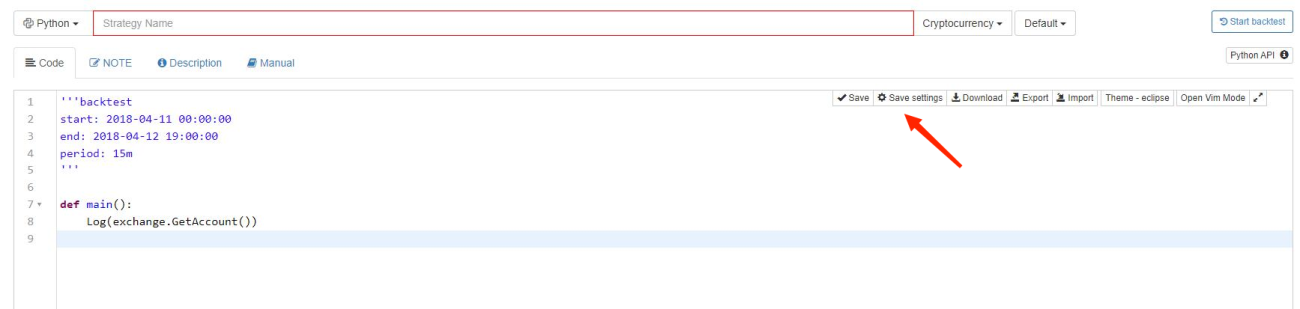
The config string can be generated automatically by saving the backtest configuration in the "Strategy Edit" page.
Documentation
API Documentation: (namely the documentation calling functions like GetAccount in the demo)
Simple Remarks of Python Code:
            python

            '''backtest
start: 2018-02-19 00:00:00
end: 2018-03-22 12:00:00
period: 15m
exchanges: [{"eid":"OKEX","currency":"LTC_BTC","balance":3,"stocks":0}]
'''
from fmz import *           # Call the FMZ Quant library
task = VCtx(__doc__)        # Initialize the backtest engine from __doc__ by calling VCtx
print exchange.GetAccount() # Test GetAccount function, and print the account information of the backtested platform
print exchange.GetTicker()  # Test GetTicker function, and print the market quote information of backtest system
print task.Join()           # Call the initialized task object, and print the backtest result
-
__doc__
With two underscores, "__doc__" is used to access the first unassigned string in modules like class declaration or function declaration; the string can be enclosed by """ ""","" "" or ' ', which is to pass the backtest configuration information of '''backtest ... ''' in the code into the VCtx class constructor to construct objects. -
Modify the backtest code, to see how to specifically call Log and GetTicker.
# coding=UTF-8 '''backtest start: 2018-02-19 00:00:00 end: 2018-03-22 12:00:00 period: 15m exchanges: [{"eid":"OKEX","currency":"LTC_BTC","balance":3,"stocks":0}] ''' from fmz import * # Call the FMZ Quant library task = VCtx(__doc__) # initialize backtest engine from __doc__ # Call VCtx function according to the initialization of __doc__ print exchange.GetAccount() # Test GetAccount and print the account information of the tested platform by the backtest system Log("\n call Log") Log("Call exchange.GetTicker() : ", exchange.GetTicker()) print task.Join() # Call the initialized task object, and print the backtest result- print exchange.GetAccount():
{'Balance': 3.0, 'Stocks': 0.0, 'FrozenBalance': 0.0, 'FrozenStocks': 0.0}- Log("\n call Log") 、 Log("Call exchange.GetTicker() : ", exchange.GetTicker())
The printed data is in the structure of print task.Join():
{ "Chart": { "Cfg": "", "Datas": [] }, "Elapsed": 42000000, "Finished": true, "Indicators": {}, "LoadBytes": 441845, "LoadElapsed": 24000000, "LogsCount": 2, "Profit": 0.0, "ProfitLogs": [], "Progress": 100.0, "RuntimeLogs": [ # Here call the printed data [1, 1518969600200, 5, "", 0, 0.0, 0.0, "\n call Log", "", ""], [2, 1518969600400, 5, "", 0, 0.0, 0.0, "Call exchange.GetTicker() : {'Sell': 0.02113476, 'Volume': 519.6953, 'Buy': 0.02113474, 'Last': 0.02113475, 'High': 0.02113476, 'Time': 1518969600000L, 'Low': 0.02113474}", "", ""] ], "Snapshort": [{ "Balance": 3.0, "BaseCurrency": "LTC", "Commission": 0.0, "FrozenBalance": 0.0, "FrozenStocks": 0.0, "Id": "OKEX", "QuoteCurrency": "BTC", "Stocks": 0.0, "Symbols": { "LTC_BTC_OKEX": { "Last": 0.01893785 } }, "TradeStatus": {} }], "Status": "", "Task": { "Args": null, "Exchanges": [{ "Balance": 3, "BaseCurrency": "LTC", "BasePeriod": 300000, "BasePrecision": 4, "DepthDeep": 5, "FaultTolerant": 0, "FeeDenominator": 5, "FeeMaker": 75, "FeeMin": 0, "FeeTaker": 80, "Id": "OKEX", "Label": "OKEX", "PriceTick": 1e-08, "QuoteCurrency": "BTC", "QuotePrecision": 8, "SlipPoint": 0, "Stocks": 0 }], "Options": { "DataServer": "q.botvs.net", "MaxChartLogs": 800, "MaxProfitLogs": 800, "MaxRuntimeLogs": 800, "NetDelay": 200, "Period": 900000, "RetFlags": 189, "SnapshortPeriod": 300000, "TimeBegin": 1518969600, "TimeEnd": 1521691200, "UpdatePeriod": 5000 } }, "TaskStatus": 1, "Time": 1521691200000 } -
How to use a strategy to backtest in a local backtest engine?
python
# !/usr/local/bin/python
# -*- coding: UTF-8 -*-
'''backtest
start: 2018-02-19 00:00:00
end: 2018-03-22 12:00:00
period: 15m
exchanges: [{"eid":"Bitfinex","currency":"BTC_USD","balance":10000,"stocks":3}]
'''
import sys
sys.path.append("/usr/local/lib/python2.7/site-packages") # Add a path during the backtest, and you can delete it if not needed
from fmz import *
import math
import talib
task = VCtx(__doc__) # initialize backtest engine from __doc__
# ------------------------------ Strategy Section Starts --------------------------
print exchange.GetAccount() # Call some interfaces, and print their return values
print exchange.GetTicker()
def adjustFloat(v): # Custom functions in the strategy
v = math.floor(v * 1000)
return v / 1000
def onTick(e):
Log("onTick")
# ....
#
# ...
#
# Here the codes including the implementation of custom functions are omitted
def main():
InitAccount = GetAccount()
while True:
onTick(exchange)
Sleep(1000)
# ------------------------------ Strategy Section Ends --------------------------
try:
main() # Raise EOFError() when the backtest ends, to stop the backtest loop. Therefore, the error needs to be processed by calling task.Join() when the error is detected, and print the backtest result
except:
print task.Join() # print the backtest result
Related Recommendations
Real Technology of FMZ Quant - How to Break the Limits for Obtaining TickQuick Construction of Your Own Exclusive Multi-User Quantitative Trading Platform Without CostUse the extended API on FMZ Quant to realize "TradingView" alert signal tradingMain Interface Overview and Structure of FMZ Quant Trading PlatformHow to Pend Market orders (Only Passively Traded) and Place Orders in Batch on BitMEX (IO Demo)FMZ Feedback to New and Old Users by AffiliationFMZ Quant Simulation Level Backtest Mechanism DescriptionFMZ Backtest Mechanism DescriptionLinux Docker Installation and Update StepsQuick Start for Python
Comment
All comments (0)
No data
- 1