
8
Follow
1375
Followers
La versión Python de TableTemplet (versión de prueba)
Porte de la plantilla TableTemplet basado en JavaScript.
# TableTemplet
import json
listener = {}
class Table():
"""docstring for Table"""
def __init__(self):
self.tb = {
"type" : "table",
"title" : "Table",
"cols" : [],
"rows" : []
}
def SetColRow(self, col_index, row_index, row):
if (type(col_index) is int) and (type(row_index) is int) :
if (col_index > len(self.tb["cols"])) or (row_index > len(self.tb["rows"])) :
Log("索引超出范围!col_index:", col_index, "row_index:", row_index)
else :
self.tb["rows"][row_index - 1][col_index - 1] = row
else :
Log("col_index:", col_index, "row_index:", row_index)
raise "SetColRow 参数错误!"
def SetBtn(self, col_index, row_index, cmd, name, callback):
global listener
if (type(col_index) is int) and (type(row_index) is int) :
if (col_index > len(self.tb["cols"])) or (row_index > len(self.tb["rows"])) :
Log("索引超出范围!col_index:", col_index, "row_index:", row_index)
else :
self.tb["rows"][row_index - 1][col_index - 1] = {"type" : "button", "cmd" : cmd, "name" : name}
listener[cmd] = callback
else :
Log("col_index:", col_index, "row_index:", row_index)
raise "SetColRow 参数错误!"
def SetRows(self, row_index, Rows):
pass
def SetCols(self, Cols):
self.tb["cols"] = Cols
def GetRows(self, row_index):
if (type(row_index) is int) and (row_index < len(self.tb["rows"])) :
return self.tb["rows"][row_index - 1]
else :
Log("参数错误! 或者 参数索引超出范围!")
def Init(self, title, col_length, row_length):
self.tb["title"] = title
for i in range(1, row_length + 1) :
if i == 1 :
for n in range(1, col_length + 1) :
self.tb["cols"].append(n)
self.tb["rows"].append([])
for m in range(1, col_length + 1) :
self.tb["rows"][i - 1].append(str(i) + "/" + str(m))
class CreateTableManager():
"""docstring for CreateTableManager"""
def __init__(self): # CreateTableManager 构造函数
self.tables = [] # 用于储存 table 对象
def GetTable(self, index):
if type(index) is int :
return self.tables[index]
elif type(index) is str :
for i in range(len(self.tables)) :
if self.tables[i]["title"] == index:
return self.tables[i]
else :
Log("GetTable参数:", index)
raise "GetTable 参数错误!"
def AddTable(self, title, col_length, row_length): # cols, rows
tb = Table()
tb.Init(title, col_length, row_length)
self.tables.append(tb.tb)
return tb
def UpdateCMD(self):
global listener
cmd = GetCommand()
if cmd :
if listener[cmd] :
listener[cmd](cmd)
else :
Log("找不到名为:" + cmd + "的命令")
def LogStatus(self, before, end):
self.UpdateCMD()
LogStatus(before + '\n`' + json.dumps(self.tables) + '`\n' + end)
# 导出函数
ext.CreateTableManager = CreateTableManager
# 测试代码
def test1(cmd): # 用作函数回调
Log(_D(), cmd)
def main():
account = exchange.GetAccount()
array1 = ["aa", "bb", "cc"]
array2 = [1, 2, 4, 55]
TbM = ext.CreateTableManager()
tb1 = TbM.AddTable("tb1", 6, 7)
tb1.SetColRow(3, 4, "hello")
tb1.SetColRow(3, 5, 12)
tb1.SetColRow(3, 6, account)
tb1.SetColRow(3, 7, array1)
tb1.SetColRow(3, 2, array2)
tb1.SetBtn(3, 1, "Cover", "平仓", test1) # 由于 python 没有多行 匿名函数(如JS 的 function(){...})所以可以声明普通函数传入。
tb_1 = TbM.GetTable(0)
tb_2 = TbM.GetTable("tb1")
Log(tb_1)
Log(tb_2, "#FF0000")
tb1_row1 = tb1.GetRows(1)
Log(tb1_row1)
tb1_row1[0] = "修改"
x = 0
while True :
x = x + 1
tb1_row1[0] = _D()
tb1.SetCols([x + 1, x + 2, x + 3, x + 4, x + 5, x + 6])
TbM.LogStatus("begin", "end")
Sleep(1000)
-
Prueba de pantalla
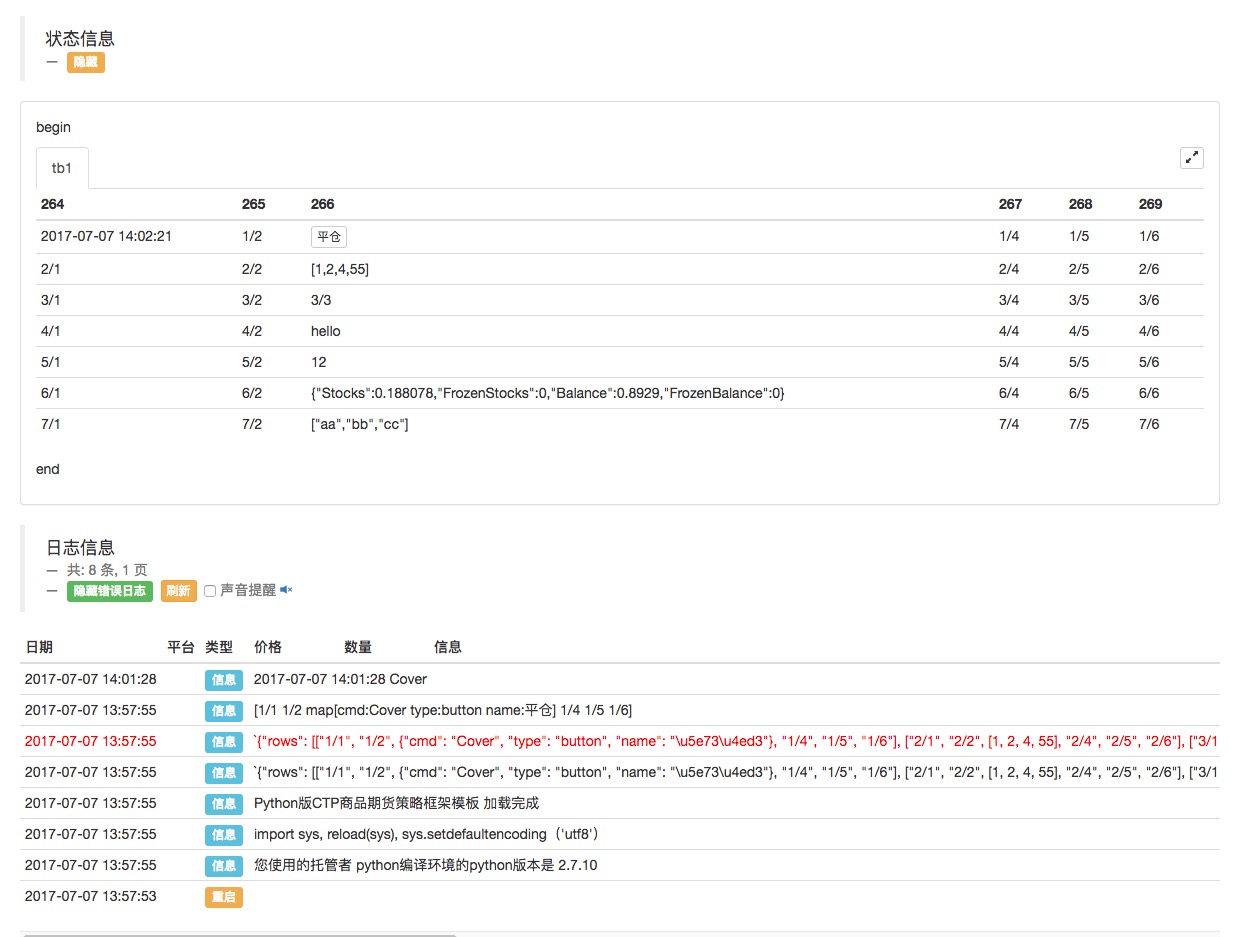
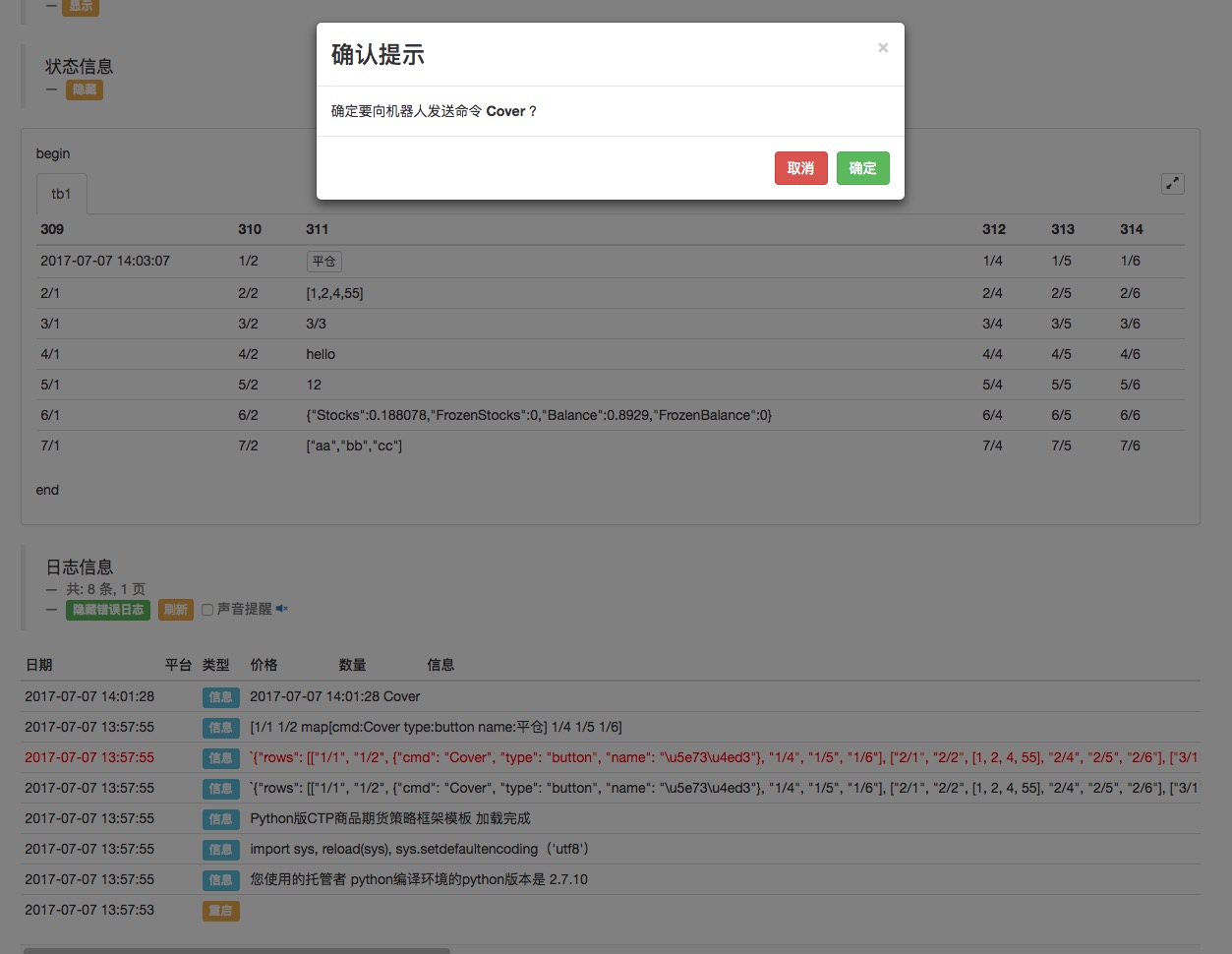
Soporte para varios formularios
            # tb2
tb2 = TbM.AddTable("tb2", 4, 4)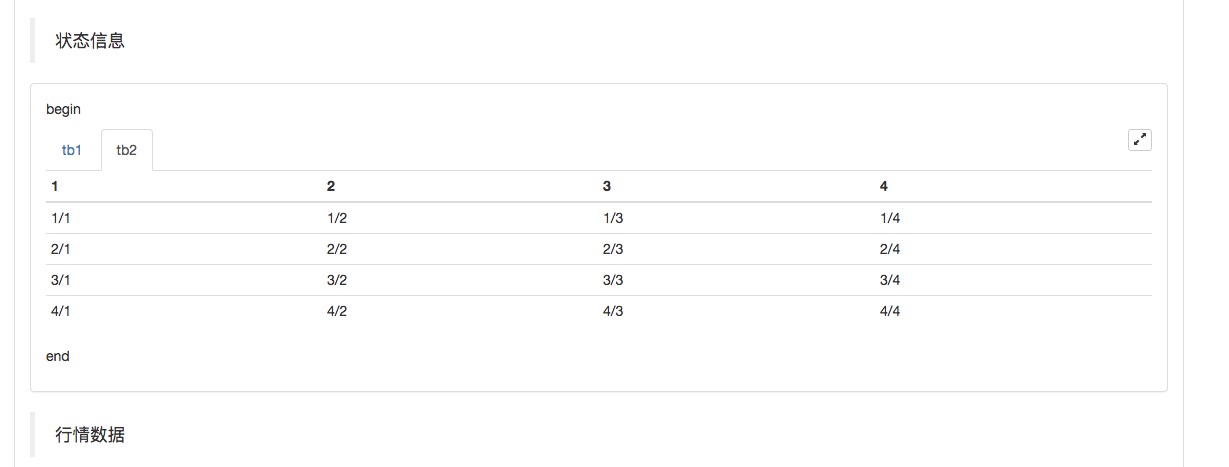
-
Código de prueba
            def test1(cmd):        # 用作函数回调
    Log(_D(), cmd)

def main():
    account = exchange.GetAccount()    # 待写入 状态栏表格的数据
    array1 = ["aa", "bb", "cc"]        # 待写入 状态栏表格的数据
    array2 = [1, 2, 4, 55]             # 待写入 状态栏表格的数据

    TbM = ext.CreateTableManager()     # 调用模板导出函数 ext.CreateTableManager 生成一个 控制对象
    tb1 = TbM.AddTable("tb1", 6, 7)    # 调用 控制对象 TbM 的成员函数 AddTable 生成一个表格对象 tb1, 6列,7行。

    tb1.SetColRow(3, 4, "hello")       # 测试 SetColRow 函数, 向 第3列 ,第4行 写入 "hello"
    tb1.SetColRow(3, 5, 12)            # 写入 数值
    tb1.SetColRow(3, 6, account)       # 写入 字典
    tb1.SetColRow(3, 7, array1)        # 写入 列表
    tb1.SetColRow(3, 2, array2)        # 写入 列表
    tb1.SetBtn(3, 1, "Cover", "平仓", test1)    # 由于 python 没有多行 匿名函数(如JS 的 function(){...})所以可以声明普通函数传入。
                                               # 写入按钮控件
    tb_1 = TbM.GetTable(0)             # 测试 GetTable 函数, 获取指定索引的 表格对象字典, 参数使用索引号,0代表第一个
    tb_2 = TbM.GetTable("tb1")         # 测试 GetTable 函数, 获取指定名称的 表格对象字典, 参数使用表格名称字符串
    Log(tb_1)
    Log(tb_2, "#FF0000")               # 同样可以使用 tb_2["rows"][2][0] = "XXX"  对表格内容进行修改
    tb1_row1 = tb1.GetRows(1)          # 测试 GetRows 函数 获取指定索引的行
    Log(tb1_row1)
    tb1_row1[0] = "修改"                # 通过GetRows返回的tb1_row1 修改 表格内容
    x = 0                              # 计数
    while True :
        x = x + 1                      # 每次循环计数变动
        tb1_row1[0] = _D()             # 使用 由 GetRows 函数获取的 tb1_row1 修改,显示出时间
        tb1.SetCols([x + 1, x + 2, x + 3, x + 4, x + 5, x + 6])  # 测试 SetCols 函数,修改 表头
        TbM.LogStatus("begin", "end")  # 显示状态栏表格
        Sleep(1000)                    # 测试轮询间隔 1秒(1000毫秒)
La estrategia de los Estados Unidos es la estrategia de los Estados Unidos.
Si hay un BUG, por favor, envíen un mensaje ^^
Related Recommendations
Comment
All comments (0)
No data
- 1