
मात्रात्मक व्यापार और स्वचालित रणनीति विकास में, कभी-कभी http सेवाओं का उपयोग किया जाता है। इन्वेंटर क्वांटिटेटिव प्लेटफॉर्म ने हाल ही में जोड़ा है_Serve() फ़ंक्शन, उपयोगकर्ताओं को लचीली HTTP, HTTPS और TCP सेवा निर्माण क्षमताएं प्रदान करता है। इस सुविधा के साथ, डेवलपर्स सेवा कॉन्फ़िगरेशन प्रक्रिया को सरल बना सकते हैं और मात्रात्मक वातावरण में अधिक अनुकूलित सेवाओं को लागू कर सकते हैं, जिससे रणनीति डिजाइन अधिक सुचारू और सुविधाजनक हो जाता है। यह लेख परिचय कराएगा_Serve() फ़ंक्शन के उपयोग परिदृश्य और बुनियादी संचालन आपको इन्वेंटर क्वांट के इस नए फ़ंक्शन के साथ शीघ्रता से आरंभ करने में सहायता करते हैं।
के बारे में_Serve()प्लेटफ़ॉर्म API दस्तावेज़ में अपडेट किया गया:
ज़रूरत
प्लेटफ़ॉर्म को उन्नत किया गया है_Serve()फ़ंक्शन (चूँकि जावास्क्रिप्ट भाषा में पहले सेवाएँ बनाने का फ़ंक्शन नहीं था, इसलिए यह फ़ंक्शन केवल जावास्क्रिप्ट भाषा नीतियों का समर्थन करता है)। सरल शब्दों में, यह नीतियों को नेटवर्क सेवाएँ बनाने की क्षमता प्रदान करता है। इस फ़ंक्शन के आधार पर, हम कई फ़ंक्शन विकसित कर सकते हैं और कई ज़रूरतों को हल कर सकते हैं। उदाहरण के लिए, रणनीति में बाह्य इंटरफेस, डेटा अग्रेषण हो सकता है, तथा यह प्लेटफॉर्म के सामान्य प्रोटोकॉल कार्यों के साथ सहयोग कर सकता है, ताकि FMZ प्लेटफॉर्म द्वारा समर्थित न होने वाले एक्सचेंजों को निर्बाध रूप से समाहित किया जा सके।
इस लेख में, हम "FMZ प्लेटफॉर्म द्वारा समर्थित नहीं होने वाले एक्सचेंजों को सहजता से समाहित करने के लिए प्लेटफॉर्म के सामान्य प्रोटोकॉल फ़ंक्शन के साथ सहयोग करने" की आवश्यकता को एक उदाहरण के रूप में लेंगे। पिछले लेखों में「सामान्य प्रोटोकॉल गाइड」इस लेख में, हम स्पॉट मोड में OKX एक्सचेंज के API को समाहित करने के लिए पायथन भाषा का उपयोग करते हैं (क्योंकि FMZ स्वयं OKX का समर्थन करता है, OKX का उपयोग यहां केवल एक उदाहरण के रूप में किया गया है, और यह उन अन्य एक्सचेंजों पर भी लागू होता है जिनसे FMZ प्लेटफॉर्म जुड़ा नहीं है)। इस लेख में पायथन सामान्य प्रोटोकॉल प्रोग्राम को अलग से चलाने की आवश्यकता है। जब जावास्क्रिप्ट भाषा समर्थन करती है_Serve()फ़ंक्शन के बाद, जावास्क्रिप्ट भाषा रणनीति के सामान्य प्रोटोकॉल तक पहुंचना आसान है।
हम एक्सचेंज इंटरफ़ेस के सामान्य प्रोटोकॉल को एक "टेम्पलेट लाइब्रेरी" में समाहित करते हैं और इसे सीधे रणनीति में एकीकृत करते हैं, ताकि रणनीति उन एक्सचेंजों तक सहजता से पहुंच सके जो FMZ पर समर्थित नहीं हैं। मैं यहां "सामान्य प्रोटोकॉल" एक्सचेंज ऑब्जेक्ट को कॉन्फ़िगर करने के तरीके के बारे में विवरण में नहीं जाऊंगा, आप लेख का संदर्भ ले सकते हैं:
-
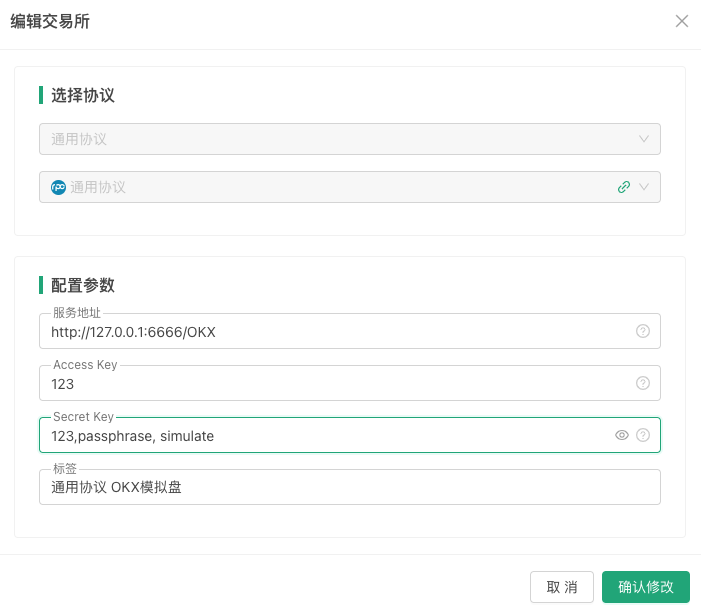
प्लेटफ़ॉर्म पर सामान्य प्रोटोकॉल एक्सचेंज कॉन्फ़िगरेशन इस प्रकार है:
टेम्पलेट डिज़ाइन करते समय, आप
/OKXयह पहचान करता है कि कॉन्फ़िगर किया गया जेनेरिक प्रोटोकॉल एक्सचेंज ऑब्जेक्ट किस एक्सचेंज से संबंधित है।
सामान्य प्रोटोकॉल टेम्पलेट कार्यान्वयन
सबसे पहले, इन्वेंटर क्वांटिटेटिव ट्रेडिंग प्लेटफॉर्म में एक नई रणनीति बनाएं, रणनीति प्रकार को टेम्पलेट लाइब्रेरी पर सेट करें, और रणनीति भाषा को जावास्क्रिप्ट पर सेट करें।
टेम्पलेट पैरामीटर डिज़ाइन
बनाए गए नीति टेम्पलेट में तीन पैरामीटर जोड़ें:

फिर आप सामान्य प्रोटोकॉल टेम्पलेट के लिए कोड डिजाइन करना और लिखना शुरू कर सकते हैं।
कोड कार्यान्वयन
कोड टीएस शैली में लिखा गया है।$.startService()यह फ़ंक्शन एक टेम्पलेट इंटरफ़ेस फ़ंक्शन है जिसका उपयोग सामान्य प्रोटोकॉल सेवा शुरू करने के लिए किया जाता है।
ts
// @ts-check
$.startService = function (address, port, proxyConfig) {
__Serve(`http://${address}:${port}`, function (ctx, proxyConfig) {
// interface
interface IData {
data: object
raw: object
}
interface IError {
error: any
}
// custom protocol for OKX
class CustomProtocolOKX {
apiBase: string = "https://www.okx.com"
accessKey: string
secretKey: string
passphrase: string
proxyConfig: string = ""
simulate: boolean = false
constructor(accessKey: string, secretKey: string, passphrase: string, simulate?: boolean, proxyConfig?: string) {
this.accessKey = accessKey
this.secretKey = secretKey
this.passphrase = passphrase
if (typeof(simulate) == "boolean") {
this.simulate = simulate
}
this.proxyConfig = proxyConfig
}
httpReq(method: string, path: string, query: string = "", params: {[key: string]: any} = {}, headers: {key: string, value: string | ArrayBuffer}[] = []): {[key: string]: any} {
let ret = null
let options = {
method: method,
headers: {
'User-Agent': 'Mozilla/5.0 (Windows; U; Windows NT 6.1; en-US; rv:1.9.1.6) Gecko/20091201 Firefox/3.5.6',
'Content-Type': 'application/json; charset=UTF-8',
'x-simulated-trading': this.simulate ? "1" : "0"
},
}
// headers
if (Array.isArray(headers) && headers.length > 0) {
for (var pair of headers) {
options.headers[pair.key] = pair.value
}
}
let url = ""
if (method == "GET") {
if (typeof(query) == "string" && query.length > 0) {
url = `${this.apiBase}${path}?${query}`
} else {
url = `${this.apiBase}${path}`
}
} else {
url = `${this.apiBase}${path}`
options.body = JSON.stringify(params)
}
// request
try {
if (this.proxyConfig != "") {
url = `${this.proxyConfig}${url}`
}
ret = JSON.parse(HttpQuery(url, options))
} catch(e) {
return null
}
return ret
}
callSignedAPI(method: string, path: string, query: string = "", params: {[key: string]: any} = {}): {[key: string]: any} {
const strTime = new Date().toISOString().slice(0, -5) + 'Z'
let jsonStr = ""
if (method == "GET") {
jsonStr = Object.keys(params).length > 0 ? JSON.stringify(params) : ""
} else {
jsonStr = Object.keys(params).length > 0 ? JSON.stringify(params) : "{}"
}
let message = `${strTime}${method}${path}${jsonStr}`
if (method === "GET" && query !== "") {
message = `${strTime}${method}${path}?${query}${jsonStr}`
}
const signature = Encode("sha256", "string", "base64", message, "string", this.secretKey)
let headers = []
headers.push({key: "OK-ACCESS-KEY", value: this.accessKey})
headers.push({key: "OK-ACCESS-PASSPHRASE", value: this.passphrase})
headers.push({key: "OK-ACCESS-TIMESTAMP", value: strTime})
headers.push({key: "OK-ACCESS-SIGN", value: signature})
return this.httpReq(method, path, query, params, headers)
}
urlEncode(params: {[key: string]: string | number}): string {
let encodeParams: string[] = []
for (const [key, value] of Object.entries(params)) {
encodeParams.push(`${encodeURIComponent(key)}=${encodeURIComponent(value)}`)
}
return encodeParams.join("&")
}
symbol2Inst(symbol: string): string {
let arr = symbol.split("_")
if (arr.length >= 2) {
return `${arr[0]}-${arr[1]}`.toUpperCase()
} else {
return `${arr[0]}-USDT`.toUpperCase()
}
}
getSymbol(inst: string): string {
let arr = inst.split("-")
if (arr.length >= 2) {
return `${arr[0]}_${arr[1]}`.toUpperCase()
} else {
return `${arr[0]}-USDT`.toUpperCase()
}
}
// The following code encapsulates OKX's interface
GetTicker(symbol: string): IData | IError {
// GET /api/v5/market/ticker , param: instId
let inst = this.symbol2Inst(symbol)
let ret = this.httpReq("GET", "/api/v5/market/ticker", `instId=${inst}`)
let retData = {}
for (var ele of ret["data"]) {
retData["symbol"] = this.getSymbol(ele["instId"])
retData["buy"] = ele["bidPx"]
retData["sell"] = ele["askPx"]
retData["high"] = ele["high24h"]
retData["low"] = ele["low24h"]
retData["open"] = ele["open24h"]
retData["last"] = ele["last"]
retData["vol"] = ele["vol24h"]
retData["time"] = ele["ts"]
}
return {data: retData, raw: ret}
}
GetAccount(): IData | IError {
// GET /api/v5/account/balance
let ret = this.callSignedAPI("GET", "/api/v5/account/balance")
let retData = []
for (var ele of ret["data"]) {
for (var detail of ele["details"]) {
let asset = {"currency": detail["ccy"], "free": detail["availEq"], "frozen": detail["ordFrozen"]}
if (detail["availEq"] == "") {
asset["free"] = detail["availBal"]
}
retData.push(asset)
}
}
return {data: retData, raw: ret}
}
IO(method: string, path: string, params: {[key: string]: any}): {[key: string]: any} {
let ret = null
if (method == "GET") {
ret = this.callSignedAPI(method, path, this.urlEncode(params))
} else {
ret = this.callSignedAPI(method, path, "", params)
}
return {data: ret}
}
}
// protocol factory
class ProtocolFactory {
static createExWrapper(accessKey: string, secretKey: string, exName: string): any {
let protocol = null
if (exName == "/OKX") {
try {
let passphrase = ""
let simulate = false
let arrSecretKey = secretKey.split(",")
if (arrSecretKey.length == 2) {
secretKey = arrSecretKey[0]
passphrase = arrSecretKey[1]
} else if (arrSecretKey.length == 3) {
secretKey = arrSecretKey[0]
passphrase = arrSecretKey[1]
simulate = arrSecretKey[2] == "simulate" ? true : false
} else {
return null
}
protocol = new CustomProtocolOKX(accessKey, secretKey, passphrase, simulate, proxyConfig)
} catch(e) {
Log("e.name:", e.name, "e.stack:", e.stack, "e.message:", e.message)
return null
}
}
return protocol
}
}
// http service
let resp = {}
let reqMethod = ctx.method()
let reqPath = ctx.path()
let httpMethod = ctx.header("Http-Method")
let reqBody = null
try {
reqBody = JSON.parse(ctx.body())
} catch(e) {
resp = {error: {name: e.name, stack: e.stack, message: e.message, errDesc: "JSON parse error."}}
}
// onPost
if (reqMethod == "POST") {
if (!["access_key", "secret_key", "method", "params"].every(key=> key in reqBody)) {
resp = {error: {reqBody: reqBody, errDesc: "reqBody error."}}
}
if ("error" in resp) {
ctx.write(JSON.stringify(resp))
return
}
let accessKey = reqBody["access_key"]
let secretKey = reqBody["secret_key"]
let method = reqBody["method"]
let params = reqBody["params"]
let protocol = ProtocolFactory.createExWrapper(accessKey, secretKey, reqPath)
if (!protocol) {
ctx.write(JSON.stringify({error: {errDesc: "createExWrapper error."}}))
return
}
// process GetTicker / GetAccount ...
if (method == "ticker") {
if (!["symbol"].every(key=> key in params)) {
resp = {error: {params: params, errDesc: "params error."}}
} else {
let symbol = params["symbol"]
resp = protocol.GetTicker(symbol)
}
} else if (method == "accounts") {
resp = protocol.GetAccount()
} else if (method.slice(0, 6) == "__api_") {
resp = protocol.IO(httpMethod, method.slice(6), params)
} else {
ctx.write(JSON.stringify({error: {method: method, errDesc: "method not support."}}))
return
}
ctx.write(JSON.stringify(resp))
}
}, proxyConfig)
}
function init() {
$.startService(address, port, proxyConfig)
Log("启动通用协议服务,address:", address, ",port:", port, "#FF0000")
if (proxyConfig != "") {
Log("设置代理:", proxyConfig, "#FF0000")
}
}
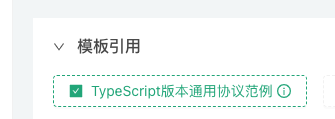
सीमित स्थान के कारण, सभी इंटरफेस यहां लागू नहीं किए गए हैं, केवलबाज़ार संबंधी प्रश्न、संपत्ति क्वेरी、आईओ कॉलइच्छुक छात्र सभी इंटरफेस को क्रियान्वित कर सकते हैं; डिजाइन पूरा होने के बाद, टेम्पलेट कोड को सेव करें और टेम्पलेट का नाम इस प्रकार सेव करें: "टाइपस्क्रिप्ट संस्करण सामान्य प्रोटोकॉल उदाहरण"।
परीक्षण रणनीति
OKX एक्सचेंज की एपीआईकी, सीक्रेटकी, पासफ़्रेज़ आदि को कॉन्फ़िगर करने के बाद, हम परीक्षण के लिए एक परीक्षण रणनीति लिख सकते हैं।
रणनीति हमारे डिज़ाइन किए गए टेम्पलेट लाइब्रेरी की जाँच करें:
परीक्षण रणनीति कोड:
javascript
function main() {
// 测试GetTicker
Log(`exchange.GetTicker():`, exchange.GetTicker())
// 测试GetAccount
Log(`exchange.GetAccount():`, exchange.GetAccount())
// 测试exchange.IO
Log(`exchange.IO("api", "POST", "/api/v5/trade/cancel-all-after", "timeOut=0"):`, exchange.IO("api", "POST", "/api/v5/trade/cancel-all-after", "timeOut=0"))
// 输出通用协议添加的交易所名称
Log(`exchange.GetName():`, exchange.GetName())
// 输出通用协议添加的交易所标签
Log(`exchange.GetLabel():`, exchange.GetLabel())
}
परीक्षण चलाना
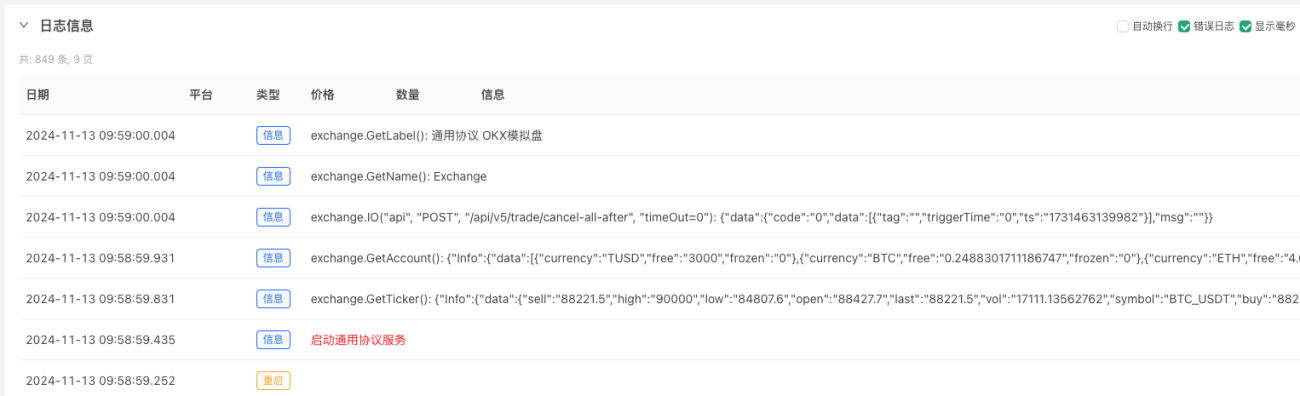
जैसा कि आप देख सकते हैं, इस रणनीति को OKX एक्सचेंज तक निर्बाध पहुंच प्राप्त करने के लिए केवल एक टेम्पलेट की जांच करने की आवश्यकता है (हालांकि OKX एक्सचेंज पहले से ही इसका समर्थन करता है, उदाहरण के लिए, यहां OKX को एक ऐसे एक्सचेंज से बदल दिया गया है जिससे FMZ अभी तक जुड़ा नहीं है)।
- 1