마켓 컬렉터의 백테스트 사용자 정의 데이터 소스 기능을 업그레이드하는 방법을 단계별로 알려드립니다.
이전 기사시장 수집기를 구현하는 방법을 단계별로 알려드립니다.우리는 함께 시장 데이터를 수집하기 위한 로봇 프로그램을 구현했습니다. 수집된 시장 데이터는 어떻게 사용합니까? 물론 백테스팅 시스템에 사용됩니다. 여기서 발명가의 양적 거래 플랫폼의 백테스팅 시스템의 사용자 정의 데이터 소스 기능에 의존하여 수집된 데이터를 백테스팅 시스템의 데이터 소스로 직접 사용할 수 있으므로 백테스팅 시스템을 만들 수 있습니다. 테스트 시스템은 과거 데이터를 백테스팅하려는 모든 시장에 적용할 수 있습니다.
그러므로 우리는 "마켓 컬렉터"를 업그레이드할 수 있습니다! 마켓 수집기는 백테스팅 시스템에 데이터를 제공하기 위한 사용자 정의 데이터 소스로도 활용될 수 있습니다.
도움이 필요하면, 행동하세요!
준비하다
준비 사항은 지난 기사와 다릅니다. 지난번에는 로컬 MAC 컴퓨터에서 호스트 프로그램을 실행하고 mongodb 데이터베이스를 설치하고 데이터베이스 서비스를 시작했습니다. 이번에는 운영 환경을 VPS로 변경하고 Alibaba Cloud Linux 서버를 사용하여 프로그램을 실행했습니다.
-
몽고디비 데이터베이스
이전 문서에서처럼 마켓 수집 프로그램이 실행되는 장치에 MongoDB 데이터베이스를 설치하고 서비스를 시작해야 합니다. 기본적으로 MAC 컴퓨터에 mongodb를 설치하는 것과 같습니다. 인터넷에는 많은 튜토리얼이 있습니다. 검색할 수 있습니다. 매우 간단합니다.
-
파이썬 3 설치
이 프로그램은 Python 3을 사용합니다. 일부 라이브러리가 사용되므로 사용할 수 없는 경우 설치해야 합니다.- pymongo
- http
- urllib
-
주인
Inventor 양적 거래 플랫폼의 관리자를 운영하세요.
"시장 정보 수집기" 수정
시장 수집가RecordsCollector(튜토리얼)이 전략.
몇 가지 변경 사항을 만들어 보겠습니다.
프로그램이 데이터 수집을 위한 while 루프에 들어가기 전에 다중 스레드 라이브러리를 사용하여 Inventor의 양적 거래 플랫폼 백테스팅 시스템으로부터 데이터 요청을 수신하는 서비스를 동시에 시작합니다.
(다른 세부 사항은 무시할 수 있습니다)
RecordsCollector(사용자 정의 데이터 소스 기능을 제공하도록 업그레이드됨)
python
import _thread
import pymongo
import json
import math
from http.server import HTTPServer, BaseHTTPRequestHandler
from urllib.parse import parse_qs, urlparse
def url2Dict(url):
query = urlparse(url).query
params = parse_qs(query)
result = {key: params[key][0] for key in params}
return result
class Provider(BaseHTTPRequestHandler):
def do_GET(self):
try:
self.send_response(200)
self.send_header("Content-type", "application/json")
self.end_headers()
dictParam = url2Dict(self.path)
Log("自定义数据源服务接收到请求,self.path:", self.path, "query 参数:", dictParam)
# 目前回测系统只能从列表中选择交易所名称,在添加自定义数据源时,设置为币安,即:Binance
exName = exchange.GetName()
# 注意,period为底层K线周期
tabName = "%s_%s" % ("records", int(int(dictParam["period"]) / 1000))
priceRatio = math.pow(10, int(dictParam["round"]))
amountRatio = math.pow(10, int(dictParam["vround"]))
fromTS = int(dictParam["from"]) * int(1000)
toTS = int(dictParam["to"]) * int(1000)
# 连接数据库
Log("连接数据库服务,获取数据,数据库:", exName, "表:", tabName)
myDBClient = pymongo.MongoClient("mongodb://localhost:27017")
ex_DB = myDBClient[exName]
exRecords = ex_DB[tabName]
# 要求应答的数据
data = {
"schema" : ["time", "open", "high", "low", "close", "vol"],
"data" : []
}
# 构造查询条件:大于某个值{'age': {'$gt': 20}} 小于某个值{'age': {'$lt': 20}}
dbQuery = {"$and":[{'Time': {'$gt': fromTS}}, {'Time': {'$lt': toTS}}]}
Log("查询条件:", dbQuery, "查询条数:", exRecords.find(dbQuery).count(), "数据库总条数:", exRecords.find().count())
for x in exRecords.find(dbQuery).sort("Time"):
# 需要根据请求参数round和vround,处理数据精度
bar = [x["Time"], int(x["Open"] * priceRatio), int(x["High"] * priceRatio), int(x["Low"] * priceRatio), int(x["Close"] * priceRatio), int(x["Volume"] * amountRatio)]
data["data"].append(bar)
Log("数据:", data, "响应回测系统请求。")
# 写入数据应答
self.wfile.write(json.dumps(data).encode())
except BaseException as e:
Log("Provider do_GET error, e:", e)
def createServer(host):
try:
server = HTTPServer(host, Provider)
Log("Starting server, listen at: %s:%s" % host)
server.serve_forever()
except BaseException as e:
Log("createServer error, e:", e)
raise Exception("stop")
def main():
LogReset(1)
exName = exchange.GetName()
period = exchange.GetPeriod()
Log("收集", exName, "交易所的K线数据,", "K线周期:", period, "秒")
# 连接数据库服务,服务地址 mongodb://127.0.0.1:27017 具体看服务器上安装的mongodb设置
Log("连接托管者所在设备mongodb服务,mongodb://localhost:27017")
myDBClient = pymongo.MongoClient("mongodb://localhost:27017")
# 创建数据库
ex_DB = myDBClient[exName]
# 打印目前数据库表
collist = ex_DB.list_collection_names()
Log("mongodb ", exName, " collist:", collist)
# 检测是否删除表
arrDropNames = json.loads(dropNames)
if isinstance(arrDropNames, list):
for i in range(len(arrDropNames)):
dropName = arrDropNames[i]
if isinstance(dropName, str):
if not dropName in collist:
continue
tab = ex_DB[dropName]
Log("dropName:", dropName, "删除:", dropName)
ret = tab.drop()
collist = ex_DB.list_collection_names()
if dropName in collist:
Log(dropName, "删除失败")
else :
Log(dropName, "删除成功")
# 开启一个线程,提供自定义数据源服务
try:
# _thread.start_new_thread(createServer, (("localhost", 9090), )) # 本机测试
_thread.start_new_thread(createServer, (("0.0.0.0", 9090), )) # VPS服务器上测试
Log("开启自定义数据源服务线程", "#FF0000")
except BaseException as e:
Log("启动自定义数据源服务失败!")
Log("错误信息:", e)
raise Exception("stop")
# 创建records表
ex_DB_Records = ex_DB["%s_%d" % ("records", period)]
Log("开始收集", exName, "K线数据", "周期:", period, "打开(创建)数据库表:", "%s_%d" % ("records", period), "#FF0000")
preBarTime = 0
index = 1
while True:
r = _C(exchange.GetRecords)
if len(r) < 2:
Sleep(1000)
continue
if preBarTime == 0:
# 首次写入所有BAR数据
for i in range(len(r) - 1):
bar = r[i]
# 逐根写入,需要判断当前数据库表中是否已经有该条数据,基于时间戳检测,如果有该条数据,则跳过,没有则写入
retQuery = ex_DB_Records.find({"Time": bar["Time"]})
if retQuery.count() > 0:
continue
# 写入bar到数据库表
ex_DB_Records.insert_one({"High": bar["High"], "Low": bar["Low"], "Open": bar["Open"], "Close": bar["Close"], "Time": bar["Time"], "Volume": bar["Volume"]})
index += 1
preBarTime = r[-1]["Time"]
elif preBarTime != r[-1]["Time"]:
bar = r[-2]
# 写入数据前检测,数据是否已经存在,基于时间戳检测
retQuery = ex_DB_Records.find({"Time": bar["Time"]})
if retQuery.count() > 0:
continue
ex_DB_Records.insert_one({"High": bar["High"], "Low": bar["Low"], "Open": bar["Open"], "Close": bar["Close"], "Time": bar["Time"], "Volume": bar["Volume"]})
index += 1
preBarTime = r[-1]["Time"]
LogStatus(_D(), "preBarTime:", preBarTime, "_D(preBarTime):", _D(preBarTime/1000), "index:", index)
# 增加画图展示
ext.PlotRecords(r, "%s_%d" % ("records", period))
Sleep(10000)
시험
로봇 구성
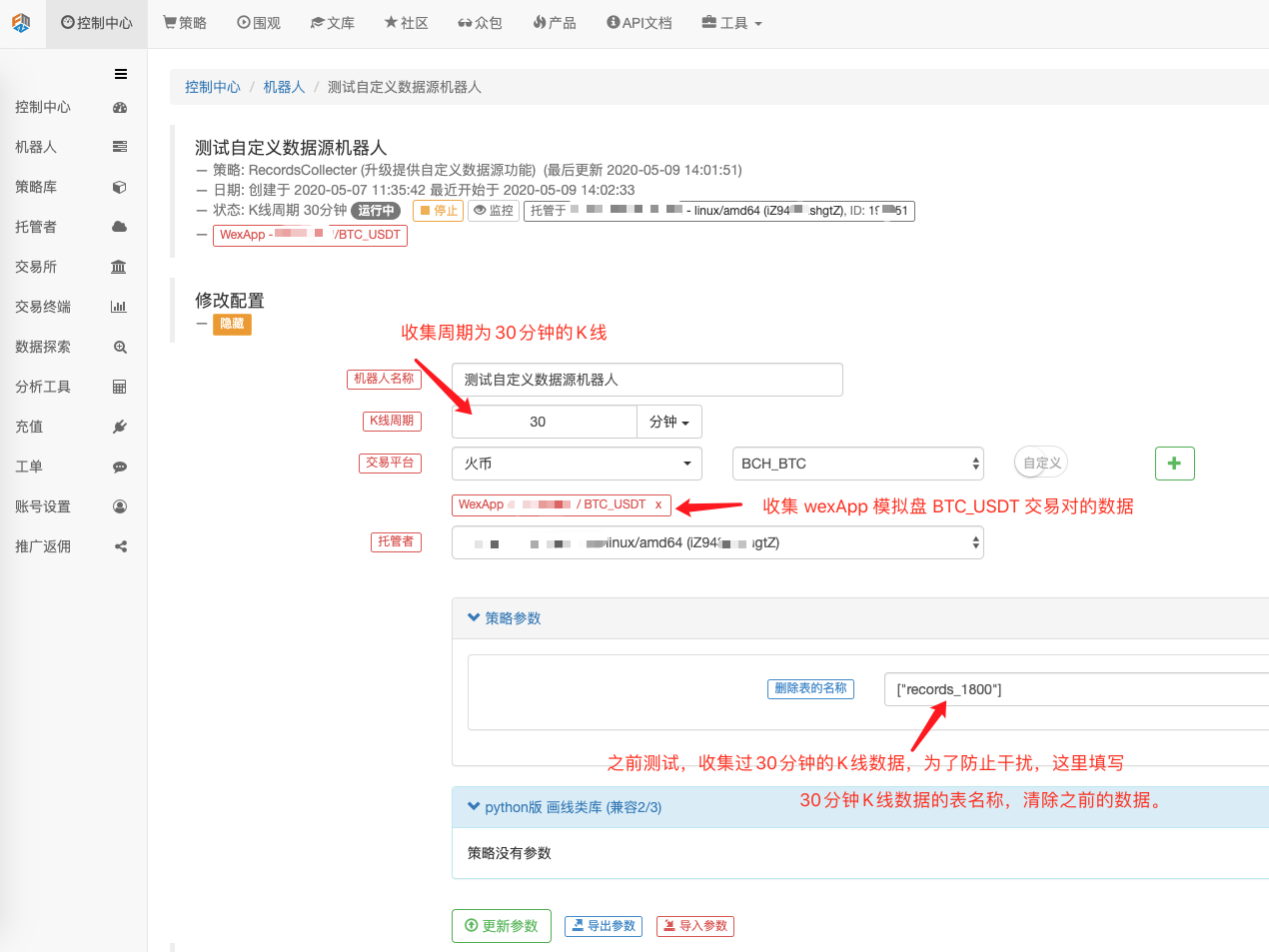
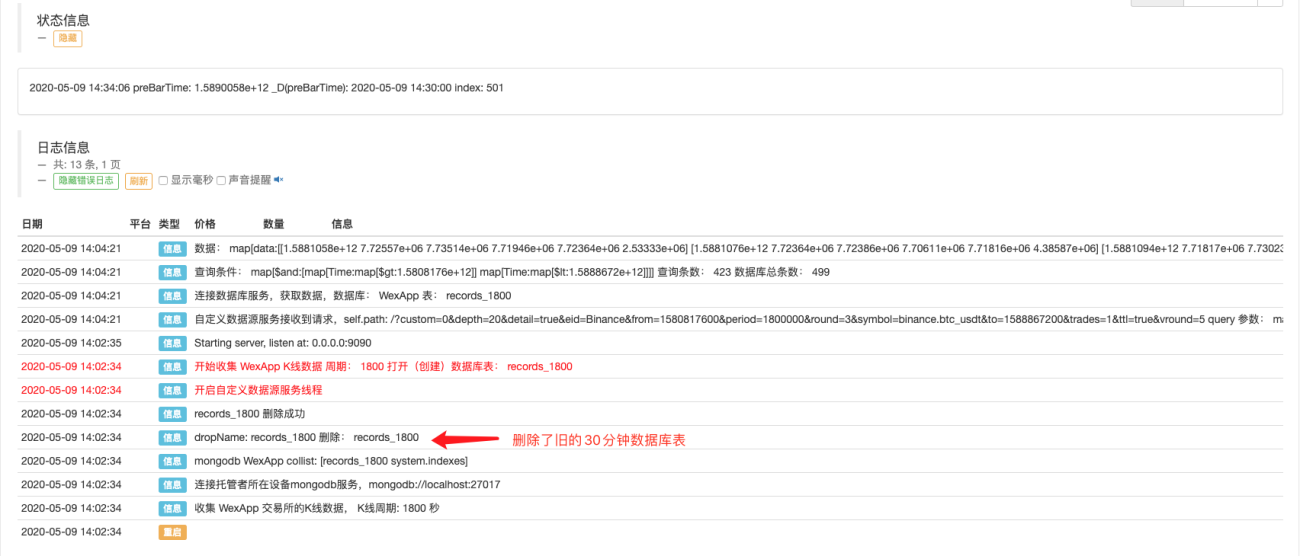
로봇을 실행하고 마켓 수집기를 실행하세요.
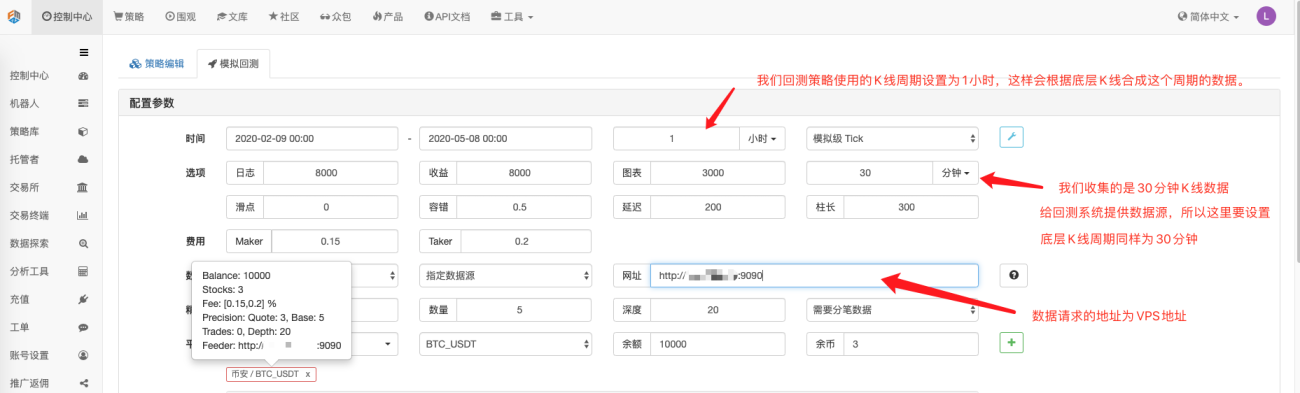
테스트 전략을 열고 이 백테스트 전략과 같은 백테스트를 수행하고 테스트해 보세요.
            javascript

            function main() {
    Log(exchange.GetRecords())
    Log(exchange.GetRecords())
    Log(exchange.GetRecords())
    Log(exchange.GetRecords())
    Log(exchange.GetRecords())
    Log(exchange.GetRecords())
    Log(exchange.GetRecords().length)
}
백테스팅 옵션을 구성하고 거래소를 Binance로 설정하십시오. 사용자 정의 데이터 소스는 당분간 거래소 이름을 스스로 설정할 수 없습니다. 구성에는 목록에 있는 거래소만 사용할 수 있습니다. 백테스팅 시 Binance가 표시됩니다. 이는 데이터입니다. wexApp 시뮬레이션 디스크.
마켓 수집기를 사용자 정의 데이터 소스로 사용하여 백테스팅 시스템에서 생성한 차트와 wexApp 거래소 페이지의 1시간 캔들스틱 차트를 비교하여 두 차트가 동일한지 확인하세요.
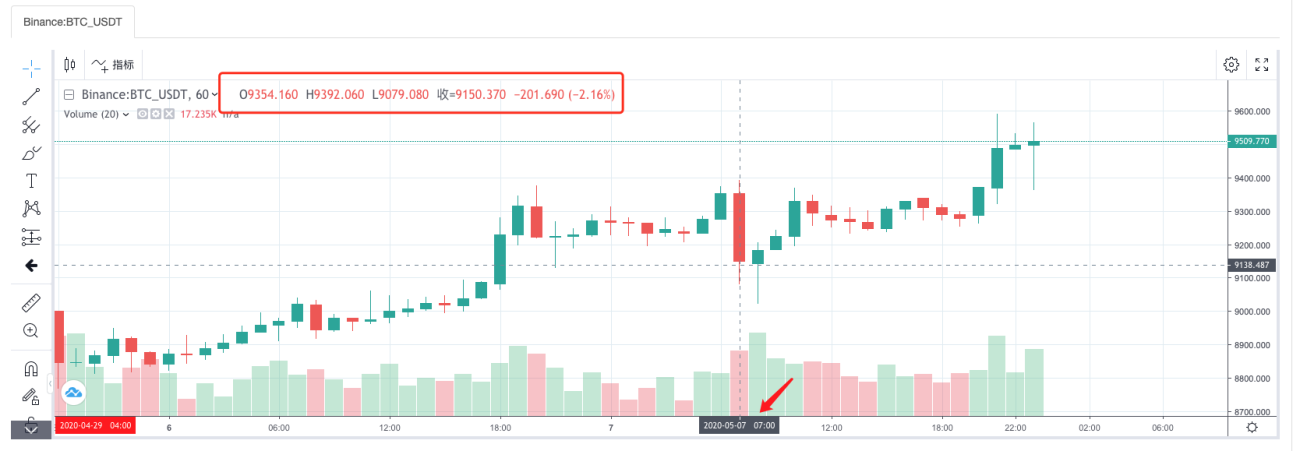
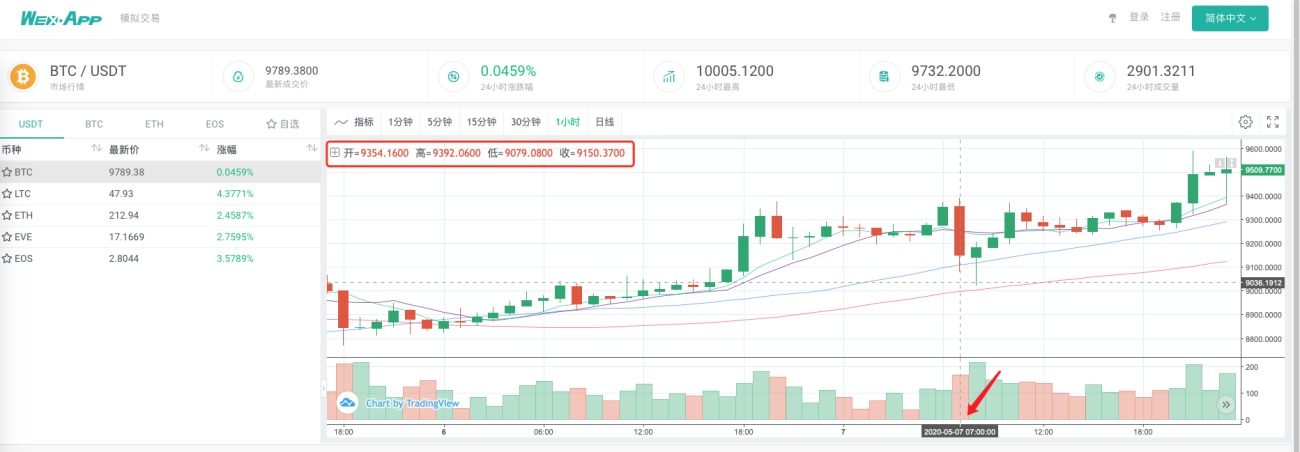
이런 방식으로 VPS의 로봇은 스스로 K-라인 데이터를 수집할 수 있으며, 우리는 언제든지 수집된 데이터를 얻어 백테스팅 시스템에서 직접 백테스팅할 수 있습니다.
이것은 바다 한 방울에 불과합니다. 전문가들은 이를 계속 확장할 수 있습니다. 예를 들어, 실시간 백테스팅을 위한 사용자 지정 데이터 소스 지원, 다양한 종류 및 다양한 시장 데이터 수집 지원 및 기타 기능.
메시지를 남겨주세요.


- 1