
This tutorial contains basic knowledge of strategy writing, including API introduction, backtest, charts and more. After learning this basic tutorial, users will be able to use the basic API proficiently and write a stable bot strategy. Before learning the tutorial, you need to learn how to use Get Started FMZ Quant Platform.
Old Version Tutorial: FMZ Quant (FMZ.COM) Strategy Writing Manual 2.0 (Tutorial); there are many post indexes in the tutorial, which are recommended to read.
Preliminary Instruction on Strategy Writing
API Introduction
Program trading is to use programs to connect with platforms through API to achieve automatic buying and selling or other functions according to the design intent. API represents Application Programming Interface.
At present, there are two main interface protocols for cryptocurrency platforms: REST and Websocket. Each time the REST protocol obtains data, it needs to be accessed once. Let’s take the API of the simulated platform “Wex.app” as an example. Open the [link] (https://api.wex.app/api/v1/public/ticker?market=BTC_USDT) directly in the browser, and you can get the result as follows:
{"data:{"buy":"11351.73","high":"11595.77","last":"11351.85","low":"11118.45","open":"11358.74","quoteVol":"95995607137.00903936","sell":"11356.02","time":1565593489318,"vol":"3552.5153"}}
In this way, you can see that the trading following the latest market quotes of the trading pair BTC_USDT , will change every time it is refreshed; "market="" is followed by the specific trading pair parameters, which can be modified to obtain other trading pair data. For public interfaces, such as market quotes, everyone can obtain them, so no verification is required. However, some interfaces need to determine the user's identity when placing an order or obtaining an account. In this case, API-KEY is needed to sign. “Websocket” is a subscription mode. After sending the content that needs to be subscribed, the platform will send the updated data to the program, and it does not need to be revisited every time, so it is more efficient.
FMZ Quant trading platform encapsulates the REST interface of every platform, and uses a unified way to call and a unified data format, making strategy writing simpler and more general. Websocket can be easily supported on FMZ platform, which will be introduced in detail in the next tutorial.
Different Programming Languages
Most parts of the FMZ platform API document use JavaScript as an example, but due to the encapsulation, there is almost no difference between different languages, and you only need to pay attention to syntax issues. "C++"" is a little bit special, and future tutorials will have a specialized introduction. Since "Js" is relatively simple and has no compatibility issues, it is recommended for beginners to use. FMZ Quant platform supports complete "Python", and can freely install various packages. It is recommended to users who have a certain programming foundation. For users who do not want to learn programming languages and just want to quickly write strategies, FMZ Quant platform also supports Mylanguage , which is basically compatible with Webstock strategies, and it is recommended for those who have relevant experience. The disadvantage is that Webstock is not as powerful and flexible as programming languages. FMZ also supports visual programming, which is similar to building blocks to implement strategies, but it is not recommended, and it is not as clear as codes. Due to the high similarity of programming languages, there is no need to struggle with which one to choose. It takes little effort to learn the basics of those programming languages.
Since Python has different versions, it can be specified at the beginning of the program, such as #!Python2 and #!Python3. Note that JavaScript has recently upgraded its ES6 syntax, and those who are interested can learn about it. The Python and Javascript codes with the same functions are shown below. It can be seen that there are only syntax differences, so the API document only gives examples of Javascript, and this tutorial will also take into account the special use cases of Python.
            #python code
def main():
    while True:
        Log(exchange.GetAccount().Balance)
        Sleep(2000)
#the corresponding Js code
function main(){
    while(true){
        Log(exchange.GetAccount().Balance)
        Sleep(2000)
    }
}
Resource Recommendations
- This tutorial will not give detailed introduction on each interface in FMZ platform API document, so you can check out this article for more details.
- If you want to receive tradingview signal and place an order on FMZ, you can refer to this article.
- For the quick start of Javascript and Python, writing simple strategies doesn’t need complex syntax, but only needs some basic concepts; you can study the tutorial while you’re learning how to program (https://www.fmz.com/bbs-topic/9123, https://www.fmz.com/bbs-topic/9124).
- Mylanguage document; Mylanguage is still very convenient for trend strategies.
- Here is an invocation example of C++. Those who are interested in C++ can have a look. Since it is not an interpretative language, the debugging is very difficult, so the example is not recommended.
- "Cryptocurrency Quantitative Trading Course" of NetEase Cloud Classroom, officially produced by FMZ, only needs 20 yuan, with richly detailed content, from simple to deep, suitable for beginners! courselink
- Here are some teaching strategies suitable for the beginning. You can try to write strategies while you’re studying the basics.
- Detailed explanation of strategy source code: the link.
Debug Tool
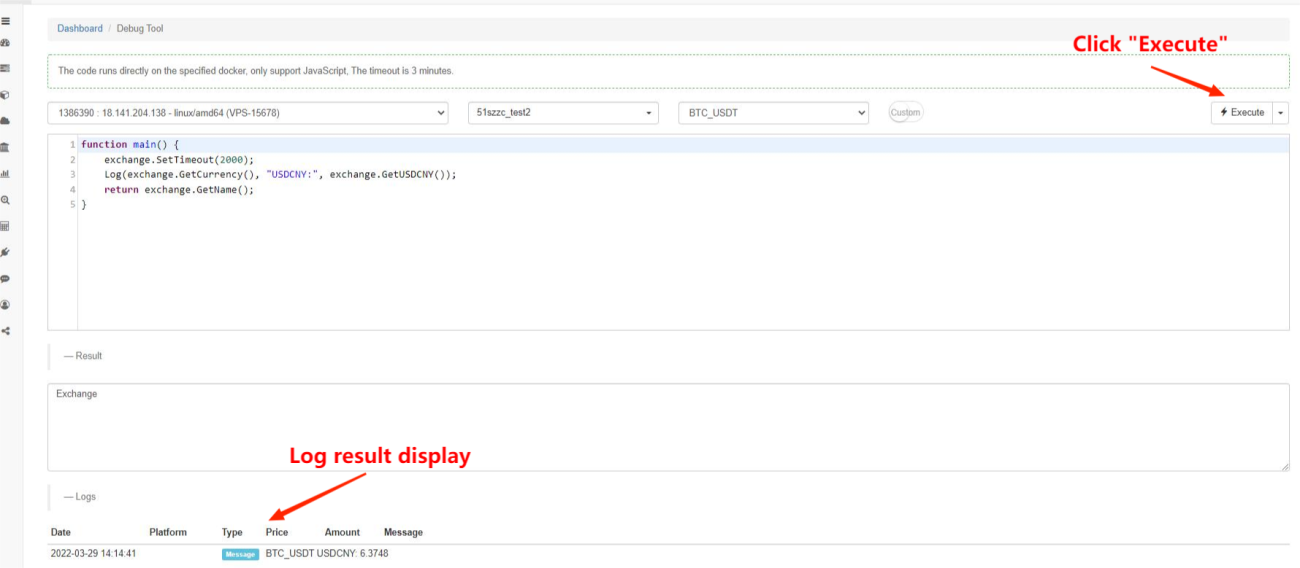
FMZ Quant platform provides the "Debug Tool" for debugging API interfaces. The debugging tool only supports JavaScript and can only be executed for a period of time; the platform interface can be debugged without creating a bot; the return data will be returned as the result, and the code of the debugging tool will not be saved. As you work through this tutorial, you can experiment with the debugging tool at the same time.
Strategy Program Framework
The strategy program is the same as a normal program, which is executed in code orders. The special part is that there must be a “main” function. Since the strategy needs to run uninterruptedly, usually a loop plus sleep time is required. Because the access frequency of platform APIs is limited, the sleep time needs to be adjusted accordingly. This framework is the typical execution at fixed intervals, and you an also use Websocket to write event-driven strategies. For example, immediate execution as long as the depth changes, which will be introduced in the advanced tutorial.
Other functions with special actions are shown as follows:
- onexit() is a normal on-exit function; its maximum execution time is 5 minutes; it can be unspecified; if the time is out, an interrupt error will be reported.
- onerror() is an abnormal exit function; its maximum execution time is 5 minutes; it can be unspecified.
- init() is an initialization function; its strategy program will be called automatically when it starts running; it can be unspecified.
            function onTick(){
   var ticker = exchange.GetTicker()
   var account = exchange.GetAccount()
    //write the strategy logic here, and it will be called ever 6 seconds
}
function main(){
    while(true){
        onTick()
        Sleep(6000)
    }
}
In the previous example, if there is an error in network access, the strategy may stop directly. If you want a strategy that is similar to automatic restart and will not stop, you can use the "try catch" fault-tolerant main loop in the bot strategy (do not use "try" for the backtest). Of course, this is only recommended when the strategy is stable, otherwise all errors will not be reported, making it difficult to find faults in the strategy.
            function onTick(){
   var ticker = exchange.GetTicker()
   var account = exchange.GetAccount()
    //write the strategy logic here, and it will be called ever 6 seconds
}
function main(){
    try{
        while(true){
           onTick()
           Sleep(6000)
       }
    }catch(err){
        Log(err)
    }
}
Platform API Introduction
Set Platform and Trading Pair
When calling any platform-related API, you need to specify the platform and trading pair. If only one “platform-trading pair” is added when creating a bot, use exchange to represent this object. For example, what exchange.GetTicker() will obtain is the market ticker of this “exchange-trading pair”.
FMZ Quant platform supports adding multiple “exchange-trading pair” objects at the same time. For example, you can operate BTC and ETH of the same platform account at the same time, or you can operate BTC of one exchange and ETH of another exchange at the same time. Note that different accounts on the same platform can also be added at the same time, and they are distinguished according to the labels added to the FMZ website. When there are multiple “exchange-trading pair” objects, use exchanges array to represent them, namely exchanges[0] and exchanges[1]... and so on, according to the adding order when the bot is created. In the format of the trading pair, like BTC_USDT, the former “BTC” is the trading currency, and “USDT” is the quote currency.
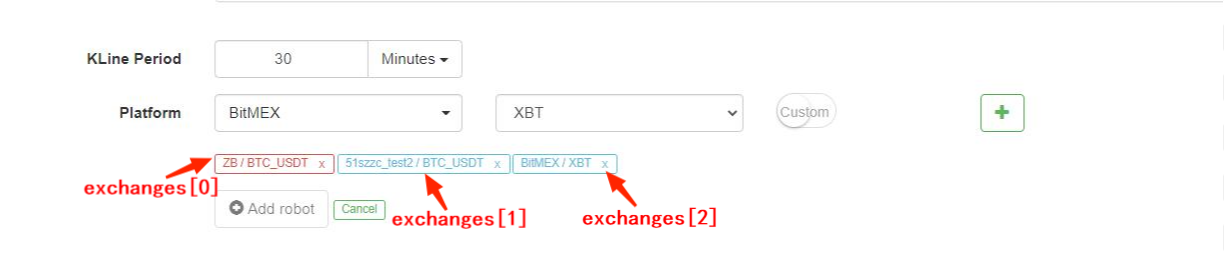
Obviously, if we operate a lot of trading pairs, this method will be very inconvenient. In this situation, we can use SetCurrency to switch trading pairs, such as exchange.SetCurrency("BTC_USDT"); then, the trading pair bound to exchangebecomes BTC_USDT, which will remain valid until the next call to change the trading pair. Note that backtest supports switching trading pairs recently. Below is a specific example:
            var symbols = ["BTC_USDT", "LTC_USDT", "EOS_USDT", "ETH_USDT"]
var buyValue = 1000
function main(){
  for(var i=0;i<symbols.length;i++){
      exchange.SetCurrency(symbols[i])
      var ticker = exchange.GetTicker()
      var amount = _N(buyValue/ticker.Sell, 3)
      exchange.Buy(ticker.Sell, amount)
      Sleep(1000)
  }
}
Get Public Interfaces
As mentioned in the previous example, the market interface is generally a public interface, which can be accessed by everyone. The common market interfaces are: GetTicker, GetDepth, GetRecords and GetTrades. The market quote is the basis for the strategy to make trading judgments. Later, I will introduce them one by one. It is better to try them in the “Debug Tool” by yourself. If you need a detailed explanation, you can check it in the API document.
Each interface generally has an Info field, which represents the original data string returned by the platform, and which can be used to supplement additional information. It needs to be parsed before use. JavaScript uses JSON.parse(), while Python uses json library. The Time field indicates the timestamp of the request, which can be used to judge the delay.
when using any API in the bot, the access may fail and return null, and Python returns None. At this time, the data in use will report an error and cause the bot to stop, so fault tolerance is very important. This tutorial will introduce the fault tolerance specially.
GetTicker
GetTicker is probably the most commonly used interface. You can find the last time executed price, buy1 price and sell1 price, and the latest trading volume. Before placing an order, the executed price can be determined according to the ticker information. An example of a bot return: {"Info:{}, "High":5226.69, "Low":5086.37,"Sell":5210.63, "Buy":5208.5, "Last":5208.51, "Volume":1703.1245, "OpenInterest":0, "Time":1554884195976}.
            function main() {
    var ticker = exchange.GetTicker()
    Log(ticker) //return ticker in the debugging tool, and you can see the specific result
    Log('Last time executed price:',ticker.Last, 'Buy1 price:', ticker.Buy)
}
GetDepth
GetDepth to obtain the depth information of pending orders. Although GetTicker includes buy 1 and sell1 prices, if you want to query deeper pending orders, you can use this interface, to generally check up and down 200 pending orders. Shock prices can be calculated by using this interface. Below is a real return result. Among them, “Asks” represents pending sell order, and the array is "Sell1", "Sell2"... So the price also rises in turn. “Bids” represents pending buy order, and the array is "buy1", "buy2"... The price goes down in turn.
            {
    "Info":null,
    "Asks":[
        {"Price":5866.38,"Amount":0.068644},
        {"Price":5866.39,"Amount":0.263985},
        ......
        ]
    "Bids":[
        {"Price":5865.13,"Amount":0.001898},
        {"Price":5865,"Amount":0.085575},
        ......
        ],
    "Time":1530241857399
}
Example of using GetDepth for Asks & Bids:
            function main() {
    var depth = exchange.GetDepth()
    Log('Buy 1 price:', depth.Bids[0].Price, 'Sell 1 price:', depth.Asks[0].Price)
}
GetRecords
GetRecords is one of the most commonly used interfaces, can return price information in a long period at a time, which is the basis of calculating various indicators. If the K-line period is not specified, it means using the default period when adding a bot. The length of the K-line cannot be specified, and it will continue to increase over time. The maximum number is 2000, and in the first call the number is about 200 (different platforms return different numbers). The last K-line is the latest K-line, so the data will change as the market quotes change; the first K-line is the oldest data.
exchange.SetMaxBarLen(Len) can set the number of K-lines acquired for the first time (supported by some platforms), and set the maximum number of K-lines. Such as: exchange.SetMaxBarLen(500).
GetRecords can specify periods like PERIOD_M1: 1 minute, PERIOD_M5: 5 minutes, PERIOD_M15: 15 minutes, PERIOD_M30: 30 minutes, PERIOD_H1: 1 hour and PERIOD_D1: 1 day. The specific use is exchange.GetRecords(PERIOD_M1). After upgrading the latest docker, it will support customizing periods, which just pass the second number of the period as a parameter. The minute-level customization will be synthesized according to the 1-minute K-line, the K-line under 1 minute will be synthesized through GetTrades(), and the commodity futures will be synthesized according to tick. Note that there are also other full uppercase variables like PERIOD_M1 in the tutorial. They are the default global variables of FMZ. If you are interested, you can “log” their specific values by yourself, and you can use them directly in usual.
Return data example:
            [
    {"Time":1526616000000,"Open":7995,"High":8067.65,"Low":7986.6,"Close":8027.22,"Volume":9444676.27669432},
    {"Time":1526619600000,"Open":8019.03,"High":8049.99,"Low":7982.78,"Close":8027,"Volume":5354251.80804935},
    {"Time":1526623200000,"Open":8027.01,"High":8036.41,"Low":7955.24,"Close":7955.39,"Volume":6659842.42025361},
    ......
]
Example of iterated K-line:
            function main(){
    var close = []
    var records = exchange.GetRecords(PERIOD_H1)
    Log('total bars: ', records.length)
    for(var i=0;i<records.length;i++){
        close.push(records[i].Close)
    }
    return close
}
GetTrades
GetTrades obtains the trading data within a certain time range (not your own trading data), which is not supported by some platforms. It is not commonly used, and you can check the detailed introduction in the API document.
Get Account to Trade
Those interfaces are related to the account, so they cannot be obtained directly. To obtain them, you need to use API-KEY to sign. After unified automatic background processing of FMZ platform, you can directly use them.
GetAccount
GetAccount to obtain the account information. As one of the most commonly used interfaces, it needs to be called before placing an order, to avoid insufficient balance. The return result is like: {"Stocks":0.38594816,"FrozenStocks":0,"Balance":542.858308,"FrozenBalance":0,"Info":{}}. Where “Stocks” is the available balance of the trading currency of the trading pair, “FrozenStocks” is the frozen balance of non-executed orders, “Balance” is the available amount of the quote currency, and “FrozenBalance” is the frozen balance. If the trading pair is BTC_USDT, “Stocks” refers to BTC, and “Balance” refers to USDT.
Note that the return result is the result of the specified trading pair, and the information of other currencies in the trading account is in the “Info” field, so you don't need to call it multiple times, when you operate multiple trading pairs.
A bot constantly printing the total value of the current trading pair:
            function main(){
    while(true){
        var ticker = exchange.GetTicker()
        var account = exchange.GetAccount()
        var price = ticker.Buy
        var stocks = account.Stocks + account.FrozenStocks
        var balance = account.Balance + account.FrozenBalance
        var value = stocks*price + balance
        Log('Account value is: ', value)
        LogProfit(value)
        Sleep(3000)//sleep 3000ms(3s), A loop must has a sleep, or the rate-limit of the exchange will be exceed
        //when run in debug tool, add a break here
    }
}
Buy Order
Buy order. Invocation methods include exchange.Buy(Price, Amount) and exchange.Buy(Price, Amount, Msg), in which “Price” indicates the price, “Amount” is the amount, “Msg” is an extra string that can be displayed in the bot log, but not required. These methods are pending orders. If the order cannot be completely executed immediately, an unfinished order will be generated; the order id is returned if the order is successfully placed, and null will be returned if the order is unsuccessful, which is used to query the order status.
If you want to place a buy order at the market price, “Price” is -1, and “Amount” is the value of the order. For example, exchange.Buy(-1, 0.5); if the trading pair is ETH_BTC, which means that buy 0.5BTC of ETH at the market price. Some platforms do not support market orders, nor do the futures backtest.
Some platforms have the precision requirements for price and amount, which can be controlled with the precision function _N(). For futures trading, “Buy” and “Sell” have other meanings, which will be introduced specially.
An example of buying in once reaching the corresponding price:
            function main(){
    while(true){
        var ticker = exchange.GetTicker()
        var price = ticker.Sell
        if(price >= 7000){
            exchange.Buy(_N(price+5,2), 1, 'BTC-USDT')
            break
        }
        Sleep(3000)//Sleep 3000ms
    }
    Log('done')
}
Sell Order
Sell order. The parameters are the same as “Buy”. The parameters of the market order have different meanings. A market sell order, such as exchange.Sell(-1, 0.2), means selling 0.2ETH at the market price.
GetOrder
GetOrder obtains the order information based on the order id. When this common interface calls the method exchange.GetOrder(OrderId), "OrderId" is the order id, which will be returned when placing an order. Note that the string of the order Type and the actual value of order Status are numbers, which represent different meanings, but are not conducive to memory. FMZ uses global constants to represent these values. For example, the Status value of an unfinished order is 0, which is equivalent to ORDER_STATE_PENDING. All these global constants can be viewed in the document... Return result:
            {
    "Id":125723661, //Order id
    "Amount":0.01, //Order ammount
    "Price":7000, //Order price
    "DealAmount":0, //Executed amount
    "AvgPrice":0, //executed average price
    "Status":0, //0: not completely executed; 1: executed; 2: canceled
    "Type":1,//Order type; 0: buy order; 1: sell order
    "ContractType":"",//contract type, used in futures trading
    "Info":{} //the platform returns the raw information
    }
}
A strategy to buy a specified amount of currency:
            function main(){
    while(true){
        var amount = exchange.GetAccount().Stocks
        var ticker = exchange.GetTicker()
        var id = null
        if(5-amount>0.01){
            id = exchange.Buy(ticker.Sell, Math.min(5-amount,0.2))
        }else{
            Log('Job completed')
            return //return the main function, bot will stop
        }
        Sleep(3000) //Sleep 3000ms
        if(id){
            var status = exchange.GetOrder(id).Status
            if(status == 0){ //Here you can aslo use "status == ORDER_STATE_PENDING" to judge
                exchange.CancelOrder(id)
            }
        }
    }
}
GetOrders
GetOrder obtains the list of all unfinished orders of the current trading pair. If there is no unfinished order, return an empty array. The specific result of the order list, such as "GetOrder".
Example of canceling all orders of the current trading pair:
            function CancelAll(){
    var orders = exchange.GetOrders()
    for(var i=0;i<orders.length;i++){
        exchange.CancelOrder(orders[i].Id) // cancel order by orderID
    }
}
function main(){
    CancelAll()
    while(true){
        //do something
        Sleep(10000)
    }
}
CancelOrder
According to the order id, cancel the order. exchange.CancelOrder(OrderId). If the canceling is successful, return "true"; if not, return "false".
Futures & Perpetual Contract
For cryptocurrency, futures trading is different from spot trading. The above functions of spot trading are also applicable to futures trading, and single futures trading has its own functions. Before conducting program trading of cryptocurrency futures, you should be familiar with manual operations on the website and understand the basic concepts, such as open, close, crossed, isolated, leverage, close profit and loss, floating income, margin and other concepts, as well as the corresponding calculation formulas. The corresponding tutorials can be found on various futures platforms, and you need to learn them by yourself.
Perpetual contracts are similar to futures contracts, but the difference is that there is no such concept of holding long and short positions at the same time.
If the platform supports both futures and spot, such as futures of OKEX and Huobi, you need to select "OKEX Futures" and "Huobi Futures" separately on the platform interface to add, for those futures platforms are regarded as different platforms from the spot ones on FMZ.
SetContractType
The first step in futures trading is to set the contract to be traded. Taking OKEX futures as an example, select a BTC trading pair when creating a bot or backtesting, and you also need to set the weekly, next week or quarterly contract in the code. If it is not set, it will prompt invalid contract type. Different from spot trading pairs, futures contracts often use trading currency such as BTC as margin. Adding BTC to a trading pair usually represents a BTC_USD trading pair that uses BTC as margin. If there is a futures contract with USDT as margin, a bot needs to be created to add BTC_USDT trading pair. For example, perpetual contracts like Binance OKEX Futures, with both crypto-margined and USDT-margined contracts. After setting the trading pair, you must also set the specific contract type, such as perpetual, weekly, next week, etc. After setting up the contract, you can perform operations such as obtaining market quotes, buying and selling.
Binance, OKEX, HuobiDM, etc. have both crypto-margined and USDT-margined contracts, which need to be distinguished when adding a bot and setting a contract. The specific settings are as follows:
            //OKEX Futures
exchange.SetContractType("swap")        // set to perpetual contract
exchange.SetContractType("this_week")   // set to weekly contract
exchange.SetContractType("next_week")   // set to next week contract
exchange.SetContractType("quarter")     // set to quarterly contract

//HuobiDM
exchange.SetContractType("this_week")   // set to weekly contract
exchange.SetContractType("next_week")   // set to next week contract
exchange.SetContractType("quarter")     // set to quarterly contract
exchange.SetContractType("swap")        // set to perpetual contract

//Binance Futures
exchange.SetContractType("swap")   // set to perpetual contract, and notice that crypto-margined and USDT-margined contracts are all in the perpetual contract
exchange.SetContractType("quarter")   // set to quarterly contract
exchange.SetContractType("next_quarter")  // set to next quarter contract

//BitMEX
exchange.SetContractType("XBTUSD")    // set to perpetual contract
exchange.SetContractType("XBTM19")  // the contract settled at a specific time; for more details, please log in BitMEX to check each contract code

//GateIO
exchange.SetContractType("swap")      // set to perpetual contract, and do not set the default as swap perpetual contract
//Deribit
exchange.SetContractType("BTC-27APR18")  // the contract settled at a specific time; for more details, please log in Deribit to check out
GetPosition
To get the current position information list, OKEX (OKCOIN) futures can pass in a parameter to specify the contract type to be obtained. Return an empty list [], if there is no position. The position information is returned as follows. There is a lot of specific information, which needs to be analyzed in combination with the trading pair.
| Data Type | Variable Name | Description |
|---|---|---|
| object | Info | the raw structure that the platform returns |
| number | MarginLevel | leverage size; OKCoin is 10 or 20, and the crossed postion of OK futures returns 10 (fixed), for the raw API does not support |
| number | Amount | position amount; OKCoin indicates the contract quantity (integer over 1) |
| number | FrozenAmount | frozen position amount |
| number | Price | position average price |
| number | Margin | frozen margin |
| number | Profit | commodity futures: the profit and loss of position mark to market; cryptocurrency: cryptocurrency unit: BTC/LTC, traditional futures unit: RMB (note:In the case of a crossed position of OKCoin futures, it refers to the realized profit and loss, not the profit and loss of the position. Under the isolated position, it refers to the profit and loss of the position.) |
| const | Type | PD_LONG is long position (CTP uses "closebuy_today" to close a position ); PD_SHORT is short position (CTP uses "closesell_today" to close a position); in CTP futures, PD_LONG_YD indicates yesterday's long position (which uses "closebuy" to close position); PD_SHORT_YD is yesterday's short position (which uses "closesell" to close position) |
| string | ContractType | commodity futures are contract codes, and stocks are "platform code_stock code"; the passed type of specific parameters of SetContractType |
            function main(){
    exchange.SetContractType("this_week");
    var position = exchange.GetPosition();
    if(position.length>0){ //especially pay attention to judging the length of position before call, or an error will occur
        Log("Amount:", position[0].Amount, "FrozenAmount:", position[0].FrozenAmount, "Price:",
            position[0].Price, "Profit:", position[0].Profit, "Type:", position[0].Type,"ContractType:", position[0].ContractType)
    }
}
Futures Open & Close Positions
First of all, you need to set the leverage size; invocation method: exchange.SetMarginLevel(10), where "10" means 10 times of leverage, and the specific supported leverage size can be checked in the corresponding platforms, Note that the leverage should be set in the platform, and the code should be consistent with the settings set on the platform, otherwise an error will occur. You can also leave it unset and use the default leverage.
Then, set the trading direction; invocation method: exchange.SetDirection(Direction) , which corresponds to open and close positions. Unlike futures, if a perpetual contract does not hold the concepts of long and short at the same time, that is, a single position is not allowed. When you operate open short on a long position, the long position will be automatically closed, so you only need to set buy and sell. If it supports two-way positions, you need to set closebuy, closesell. Specific relationships:
| Operation | SetDirection Parameters | Function of Placing Order |
|---|---|---|
| Open Long Position | exchange.SetDirection("buy") | exchange.Buy() |
| Close Long Position | exchange.SetDirection("closebuy") | exchange.Sell() |
| Open Short Position | exchange.SetDirection("sell") | exchange.Sell() |
| Close Short Position | exchange.SetDirection("closesell") | exchange.Buy() |
Finally, there is the specific code for open and close positions. The amount of orders placed varies from platform to platform. For example, Huobi futures are based on the number of contract quantity, and one contract is 100 US dollars. Note that futures backtest does not support market orders.
            function main(){
    exchange.SetContractType("this_week")    // for example, set OKEX futures to weekly contract
    price = exchange.GetTicker().Last
    exchange.SetMarginLevel(10) // set to 10 times of leverage
    exchange.SetDirection("buy") // set the order type as buy long
    exchange.Buy(price+10, 20) // set contract quantity as 20 orders
    pos = exchange.GetPosition()
    Log(pos)
    Log(exchange.GetOrders()) // check out if there is any unfinished order
    exchange.SetDirection("closebuy"); // if it is a perpetual contract, directly set exchange.SetDirection("sell")
    exchange.Sell(price-10, 20)
}
Give a specific strategy example of full close postions as follows:
            function main(){
    while(true){
        var pos = exchange.GetPosition()
        var ticker = exchange.GetTicekr()
        if(!ticker){
            Log('not able to obtain ticker')
            return
        }
        if(!pos || pos.length == 0 ){
            Log('no position')
            return
        }
        for(var i=0;i<pos.length;i++){
            if(pos[i].Type == PD_LONG){
                exchange.SetContractType(pos[i].ContractType)
                exchange.SetDirection('closebuy')
                exchange.Sell(ticker.Buy, pos[i].Amount - pos[i].FrozenAmount)
            }
            if(pos[i].Type == PD_SHORT){
                exchange.SetContractType(pos[i].ContractType)
                exchange.SetDirection('closesell')
                exchange.Buy(ticker.Sell, pos[i].Amount - pos[i].FrozenAmount)
            }
        }
        var orders = exchange.Getorders()
        Sleep(500)
        for(var j=0;j<orders.length;j++){
            if(orders[i].Status == ORDER_STATE_PENDING){
                exchange.CancelOrder(orders[i].Id)
            }
        }
    }
}
Cryptocurrency Leverage Trading
Cryptocurrency leverage trading needs to switch to the leverage account in the code, and other parts are the same as spot trading.
Use exchange.IO("trade_margin") to switch to leverage account mode; placing an order and obtaining account assets will access the interface of the platform leverage.
Use exchange.IO("trade_normal") to switch back to the ordinary account mode.
Supported Platforms:
- OKEX V3: The trading pairs of the leverage account mode are different from the ordinary ones, and some trading pairs may not exist.
- Huobi: the trading pairs of the leverage account mode are different from the ordinary ones, and some trading pairs may not exist.
- ZB: the assets can only be transferred in QC. In the leverage trading sector, the assets between different trading pairs are independent, that is, the number of QC coins under the ETH_QC trading pair is not visible in BTC_QC.
- FCoin
- Binance
Commodity Futures Trading
Commodity futures trading and cryptocurrency futures trading are quite different. First of all, the trading time of commodity futures is very short, but cryptocurrency is traded for 24 hours; the protocol of commodity futures is not a commonly used REST API; the trading frequency and the pending order amount of commodity futures are limited, but those of cryptocurrency are very loose, and so on. Therefore, there are many points in need of special attention when trading commodity futures, and it is recommended to those who have rich experience in manual operations. FMZ supports simnow commodity futures simulated bot, and you can refer to: https://www.fmz.com/bbs-topic/325. For adding commodity futures companies: https://www.fmz.com/bbs-topic/371
Commodity futures have implemented see-through supervision in June 2019; for individual program, individual users need to open an account to apply for an authorization code for futures brokers (the specific application information template can be sent to WeChat group or QQ group), which generally takes 4-5 days; the procedures are quite complicated. As a programmatic trading provider, FMZ Quant platform has applied for software authorization codes from various futures service providers. Users can use them directly without applying. When adding a futures broker, search for "see through" to see the list that FMZ has applied for. Specific reference post: https://www.fmz.com/bbs-topic/3860 . If your futures broker is no longer on the list, you can only apply by yourself, or open a new account of a supported broker, which generally takes 2 days. FMZ has in-depth cooperative relations with some service providers; for example, Guotai Junan Hongyuan Futures has purchased the institutional version of FMZ platform, which can be used by its users, and users automatically become a VIP when opening an account, and the service fee is minimized. Account opening reference: https://www.fmz.com/bbs-topic/506.
Due to the advantages of FMZ Quant platform structure, users can also add multiple futures broker accounts, and implement some functions that other commodity futures program trading software cannot complete, such as the synthesis of high-frequency tick; you can refer to: https://www.fmz.com/bbs-topic/1184
Strategy Framework
First of all, because it is not a 24h trading and requires a login operation, it is necessary to judge the link status before trading. exchange.IO("status") is true, which inidcates successful connection to the platform. If the API is called when the login is not successful, 'not login' is not prompted. You can add "Sleep (2000)" after the strategy starts, giving it a certain time to log in. You can also retry to subscribe _C(exchange.SetContractType,"MA888"), which will ensure a successful login.
The market quote acquisition and trading codes of commodity futures are the same as those of cryptocurrency futures. Here we will introduce the differences and points that need to be paid attention to.
            function main(){
    _C(exchange.SetContractType,"MA888") //If you do not log in successfully, you cannot subscribe to the contract, so better to try again
    while(true){
        if(exchange.IO("status")){
            var ticker = exchange.GetTicker()
            Log("MA888 ticker:", ticker)
            LogStatus(_D(), "Already connected with CTP !")//_D obtain event
        } else {
            LogStatus(_D(), "Not connected with CTP !")
            Sleep(1000)
        }
    }
}
It is recommended to use the commodity futures library for trading (which will be described later), the code will be very simple at this time, and there is no need to deal with tedious details. Source code copy address: https://www.fmz.com/strategy/57029
            function main() {
    // Use the CTA strategy framework of commodity futures library
    $.CTA(Symbols, function(st) {
        var r = st.records
        var mp = st.position.amount
        var symbol = st.symbol
        /*
        "r" represents K-line, "mp" indicates the position amount of the current variety; positive number means long position, negative number means short position, and 0 means no position; "symbol" is the variety name
        if the return value is n:
            n = 0 : full close positions (no matter now they are long or short)
            n > 0 : if right now long positions are held, add n long positions; if now they are short positions, close n short posiitons; if n is over the position amount right now, reverse to open long positions
            n < 0 : if right now short positions are held, add n short positions; if now they are long positions, close n long posiitons; if -n is over the position amount right now, reverse to open short positions
        */
        if (r.length < SlowPeriod) {
            return
        }
        var cross = _Cross(TA.EMA(r, FastPeriod), TA.EMA(r, SlowPeriod));
        if (mp <= 0 && cross > ConfirmPeriod) {
            Log(symbol, "Golden Cross Period", cross, "the moment position", mp);
            return Lots * (mp < 0 ? 2 : 1)
        } else if (mp >= 0 && cross < -ConfirmPeriod) {
            Log(symbol, "Death Cross Period", cross, "the moment position", mp);
            return -Lots * (mp > 0 ? 2 : 1)
        }
    });
}
Modes of Getting CTP Data
Commodity futures use the CTP protocol, and all market quotes and order executions will be notified only after there are changes, while queries about orders, accounts, and positions are active queries. Therefore, it is suitable for writing event-driven high-frequency strategies. The interfaces for obtaining market quotes in the default mode, such as GetTicker, GetDepth and GetRecords, all need to have cached data to obtain the latest data. If there is no data, it will wait until there is data, so it is not necessary for the strategy to use "Sleep". When there are market quote changes, ticker, depth and records will be updated. At this time, calling any of these interfaces will return immediately, and the state of the called interface will be set to "wait for update" mode. The next time when the same interface is called, it will wait until there is new data returned. Some unpopular contracts or the price limit will cause no trading for a long time, which means the strategy has stuck for a long time, also normal.
If you want to get data every time you get the market quotes, even if it is old data, you can switch to the immediate update mode of market quotes exchange.IO("mode", 0). At this time, the strategy cannot be written as event-driven, and a "SLeep" event needs to be added to avoid a fast infinite loop. Some infrequent strategies can use this mode, and the strategy design is simple. Use exchange.IO("mode", 1) to switch back to the default cache mode.
When operating a single contract, use the default mode. However, if there are multiple contracts, it is possible that one of the contracts does not update the market quotes, resulting in the interface blockage for obtaining market quotes, and the quotes updates of other contracts cannot be obtained, either. To solve this problem, the immediate update mode can be used, but it is inconvenient to write high-frequency strategies. At this time, you can use the event push mode to get the push of orders and quotes. The setting method is exchange.IO("wait"). If multiple exchange objects are added, which is rare in commodity futures, you can use exchange.IO("wait_any"), and the returned "Index" will indicate the returned platform index.
Push of market tick changes: {Event:"tick", Index: platform index (in the order of the platforms added in the bot), Nano: event of nanosecond-level time, Symbol: contract name}
Order push: {Event:"order", Index:Exchange index, Nano:Event of nanosecond-level time, Order:Order information (same as GetOrder)}
By this time, the strategy structure can be written as:
            function on_tick(symbol){
    Log("symbol update")
    exchange.SetContractType(symbol)
    Log(exchange.GetTicker())
}

function on_order(order){
    Log("order update", order)
}

function main(){
    while(true){
        if(exchange.IO("status")){ //Judge the link status
            exchange.IO("mode", 0)
            _C(exchange.SetContractType, "MA888")//Subscribe to MA; only the subscription request for the first time is ture, and the later ones are program switches, which do not consume time
            _C(exchange.SetContractType, "rb888")//Subscribe to rb
            while(true){
                var e = exchange.IO("wait")
                if(e){
                    if(e.event == "tick"){
                        on_tick(e.Symbol)
                    }else if(e.event == "order"){
                        on_order(e.Order)
                    }
                }
           }
        }else{
            Sleep(10*1000)
        }
    }
}
Differences Between Commodity Futures & Cryptocurrency
Also note the difference between commodity futures and cryptocurrency platforms. For example, "GetDepth" actually only has one level of depth (5 levels of depth are expensive), and "GetTrades" cannot obtain trading history (all are simulated based on position changes, and there is no real trading record). Commodity futures have a price limit mechanism. When the limit is up, the price of a depth sell order to sell one is the limit price, and the order volume is 0. When the limit is down, the price of a buy order to buy one is the limit price, and the order volume is 0. In addition, the frequency of commodity futures query interface, such as obtaining accounts, orders, and positions, is strictly limited, generally every 2 seconds. Commodity futures also have restrictions on the amount of orders placed and cancelled.
Set Contracts
exchange.IO("instruments"): it returns the list of all contracts on the platform {contract name: details} in dictionary form, and only supports bots.
exchange.IO("products"): it returns the list of all items on the platform {contract name: details} in dictionary form, and only supports bots.
exchange.IO("subscribed"): it returns the subscribed market quotes on the platform in dictionary form, and only supports bots.
The ContractType of traditional CTP futures refers to the contract ID, which is case-sensitive. Such as exchange.SetContractType("au1506"). After the contract is set successfully, it will return the detailed information of the contract, such as the minimum purchase amount, service fee, delivery time, etc. When subscribing to multiple contracts, only the first time a subscription request is actually sent, and then the trading pair is just switched at the code level, which does not take time. The main continuous contract is code 888, such as MA888, the continuous rate contract is 000, such as MA000; 888 and 000 are virtual contract trades that only support backtest, and real bots only support market quotes. However, Mylanguage can operate the main contract, and the program will automatically change positions, that is, close the non-main positions and open new positions on the main positions.
Unsuccessful login cannot set contracts, but will returnn immediately, so you can try by "_c" again, to know the CTP login is completed. After the successful login, it does not consume any time to set contracts, and there will be no real network access.
Open Position & Close Position
The "Direction" of SetDirection can obtain four parameters: buy, closebuy, sell, closesell. Commodity futures have more closebuy_today and closesell_today, indicating closing the current positions; the default is closebuy/ closesell, indicating closing yesterday's positions; only the varieties of the Shanghai Futures Exchange are divided into closing today and closing yesterday, which may affect the service fee, so it is necessary to give priority to closing yesterday's positions. For CTP traditional futures, you can set the second parameter as "1" or "2" or "3", which refers to "speculation", "arbitrage", and "hedge" respectively. If not set, the default is speculation. The specific operations such as buying and selling, obtaining positions, obtaining orders, canceling orders, and obtaining accounts are the same as cryptocurrency futures trading, so please refer to the previous section.
| Operation | SetDirection Parameters | Function of Placing Order |
|---|---|---|
| Open Long Position | exchange.SetDirection("buy") | exchange.Buy() |
| Close Long Position | exchange.SetDirection("closebuy") | exchange.Sell() |
| Open Short Position | exchange.SetDirection("sell") | exchange.Sell() |
| Close Short Position | exchange.SetDirection("closesell") | exchange.Buy() |
The following example is a specific closing position function. Note that this example is too simple. You should also consider whether it is within the trading time, how to retry the pending order if it is not completely filled, what is the maximum order volume, whether the frequency is too high, and whether it is sliding price or market price and so on. Only for reference, it is a library package of the suggested platforms for opening and closing positions in real bots:https://www.fmz.com/strategy/12961. There is a specific introduction in the library section, and it is also recommended to study the source codes of the library.
            function Cover(contractType, amount, slide) {
    for (var i = 0; i < positions.length; i++) {
        if (positions[i].ContractType != contractType) {
            continue;
        }
        var depth = _C(e.GetDepth);
        if (positions[i].Type == PD_LONG || positions[i].Type == PD_LONG_YD) {
            exchange.SetDirection(positions[i].Type == PD_LONG ? "closebuy_today" : "closebuy");
            exchange.Sell(depth.Bids[0]-slide, amount, contractType, positions[i].Type == PD_LONG ? "Close today" : "Close yesterday", 'Bid', depth.Bids[0]);
        } else {
            exchange.SetDirection(positions[i].Type == PD_SHORT ? "closesell_today" : "closesell");
            exchange.Buy(depth.Asks[0]+slide, amount, contractType, positions[i].Type == PD_SHORT ? "Close today" : "Close yesterday", 'Ask', depth.Asks[0]);
        }
    }
}
Commodity futures support custom order types (support for bots, but not for backtest), which are specified by suffix, appended to "_", such as:
            exchange.SetDirection("buy_ioc");
exchange.SetDirection("sell_gtd-20170111")
Specific suffixes:
- ioc complete immediately, or cancel THOST_FTDC_TC_IOC
- gfs valid in the node THOST_FTDC_TC_GFS
- gfd valid in the day THOST_FTDC_TC_GFD
- gtd valid before the specified date THOST_FTDC_TC_GTD
- gtc valid before canceled THOST_FTDC_TC_GTC
- gfa valid in auction bidding THOST_FTDC_TC_GFA
Esunny Interface
By default, the interfaces opened in commodity futures brokers are all CTP interfaces. If required, they can be replaced by Esunny interfaces. Through the encapsulation of FMZ, the invocation method is the same. The difference is that accounts, orders, and positions are all in push mode, so the docker will maintain these data locally, and will return immediately when the corresponding interface is called, without actually making a request.
Esunny Protocol Custom Order Types are:
- gfd valid in the day TAPI_ORDER_TIMEINFORCE_GFD
- gtc valid before canceled TAPI_ORDER_TIMEINFORCE_GTC
- gtd valid before the specified date TAPI_ORDER_TIMEINFORCE_GTD
- fak Partially executed, cancel the rest TAPI_ORDER_TIMEINFORCE_FAK
- ioc execute immediately, or cancel TAPI_ORDER_TIMEINFORCE_FAK
- fok not executed completely, cancel all TAPI_ORDER_TIMEINFORCE_FOK
Commonly Used Global Functions
Log - Log & WeChat Push
When log a log record on the bot interface, and add the character "@" after the string, the message will enter the push queue, and it will be pushed directly after binding to WeChat or telegram, such as Log('Push to WeChat@').
The log color can also be customized, such as Log('this is a log in red font #ff0000').
#ff0000 is the hexadecimal of RGB color, indicating that all log files are stored in the SqLit database of the bot in the directory where the docker is located, which can be downloaded and opened with database software, or can be used to copy backup and restore (database name and the bot id are the same).
LogProfit - Print Profits
It records the profits, and draws the profit curve on the bot interface, which can be retained after the bot is restarted. Invocation method: LogProfit(1000). Note that the parameter of LogProfit is not necessarily the profit, and it can be any number and needs to be filled in by yourself.
LogStatus - Status Display (Including Tables)
If the bot status, since the log will be saved first and refreshed continuously, needs the information only for display not for saving, you can use the LogStatus function. The paramenters of LogStatus are strings, which can also be used to represent the table information.
An example of a specific real bot position display table:
            var table = {type: 'table', title: 'position information', cols: ['Column1', 'Column2'], rows: [ ['abc', 'def'], ['ABC', 'support color #ff0000']]};
LogStatus('`' + JSON.stringify(table) + '`'); // After serialization, JSON will be added the character "'" on both sides, which is regarded as a comlpex messag format (now supporting tables)
LogStatus('The first line information\n`' + JSON.stringify(table) + '`\nthe third line information'); // the table information can be displayed in multiple lines
LogStatus('`' + JSON.stringify([table, table]) + '`'); // Multiple tables are supported to be displayed at the same time, which will be displayed in one group by TAB
LogStatus('`' + JSON.stringify(tab1) + '`\n' + '`' + JSON.stringify(tab2) + '`\n'); // Multiple tables are displayed up and down by arrangement
Sleep
Its paramert is the number of millisecond, such as Sleep(1000), indicating sleep for one second. Due to the limited access frequency of all platforms, sleep time should be added to the infinite loop in general strategies.
_G
After the bot is restarted, the program will restart. If you want to save some persistent information, _G is very convenient and practical, and it can save the JSON serialized content. The _G function is written in onexit(), so that every time the strategy is stopped, the required information will be automatically saved.
If you want to save more formatted data, the _G function is not suitable, but you can use Python to write directly to the database.
            function onexit(){
    _G('profit', profit)
}
function main(){
    _G("num", 1); // Set a global variable num, with a value of 1 second
    _G("num", "ok"); // Change a global variable num, whose value is the string "ok"
    _G("num", null); // Delete the global variable num
    _G("num"); // Return the value of the global variable num; if it does not exist, return null

    var profit = 0
    if(_G('profit')){
        profit = _G('profit')
    }
}
_N
When placing an order, the precisions of price and volume normally need to be controlled; FMZ has builted in the _N function to determine the decimal places to be saved; for example, the result of _N(4.253,2) is 4.25.
_C
Calling the plaform API cannot guarantee the access is successful every time, and _C is an automatic retry function. It will always call the specified functions until it returns successfully (the function will retry if it returns null or false); for example, _C(exchange.GetTicker), with the default retry interval of 3 seconds, and you can call _CDelay function to control the retry interval, such as _CDelay(1000), which means to change the _C function retry interval to 1 second. It is recommended to use _C to operate fault tolerance in GetTicker(), exchange.GetDepth, GetTrade, GetRecords, GetAccount, GetOrders and GetOrder to prevent the program interruption caused by the access failure.
CancelOrder cannot use the _C function, because there are various reasons for the failure to cancel an order. If an order has been executed, then canceling the order will return a failure, and using the _C function will result in retrying all the time.
The _C function can also pass in parameters and is also used in custom functions.
            function main(){
    var ticker = _C(exchange.GetTicker)
    var depth = _C(exchange.GetDepth)
    var records = _C(exchange.GetRecords, PERIOD_D1) // Pass in the parameters
}
_D
Calling _D() directly will return the current time string, such as: 2019-08-15 03:46:14. If it is called during the backtest, the backtest time will be returned. You can use the _D function to judge the time, such as: _D().slice(11) > '09:00:00':.
_D(timestamp, fmt), will convert the ms timestamp to a time string, such as _D(1565855310002). The fmt parameter is the time format, and the default is yyyy-MM-dd hh:mm:ss.
TA Indicator Functions
For some commonly used indicator functions, such as MA\MACD\KDJ\BOLL and other common indicators, which have been directly built in by FMZ platform, and the specific supported indicators can be found in the API document.
Before using the indicator functions, it is best to judge the length of K-line. When the previous K-line length cannot meet the required period for calculation, the result is null. For example, if the input K-line length is 100 and the period for calculating MA is 10, then the first 9 values are all null, and the calculation after the formar 9 values will be done normally.
JavaScript also supports the complete talib, as a third-party library, with invocation method such as talib.CCI(records). Please refer to http://ta-lib.org/function.html. For Python, you can install the talib library by yourself. Due to the need for compilation, you cannot simply use pip to install. You can search for the installation method by yourself.
Indicator functions can not only pass the K-line data, but also pass any array
            function main(){
    var records = exchange.GetRecords(PERIOD_M30)
    if (records && records.length > 9) {
        var ma = TA.MA(records, 14)
        Log(ma)
    }
}
Commonly Used Functions in JavaScript
Here we introdue some commonly used JavaScript functions in the bots.
Date.now()returns the current timestamp;parseFloat()transfers strings into numbers, such asparseFloat("123.21");parseInt()transfers strings into integers;num.toString()transfers numbers into strings, with number variable num;JSON.parse()formats Json strings, such asJSON.parse(exchange.GetRawJSON());- JavaScript has its own Math functions, such as the common math operations, inluding
Math.max(),Math.abs()and so on; reference: https://www.w3school.com.cn/jsref/jsref_obj_math.asp ; - The third-party math library used by FMZ; reference: https://mathjs.org/ ;
- The third-party underscore library of JavaScript used by FMZ, which is recommended to have a knowledge of and which makes the tedious Js operations more convenient; reference: https://underscorejs.org/.
Template
There are many situations that need to be considered when writing a bot strategy function. For example, a simple function such as buying 5 coins, we need to consider: Is the current balance enough? How much is the order price? What is the precision? Do you need to split orders to avoid impacting the market? How to deal with unfinished orders? And some details like that. In different strategies, these functions are the same, so you can make them into a template. Following the official templates, users can also write their own template strategies. Here we will introduce several very commonly used template class libraries officially released by FMZ, so that users can quickly write their own strategies.
The JavaScript cryptocurrency trading library and commodity futures trading library are built in by default and do not need to be copied. Other template libraries can be found at the strategy "Square" (https://www.fmz.com/square/20/1). Copy and save the template library, and check the library to be used when creating your own strategy.
JavaScript template functions all start with $, while Python ones all start with ext.
Cryptocurrency Trading library
Source Code Address: https://www.fmz.com/strategy/10989, which has already been built-in, so no need to copy. Specific funtion implementation can directly refer to the source code.
Get Account:
            $.GetAccount(e)

Log($.GetAccount()); // Obtain the account information, with fault tolerance function
Log($.GetAcccount(exchanges[1]));
Order Placing & Canceling:
            $.Buy/Sell(e, amount)
$.Buy(0.3); // The main platform buys 0.3 coin
$.Sell(0.2); // The main platform sells 0.2 coin
$.Sell(exchanges[1], 0.1); // The secondary platform sells 0.1 coin
$.CancelPendingOrders(e, orderType)

$.CancelPendingOrders(); // Cancel all entrusted orders of the main platform
$.CancelPendingOrders(ORDER_TYPE_BUY); // Cancel all buy orders of the main platform
$.CancelPendingOrders(exchanges[1]); // Cancel all orders of the secondary platform
$.CancelPendingOrders(exchanges[1], ORDER_TYPE_SELL); // Cancel all sell orders of the secondary platforom
Judge the Cross:
            $.Cross(periodA, periodB) / $.Cross(arr1, arr2);

var n = $.Cross(15, 30);
var m = $.Cross([1,2,3,2.8,3.5], [3,1.9,2,5,0.6])
If n = 0, it means that the current prices of exactly 15-period EMA and 30-period EMA are equal.
If n > 0, such as 5, it means that the 15-period EMA up-crosses the 30-period EMA by 5 periods (Bar)
If n < 0, such as -12, it means that the 15-period EMA down-crosses the 30-period EMA by 12 periods (Bar)
If it is not an array passed to the Cross, the function automatically obtains the K-line for moving average calculation.
If an array is passed to Cross, compare directly.
$.withdraw(e, currency, address, amount, fee, password) function:
$.withdraw(exchange, "btc", "0x.........", 1.0, 0.0001, "***")
Commodity Futures Trading library
For the use of the commodity futures trading library is very stable, it is recommended. Source code address: https://www.fmz.com/strategy/12961, which has already been built-in, so no need to copy. Specific funtion implementation can directly refer to the source code.
CTA Library
- The bot will automatically map the index to the main continuous contract;
- it Will automatically handle the move;
- you can specify the mapping for backtest, such as rb000/rb888, which is to map the k-line of rb index to trade the main continuous contract;
- it can also be mapped to other contracts; for example, rb000/MA888 is to look at the K-line of the rb index to trade the MA main continuous contract.
            function main() {
    $.CTA("rb000,M000", function(r, mp) {
        if (r.length < 20) {
            return
        }
        var emaSlow = TA.EMA(r, 20)
        var emaFast = TA.EMA(r, 5)
        var cross = $.Cross(emaFast, emaSlow);
        if (mp <= 0 && cross > 2) {
            Log("Golden cross period", cross, "the moment position", mp);
            return 1
        } else if (mp >= 0 && cross < -2) {
            Log("Death cross period", cross, "the moment position", mp);
            return -1
        }
    });
}
Invocation Example of library
            function main() {
    var p = $.NewPositionManager();
    p.OpenShort("MA609", 1);
    p.OpenShort("MA701", 1);
    Log(p.GetPosition("MA609", PD_SHORT));
    Log(p.GetAccount());
    Log(p.Account());
    Sleep(60000 * 10);
    p.CoverAll("MA609");
    LogProfit(p.Profit());
    Log($.IsTrading("MA609"));
    // Multiple varieties use the trading queue to complete the non-blocking trading task
    var q = $.NewTaskQueue();
    q.pushTask(exchange, "MA701", "buy", 3, function(task, ret) {
        Log(task.desc, ret)
    })
    while (true) {
        // Call "poll" to execute the unfinished tasks in the spare time
        q.poll()
        Sleep(1000)
    }
}
Drawing Library
For the raw functions for drawing are very complicated, which will be introduced in the next tutorial, we recommend beginners to use the drawing library, to draw very simple line charts and k-line charts, etc. The simple drawing library has been built in FMZ, which can be seen on the strategy editing page; if the library is not built in yet, users need to copy and save, to check and use the library in the strategy.

Copy address of Javascript version drawing library: https://www.fmz.com/strategy/27293
Copy address of Python version drawing library: https://www.fmz.com/strategy/39066
Specific example:
            function main() {
    while (true) {
        var ticker = exchange.GetTicker()
        if (ticker) {
            $.PlotLine('Last', ticker.Last) // You can draw two lines at the samw time, "Last" is the name of the line
            $.PlotLine('Buy', ticker.Buy)
        }
        Sleep(6000)
    }
}
Strategy Parameter Settings
Under the "Edit Strategy", there are strategy parameter settings, which are equal to the global variables of the strategy, and can be accessed at any location in the code. The strategy parameters can be modified on the bot page, and they will be valid after restart. Therefore, some variables can be set to the parameters, and the parameters can be modified without modifying the strategy.
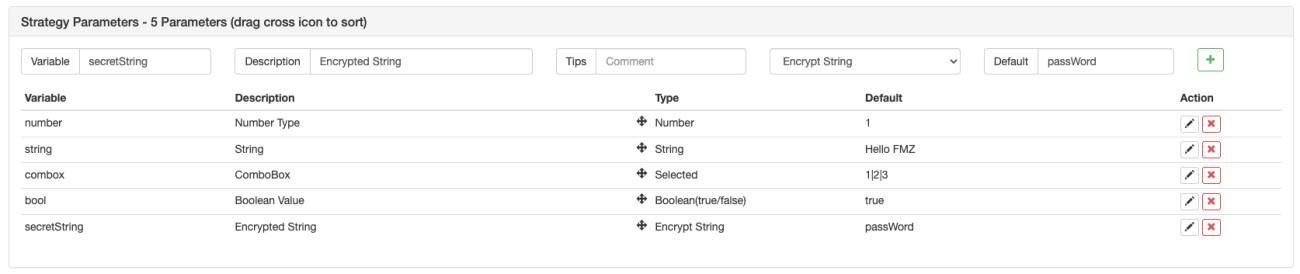
- Varable Name: namely the number, string and combox etc. in the above image,which can be directly used in the strategy group.
- Description: the name of a parameters on strategy interface, more convenient for users to understand the meaning of the parameter.
- Remark: the detailed explanation of a parameter, which will be displayed accordingly when the mouse is over the parameter.
- Type: the type of a parameter, which will be introduced in details later.
- Default: the default of the a parameter.
It is very easy to undertand string type and number type. which are very commonly used types. The combo box will display the options in the box on the parameter interface. For example, you can set the SYMBOL paramater as BTC|USDT|ETH in the combo box; if you choose USDT in the box on the page, the SYMBOL value in the strategy is USDT index 1. Check options refers to an optional checkbox; check means true, while no check means false.
There are more parameters for settings; referene:https://www.fmz.com/api.
Strategy Backtest
When the quantization of a strategy is finished, you can test it by the history data, to check out the profit situation of the strategy in the history date. Of course, the backtest result is only for reference. FMZ Quant platform supports the backtests of cryptocurrency spot and futures, BitMEX perpetual contract, commodity futures, in which only mainstream cryptocurrencies are supported.
The Javascript backtest is run on the browser; the Python backtest is on the docker, and our platform provides public dockers for users. The backtest of Mylanguage has more parameters for settings, and more details can be referred in the document of Mylanguage.
Baktest Mechanism
Onbar backtest mechanism is based on K-line, that is, each K-line will generate one point in time for backtest. On the point in time, you can obtain the information including the open, close, highest and lowest prices and trading volume of the current K-line, as well as the history K-line information before the point. The shortcoming of this kind of mechanism is very obvious: only one purchase can be generated on one K-line; usually the referred price is the close price of thr K-line. also, one K-line can only obtain four prices, namely the close, open, highest and lowest prices; the information, icluding how the prices change in one K-line and whether the highest price or the lowest price changes first, cannot be obtained. Take the one-hour K-line as an example. The market quote information is surely obtained every several seconds in the bot, and trading commands will be conducted in the bot not after the K-line is finished. The advantage of onbar backtest mechanism is easy to understand, and fast to backtest.
The backtest on FMZ contains two kinds, namely the simulation level backtest and the real market level backtest. The simulation level backtest can generate the simulated tick according to the underlayer K-line periods, and each underlayer K-line period will generate 14 backtest time points. However, the real market level backtest will actually collect tick, every several seconds, and now it supports real depth (inluding 20 levels), and real execution trade by tarde. The date volume is pretty huge, and the backtest speed is very slow, so the backtest cannot be run in a long time. FMZ backtest mechanism can realize multiple trades of the startegy on one K-line, to prevent the situation that the trading can only be executed by the close price, and also increasingly targeting at and taking care of the backtest speed. For more detailed instructions: https://www.fmz.com/bbs-topic/9126.
The framework of backtest and bot are the same, both an infinite loop. Because the backtest is to skip to different backtest points, the backtest can be run without using "Sleep", and it will automatically skip to the next time point when one loop is over. However, Python, due to the program mechanism, needs a constraint of Sleep(10), to avoid being stuck.
Backtest Matching
The backtest engine will match the order price placed by the user and the market price at the backtest time point. If the buy price is higher than sell one, the sell one will be executed. If the trading cannot be executed, a pending order will be generated. Slippage needs to be added to ensure the trading. If the position cannot be opened or closed during the backtest, check whether the position is frozen due to unfinished orders.
Backtest Page Settings
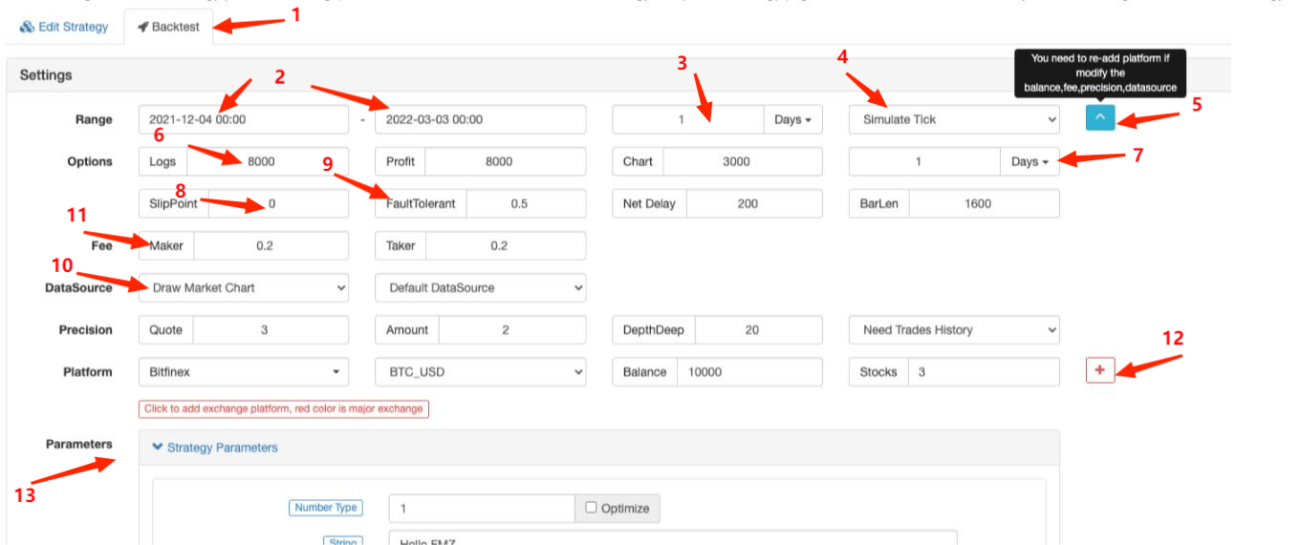
- 1.choosing the page of "Backtest", on the left of which is "Edit Strategy" page;
- 2.the starting time and the ending time of the backtest; for the data might be incomplete, the backtest may directly start from the time when the data exists;
- 3.the default period of backtesting the
GetRecords()function; you can also specify a period parameter in the code; - 4.choosing the backtest mechanism;
- 5.displaying or hiding more backtest settings;
- 6.the maximums of log items, profit log items and chart log items, to prevent the browser from the breakdown caused by huge data amount;
- 7.the period generated by the underlayer tick according to K-line;
- 8.traing slippoint;
- 9.fault tolerance, which will simulate the situation when the API request is wrong, and test the fault tolerance capacity of the strategy;
- 10.whether to draw the market chart; if a TA indicator function is used in the baacktest, the function will be automatically shown in the chart, and buying and selling also will be marked;
- 11.service fee setting;
- 12.adding platforms - trading pair & assests;
- 13.backtest parameter settings; if the parameters are numbers and also support one-key optimizaton, the parameters will be traversed automatically in a certain range in the backtest.
Differences Between Bot & Backtest
- 1.the only valid market quotes in the backtest are only from GetTicker and GetRecords; others like GetDepth and GetTrades are not real (the data volume is huge, and although the real market level backtest now supports the data already, it only supports the latest data);
- 2.the platforms added in the backtest are all segregated accounts; right ow switching the trading pairs is not supported; therefore, you cannot operate two trading pairs in one account;
- 3.netwrok request cannot be used in the backtest;
- 4.IO extension cannot be used in the backtest, and only basic APIs can be operated;
- 5.only standard data can be obtained in the backtest, and the data, like Info that is related to the bot, does not exist;
- 6.tarding might be not executed in the backtest, and pay attention to the situation of frozen orders;
- 7.in the backtest of commodity futures, market order is not supported.
Strategy Fault Tolerance & Common Errors
As we mentioned earlier, Using an API interface in the bot may fail to access and return null; if you still use the data of it, an error will be reported and the bot will stop. Therefore, strategies need to do well in fault tolerance.
Common Ways of Fault Tolenrance
Common Causes:
-
API access network error; the timeout of accessing the interface returns nunll, and an error will be reported.
-
Platfrom limitation error, such as ip limitation, order precision, access frequency, parameter error, asset deficiency, market trading failure, the canceling of executed orders, etc.; the details can be queried in the API document according to the wrong codes.
-
Platform return data error; it happens sometimes, such as returning null depth, delayed account information and delayed order status, etc.
-
Program logic error.
Before you use the returned data of API, you should judge whether the data is null, and the common methods are introduced as follows:
            //1.judge the data is null and handle
var ticker = exchange.GetTicker();
while(ticker == null){
     Log('ticker obtain error');
     ticker = exchange.GetTicker();
 }
 Log(ticker.Last);
 // 2. judge the data is not null, and use
 var ticker = exchange.GetTicker();
 if(!ticker){
     Log(ticker.Last);
 }
 // 3.retry _C() function
 var ticker = _C(exchange.GetTicker);
 Log(ticker.Last);
 // 4.try cache fault tolerance
 try{
     var ticker = exchange.GetTicker();
     Log(ticker.Last);
 }
 catch(err){
     Log('ticker obtain error');
 }
If you want to obtain the information of erors, you can use GetLastError(), and the strings of the last time error information will be returned, and the errors can be processed by differences.
FAQ
Common error summary in the top posts of the forums: https://www.fmz.com/bbs-topic/9158. Here we introduce it in brief; you can use ctrl+F to search, when you have problems.
How to deploy the docker?
There is a detailed introdution about it in the section of adding a docker.
Can I ask someone to ghostwrite strategies for me?
on https://www.fmz.com/markets , there are some people who provide services of writing strategies for others, or you can ask in the chatting groups; notice that those kind of services shall be contacted by yourself, and you should be aware that the risk shall also be borne by yourself.
All interfaces prompt timeout when acessed
it refers to the timeout of the accessed platform interface; if the timeout happens occasionally, it is not a problem; if the timeout is prompted all the time, that means all networks cannot be accessed and an overseas server is needed.
ERR_INVALID_POSITION
If the backtest reports an error, it is generally a writing error; when you try to place an order to close a position, when there is no position or the position volume is not enough, an error will be reported.
Symbol not set
There is no contract set in the code, durig the backtests of futures platforms. Refer to exchange.SetContractType function.
BITMEX 429error,{"error":{"message":"Rate limit exceeded retry in 1 seconds ……"}}
The access frequency of the platform interface is too high.
{"status":6004,"msg":"timestamp is out of range"}
The timestamp of the server exceeds the time range of updating the server, and the exceeded time cannot be too long.
GetOrder(455284455): Error: invalid order id or order cancelled.
If the order of a platform is cancelled, the platform will not maintain the order information anymore, so the information cannot be obtained.
GetOrders: 400: {"code":-1121,"msg":"Invalid symbol."}
Invalid trading pair; check out if the tradig pair setting is wrong.
Secret key decrypt failed
The APIKEY parsing fails. If the FMZ password has been modified after the APIKEY is configured, try to add a platform page on FMZ and reconfigure the platform APIKEY.
Signature not valid: invalid submission time or incorrect time format
suggest you use Linux server, or install time synchronization software on these Windows systems where this problem occurs.
Why the docker still cannot access the platform API when a global proxy is set?
The global proxy does not have a proxy docker network port. Due to the delay problem, it is best to deploy the docker of an overseas server.
How to save a strategy locally, not to upload it to FMZ?
Using Python, and you can import local files, save the strategy normally written by FMZ API as a file and put it in the execution path on your own server, and you can directly read and execute it.
            #!python2.7

def run(runfile):
      with open(runfile,"r") as f:
            exec(f.read())

def main():
    run('my.py')
How to the testnet of a platform or how to change API base address?
Use exchange.SetBase() to directly switch to the corresponding API base address. For example:
exchange.SetBase("https://www.okex.me")
- 1