
FMZ Based Order Synchronous Management System Design (2)
Order Synchronous Management System (Synchronous Server)
Let's continue the discussion in last article: FMZ Based Order Synchronous Management System Design (1), to design a synchronous order supervising strategy.
Please consider of the following designing questions:
- 1.If you do not want to synchronously supervise orders for a while, can it be stopped? Once it is stopped, disable the restart from extended API, and use password verification.
To implement this function, add 2 global variables:var isStopFollow = false // used to mark whether to currently supervise orders or not var reStartPwd = null // used to record the restart password

Then add interactive controls on the strategy editing page to stop/restart the strategy (it is not to stop the bot, just stop the logic, to not follow and supervise orders, without doing anything). When to stop it, you can set a stop password, so that even if there is a bot of the Order Synchronous Management System Library (Single Server) of your extended API KEY, it will not be able to invoke your strategy. When restart to supervise orders, enter the preset password to invoke the order supervising function.
Implementation code of the related function:
            ...
          // Judge the interactive command
          if (arr.length == 2) {
          	// Buttons with controls
          	if (arr[0] == "stop/restart") {
          		// Stop/restart to supervise orders
          		if (!isStopFollow) {
          		    isStopFollow = true
          		    reStartPwd = arr[1]
          		    Log("stopped to supervise orders,", "the set restart password is:", reStartPwd, "#FF0000")
          		} else if (isStopFollow && arr[1] == reStartPwd) {
          			isStopFollow = false
          			reStartPwd = null
          			Log("restarted to supervise orders,", "clear the restart password.", "#FF0000")
          		} else if (isStopFollow && arr[1] != reStartPwd) {
          			Log("Wrong restart password!")
          		}
          	}
          	continue
          }
-
2.The ordering amount of the supervised order can be specified or it can be zoomed by ratio:
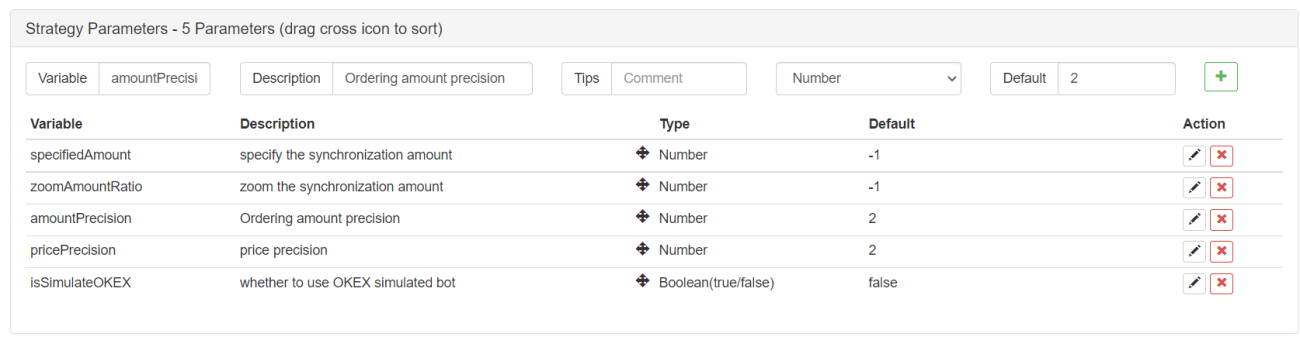
specifiedAmount: specify amount of the supervised order; default is -1, namely not specified.
zoomAmountRatio: zoom according to the ordering amount in the signal sent. For example, the signal sent is:ETH_USDT,swap,buy,1, then multiply the value of the ordering amount by zoomAmountRatio; default is -1, namely not zoomed.var amount = specifiedAmount == -1 ? action.amount : specifiedAmount amount = zoomAmountRatio == -1 ? amount : amount * zoomAmountRatioHere we have realized to zoom the ordering amount or specify a certain value, according to the signal received.
-
3.Write codes as simple as possible, and use other template libraries to deal with placing orders.
Template library used for placing spot orders: https://www.fmz.com/strategy/10989
Template library used for placing futures orders: https://www.fmz.com/strategy/203258function trade(action) { // Switch the trading pair, and set contract exchange.SetCurrency(action.symbol) if (action.ct != "spot") { exchange.SetContractType(action.ct) } var retTrade = null var amount = specifiedAmount == -1 ? action.amount : specifiedAmount amount = zoomAmountRatio == -1 ? amount : amount * zoomAmountRatio if (action.direction == "buy") { retTrade = action.ct == "spot" ? $.Buy(amount) : $.OpenLong(exchange, action.ct, amount) } else if (action.direction == "sell") { retTrade = action.ct == "spot" ? $.Sell(amount) : $.OpenShort(exchange, action.ct, amount) } else if (action.direction == "closebuy") { retTrade = action.ct == "spot" ? $.Sell(amount) : $.CoverLong(exchange, action.ct, amount) } else if (action.direction == "closesell") { retTrade = action.ct == "spot" ? $.Buy(amount) : $.CoverShort(exchange, action.ct, amount) } return retTrade }Therefore, it can been seen that placing an order only needs one statement:
$.Sell(amount),$.Buy(amount),$.OpenLong(exchange, action.ct, amount), etc.
Strategy Code:
The temporary code in the previous Order Synchronous Management System (Synchronous Server) is as follows:
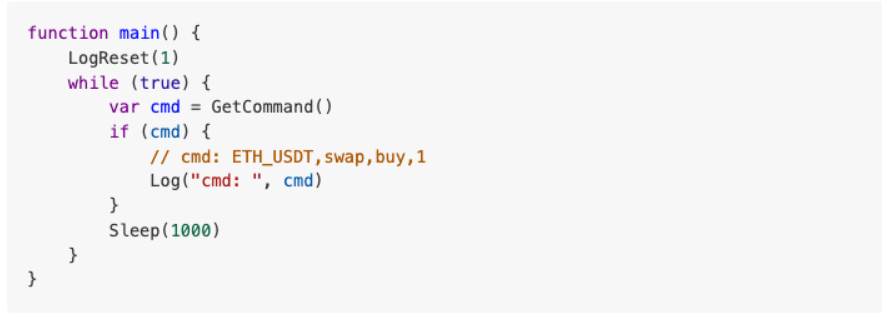
Now, let's design the Order Synchronous Management System (Synchronous Server) again:
// Global variables
var isStopFollow = false
var reStartPwd = null
function trade(action) {
// Switch the trading pair, and set contract
exchange.SetCurrency(action.symbol)
if (action.ct != "spot") {
exchange.SetContractType(action.ct)
}
var retTrade = null
                var amount = specifiedAmount == -1 ? action.amount : specifiedAmount
    amount = zoomAmountRatio == -1 ? amount : amount * zoomAmountRatio
if (action.direction == "buy") {
retTrade = action.ct == "spot" ? $.Buy(amount) : $.OpenLong(exchange, action.ct, amount)
} else if (action.direction == "sell") {
retTrade = action.ct == "spot" ? $.Sell(amount) : $.OpenShort(exchange, action.ct, amount)
} else if (action.direction == "closebuy") {
retTrade = action.ct == "spot" ? $.Sell(amount) : $.CoverLong(exchange, action.ct, amount)
} else if (action.direction == "closesell") {
retTrade = action.ct == "spot" ? $.Buy(amount) : $.CoverShort(exchange, action.ct, amount)
}
return retTrade
}
function parseCmd(cmd) {
var objAction = {}
// Parse cmd, such as: ETH_USDT,swap,buy,1
var arr = cmd.split(",")
if (arr.length != 4) {
return null
}
objAction.symbol = arr[0]
objAction.ct = arr[1]
objAction.direction = arr[2]
objAction.amount = arr[3]
return objAction
}
function main() {
// Clear all logs
LogReset(1)
if (isSimulateOKEX) {
exchange.IO("simulate", true)
Log("Switch to OKEX simulated bot!")
}
// set precision
exchange.SetPrecision(pricePrecision, amountPrecision)
// Check specifiedAmount and zoomAmountRatio, for they cannot be set at the same time
if (specifiedAmount != -1 && zoomAmountRatio != -1) {
throw "cannot set specifiedAmount and zoomAmountRatio at the same time"
}
while (true) {
var cmd = GetCommand()
if (cmd) {
Log("cmd: ", cmd)
var arr = cmd.split(":")
// Judge the interactive command
if (arr.length == 2) {
// Buttons with controls
if (arr[0] == "stop/restart") {
// Stop/restart to supervise orders
if (!isStopFollow) {
isStopFollow = true
reStartPwd = arr[1]
Log("stopped to supervise orders,", "the set restart password is:", reStartPwd, "#FF0000")
} else if (isStopFollow && arr[1] == reStartPwd) {
isStopFollow = false
reStartPwd = null
Log("restarted to supervise orders,", "Clear the restart password", "#FF0000")
} else if (isStopFollow && arr[1] != reStartPwd) {
Log("Wrong restart password!")
}
}
continue
}
// Allow to supervise orders
if (!isStopFollow) {
// Parse the interactive command of the order supervising signal
var objAction = parseCmd(cmd)
if (objAction) {
// Parse correctly
var ret = trade(objAction)
} else {
Log("Wrong signal cmd:", cmd)
}
}
}
// Display the order supervising status
LogStatus(_D(), isStopFollow ? "Stop synchronization" : "Maintain synchronization", "\n")
Sleep(1000)
}
}
Test
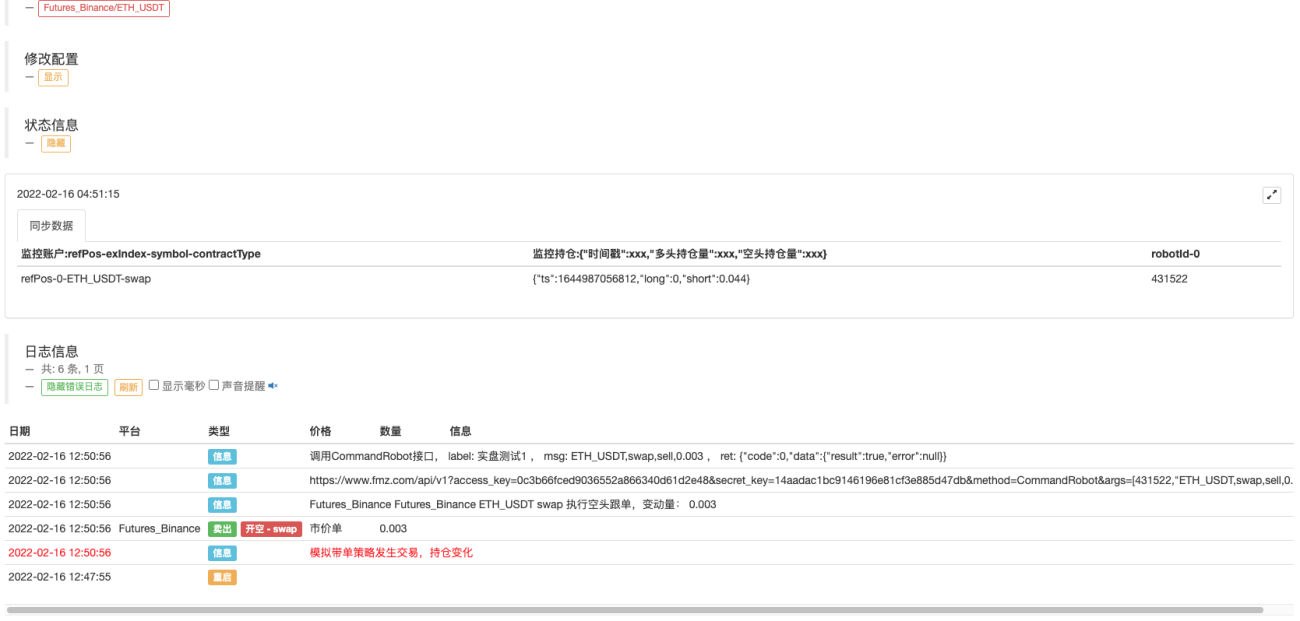
This time, the Binance real tick test is used for the account with orders, and the OKEX account is used for the order supervising bot. For the order supervising, we still use the testing function used in the previous article (the main function in the Order Synchronous Management System Library (Single Server) template).
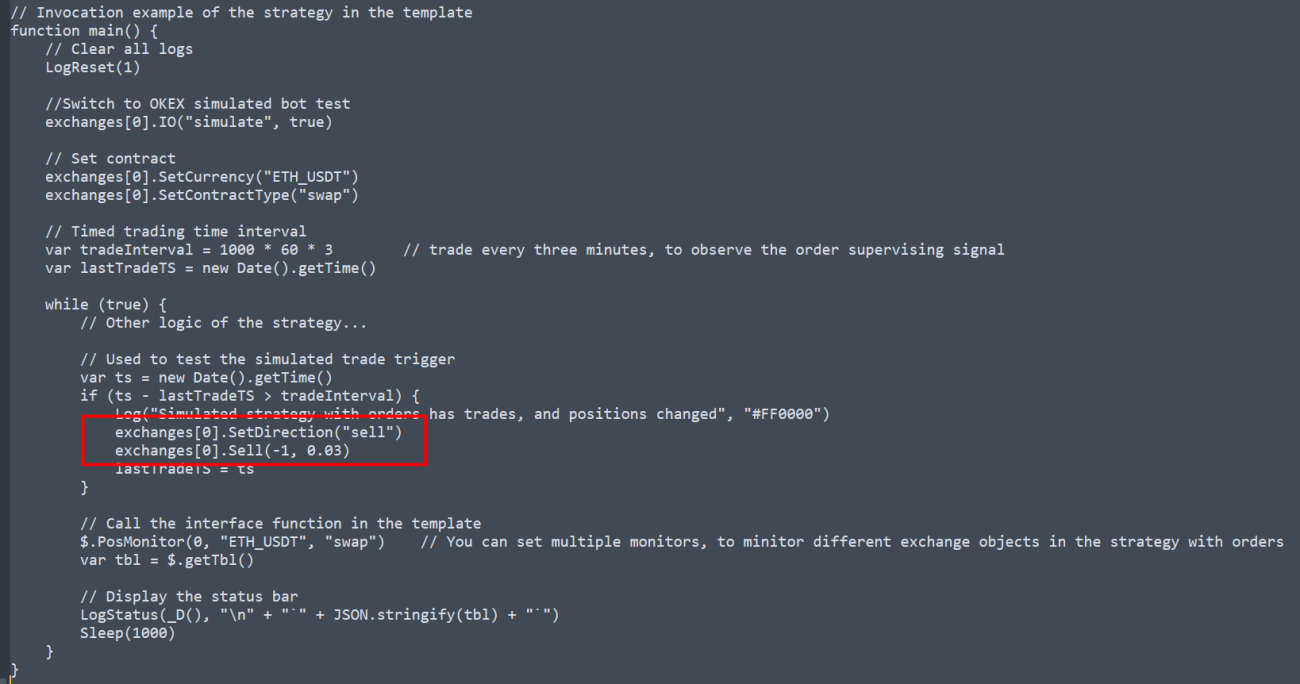
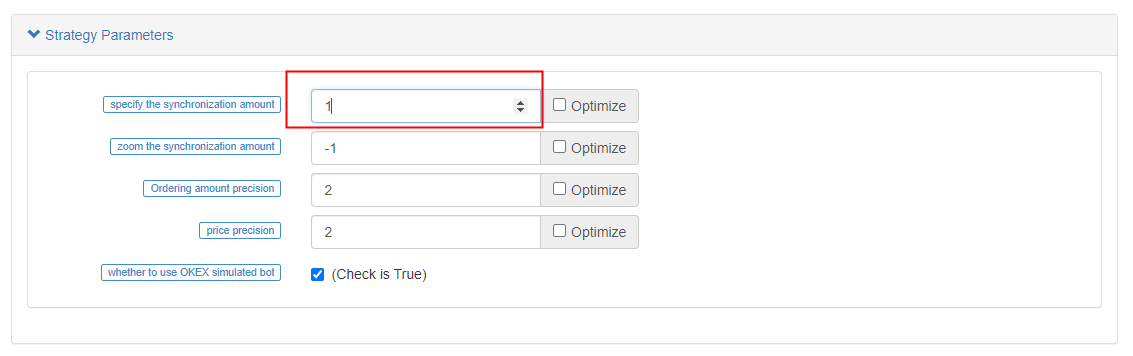
It's just that we changed the trading direction to short, and the trading volume was changed to 0.003 (Binance USDT-margined contracts can be placed in decimals). However, the OKEX account with orders must be an integer (the order placed by OKEX must be an integer number), so the parameter I specify the strategy parameter specifiedAmount as 1.
The bot of the testing function in Order Synchronous Management System Library (Single Server) triggered the trade.
The order supervising bot strategy received the signal, and execute the supervision action:
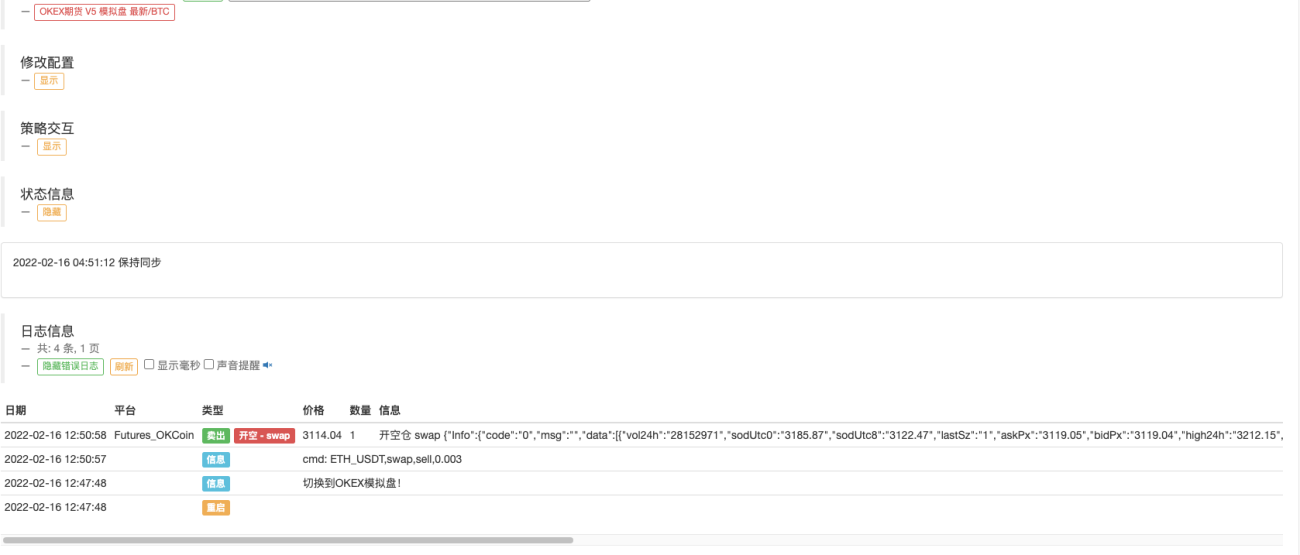
The platform opened the corresponding order.

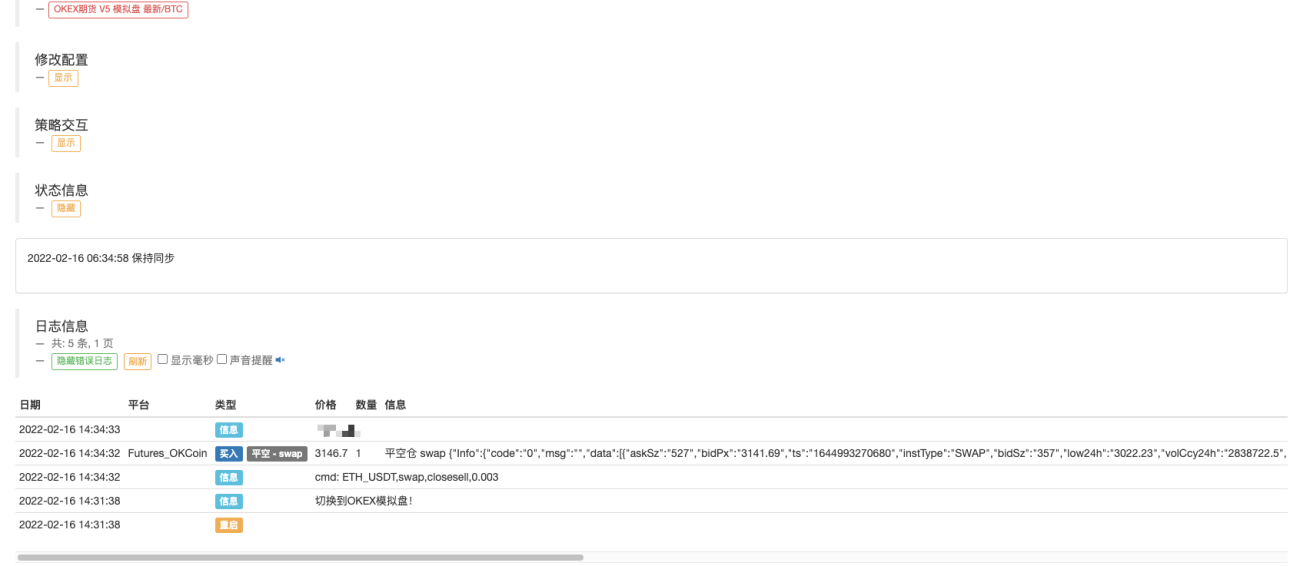
Next, test closing positions, and change the order direction in the main function to close short position, 0.003.
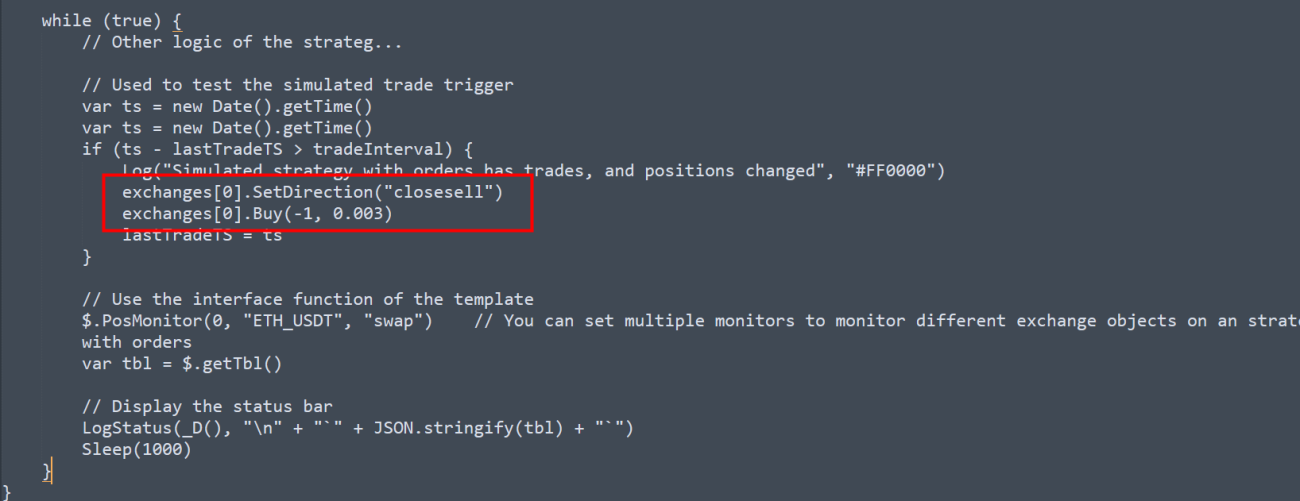
Then restart the bot which is responsible for carrying orders (Order Synchronous Management System Library (Single Server)).
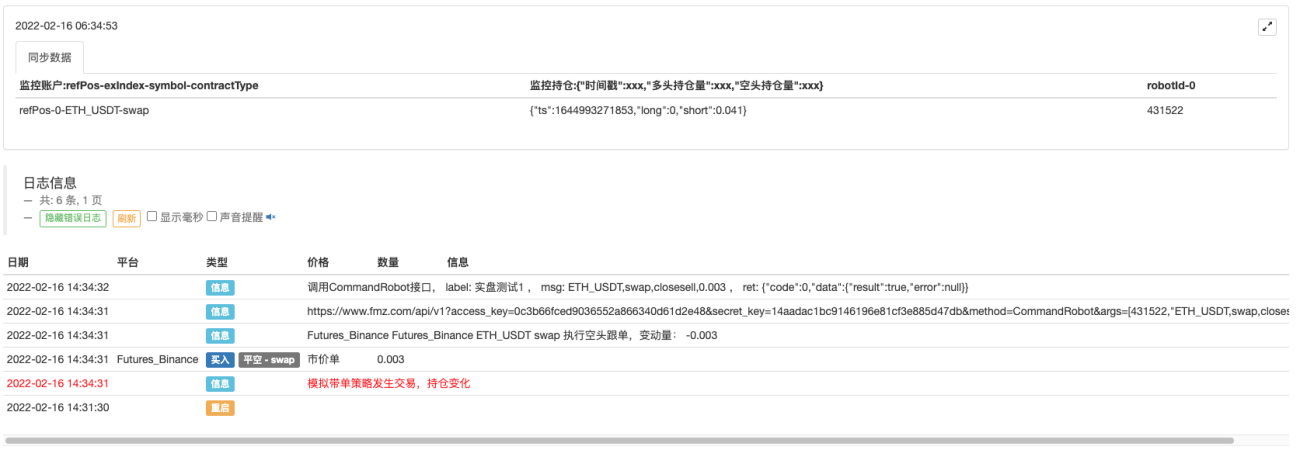
The same operation is also triggered in the order supervising bot:
Strategy Address:
Order Synchronous Management System Library (Single Server)
Order Synchronous Management System (Synchronous Server)
Those strategies are only used for communication and study; for actual use, you need to modify, adjust and optimize them by yourself.
- 1