

MyLanguage is a programmatic trading language that is compatible and enhanced with MyLanguage. The MyLanguage of FMZ Quant will undergo strict syntax checking. For example, when using language enhancement to embed JavaScript language code, an extra space character after the %% operator will cause an error to be reported.
-
Basic instructions
-
Contract
Cryptocurrency Contract
Cryptocurrency Contract
this_week cryptocurrency futures contract this week next_week cryptocurrency futures contract next week month cryptocurrency futures contract month quarter cryptocurrency futures contract quarter next_quarter cryptocurrency futures contract next quarter third_quarter cryptocurrency futures contract third quarter last_quarter contract last quarter XBTUSD BITMEX perpetual contract swap cryptocurrency futures perpetual contracts other than BITMEX exchange For details, please refer to the exchange.SetContractType() function section of the JavaScript/Python/C++ documentation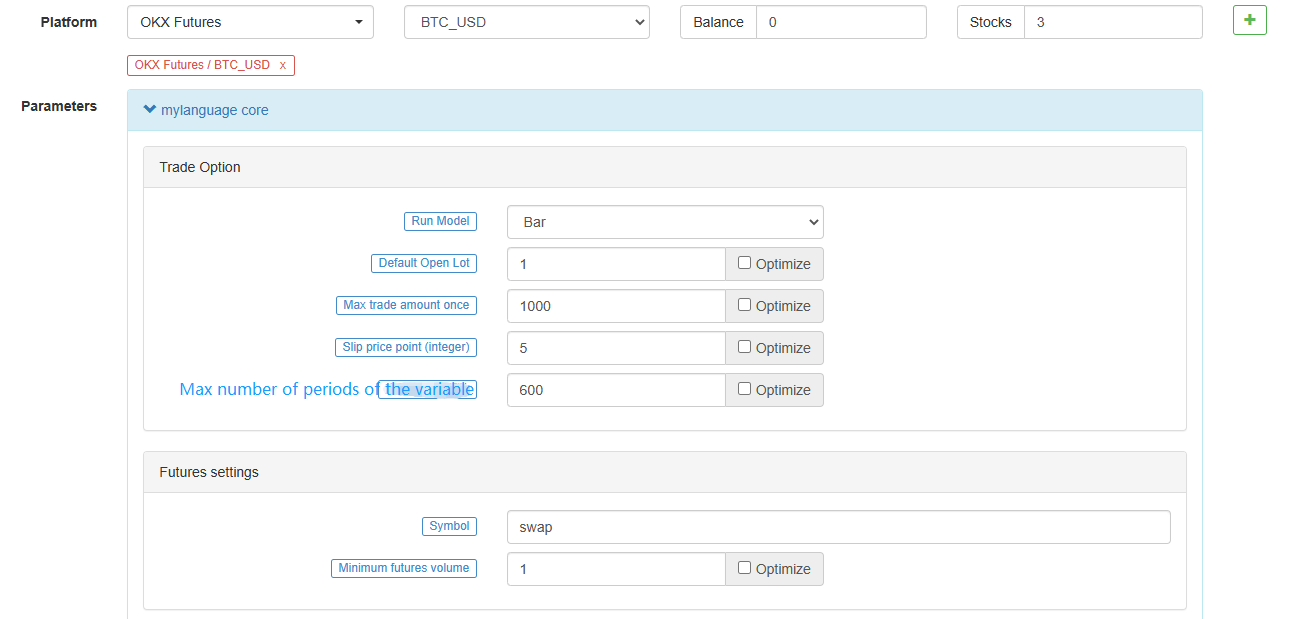
-
Variables
A variable is a space opened up in the computer memory to store data. Simply put, it is used to store data.
open the first variable
            // assign 1 to variable a
a:=1;
In
MyLanguage, it is simple to distinguish from thedata volume:- Single-valued data: There is only one value, such as
0,1,'abc'. - Sequence data: a data sequence composed of a bunch of single-valued data, such as
Close(closing price), whereClosecontains the closing price ofnperiods.[ 10.1 , 10.2 , 10.3 , 10.4 , 10.5 ...]
Distinguish from "variable type"
- String type: it must be wrapped with ```''``, string type is not allowed to be used directly, and it need to be output to the view with the function.
INFO(CLSOE>OPEN,'OK!');- Value types: including integers, floating-point numbers (decimals).
// integer int:=2; // decimal float:=3.1;- Boolean type, using 1 (for true) or 0 (for false): 1, 0, true or false. For example:
A:=1>0;After this code is executed, the value ofAis 1.
// The closing price of the current period is greater than -999, you will find that the return value of each period is 1, which means true, because the closing price is almost impossible to be negative. is_true:=Close>-999;- Global variables
VARIABLE:VALUE1:10; // Declare a global variable, assign the value 10, and execute it only once.Remark that when backtesting:
            VARIABLE:NX:0;    // The initial global variable NX is 0
NX..NX+1;         // Accumulate 1 each time
INFO(1,NX);       // Print NX every time
Initially, the
INFOstatement prints101, maybe it's not0initially?
The reason is that there are 100 initial K-lines in the backtest, and 100 K-lines have already been run through, which has been accumulated 100 times.
The actual price depends on how many K-lines are initially obtained.-
Naming rules
In most systems, variable naming does not allow the use of system "reserved words" (built-in variable names, function names). For example, the well-known
Close,C. In addition, pure numbers or leading numbers are not allowed. Finally, it is not allowed to be very long, and different systems have different length restrictions.
In fact, you don't have to worry about the efficiency of the mainstream system's parsing of Chinese. I believe that "MyLanguage" is very friendly to Chinese. For experienced programmer, it is recommended that you use the following two naming rules:- Chinese name
// elegant output 5-day moving average:=MA(C,5);- English + underline
            // Output
move_avg_5:=MA(C,5);
If you prefer English, try to make the meaning of your variables as understandable as possible. Do not use names such as:
A1,AAA,BBB.... Trust me when you review your indicator code again in a few days, you will be very miserable due to memory loss. Similarly, when you export the code to others, the reader must be devastated.So from now on, embrace the "MyLanguage" to the fullest! I hope it can become a powerful tool for your analysis and decision-making.
- Single-valued data: There is only one value, such as
-
Type of Data
Type of data is a basic concept. When we assign a clear data to a variable in writing, the variable also becomes the type of the data itself.
-
- Type of Value:
1.2.3.1.1234.2.23456 ... -
- String type(str):
'1' .'2' .'3' ,String types must be wrapped with '' -
- Sequence data:
A collection of data consisting of a series of single-valued data -
- Boolean type(boolean):
Use
1representstrueand0forfalse.Example
            // declare a variable of value type
var_int := 1;
// Declare a variable for sequence data
var_arr := Close;
// The string type cannot be declared alone, it needs to be combined with the function
INFO(C>O, 'positive line');
-
-
Operator
The operation and calculation used to execute the indicator code are simply the symbols involved in the operation.
-
Assignment operator
to assign a value to a variable
-
:
:, represents assignment and output to the graph (subgraph).Close1:Close; // Assign Close to the variable Close1 and output to the figure -
:=
:=, represents assignment, but is not output to the graph (main graph, sub graph...), nor is it displayed in the status bar table.Close2:=Close; // Assign Close to the variable Close2 -
^^
^^, Two^symbols represent assignment, assign values to variables and output to the graph (main graph).lastPrice^^C; -
..
.., two.symbols represent assignment, assign values to variables and display variable names and values in the chart, but do not draw pictures to the chart (main picture, sub-picture...).openPrice..O
-
-
Relational operators
Relational operators are binary operators that are used in conditional expressions to determine the relationship between two data.
Return value: Boolean type, either
true(1) orfalse(0).-
- more than
>
// Assign the operation result of 2>1 to the rv1 variable, at this time rv1=1 rv1:=2>1; - more than
-
- less than
<
// Returns false, which is 0, because 2 is greater than 1 rv3:=2<1; - less than
-
- more than or equal to
>=
x:=Close; // Assign the result of the operation that the closing price is more than or equal to 10 to the variable rv2 // Remark that since close is a sequence of data, when close>=10 is performed, the operation is performed in each period, so each period will have a return value of 1 and 0 rv2:=Close>=10; - more than or equal to
-
- less than or equal to
<=
omitted here - less than or equal to
-
- equal to
=
A:=O=C; // Determine whether the opening price is equal to the closing price. - equal to
-
- Not equal to
<>
1<>2 // To determine whether 1 is not equal to 2, the return value is 1 (true) - Not equal to
-
-
Logical Operators
Return value: Boolean type, either
true(1) orfalse(0).- The logical and
&&, can be replaced byand, and the left and right sides of the and connection must be established at the same time.
// Determine whether cond_a, cond_b, cond_c are established at the same time cond_a:=2>1; cond_b:=4>3; cond_c:=6>5; cond_a && cond_b and cond_c; // The return value is 1, established- Logical or
||, you can useorto replace the left and right sides of the or link, one side is true (true), the whole is true (return value true).
cond_a:=1>2; cond_b:=4>3; cond_c:=5>6; cond_a || cond_b or cond_c; // The return value is 1, established()operator, the expression in parentheses will be evaluated first.
1>2 AND (2>3 OR 3<5) // The result of the operation is false 1>2 AND 2>3 OR 3<5 // The result of the operation is true - The logical and
-
Arithmetic operators
Return value: numeric typeArithmetic operators are arithmetic operators. It is a symbol for completing basic arithmetic operations (arithmetic operators), which is a symbol used to process four arithmetic operations.
-
plus +
A:=1+1; // return 2 -
minus -
A:=2-1; // return 1 -
*multiply *
A:=2*2; // return 4 -
divide /
A:=4/2; // return 2
-
-
-
Functions
-
Functions
In the programming world, a "function" is a piece of code that implements a certain function. And it can be called by other code, the general form is as follows:
function(param1,param2,...)-
Composition:
Function name (parameter1, parameter2, ...), may have no parameters or have multiple parameters. For example,
MA(x,n);means to return to the simple moving average ofxwithinnperiods. Among them,MA()is a function,xandnare the parameters of the function.When using a function, we need to understand the basic definition of the function, that is, what data can be obtained by calling the function. Generally speaking, functions have parameters. When we pass in parameters, we need to ensure that the incoming data type is consistent. At this stage, the code hinting function of most IDEs is very imperfect. There is a data type of the parameter given, which brings some trouble to our use, and
MA(x,n);is interpreted as:Return to simple moving average Usage: AVG:=MA(X,N): N-day simple moving average of X, algorithm (X1+X2+X3+...+Xn)/N, N supports variablesThis is very unfriendly to beginners, but next, we will dissect the function thoroughly, trying to find a quick way to learn and use the function.
-
-
Return value
To learn functions quickly, we need to understand a concept first, it's called "return value", "Return", as the name suggests, means "return back"; The value represents "specific value", then the meaning of the return value is: the data that can be obtained.
// Because it will be used in the following code, the variable return_value is used to receive and save the return value of function() // retrun_value := function(param1,param2); // For example: AVG:=MA(C,10); // AVG is retrun_value, function is MA function, param1 parameter: C is the closing price sequence data, param2 parameter: 10. -
Parameters
Secondly, the second important concept of the function is the parameter, and different return values can be obtained by passing in different parameters.
            // The variable ma5 receives the 5-day moving average of closing prices
ma5:=MA(C,5);
// The variable ma10 receives the 10-day moving average of closing prices
ma10:=MA(C,10);
The first parameter
Xof the above variablesma5,ma10isC(closing price), in fact,Cis also a function (returns the sequence of closing prices from the opening to the present), but it has no parameters. The 5 and 10 of the second parameter are used to tell theMA()function that we want to get the moving average of the closing price for a few days. The function becomes more flexible to use through the parameters. -
How to learn
-
- First, we need to understand what a function does, that is, what data this function can return to us.
-
- The last thing is to understand the type of the return value. After all, we use functions to get the return value.
-
- Moreover, we need to know the data type of the parameter
MA(x,n), if you don't know the data type of the parameterx,n, it will not be able to get the return correctly value.
- Moreover, we need to know the data type of the parameter
In the following function introduction and use, follow the above three principles.
-
-
-
Language enhancement
-
MyLanguageandJavaScriptlanguage mixed programming%% // This can call any API quantified of FMZ scope.TEST = function(obj) { return obj.val * 100; } %% Closing price: C; Closing price magnified 100 times: TEST(C); The last closing price is magnified by 100 times: TEST(REF(C, 1)); // When the mouse moves to the K-line of the backtest, the variable value will be prompted-
scopeobjectThe
scopeobject can add attributes and assign anonymous functions to attributes, and the anonymous function referenced by this attribute can be called in the code part of MyLanguage. -
scope.getRefs(obj)functionIn
JavaScriptcode block, call thescope.getRefs(obj)function to return the data of the passed inobjobject.The
JavaScriptcode wrapped with the following%% %%will get theCpassed in when theTEST(C)function in MyLanguage code is called Close price.
Thescope.getRefsfunction will return all the closing prices of this K-line data. Because of the use ofthrow "stop"to interrupt the program, the variablearrcontains the closing price of the first bar only. You can try to deletethrow "stop", it will execute thereturnat the end of theJavaScriptcode, and return all closing price data.%% scope.TEST = function(obj){ var arr = scope.getRefs(obj) Log("arr:", arr) throw "stop" return } %% TEST(C); -
scope.bars
Access all K-line bars in the
JavaScriptcode block.The
TESTfunction returns a value. 1 is a negative line and 0 is a positive line.%% scope.TEST = function(){ var bars = scope.bars return bars[bars.length - 1].Open > bars[bars.length - 1].Close ? 1 : 0 // Only numeric values can be returned } %% arr:TEST;# Attention: # An anonymous function received by TEST, the return value must be a numeric value. # If the anonymous function has no parameters, it will result in an error when calling TEST, writing VAR:=TEST; and writing VAR:=TEST(); directly. # TEST in scope.TEST must be uppercase. -
scope.bar
In the
JavaScriptcode block, access the current bar.Calculate the average of the high opening and low closing prices.
%% scope.TEST = function(){ var bar = scope.bar var ret = (bar.Open + bar.Close + bar.High + bar.Low) / 4 return ret } %% avg^^TEST; -
scope.depth
Access to market depth data (order book).
%% scope.TEST = function(){ Log(scope.depth) throw "stop" // After printing the depth data once, throw an exception and pause } %% TEST; -
scope.symbol
Get the name string of current trading pair.
%% scope.TEST = function(){ Log(scope.symbol) throw "stop" } %% TEST; -
scope.barPos
Get the Bar position of the K-line.
%% scope.TEST = function(){ Log(scope.barPos) throw "stop" } %% TEST; -
scope.get_locals('name')
This function is used to get the variables in the code section of MyLanguage.
            V:10;
%%
scope.TEST = function(obj){
    return scope.get_locals('V')
}
%%
GET_V:TEST(C);
# Attention: # If a variable cannot calculate the data due to insufficient periods, call the scope.get_locals function in the JavaScript code at this time # When getting this variable, an error will be reported: line:XX - undefined locals A variable name is undefined -
scope.canTrade
The
canTradeattribute marks whether the current bar can be traded (whether the current Bar is the last one)For example, judging that the market data is printed when the strategy is in a state where the order can be traded
            %%
scope.LOGTICKER = function() {
    if(exchange.IO("status") && scope.canTrade){
        var ticker = exchange.GetTicker();
        if(ticker){
            Log("ticker:", ticker);
            return ticker.Last;
        }
    }
}
%%
LASTPRICE..LOGTICKER;
-
-
Application example:
            %%
scope.TEST = function(a){
    if (a.val) {
        throw "stop"
    }
}
%%
O>C,BK;
C>O,SP;
TEST(ISLASTSP);
Stop the strategy after opening and closing a position once.
-
-
Multiperiod reference
The system will select a suitable underlying K-line period automatically, and use this underlying K-line period data to synthesize all referenced K-line data to ensure the accuracy of the data.
-
Use:
#EXPORT formula_name ... #ENDto create a formula. If the formula is not calculated just to obtain data of different periods, you can also write an empty formula.An empty formula is:
#EXPORT TEST NOP; #END // end -
Use:
#IMPORT [MIN,period,formula name] AS variable valueto refer to a formula. Get various data of the set period (closing price, opening price, etc., obtained by variable value).The
MINin theIMPORTcommand means minute level.MyLanguage of FMZ Quant platform, and only theMINlevel is supported in theIMPORTcommand. Non-standard periods are now supported. For example, you can use#IMPORT [MIN, 240, TEST] AS VAR240to import data such as 240-minute period (4 hours) K-line.Code example:
// This code demonstrates how to reference formulas of different periods in the same code // #EXPORT extended grammar, ending with #END marked as a formula, you can declare multiple #EXPORT TEST Mean value 1: EMA(C, 20); Mean value 2: EMA(C, 10); #END // end #IMPORT [MIN,15,TEST] AS VAR15 // Quoting the formula, the K-line period takes 15 minutes #IMPORT [MIN,30,TEST] AS VAR30 // Quoting the formula, the K-line period takes 30 minutes CROSSUP(VAR15.Mean value is 1, VAR30.Mean value is 1),BPK; CROSSDOWN(VAR15.Mean value is 2, VAR30.Mean value is 2),SPK; The highest price in fifteen minutes:VAR15.HIGH; The highest price in thirty minutes:VAR30.HIGH; AUTOFILTER; -
It is necessary to pay attention to when using
REF,LLV,HHVand other instructions to reference data when referencing data in multiple periods.(*backtest start: 2021-08-05 00:00:00 end: 2021-08-05 00:15:00 period: 1m basePeriod: 1m exchanges: [{"eid":"Futures_OKCoin","currency":"ETH_USD"}] args: [["TradeAmount",100,126961],["ContractType","swap",126961]] *) %% scope.PRINTTIME = function() { var bars = scope.bars; return _D(bars[bars.length - 1].Time); } %% BARTIME:PRINTTIME; #EXPORT TEST REF1C:REF(C,1); REF1L:REF(L,1); #END // end #IMPORT [MIN,5,TEST] AS MIN5 INFO(1, 'C:', C, 'MIN5.REF1C:', MIN5.REF1C, 'REF(MIN5.C, 1):', REF(MIN5.C, 1), 'Trigger BAR time:', BARTIME, '#FF0000'); INFO(1, 'L:', L, 'MIN5.REF1L:', MIN5.REF1L, 'REF(MIN5.L, 1):', REF(MIN5.L, 1), 'Trigger BAR time:', BARTIME, '#32CD32'); AUTOFILTER;Comparing the difference between
MIN5.REF1CandREF(MIN5.C, 1),we can find:
MIN5.REF1Cis the value of the closing price of the penultimate BAR at the current moment of the 5-minute K-line data.
REF(MIN5.C, 1)is the K -line period of the current model (the above code backtest period is set to 1 minute, i.e. ```period: 1m``), the closing price of the 5-minute period where the penultimate BAR is located at the current moment.
These two definitions are differentiated, and they can be used as needed.
-
-
Mode Description
-
Signal filtering model of one opening and one leveling
In the model, the
AUTOFILTERfunction is written to control and realize the signal filtering of one opening and one closing. When there are multiple opening signals that meet the conditions, the first signal is taken as the valid signal, and the same signal on the K-line will be filtered out.Instructions supported by filtering model: BK, BP, BPK, SK, SP, SPK, CLOSEOUT, etc. Instructions with lot numbers such as BK(5) are not supported.
For example
            MA1:MA(CLOSE,5);
MA2:MA(CLOSE,10);
CROSSUP(C,MA1),BK;
CROSSUP(MA1,MA2),BK;
C>BKPRICE+10||C<BKPRICE-5,SP;
AUTOFILTER;
Comprehension: As in the above example, when AUTOFILTER is not set, the third row BK, the fourth row BK and the fifth row SP are triggered in sequence, and each K-line triggers a signal once. After opening the position, and closing the position, the model state is reset. If AUTOFILTER is set, after triggering BK, only SP is triggered, other BK signals are ignored, and each K-line triggers a signal once. -
Increase and decrease position model
The
AUTOFILTERfunction is not written in the model, allowing continuous opening signals or continuous closing signals, which can increase and decrease positions.Supported instructions: BK(N), BP(N), SK(N), SP(N), CLOSEOUT, BPK(N), SPK(N), open and close orders without lot size are not supported.
(1)Instruction grouping is supported.
(2)When multiple instruction conditions are satisfied at the same time, the signals are executed in the order in which the conditional statements are written.
For example:MA1:MA(CLOSE,5); MA2:MA(CLOSE,10); CROSSUP(C,MA1),BK(1); CROSSUP(MA1,MA2),BK(1); C>BKPRICE+10||C<BKPRICE-5,SP(BKVOL);Use
TRADE\_AGAIN
It is possible to make the same command line, multiple signals in succession.Comprehension: The above example is executed one by one, and the signal after execution is no longer triggered. Reset the model status after closing the position. A K -line triggers a signal once. -
Model with one K-line and one signal
Regardless of whether the K-line is finished, the signal is calculated in real-time orders, that is, the K-line is placed before the order is completed; the K-line is reviewed at the end. If the position direction does not match the signal direction at the end of the K-line, the position will be automatically synchronized.
For example:
MA1:MA(CLOSE,5); MA2:MA(CLOSE,10); CROSSUP(MA1,MA2),BPK; //The 5-period moving average crosses up, and the 10-period moving average goes long. CROSSDOWN(MA1,MA2),SPK; //The 5-period moving average crosses down, and the 10-period moving average goes short. AUTOFILTER; -
A model of multiple signals on one K-line
The model uses
multsigto control and implement multiple signals from one K-line.Regardless of whether the K-line is finished, the signal is calculated in real-time.
The signal is not reviewed, there is no signal disappearance, and the direction of the signal is always consistent with the direction of the position.
If multiple signal conditions are met in one K-line, it can be executed repeatedly.
For example: MA1:MA(CLOSE,5); MA2:MA(CLOSE,10); CROSSUP(MA1,MA2),BK; C>BKPRICE+10||C<BKPRICE-5,SP; AUTOFILTER; MULTSIG(0,0,2,0);MULTSIGcan execute multiple command lines within one K-line.
A command line is only signaled once.O<C,BK; // These conditions may all be executed in a K-line Bar, but only one signal per line 10+O<C,BK; // Strategy plus TRADE_AGAIN(10);it can make multiple signals per line 20+O<C,BK; 40+O<C,BK; MULTSIG(1,1,10);Supplement:
1.The model of adding and reducing positions, two ways of one signal and one K-line: placing an order at the closing price and placing an order at the order price, are both supported.
2.The model of adding and reducing positions also supports ordering of multiple signals from one K-line.
The model of adding and reducing positions, write themultsigfunction to realize multiple additions or multiple reductions on one K-line.
-
-
Execution mode
-
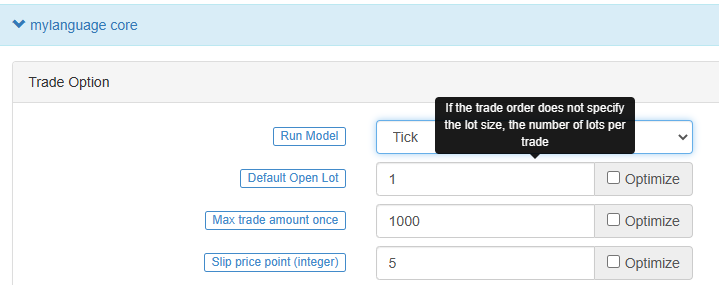
Bar model
The Bar model refers to the model that is executed after the current BAR is completed, and the trading is executed when the next BAR starts.
-
Tick model
The Tick model means that the model is executed once for each price movement and trades immediately when there is a signal.
The Tick model ignores the previous day's signal (the previous day's signal is executed immediately on the same day), and the Tick model focuses only on the current market data to determine whether the signal is triggered.
-
-
Chart display
-
Additional indicators for main chart
Use operator
^^, set indicators are displayed on the main chart while assigning values to variables.MA60^^MA(C, 60); // Calculate the average indicator with the parameter of 60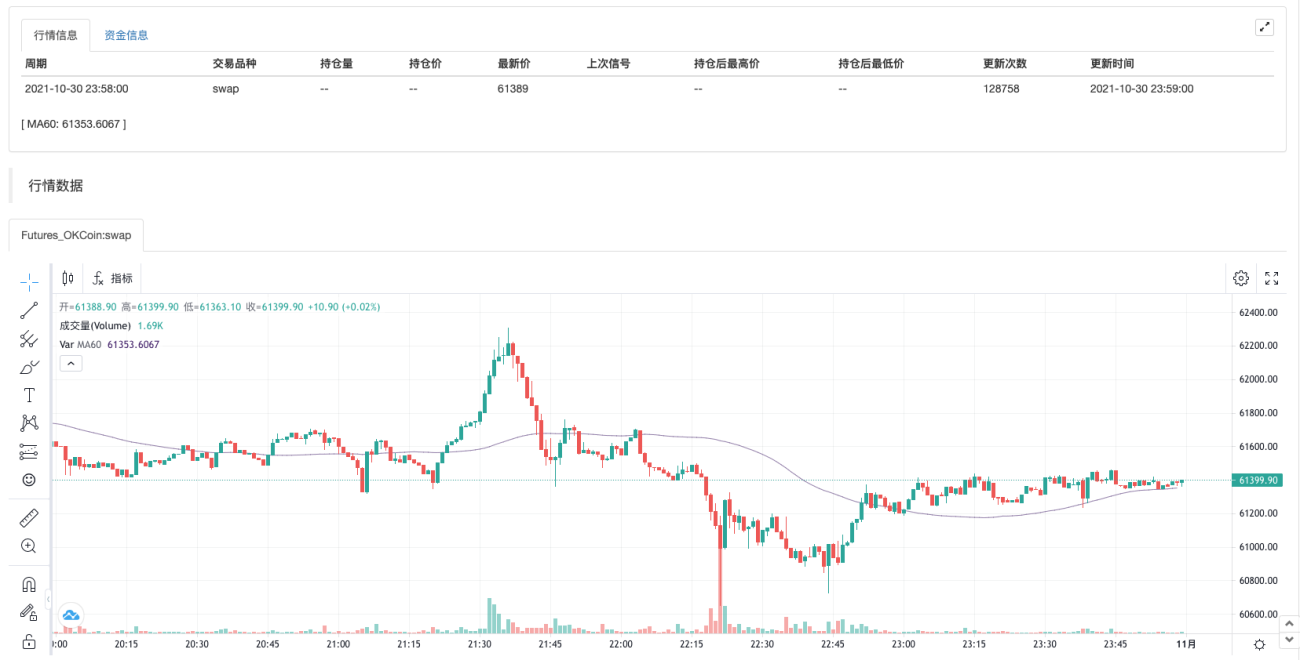
-
Additional Indicators for sub-chart
Use operator
:, set indicators are displayed on the sub-chart while assigning values to variables.ATR:MA(MAX(MAX((HIGH-LOW),ABS(REF(CLOSE,1)-HIGH)),ABS(REF(CLOSE,1)-LOW)),26); // Assign a value to the ATR variable, the ":" symbol is followed by the formula for calculating the ATR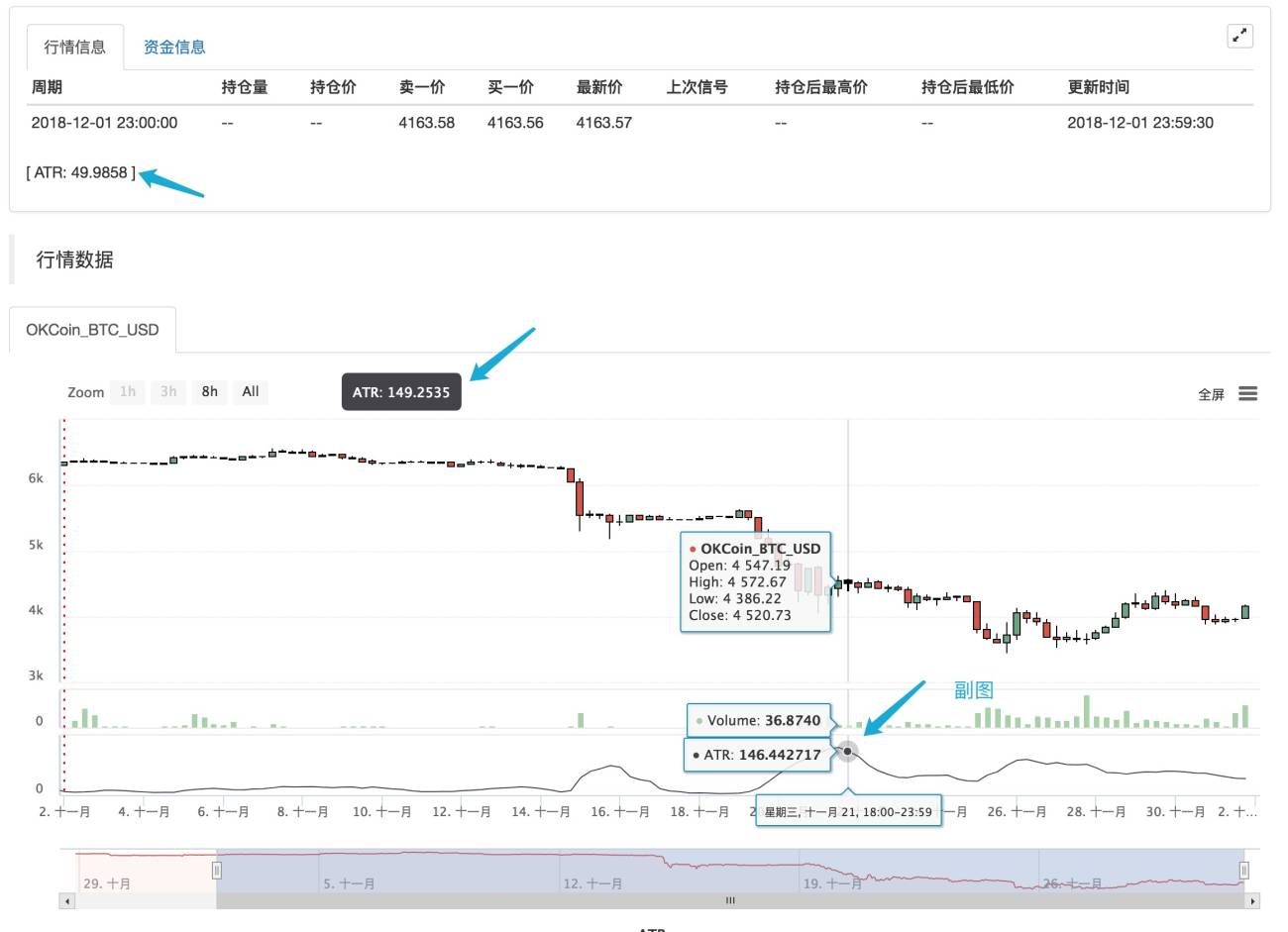
If you don't want it to be displayed on the main or subchart, use the "..." operator.
MA60..MA(C, 60); // Calculate the average indicator with the parameter of 60You can use
DOTandCOLORREDto set the line type and color of the line, etc., in line with the habits of users familiar with the MyLanguage.
-
-
Common problems
Introduce the problems commonly encountered in the process of writing indicators, usually the points that need to be paid attention to when writing (continuously added).
-
Remark the semicolon
;at the end. -
Remark that system keywords cannot be declared as variables.
-
Remark that the string uses single quotes, for example: the string
'Open position'. -
Remark
Annotation
-
// The Remark content(input method can be typed in both Chinese and English) means that the code is not compiled during the execution process, that is, the content after//is not executed. Usually we use it to mark the meaning of the code, when it is convenient for code review, it can be quickly understood and recalled. -
{ Remark content }Block Remark.A:=MA(C,10); {The previous line of code is to calculate the moving average.} -
(* Remark content *)Block Remark.A:=MA(C,10); (*The previous line of code is to calculate the moving average.*)
-
-
Input
When writing code, because the input method is often switched between Chinese and English, resulting in symbol errors. The common errors are as follows: colon
:, terminator;, comma,, brackets(), etc. These characters in different states of Chinese and English need attention.If you use Sogou, Baidu, or Bing input methods, you can quickly switch between Chinese and English by pressing the
shiftkey once. -
Error-prone logic
- At least, not less than, not less than: the corresponding relational operator
>=. - Up to, at most, no more than: the corresponding relational operator
<=.
- At least, not less than, not less than: the corresponding relational operator
-
Strategy launch synchronization
In the futures strategy, if there is a manually opened position before the strategy robot starts, when the robot starts, it will detect the position information and synchronize it to the actual position status.
In the strategy, you can use theSP,BP,CLOSEOUTcommands to close the position.%% if (!scope.init) { var ticker = exchange.GetTicker(); exchange.Buy(ticker.Sell+10, 1); scope.init = true; } %% C>0, CLOSEOUT; -
Two-way positions are not supported
MyLanguage does not support the same contract with both long and short positions.
-
-
-
K-line data citation
-
OPEN
Obtain the opening price of the K-line chart.
Opening price
Function: OPEN, short for O
parameters: none
Explanation: Returns the opening price of "this period"
Sequence data
OPEN gets the opening price of the K-line chart. Remark: 1.It can be abbreviated as O. Example 1: OO:=O; //Define OO as the opening price; Remark that the difference between O and 0. Example 2: NN:=BARSLAST(DATE<>REF(DATE,1)); OO:=REF(O,NN); //Take the opening price of the day Example 3: MA5:=MA(O,5); //Define the 5-period moving average of the opening price (O is short for OPEN). -
HIGH
Get the highest price on the K-line chart.
The highest price
Function: HIGH, abbreviated H
parameters: none
Explanation: Return the highest price of "this period"
Sequence data
HIGH achieved the highest price on the K-line chart. Remark: 1.It can be abbreviated as H. Example 1: HH:=H; // Define HH as the highest price Example 2: HH:=HHV(H,5); // Take the maximum value of the highest price in 5 periods Example 3: REF(H,1); // Take the highest price of the previous K-line -
LOW
Get the lowest price on the K-line chart.
The lowest price
Function: LOW, abbreviated L
parameters: none
Explanation: Return the lowest price of "this period"
Sequence data
LOW gets the lowest price on the K-line chart. Remark: 1.It can be abbreviated as L. Example 1: LL:=L; // Define LL as the lowest price Example 2: LL:=LLV(L,5); // Get the minimum value of the lowest price in 5 periods Example 3: REF(L,1); // Get the lowest price of the previous K-line -
CLOSE
Get the closing price of the K-line chart.
Closing price
Function: CLOSE, abbreviated as C
parameters: none
Explanation: Returns the closing price of "this period"
Sequence data
CLOSE Get the closing price of the K-line chart Remarks: 1.Obtain the latest price when the intraday K-line has not finished. 2.It can be abbreviated as C. Example 1: A:=CLOSE; //Define the variable A as the closing price (A is the latest price when the intraday K-line has not finished) Example 2: MA5:=MA(C,5); //Define the 5-period moving average of the closing price (C is short for CLOSE) Example 3: A:=REF(C,1); //Get the closing price of the previous K-line -
VOL
Obtain the trading volume of K-line chart.
Trading volume
Function: VOL, abbreviated as V
parameters: none
Explanation: Returns the trading volume of "this period"
Sequence data
VOL obtains the trading volume of the K-line chart. Remarks: It can be abbreviated as V. The return value of this function on the current TICK is the cumulative value of all TICK trading volume on that day. Example 1: VV:=V; // Define VV as the trading volume Example 2: REF(V,1); // Indicates the trading volume of the previous period Example 3: V>=REF(V,1); // The trading volume is greater than the trading volume of the previous period, indicating that the trading volume has increased (V is the abbreviation of VOL) -
OPI
Take the current total position in the futures (contract) market.
OpenInterest:OPI; -
REF
Forward citation.
Reference the value of X before N periods. Remarks: 1.When N is a valid value, but the current number of K-lines is less than N, returns null; 2.Return the current X value when N is 0; 3.Return a null value when N is null. 4.N can be a variable. Example 1: REF(CLOSE,5);Indicate the closing price of the 5th period before the current period is referenced Example 2: AA:=IFELSE(BARSBK>=1,REF(C,BARSBK),C);//Take the closing price of the K-line of the latest position opening signal // 1)When the BK signal is sent, the bar BARSBK returns null, then the current K-line REF(C, BARSBK) that sends out the BK signal returns null; // 2)When the BK signal is sent out, the K-line BARSBK returns null, and if BARSBK>=1 is not satisfied, it is the closing price of the K-line. // 3)The K-line BARSBK after the BK signal is sent, returns the number of periods from the current K-line between the K-line for purchasing and opening a position, REF(C,BARSBK) Return the closing price of the opening K-line. // 4)Example: three K-lines: 1, 2, and 3, 1 K-line is the current K-line of the position opening signal, then returns the closing price of the current K-line, 2, 3 The K-line returns the closing price of the 1 K-line. -
UNIT
Get the trading unit of the data contract.
            Get the trading unit of the data contract.
Usage:
UNIT takes the trading unit of the loaded data contract.
Cryptocurrency spot
UNIT value is 1.
Cryptocurrency futures
The UNIT value is related to the contract currency.
OKEX futures currency standard contracts: 1 contract for BTC represents $100, 1 contract for other currencies represents $10 -
MINPRICE
The minimum variation price of the data contract.
Take the minimum variation price of the data contract. Usage: MINPRICE; Take the minimum variation price of the loaded data contract. -
MINPRICE1
The minimum variation price of a trading contract.
            Take the minimum variation price of a trading contract.
Usage:
MINPRICE1; Take the minimum variation price of a trading contract.
-
-
Time function
-
BARPOS
Take the position of the K-line.
BARPOS, Returns the number of periods from the first K-line to the current one. Remarks: 1.BARPOS returns the number of locally available K-line, counting from the data that exists on the local machine. 2.The return value of the first K-line existing in this machine is 1. Example 1:LLV(L,BARPOS); // Find the minimum value of locally available data. Example 2:IFELSE(BARPOS=1,H,0); // The current K-line is the first K-line that already exists in this machine, and it takes the highest value, otherwise it takes 0. -
DAYBARPOS
DAYBARPOS the current K-line BAR is the K-line BAR of the day.
-
PERIOD
The period value is the number of minutes.
1, 3, 5, 15, 30, 60, 1440 -
DATE
DateFunction DATE, Get the year, month, and day of the period since 1900.
Example 1: AA..DATE; // The value of AA at the time of testing is 220218, which means February 18, 2022 -
TIME
The time of taking the K-line.
TIME, the time of taking the K-line. Remarks: 1.The function returns in real time in the intraday, and returns the starting time of the K-line after the K-line is completed. 2.This function returns the exchange data reception time, which is the exchange time. 3.The TIME function returns a six-digit form when used on a second period, namely: HHMMSS, and displays a four-digit form on other periods, namely: HHMM. 4.The TIME function can only be loaded in periods less than the daily period, and the return value of the function is always 1500 in the daily period and periods above the daily period. 5. It requires attention when use the TIME function to close a position at the end of the day (1).It is recommended to set the time for closing positions at the end of the market to the time that can actually be obtained from the return value of the K-line (for example: the return time of the last K-line in the 5-minute period of the thread index is 1455, and the closing time at the end of the market is set to TIME>=1458, CLOSEOUT; the signal of closing the position at the end of the market cannot appear in the effect test) (2).If the TIME function is used as the condition for closing the position at the end of the day, it is recommended that the opening conditions should also have a corresponding time limit (for example, if the condition for closing the position at the end of the day is set to TIME>=1458, CLOSEOUT; then the condition TIME needs to be added to the corresponding opening conditions. <1458; avoid re-opening after closing) Example 1: C>O&&TIME<1450,BK; C<O&&TIME<1450,SK; TIME>=1450,SP; TIME>=1450,BP; AUTOFILTER; // Close the position after 14:50. Example 2: ISLASTSK=0&&C>O&&TIME>=0915,SK; -
YEAR
Year.
YEAR, year of acquisition. Remark: The value range of YEAR is 1970-2033. Example 1: N:=BARSLAST(YEAR<>REF(YEAR,1))+1; HH:=REF(HHV(H,N),N); LL:=REF(LLV(L,N),N); OO:=REF(VALUEWHEN(N=1,O),N); CC:=REF(C,N); // Take the highest price, lowest price, opening price, and closing price of the previous year Example 2: NN:=IFELSE(YEAR>=2000 AND MONTH>=1,0,1); -
MONTH
Take the month.
MONTH, returns the month of a period. Remark: The value range of MONTH is 1-12. Example 1: VALUEWHEN(MONTH=3&&DAY=1,C); // Take its closing price when the K-line date is March 1 Example 2: C>=VALUEWHEN(MONTH<REF(MONTH,1),O),SP; -
DAY
Get the number of days in a period
DAY, returns the number of days in a period. Remark: The value range of DAY is 1-31. Example 1: DAY=3&&TIME=0915,BK; // 3 days from the same day, at 9:15, buy it Example 2: N:=BARSLAST(DATE<>REF(DATE,1))+1; CC:=IFELSE(DAY=1,VALUEWHEN(N=1,O),0); // When the date is 1, the opening price is taken, otherwise the value is 0 -
HOUR
Hour.
HOUR, returns the number of hours in a period. Remark: The value range of HOUR is 0-23 Example 1: HOUR=10; // The return value is 1 on the K-line at 10:00, and the return value on the remaining K-lines is 0 -
MINUTE
Minute.
MINUTE, returns the number of minutes in a period. Remarks: 1: The value range of MINUTE is 0-59 2: This function can only be loaded in the minute period, and returns the number of minutes when the K-line starts. Example 1: MINUTE=0; // The return value of the minute K-line at the hour is 1, and the return value of the other K-lines is 0 Example 2: TIME>1400&&MINUTE=50,SP; // Sell and close the position at 14:50 -
WEEKDAY
Get the number of the week.
            WEEKDAY, get the number of the week.

Remark:
1: The value range of WEEKDAY is 0-6. (Sunday ~ Saturday)

Example 1:
N:=BARSLAST(MONTH<>REF(MONTH,1))+1;
COUNT(WEEKDAY=5,N)=3&&TIME>=1450,BP;
COUNT(WEEKDAY=5,N)=3&&TIME>=1450,SP;
AUTOFILTER;                               // Automatically close positions at the end of the monthly delivery day
Example 2:
C>VALUEWHEN(WEEKDAY<REF(WEEKDAY,1),O)+10,BK;
AUTOFILTER;
-
-
Logical judgment function
-
BARSTATUS
Return the position status for the current period.
BARSTATUS returns the position status for the current period. Remark: The function returns 1 to indicate that the current period is the first period, returns 2 to indicate that it is the last period, and returns 0 to indicate that the current period is in the middle. Example: A:=IFELSE(BARSTATUS=1,H,0); // If the current K-line is the first period, variable A returns the highest value of the K-line, otherwise it takes 0 -
BETWEEN
Between.
BETWEEN(X,Y,Z) indicates whether X is between Y and Z, returns 1 (Yes) if established, otherwise returns 0 (No). Remark: 1.The function returns 1(Yse) if X=Y, X=Z, or X=Y and Y=Z. Example 1: BETWEEN(CLOSE,MA5,MA10); // It indicates that the closing price is between the 5-day moving average and the 10-day moving average -
BARSLASTCOUNT
BARSLASTCOUNT(COND) counts the number of consecutive periods that satisfy the condition, counting forward from the current period.
Remark: 1. The return value is the number of consecutive non zero periods calculated from the current period 2. the first time the condition is established when the return value of the current K-line BARSLASTCOUNT(COND) is 1 Example: BARSLASTCOUNT(CLOSE>OPEN); //Calculate the number of consecutive positive periods within the current K-line -
CROSS
Cross function.
CROSS(A,B) means that A crosses B from bottom to top, and returns 1 (Yes) if established, otherwise returns 0 (No) Remark: 1.To meet the conditions for crossing, the previous k-line must satisfy A<=B, and when the current K-line satisfies A>B, it is considered to be crossing. Example 1: CROSS(CLOSE,MA(CLOSE,5)); // Indicates that the closing line crosses the 5-period moving average from below -
CROSSDOWN
Crossdown
CROSSDOWN(A,B): indicates that when A passes through B from top to bottom, it returns 1 (Yes) if it is established, otherwise it returns 0 (No) Remark: 1.CROSSDOWN(A,B) is equivalent to CROSS(B,A), and CROSSDOWN(A,B) is easier to understand Example 1: MA5:=MA(C,5); MA10:=MA(C,10); CROSSDOWN(MA5,MA10),SK; // MA5 crosses down MA10 to sell and open a position // CROSSDOWN(MA5,MA10),SK; Same meaning as CROSSDOWN(MA5,MA10)=1,SK; -
CROSSUP
Crossup.
CROSSUP(A,B) means that when A crosses B from the bottom up, it returns 1 (Yes) if it is established, otherwise it returns 0 (No) Remark: 1.CROSSUP(A,B) is equivalent to CROSS(A,B), and CROSSUP(A,B) is easier to understand. Example 1: MA5:=MA(C,5); MA10:=MA(C,10); CROSSUP(MA5,MA10),BK; // MA5 crosses MA10, buy open positions // CROSSUP(MA5,MA10),BK;与CROSSUP(MA5,MA10)=1,BK; express the same meaning -
EVERY
Determine if it is continuously satisfied.
EVERY(COND,N), Determine whether the COND condition is always satisfied within N periods. The return value of the function is 1 if it is satisfied, and 0 if it is not satisfied. Remarks: 1.N contains the current K-line. 2.If N is a valid value, but there are not so many K-lines in front, or N is a null value, it means that the condition is not satisfied, and the function returns a value of 0. 3.N can be a variable. Example 1: EVERY(CLOSE>OPEN,5); // Indicates that it has been a positive line for 5 periods Example 2: MA5:=MA(C,5); // Define a 5-period moving average MA10:=MA(C,10); // Define a 10-period moving average EVERY(MA5>MA10,4),BK; // If MA5 is greater than MA10 within 4 periods, then buy the open position // EVERY(MA5>MA10,4),BK; has the same meaning as EVERY(MA5>MA10,4)=1,BK; -
EXIST
Determine if there is satisfaction.
EXIST(COND, N) judges whether there is a condition that satisfies COND within N periods. Remarks: 1.N contains the current K-line. 2.N can be a variable. 3.If N is a valid value, but there are not so many K-lines in front, it is calculated according to the actual number of periods. Example 1: EXIST(CLOSE>REF(HIGH,1),10); // Indicates whether there is a closing price greater than the highest price of the previous period in 10 periods, returns 1 if it exists, and returns 0 if it does not exist Example 2: N:=BARSLAST(DATE<>REF(DATE,1))+1; EXIST(C>MA(C,5),N); // Indicates whether there is a K-line that satisfies the closing price greater than the 5-period moving average on the day, returns 1 if it exists, returns 0 if it does not exist -
IF
Condition function.
IF(COND,A,B)Returns A if the COND condition is true, otherwise returns B. Remarks: 1.COND is a judgment condition; A and B can be conditions or values. 2.This function supports the variable circular reference to the previous period's own variable, that is, supports the following writing Y: IF(CON,X,REF(Y,1)). Example 1: IF(ISUP,H,L); // The K-line is the positive line, the highest price is taken, otherwise the lowest price is taken Example 2: A:=IF(MA5>MA10,CROSS(DIFF,DEA),IF(CROSS(D,K),2,0)); // When MA5>MA10, check whether it satisfies the DIFF and pass through DEA, otherwise (MA5 is not greater than MA10), when K and D are dead fork, let A be assigned a value of 2, if none of the above conditions are met, A is assigned a value of 0 A=1,BPK; // When MA5>MA10, the condition for opening a long position is to cross DEA above the DIFF A=2,SPK; // When MA5 is not greater than MA10, use K and D dead forks as the conditions for opening short positions -
IFELSE
Condition function.
IFELSE(COND,A,B) Returns A if the COND condition is true, otherwise returns B. Remarks: 1.COND is a judgment condition; A and B can be conditions or values. 2.This function supports variable circular reference to the previous period's own variable, that is, supports the following writing Y: IFELSE(CON,X,REF(Y,1)); Example 1: IFELSE(ISUP,H,L); // The K-line is the positive line, the highest price is taken, otherwise the lowest price is taken Example 2: A:=IFELSE(MA5>MA10,CROSS(DIFF,DEA),IFELSE(CROSS(D,K),2,0)); // When MA5>MA10, check whether it satisfies the DIFF and pass through DEA, otherwise (MA5 is not greater than MA10), when K and D are dead fork, let A be assigned a value of 2, if none of the above conditions are met, A is assigned a value of 0 A=1,BPK; // When MA5>MA10, the condition for opening a long position is to cross DEA above the DIFF A=2,SPK; // When MA5 is not greater than MA10, use K and D dead forks as the conditions for opening short positions -
ISCONTRACT
Whether it is currently the specified contract.
            Whether ISCONTRACT(CODE) is currently the specified contract.

Usage: ISCONTRACT(CODE); It is the current contract that returns 1, not the current contract that returns 0.

Remark:
1.When judging whether it is a specified contract, CODE can be the trading code of the contract.

Example:
ISCONTRACT('this_week');    // Cryptocurrency OKEX futures contract
ISCONTRACT('XBTUSD');       // Cryptocurrency BITMEX futures contract
Regular expressions are supported.
Judgment contract
ISCONTRACT('this_week'); // Determine whether the current contract is OKEX futures this_week contractDetermining the name of the exchange
ISCONTRACT('@Futures_(Binance|FTX)'); // Determine whether the current exchange object is Binance futures or FTX futures ISCONTRACT('@(OKEX|Bitfinex)'); // To judge the exchange, you need to add the @ character at the beginning -
ISDOWN
Negative line.
ISDOWN Determine whether the period closed negative. Remark: 1.ISDOWN is equivalent to C<O Examples: ISDOWN=1&&C<REF(C,1),SK; // When the K-line closes negative and the closing price is less than the closing price of the previous period, then open short position // ISDOWN=1&&C<REF(C,1),SK; has the same meaning as ISDOWN&&C<REF(C,1),SK; -
ISEQUAL
Flat plate.
ISEQUAL determines whether the period is flat or not. Remark: 1.ISEQUAL is equal to C=O Example 1: EVERY(ISEQUAL=1,2),CLOSEOUT; // If 2 K-lines are flat for a sustained period, then all flat -
ISLASTBAR
Determine whether the period is the last K-line.
ISLASTBAR judges whether the period is the last K-line. Example 1: VALUEWHEN(ISLASTBAR=1,REF(H,1)); // The current K-line is the last K-line, then take the highest price of the previous period -
ISNULL
Determine the null value.
ISNULL Determine the null value. Usage: ISNULL(N); If N is null, the function returns 1; if N is non-null, the function returns 0. Example :MA5:=IFELSE(ISNULL(MA(C,5))=1,C,MA(C,5)); // Define a five-period moving average. When the number of K-lines is less than five, return the closing price of the current K-line -
ISUP
Positive line.
ISUP determines whether the period closes positive or not. Remark: 1.ISUP is equivalent to C>O. Example : ISUP=1&&C>REF(C,1),BK; // If the current K-line closes positive and the closing price is greater than the closing price of the previous period, then open a long position // ISUP=1&&C>REF(C,1),BK; together with ISUP&&C>REF(C,1),BK // Express the same meaning -
LAST
Judgment function.
LAST(COND,N1,N2) determine whether the COND condition has been satisfied in the past N1 to N2 periods. Remarks: 1.If the difference between N1 and N2 is only one period (such as N1=3, N2=2), the function determines whether the condition is satisfied on the period closest to the current K-line (that is, to determine whether the K-line in the past N2 periods satisfies the condition or not) ). 2.When N1/N2 is a valid value, but the current number of K-lines is less than N1/N2, or the case of N1/N2 null, the representative is not valid and the function returns 0. 3.N1 and N2 cannot be variables. Example 1: LAST(CLOSE>OPEN,10,5); // Indicates a positive line from the 10th period to the 5th period in the past Example 2: MA5:=MA(C,5); LAST(C>MA5,4,3); // Determine if the K-line that is 3 periods away from the current K-line meets C is greater than MA5 -
LONGCROSS
Maintain the cross function.
LONGCROSS(A,B,N)Indicates that A is less than B in N periods, and A crosses B from bottom to top in this period. Remarks: 1.When N is a valid value, but the current number of K-lines is less than N, the LONGCROSS function returns null. 2.N does not support variables. Example 1: LONGCROSS(CLOSE,MA(CLOSE,10),20); // Indicates that the closing line is below the 10-day SMA for 20 periods and then crosses the 10-day SMA from bottom to top -
NOT
Not.
NOT(X): Takes not. Returns 1 when X = 0, otherwise returns 0. Example 1: NOT(ISLASTBK); If the last signal is not a BK signal, NOT(ISLASTBK) returns a value of 1; if the last signal is a BK signal, NOT(ISLASTBK) returns a value of 0. Example 2: NOT(BARSBK>=1)=1; // BK signal is issued when the current K-line meets the conditions // NOT(BARSBK>=1)=1 has the same meaning as NOT(BARSBK>=1) -
NULL
Return null.
Return null Usage: MA5:=MA(C,5); MA10:=MA(C,10); A:=IFELSE(MA5>MA10,MA5,NULL),COLORRED; // When MA5>MA10, draw the five-day moving average MA5, when MA5>MA10 is not satisfied, return null and no line is drawn -
VALUEWHEN
Take values.
            VALUEWHEN(COND,X)When the COND condition is true, the current value of X is taken. If the COND condition is not established, the value of X when the last COND condition is established is taken.

Remark:
X can be a numerical value or a condition.

Example 1:
VALUEWHEN(HIGH>REF(HHV(HIGH,5),1),HIGH);  // Indicates that the current highest price is returned when the current highest price is greater than the maximum value of the highest prices in the previous five periods
Example 2:
VALUEWHEN(DATE<>REF(DATE,1),O);           // Indicates to take the opening price of the first K-line of the day (that is, the opening price of the day)
Example 3:
VALUEWHEN(DATE<>REF(DATE,1),L>REF(H,1));  // Indicates whether the current low price is greater than the high price of yesterday's last K-line on the first K-line of the day. Returns 1, indicating that the day jumped higher. If returns 0, it means the day does not meet the condition of jumping high.
-
-
Loop execution function
-
LOOP2
Loop condition function.
            LOOP2(COND,A,B); The loop condition function returns A if the COND condition is true, otherwise returns B.

Remarks:
1.COND is a judgment condition; A and B can be conditions or values.
2.This function supports variable circular reference to the previous period's own variable, that is, supports the following writing method Y:=LOOP2(CON,X,REF(Y,1));

Example 1:
X:=LOOP2(ISUP,H,REF(X,1));                // If the K-line is a positive line, take the highest price of the current K-line, otherwise, take the highest price of the K-line that was a positive line last time; if there has been no positive line before, X returns null

Example 2:
BB:=LOOP2(BARSBK=1,LOOP2(L>LV(L,4),L,LV(L,4)),LOOP2(L>REF(BB,1),L,REF(BB,1))); // When holding a long order, the lowest price in the previous 4 periods of the long order is the starting stop loss point BB, the lowest price of the subsequent K-line is higher than the previous lowest price, and the current lowest price stop loss point is taken, otherwise take the previous low and stop loss
SS:=LOOP2(BARSSK=1,LOOP2(H<HV(H,4),H,HV(H,4)),LOOP2(H<REF(SS,1),H,REF(SS,1))); // When holding a short order, the highest price in the previous 4 periods of the short order is the starting stop loss point SS, the highest price is lower than the previous highest price, and the current highest price stop loss point is taken, otherwise take the stop loss point of the previous high point
H>HV(H,20),BK;
L<LV(L,20),SK;
C<BB,SP;
C>SS,BP;
AUTOFILTER;
-
-
Financial statistics functions
-
BARSCOUNT
The number of periods from the first valid period to the current one.
BARSCOUNT(COND)The number of periods from the first valid period to the current one. Remarks: 1.The return value is the number of periods counted by COND from the first valid period until now. 2.When the condition is satisfied for the first time, the return value of BARSCOUNT(COND) on the K-line is 0. Example: BARSCOUNT(MA(C,4)); // Calculate the number of periods from the first time MA(C,4) has a return value to the current one -
BARSLAST
The position where the last condition was met.
            BARSLAST(COND), the number of periods since the last time the condition COND was established.

Remark:
1.When the condition is satisfied, the return value of BARSLAST(COND) on the current K-line is 0.

Example 1:
BARSLAST(OPEN>CLOSE);                     // Number of periods from the last negative line to the present
Example 2:
N:=BARSLAST(DATE<>REF(DATE,1))+1;         // Minute period, number of K-lines for the day
// Since the return value of BARSLAST(COND) is 0 for the current K-line when the condition is established, "+1" is the number of k-lines for that day
Description of the
BARSLASTfunction:- 1.If the current K-line condition is established, it will return 0.
- 2.If it does not hold, it will keep going back until it finds the K-line for which the condition holds, returning a number of periods traced.
- 3.If the K-line whose condition holds is not found even after tracing back to the end, returns null.
-
BARSSINCE
The number of periods from when the first condition was established to the current one.
BARSSINCE(COND)the number of periods from when the first condition was established to the current one. Remarks: 1.The return value is the number of periods from the first time COND was established to the current. 2.When the condition is satisfied for the first time, the return value of BARSSINCE(COND) on the K-line is 0. Example: BARSSINCE(CLOSE>OPEN); // Count the number of periods from the first positive K-line to the present -
BARSSINCEN
Count the number of periods from the first condition held in N periods to the current one.
BARSSINCEN(COND,N) counts the number of periods between the first condition held in N periods and the current one. Remarks: 1.N contains the current K-line. 2.When N is valid, but the current number of K-lines is less than N, it is calculated according to the actual number of lines. 3.Returns null if N is 0. 4.N can be a variable. Examples: N:=BARSLAST(DATE<>REF(DATE,1))+1; // Minute period, the number of K-lines on the day BARSSINCEN(ISUP,N); // Count the number of periods from the first positive line met in N periods to the current period -
CONDBARS
Obtain the number of periods between the most recent K-lines that satisfy the A,B condition.
CONDBARS(A,B); obtain the number of periods between the most recent K-lines that satisfy the A,B condition. Attention: 1.This function returns the number of periods without the last K-line that meets the condition. 2.The closest satisfied condition to the current K-line is the B condition, then the function returns the number of periods from the last K-line that satisfied the A condition to the K-line that satisfied the B condition (the first K-line that satisfied the B condition after the A condition was satisfied). The closest satisfied condition to the current K-line is the A condition, then the function returns the number of periods from the last K-line that satisfied the B condition to the K-line that satisfied the A condition (the first K-line that satisfied the A condition after the B condition was satisfied). Example 1: MA5:=MA(C,5); // 5-period moving average MA10:=MA(C,10); // 10-period moving average CONDBARS(CROSSUP(MA5,MA10),CROSSDOWN(MA5,MA10)); // The number of periods between the last time the 5-period moving average crosses the 10-period moving average and the 5-period moving average crosses the 10-period moving average -
COUNT
Total statistics.
COUNT(COND,N), counts the number of periods in N periods that satisfy the COND condition. Remarks: 1.N contains the current K-line. 2.If N is 0, count from the first valid value. 3.If N is valid, but the current number of K-lines is less than N, count from the first one to the current period. 4.If N is null, the return value is null. 5.N can be a variable. Example 1: N:=BARSLAST(DATE<>REF(DATE,1))+1; // Minute period, the number of K-lines on the day M:=COUNT(ISUP,N); // Count the number of positive lines since the market opened in the minute period Example 2: MA5:=MA(C,5); // Define the 5-period moving average MA10:=MA(C,10); // Define the 10-period moving average M:=COUNT(CROSSUP(MA5,MA10),0); // Count the number of times that the 5-period moving average crossed the 10-period moving average during the period from the applied market data to the current period. -
DMA
Dynamic moving average.
DMA(X,A): Find the dynamic moving average of X, where A must be less than 1 and greater than 0. Remarks: 1.A can be a variable. 2.If A<=0 or A>=1, return null. Calculation formula: DMA(X,A)=REF(DMA(X,A),1)*(1-A)+X*A Example 1: DMA3:=DMA(C,0.3); // The calculation result is REF(DMA3,1)*(1-0.3)+C*0.3 -
EMA
Index-weighted moving average.
EMA(X,N): finds the index-weighted moving average (smoothed moving average) of the N-period X values. Remarks: 1.N contains the current K-line. 2.A larger weight is given to the K-line that is closer to the current one. 3.When N is valid, but the current number of K-lines is less than N, the actual number of lines will be counted. 4.When N is 0 or null, the return value is null. 5.N can be a variable. EMA(X,N)=2*X/(N+1)+(N-1)*REF(EMA(X,N),1)/(N+1) Example 1: EMA10:=EMA(C,10); // Find the 10-period index-weighted moving average of closing prices -
EMA2
Linear weighted moving average.
EMA2(X,N); // Find the linear weighted moving average (also known as WMA) of the N period X values EMA2(X,N)=[N*X0+(N-1)*X1+(N-2)*X2+...+1*X(N-1)]/[N+(N-1)+(N-2)+...+1], X0 represents the current period value, X1 represents the previous period value Remarks: 1.N contains the current K-line. 2.When N is valid, but the current number of K-lines is less than N, the return value is null. 3.When N is 0 or null, the return value is null. 4.N can be a variable. Example 1: EMA2(H,5); // Find the linearly weighted moving average of the highest price over 5 periods -
EMAWH
Index-weighted moving average.
EMAWH(C,N), index-weighted moving average, also known as smoothed moving average, it uses index-weighted method to give greater weight to the K-line that is closer to the current one. Remark: 1.When N is valid and the current number of K-lines is less than N, or when the value of the previous period is still applied to the current period, EMAWH returns null. Because the weight of the current period is mainly considered in the EMAWH calculation formula, when the period is longer, the previous period value has less influence on the current period. EMAWH starts showing the values taken when the previous data no longer affects the current period, so even if the selected data starts at a different time, the EMAWH value of the currently displayed K-line will not change. 2.When N is 0 or null, the return value is null. 3.N cannot be a variable. EMAWH(C,N)=2*C/(N+1)+(N-1)*REF(EMAWH(C,N),1)/(N+1) Remark: EMAWH is used in the same way as EMA(C,N) -
HARMEAN
Reconciliation average.
HARMEAN(X,N), Find the reconciliation average of X over N periods. Example of algorithm: HARMEAN(X,5)=1/[(1/X1+1/X2+1/X3+1/X4+1/X5)/5] Remarks: 1.N contains the current K-line. 2.The reconciliation average and the reciprocal simple average are the reciprocals of each other. 3.When N is valid, but the current number of K-lines is less than N, the function returns null. 4.When N is 0 or null, the function returns null. 5.When X is 0 or null, the function returns null. 6.N can be a variable. Example: HM5:=HARMEAN(C,5); // Find the reconciliation average of the 5-period closing prices -
HHV
The highest value.
HHV(X,N): Find the highest value of X over N periods. Remark: 1.N contains the current K-line. 2.If N is 0, start counting from the first valid value. 3.When N is valid, but the current number of K-lines is less than N, calculate according to the actual number of lines. 4.When N is null, the return value is null. 5.N can be a variable. Example 1: HH:=HHV(H,4); // Find the maximum value of the highest price in 4 periods, that is, the 4-period high point (including the current K-line) Example 2: N:=BARSLAST(DATE<>REF(DATE,1))+1; // Minute period, the number of K-lines in the day HH1:=HHV(H,N); // In the minute period, the high point in the day -
HV
The highest value except the current K-line.
HV(X,N), Find the highest value of X in N periods (excluding the current K-line). Remarks: 1.If N is 0, it starts from the first valid value (excluding the current K-line). 2.When N is valid, but the current number of K-lines is less than N, the first K-line returns null according to the actual number of K-lines. 3.When N is null, the return value is null. 4.N can be a variable. Example 1: HH:=HV(H,10); // Find the highest point of the first 10 K-lines Example 2: N:=BARSLAST(DATE<>REF(DATE,1))+1; NN:=REF(N,N); ZH:=VALUEWHEN(DATE<>REF(DATE,1),HV(H,NN)); // In the minute period, find the highest price yesterday Example 3: The results of HV(H,5) and REF(HHV(H,5),1) are the same, and it is more convenient to write in HV. -
HHVBARS
The previous highest point position.
HHVBARS(X,N), find the highest value of X in N periods to the current number of periods. Remarks: 1.If N is 0, it starts from the first valid value (excluding the current K-line). 2.When N is valid, but the current number of K-lines is less than N, the first K-line returns null according to the actual number of K-lines. 3.When N is null, the return value is null. 4.N can be a variable. Example 1: HHVBARS(VOL,0); // Find the period with the largest historical volume to the current number of periods (the return value of HHVBARS(VOL,0); on the K-line with the maximum value is 0, and the return value of the first K-line after the maximum value is 1, and so on) Example 2: N:=BARSLAST(DATE<>REF(DATE,1))+1; // Minute period, the number of K-lines in the day ZHBARS:=REF(HHVBARS(H,N),N)+N; // In the minute period, find the number of periods between the K-line where the highest price was yesterday and the current K-line -
LLV
The minimum value.
LLV(X,N), find the minimum value of X over N periods. Remarks: 1.N contains the current K-line. 2.If N is 0 then the count starts from the first valid value. 3.When N is valid, but the current number of K-lines is less than N, it is calculated according to the actual number of lines. 4.When N is null, the return value is null. 5.N can be a variable. Example 1: LL:=LLV(L,5); // Find the lowest point of 5 K-lines (including the current K-line) Example 2: N:=BARSLAST(DATE<>REF(DATE,1))+1; // Minute period, the number of K-lines in the day LL1:=LLV(L,N); // In the minute period, find the minimum value from the first K-line of the day to the lowest price of all K-lines in the current period -
LV
The lowest value except the current K-line.
LV(X,N), find the minimum value of X in N periods (excluding the current K-line). Remarks: 1.If N is 0 then the count starts from the first valid value. 2.When N is valid, but the current number of K-lines is less than N, it is calculated according to the actual number of lines. 3.When N is null, the return value is null. 4.N can be a variable. Example 1: LL:=LV(L,10); // Find the lowest point of the previous 10 K-lines (excluding the current K-line) Example 2: N:=BARSLAST(DATE<>REF(DATE,1))+1; // Minute period, the number of K-lines in the day NN:=REF(N,N); ZL:=VALUEWHEN(DATE<>REF(DATE,1),LV(L,NN)); // Find the lowest price yesterday in the minute period. Example 3: The results of LV(L,5) and REF(LLV(L,5),1) are the same, and it is more convenient to write with LV. -
LLVBARS
The previous lowest point position.
LLVBARS(X,N), find the lowest value of X in N periods to the current number of periods. Remarks: 1.If N is 0, it starts from the first valid value (excluding the current K-line). 2.When N is valid, but the current number of K-lines is less than N, it is calculated according to the actual number of lines, the first K-line returns null. 3.When N is null, the return value is null. 4.N can be a variable. Example 1: LLVBARS(VOL,0); // Find the period with the smallest historical volume to the current number of periods (the return value of HHVBARS(VOL,0); on the K-line with the minimum value is 0, and the return value of the first K-line after the minimum value is 1, and so on) Example 2: N:=BARSLAST(DATE<>REF(DATE,1))+1; // Minute period, the number of K-lines in the day ZLBARS:=REF(LLVBARS(L,N),N)+N; // In the minute period, find the number of periods between the K-line where yesterday's lowest price is located to the current K-line. -
MA
Arithmetic moving average.
MA(X,N), find the simple moving average of X over N periods. Algorithm: MA(X,5)=(X1+X2+X3+X4+X5)/5 Remarks: 1.N contains the current K-line. 2.Simple moving averages follow the simplest statistical approach, taking the average of prices over a specific period of time in the past. 3.When N is valid, but the current number of K-lines is less than N, the function returns null. 4.When N is 0 or null, the function returns null. 5.N can be a variable. Example 1: MA5:=MA(C,5); // Find the simple moving average of the 5-period closing price Example 2: N:=BARSLAST(DATE<>REF(DATE,1))+1; // Minute period, the number of K-lines in the day M:=IFELSE(N>10,10,N); // If there are more than 10 K-lines, M takes 10, otherwise M takes the actual number MA10:=MA(C,M); // In the minute period, if the number of K-lines on the day is less than 10, the MA10 is calculated according to the actual number of K-lines, and the MA10 is calculated according to the 10-period if it is more than 10 K-lines. -
MV
Take the average.
MV(A,...P), take the average of A to P. Remarks: 1.It supports to take the average of 2-16 values. 2.A...P can be numbers or variables. Example 1: MV(CLOSE,OPEN); // Take the average of the closing and opening prices -
NUMPOW
Sum of powers of natural numbers.
NUMPOW(X,N,M), sum of powers of natural numbers. Algorithm: NUMPOW(x,n,m)=n^m*x+(n-1)^m*ref(x,1)+(n-2)^m*ref(x,2)+...+2^m*ref(x,n-2)+1^m*ref(x,n-1) Attention: 1.N is a natural number, M is a real number; and N and M cannot be variables. 2.X is the basic variable. Example: JZ:=NUMPOW(C,5,2); -
SAR
Parabolic steering.
SAR(N,STEP,MAX), returns the parabolic steering value. Calculated according to the formula SAR(n)=SAR(n-1)+AF*(EP(n-1)-SAR(n-1)). Among which: SAR(n-1): The absolute value of the last K-line SAR. AF: acceleration factor, when AF is less than MAX, it is accumulated by AF+STEP one by one, and AF is recalculated when the ups and downs are converted. EP: An extreme value within an up or down market is the highest price of the previous K-line in an up market; the lowest price of the previous K-line in a down market. Remark: 1.parameter N, Step, Max do not support variables. Example 1: SAR(17,0.03,0.3); // Indicates that 17 periods of parabolic steering are calculated, the step size is 3%, and the limit value is 30% -
SMA
Extended index-weighted moving average.
SMA(X,N,M) find the extended index-weighted moving average over N periods of X, where M is the weight. Calculation formula: SMA(X,N,M)=REF(SMA(X,N,M),1)*(N-M)/N+X(N)*M/N Remarks: 1.When N is valid, but the current number of K-lines is less than N, it is calculated according to the actual number of lines. 2.When N is 0 or null, the function returns null. Example 1: SMA10:=SMA(C,10,3); // Extended index-weighted moving average of the 10-period closing price found, with a weight of 3 -
SMMA
Fluent moving average.
SMMA(X,N), X is a variable, N is a period, SMMA(X, N) represents the fluent moving average of X in N periods on the current K-line Algorithm: SMMA(X,N)=(SUM1-MMA+X)/N Among which SUM1=X1+X2+.....+XN MMA=SUM1/N Example 1: SMMA(C,5); // The 5-period fluent moving average of the closing price -
SORT
Take the value sorted at the corresponding position.
SORT(Type,POS,N1,N2,...,N16); Arrange in ascending (descending) order, and take the value corresponding to the POSth parameter. Remarks: 1.When Type is 0, it is sorted in ascending order, and when Type is 1, it is sorted in descending order. 2.TYPE, POS, variables are not supported. 3.N1,...,N16 are parameters, support constants, variables, up to 16 parameters. Example: SORT(0,3,2,1,5,3); // 2, 1, 5, 3 are arranged in ascending order, take the third number 3 -
SUM
SUM.
SUM(X,N), find the sum of X over N periods. Remarks: 1.N contains the current K-line. 2.If N is 0, start counting from the first valid value. 3.When N is valid, but the current number of K-lines is less than N, it is calculated according to the actual number of lines. 4.When N is null, the return value is null. 5.N can be a variable. Example 1: SUM(VOL,25); Indicates the total trading volume within 25 periods of statistics. Example 2: N:=BARSLAST(DATE<>REF(DATE,1))+1; // Minute period, the number of K-line in the day SUM(VOL,N); // In the minute period, take the sum of the day's trading volume -
SUMBARS
The number of periods to accumulate to the specified value.
SUMBARS(X,A), fine the number of periods to accumulate to the specified value. Remark: parameter A supports variables. Example 1: SUMBARS(VOL,20000); Accumulate the volume forward until it is greater than or equal to 20000, and return the period number of this range. -
TRMA
Triangular moving average.
TRMA(X,N), find the triangular moving average of X over N periods. Algorithm: The triangular moving average formula is to take an arithmetic moving average and apply the arithmetic moving average again to the first moving average. The TRMA(X,N) algorithm is as follows: ma_half= MA(X,N/2) trma=MA(ma_half,N/2) Remarks: 1.N contains the current K-line. 2.When N is valid, but the current number of K-lines is less than N, the function returns null. 3.When N is 0 or null, the function returns null. 4.N supports the use of variables. Example 1: TRMA5:=TRMA(CLOSE,5); // Calculates the triangular moving average of closing prices over 5-period. (N is not divisible by 2) // TRMA(CLOSE,5)=MA(MA(CLOSE,(5+1)/2)),(5+1)/2); Example 2: TRMA10:=TRMA(CLOSE,10); // Calculates a triangular moving average of closing prices over 10-period. (N is divisible by 2) // TRMA(CLOSE,10)=MA(MA(CLOSE,10/2),(10/2)+1)); -
TSMA
Time series moving average.
            TSMA(X,N), find the time series triangular moving average of X over N periods.
TSMA(a,n) the algorithm is as follows:
ysum=a[i]+a[i-1]+...+a[i-n+1]
xsum=i+i-1+..+i-n+1
xxsum=i*i+(i-1)*(i-1)+...+(i-n+1)*(i-n+1)
xysum=i*a[i]+(i-1)*a[i-1]+...+(i-n+1)*a[i-n+1]
k=(xysum -(ysum/n)*xsum)/(xxsum- xsum/n * xsum) // slope
b= ysum/n - k*xsum/n
forcast[i]=k*i+b                                // Linear regression
tsma[i] = forcast[i]+k                          // Linear regression + slope

Remarks:
1.When N is valid, but the current number of K-lines is less than N, the function returns null.
2.When N is 0 or null, the function returns null.
3.N supports the use of variables.
Example 1:
TSMA5:=TSMA(CLOSE,5);                           // Calculate the serial triangular moving average of closing prices over 5 periods
-
-
Mathematical statistics functions
-
AVEDEV
Average absolute deviation.
AVEDEV(X,N), returns the average absolute deviation of X over N periods. Remarks: 1.N contains the current K-line. 2.N is valid, but the current number of K-lines is less than N, the function returns null. 3.When N is 0, the function returns null. 4.N is null, the function returns null. 5.N cannot be a variable. Example of algorithm: Calculate the value of AVEDEV(C,3); on the latest K-line. It can be expressed by MyLanguage functions as follows: (ABS(C-(C+REF(C,1)+REF(C,2))/3)+ABS(REF(C,1)-(C+REF(C,1)+REF(C,2))/3)+ABS(REF(C,2)-(C+REF(C,1)+REF(C,2))/3))/3; Example: AVEDEV(C,5); // Returns the average absolute deviation of the closing price over 5 periods // Indicates the average value of the absolute value of the difference between the closing price of each period and the average value of the closing prices in 5 periods, and judges the degree of deviation between the closing price and its average value -
COEFFICIENTR
Pearson correlation coefficient.
COEFFICIENTR(X,Y,N), find the Pearson correlation coefficient of X and Y over N periods. Remarks: 1.N contains the current K-line. 2.N is valid, but the current number of K-lines is less than N, the function returns null. 3.When N is 0, the function returns null. 4.N is null, the function returns null. 5.N can be a variable. Example of algorithm: Calculate COEFFICIENTR(O, C, 3); the value on the nearest K-line. It can be expressed by MyLanguage functions as follows: (((O-MA(O,3))*(C-MA(C,3))+(REF(O,1)-MA(O,3))*(REF(C,1)-MA(C,3))+(REF(O,2)-MA(O,3))*(REF(C,2)-MA(C,3))) /(STD(O,3)*STD(C,3)))/(3-1); Example: COEFFICIENTR(C,O,10); //Find the Pearson correlation coefficient over 10 periods //The Pearson correlation coefficient is a measure of the degree of correlation between two random variables -
CORRELATION
Correlation coefficient.
CORRELATION(X,Y,N), find the correlation coefficient of X and Y in N periods. Remarks: 1.N contains the current K-line. 2.N is valid, but the current number of K-lines is less than N, the function returns null. 3.When N is 0, the function returns null. 4.N is null, the function returns null. 5.N can be a variable. Example of algorithm: Calculate CORRELATION(O,C,3); the value on the latest K-line. In terms of a MyLanguage function, it can be expressed as follows: (((O-MA(O,3))*(C-MA(C,3))+(REF(O,1)-MA(O,3))*(REF(C,1)-MA(C,3))+(REF(O,2)-MA(O,3))*(REF(C,2)-MA(C,3))))/SQRT((SQUARE(O-MA(O,3))+SQUARE(REF(O,1)-MA(O,3))+SQUARE(REF(O,2)-MA(O,3)))*(SQUARE(C-MA(C,3))+SQUARE(REF(C,1)-MA(C,3))+SQUARE(REF(C,2)-MA(C,3)))); Example: CORRELATION(C,O,10); // Find the correlation coefficient over 10 periods // The correlation coefficient is a measure of the degree of correlation between two random variables -
COVAR
Covariance.
COVAR(X,Y,N) Find the covariance of X and Y over N periods. Remarks: 1.N contains the current K-line. 2.N is valid, but the current number of K-lines is less than N, the function returns null. 3.When N is 0, the function returns null. 4.N is null, the function returns null. 5.N can be a variable. Example of algorithm: Calculate COVAR(O,C,3); the value on the nearest K-line. In terms of a MyLanguage function, it can be expressed as follows: (((O-MA(O,3))*(C-MA(C,3))+(REF(O,1)-MA(O,3))*(REF(C,1)-MA(C,3))+(REF(O,2)-MA(O,3))*(REF(C,2)-MA(C,3))) )/3; Example: COVAR(C,O,10); // Find the covariance over 10 periods // The variance between two different variables is the covariance. If the trend of the two variables is the same, then the covariance between the two variables is positive; if the trend of the two variables is opposite, then the covariance between the two variables is negative -
DEVSQ
Obtain the sum of squared data deviations.
DEVSQ(X,N): Calculate the sum of squares of data deviations for N periods of data X. Remarks: 1.N contains the current K-line. 2.N is valid, but the current number of K-lines is less than N, the function returns null. 3.When N is 0, the function returns null. 4.N is null, the function returns null. 5.N is not supported as a variable. Example of algorithm: Calculate the value of DEVSQ(C,3); on the nearest K-line. In terms of a MyLanguage function, it can be expressed as follows: SQUARE(C-(C+REF(C,1)+REF(C,2))/3)+SQUARE(REF(C,1)-(C+REF(C,1)+REF(C,2))/3)+SQUARE(REF(C,2)-(C+REF(C,1)+REF(C,2))/3); Example: DEVSQ(C,5); // Calculate the sum of squared data deviations for 5 periods of the data closing price //Represents the sum of the square deviation between the closing price and the average closing price respectively, DEVSQ (C, 5) means the sum of the square deviations between the closing price and the average closing price of the 5 periods -
FORCAST
Linear regression value.
Forcast (x, n) is the predicted value of N-period linear regression of X. Remarks: 1.N contains the current K-line. 2.N is valid, but the current number of K-lines is less than N, the function returns null. 3.When N is 0, the function returns null. 4.N is null, the function returns null. 5.N can be a variable. Example of algorithm: Calculate the value of FORCAST(C,3) on the nearest K-line by using the least square method. 1.Establish a linear formula of one variable: y=a+b*i+m 2.Estimated value of Y: y(i)^=a+b*i 3.Find the residuals: m^=y(i)-y(i)^=y(i)-a-b*i 4.Sum of squared errors. Q=m(1)*m(1)+...+m(3)*m(3)=[y(1)-a-b*1]*[y(1)-a-b*1]+...+[y(3)-a-b*3]*[y(3)-a-b*3] 5.Find the first-order partial derivative of parameters a and b in the linear formula: 2*{[y(1)-a-b*1]+...+[y(3)-a-b*3]}*(-1)=0 2*[y(1)-a-b*1]*(-1)+...+[y(3)-a-b*3]*(-3)=0 6.Combine the above two formulas and solve for the values of a,b: a=(y(1)+y(2)+y(3))/3-b(i(1)+i(2)+i(3))/3 b=(y(1)*i(1)+y(2)*i(2)+y(3)*i(3)-(3*((i(1)+i(2)+i(3))/3)*((y(1)+y(2)+y(3))/3))/((i(1)^2+i(2)^2+i(3)^2)-3*((i(1)+i(2)+i(3))/3)^2) 7.Bring the values of a, b, and i to 1 to find the value of y. The above formula can be expressed in terms of a MyLanguage function as follows: BB:=(3*C+2*REF(C,1)+REF(C,2)-(3*((1+2+3)/3)*MA(C,3)))/((SQUARE(1)+SQUARE(2)+SQUARE(3))-3*SQUARE((1+2+3)/3)); AA:=MA(C,3)-BB*(1+2+3)/3; YY:=AA+BB*3; Example: FORCAST(CLOSE,5); // Means to calculate the predicted value of 5-period linear regression -
KURTOSIS
Kurtosis coefficient.
KURTOSIS(X,N), find the kurtosis coefficient of X over N periods. Remarks: 1.N contains the current K-line. 2.N is valid, but the current number of K-lines is less than N, the function returns null. 3.When N is 0, the function returns null. 4.N is null, the function returns null. 5.N can be a variable. 6.N is at least 4, if less than 4, returns null. Example of algorithm: Calculate KURTOSIS(C,4); the value on the nearest K-line. In terms of a MyLanguage function, it can be expressed as follows: ((POW(C-MA(C,4),4)+POW(REF(C,1)-MA(C,4),4)+POW(REF(C,2)-MA(C,4),4)+POW(REF(C,3)-MA(C,4),4)) /POW(STD(C,4),4))*(4*(4+1)/((4-1)*(4-2)*(4-3)))-3*SQUARE(4-1)/((4-2)*(4-3)); Example: KURTOSIS(C,10); // Indicates the 10-period peak of the closing price. The peak reflects the sharpness or flatness of a distribution compared to a normal distribution. Positive peaks indicate a relatively sharp distribution. Negative peaks indicate a relatively flat distribution -
NORMPDF
Normal distribution probability density.
NORMPDF(X,MU,SIGMA), the return parameter is the value of the normal distribution density function of MU and SIGMA at X. Remarks: 1.If MU or SIGMA is null, the function returns null. 2.MU and SIGMA support variables. Example of algorithm: The random variable X obeys a probability distribution with location parameter MU and scale parameter SIGMA, and its probability density is NORMPDF(X,MU,SIGMA). It can be approximately expressed as follows by using MyLanguage function: (1/(SQRT(2*3.14)*SIGMA))*EXP((-SQUARE(X-MU))/(2*SQUARE(SIGMA))); Example: TR:=MAX(MAX((HIGH-LOW),ABS(REF(CLOSE,1)-HIGH)),ABS(REF(CLOSE,1)-LOW)); ATR:=MA(TR,26); // Find the simple moving average of TR over 26 periods ZZ..NORMPDF(ATR,0,1); // Define the variable ZZ and return the probability density of ATR following the standard normal distribution -
SKEWNESS
Skewness coefficient.
SKEWNESS(X,N), Find the skewness coefficient of X over N periods. Remarks: 1.N contains the current K-line. 2.N is valid, but the current number of K-lines is less than N, the function returns null. 3.When N is 0, the function returns null. 4.N is null, the function returns null. 5.N can be a variable. 6.N is at least 3, if less than 3, returns null. Example of algorithm: Calculate SKEWNESS(C,3); the value on the nearest K-line. In terms of a MyLanguage function, it can be expressed as follows: ((POW(C-MA(C,3),3)+POW(REF(C,1)-MA(C,3),3)+POW(REF(C,2)-MA(C,3),3)) /POW(STD(C,3),3))*3/((3-1)*(3-2)); Example: SKEWNESS(C,10); // The 10-period skewness of the closing price reflects the asymmetry of the distribution, and the asymmetry reflects the degree of asymmetry of the distribution centered on the average value. Positive asymmetry indicates that the asymmetric part of the distribution tends to be more positive, while negative asymmetry indicates that the asymmetric part of the distribution tends to be more negative -
SLOPE
Slope of linear regression.
SLOPE(X,N), the slope of the linear regression of the N periods of X is obtained. Remarks: 1.N contains the current K-line. 2.N is valid, but the current number of K-lines is less than N, the function returns null. 3.When N is 0, the function returns null. 4.If N is null, the function returns null. 5.N can be a variable. For example: Calculate the value of SLOPE(CLOSE,5) on the latest K-line by using the least-square method. 1.Establish a linear formula of one variable: close=a+slope*i+m 2.The estimated value of close: close(i)^=a+slope*i 3.Find the residuals: m^=close(i)-close(i)^=close(i)-a-slope*i 4.Sum of squared errors. Q=m(1)*m(1)+...+m(5)*m(5)=[close(1)-a-slope*1]*[close(1)-a-slope*1]+...+[close(5)-a-slope*5]*[close(5)-a-slope*5] 5.Find the first order partial derivatives for the parameters a,slope in the linear formula: 2*{[close(1)-a-slope*1]+...+[close(5)-a-slope*5]}*(-1)=0 2*{[close(1)-a-slope*1]+...+[close(5)-a-slope*5]}*(-5)=0 6.Combine the above two formulas to inverse the slope value: slope={[5*close(1))+...+1*close(5)]-[close(1)+...+close(5)]*(1+2+3+4+5)/5}/[(1*1+...+5*5)-(1+...+5)(1+...+5)/5] In terms of a MyLanguage function, the above formulas can be expressed as follows: ((5*C+4*REF(C,1)+3*REF(C,2)+2*REF(C,3)+1*REF(C,4))-SUM(C,5)*(1+2+3+4+5)/5)/((SQUARE(1)+SQUARE(2)+SQUARE(3)+SQUARE(4)+SQUARE(5))-SQUARE(1+2+3+4+5)/5); Example: SLOPE(CLOSE,5); // Indicates the slope of the 5-period linear regression line for calculating the closing price -
STD
Sample standard deviation.
STD(X,N), find the sample standard deviation of X over N periods. Remarks: 1.N contains the current K-line. 2.N is valid, but the current number of K-lines is less than N, the function returns null. 3.When N is 0, the function returns null. 4.N is null, the function returns null. 5.N can be a variable. Example of algorithm: Calculate the value of STD(C,3); on the nearest K-line. In terms of a MyLanguage function, it can be expressed as follows: SQRT((SQUARE(C-MA(C,3))+SQUARE(REF(C,1)-MA(C,3))+SQUARE(REF(C,2)-MA(C,3)))/2); Examples: STD(C,10); // Calculate the sample standard deviation of closing price within 10 periods // The standard deviation represents the square root of the arithmetic average of the squared deviation of the standard value of each unit of the overall population from its average, which reflects the degree of dispersion of a data set. STD(C,10) represents the arithmetic square root of the mean of the sum of the squares of the differences between the closing price and the 10-period mean of the closing price. The sample standard deviation is the square root of the sample variance -
STDP
Overall standard deviation.
STDP(X,N), is the overall standard deviation of N periods of X. Remarks: 1.N contains the current K-line. 2.N is valid, but the current number of K-lines is less than N, the function returns null. 3.When N is 0, the function returns null. 4.N is null, the function returns null. 5.N can be a variable. Example of algorithm: Calculate the value of STDP(C,3); on the nearest K-line. In terms of a MyLanguage function, it can be expressed as follows: SQRT((SQUARE(C-MA(C,3))+SQUARE(REF(C,1)-MA(C,3))+SQUARE(REF(C,2)-MA(C,3)))/3); Examples: STDP(C,10); //It is the overall 10-period standard deviation of the closing price // The overall standard deviation is a statistical indicator that reflects the degree of variation between individuals within the research population. The overall variance is the average of the sum of the squared deviations of each value from its arithmetic average, and the overall standard deviation is the square root of the overall variance. -
VAR
Sample variance.
VAR(X,N), find the sample variance of X over N periods. Remarks: 1.N contains the current K-line. 2.N is valid, but the current number of K-lines is less than N, the function returns null. 3.When N is 0, the function returns null. 4.N is null, the function returns null. 5.N supports the use of variables. Example of algorithm: Calculate the value of VAR(C,3);on the nearest K-line. In terms of a MyLanguage function, it can be expressed as follows: (SQUARE(C-MA(C,3))+SQUARE(REF(C,1)-MA(C,3))+SQUARE(REF(C,2)-MA(C,3)))/(3-1); Examples: VAR(C,5); // Find the sample variance of the closing price within 5 periods // indicates N/(N-1) times the overall variance and VAR(C,5) indicates 5/4 times the overall sample variance of the 5 period of the closing price -
VARP
Overall variance.
            VARP(X,N), is the N-period overall variance of X.

Remarks:
1.N contains the current K-line.
2.N is valid, but the current number of K-lines is less than N, the function returns null.
3.When N is 0, the function returns null.
4.N is null, the function returns null.
5.N supports the use of variables.

Example of algorithm: Calculate VARP(C,3); the value on the nearest K-line.
In terms of a MyLanguage function, it can be expressed as follows:
(SQUARE(C-MA(C,3))+SQUARE(REF(C,1)-MA(C,3))+SQUARE(REF(C,2)-MA(C,3)))/3;

Examples:
VARP(C,5);   // It is the 5-period overall variance of the closing price
             // Indicates the sum of squared data deviations divided by the total number of periods N. VARP(C,5) indicates the sum of squared data deviations for 5 periods of the closing price divided by 5
-
-
Mathematical functions
-
ABS
Absolute values.
ABS(X), the absolute value of X taken. Remarks: 1.The absolute value of a positive number is itself. 2.The absolute value of a negative number is its opposite. 3.The absolute value of 0 is still 0. Example 1: ABS(-10); // Return 10 Example 2: ABS(CLOSE-10); // Return the absolute value of the closing price and the 10 spread Example 3: ABS(C-O); // Current K-line entity length -
ACOS
Arccosine value.
ACOS(X), returns the arccosine of X. Remarks: 1.X takes values in the range [-1, 1]. 2.If X is not in the range, the return value is null. Example 1: ACOS(-1); // Find the arccosine value of -1 Example 2: ACOS(1); // Find the arccosine value of 1 -
ASIN
Arcsine value.
ASIN(X), returns the arcsine value of X. Remarks: 1.X takes values in the range [-1, 1]. 2.If X is not in the range, the return value is null. Example 1: ASIN(-1); // Find the arcsine value of -1 Example 2: ASIN(1); // Find the arcsine value of 1 -
ATAN
Arctangent value.
ATAN(X), returns the arctangent value of X. Remark: X takes the value of R (the set of real numbers). Example 1: ATAN(-1.75); // Find the arctangent value of -1.75 Example 2: ATAN(1.75); // Find the arctangent value of 1.75 -
CEILING
Round up.
CEILING(X,Y), returns the first value of the specified real number (X) that divides the base number (Y) in the direction of increasing absolute value. Remarks: 1.If the X and Y symbols are the same, the value is rounded away from 0. 2.In case of different X and Y symbols: (1)If X is negative and Y is positive, the values are rounded upward in the direction toward 0. (2)If X is positive and Y is negative, CEILING returns null. 3.Both X and Y can be variables. 4.If any one of X and Y is null, the function returns null. Example 1: CEILING(2.1,1); // Obtain 3 Example 2: CEILING(-8.8,-2); // Obtain -10 Example 3: CEILING(CLOSE*1.01,1); // Find 1.01 times the closing price rounded up Example 4: CEILING(-7,2); // Obtain -6 Example 5: CEILING(8,-2); // Return null -
COS
Cosine.
COS(X), returns the cosine of X. Remarks: 1.X takes the value of R (the set of real numbers). 2.The value range is [-1, 1]. Example 1: COS(-1.57); // Returns the cosine value of -1.57 Example 2: COS(1.57); // Returns the cosine value of 1.57 -
CUBE
Cubic function.
CUBE(X), returns the third power of X. Example 1: CUBE(4); // Find the cube of 4 -
EXP
Index.
EXP(X), find the X power of e. Example 1: C*EXP(0.01); // Find the closing price multiplied by 0.01 power of e -
FLOOR
Round down.
FLOOR(A), rounding in the decreasing direction of the value. Remark: FLOOR(A) returns the nearest integer along the decreasing direction of the value of A. If A is an integer, then the return value is A. Example 1: FLOOR(2.1); // The return value is 2 Example 2: FLOOR(-8.8); // The return value is -9 Example 3: FLOOR(5); // The return value is 5 Example 4: IFELSE(C-INTPART(C)>=0.5,CEILING(C),FLOOR(C)); // Rounding the closing price to the nearest whole number -
INTPART
Take the whole number.
INTPART(X), take the integer part of X. Example 1: INTPART(12.3); // The return value is 12 Example 2: INTPART(-3.5); // The return value is -3 Example 3: INTPART(10); // The return value is 10 Example 4: INTPART(C); // Find the integer part of the closing price -
LN
Natural logarithm.
LN(X), find the natural logarithm of X. Remarks: 1.X takes values in the range of non-zero natural numbers, i.e. 1, 2, 3, 4, 5 ... 2.If X takes a value of 0 or a negative number, the return value is null. Example: LN(OPEN); // Find the logarithm of the opening price -
LOG
Common logarithm.
LOG(X), find the common logarithmic value of X. Remarks: 1.The range of values of X in this function is X>0. 2.There is no logarithm for 0 and negative numbers, and the return value is null when X is 0 or negative. Example 1: LOG(100); // Return 2 Example 2: LOG(0); // Return null -
MAX
Max.
MAX(A,B), the maximum value is taken. Take the larger of A, B. Remark: If A=B, the return value is the value of A or B. Example 1: MAX(CLOSE,OPEN); // Indicates the larger one of the opening price and the closing price Example 2: MAX(CLOSE-OPEN,0); // Indicates if the closing price is greater than the opening price, then return the difference between them, otherwise return 0 Example 3: MAX(A,MAX(B,MAX(C,D))); // Find the maximum value of A, B, C and D -
MAX1
Take the maximum value.
MAX1(A...P), takes the maximum value in A to P. Remarks: 1.Supports 2-16 values for comparison. 2.A...P can be either a number or a variable. Example 1: MAX1(CLOSE,OPEN); // Indicates to take the larger one of the opening price and the closing price Example 2: MAX1(1,2,3,4,5,6,7,8,9,10,11,12,13,14,15,16); // Indicates to take the maximum value of the number 1 to 16 -
MEDIAN
Find the median.
MEDIAN(X,N), find the middle value of X in N periods. Remarks: 1.After sorting all X in N periods, if N is odd, the (N+1)/2nd is chosen as the median, and if N is even, the median is the average of (N/2 as well as N/2+1). 2.N can be a variable. Example 1: The closing prices of soybean meal 1509 in the last 3 days are 2727, 2754 and 2748, so the current return value of MEDIAN(C,3) is 2748. Example 2: The opening prices of soybean meal 1509 in the last 4 days are 2752, 2743, 2730, 2728, so the current return value of MEDIAN(O,4) is 2736.5. -
MEDIAN1
Find the median value.
MEDIAN1(A,...,P), find the middle value from A to P. Remarks: 1.Supports up to 16 parameters for calculation. 2.A...P can be either a value or a variable. 3.If the number of parameters is N, and after sorting the N parameters, if N is an odd number, the (N+1)/2th is selected as the median; if N is an even number, the median is (N/2 and N /2+1). Example 1: AA:=MEDIAN1(O,C,H); // The opening price, closing price, and highest price are sorted by numerical value, and the value in the middle is taken. Example 2: BB:=MEDIAN1(1,2,3,4,5,6,7,8,9,10,11,12,13,14,15,16); // Indicate to take the median of numbers 1-16, BB returns 8.5 -
MIN
The minimum value.
MIN(A,B), take the minimum value. Take the smaller one of A and B. Remark: If A=B, the return value will be the value of A or B. Example 1: MIN(OPEN,CLOSE); // Indicate to take the smaller one of the opening price and the closing price Example 2: MIN(C,MIN(O,REF(C,1))); // Find the opening price, the closing price of the current period, and the minimum value between the closing price of the previous period -
MIN1
Take the minimum value.
MIN1(A...P), take the minimum value from A to P. Remarks: 1.Supports 2-16 values for comparison. 2.A...P can be either a number or a variable. Example 1: MIN1(CLOSE,OPEN); // Indicates to take the smaller one of the opening price and closing price Example 2: MIN1(1,2,3,4,5,6,7,8,9,10,11,12,13,14,15,16); // Indicates to take the minimum value of the numbers 1-16 -
MOD
Take the modulus.
MOD(A,B), take the modulus. Return A to B for modulus. Example 1: MOD(26,10); // Returns 6, the remainder of 26 divided by 10 is 6, that is, the modulus of 26 to 10 is 6 Example 2: MOD(A,2)=0; // Determine if A is an even number -
MODE
Find the plural.
MODE(X,N), find the most frequent value of X in N periods. Remarks: 1.If N periods do not contain duplicate values, the function returns null. 2.N can be a variable. -
POW
Power.
POW(X,Y), find X to the Y power. Remarks: 1.When X is negative, Y must be an integer, because when the base is negative, the square root operation cannot be performed, and the return value is null. 2.X,Y can be either numeric values or variables. Example 1: POW(CLOSE,2); // Find the 2nd power of the closing price Example 2: POW(10,2); // The return value is 100 Example 3: POW(1/2,-2); // The return value is 4 Example 4: POW(100,O-C); // Return to the O-Cth power of 100 -
RAND
A random function that generates random numbers.
RAND(X,Y), A random function that generates random numbers, return to random number in the range X to Y. Remarks: 1.Both X and Y parameters are supported to be set as variables. 2.This function supports returning integers only. 3.When X>Y, the function returns null. 4.When the range of X and Y is less than 1, the function returns an invalid value. Example 1: RAND(1,60); // Returns to a random value between 1 and 60 Example 2: RAND(C,O); // Returns to a random value between the closing price and the opening price -
RANGE
Range.
RANGE(X,Y,Z): within a certain range. Returns to 1 if X is greater than Y and less than Z, otherwise returns to 0 Example 1: RANGE(5,4,6); // The return value is 1 Example 2: RANGE(8,3,6); // The return value is 0 Example 3: MA5:=MA(C,5); MA10:=MA(C,10); MA20:=MA(C,20); RANGE(MA10,MA20,MA5),BK; // The 10-period SMA buys open positions between the 5-period SMA and the 20-period SMA // RANGE(MA10,MA20,MA5)=1,BK; has the same meaning as RANGE(MA10,MA20,MA5),BK; -
REVERSE
Takes the reverse value.
REVERSE(X), takes the reverse value. Returns to -X. Example 1: REVERSE(LOW); // Returns to -LOW Example 2: REVERSE(-55); // The return value is 55 Example 3: REVERSE(0); // The return value is 0 -
ROUND
Specified digits are rounded.
ROUND(N,M), the number N is rounded to the nearest M digits. Remarks: 1.N supports writing as variables and parameters; M does not support writing as variables, but can be written as parameters. 2.If M>0, round the number N to M decimal places after the decimal point. 3.If M=0, round the number N to an integer. 4.If M<0, round the number N before M digits to the left of the decimal point. Example 1: ROUND(125.345,2); // Returns to 125.35 Example 2: ROUND(125.345,0); // Returns to 125 Example 3: ROUND(125.345,-1); // Returns to 130 -
SGN
Take the symbol.
SGN(X), take the symbol. Returns to 1 if X>0, -1 if X<0, otherwise returns to 0. Example 1: SGN(5); // The return value is 1 Example 2: SGN(-5); // The return value is -1 Example 3: SGN(0); // The return value is 0 -
SIN
Find the sine.
SIN(X), find the sine of X. Remarks: 1.X takes the value of R (the set of real numbers). 2.The value range is (-1, 1). Example 1: SIN(-1.57); // Returns to the sine of -1.57 Example 2: SIN(1.57); // Returns to the sine of 1.57 -
SQRT
Square root.
SQRT(X), find the square root of X. Remark: X takes a positive value and returns null when X is negative. Example 1: SQRT(CLOSE); // Square root of closing price -
SQUARE
Square.
SQUARE(X) finds the square of X. Example 1: SQUARE(C); // Square of closing price Example 2: SQUARE(2); // Square of 2 -
TAN
Tangent.
            TAN(X), returns to the tangent of X.
Example 1:
TAN(0);              // Returns to the tangent of 0
Example 2:
TAN(-3.14);          // Returns to the tangent of -3.14
-
-
Trading commands
-
BK
BKBuy open positions. -
BP
BPBuy close positions. -
SK
SKSell open positions. -
SP
SPSell close positions. -
BPK
BPKbuy close positions and then buy open new positions. -
SPK
SPKsell close positions and then sell open new positions. -
CLOSEOUT
CLOSEOUTa liquidation command to close positions in all directions. -
SELECT
SELECTidentifies a pattern on an eligible K-line, generally used for pattern recognition. -
TRADE_AGAIN
TRADE_AGAIN(N), in the addition and subtraction model with this function, N signals can be continuously output from the same instruction line. -
AUTOFILTER
AUTOFILTER, to enable a signal filtering mechanism for opening a position and closing a position. -
MULTSIG
MULTSIG(Sec1, Sec2, N), set a k-line with multi-signal command price method (TICK backtest by backtest, it can set backtest accuracy).When the position opening signal comes out the signal Sec 1 second, the order will be placed without review. When the position opening signal comes out the signal Sec 2 second, the order will be placed without review.
-
-
Calculate the control function
-
FILTER
FILTER(COND,N), filtering signals that appear continuously.
When the COND condition holds, the data for the next N periods returns to 0.For Example:
a:=FILTER(CLOSE>OPEN, 3) // Find the positive line, the positive line that appears again within 3 periods will not be recordedNote: it cannot be used with BKPRICE, BARSBK, SKPRICE, BARSSK.
-
AUTOFILTER
Enable the signal filtering mechanism of one opening and one closing position.
AUTOFILTER enable the signal filtering mechanism of one opening and one closing position. Usage: If AutoFilter function is included in the model, enable the signal filtering mechanism of one opening and one closing position. If this function is not written in the model, each instruction is valid and supports adding and subtracting positions. Filtering rules of the model. 1.Only the first one of consecutive commands in the same direction is valid, and the others will be filtered; 2.Trading orders must be opened first and then closed, and a pair of opening and closing position will appear: When the BK command appears, the next command only allows the SP\SPK command; When the SK command appears, the next command only allows the BP\BPK command; When a closing command such as SP/BP/CLOSEOUT appears, the next one can be any one of BK/SK/SPK/BPK; The backhand commands SPK and BPK appear crosswise. Examples: CLOSE>OPEN,BK; CLOSE<OPEN,SP; AUTOFILTER; // Enable the signal filtering mechanism of one opening and one closing position -
TRADE_AGAIN
Limit signal function.
            TRADE_AGAIN(N), it can output N signals continuously in the same instruction line.

Usage:
TRADE_AGAIN(N) contains this function in the scaling in/dumping position model, it can output N signals continuously in the same instruction line.

Remarks:
1.This function is only applicable to plus and minus position models.
2.The function is written in the model, a K-line supports one signal only. It cannot be used at the same time as the MULTSIG function.
3.N signals must be executed consecutively, and if other signals appear during the period, N counts from new.
4.N cannot be written as a variable.

Examples:
C>O,BK(1);                   // K-line is positive, buy and open a position of 1 lot
C<O,SP(BKVOL);               // K-line is negative, sell to close long position
TRADE_AGAIN(3);              // The same command line can be executed three times in a row (if there are three consecutive positive lines, then buy open positions for three consecutive times)
-
-
Signal recording functions
-
BKPRICE
Returns to the last buy open signal price of the data contract.
BKPRICE returns to the latest buy and open signal price of the data contract. Usage: BKPRICE returns to the latest price of the data contract when the last buy and open signal was issued. Remarks: 1.The BKPRICE value and the BKPRICE1 value are equal when the data contract and the trading contract are the same. 2.When there are multiple consecutive position opening signals (scaling in) in the model, the function returns to the price of the latest position opening signal, not the average position opening price. 3.The return values for the different signal execution methods are: (1)Signal execution mode is no signal review Historical backtest: BKPRICE returns to the latest price of the data contract market at the time the signal was sent. (2)Signal execution method: choose the K-line to go through the confirmation signal to place an order Historical backtest: BKPRICE returns to the closing price of the current K-line of the data contract at the time the signal was sent. (3)Set the signal execution mode to check the signal after the K-line is completed Historical backtest: BKPRICE returns to the closing price of the current K-line of the data contract when the signal is sent. Example: BKPRICE-CLOSE>60 && BKPRICE>0 && BKVOL>0, SP; // If the bid-opening price is 60 higher than the current price, and a long position exists, sell and close the position -
BKPRICEAV
Returns to the average long position opening price of the data contract.
BKPRICEAV returns to the average long position opening price of the data contract. Usage: BKPRICEAV returns to the average long position opening price of the data contract. Remarks: 1.Signal filtering model of one opening and one leveling (1)After the signal for opening a position, when there is no signal for closing a position: the value of BKPRICEAV is the same as the value of BKPRICE. (2)after the closing signal: BKPRICEAV returns to a value of 0. 2.Model of scaling in and dumping positions: (1)When the position is not 0: BKPRICEAV returns to the average opening price of the data contract position. (2)When the position of scaling in and dumping position model is 0: the return value of BKPRICEAV is 0. Remark: The calculation takes into account the slippage of this function. Example: CLOSE-BKPRICEAV>60,SP(BKVOL); // The current price is 60 higher than the average long position opening price, close all long positions -
BKVOL
The number of lots of buying opening position signal.
The number of lots of buying opening position signal. Usage: BKVOL returns to the current long position of the model. 1.Loading runs: (1)When the backtesting system is running, BKVOL is not limited by the capital and it shows the number of opening position lots according to the signal. 2.Backtest is running: (1)If there is no enough capital to open a position, the number of opening position lots is 0 and BKVOL returns a value of 0. (2)When the BK (BPK) signal appears and confirmed to be fixed, the value of BKVOL increases the value of the number of opening position lots; when the SP (SPK) signal appears and confirmed to be fixed, the value of BKVOL decreases the value of the number of closed position lots. Examples: BKVOL=0&&C>O,BK(1); // When the long position is 0 and the closing price is greater than the opening price, buy a lot of opening position BKVOL>=1&&H>HV(H,5),BK(2); // When the long position is greater than or equal to 1, and the highest price of a K-line is greater than the maximum of the highest price in the previous 5 periods, scale in 2 lots of position BKVOL>0&&L<REF(L,5),SP(BKVOL); // When the long position is greater than 0 and the lowest price of the K-line is less than the lowest price of the K-line before 5 periods, sell all long positions -
BKHIGH
Returns to the highest price since the data contract was bought to open a position.
            Returns to the highest price since the data contract was bought to open a position.
Usage:
BKHIGH returns to the highest price of the data contract from the most recent model buy open position to the current one.
1.The return values for the different signal execution methods are:
(1)The signal execution method is to confirm the signal order after the K-line is completed.
a.In the historical signal calculation, the K-line following the BK (BPK) signal returns to the highest price of the data contract market since the commission.
b.During the loading and running process, when the current K-line of the BK (BPK) signal returns the latest price of the data contract market when the signal is sent, the K-line after BK returns to the highest price of the data contract market since the commission.

The highest price of the data contract market is counted from the time the BK (BPK) signal is issued; if the signal disappears, it returns to the highest price of the data contract market since the last time it was bought, and if the signal is confirmed to exist, the highest price of the data contract market recorded by the current K-line is returned.
Remarks:
-
After the BK signal is issued, the signal disappears in the middle, and the highest price of the contract is counted from the last signal appearance.
(3)The signal execution method is selected without signal review (e.g., writing MULTSIG in the model).
The current K-line of the BK(BPK) signal returns to the highest price of the data contract market from the time the signal was sent to the time the K-line was completed; the K-line following the BK(BPK) signal returns to the highest price of the data contract market since the signal was sent.
Examples:
C>O,BK;
C>BKPRICE&&C<BKHIGH-5,SP;
AUTOFILTER; // If the latest price is 5 points lower than the highest price of the data contract since the position was opened, take profit and close the position
```
-
BKLOW
Returns to the lowest price since the data contract was bought to open a position.
Returns to the lowest price since the data contract was bought to open a position. Usage: BKLOW returns to the latest model buy open position of the data contract to the current lowest price. 1.The return values for the different signal execution methods are: (1)Place an order after the K-line completed the confirmation signal a.In the calculation of historical signals, the K-line after the BK (BPK) signal returns to the lowest price of the data contract since the commission was issued. b.During the loading and running process, when the current K-line of the BK (BPK) signal returns to the latest price of the data contract market when the signal is sent, the K-line after BK returns to the lowest price of the data contract market since the commission was issued. The lowest price of the data contract market starts from the time when the BK (BPK) signal is sent out; if the signal disappears, it returns to the lowest price of the data contract market since the last time it was bought and opened. If the signal confirmation exists, returns to the lowest price of the data contract market price recorded by the current K-line. Remark: After the BK signal is issued, the signal disappears in the middle, and the lowest price of the data contract is counted from the last signal. (3)Signal execution mode choose not to perform signal review (for example: write MULTSIG in the model) For BK(BPK) signal, the lowest price of the data contract market from the time the signal is sent to the end of the K-line when the current K-line returns; The K-line after the BK (BPK) signal returns to the lowest price of the data contract since the signal was sent. Examples: C>O,BK; C>BKLOW+5,SP; AUTOFILTER; // If the latest price is 5 points higher than the lowest price of the data contract since the position was opened, close the position -
SKPRICE
Returns to the latest price of selling open position signal of the data contract.
SKPRICE returns to the latest price of selling open position signal of the data contract. Usage: SKPRICE returns to the latest price of the data contract when the last sell open signal was issued. Remarks: 1.When the data contract and the trading contract are the same, the SKPRICE value and the SKPRICE1 value are equal. 2.When there are multiple consecutive position opening signals (scaling in positions) in the model, the function returns to the price of the latest position opening signal, not the average price of opening position. 3.The return values for the different signal execution methods are: (1)The signal execution mode is no signal review a.Historical backtesting: SKPRICE returns to the latest price of the data contract when the signal is sent. (2)Select the K-line to complete the confirmation signal to place an order for signal execution method a.Historical backtesting: SKPRICE returns to the closing price of the current K-line of the data contract when the signal is sent. (3)Set the signal execution mode to check the signal after the K-line is completed a.Historical backtesting: SKPRICE returns to the closing price of the current K-line of the data contract when the signal is sent. Example: CLOSE-SKPRICE>60 && SKPRICE>0 && SKVOL>0, BP; // If the selling price is 60 lower than the current price, and there is a short position, buy the close position -
SKPRICEAV
Returns to the average price of open short positions in data contracts.
SKPRICEAV returns to the average price of open short positions in data contracts. Usage: SKPRICEAV returns to the average price of open short positions in data contracts. Remarks: 1.Signal filtering model of one opening and one leveling (1)When there is no close signal after the open position signal: SKPRICEAV takes the same value as SKPRICE. (2)After the position closing signal: the return value of SKPRICEAV is 0. 2.Model of scaling in and dumping positions (1)When the position is not 0: SKPRICEAV returns to the average opening price of the data contract position. (2)When the scaling in/dumping model position is 0:the return value of SKPRICEAV is 0. Remark: The calculation of this function takes into account the slippage. Examples: SKPRICEAV-CLOSE>60,BP(SKVOL); // The current price is 60 lower than the average price of opening short positions, close all short positions -
SKVOL
Number of lots for selling open positions signal.
Number of lots for selling open positions signal Usage: SKVOL returns to the current short position of the model. 1.Load and run: (1)During the operation of the backtesting system, SKVOL is not limited by the capital, and displays the number of open positions lots according to the signal. 2.Backtest running: (1)If the funds are not enough to open the position, the open lot size is 0, and the return value of SKVOL is 0. (2)After the SK (SPK) signal appears and confirmed to be fixed, the value of SKVOL increases the value of the opening position lot; after the BP (BPK) signal appears and confirmed to be fixed, the value of SKVOL decreases the value of the closed lot. Examples: SKVOL=0&&C<O,SK(1); // If the short position is 0 and the closing price is less than the opening price, sell the open lot SKVOL>=1&&L<LV(L,5),SK(2); // If the short position is greater than or equal to 1, and when the lowest price of the current K-line is less than the minimum value of the lowest price in the previous 5 periods, scale in 2 lots SKVOL>0&&H>REF(H,5),BP(SKVOL); // If the short position is greater than 0, and when the highest price of the current K-line is greater than the highest price of the K-line 5 periods ago, all short positions are closed. -
SKHIGH
Returns to the highest price since the data contract sell position was opened.
Returns to the highest price since the data contract sell position was opened. Usage: SKHIGH returns to the latest model sell position of the data contract to the current highest price. 1.The return values for the different signal execution methods are: (1)After the K-line is completed, the confirmation signal is placed to place an order a.In the calculation of historical signals, the K-line following the SK (SPK) signal returns to the highest price of the data contract market since the commission. b.During the loading and running process, when the current K-line of the SK (SPK) signal returns to the latest price of the data contract market when the signal is sent, the K-line after SK returns the highest price of the data contract market since the commission. The highest price of the data contract market starts to be counted from the time when the SK (SPK) signal is sent; if the signal disappears, and the highest price of the data contract market since the last sale is returned. If the signal is confirmed to exist, it will return to the highest price of the data contract recorded by the current K-line. Remark: After the SK signal is issued, if the signal disappears in the middle, the highest price of the data contract is counted from the appearance of the last signal. (3)Select signal execution method without signal review (e.g., write MULTSIG in the model) The SK(SPK) signal returns to the highest price of the data contract from the time the signal is issued to the time the K-line is completed; the K-line following the SK(SPK) signal returns to the highest price of the data contract market since the signal was issued. Examples: C<O,SK; C<SKHIGH-5,BP; AUTOFILTER; // If the latest price is 5 points lower than the highest price of the data contract since the sell position was opened, the position will be closed. -
SKLOW
Returns to the lowest price since the data contract sell position was opened.
Returns to the lowest price since the data contract sell position was opened. Usage: SKLOW returns to the last model selling position of the data contract to the current lowest price. 1.The return values of different signal execution methods are: (1)After the K-line is completed, the confirmation signal is placed to place an order a.In the calculation of historical signals, the K-line following the SK (SPK) signal returns to the lowest price of the data contract since the commission. b.During the loading and running process, when the current K-line of the SK (SPK) signal returns to the latest price of the data contract market when the signal is sent, the K-line following the SK returns to the lowest price of the data contract market since the commission. When the signal is issued, the market starts to count the lowest price of the data contract; if the signal disappears, it returns to the lowest price of the data contract since the last time it was sold. If the signal is confirmed to exist, it returns to the lowest price of the data contract recorded by the current K-line. Remark: After the SK signal is issued, the signal disappears in the middle, and the lowest price of the data contract is counted from the last signal. (3)Select signal execution method without signal review (e.g., write MULTSIG in the model) The current K-line of the SK(SPK) signal returns to the lowest price of the data contract market from the time the signal is issued to the time the K-line is completed; the K-line following the SK(SPK) signal returns to the lowest price of the data contract market since the signal was issued. Examples: C<O,SK; C<SKPRICE&&C>SKLOW+5,BP; AUTOFILTER; // The latest price is 5 points higher than the lowest price of the data contract since the opening of the sell position, and the position is closed by stopping out -
ISLASTBK
Determine whether the previous signal is BK.
ISLASTBK determines whether the previous signal is BK. Usage: ISLASTBK returns to 1 (Yes) if the last trading signal is BK, otherwise it returns to 0 (No). ISLASTBK returns to a value of 0 when the BK signal is not acknowledged. After the BK signal is confirmed, ISLASTBK returns to 1. b.Select the signal execution method without signal review (e.g., writing MULTSIG in the model) and the current ISLASTBK of the BK signal returns to a value of 1. Remark: When the model contains BPK conditions, and the last signal is the closing signal, the BK signal generated by the BPK command, and ISLASTBK returns to 0, ISLASTBPK returns to 1. Example: C>O,BK; ISLASTBK&&C>BKPRICE,SP; AUTOFILTER; // The previous signal is a BK signal and the latest price is greater than the opening price, sell to close the position -
ISLASTSK
Determine whether the previous signal is SK.
ISLASTSK determines whether the previous signal is SK. Usage: ISLASTSK returns to 1 (Yes) if the last trading signal is SK, otherwise it returns to 0 (No). When the SK signal is not acknowledged, ISLASTSK returns to a value of 0. After the SK signal is confirmed, ISLASTSK returns to 1. b.Select the signal execution method without signal review (e.g., writing MULTSIG in the model) and the current ISLASTSK of the SK signal returns to a value of 1. Remark: If the model contains SPK conditions, and the last signal is the closing signal, the SK signal generated by the SPK command, ISLASTSK returns to 0, and ISLASTSPK returns to 1. Example: C<O,SK; ISLASTSK&&C<SKPRICE,BP; AUTOFILTER; // The last signal is SK signal, and the latest price is less than the opening price, buy and close the position -
ISLASTBP
Determine whether the previous signal is BP.
ISLASTBP determines whether the previous signal is BP. Usage: SLASTBP returns to 1 (Yes) if the last trading signal is BP, otherwise it returns to 0 (No). When the BP signal is not acknowledged, ISLASTBP returns to a value of 0. After the BP signal is confirmed, ISLASTBP returns to 1. b.Select the signal execution method without signal review (e.g., writing MULTSIG in the model) and the current ISLASTBP of the BP signal returns to a value of 1. Examples: C<O,SK(2); C>O,BP(1); ISLASTBP,BP(1); // The last signal is to buy and close the position, then dump in the position by one lot -
ISLASTSP
Determine whether the previous signal is SP.
ISLASTSP determines whether the previous signal is SP. Usage: ISLASTSP, if the last trading signal is SP, it will return to 1 (Yes), otherwise it will return to 0 (No). When the SP signal is not acknowledged, ISLASTSP returns to the value of 0. After the SP signal is confirmed, ISLASTSP returns to 1. b.Select the signal execution method without signal review (e.g., writing MULTSIG in the model) and the current ISLASTSP of the SP signal returns to a value of 1. Examples: C>O,BK(2); C<O,SP(1); ISLASTSP,SP(1); // The last signal is to sell and close the position, then dump in the position by one lot -
ISLASTBPK
Determine whether the previous signal is BPK.
ISLASTBPK determines whether the previous signal is BPK. Usage: ISLASTBPK returns to 1 (Yes) if the last trading signal is BPK, otherwise it returns to 0 (No). ISLASTBPK returns to a value of 0 when the BPK signal is not acknowledged. ISLASTBPK returns to 1 after the BPK signal is confirmed. b.Select the signal execution method without signal review (e.g., writing MULTSIG in the model) and the current ISLASTBPK of the BPK signal returns to a value of 1. Remark: When the model contains BPK conditions, and the previous signal is the closing signal, the BK signal generated by the BPK command, ISLASTBK returns to 0, and ISLASTBPK returns to 1. Examples: C>O,BPK; ISLASTBPK&&C<O,SPK; AUTOFILTER; // If the previous signal is a BPK signal, then backhand SPK -
ISLASTSPK
Determine whether the previous signal is SPK.
ISLASTSPK determines whether the previous trading signal is SPK. Usage: ISLASTSPK returns to 1 (Yes) if the last trading signal is SPK, otherwise it returns to 0 (No). ISLASTSPK returns to a value of 0 if the SPK signal is not acknowledged. ISLASTSPK returns to 1 after the SPK signal is acknowledged. b.Select the signal execution method without signal review (e.g., writing MULTSIG in the model) and the current ISLASTSPK of the SPK signal returns to a value of 1. Remark: When the model contains SPK conditions, and the previous signal is the closing signal, the SK signal generated by the SPK command, ISLASTSK returns to 0, and ISLASTSPK returns to 1. Examples: C<O,SPK; ISLASTSPK&&C>O,BPK; AUTOFILTER; // If the previous signal is a SPK signal, then backhand BPK -
ISLASTSTOP
Determine whether the previous signal is STOP.
ISLASTSTOP determines whether the previous signal is STOP. Usage: ISLASTSTOP returns to 1 (Yes) if the last trading signal is STOP, otherwise it returns to 0 (No). Remark: The return value of ISLASTSTOP of the current K-line under the STOP signal of the closing price model is 1; the return value of ISLASTSTOP of the current K-line of the STOP signal of the order price model is 1. Examples: CROSS(C,MA(C,5)),BK(2); STOP(0,5); ISLASTSTOP&&CROSS(C,MA(C,10)),BK(1); // The last signal was a STOP signal, and the price crossed the 10-period moving average, opening a position -
ISLASTCLOSEOUT
Determine whether the previous signal is CLOSEOUT.
ISLASTCLOSEOUT determines whether the previous signal is CLOSEOUT. Usage: ISLASTCLOSEOUT the last trading signal is CLOSEOUT returns to 1 (Yes), otherwise it returns to 0 (No). ISLASTCLOSEOUT returns to the value 0 when the CLOSEOUT signal is not acknowledged. After the CLOSEOUT signal is acknowledged, ISLASTCLOSEOUT returns to 1. b.Select the signal execution method without signal review (e.g., writing MULTSIG in the model) and the current ISLASTCLOSEOUT of the CLOSEOUT signal returns to a value of 1. Example: ISLASTCLOSEOUT&&C>O,BK(1); // If the last signal is a liquidation signal and the current K-line is positive, then buy and open a lot -
BARSBK
The last buy open signal position.
BARSBK the last buy open signal position. Usage: BARSBK returns to the number of periods from the K-line of the last buy and open position to the current K-line (excluding the K-line with the BK signal). Take the number of periods from the K-line containing the BK signal to the current K-line, it is necessary to +1 after this function, that is, BARSBK+1; since the BK signal returns to null on the K-line when the BK signal is sent, BARSBK+1 returns to null when the BK signal is issued. Remarks: 1.If there is no BK signal before the current K-line, the function returns to null. 2.BARSBK returns to null after the BK signal is fixed. (1)Set the signal execution method as that K-line go through to confirm the signal to place an order. The return value of BARSBK is the number of current K-line from the last BK signal to the current one (including the current K-line) (2)Set the signal execution to place an order immediately after the signal is issued, without review (e.g., write MULTSIG in the model) a.In the calculation of historical signals, when the current K-line of the BK signal appears, BARSBK returns to null. b.During the loading operation, BARSBK returns to null after the signal is fixed. The return value of BARSBK is the number of K-lines (including the current K-line) from the previous BK signal to the current K-line. Examples: 1.BARSBK>10,SP; // The last time to buy and open a position (excluding the K-line with a buy-to-open signal) is greater than 10 periods from the current K-line, sell to close. 2.HHV(H,BARSBK+1); // The maximum value from the last buy and open position (including the current K-line when the opening signal appears) to the current highest price When the BK signal appears on the current K-line, AA returns to null, and the highest price on the current K-line needs to be returned. The model needs to be modified as follows: AA:=IFELSE(BARSBK>=1,HHV(H,BARSBK+1),H); (1) When the BK signal appears on the current K-line, BARSBK returns to null, and the condition of BARSBK>=1 is not satisfied, then the value is the highest price H of the current K-line. (2) After the BK signal is sent, the K-line BARSBK returns to the number of periods from the K-line for buying and opening the position to the current K-line. If the condition of BARSBK>=1 is satisfied, the value is HHV(H, BARSBK+1), which is the maximum value of the buy opening position (including the current K-line where the open position signal appears) to the current maximum price. After the modification, if the value of AA is used in the closing conditions, a closing signal can appear when the current K-line meets the closing conditions. 3.AA:=IFELSE(BARSBK>=1,REF(C,BARSBK),C); // Take the closing price of the K-line of the latest open position (1)When the current K-line BARSBK that sends the BK signal returns to null, then when the K-line does not meet the condition of BARSBK>=1, AA returns to the closing price of the current K-line. (2)The K-line BARSBK after the BK signal is sent returns to the number of periods from the K-line for buying and opening the position to the current K-line, then AA returns REF(C, BARSBK), which is the closing price of the K-line for opening the position. (3)Example: three K-lines: 1, 2, and 3, the K-line in 1 is the current K-line of the position opening signal, then returns to the closing price of the current K-line, and the K-line AA in 2, 3 returns to the closing price of the K-line in 1. -
BARSSK
The last sell open signal position.
BARSSK the last sell open signal position. Usage: BARSSK returns to the number of periods from the last K-line of selling and opening to the current K-line (excluding the K-line with the SK signal). Take the number of periods from the K-line that contains the SK signal to the current K-line, you need to +1 after this function, that is, BARSSK+1; since the current K-line that sends the SK signal BARSSK returns to null, then BARSSK+1 returns to null when the SK signal is sent. Remarks: 1.If there is no SK signal before the current K-line, the function returns to null. 2.After the SK signal is fixed, BARSSK returns to null. (1)Set the signal execution method as that K-line go through to confirm the signal to place an order. The return value of BARSSK is the number of K-line from the previous SK signal to the current K-line (including the current K-line) (2)Set the signal execution method to place an order immediately after the signal is issued, without review (for example: write MULTSIG in the model) a.In the calculation of historical signals, when the SK signal appears as the K-line, BARSSK returns to null. b.During the loading and running process, the SK signal is used as the current K-line, and BARSSK returns to null after the signal is fixed. The return value of BARSSK is the number of K-lines (including the current K-line) from the previous SK signal to the current K-line. Examples: 1.BARSSK>10,BP; // The period of the last sell open position (excluding the K-line with the buy-open signal) is greater than 10 from the current K-line, the buy is closed. 2.LLV(L,BARSSK+1); // The minimum value from the last sell open position (including the current K-line of the open position signal) to the current lowest price When the SK signal appears on the current K-line, AA returns to null. If the lowest price on the current K-line needs to be returned, the model needs to be modified as: AA:=IFELSE(BARSSK>=1,LLV(L,BARSSK+1),L); (1)When the SK signal appears on the current K-line, BARSSK returns to null. If the condition of BARSSK>=1 is not met, the value is the lowest price L of the current K-line. (2)After the SK signal is issued, the K-line SARSBK returns to the number of periods from the K-line for selling and opening positions to the current K-line. If the condition of BARSSK>=1 is satisfied, the value is LLV(L,BARSSK+1), that is, the minimum value from the current lowest price (including the current K-line where the opening signal appears) to the current lowest price. After the modification, if the value of AA is used in the closing conditions, when the current K-line meets the closing conditions, a closing signal can appear. 3.AA:=IFELSE(BARSSK>=1,REF(C,BARSSK),C); // Take the closing price of the last K-line for selling and opening a position (1)When BARSSK of the current K-line that sends the SK signal returns to null, then the K-line does not meet the condition of BARSSK>=1, AA returns the closing price of the current K-line. (2)The K-line BARSSK after the SK signal is sent, returns to the period number of the K-line for selling and opening the position from the current K-line, then AA returns REF(C, BARSSK), which is the closing price of the K-line for opening the position. (3)Example: three K-lines:1, 2, and 3, 1K-line is the current K-line of the position opening signal, then returns to the closing price of the current K-line, and the AA return value of 2 and 3K-lines is the closing price of 1K-line. -
BARSSP
The position of the last sell-out signal.
BARSSP the position of the last sell-out signal. Usage: BARSSP returns to the number of periods from the last K-line to the current K-line (excluding the K-line with the SP signal). Take the number of periods from the K-line containing the appearance of the SP signal to the current K-line, then you need to +1 after this function, that is, BARSSP+1. Since BARSSP returns null on the K-line when the SP signal is sent, BARSSP+1 returns null on the K-line when the SP signal is sent. Remarks: 1.If there is no SP signal before the current K-line, the return value of the function is null. 2.After the SP signal is fixed, BARSSP returns null. (1)Set the signal execution mode to confirm the signal order after the K-line is completed. The return value of BARSBP is the number of K-lines (including the current K-line) from the previous BP signal to the current K-line. (2)Set the signal execution method to place an order immediately after the signal is issued, without review (for example: write MULTSIG in the model) a.In the calculation of historical signals, when the SP signal appears the current K-line, BARSSP returns null. b.During the loading operation, when the SP signal is fixed, the BARSSP returns null. The return value of BARSSP is the number of K-line (including the current K-line) from the previous SP signal to the current K-line. Examples: 1.BARSSP>10,BK; // The last sell-to-close position (excluding the K-line with the sell-to-close signal) is greater than 10 periods from the current K-line, buy open position 2.AA:=HHV(H,BARSSP+1); // The maximum value from the last selling and closing position (including the current K-line when the closing signal appears) to the current highest price When the SP signal appears on the current K-line, AA returns null. If the highest price on the current K-line needs to be returned, the model needs to be modified as: AA:=IFELSE(BARSSP>=1,HHV(H,BARSSP+1),H); (1)When the SP signal appears on the current K-line, BARSSP returns null. If the condition of BARSSP>=1 is not satisfied, the value is the highest price H of the current K-line. (2)After the SP signal is sent, the K-line BARSSP returns to the number of periods from the K-line for buying and closing the position to the current K-line. If the condition of BARSSP>=1 is satisfied, the value is HHV(H,BARSSP+1), that is, the maximum value of selling and closing the position (including the current K-line where the closing signal appears) to the current highest price. 3.AA:=IFELSE(BARSSP>=1,REF(C,BARSSP),C); // Take the closing price of the most recent sell close K-line (1)When the BARSSP of the current K-line that sends the SP signal returns null, then the K-line does not meet the condition of BARSSP>=1, AA returns to the closing price of the current K-line. (2)The k-line BARSSP after the SP signal is sent, returns to the number of periods from the current K-line of the K-line that sold the closed position, then AA returns to REF(C,BARSSP), which is the closing price of the closed K-line. (3) Three K-lines: 1, 2, and 3. If the K-line in 1 is the current K-line of the closing signal, and the closing price of the current K-line is returned, and the K-line AA in 2 and 3 returns to the closing price of K-line in 1. -
BARSBP
The signal position of the last buy to close position.
            BARSBP the signal position of the last buy to close position.

Usage:
BARSBP returns to the number of periods from the last K-line to the current K-line (excluding the K-line with the BP signal).
Take the number of periods from the K-line containing the appearance of the BP signal to the current K-line, then you need to +1 after this function, i.e. BARSBP+1.
Since BARSBP returns null when the BP signal is sent, then BARSBP+1 returns a null value when the BP signal is sent.
```
Remarks:
1.If there is no BP signal before the current K-line, the function returns null.
2.BARSBP returns to null after the BP signal is fixed.
(1)Set the signal execution method to place an order after K-line going through the confirm signal.
The return value of BARSBP is the number of K-lines from the previous BP signal to the current K-line (including the current K-line)
(2)Set the signal execution method to place an order immediately after the signal is issued, without review (for example: write MULTSIG in the model)
a.In the historical signal calculation, when a BP signal appears the current K-line, BARSBP returns null.
b.During the loading and running process, the BP signal is the current K-line, and BARSBP returns null after the signal is fixed.
The return value of BARSBP is the number of K-lines from the previous BP signal to the current K-line (including the current K-line).
Examples:
1.BARSBP>10,BK; // If the period of the last buy and close position (excluding the K-line with the buy-to-close signal) is greater than 10 from the current K-line, buy open position
2.AA:=HHV(H,BARSBP+1); // The maximum value from the last buy and close position (including the current K-line where the close signal appears) to the current highest price
When the BP signal appears on the current K-line, AA returns null. If the highest price on the current K-line needs to be returned, the model needs to be modified as follows:
AA:=IFELSE(BARSBP>=1,HHV(H,BARSBP+1),H);
(1)When a BP signal appears on the current K-line, BARSBP returns null, and the condition of BARSBP>=1 is not satisfied, then the value is the highest price H of the current K-line.
(2)After the BP signal is sent, the K-line BARSBP returns to the number of periods from the K-line for buying and closing positions to the current K-line. If the condition of BARSBP>=1 is satisfied, the value is HHV(H, BARSBP+1), that is, the maximum value of the buying and closing positions (including the current K-line when the close signal appears) to the current highest price.
3.AA:=IFELSE(BARSBP>=1,REF(C,BARSBP),C);//Take the closing price of the last K-line to buy and close the position:
(1)When the BARSBP of the current K-line that sends the BP signal returns null, then when the K-line does not meet the condition of BARSBP>=1, AA returns to the closing price of the current K-line.
(2)The K-line BARSBP after the BP signal is sent returns to the period number of the K-line for buying and closing the position from the current K-line, then AA returns to REF(C, BARSBP), which is the closing price of the closing K-line.
(3)For example: three K-lines: 1, 2, and 3, the K-line in 1 is the current K-line of the closing signal, then returns to the closing price of the current K-line, and the K-line AA in 2 and 3 returns to the closing price of the K-line in 1.
```
-
REFSIG_VOL
Returns to the number of signal lots for the Nth fixed Sig signal counted down from the current K-line (backhand orders take the number of open position lots).
Usage:
REFSIG_VOL(Sig,N);, determine the lot size of the Nth fixed Sig signal counting from the current K-line. If there is no sig signal, or if there is no fixed sig signal, the function returns 0.Remarks:
1.The signals supported by the Sig position are:BK,SK,BP,SP,BPK,SPK,CLOSEOUT,STOP.
2.If the countdown to the Nth fixed Sig signal is on the current K-line, then the function returns to the current signal lot.
4.When N is 0 or null, the function returns 0.
5.The parameter N supports variables.Examples:
// If there are 5 K-lines from the current K-line where the third fixed BK signal is located from the bottom of the current K-line, and the number of signal lots is greater than 2, close all positions REFSIG_PLACE(BK,3)=5&&REFSIG_VOL(BK,3)>2,SP(BKVOL); -
REFSIG_PRICE
Returns to the signal price of the Nth fixed Sig signal from the beginning of the current K-line.
Usage:
REFSIG_PRICE(Sig,N);, determine the signal price of the Nth fixed Sig signal from the current K-line. If there is no Sig signal, or if there is no fixed Sig signal, the function returns 0.Remarks:
1.The signals supported by the Sig position are:BK,SK,BP,SP,BPK,SPK,CLOSEOUT,STOP.
2.If there is a fixed Sig signal on the current K-line, then when the function calculates the signal, the signal of the current K-line is included.
3.When N is 0 or null, the function returns null.
4.The parameter N supports variables.Examples:
// If the opening price of the 3rd last fixed BK signal from the current K-line is 3000, and the long position is greater than 0, sell and close the position REFSIG_PRICE(BK,3)=3000&&BKVOL>0,SP; -
COUNTSIG
Count the number of X signals in N periods.
Usage:
COUNTSIG(X,N);Count the number of X signals in N periods.
X can beBK,SK,SP,BP,SPK,BPK,CLOSEOUT,STOP.Remarks:
1.During the statistical period,
(1)Contains the current K-line.
(2)If N is 0, then count from the first valid value.
(3)When N is a valid value, but the current number of K-line is less than N, count from the first one to the current period.
(4)The return value is null when N is null.
(5)N can be a variable.
2.When counting signals:
(1)The signal execution method is selected as the confirmation signal after the K-line is completed or the review after the K-line is completed (for example: write CHECKSIG(SIG,'A',0,'D',0,0); in the model), excluding the Signals that are not fixed on the current K-line, that is, return to the number of signals that have been fixed.
(2)The signal execution method is selected not to perform signal review (for example: write MULTSIG or MULTSIG_MIN; in the model), including the signal when the current K-line is sent and fixed.
3.The BK signal generated by the BPK command is processed as the BPK signal, and the SK signal generated by the SPK command is the same.Examples:
N:=BARSLAST(DATE<>REF(DATE,1))+1; BKN:=COUNTSIG(BK,N); MA5:=MA(C,5); BKN=0&&C>MA5,BK; // There is no BK signal in the day and the latest price is greater than the 5-period moving average, then buy and open a position -
ENTRYSIG_PLACE
Take the K-line position of the specified opening position signal.
Usage:
ENTRYSIG_PLACE(N);, take the position of the K-line where the Nth position opening signal is located in a complete trading. If there is no signal to open a position, the function returns null.Remarks:
1.Signals for opening positions are:BK,SK,BPK,SPK.
2.A position is considered a full trade from the time it is opened until it is held at 0.
3.If the number of open signals in a complete trade is less than N, the function returns null.
4.The K-line position is the number from the current K-line to the K-line where the specified opening signal is located.
5.When N is 0 or null, the function returns null.
6.Parameter N is not supported as a variable.Examples:
ENTRYSIG_PLACE(3)=5&&BKVOL>0,SP; // If the K-line of the third position opening signal is 5 K-lines away from the current K-line, and the long position is greater than 0, sell and close the position -
ENTRYSIG_PRICE
Take the price of the specified open position signal.
Usage:
ENTRYSIG_PRICE(N);, take the price of the Nth opening signal in a complete trade. If there is no signal to open a position, the function returns null.Remarks:
1.Signals for opening positions are:BK,SK,BPK,SPK.
2.A position is considered a full trade from the time it is opened until it is held at 0.
3.If the number of open signals in a complete trade is less than N, the function returns null.
4.When N is 0 or null, the function returns null.
5.Parameter N is not supported as a variable.
6.The calculation of this function includes slippage.
7.Closing price model: The value of the current K-line function of the specified signal will not change.
Command price model: Return to the price of the Nth opening signal of the current trading at the current K-line of the specified signal.Examples:
ENTRYSIG_PRICE(3)=3000&&BKVOL>0,SP; // If the opening price of the 3rd fixed opening signal is 3000, and the long position is greater than 0, sell and close the position -
ENTRYSIG_VOL
Take the signal lot of the specified position opening signal.
Usage:
ENTRYSIG_VOL(N);, take the signal lot size of the Nth opening signal in a complete trade. If there is no signal to open a position, the function returns null.Remarks:
1.Signals for opening positions are:BK,SK,BPK,SPK.
2.A position is considered a full trade from the time it is opened until it is held at 0.
3.If the number of open signals in a complete trade is less than N, the function returns null.
4.When N is 0 or null, the function returns null.
5.Parameter N is not supported as a variable.
6.Closing price model: The value of the current K-line function of the specified signal will not change.
Command price model: At the current K-line of the specified signal, it returns to the signal lot number of the Nth opening signal of the current trading.Examples:
ENTRYSIG_PRICE(3)=3000&&ENTRYSIG_VOL(3)>2,SP; // If the opening price of the 3rd fixed opening signal is 3000, and the signal lot number of the 3rd fixed opening signal is greater than 2, sell and close the position -
EXITSIG_PLACE
Take the K-line position of the specified closing signal.
Usage:
EXITSIG_PLACE(N);, take the position of the K-line of the Nth closing signal in a complete trading. If there is no close signal, the function returns null.Remarks:
1.Signals for closing positions are:BP,SP,CLOSEOUT,STOP.
2.A position is considered a full trade from the time it is opened until it is held at 0.
3.When the number of closing signals is less than N, the function returns null.
4.The K-line position refers to the number of K-lines from the current K-line to the designated closing signal.
5.When N is 0 or null, the function returns null.
6.Parameter N is not supported as a variable.Examples:
EXITSIG_PLACE(3)=5&&BKVOL<=0,BK; // If the K-line of the third closing signal is 5 K-lines away from the current K-line, and there is no long position, buy to open a position -
EXITSIG_PRICE
Take the price of the specified closing position signal.
Usage:
EXITSIG_PRICE(N);, take the price of the Nth closing signal in a complete trade. If there is no close signal, the function returns null.Remarks:
1.Signals for closing positions are:BP,SP,CLOSEOUT,STOP.
2.A position is considered a full trade from the time it is opened until it is held at 0.
3.When the number of closing signals in a complete trading is less than N, the function returns null.
4.When N is 0 or null, the function returns null.
5.Parameter N is not supported as a variable.
6.The calculation of this function includes slippage.
7.Closing price model: The value of the current K-line function of the specified signal will not change.
Command price model: Return to the price of the Nth opening signal of the current trading at the current K-line of the specified signal.Examples:
EXITSIG_PRICE(3)=3000&&BKVOL>0,SP; // If the closing price of the 3rd fixed closing signal is 3000, and the long position is greater than 0, sell and close the position -
EXITSIG_VOL
Take the signal lot of the specified closing position signal.
Usage:
EXITSIG_VOL(N)Take the signal lot size of the Nth closing signal in a complete trade. If there is no close position signal, the function returns null.Remarks:
1.Signals for closing positions are:BP,SP,CLOSEOUT,STOP.
2.A position is considered a full trade from the time it is opened until it is held at 0.
3.When the number of closing signals in a complete trading is less than N, the function returns null.
4.When N is 0 or null, the function returns null.
5.Parameter N is not supported as a variable.
6.Closing price model: The value of the current K-line function of the specified signal will not change.
Command price model: At the current K-line of the specified signal, it returns to the signal lot number of the Nth closing signal of the current trading.Examples:
EXITSIG_PRICE(3)=3000&&EXITSIG_VOL(3)>2,BK; // If the closing price of the 3rd fixed closing signal is 3000, and the signal lot number of the 3rd fixed closing signal is greater than 2, buy to open the position -
Position functions
-
MYVOL
Take the lot number of orders.
MYVOL take the lot number of orders. Usage: Take the lot number of orders, it is mostly used for lot calculation when multiple contracts are loaded in the scale in/dump model. Remark: Backtesting: Return to the lot size set in the backtesting parameters. Examples: // When the order lot size in the loading parameter is set to 3, the order lot size of BK written following is 6 C>O,BK(2*MYVOL); C<O,SP(BKVOL); -
MONEY
Funds available in the account.
MONEY funds available in the account. Usage: MONEY returns to the available funds in the account for calculation of positions, lot sizes, etc. Calculation methods: 1.The initial value of MONEY in the account is the starting capital set in the margin parameters. 2.The initial value of MONEY in the historical backtesting is the initial capital set in the backtesting parameters. 3.The MONEY value of the current K-line of the position opening signal: available funds before opening a position - margin for holding positions - handling fee, where margin for holding positions = opening price * margin ratio * trading unit * lot size. 4.Money value of K-line not closed after opening = money value of K-line before opening signal + floating profit and loss profit. 5.The MONEY value of the current K-line of the closing signal: available funds before closing the position + profit and loss of closing the position + margin released by closing the position - handling fee, where the margin released by closing the position = opening price * margin ratio * trading unit * lot size. Remarks: 1.The signal execution method is 'confirm the order after the K-line is completed' or 'XX order and review after the K-line is completed': a.When the signal to open a position is a K-line, the return value of MONEY is the available funds of the previous K-line - margin for opening a position - handling fee. b.When the closing signal is a K-line, the return value of MONEY is the available funds of the previous K-line + closing profit and loss + margin released by the position - handling fee. 2.Select the signal execution method as 'send a signal to place an order without reviewing': a.When the signal to open a position is a K-line, the return value of MONEY is the available funds of the previous K-line - margin for opening a position - handling fee. b.When the closing signal is a K-line, the return value of MONEY is the available funds of the previous K-line + closing profit and loss + margin released by the position - handling fee. 3.The signal execution method is 'When the K-line is completed to confirm the signal to place an order', the closing profit and loss = (the closing price of the K-line of the closing signal - the opening price) * lot size * trading unit - handling fee. 4.When the signal execution method is 'the signal is placed immediately without review', the closing profit and loss = (the order price of the closing signal - the opening price) * lot size * trading unit - handling fee. 5.After the account is initialized, the return value of MONEY is the funds available in the initialization box. Examples: K:=MONEY*0.2/(C*MARGIN*UNIT+FEE); // The number of lots that can be opened with 20% of the account's available funds (this writing method is applicable to contracts that charge a fee based on a fixed number of lots), FEE custom, or calculated -
MONEYTOT
Account Equity.
MONEYTOT account Equity. Usage: MONEYTOT returns to the current account equity, and the model performs position control. It is used for fund management such as order lot size. Calculation method: MONEYTOT=Account available funds + position margin. Remarks: 1.The initial value of MONEYTOT in the account is the initial capital set in the margin parameters. 2.The initial value of MONEYTOT in the historical backtesting is the initial capital set in the backtesting parameters. 3.When the account is initialized: a.The current signal is the opening signal, and the return value of MONEYTOT is the available funds of the account in the initialization box. b.The current signal is the closing signal, then MONEYTOT returns to the available funds of the account + margin in the initialization box. 4.The signal to open a position is the K-line: MONEYTOT = available funds in the account + margin for holding positions. 5.After opening a position and before closing a position: MONEYTOT returns to the available funds in the current account + margin for holding positions. 6.The current k-line of the closing signal: when the position is 0, MONEYTOT = available funds; when the position is not 0, MONEYTOT = available funds + margin occupied by the position. Remark: The available funds in the position list are the available funds including floating profit and loss (= current equity - margin occupied by positions). Examples: K:=MONEYTOT*0.2/(C*MARGIN*UNIT+FEE); // The number of lots that can be opened with 20% of the account equity(this writing method is applicable to contracts that charge a fixed lot size), FEE customization, or calculation. -
ACCOUNTMONEY
Returns to the available funds in the trading account, equivalent to
MONEY.Usage:
ACCOUNTMONEYReturns to the available funds in the trading account. -
ACCOUNTMONEYTOT
Returns to the equity in the trading account, equivalent to
MONEYTOT.Usage:
ACCOUNTMONEYTOTReturns to the equity in the trading account. -
COINS
The number of coins available in the digital currency spot account.
1.It is used for digital currency spot to obtain the current number of available coins. -
MARGIN
Leverage.
Digital currency spot
a := MARGIN; // Fixed as value 1Digital currency futures
Digital currency futures set leverage.
 a := MARGIN; // Declare the variable a and assign the current contract leverage to a
-
-
TICK data function
-
ASK1
Obtain the selling price of
TICKfor one. -
ASK2
Obtain the selling price of
TICKfor two. -
ASK3
Obtain the selling price of
TICKfor three. -
ASK4
Obtain the selling price of
TICKfor four. -
ASK5
Obtain the selling price of
TICKfor five. -
ASK1VOL
Obtain the selling volume of
TICKfor one. -
ASK2VOL
Obtain the selling volume of
TICKfor two. -
ASK3VOL
Obtain the selling volume of
TICKfor three. -
ASK4VOL
Obtain the selling volume of
TICKfor four. -
ASK5VOL
Obtain the selling volume of
TICKfor five. -
BID1
Obtain the bid price of
TICKfor one. -
BID2
Obtain the bid price of
TICKfor two. -
BID3
Obtain the bid price of
TICKfor three. -
BID4
Obtain the bid price of
TICKfor four. -
BID5
Obtain the bid price of
TICKfor five. -
BID1VOL
Obtain the bid volume of
TICKfor one. -
BID2VOL
Obtain the bid volume of
TICKfor two. -
BID3VOL
Obtain the bid volume of
TICKfor three. -
BID4VOL
Obtain the bid volume of
TICKfor four. -
BID5VOL
Obtain the bid volume of
TICKfor five. -
NEW
Obtain the latest price of
TICK.
-
-
System
-
EXIT
An error text is thrown and the program exits.
EXIT('msg'); // Parameters need to be passed in, string parameters need to be wrapped with '', an error is thrown, the error text is string msg -
INFO
Log output
INFO(cond, param, ...); 1.cond is a condition variable, output log if true. 2.A condition variable can be followed by multiple variadic parameters. Example: INFO(1, C, '<-closing price'); -
CONTRACT
Use CONTRACT to get the exchange contract code of the currently set contract mapping.
INFO(1, CONTRACT);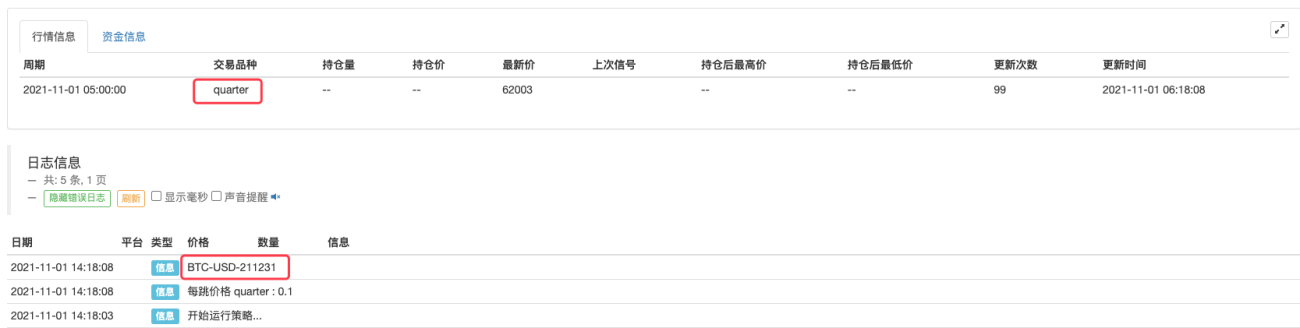
-
DATA
Use the DATA command to load data.
            (*backtest
start: 2020-01-21 00:00:00
end: 2020-02-12 00:00:00
period: 1d
basePeriod: 1h
exchanges: [{"eid":"Binance","currency":"BTC_USDT"}]
*)
A:DATA('https://www.fmz.com/upload/asset/32bf73a69fc12d36e76.json');
INFO(1, CONTRACT, A);
C>HV(H, 10),SPK;
C<LV(L, 15),BPK;
AUTOFILTER;
Use
['attribute name']to take the value of an attribute in the data.https://www.fmz.com/upload/asset/1ef31d778467ed9dd00.jsonis the external data links, it can be a link to data provided by other service programs, or it can be data provided by the data center of the FMZ Quant trading platform, such as the part of the comments in the example(*Consumption Index: DATA('CPI')[ 'city'];*), use the codeCPIto get data (the data is not all opened yet).(*backtest start: 2018-01-21 00:00:00 end: 2020-02-12 00:00:00 period: 1d basePeriod: 1d exchanges: [{"eid":"Binance","currency":"BTC_USDT"}] *) Consumption index: DATA('https://www.fmz.com/upload/asset/1ef31d778467ed9dd00.json')['city']; (*Consumption index: DATA('CPI')['city'];*) Consumption index > HV(Consumption index, 90),BPK; Consumption index < LV(Consumption index, 90),SPK; AUTOFILTER;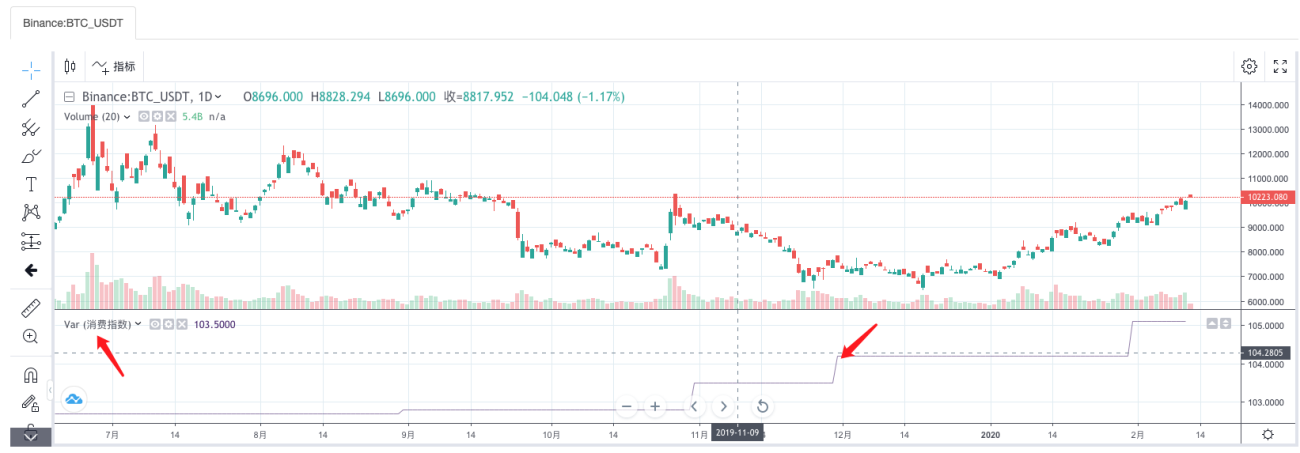
-
-
Others
-
MyLanguage class library parameters
-
Minimum points of price
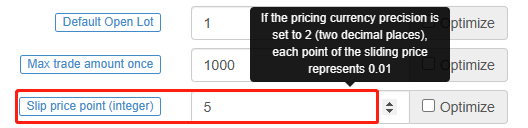
On the BITMEX futures exchange, the minimum points of price is 0.5.
On the OKEX futures exchange, the minimum points of price is 0.01.When the price of some contracts is relatively low, it's necessary to pay attention to whether the setting of parameters, such as pricing currency precision, trading variety precision are appropriate.
-
Maximum number of periods of the variable
It affects the number of chart K-line BARs in the same way that calling theSetMaxBarLenfunction in thejavascriptstrategy does. -
MyLanguage strategy, the number of positions displayed on the table in the status column.
All are the actual number of positions held.

-
Conditional judgment (not recommended to write in this way).
            IF H > C THEN
BEGIN
    X:=10;
END
-
-
Example:
-
When the real-time price model is used, the new K-line Bar is detected:
            VARIABLE:N:0;
IF N <> BARPOS AND ISLASTBAR = 1 THEN
BEGIN
    N:=BARPOS;
    INFO(1, '123');
END
-
-
- 1