
Solutions to Obtaining Docker Http Request Message
When testing and debugging the strategy code, or running the bot in a real market, the platform interface is often reported with errors. At this time, you need to query the platform interface API documentation, search for the relevant error reporting information, and always need to provide the request messages of errors, when querying the platform API technical service, to analyze the causes of the errors.
If you can't see the message information, it will be difficult to find the problems. In this article, we will discuss on two solutions.
1. Use Python Scapy (packet capture) to print the request message sent
First, install scapy.
pip3 install scapy
Then, create a python strategy:
            from scapy.all import *

def Method_print(packet):
    ret = "\n".join(packet.sprintf("{Raw:%Raw.load%}").split(r"\r\n"))
    Log(ret)

sniff(
    iface='eth0',
    prn=Method_print,
    lfilter=lambda p: "GET" in str(p) or "POST" in str(p),
    filter="tcp")
Then create a bot that uses the strategy, and the bot will capture http packets sent by the docker server (https can't catch the packets, and we have some processing for that).
Run the packet capture bot, and then you can use the debugging tool to send requests to let the bot capture packets. In the debugging tool, we write the code that can send requests.
            function main(){
    // The base address should be set to the address of other http protocols. If the address of a platform is not set, it is generally https, so the packet cannot be captured.
    exchange.SetBase("http://www.baidu.com")

    // POST request
    exchange.IO("api", "POST", "/api/swap/v3/order", "aaa=111&bbb=222")

    // GET request
    exchange.SetContractType("swap")
    exchange.GetTicker()
}
The information printed by the bot of packet capture:

We can copy the request messages and have a look:
GET request message:
            GET
/api/swap/v3/instruments/BTC-USD-SWAP/ticker
HTTP/1.1
Host: www.baidu.com
User-Agent: Mozilla/5.0 (Macintosh; Intel Mac OS X 10_9_3) AppleWebKit/537.36 (KHTML, like Gecko) Chrome/35.0.1916.153 Safari/537.36 Accept-Encoding: gzip
Host: www.baidu.com is what we have modified in order to catch the packets, which can be ignored; the correct one should be Host: www.okex.com.
You can see the link in the request message is: /api/swap/v3/instruments/BTC-USD-SWAP/ticker, which is to request the crypto-margined (BTC) perpetual contract market data.
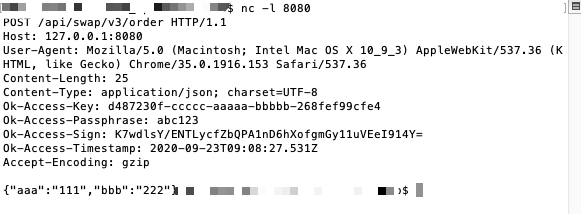
POST request message:
            POST
/api/swap/v3/order
HTTP/1.1
Host: www.baidu.com
User-Agent: Mozilla/5.0 (Macintosh; Intel Mac OS X 10_9_3) AppleWebKit/537.36 (KHTML, like Gecko) Chrome/35.0.1916.153 Safari/537.36
Content-Length: 25
Content-Type: application/json; charset=UTF-8
Ok-Access-Key: d487230f-ccccc-aaaaa-bbbbb-268fef99cfe4
Ok-Access-Passphrase: abc123
Ok-Access-Sign: h1x6f80rhhkELobJcO1rFyMgUUshOlmgjRBHD+pLvG0=
Ok-Access-Timestamp: 2020-09-23T08:43:49.906Z Accept-Encoding: gzip

{"aaa":"111","bbb":"222"}
You can see the request path is: /api/swap/v3/order.
Verified Access key: d487230f-ccccc-aaaaa-bbbbb-268fef99cfe4 (for demo, not real KEY)
Signature of this request: h1x6f80rhhkELobJcO1rFyMgUUshOlmgjRBHD+pLvG0=
API KEY Passphrase: abc123 (for demo)
Requested Body data: {"aaa":"111","bbb":"222"}.
Thus, we can observe the request messages, and analyze the causes of errors encountered by the interface.
2. Local Listener Request
The second solution, without creating a bot, is to use the Netcat that comes with the Mac system: https://baike.baidu.com/item/Netcat/9952751?fr=aladdin. Listen to requests and print messages.
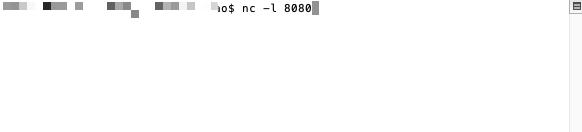
In the terminal, use the command nc -l 8080 to run Netcat.
As is shown in the picture:
Similarly, we deploy a docker on this machine, and then in the debugging tool, use the following code to send a request.
            function main(){
    exchange.SetBase("http://127.0.0.1:8080")    // here we modify the base address to the local, port 8080, and then Netcat can listen to the requests
    // POST request
    exchange.IO("api", "POST", "/api/swap/v3/order", "aaa=111&bbb=222")

    // GET request
    exchange.SetContractType("swap")
    exchange.GetTicker()
}
The POST request message printed on the terminal:
The GET request message printed on the terminal:

- 1