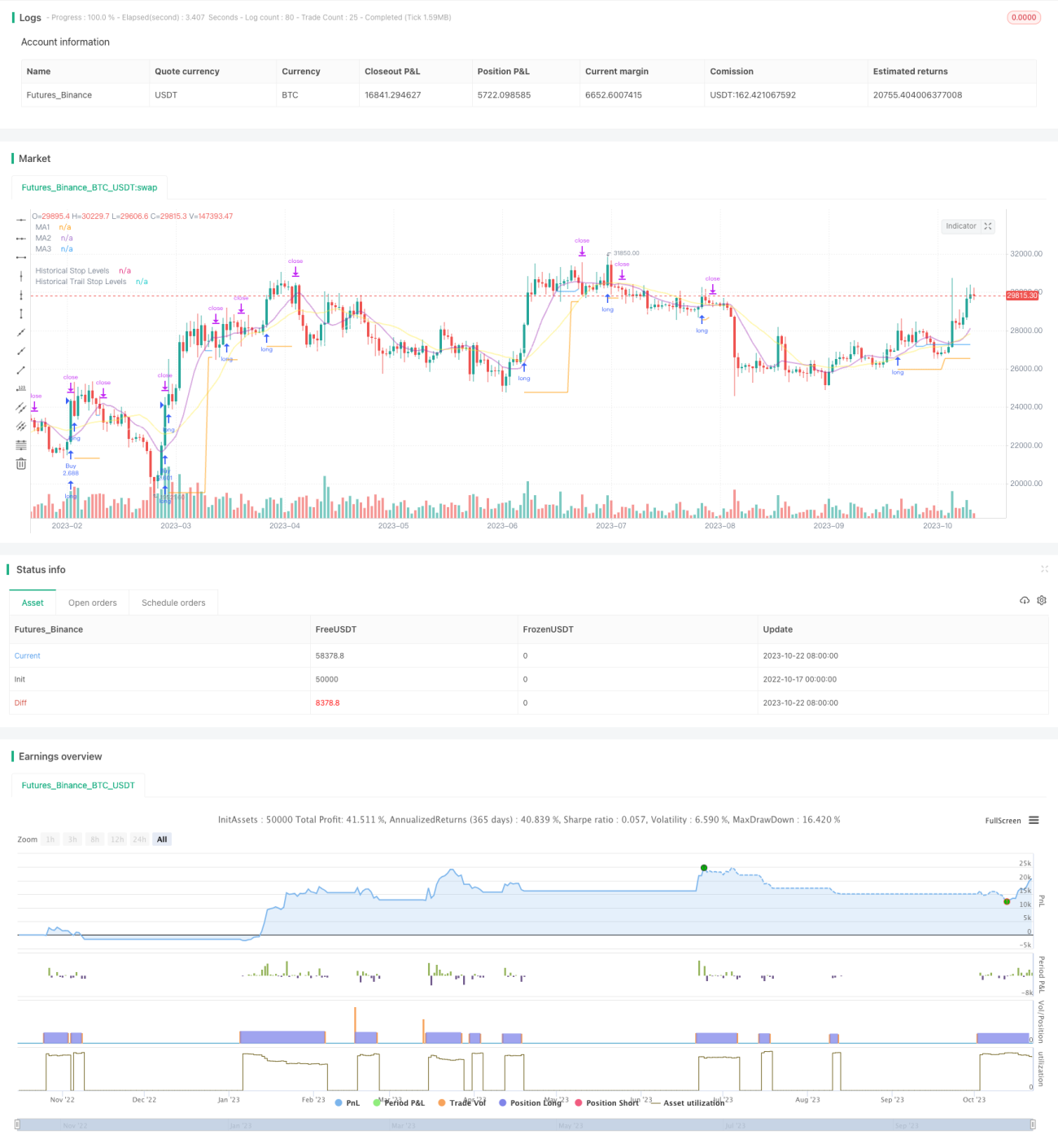
এই কৌশলটি ব্রেকিং কৌশল এবং ট্রেন্ড ট্র্যাকিং স্টপ লস কৌশলগুলির সুবিধাগুলি একত্রিত করে, যা লম্বা লাইনের গ্রাফিকগুলিতে সমর্থন প্রতিরোধের ব্রেকিং সিগন্যালগুলিকে ক্যাপচার করার জন্য এবং চলমান গড়গুলিকে স্টপ লস ট্র্যাকিংয়ের জন্য ব্যবহার করে, লম্বা লাইনের প্রবণতার দিক থেকে মুনাফা অর্জনের জন্য এবং ঝুঁকি নিয়ন্ত্রণের জন্য।
কৌশলটি প্রথমে বিভিন্ন প্যারামিটারগুলির একাধিক গ্রুপের চলমান গড় গণনা করে, যা প্রবণতা নির্ণয়, সমর্থন প্রতিরোধ এবং ক্ষতির ট্র্যাকিং হিসাবে ব্যবহৃত হয়।
তারপর একটি নির্দিষ্ট সময়ের মধ্যে সর্বোচ্চ এবং সর্বনিম্ন পয়েন্টগুলি খুঁজে বের করা হয় যা প্রবেশের জন্য সমর্থন এবং প্রতিরোধের অঞ্চল হিসাবে কাজ করে। যখন দামগুলি এই সমর্থন এবং প্রতিরোধকে অতিক্রম করে তখন একটি সংকেত তৈরি হয়।
কৌশলটি হল, সর্বোচ্চ পয়েন্ট অতিক্রম করে মাল্টি সিগন্যাল কেনা এবং নিম্নতম পয়েন্ট অতিক্রম করে শূন্য সিগন্যাল বিক্রি করা।
প্রবেশের পর, আপনি আপনার সর্বনিম্ন ব্রেকিং পয়েন্টের সর্বনিম্ন পয়েন্টটি স্টপ লস হিসাবে অবস্থানটি ধরে রাখবেন।
যখন পজিশন লাভজনক অবস্থায় চলে যায়, তখন স্টপ লস ট্র্যাকিং মুভিং এভারেজের দিকে চলে যায়। যখন দাম মুভিং এভারেজের নীচে চলে যায়, তখন স্টপ লসকে এই রুট কে লাইনের সর্বনিম্ন পয়েন্ট হিসাবে সেট করা হয়।
এইভাবে, ট্রেন্ড অনুসরণ করার জন্য পর্যাপ্ত জায়গা থাকা সত্ত্বেও, মুনাফা লক করা যায়।
কৌশলটি একই সাথে গড় বাস্তব ওঠানামা যোগ করে যাতে নিশ্চিত করা যায় যে কেবলমাত্র উপযুক্ত ব্যাপ্তিতেই ক্রয়-বিক্রয় করা যায় এবং অত্যধিক সম্প্রসারণের ক্রয়-বিক্রয় এড়ানো যায়।
ব্রেক-আউট কৌশল এবং ট্রেন্ড-ট্র্যাকিং স্টপ লস কৌশলগুলির দ্বৈত সুবিধা।
লং লাইন ট্রেন্ডের উপর ভিত্তি করে একটি ব্রেক কিনে লাভের সম্ভাবনা বাড়িয়ে তুলতে পারে।
স্টপ লস স্ট্র্যাটেজি পজিশনকে সুরক্ষিত করে এবং পজিশনের জন্য পর্যাপ্ত জায়গা দেয়।
অস্থিরতা ফিল্টার যুক্ত করুন যাতে অতিরিক্ত উত্তোলন থেকে বিরত থাকতে পারে।
স্বয়ংক্রিয় লেনদেন, আংশিক সময় চালানের জন্য উপযুক্ত
বিভিন্ন সময়কালের গড়রেখার উপর কাজ করার জন্য কাস্টমাইজ করা যায়।
নমনীয়ভাবে স্টপ লস ট্র্যাকিং পদ্ধতি পরিবর্তন করা যায়।
ভঙ্গের কৌশল ভুয়া ভঙ্গের ঝুঁকিতে রয়েছে। উপযুক্তভাবে ভঙ্গের নিশ্চয়তা দেওয়া যেতে পারে।
বিপর্যয় ঘটানোর জন্য পর্যাপ্ত তরঙ্গের প্রয়োজন হয়, যা বিপর্যয় ঘটানোর সময় কার্যকর হয় না।
কিছু বিরাট সাফল্য খুব অল্প সময়ের জন্য ধরা পড়ার মতো হতে পারে।
ট্র্যাকিং স্টপডাউনের সময় স্টপডাউনের ঘন ঘনতা বাড়তে পারে। স্টপডাউনের দূরত্ব যথাযথভাবে শিথিল করা যেতে পারে।
ফ্ল্যাশ রেট ফিল্টার কিছু সুযোগ মিস করতে পারে। ফিল্টারিং প্যারামিটারগুলি কমিয়ে আনা যেতে পারে।
বিভিন্ন সমান্তরাল প্যারামিটার সমন্বয় পরীক্ষা করে সেরা প্যারামিটার খুঁজুন।
বিভিন্ন ব্রেকথ্রু কনফার্মেশন মেকানিজম যেমন, চ্যানেল, কে-লাইন ফর্ম্যাট ইত্যাদি পরীক্ষা করা।
বিভিন্ন স্টপ-ট্র্যাকিং পদ্ধতি ব্যবহার করে সেরা স্টপ-ট্র্যাকার খুঁজুন।
পজিশন স্কোরের মতো তহবিল পরিচালনার কৌশলগুলিকে অনুকূলিত করুন।
পরিসংখ্যানগত প্রযুক্তিগত সূচক ফিল্টারিং যোগ করা হয়েছে, যা ফিল্টারিং নির্ভুলতা উন্নত করেছে।
এই কৌশলটি বিভিন্ন জাতের উপর পরীক্ষা করা হচ্ছে।
মেশিন লার্নিং অ্যালগরিদমের সাহায্যে কৌশলগুলি কার্যকর করা।
এই কৌশলটি ব্রেকথ্রু চিন্তাভাবনা এবং প্রবণতা ট্র্যাকিং স্টপস্টপ চিন্তাভাবনাকে একত্রিত করে, লম্বা লাইনটি সঠিকভাবে বিচার করা হলে, লাভের স্থানটি অপ্টিমাইজ করা যায়। মূল বিষয়টি হ’ল সর্বোত্তম প্যারামিটারগুলির সমন্বয় খুঁজে পাওয়া এবং একটি ভাল তহবিল পরিচালনার কৌশলটির সাথে কাজ করা, যাতে লম্বা লম্বা সুযোগগুলি দখল করা যায় এবং ঝুঁকি নিয়ন্ত্রণ করা যায়। এই কৌশলটি আরও অপ্টিমাইজেশনের মাধ্যমে আরও নির্ভরযোগ্য লম্বা ট্রেন্ড কৌশল হওয়ার সম্ভাবনা রয়েছে।
/*backtest
start: 2022-10-17 00:00:00
end: 2023-10-23 00:00:00
period: 1d
basePeriod: 1h
exchanges: [{"eid":"Futures_Binance","currency":"BTC_USDT"}]
*/
// This source code is subject to the terms of the Mozilla Public License 2.0 at https://mozilla.org/MPL/2.0/
// © millerrh
// The intent of this strategy is to buy breakouts with a tight stop on smaller timeframes in the direction of the longer term trend.
// Then use a trailing stop of a close below either the 10 MA or 20 MA (user choice) on that larger timeframe as the position
// moves in your favor (i.e. whenever position price rises above the MA).
// Option of using daily ADR as a measure of finding contracting ranges and ensuring a decent risk/reward.
// (If the difference between the breakout point and your stop level is below a certain % of ATR, it could possibly find those consolidating periods.)
// V2 - updates code of original Qullamaggie Breakout to optimize and debug it a bit - the goal is to remove some of the whipsaw and poor win rate of the
// original by incorporating some of what I learned in the Breakout Trend Follower script.
//@version=4
strategy("Qullamaggie Breakout V2", overlay=true, initial_capital=100000, currency='USD', calc_on_every_tick = true,
default_qty_type=strategy.percent_of_equity, default_qty_value=100, commission_type=strategy.commission.percent, commission_value=0.1)
// === BACKTEST RANGE ===
Start = input(defval = timestamp("01 Jan 2019 06:00 +0000"), title = "Backtest Start Date", type = input.time, group = "backtest window and pivot history")
Finish = input(defval = timestamp("01 Jan 2100 00:00 +0000"), title = "Backtest End Date", type = input.time, group = "backtest window and pivot history")
// Inputs
showPivotPoints = input(title = "Show Historical Pivot Points?", type = input.bool, defval = false, group = "backtest window and pivot history",
tooltip = "Toggle this on to see the historical pivot points that were used. Change the Lookback Periods to adjust the frequency of these points.")
htf = input(defval="D", title="Timeframe of Moving Averages", type=input.resolution, group = "moving averages",
tooltip = "Allows you to set a different time frame for the moving averages and your trailing stop.
The default behavior is to identify good tightening setups on a larger timeframe
(like daily) and enter the trade on a breakout occuring on a smaller timeframe, using the moving averages of the larger timeframe to trail your stop.")
maType = input(defval="SMA", options=["EMA", "SMA"], title = "Moving Average Type", group = "moving averages")
ma1Length = input(defval = 10, title = "1st Moving Average Length", minval = 1, group = "moving averages")
ma2Length = input(defval = 20, title = "2nd Moving Average Length", minval = 1, group = "moving averages")
ma3Length = input(defval = 50, title = "3rd Moving Average Length", minval = 1, group = "moving averages")
useMaFilter = input(title = "Use 3rd Moving Average for Filtering?", type = input.bool, defval = true, group = "moving averages",
tooltip = "Signals will be ignored when price is under this slowest moving average. The intent is to keep you out of bear periods and only
buying when price is showing strength or trading with the longer term trend.")
trailMaInput = input(defval="1st Moving Average", options=["1st Moving Average", "2nd Moving Average"], title = "Trailing Stop", group = "stops",
tooltip = "Initial stops after entry follow the range lows. Once in profit, the trade gets more wiggle room and
stops will be trailed when price breaches this moving average.")
trailMaTF = input(defval="Same as Moving Averages", options=["Same as Moving Averages", "Same as Chart"], title = "Trailing Stop Timeframe", group = "stops",
tooltip = "Once price breaches the trail stop moving average, the stop will be raised to the low of that candle that breached. You can choose to use the
chart timeframe's candles breaching or use the same timeframe the moving averages use. (i.e. if daily, you wait for the daily bar to close before setting
your new stop level.)")
currentColorS = input(color.new(color.orange,50), title = "Current Range S/R Colors: Support", type = input.color, group = "stops", inline = "lineColor")
currentColorR = input(color.new(color.blue,50), title = " Resistance", type = input.color, group = "stops", inline = "lineColor")
// Pivot lookback
lbHigh = 3
lbLow = 3
// MA Calculations (can likely move this to a tuple for a single security call!!)
ma(maType, src, length) =>
maType == "EMA" ? ema(src, length) : sma(src, length) //Ternary Operator (if maType equals EMA, then do ema calc, else do sma calc)
ma1 = security(syminfo.tickerid, htf, ma(maType, close, ma1Length))
ma2 = security(syminfo.tickerid, htf, ma(maType, close, ma2Length))
ma3 = security(syminfo.tickerid, htf, ma(maType, close, ma3Length))
plot(ma1, color=color.new(color.purple, 60), style=plot.style_line, title="MA1", linewidth=2)
plot(ma2, color=color.new(color.yellow, 60), style=plot.style_line, title="MA2", linewidth=2)
plot(ma3, color=color.new(color.white, 60), style=plot.style_line, title="MA3", linewidth=2)
// === USE ADR FOR FILTERING ===
// The idea here is that you want to buy in a consolodating range for best risk/reward. So here you can compare the current distance between
// support/resistance vs. the ADR and make sure you aren't buying at a point that is too extended.
useAdrFilter = input(title = "Use ADR for Filtering?", type = input.bool, defval = false, group = "adr filtering",
tooltip = "Signals will be ignored if the distance between support and resistance is larger than a user-defined percentage of ADR (or monthly volatility
in the stock screener). This allows the user to ensure they are not buying something that is too extended and instead focus on names that are consolidating more.")
adrPerc = input(defval = 120, title = "% of ADR Value", minval = 1, group = "adr filtering")
tableLocation = input(defval="Bottom", options=["Top", "Bottom"], title = "ADR Table Visibility", group = "adr filtering",
tooltip = "Place ADR table on the top of the pane, the bottom of the pane, or off.")
adrValue = security(syminfo.tickerid, "D", sma((high-low)/abs(low) * 100, 21)) // Monthly Volatility in Stock Screener (also ADR)
adrCompare = (adrPerc * adrValue) / 100
// === PLOT SWING HIGH/LOW AND MOST RECENT LOW TO USE AS STOP LOSS EXIT POINT ===
ph = pivothigh(high, lbHigh, lbHigh)
pl = pivotlow(low, lbLow, lbLow)
highLevel = valuewhen(ph, high[lbHigh], 0)
lowLevel = valuewhen(pl, low[lbLow], 0)
barsSinceHigh = barssince(ph) + lbHigh
barsSinceLow = barssince(pl) + lbLow
timeSinceHigh = time[barsSinceHigh]
timeSinceLow = time[barsSinceLow]
//Removes color when there is a change to ensure only the levels are shown (i.e. no diagonal lines connecting the levels)
pvthis = fixnan(ph)
pvtlos = fixnan(pl)
hipc = change(pvthis) != 0 ? na : color.new(color.maroon, 0)
lopc = change(pvtlos) != 0 ? na : color.new(color.green, 0)
// Display Pivot lines
plot(showPivotPoints ? pvthis : na, color=hipc, linewidth=1, offset=-lbHigh, title="Top Levels")
plot(showPivotPoints ? pvthis : na, color=hipc, linewidth=1, offset=0, title="Top Levels 2")
plot(showPivotPoints ? pvtlos : na, color=lopc, linewidth=1, offset=-lbLow, title="Bottom Levels")
plot(showPivotPoints ? pvtlos : na, color=lopc, linewidth=1, offset=0, title="Bottom Levels 2")
// BUY AND SELL CONDITIONS
buyLevel = valuewhen(ph, high[lbHigh], 0) //Buy level at Swing High
// Conditions for entry
stopLevel = float(na) // Define stop level here as "na" so that I can reference it in the ADR calculation before the stopLevel is actually defined.
buyConditions = (useMaFilter ? buyLevel > ma3 : true) and
(useAdrFilter ? (buyLevel - stopLevel[1]) < adrCompare : true)
buySignal = crossover(high, buyLevel) and buyConditions
// Trailing stop points - when price punctures the moving average, move stop to the low of that candle - Define as function/tuple to only use one security call
trailMa = trailMaInput == "1st Moving Average" ? ma1 : ma2
f_getCross() =>
maCrossEvent = crossunder(low, trailMa)
maCross = valuewhen(maCrossEvent, low, 0)
maCrossLevel = fixnan(maCross)
maCrossPc = change(maCrossLevel) != 0 ? na : color.new(color.blue, 0) //Removes color when there is a change to ensure only the levels are shown (i.e. no diagonal lines connecting the levels)
[maCrossEvent, maCross, maCrossLevel, maCrossPc]
crossTF = trailMaTF == "Same as Moving Averages" ? htf : ""
[maCrossEvent, maCross, maCrossLevel, maCrossPc] = security(syminfo.tickerid, crossTF, f_getCross())
plot(showPivotPoints ? maCrossLevel : na, color = maCrossPc, linewidth=1, offset=0, title="Ma Stop Levels")
// == STOP AND PRICE LEVELS ==
inPosition = strategy.position_size > 0
buyLevel := inPosition ? buyLevel[1] : buyLevel
stopDefine = valuewhen(pl, low[lbLow], 0) //Stop Level at Swing Low
inProfit = strategy.position_avg_price <= stopDefine[1]
// stopLevel := inPosition ? stopLevel[1] : stopDefine // Set stop loss based on swing low and leave it there
stopLevel := inPosition and not inProfit ? stopDefine : inPosition and inProfit ? stopLevel[1] : stopDefine // Trail stop loss until in profit
trailStopLevel = float(na)
// trying to figure out a better way for waiting on the trail stop - it can trigger if above the stopLevel even if the MA hadn't been breached since opening the trade
notInPosition = strategy.position_size == 0
inPositionBars = barssince(notInPosition)
maCrossBars = barssince(maCrossEvent)
trailCross = inPositionBars > maCrossBars
// trailCross = trailMa > stopLevel
trailStopLevel := inPosition and trailCross ? maCrossLevel : na
plot(inPosition ? stopLevel : na, style=plot.style_linebr, color=color.new(color.orange, 50), linewidth = 2, title = "Historical Stop Levels", trackprice=false)
plot(inPosition ? trailStopLevel : na, style=plot.style_linebr, color=color.new(color.blue, 50), linewidth = 2, title = "Historical Trail Stop Levels", trackprice=false)
// == PLOT SUPPORT/RESISTANCE LINES FOR CURRENT CHART TIMEFRAME ==
// Use a function to define the lines
// f_line(x1, y1, y2, _color) =>
// var line id = na
// line.delete(id)
// id := line.new(x1, y1, time, y2, xloc.bar_time, extend.right, _color)
// highLine = f_line(timeSinceHigh, highLevel, highLevel, currentColorR)
// lowLine = f_line(timeSinceLow, lowLevel, lowLevel, currentColorS)
// == ADR TABLE ==
tablePos = tableLocation == "Top" ? position.top_right : position.bottom_right
var table adrTable = table.new(tablePos, 2, 1, border_width = 3)
lightTransp = 90
avgTransp = 80
heavyTransp = 70
posColor = color.rgb(38, 166, 154)
negColor = color.rgb(240, 83, 80)
volColor = color.new(#999999, 0)
f_fillCellVol(_table, _column, _row, _value) =>
_transp = abs(_value) > 7 ? heavyTransp : abs(_value) > 4 ? avgTransp : lightTransp
_cellText = tostring(_value, "0.00") + "%\n" + "ADR"
table.cell(_table, _column, _row, _cellText, bgcolor = color.new(volColor, _transp), text_color = volColor, width = 6)
srDistance = (highLevel - lowLevel)/highLevel * 100
f_fillCellCalc(_table, _column, _row, _value) =>
_c_color = _value >= adrCompare ? negColor : posColor
_transp = _value >= adrCompare*0.8 and _value <= adrCompare*1.2 ? lightTransp :
_value >= adrCompare*0.5 and _value < adrCompare*0.8 ? avgTransp :
_value < adrCompare*0.5 ? heavyTransp :
_value > adrCompare*1.2 and _value <= adrCompare*1.5 ? avgTransp :
_value > adrCompare*1.5 ? heavyTransp : na
_cellText = tostring(_value, "0.00") + "%\n" + "Range"
table.cell(_table, _column, _row, _cellText, bgcolor = color.new(_c_color, _transp), text_color = _c_color, width = 6)
if barstate.islast
f_fillCellVol(adrTable, 0, 0, adrValue)
f_fillCellCalc(adrTable, 1, 0, srDistance)
// f_fillCellVol(adrTable, 0, 0, inPositionBars)
// f_fillCellCalc(adrTable, 1, 0, maCrossBars)
// == STRATEGY ENTRY AND EXIT ==
strategy.entry("Buy", strategy.long, stop = buyLevel, when = buyConditions)
stop = stopLevel > trailStopLevel ? stopLevel : close[1] > trailStopLevel and close[1] > trailMa ? trailStopLevel : stopLevel
strategy.exit("Sell", from_entry = "Buy", stop=stop)