
During the use of the FMZ Quant Workflow, many developers have raised a large number of questions in the comment sections and community discussions. This article organizes these high-frequency questions, covering environment configuration, node usage, data access, AI invocation, backtesting mechanisms, and more, to help you quickly find solutions.
I. Environment Configuration Issues
Q1: Why can’t my live trading run workflow strategies?
Only the latest version of the Host supports running workflows. If your Host version is outdated, workflow strategies will not start. Please update to the latest version in time.
Q2: Which programming languages are supported by workflows?
Workflow code nodes only support JavaScript and do not support Python. If you are used to writing strategies in Python, you need to convert them to JavaScript syntax. Fortunately, JavaScript and Python share similar logic structures, with the main differences being syntax.
II. Node Execution Mechanism
Q3: Are workflow nodes triggered simultaneously or executed sequentially?
Workflow nodes are strictly executed in sequence. They do not run in parallel. Each node must wait for the previous node to finish execution before starting. This characteristic must be considered when designing strategy logic.
Q4: Why does the workflow keep waiting after setting a K-line update trigger?
If you set a 1-hour K-line update trigger, the workflow will wait until the hourly candle closes before running. During this waiting period, the workflow will not execute—this is normal. If you want other strategy logic to run during the waiting period, you can add a second trigger to execute that logic.
III. Data Reading and Variable Persistence
Q5: How do I read the output data of a node?
The standard syntax is:
javascript
$node["Node Name"].json
This syntax allows you to read the JSON output of any node. However, there is an important limitation: you can only read data from directly connected parent nodes. If two nodes are not directly connected, this method cannot be used.
Q6: How can data be shared between nodes that are not directly connected?
You can use the global variable _G. _G is a global memory storage provided by the FMZ workflow, allowing data sharing across any node and any flow.
Usage is very simple:
            javascript

            // Save data
_G("variable_name", value)

// Read data
_G("variable_name")
However, note that variables stored in _G persist indefinitely and will not be cleared even if the live trading instance restarts. If you find that old incorrect data is being read, you must manually clear it using _G("variable_name", null), or delete and recreate the live trading instance.
Q7: When should JSON.stringify be used?
When handling complex data, JSON.stringify is often required. This method converts complex objects and arrays into plain text strings. It is especially useful when passing data to AI nodes, since AI can only understand text-based input.
IV. Data Passing in Code Nodes
Q8: Must a code node return data?
Yes—this is a critical requirement. A code node must end with a return statement to ensure data continues flowing between nodes. Even if your logic does not need to output anything, you must return an empty object:
            javascript

            return {}
If you forget to return data, subsequent nodes will not receive any input, causing the entire workflow to break.
Q9: How should multiple outputs from a node be handled?
If a node outputs multiple items—for example, fetching 10 news articles—and you want to process them together instead of individually, you cannot pass them directly to the next node. You must first use a merge or aggregation node to combine them into a single data package.
This approach results in a cleaner data structure and makes downstream processing easier. For example, if you want to send multiple news items to an AI node for analysis, they must first be aggregated into an array so the AI can process them all at once.
V. AI Node Configuration and Debugging
Q10: What should be checked first when an AI node reports an error?
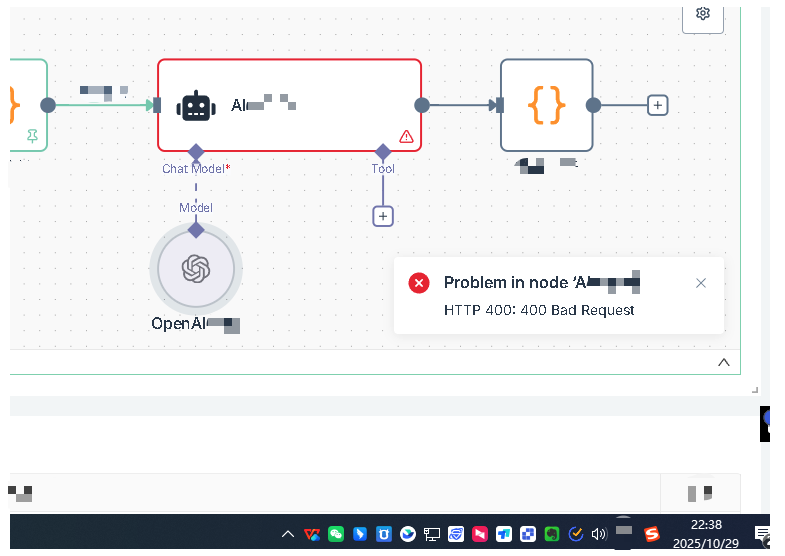
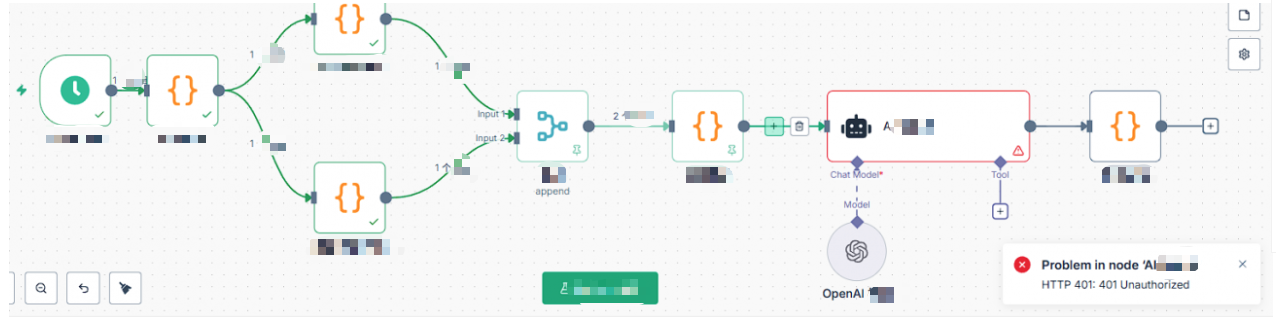
First, check the basic settings of the AI node. The AI node requires a model to be configured, and credentials must be set within the model.
You need to create a new credential first. Credential configuration includes two key pieces of information: API key and base URL. The API key is the key you obtain from the corresponding platform, and the base URL is the API request endpoint.
It is especially important to note that different providers use different base URLs. For example, OpenRouter, DeepSeek, and other proxy services all have different base URLs. Make sure you enter the correct one.
Q11: Which API service is recommended?
It is not recommended to use DeepSeek’s direct API, as response times are slow and timeouts are common, with limited quotas. OpenRouter is recommended instead, as it can connect to multiple large language models and generally offers better stability and speed.
Q12: Does AI invocation incur costs?
Yes. AI calls cost money—each request consumes tokens. If a call fails, check whether your account balance is sufficient. During strategy logic testing, it is recommended to use cheaper models. After confirming that the logic works correctly, you can switch to more powerful models.
Q13: How do I write effective AI prompts?
This is an art and requires optimization based on the characteristics of different models. For example, Grok tends to be aggressive, Claude is more conservative, and DeepSeek—trained on A-share market data—has a natural bullish bias. Understanding these traits helps you write more effective prompts.
VI. AI Model Stability and Risk Control
Q14: Are AI model decisions stable?
AI models are not fully stable at this stage. While AI can improve decision quality, it can also make incorrect judgments. Different market environments, different news wording, or even the same input at different times may yield different outputs. This uncertainty is an inherent characteristic of AI.
Q15: What should be considered when using AI strategies?
Strict risk control measures are essential when using AI strategies. For example: set a maximum loss per trade, cap total position size, implement stop-loss and take-profit logic, and never allow AI to have full control over funds.
AI should be a decision-support tool, not a fully autonomous decision-maker. Human oversight and risk management are always indispensable. As AI technology improves, models will become more stable, but caution is the wise choice at the current stage.
VII. Special Characteristics of AI Strategy Backtesting
Q16: Can strategies that include AI be backtested normally?
AI-based strategies have major limitations in backtesting, and this must be clearly understood. Traditional strategies can be freely backtested using historical data, but AI strategies cannot.
Why? Because every AI call consumes tokens and incurs real costs. Backtesting one year of data could result in thousands of AI calls, making it extremely expensive.
To protect users’ wallets, FMZ has designed a mechanism: in backtest mode, the AI node will only make three real calls, and all subsequent calls will use cached results from those three calls. Therefore, backtest results are only for reference and do not represent the true quality of AI decision-making.
Q17: Can AI strategies that use the latest news be backtested?
If your strategy relies on the latest news, backtesting becomes even more meaningless. This is because you are using historical K-line data while reading current news—there is a complete time mismatch, rendering the backtest invalid.
Q18: How should AI strategies be tested, then?
The recommended approach is to conduct live testing with small capital and small position sizes over a period of time. Observe AI decision quality and strategy performance, and only scale up after confirming stability. For AI strategies, live validation is far more important than historical backtesting.
VIII. HTTP and MCP Node Configuration
Q19: What should I do if an HTTP node fails to retrieve data?
HTTP and MCP nodes are commonly used to fetch external data, but many APIs require authentication keys. If your HTTP request consistently fails, check whether an API key is required and whether authentication is correctly configured.
Some APIs also enforce rate limits. Excessive requests may result in throttling or even bans.
Q20: How can the stability of external data retrieval be improved?
MCP nodes are more powerful and can connect to various structured data services, but they are also more complex to configure. You must correctly set service endpoints, authentication methods, request parameters, and more.
It is recommended to first test API accessibility using an HTTP node. After confirming the data format and availability, integrate it into the workflow.
Additionally, to improve stability, you can enable retry mechanisms for these nodes. In node settings, enable retries and configure retry counts and intervals, so temporary network issues do not cause the entire workflow to fail.
IX. Code Compatibility Issues
Q21: Can FMZ workflows and n8n workflows share code?
FMZ workflows are quantitatively customized based on the open-source n8n framework, but code cannot be directly copied and used between them.
If you find an n8n workflow online and paste it directly into FMZ, it will not run. You must modify it according to FMZ’s APIs and node specifications. Likewise, FMZ workflow code cannot be directly used in n8n.
The main differences lie in FMZ’s customized nodes, where parameters and output formats differ. When migrating code, you must carefully inspect each node’s configuration and function calls to ensure compliance with the target platform’s specifications.
Conclusion
The above covers the most common questions about the FMZ Quant Workflow. We have addressed high-frequency issues ranging from environment configuration and node execution to data handling, coding standards, AI usage, and backtesting.
Mastering these points will help you avoid many pitfalls when developing workflows.
However, quantitative trading is a continuous learning process, and new problems will always arise. When you encounter issues, don’t be discouraged—first consult FMZ’s official documentation and search community discussions, as many problems have already been encountered and solved by others.
If the issue persists, you can submit a support ticket to consult FMZ engineers. You are also welcome to leave comments and exchange experiences with other quantitative traders.
Remember: problems are the best teachers. Every problem you solve deepens your understanding of workflows. We hope this FAQ helps you develop quantitative strategies more smoothly using workflows!
- 1