
1. The Wave Sparked by Robinhood Chain
On-chain trading has picked up noticeably since Robinhood Chain went live. New tokens keep launching, pools are being created one after another, and stock tokens, meme coins, and stablecoin pools are all seeing activity. The momentum has not been confined to a single chain: capital and users are moving between Robinhood, Solana, and BSC, bringing more activity to new tokens and liquidity pools on Solana and BSC as well. One active newcomer seems to have stirred up the wider market.
The main action in this wave is in the primary market: tokens have just launched, pools have just been created, and centralized exchanges have not listed them yet. The opportunities are all on-chain. Users have very specific needs:
- Buy new tokens on-chain as soon as they become available, and avoid having slippage eat into the proceeds when selling.
- Provide liquidity to new pools and earn trading fees.
- Compare prices and fee income across several chains and pools.
- Ideally, put all of this into strategies with automated execution and consistent accounting.
FMZ has supported Web3 for a long time through a unified interface: exchange.IO connects to nodes and calls contracts. This interface is flexible enough to do almost anything in principle, but the barrier to entry is too high for most users. To make a single swap on Uniswap, you have to look up contract addresses, encode the ABI, handle token approvals, calculate slippage, estimate gas, and wait for transaction confirmation. To provide concentrated liquidity, you also have to convert ticks, calculate the ratio of the two tokens, and manage the position NFT. Each chain and DEX adds its own differences: Uniswap has V2, V3, and V4; PancakeSwap has its own Infinity; Aerodrome has basic pools and Slipstream; and Solana has another ecosystem with Meteora, Raydium, and Orca. Much of the time that should go into writing a strategy ends up being spent dealing with contracts.
2. What This Update Adds
We have now completed the DEX module as a whole. The idea is to stop making users interact directly with contracts and instead represent each DEX as an exchange object, connecting to it just as they would to a centralized exchange, with dedicated functions for operations unique to on-chain trading.
Select the chain and wallet when adding an exchange, and the strategy uses familiar calls: GetTicker for prices, GetAssets for balances, and Buy / Sell / CreateOrder to place orders. The platform handles approvals, routing, slippage, gas, and transaction confirmation. When finer control is needed, parameters let you specify the routing version (v2 / v3 / v4), fee tier, and a particular pool. If a token launched only a few hours ago and is not yet in the platform's token list, register it with a single line, exchange.IO("token", name, contractAddress), and trade it like any other pair.
| Type | Exchanges | Description | Documentation |
|---|---|---|---|
| Swaps / aggregated routing (new) | Uniswap (including PancakeSwap, Aerodrome, Velodrome, etc.), KyberSwap, 1inch, OKX DEX, Jupiter | On-chain buying and selling with specified routes and pools; the Uniswap family and Jupiter support concentrated-liquidity LP operations | Uniswap, KyberSwap, 1inch, OKX DEX, Jupiter |
| On-chain perpetuals / spot order books (updated) | Hyperliquid, Lighter, edgeX, Aster, Aevo, WOOFi Pro | Usage is similar to centralized exchanges, with consistent definitions for fields such as positions, margin, average fill prices, and conditional orders | Hyperliquid, Lighter, edgeX, Aster, Aevo, WOOFi Pro |
| Yield / interest-rate trading | Pendle, Boros (Futures_Boros) | Pendle trades PT / YT with yield-based pricing; Boros trades perpetual-contract funding rates on an on-chain order book | Pendle and Boros |
Check the capability matrix to compare the functions supported by each exchange.
For primary-market users, the three most immediate changes are:
- One set of calls across chains and DEXs. The same strategy can use Uniswap on Robinhood, PancakeSwap on BNB Chain, or Jupiter on Solana. The functions and fields stay the same; only the chain and pools change.
- Register a new token and start trading immediately. There is no need to wait for the platform to list it. With the contract address—or mint address on Solana—you can obtain quotes, place orders, and provide liquidity.
- Dedicated functions for liquidity provision (LP). Finding a pool, setting a range, opening a position, collecting fees, and withdrawing liquidity each have an
lp.*function. Tick conversions, token ratios, and approvals that you previously handled yourself are now handled inside these functions.
We will connect these capabilities through an LP example strategy below. First, let's spend two minutes on how LP works.
3. Understanding LP in Two Minutes
On a DEX, there are no traditional resting buy and sell orders; trades are made against a pool. A pool holds two tokens, such as CASHCAT and WETH. Someone who wants to buy CASHCAT puts WETH into the pool and takes CASHCAT out, paying a fee along the way (1% for this pool). Liquidity providers supply the tokens in the pool, and the fees are distributed to them in proportion to their shares.
Uniswap V3 introduced concentrated liquidity: LPs can provide liquidity only within a price range they choose. What a position holds changes with the price:
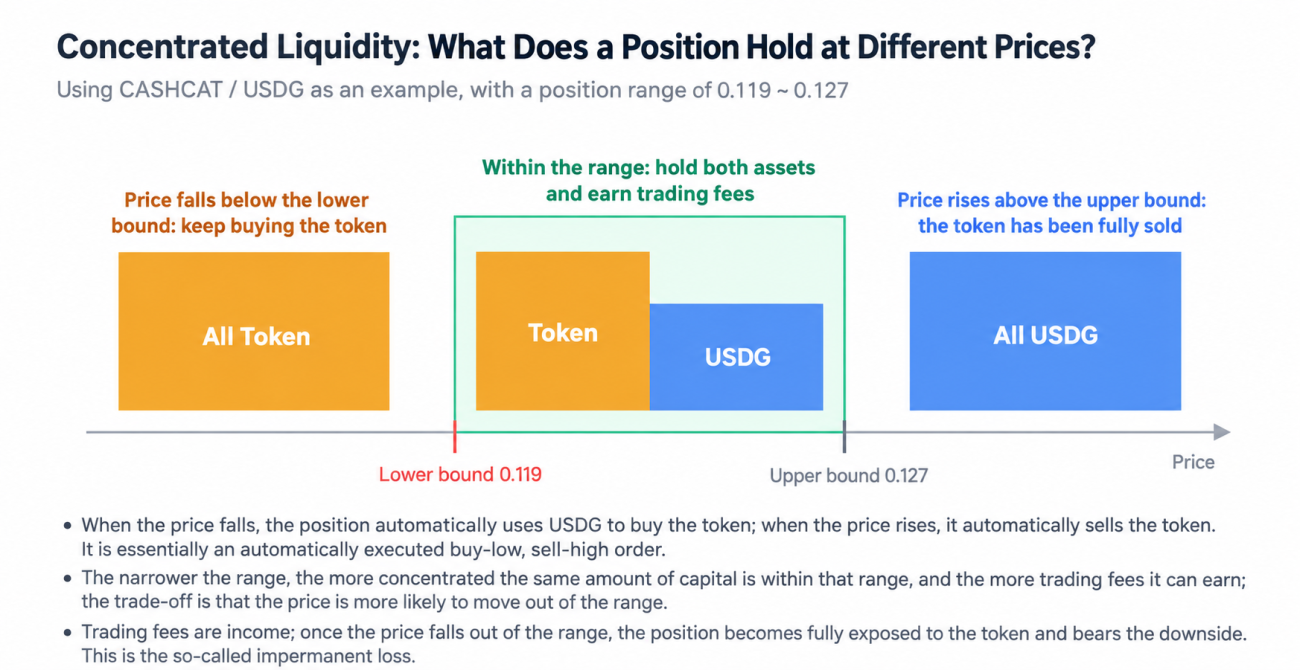
- Price is inside the range: The position contains both tokens, and each trade through that range pays you fees.
- Price falls: As other traders sell the token into the pool, your position keeps buying it. Once the price drops below the lower bound, the position consists entirely of the token.
- Price rises: The reverse happens: your position keeps selling the token. Once the price rises above the upper bound, the position consists entirely of the quote token.
An LP position can therefore be understood as an automatically executed “buy low, sell high” order that also earns fees as it fills:
- The income comes from fees. The more the price moves back and forth within the range, the more fees you collect. A narrower range concentrates your capital and gives you a larger share.
- The risk comes from a sustained move in one direction. If the price falls all the way through the range, you end up holding only the token. If it rises all the way through, you sell all your tokens early. The difference compared with simply holding the original assets is what is commonly called impermanent loss.
Whether LP is profitable ultimately comes down to arithmetic: can fee income exceed the losses caused by price movements?
3.1 LP Functions Provided by the Platform
The lp.* functions cover the full life cycle of an LP position, from finding a pool to withdrawing liquidity. They are all called through exchange.IO("lp.xxx", ...). The Uniswap family (including PancakeSwap, Aerodrome, and others) and Jupiter (Meteora DLMM, Raydium CLMM, and Orca on Solana) use the same function names and return fields:
| Function | Purpose | Main return values |
|---|---|---|
lp.pools(token[, quoteToken]) | List pools for a token; omit the quote token to list pools across all quote tokens | Protocol, fee tier, TVL, 24-hour volume and fees, current price, and whether the pool is empty |
lp.select(token, budget[, options]) | Automatically select a pool according to rules | A pool and the reason for selecting it |
lp.pool(poolId) / lp.ticks(...) | Get the pool's live state / liquidity distribution across price levels | Tick (or bin), price, and liquidity |
lp.plan(parameters) | Generate a position-opening plan from the budget, range, and shape (read-only; submits no transactions) | Lower and upper bounds and quantities for each band, whether a swap is needed, share of pool liquidity, and estimated daily fees |
lp.simulate(plan) | Simulate the position-opening transaction without signing | The simulated position |
lp.add(plan) | Swap tokens, handle approvals, and add liquidity | Transaction hash, position IDs, and ranges |
lp.increase / lp.decrease | Add to a position / reduce it proportionally | Transaction hash and tokens received |
lp.collect(positionIds[, sell]) | Collect fees, optionally selling them directly into the quote token | Fees collected |
lp.remove(positionIds[, proportion[, sell]]) | Withdraw liquidity and collect fees, optionally selling directly into the quote token | Principal and fees withdrawn |
lp.positions([filter[, wallet]]) | Query positions in a wallet | Range, whether the position is in range, quantities of both tokens, value, and uncollected fees |
lp.track(positionIds) | Register V4 and other positions so they can be queried | Registered IDs |
Aerodrome / Velodrome also provide lp.stake, lp.unstake, and lp.claim for staking positions and claiming rewards. For full parameter details, see Uniswap · Concentrated Liquidity (LP) and Jupiter.
4. Example Strategy: Web3 Liquidity Provision
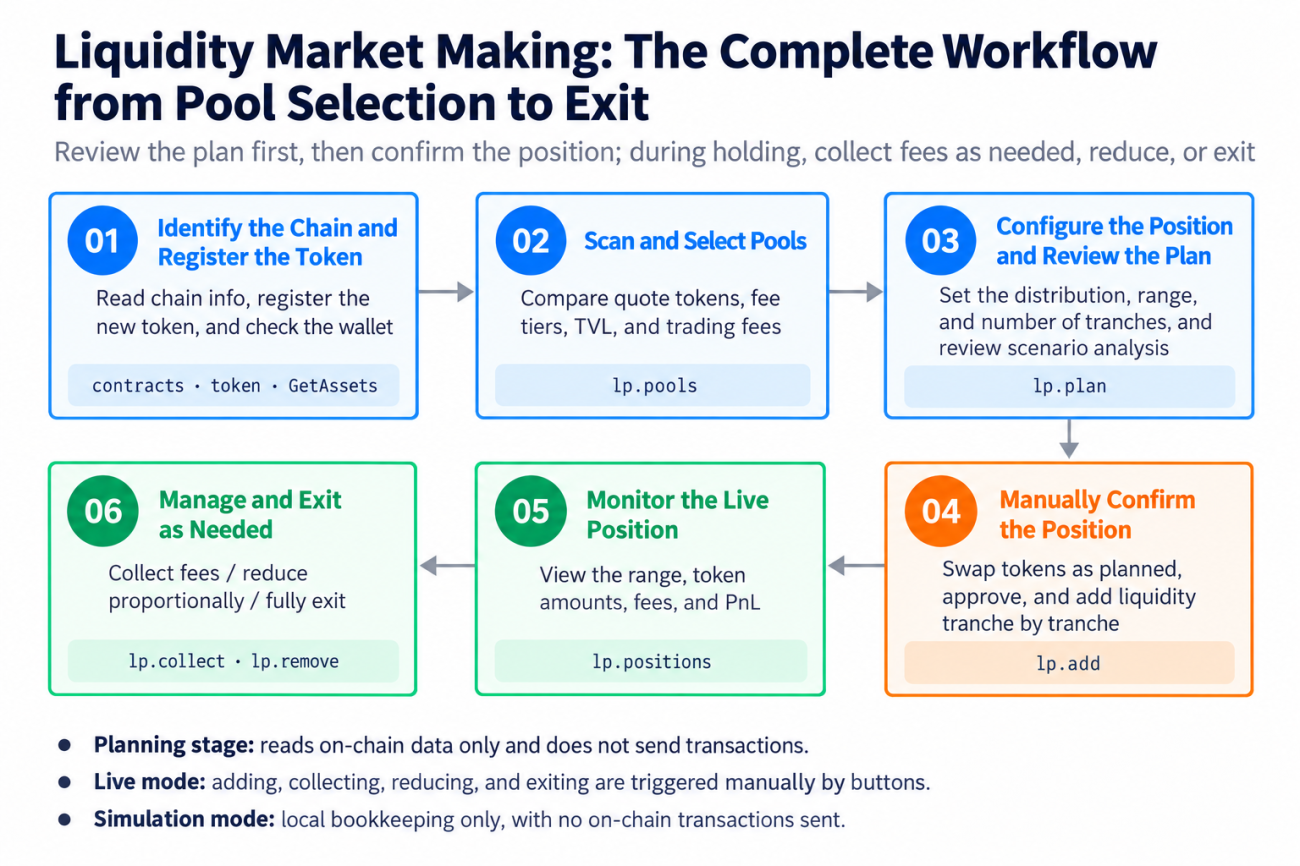
We used these functions to build a “Web3 Liquidity Provision Example Strategy.” Rather than being a fully automated black box, it breaks one LP cycle into clear steps: select a pool → configure positions → review the plan and scenario analysis → open positions → collect fees / reduce positions / withdraw liquidity. Opening positions, collecting fees, and withdrawing liquidity are triggered manually through status-panel buttons. The strategy handles calculations, display, swaps, and accounting, and writes every step to the log.
There are only three parameters: the token (enter its name if already listed, or “name,contractAddress” for a new token), the amount to invest each time, and whether to trade live. Leave live trading unchecked to simulate: the strategy only reads on-chain data, accounts for positions locally using Uniswap formulas, and submits no transactions.
The overall workflow and the functions used at each step are shown below:
4.1 Identify the Chain and Register a New Token
At startup, the strategy first identifies the chain used by the current exchange and determines the funding token and gas token. It uses USDG on Robinhood, USDT on BNB Chain, and USDC on the remaining chains and Solana. For the Uniswap family, chain information is read through contracts; Jupiter is identified as Solana by its exchange name. The strategy then registers the new token and reads the current price and wallet balances:
javascript
var ct = exchange.IO("contracts")
exchange.IO("token", "CASHCAT", "0x020bfc650a365f8bb26819deaabf3e21291018b4")
var ticker = exchange.GetTicker()
var assets = exchange.GetAssets()
The startup log records each item clearly: the chain, funding token and gas token, whether the new token was registered successfully, current price, wallet balances, and whether the strategy is in simulation or live mode. In live mode, it immediately flags insufficient balances or a low gas-token balance.

4.2 Pool Selection: Every Pool for a Token
New tokens in the primary market often have several pools at once: different quote tokens (USDG, WETH, native ETH), different protocol versions, and different fee tiers. When no quote token is supplied, lp.pools lists the token's pools across all quote tokens:
            javascript

            var pools = exchange.IO("lp.pools", "CASHCAT")
pools.forEach(function (p) {
    if (p.empty) return
    p.dailyYield = p.fees24hUsd / p.tvlUsd * 100
})
LPs earn fees, so the metric to compare is not trading volume but daily fee yield = 24-hour fees / TVL. The strategy lists valid pools on separate pages by quote token, showing the fee tier, current price (also converted into the funding token when quoted in another token), TVL, 24-hour volume and fees, daily fee yield, annualized yield, daily turnover, and “estimated daily income for this investment” based on the default position configuration. Empty pools are excluded separately.
In the live run, the scan found several valid CASHCAT pools quoted in USDG, WETH, and ETH. The WETH-quoted 1% pool had the deepest TVL, at approximately $2.5 million.

A pool can be selected directly even when its quote token differs from the funding token, as with CASHCAT/WETH. When opening positions, the strategy first uses any WETH already in the wallet, then automatically swaps USDG to cover the shortfall. After withdrawing, it swaps WETH back into USDG, keeping all profit and loss accounting in the funding token. Operations across quote tokens that once required several contract calls now take a single Buy / Sell call.
4.3 Configure Positions and Review the Plan and Scenario Analysis
Click “Configure Positions” on a pool and set three things:
- Liquidity distribution: uniform Spot, center-concentrated Curve, or edge-concentrated Bid-Ask.
- Range: the lower and upper bounds relative to the current price. A negative upper bound places staggered “buy orders” entirely below the current price.
- Number of bands: with uniform distribution, the range is divided into equal intervals on a logarithmic price scale.
After confirmation, the strategy immediately calls lp.plan to create a plan without submitting a transaction, and displays two tables:
            javascript

            var plan = exchange.IO("lp.plan", {
    symbol: "CASHCAT_WETH",
    budget: 0.0041,
    range: {lower: a, upper: b},
    shape: "spot",
    pool: pool.id,
    slippage: 0.01
})
- Position plan: Each band's price range, quantities of the two tokens, and equivalent amount in the funding token.
- Returns and scenario analysis: Estimated daily fees and annualized yield, share of pool liquidity, funding preparation, swaps required to open positions, whether wallet balances are sufficient, profit and loss and impermanent loss if the price falls to the lower bound or rises to the upper bound, and how many days of fees would be needed to recover the loss at the lower bound.
There is a detail to watch when planning multiple bands: pool price boundaries must fall on multiples of the tick spacing (one spacing interval is about 2% in a pool with a 1% fee tier), so lp.plan aligns each band's lower and upper bounds outward. If each band is planned independently, adjacent bands overlap. The strategy therefore uses the previous band's actual aligned upper bound as the next band's lower bound, keeping them joined end to end. If a band is so narrow that it merges into the previous band, the strategy skips it and suggests reducing the number of bands.
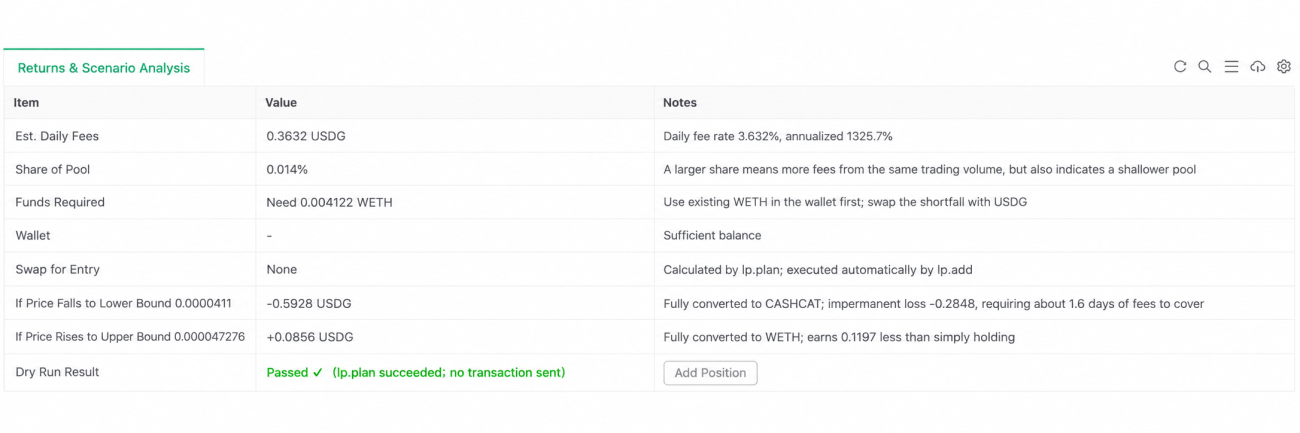
If the returns look suitable, click “Open Positions” in the scenario-analysis table. Otherwise, configure positions in another pool.
4.4 Open Positions
lp.add executes the plan: it swaps tokens if needed, handles approvals, and then adds liquidity one band at a time. Actual gas costs are read from the receipt (on Solana, transaction fees and non-refundable account rent are used) and included in the cost of the cycle:
            javascript

            var r = exchange.IO("lp.add", part)
var rc = exchange.IO("receipt", r.txHash)
On-chain transactions occasionally time out without being included in a block, which is relatively common on Solana. The platform's error message explicitly states whether the transaction has reached the chain. If it is confirmed not to have reached the chain, the strategy replans that band at the latest price and automatically resubmits it, up to two times. If the status is uncertain, it does not retry, avoiding duplicate positions.
The position-opening log follows four stages: “plan → swap → submit each band on-chain → complete.” Every band's position ID and transaction hash can be found in the log.
4.5 Position Management
After the positions are opened, the “Position Plan” table becomes a table of actual holdings, refreshed with lp.positions every 10 seconds:
            javascript

            var ps = exchange.IO("lp.positions", "CASHCAT_WETH")
ps.forEach(function (p) {
    // p.priceLower / p.priceUpper / p.amountBase / p.amountQuote / p.value / p.feesValue
})
Each band shows its price range, status, quantities of both tokens, invested amount, value, uncollected fees, and profit or loss after its allocated gas costs. Summing the individual bands gives exactly the profit or loss for the group. The status column explains what each band is doing:
- 🟢 In range: shows the distance to the lower and upper bounds.
- ⏳ Not yet reached; price must fall x% to enter: currently holds only the quote token and is waiting to buy the token.
- ⏳ Not yet reached; price must rise x% to enter: currently holds only the token and is waiting to sell.

Each band and the total row have three buttons:
| Button | Function | Action |
|---|---|---|
| Collect Fees | lp.collect(ids, true) | Collect fees, sell them into the quote token, and then swap back into the funding token |
| Reduce Position | lp.remove(ids, proportion, true) | Withdraw the specified proportion |
| Withdraw Liquidity and Sell | lp.remove(ids, 1, true) + Sell | Withdraw everything, collect fees, and sell both the token and the quote token back into the funding token |
When withdrawing liquidity, the platform submits transactions for each position in turn. If a transaction times out partway through, the error includes the positions already completed. The strategy first records those completed withdrawals, then automatically retries the remaining ones if they are confirmed not to have reached the chain. Before withdrawing, it also checks which positions still exist on-chain so that withdrawals are not duplicated.
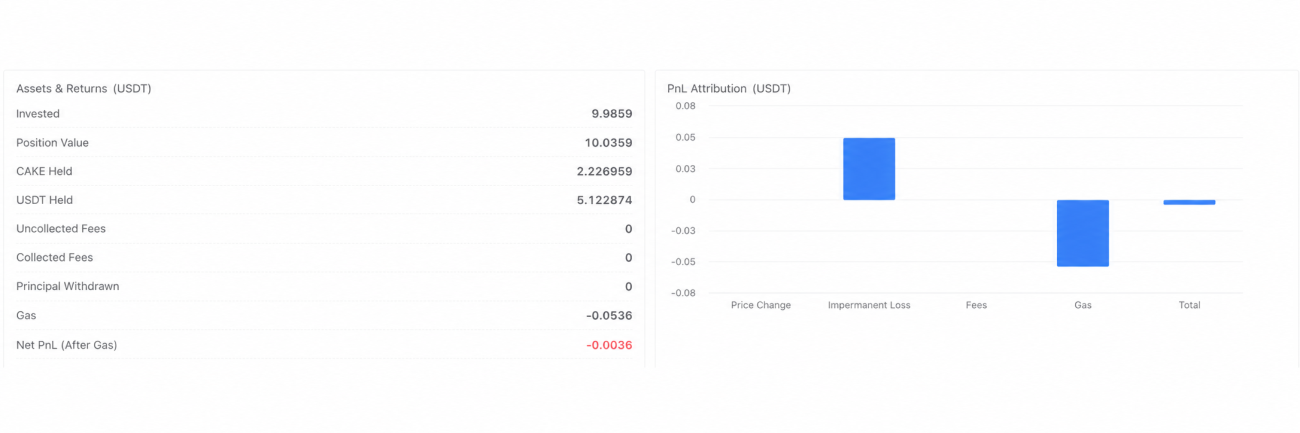
The metric cards at the top, price and range chart, fee coverage ratio, location within the range, capital and return breakdown, and return attribution (price changes / impermanent loss / fees / gas / quote-token exchange rate) put the arithmetic of “can fees cover the losses from price movements?” in front of you in real time.
4.6 One Codebase, Multiple Chains
Because DEXs are represented as exchange objects, this strategy can run on several chains without code changes. Only the exchange configuration needs to change:
| Chain | Exchange configuration | Funding token | Example token parameter |
|---|---|---|---|
| Robinhood | Uniswap | USDG | CASHCAT,0x020b…18b4 |
| BNB Chain | Uniswap (select PancakeSwap as the DEX, including Infinity) | USDT | CAKE,0x0E09…cE82 |
| Base / Arbitrum / Ethereum | Uniswap (or Aerodrome) | USDC | WETH |
| Solana | Jupiter (Meteora / Raydium / Orca) | USDC | SOL, or ORCA,orcaEKTd…ktZE |
There are two differences on Solana, both already handled by the strategy: token names and mint addresses are case-sensitive, and position IDs carry a protocol prefix, such as orca:address or meteora:address.
5. Live Trading Results
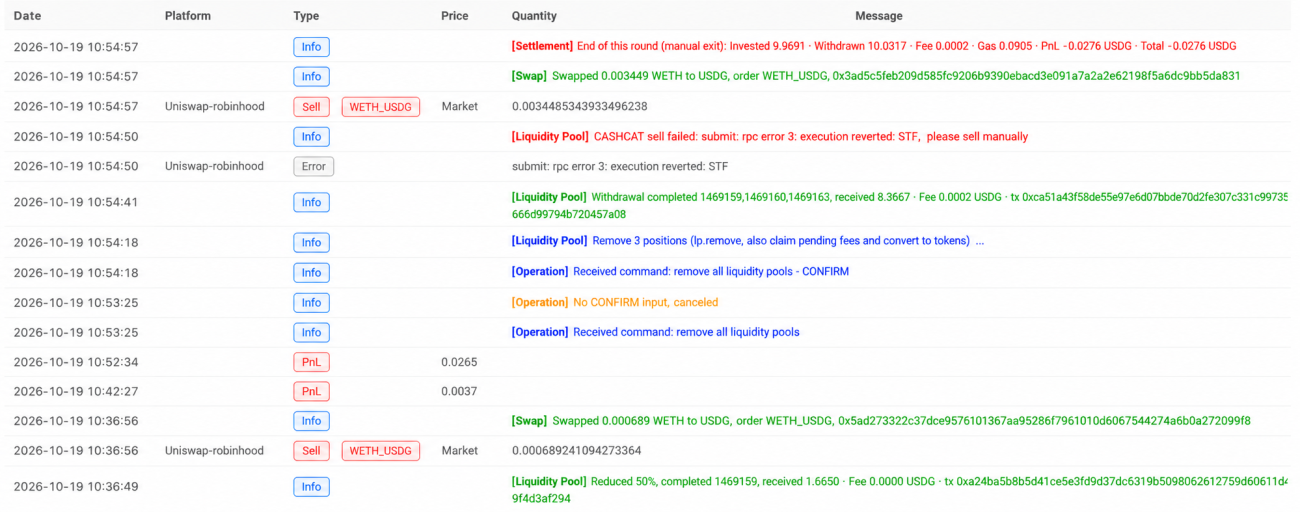
We ran one live cycle on Robinhood Chain with 10 USDG, selecting the CASHCAT/WETH 1% pool with three uniform bands and a range of ±6%:
| Step | What happened |
|---|---|
| Pool selection | Four valid pools were found and nine empty pools excluded; we selected the WETH-quoted 1% pool with approximately $2.5 million in TVL |
| Swap | The wallet had no WETH, so 10.15 USDG was automatically swapped |
| Open positions | Three lp.add transactions were submitted on-chain in sequence, investing approximately 9.97 USDG with gas costs of approximately 0.056 USDG |
| Management | After entry, two bands were in range and the lowest band was waiting for the price to pull back; we tested a 50% reduction, and the WETH received was automatically swapped back into USDG |
We also ran a cycle with ORCA on Solana. Opening positions and withdrawing liquidity in the Orca pool both worked normally. A transaction timeout during the process led to the automatic resubmission and partial-completion accounting described in Sections 4.4 and 4.5.
A single cycle with a small amount of capital does not establish long-term returns. A more measured approach is to run in simulation mode for a few days, checking fee coverage, time in range, and performance against buying and holding over the same period, then move to a small live allocation to confirm actual gas costs and slippage. On Solana, we recommend configuring a private RPC for the Jupiter exchange, as public nodes impose strict rate limits and transactions can easily time out.
6. A Side Note: The New Status Panel
The screenshots above use the platform's new status panel. LogStatus now accepts objects directly to render components: metric cards, gauges, progress bars, various charts, calendar heatmaps, tabs, and more. Existing tables and buttons continue to work as before. For example, here are the metric cards at the top of the positions page:
            javascript

            LogStatus("Liquidity Market Making · CASHCAT", {type: "badge", items: [{text: "Position Active", color: "up"}, {text: "Live Trading", color: "down"}]}, "\n", [
    {type: "alert", level: "success", title: "In Range, Earning Fees", text: "2/3 ranges are active"},
    {type: "grid", cols: 3, items: [
        {type: "kpi", title: "Strategy Equity", value: 9.998, unit: "USDG"},
        {type: "kpi", title: "Fee Income", value: 0, unit: "USDG", color: "up"},
        {type: "progress", title: "Range Position", value: 0.62}
    ]}
])
| Component | Use in this strategy |
|---|---|
badge / alert | Stage and mode labels, range-status notifications |
kpi / grid | Strategy equity, group profit and loss, fees, annualized yield, current price |
chart | Price and range chart, return attribution, daily profit and loss |
gauge / progress | Fee coverage ratio, location within the range, time in range |
stat | Capital and return breakdown |
calendar | Calendar of daily returns |
tabs / table | Daily returns and historical cycles; pool-selection, planning, and position tables with buttons |
See the LogStatus documentation for complete component syntax.
7. What's Next
With the DEX module complete, several primary-market approaches—buying newly launched tokens, making markets to earn fees, comparing prices across chains and pools, and trading on-chain perpetuals and yields—can all be written into strategies under the same set of APIs. This LP example is just one of them. We will continue developing more on-chain strategies and sharing them with the community. If you have an approach you would like to implement on-chain, or run into problems while using these features, please leave a message in the community.
Reference Documentation
- 1