
Robinhood Chain has recently seen a noticeable surge in on-chain activity. By late August 2026, transaction activity on the network had accelerated significantly. On August 30, Robinhood Chain processed approximately 5.52 million transactions in a single day, while daily DEX trading volume reached roughly $875 million. At the same time, token issuance also began to accelerate rapidly, with the Pons launch platform alone creating around 22,600 tokens that day.
For ordinary users, the most visible takeaway may simply be that Robinhood Chain has recently become very active and that a large number of new tokens are appearing. For quantitative developers, however, a more interesting question is:
Can we let a program monitor Robinhood Chain directly and detect a new Uniswap pool the moment it appears?
The answer is yes.
We do not need to keep refreshing web pages, nor do we need to rely on third-party new-token alert services. By reading on-chain events directly through Robinhood Chain's JSON-RPC interface, we can capture new pools at the data source itself.
In this article, we will use FMZ Quant to connect to Robinhood Chain mainnet through its JSON-RPC interface and monitor the Uniswap V4 PoolManager contract. Starting from scratch, we will build a Robinhood Chain new-pool radar.
Once running, the program continuously reads the latest blocks and uses eth_getLogs to monitor Uniswap V4 Initialize events. Whenever a new pool is created, it automatically decodes the trading pair, token information, fee, tick spacing, hook, and pool ID, with special attention given to pools pairing a new token with ETH or WETH.
For now, we will solve the most fundamental problem in the entire system:
How can we discover a newly created Uniswap V4 pool as early as possible?
Later, this framework can be extended with liquidity monitoring, swap monitoring, wallet analysis, risk detection, new-token scoring, automated trading, and more.

1. Why Is Robinhood Chain Worth Watching?
Robinhood Chain is an Ethereum Layer 2 network built on the Arbitrum technology stack. For developers building on-chain strategies with FMZ, one of its most important characteristics is that it is EVM-compatible.
That means standard JSON-RPC methods we already use on Ethereum and other EVM networks—such as eth_blockNumber, eth_getLogs, eth_call, eth_getBalance, and eth_getTransactionReceipt—can also be used on Robinhood Chain.
The current core parameters for Robinhood Chain mainnet are:
| Parameter | Value |
|---|---|
| Network | Robinhood Chain |
| Chain ID | 4663 |
| Chain ID HEX | 0x1237 |
| Native Gas Token | ETH |
| EVM | Compatible |
| Public RPC | https://rpc.mainnet.chain.robinhood.com |
| Explorer | https://robinhoodchain.blockscout.com |
Robinhood provides a free public RPC endpoint, so during development you can start testing without purchasing access from a third-party node provider. However, Robinhood also states that the public RPC is rate-limited. If the strategy later needs to run continuously, perform large numbers of queries, or require higher reliability, a professional RPC provider such as Alchemy can be considered.
Reference: Robinhood Chain — Connecting to Robinhood Chain
From FMZ's perspective, connecting to Robinhood Chain is fundamentally no different from connecting to other EVM networks. We really need to solve only three problems:
- connect to the correct RPC;
- find the target smart contract;
- monitor the correct on-chain event.
2. Why Choose New Uniswap V4 Pools as the Monitoring Target?
Our goal is not simply to know that Robinhood Chain has produced another block.
The information that is actually useful is:
Has a new token trading pool appeared?
For example, during real operation we have already captured V4 pools such as:
ETH / GREATETH / MERRYETH / ANTIDOTE
If we can discover these pools immediately, we can then continue investigating what the token is, how much ETH liquidity has been added, what the initial price is, whether users have started trading, who the first buyers are, what the buy/sell ratio looks like, and whether the token itself shows any obvious risks.
New-pool discovery therefore acts as the entrance to a broader on-chain new-token monitoring system.
Uniswap is already deployed on Robinhood Chain, with V2, V3, V4, and UniswapX all part of the ecosystem. In August 2026, Uniswap Labs also launched Pools.trade for Robinhood Chain, providing infrastructure for new-token launches and liquidity creation.
Reference: Uniswap — Robinhood Chain is Live
For us, then, building a Uniswap V4 new-pool radar is a natural place to start.
3. Understanding Uniswap V4's PoolManager
Before writing code, we first need to understand one important difference between Uniswap V4 and the earlier V2/V3 architecture.
In Uniswap V2 and V3, we often think of different liquidity pools as separate pool contracts. Uniswap V4 introduces a Singleton Architecture, where the core state of many pools is managed by one important contract: PoolManager.
As a result, in V4 we do not need to search everywhere for newly deployed pool contracts. For new-pool monitoring, what matters more is monitoring the events emitted by PoolManager directly.
That makes the monitoring logic much simpler.
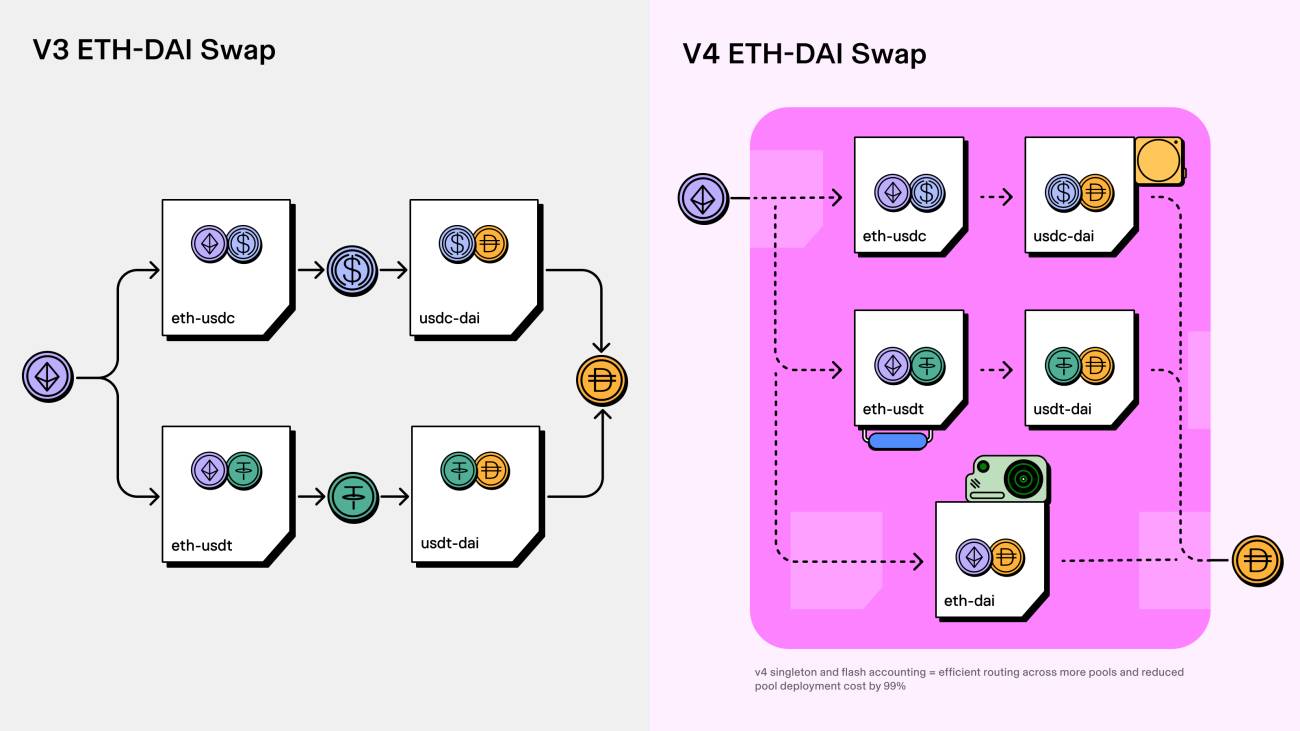
The Uniswap V4 PoolManager address on Robinhood Chain is:
text
0x8366a39cc670b4001a1121b8f6a443a643e40951
The Robinhood Chain WETH address is:
            text

            0x0Bd7D308f8E1639FAb988df18A8011f41EAcAD73
The program later in this article will use both addresses directly.
4. How Is a New Pool Discovered?
When a new Uniswap V4 pool is initialized, PoolManager emits a very important event:
            text

            Initialize
Its structure can be represented as:
            solidity

            event Initialize(
    PoolId indexed id,
    Currency indexed currency0,
    Currency indexed currency1,
    uint24 fee,
    int24 tickSpacing,
    IHooks hooks,
    uint160 sqrtPriceX96,
    int24 tick
);
This event already contains a large amount of information useful for monitoring a new pool, including:
- Pool ID;
- the two trading assets;
- fee;
- tick spacing;
- hook;
- initial price information;
- initial tick.
The monitoring principle itself is not complicated.
When a user calls PoolManager.initialize() to initialize a new V4 pool, PoolManager emits an Initialize event. That event is then recorded in the block logs.
FMZ can query these logs through the standard JSON-RPC method eth_getLogs. As long as we specify both the PoolManager contract address and the Initialize event topic, the RPC node can filter out the new-pool events we need directly. There is no need to download every transaction in the block and analyze them one by one.
This is the core mechanism behind the new-pool radar in this article.
5. Adding Robinhood Chain to FMZ
Now we can start the actual setup.
First, add a Web3 exchange object on FMZ Quant.
Because Robinhood Chain is an EVM network, set ChainType to:
            text

            ETH
Note that selecting ETH does not mean we are connecting to Ethereum Mainnet. It tells FMZ to use the Ethereum/EVM-style Web3 interface.
For testing, set the RPC address to the official Robinhood Chain mainnet RPC:
            text

            https://rpc.mainnet.chain.robinhood.com
The final configuration is:
| Setting | Value |
|---|---|
| ChainType | ETH |
| Private Key | Private key of the test wallet |
| Rpc Address | https://rpc.mainnet.chain.robinhood.com |
| Rpc Api Key | Leave blank |
Although the new-pool radar in this article only reads public on-chain data and does not send transactions, the wallet private key will become involved in transaction signing if functions such as Approve or Swap are added later.
For development, it is therefore better to create a dedicated test wallet rather than using a main wallet that holds substantial assets. Never provide your private key or seed phrase to anyone.
6. Testing the FMZ–Robinhood Chain Connection
When developing Web3 strategies, I recommend starting with the smallest possible test. Do not begin by writing hundreds of lines of code. First verify that the most basic data path works:
            text

            FMZ → RPC → Robinhood Chain
Create a minimal FMZ JavaScript strategy:
javascript
function main() {
var chainId = exchange.IO(
"api",
"eth",
"eth_chainId"
);
var blockNumber = exchange.IO(
"api",
"eth",
"eth_blockNumber"
);
Log(
"Chain ID:",
chainId
);
Log(
"Block Number:",
blockNumber
);
}
After running it, we obtained:
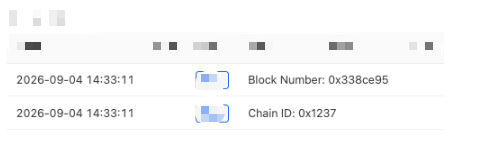
0x1237 converted to decimal is 4663, which matches the Robinhood Chain Mainnet Chain ID exactly.
This means FMZ has successfully connected to Robinhood Chain mainnet through JSON-RPC.
The test is simple, but it is important. If new-pool monitoring later encounters a problem, we already know that the RPC connection itself is working.
7. Calculating the Uniswap V4 Initialize Event Topic
In an Ethereum event log, topics[0] is the Keccak256 hash of the event signature.
We can therefore calculate the topic for Initialize directly in FMZ:
            javascript

            function getInitializeTopic() {

    var signature =
        "Initialize(bytes32,address,address,uint24,int24,address,uint160,int24)";

    return (
        "0x" +
        Encode(
            "keccak256",
            "string",
            "hex",
            signature
        )
    );
}
The result is:

Later, when calling eth_getLogs, we only need to place this value in topics[0]. The RPC node can then filter Initialize events for us.
8. Querying New Pools with eth_getLogs
FMZ Web3 can call Ethereum JSON-RPC directly through exchange.IO().
For example:
            javascript

            var logs = exchange.IO(
    "api",
    "eth",
    "eth_getLogs",
    params
);
The query parameters mainly specify:
- the starting block;
- the ending block;
- the
PoolManageraddress; - the
Initializetopic.
            javascript

            var params = {

    fromBlock:
        numberToHex(fromBlock),

    toBlock:
        numberToHex(toBlock),

    address:
        "0x8366a39cc670b4001a1121b8f6a443a643e40951",

    topics: [
        getInitializeTopic()
    ]
};
The RPC node will now return not every transaction in the block, but specifically the Initialize events emitted by Uniswap V4 PoolManager within the requested block range.
For a new-pool radar intended to run continuously, this is far more efficient than downloading every block's transactions and analyzing them individually.
9. Decoding the Initialize Event
Once we receive an event log, we still need to convert the raw hexadecimal data into human-readable information.
The first three parameters in Initialize are indexed parameters, so they appear in topics[1], topics[2], and topics[3]:
            javascript

            var poolId =
    log.topics[1];

var currency0 =
    topicToAddress(
        log.topics[2]
    );

var currency1 =
    topicToAddress(
        log.topics[3]
    );
The remaining parameters are stored in log.data:
            javascript

            var fee =
    wordToUint24(
        getWord(
            log.data,
            0
        )
    );

var tickSpacing =
    wordToInt24(
        getWord(
            log.data,
            1
        )
    );

var hooks =
    wordToAddress(
        getWord(
            log.data,
            2
        )
    );
After decoding, what originally looked like an unreadable blockchain log becomes structured information such as:
- Pool ID;
- token addresses;
- fee;
- tick spacing;
- hook.
10. A Common Native ETH Pitfall in Uniswap V4
In Uniswap V4, native ETH can be used directly as a Currency.
Therefore, if the program sees:
            text

            0x0000000000000000000000000000000000000000
we cannot simply assume it is an invalid address. In this context, it may represent native ETH.
Our program therefore needs to recognize both native ETH and WETH.
Native ETH:
            text

            0x0000000000000000000000000000000000000000
Robinhood Chain WETH:
            text

            0x0Bd7D308f8E1639FAb988df18A8011f41EAcAD73
This allows the program to filter pools such as:
            text

            ETH / new token
WETH / new token
For a new-token radar, these pools are usually worth prioritizing over ordinary token/token pools.
11. Reading Token Information
Displaying only a token contract address is not very readable.
For example:
            text

            0xffb1e3a069d2060cf42247ed67a8e712a05064de
By looking at the address alone, we have no idea what the token is.
After detecting the token, we can continue by using eth_call to call the standard ERC20 functions symbol(), name(), and decimals().
First register a simple ERC20 ABI:
            javascript

            var ERC20_ABI = `[
    {
        "inputs": [],
        "name": "symbol",
        "outputs": [{"type":"string"}],
        "stateMutability":"view",
        "type":"function"
    },
    {
        "inputs": [],
        "name":"name",
        "outputs":[{"type":"string"}],
        "stateMutability":"view",
        "type":"function"
    },
    {
        "inputs":[],
        "name":"decimals",
        "outputs":[{"type":"uint8"}],
        "stateMutability":"view",
        "type":"function"
    }
]`;
Then:
            javascript

            exchange.IO(
    "abi",
    addr,
    ERC20_ABI
);

var symbol = exchange.IO(
    "api",
    addr,
    "symbol"
);
The original token address can now be displayed together with:
- Symbol;
- Name;
- Decimals;
- Contract Address.
In practice, there is no guarantee that every on-chain token implements the standard ERC20 ABI perfectly. The token-information query should therefore be wrapped in try...catch.
Even if a strange token fails to return symbol(), it should not cause the entire new-pool radar to stop running.
12. Running It for Real: We Actually Captured New Robinhood Chain Pools
After implementing the logic above, we ran the program on Robinhood Chain mainnet.
It quickly captured real Uniswap V4 Initialize events.

This means we have successfully completed the full data path:
            text

            Robinhood Chain
    ↓
Uniswap V4 PoolManager
    ↓
Initialize Event
    ↓
FMZ new-pool monitoring
13. Building a Real-Time New Pool Radar with LogStatus
If the program simply keeps calling Log(), after running for several hours the log output becomes very large and it becomes difficult to understand the current system state quickly.
So we continue by using FMZ's LogStatus() to build a simple real-time dashboard.
The dashboard mainly displays:
- network status;
- latest block;
- RPC latency;
- number of scans;
- number of newly detected pools;
- number of ETH/WETH pools;
- recently discovered pools;
- priority new-token information.
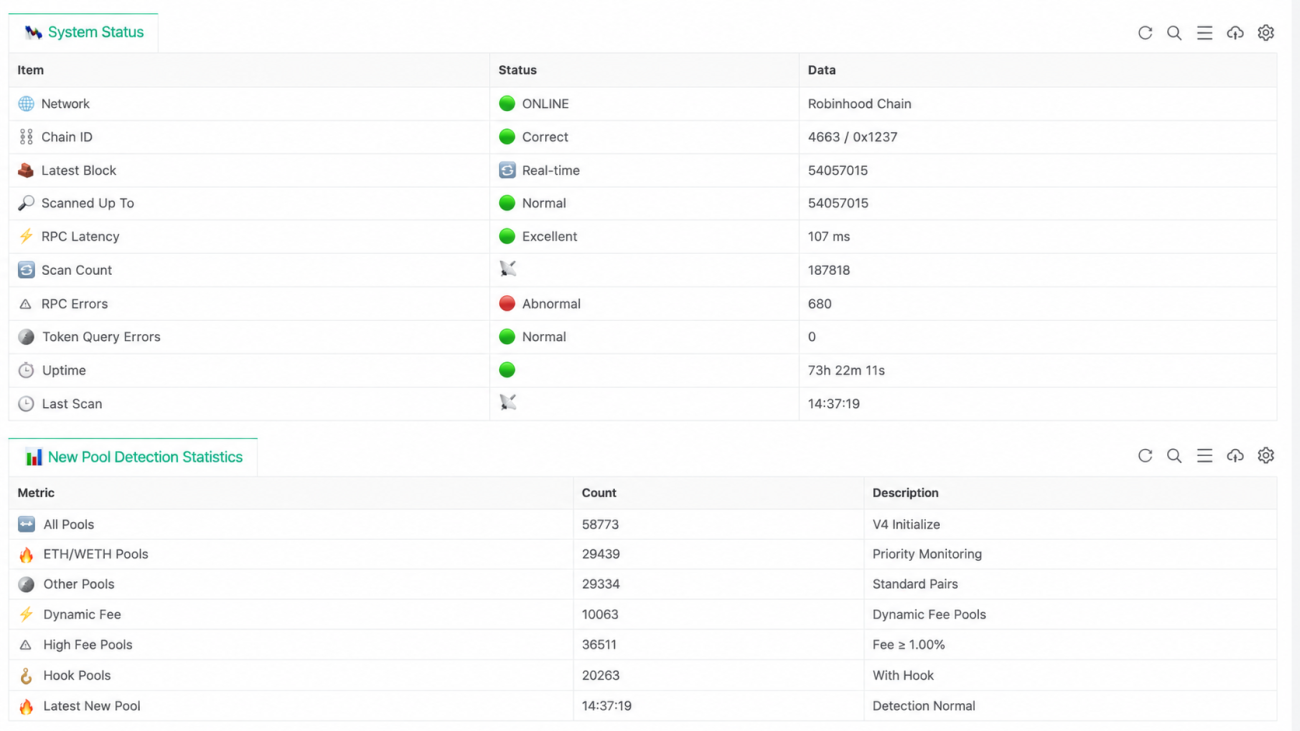
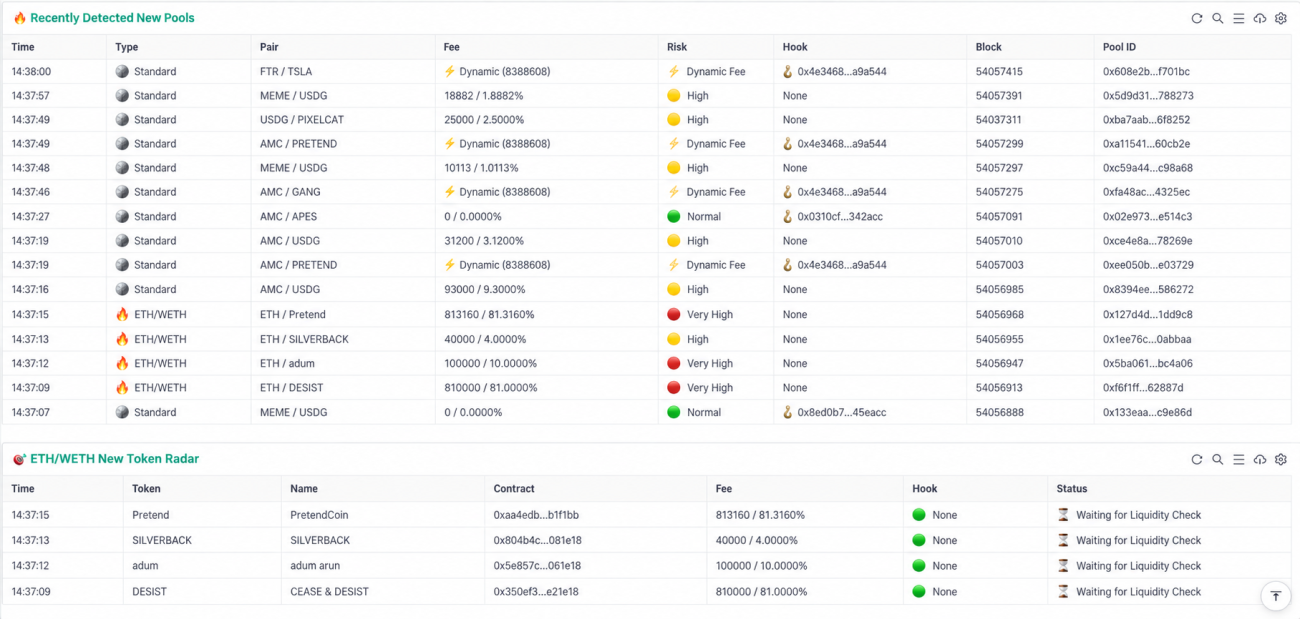
At this point, the program is no longer just a simple event-log script. It is beginning to take the shape of an actual on-chain monitoring system.
14. Choosing an RPC Provider and the Problems We Actually Hit
Robinhood Chain provides an official public RPC:
            text

            https://rpc.mainnet.chain.robinhood.com
In our real tests, the free official RPC was already able to handle both eth_blockNumber and eth_getLogs queries successfully, so it is perfectly usable during development.
However, if the program is expected to run 24/7 for long periods, or if we later add large numbers of Swap, Liquidity, and Token queries, RPC stability and rate limits become important considerations.
So we also tested Alchemy.
An Alchemy Robinhood Chain HTTP endpoint looks similar to:
            text

            https://robinhood-mainnet.g.alchemy.com/v2/YOUR_API_KEY
On FMZ, we only need to replace the Rpc Address with the corresponding endpoint. The strategy can continue using standard JSON-RPC calls, and the core logic does not need to be rewritten simply because the provider changed.
During testing, however, we encountered an interesting issue.
When Alchemy's Free Plan received an eth_getLogs request covering too large a block range, it returned:
            text

            400 Bad Request
Under the Free tier plan,
you can make eth_getLogs requests
with up to a 10 block range.
The original program used:
            javascript

            maxBlockRange: 100
This meant a single request could cover as many as 100 blocks, triggering the free-plan limit.
The solution was simple:
            javascript

            maxBlockRange: 10
Then let the program divide a larger scan automatically into batches.
For example, if the bot has been offline for a while and needs to catch up on 35 blocks, it can split the job into four eth_getLogs requests, each covering no more than 10 blocks.
This looks like a small change, but it is actually very valuable.
An on-chain monitoring program cannot assume that RPC services will always be stable, and it cannot assume that every provider has exactly the same limits.
If the project is improved further, we can add mechanisms such as:
- primary RPC;
- backup RPC;
- automatic failover;
- retry handling for HTTP 429;
- exponential backoff.
15. Complete FMZ New Pool Radar Code
Below is the complete strategy used in this article.
The role of this version is intentionally clear:
monitor only, no trading.
Robinhood Chain · Uniswap V4 New Pool Radar V2
It does not execute Approve, call Swap, or automatically purchase any token.
The first priority is to build the on-chain data layer correctly. Trading logic can then be added on top of that foundation.
16. Why Can't We Buy Immediately After Discovering a Pool?
Once we reach this point, it is easy to have another idea:
If we can already detect a new pool immediately, why not simply call Swap as soon as the pool appears?
In practice, we are still far from that point.
An Initialize event only tells us that the pool has been initialized. It does not mean the pool already has enough liquidity to be worth trading.
After a pool is created, liquidity may only be added later. Even after liquidity has been added, we still need to evaluate:
- liquidity size;
- initial price;
- fee;
- hook;
- token contract risk.
Therefore, discovering a new pool and discovering a trading opportunity are two very different things.
We have solved the first problem.
The next step is to continue monitoring liquidity-related events after capturing Initialize.
When the program discovers ETH / GREAT, for example, it should no longer stop at displaying the token name. It should continue answering questions such as:
- Has actual liquidity been added to this pool?
- How much ETH liquidity has been added?
- How many tokens were added on the other side?
- What is the approximate initial price?
Once this step is complete, the new-pool radar begins to evolve into a true new-token radar.
17. Next Step: Add a Liquidity Radar
The code framework in this article is not a one-off script.
We already have:
- Pool ID;
- Currency0;
- Currency1;
- Fee;
- TickSpacing;
- Hook;
- Block;
- Transaction Hash;
- basic token metadata.
All of these can become inputs to later modules.
The most useful next component to implement is a Liquidity Radar.
After Initialize detects a new ETH-token pool, the program can continue tracking changes in that pool's liquidity and attempt to calculate:
- ETH liquidity;
- token liquidity;
- initial price;
- speed of liquidity changes.
After that, we can continue monitoring Swap events.
Once swaps can be decoded in real time, the system can begin tracking:
- the first trade;
- the first 10 trades;
- number of buys;
- number of sells;
- trading volume;
- number of unique trading addresses;
- early trading speed.
With these data points, the system is no longer limited to telling us that a new token has appeared. It can gradually build a richer profile such as:
| Metric | Data |
|---|---|
| Token | GREAT |
| Pool | Created |
| ETH Liquidity | 12.6 ETH |
| Swap | 38 |
| Buyers | 27 |
| Sellers | 4 |
| Hook | None |
| Risk | Medium |
| Score | 76 / 100 |
Going further, we can research:
- deployer addresses;
- early buyers;
- historical wallet behavior;
- liquidity withdrawals;
- token permissions;
- abnormal trading patterns.
These modules can eventually feed into a unified Scoring Engine, allowing large numbers of new pools to be automatically classified into categories such as:
- Ignore;
- Watch;
- High Priority.
Only after reaching that stage does it become more meaningful to discuss automated trading.
18. What Can We Research Next?
This entire series can continue expanding around the code built in this article instead of rewriting a completely different program each time.
Stage 1: Pool Discovery
This is the Initialize monitoring implemented in this article. It answers:
When did a new pool appear?
Stage 2: Liquidity Intelligence
The focus shifts to questions such as:
- How much ETH was added to the new pool?
- How many tokens were added?
- When does liquidity increase?
- When is liquidity withdrawn?
Stage 3: Trading Intelligence
Begin monitoring Swap events and measure:
- early trades;
- buy/sell direction;
- trading speed;
- transaction value.
Stage 4: Wallet Intelligence
Analyze:
- who is buying;
- who is selling;
- whether the deployer is trading;
- whether certain addresses repeatedly appear among the early traders of high-performing new tokens.
Stage 5: Risk Engine
Perform unified checks on:
- token permissions;
- hooks;
- fees;
- liquidity;
- wallet concentration;
- abnormal trading behavior.
Final Stage: Strategy Engine
Only then do we turn the previous on-chain data into rules or scores, decide whether a pool should enter a watchlist, and determine whether the strategy may eventually be allowed to execute swaps automatically.
In this way, a new-pool listener that initially contains only a few hundred lines of code can gradually evolve into a complete Robinhood Chain on-chain quantitative data and strategy system.
19. Conclusion
This exercise demonstrates something interesting.
For a new EVM chain, we do not necessarily need to wait until a complete SDK, third-party data platform, or ready-made quantitative framework becomes available before we begin development.
As long as the network exposes standard Ethereum JSON-RPC, FMZ can already read on-chain data directly from the underlying infrastructure.
The core interfaces used in this article are actually quite limited:
eth_chainId;eth_blockNumber;eth_getLogs;- ERC20
eth_call.
Yet with these very basic interfaces, we have already completed:
- Robinhood Chain mainnet connectivity;
- Uniswap V4
PoolManagermonitoring; Initializeevent decoding;- token metadata queries;
- ETH/WETH new-pool filtering;
- a real-time dashboard.
More importantly, during actual operation we successfully captured newly created V4 pools such as:
ETH / GREAT;ETH / MERRY;ETH / ANTIDOTE.
Strategy description:
Robinhood Chain · Uniswap V4 New Pool Radar V2
This article is provided solely for Web3 technical research and software-development practice and does not constitute investment advice. Newly issued tokens and low-liquidity on-chain assets can involve substantial price, smart-contract, and liquidity risks. Before adding any automated trading functionality, the system should be thoroughly tested and equipped with comprehensive risk controls.
- 1