
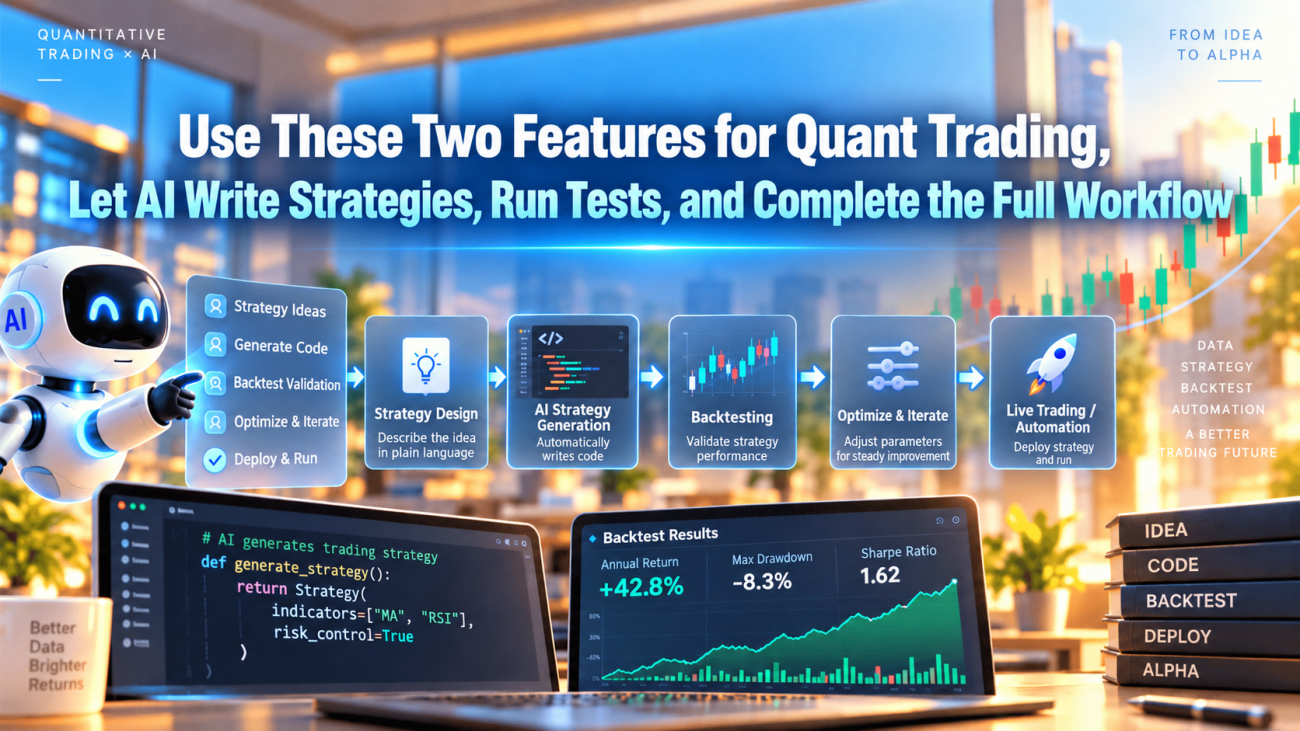
Recently, a user in the community raised a very practical question: when you use a browser-based AI to modify a strategy, you have to keep copying code between the chat window and the FMZ editor. Once the conversation gets long, you have to explain the background all over again. Switching to a coding tool such as Codex does let you edit a local project directly, but can you still make use of FMZ's candlestick annotations, logs, and profit curves at the same time?
Yes. Connect your local project, FMZ remote synchronization, and the Extended API, and after changing the code, the AI can go on to read the strategy's runtime records, check its actual behavior, and make the next round of adjustments. The platform's charts remain available, while source code, tests, and review materials accumulate locally.
Using Codex and a JavaScript strategy as examples, this article introduces the way we actually collaborate with AI in our strategy research. Other AI coding tools that can read and write project files and execute scripts can follow the same workflow.
It seems that quite a few people don't know these tools can be used together this way, so this article was clearly needed! The examples below use GPT6. A model that is too weak may not be up to the task, so try to use a leading model. Let's get started.
Quick tip: >_<! If the article feels too long and you don't want to read it all, you can simply hand it to AI. It will explain it clearly and tell you what you need to do.
1. First, Define the Roles of Development and Execution
The overall workflow can be organized like this:
text
Propose a strategy idea, constraints, and acceptance criteria
↓
AI reads the local project → Modifies code → Runs tests
↓
FMZ remote synchronization → Verify platform source code and parameters → Load the new version
↓
FMZ Docker runs the strategy, producing status information, order records, and profit data
↓
Retrieve data through the Extended API → Review locally → Make the next round of changes
The local project preserves the development process, FMZ Docker executes the strategy, and the FMZ interface continues to provide monitoring and charts. AI performs specific tasks based on the files, tool permissions, and runtime data made available to it.
Day-to-day trading should still follow explicit rules in the strategy code. The AI in this article is used for development and review. There is no need to call a large language model before every order, nor do you need to put exchange API keys into the chat history.
There is an important prerequisite here: what AI can analyze depends on which data sources and tools we have actually connected. With only local source code, it cannot know what happened last night. With only a screenshot of the status panel, it cannot reconstruct an entire night's order changes, either.
2. Create a Local Project That AI Can Pick Up and Continue
In plain English: create a local strategy development directory (folder), set up a series of project directories and files inside it, and then let your installed Codex application work in that strategy development directory.
If you are not comfortable setting up Codex CLI, you can also use the Codex desktop app for your operating system, which is quite convenient. The instructions below use Codex CLI.
If you already have Node.js and npm installed, you can install Codex CLI in a terminal and then enter your strategy directory:
            bash

            npm install -g @openai/codex
cd "your-strategy-project-directory"
codex
Follow the prompts to sign in on your first run. Codex can read project files, modify code, and execute local commands, subject to the current permission settings. Refer to the official Codex CLI documentation for installation and sign-in instructions.
Start by downloading the existing source code from FMZ and exporting the complete strategy configuration as well. A .js file contains only code, whereas the .xml file from a complete strategy export also contains configuration such as parameters. The two are not interchangeable. For the differences, see FMZ's guide to importing and exporting complete strategies.
A small project can use the following structure:
            text

            my-strategy/
├── AGENTS.md                   # Project rules for AI
├── README.md                   # Current version, how to run it, and outstanding issues
├── strategy-design.md          # Signals, positions, exits, and profit accounting definitions
├── quant.js                    # Source code to synchronize to FMZ
├── complete-strategy-export.xml # Backup of platform configuration: parameters, interactive controls, etc.
├── tests/                      # Tests for key calculations and order scenarios
└── reports/                    # Runtime snapshots, reviews, and version verification records
A complex strategy can be split into multiple modules and then built into a single release file. In that case, establish a fixed build entry point so that local modules, the release file, and the source code in the web editor do not each end up being edited separately.
Codex supports reading project guidance from AGENTS.md. We can put frequently repeated requirements in this file, for example:
            markdown

            # Project Rules

- Before making changes, read README.md, strategy-design.md, and the latest review report.
- Use the local source code as the basis for development; if someone edits the code manually in the web interface, pull it back and compare it first.
- When changing order logic, check partial fills, fills during cancellation, and duplicate updates.
- Preserve profit accounting, recording realized P&L, unrealized P&L, trading fees, and funding fees separately.
- Record test results before release; after release, verify the source code and the version running in live trading.
- Read keys from local environment variables or a separate credentials file; do not put them in source code or reports.
For how project rules are loaded, see Codex's AGENTS.md documentation. This file guides collaboration; actual permissions are still controlled by the tools and API permissions.
At the end of each round, also ask AI to update the README: which version is local, which version is stored on the platform, which version is running live, and what evidence is still needed next. Even if you switch to a new conversation, work can resume from these files without retelling the entire chat history. Use Git alongside the source code to save checkpoints for comparison and rollback.
3. Connect FMZ's Two Channels
Essential reading: before putting the following into practice, have your Codex Agent thoroughly read the FMZ platform's API documentation. Simply tell the AI to read the FMZ platform documentation first.
There are two channels to connect: one for uploading code and one for reading runtime data. First, distinguish between the credentials involved:
| Credential | Purpose | Where it fits in this workflow | In plain English |
|---|---|---|---|
| Strategy synchronization token | Upload source code for a specific strategy | Local synchronization script | Gives AI permission to modify the strategy directly and synchronize it to FMZ's online production environment |
| FMZ Extended API AccessKey / SecretKey | Query platform data such as live trading instances and logs; management endpoints can also be enabled through permissions | Local query script | Gives AI permission to view live trading data and logs, operate live trading instances, and so on |
-
Strategy synchronization token (strategy synchronization code): open the page for the strategy you want AI to design and work on:
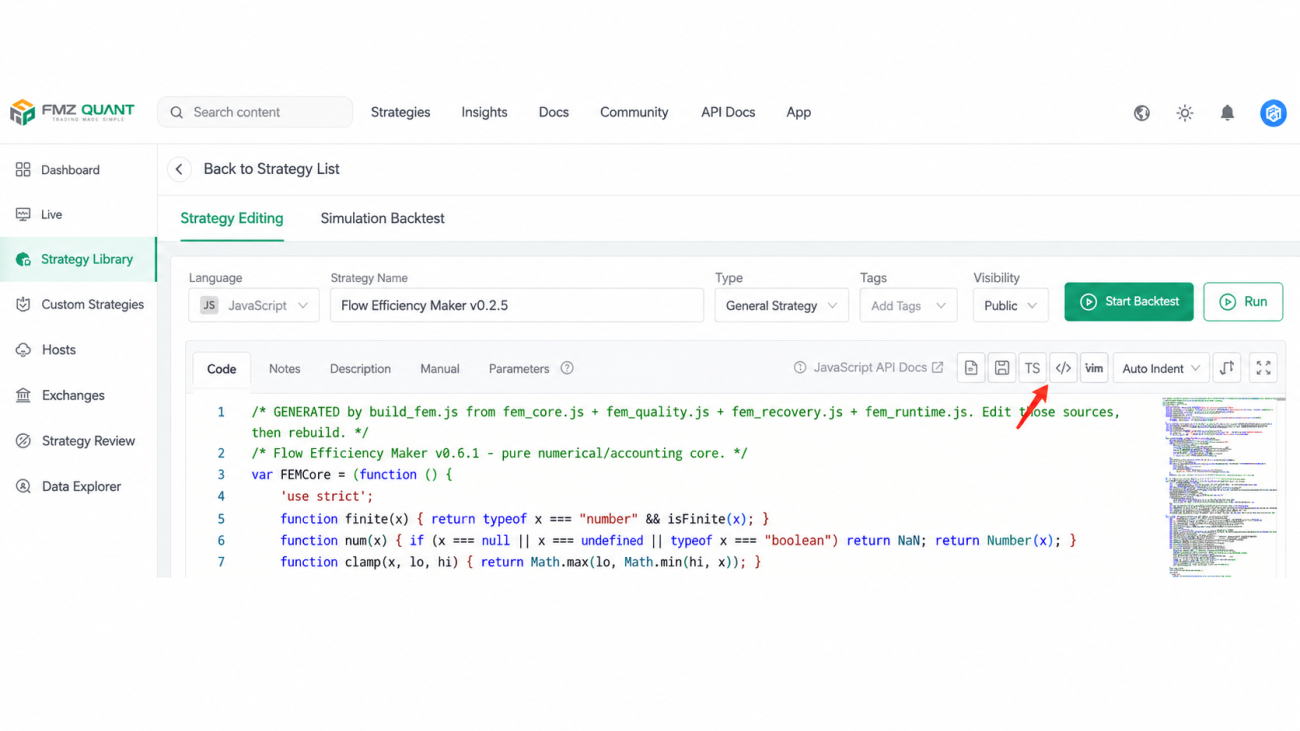
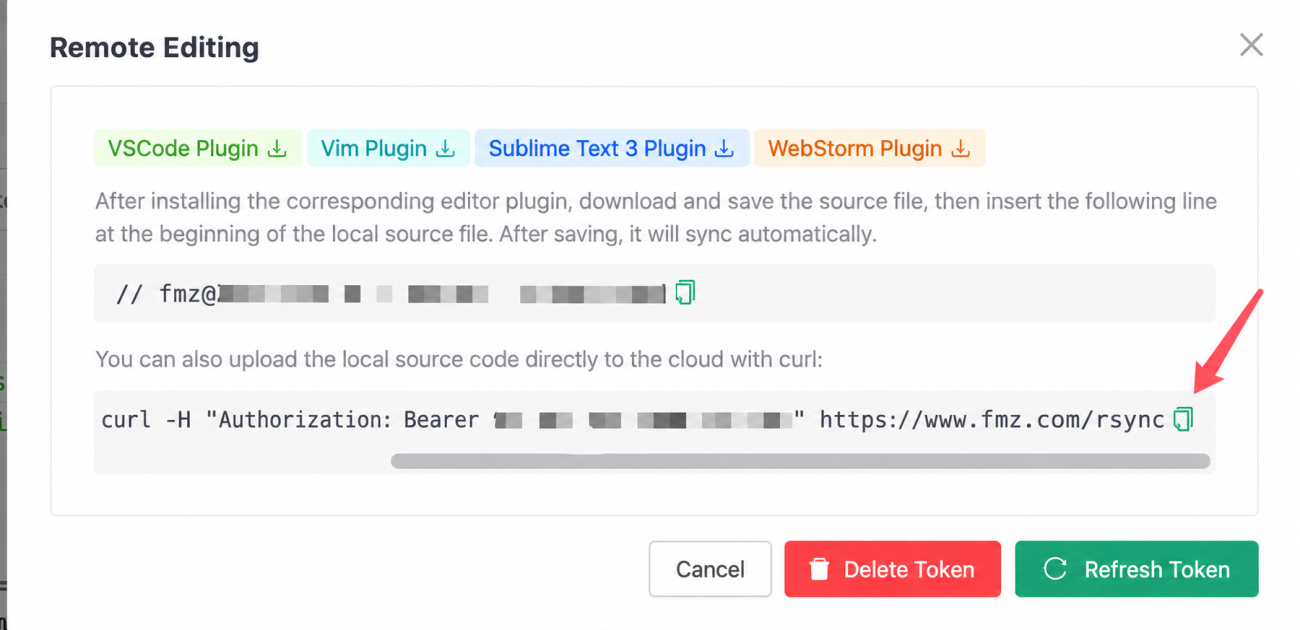
Once you have the synchronization code, you can give it directly to AI. You can delete the code when you are finished using it, so there will be no security issues.
-
FMZ Extended API, on this page:
https://www.fmz.com/m/account#apikey.
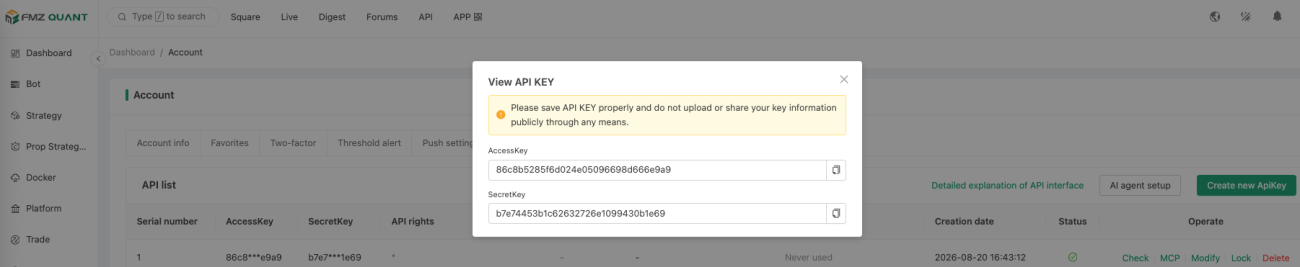
Once you have the Extended API KEY, you can give it directly to AI. You can also delete it after use, or save it in a file for AI to read when needed.
1. Upload Source Code with Remote Synchronization (AI Can Do This; You Only Need to Understand the Basics Here)
Find the remote synchronization option on the target strategy's editing page and obtain the synchronization command provided for that strategy. Using the endpoint employed in our current project as an example, the core operation is to upload source code to https://www.fmz.com/rsync with the strategy's Bearer token.
Here is the Bash version. First, set the FMZ_SYNC_TOKEN environment variable through your local credentials configuration. The file to upload is quant.js in the current directory:
            bash

            # Exit immediately if the token is missing; do not put the real token in this script.
: "${FMZ_SYNC_TOKEN:?Please configure FMZ_SYNC_TOKEN first}"

printf 'Authorization: Bearer %s\n' "$FMZ_SYNC_TOKEN" |
  curl --fail-with-body --silent --show-error \
    --header @- \
    --upload-file quant.js \
    https://www.fmz.com/rsync
Use the path and token in the command generated by your own strategy editor. After synchronization, check the response and the target strategy, then read the source code back for comparison. An HTTP 200 response alone does not mean the entire release is complete.
Successfully synchronizing the source code does not mean the running live trading instance has loaded the new code. In this project's actual synchronization process, after the platform's source code was updated, the original process continued running the old version. The new version would only load on the next start. Release records therefore need to keep both the "synchronized version" and the "currently running version." Use the new startup logs and the version shown in the status panel to establish the latter.
Source code synchronization is no substitute for parameter migration, either. When code adds or changes parameters, interactive controls, or template references, also verify the platform configuration and the parameter values saved in existing live trading instances. The update plan should explain how existing positions, pending orders, and the persistent ledger will be carried forward.
2. Read Live Trading Data with the Extended API (AI Can Do This; You Only Need to Understand the Basics Here)
Open "API Interface" in your FMZ account settings and create an Extended API Key. For the initial connection, you can enable only GetRobotDetail,GetRobotLogs, which read live trading instance details and runtime records, respectively. FMZ supports configuring permissions by API method name; see the Create ApiKey documentation.
The following Python 3 example only queries live trading instance details; it does not modify a strategy or start a live trading instance. Before running it, set three environment variables locally: FMZ_ACCESS_KEY, FMZ_SECRET_KEY, and FMZ_ROBOT_ID. The live trading instance ID is not the strategy ID.
            python

            import hashlib
import json
import os
import time
from urllib.parse import urlencode
from urllib.request import Request, urlopen

params = {
    "version": "1.0",
    "access_key": os.environ["FMZ_ACCESS_KEY"],
    "method": "GetRobotDetail",
    "args": json.dumps([int(os.environ["FMZ_ROBOT_ID"])]),
    "nonce": str(time.time_ns() // 1_000_000),
}
message = "|".join([
    params["version"], params["method"], params["args"],
    params["nonce"], os.environ["FMZ_SECRET_KEY"],
])
params["sign"] = hashlib.md5(message.encode("utf-8")).hexdigest()

request = Request(
    "https://www.fmz.com/api/v1",
    data=urlencode(params).encode("utf-8"),
    headers={"Content-Type": "application/x-www-form-urlencoded"},
    method="POST",
)
with urlopen(request, timeout=20) as response:
    payload = json.load(response)

data = payload.get("data") or {}
if payload.get("code") != 0 or data.get("error") or not data.get("result"):
    raise RuntimeError("FMZ query failed; check code and data.error in the response")

robot = data["result"]["robot"]
fields = ("id", "status", "strategy_id", "start_time", "refresh", "profit")
print(json.dumps({k: robot.get(k) for k in fields}, ensure_ascii=False, indent=2))
The signature concatenation follows the FMZ Extended API authentication documentation, and the response structure follows the GetRobotDetail documentation. The example retains HTTPS certificate verification and checks for application-level errors returned by the platform.
This is only a single-query example. When turning it into a reusable tool, also handle timeouts, rate limits, and error logging. Requests using the same Key should centrally manage an increasing nonce to avoid conflicts between concurrently running scripts. See the Extended API interface details for the relevant requirements.
It is fine if you are unfamiliar with the API. You can give AI the official documentation and the structure above and ask it to generate a query script in your project. Inject credentials through local input or a separate configuration, and let AI call the script. Do not copy real keys into public articles, strategy source code, or version-control repositories.
4. How to Keep Using FMZ's Charts and Profit Curves
Editing locally changes where the code is maintained. The strategy still runs on FMZ Docker, and its existing Log, LogStatus, LogProfit, Chart, and other outputs remain available. These display runtime logs, the status panel, the profit curve, and custom charts, respectively. See FMZ's logging and charting function documentation.
For AI-assisted review, you can retrieve the data behind these displays locally:
| What to check | How to obtain the data | Questions it can answer |
|---|---|---|
| Live trading status, startup time, and associated strategy | GetRobotDetail | Is the instance running, has it restarted, and is it linked to the correct strategy? |
| Order submissions, cancellations, errors, and custom events | Strategy logs from GetRobotLogs | Did requests succeed, why were orders canceled, and were there API errors? |
| Recorded points on the profit curve | Profit logs from GetRobotLogs | During which periods did net profit change? |
| Custom chart records | Chart logs from GetRobotLogs | How do the recorded prices, indicators, and annotations correspond to one another? |
| Current strategy status panel | summary returned by GetRobotLogs | What are the current positions, execution stage, and reasons preventing action? |
The GetRobotLogs documentation describes the three groups of records—logs, profit, and charts—as well as the status panel field. Set the number of records requested according to your actual needs, read them in batches, and deduplicate them by record ID. Follow the official GetRobotLogs documentation and the actual responses for the API's response structure and parameters.
The API returns data stored by the platform, not a screenshot of the entire web page. If existing candlestick annotations are recorded in chart data, they can be parsed alongside the series definitions. If the output consists only of images, those images need to be provided separately. Nor can tick-by-tick order book data that the strategy never saved be reconstructed from a profit curve.
So, beyond charts, it is best to leave structured records of key actions. For example, for a single order, you should at least be able to trace:
            text

            SUBMIT: What side, price, and quantity were submitted?
ACK: Did the exchange accept the order, and what order ID did it return?
FILL: What quantity actually filled, at what price, and with what fees?
CANCEL: Why was the order canceled, and what was the cancellation result?
SETTLED: Have the final filled quantity and position been reconciled?
Only then can AI distinguish between "a signal occurred," "an order was submitted," and "an order actually filled." A buy log or an order ACK does not mean a purchase has completed. Partial fills may also continue to arrive after a cancellation request has been sent.
Keep the status panel concise, showing the version, freshness of market and account data, positions, current orders, main reasons preventing action, and net profit. Detailed diagnostics can be output on demand. The following illustrative snippet is intended to be embedded in an existing main loop; diag is maintained by the strategy's own statistics module:
            javascript

            // Place this in the existing command dispatch logic; if GetCommand is already called, do not consume commands again.
var command = GetCommand();
if (command === "diagnostics") {
    Log("DIAGNOSTICS", JSON.stringify({
        version: diag.version,
        observedAt: Date.now(),
        decisions: diag.decisions,
        signalPassed: diag.signalPassed,
        orderAttempts: diag.orderAttempts,
        blockers: diag.blockers
    }));
}
Here, diagnostics is a command implemented by the strategy itself, not a built-in FMZ diagnostics feature. You can configure an interactive button, or trigger it through the API after separately enabling CommandRobot permission. For the command-receiving mechanism, see FMZ's GetCommand documentation.
Profit accounting also needs clear definitions. Our project breaks strategy net profit down into realized P&L, unrealized P&L, trading fees, and signed funding fees, with account equity displayed separately. LogProfit only records the value passed to it. It does not automatically account for all costs, nor does it distinguish deposits, other strategies' P&L, and the strategy's own returns on the strategy's behalf.
To avoid flooding the logs, you can record profit after events such as fills, reconciled position changes, or fees being posted, while continuously updating valuations in the status panel. When reviewing a run, save both the accounting period and the valuation time so that an event-sampled curve is not mistaken for an account equity curve updated every second.
5. A Practical Case: Why a Strategy Ran All Night Without Trading
During one iteration of Flow Efficiency Maker, the live trading instance ran for about 15 hours without making a new trade. The status panel at that moment showed the strategy waiting for a signal, but it could not tell us whether that had been the case all night.
We examined the runtime records, diagnostic snapshots, and the corresponding version of the source code together and established several specific facts:
- Of about 209,000 decision samples, roughly 189,000 had valid model data. The market data inputs had not been invalid throughout the night.
- Only one sample reached recovery confirmation. That candidate had about 3.35 bp of remaining room to its target, below the strategy's required 5 bp cost buffer.
- The account, limits, and stopping mechanisms were not the main reasons for the lack of trades in this instance.
Further code inspection revealed a conflict between the recovery conditions and cost requirements: the strategy was designed to capture price shocks starting at about 8 bp, but required at least 20% recovery before entering confirmation, with the target set at 80% recovery. Ignoring small differences from the price denominator and rounding, the maximum available room was approximately:
            text

            8bp × (80% − 20%) = 4.8bp
That was already below the 5 bp cost buffer, and subsequent confirmation could consume still more of the available room. This explained why, even with apparently normal market data and the strategy continuously computing, it struggled to produce executable orders. Decision samples were highly correlated, so the counts above cannot be treated as the number of independent trading opportunities, either.
Subsequent adjustments used this finding to align recovery timing with the room available to cover costs. We also added event-stage statistics to record whether opportunities disappeared at the identification, confirmation, cost, or execution stage. For validation, we used the same synthetic market data to compare behavior before and after the changes, then checked compatibility with the platform's runtime environment.
This case illustrates the value of the collaboration workflow: use live trading evidence to locate specific conditions in the code, then use tests to validate the changes. It does not prove that the new version has acquired a profitable edge. Preset fills in synthetic scenarios cannot be treated as a market backtest. Ultimately, we still need to observe price movements after real fills, exit costs, and net profit.
6. Organize Each Round of Changes as a Verifiable Experiment
After connecting the tools, it is not enough to tell AI simply to "keep optimizing." Each iteration should have a goal whose outcome can be assessed, such as "identify the main reason there have been no trades in the last 12 hours" or "check whether partial fills during cancellation are being counted twice."
You can describe a task like this:
First, read the project rules, strategy design, and latest validation report, and establish which versions are present locally, in the platform source code, and in the current live trading instance. Use the Extended API to retrieve the last 12 hours of logs, profit records, and diagnostic information, and save them in reports by time and record ID. Distinguish between signals not triggering, insufficient order amount, insufficient room to cover costs, failed order submissions, and orders canceled without fills, and provide supporting data. Once the cause is confirmed, modify the local code and run the relevant tests, recording the differences in behavior before and after the changes. Carry out source code synchronization and the live trading restart separately, as agreed for this round, and state in the report exactly which steps have actually been completed.
This task description connects the subject of the investigation, the evidence, the changes, and the release status. When first connecting the tools, you can limit the work to queries, then gradually add authorized synchronization and testing operations as you become familiar with the workflow. The Extended API includes both query and control endpoints; there is no need to enable every permission just to read logs.
Validation should also be separated into levels, so that a single statement such as "tests passed" does not stand in for answers to every question:
| Validation level | Main checks | What it does not justify claiming |
|---|---|---|
| Local calculation and scenario tests | Precision, minimum orders, order state transitions, and profit accounting | Real execution quality has been validated |
| FMZ environment checks | Whether the code runs and whether the required functions and data interfaces are compatible | Trading profitability has been validated |
| Historical replay or platform backtesting | Strategy performance under the given data and matching assumptions | Live trading will necessarily reproduce the results |
| Simulation or small-scale live trading observation | Actual latency, fills, cancellations, fees, and net profit | A small number of trades is enough to prove long-term effectiveness |
For example, for a market-making strategy that relies on individual trades and order book queues, an ordinary candlestick backtest cannot adequately test queue-based fills and adverse selection. The test report needs to describe the data granularity, matching assumptions, sample period, and scenarios not covered. Any uncovered questions should remain on the list of items to validate.
It is useful for each round to leave four deliverables: the modified source code, test results addressing that round's issue, runtime data and review conclusions, and a clear release status. In the next round, AI can read these files and continue researching the unresolved issues.
With this approach, developers can devote more attention to strategy hypotheses, trading constraints, and evaluating the evidence: let AI perform repeatable queries, changes, and checks, while FMZ handles strategy execution and result recording. Only when each change has a corresponding version and validation record can we later determine what it actually solved.
While we're here, let me also share a strategy used in the hands-on work discussed in this article: https://www.fmz.com/strategy/550057
- 1