Authentication Methods
Two authentication methods are supported when calling extended API interfaces: token authentication and direct authentication.
Token Authentication
Use md5 encryption for verification. Below are calling examples in Python and Golang:
python
#!/usr/bin/python
# -*- coding: utf-8 -*-
import time
import json
import ssl
ssl._create_default_https_context = ssl._create_unverified_context
try:
import md5
import urllib2
from urllib import urlencode
except:
import hashlib as md5
import urllib.request as urllib2
from urllib.parse import urlencode
accessKey = '' # your API KEY
secretKey = ''
def api(method, *args):
d = {
'version': '1.0',
'access_key': accessKey,
'method': method,
'args': json.dumps(list(args)),
'nonce': int(time.time() * 1000),
}
d['sign'] = md5.md5(('%s|%s|%s|%d|%s' % (d['version'], d['method'], d['args'], d['nonce'], secretKey)).encode('utf-8')).hexdigest()
# Note: urllib2.urlopen function may have timeout issues, you can set timeout, for example: urllib2.urlopen('https://www.fmz.com/api/v1', urlencode(d).encode('utf-8'), timeout=10) sets timeout to 10 seconds
return json.loads(urllib2.urlopen('https://www.fmz.com/api/v1', urlencode(d).encode('utf-8')).read().decode('utf-8'))
# Return docker list
print(api('GetNodeList'))
# Return exchange list
print(api('GetPlatformList'))
# GetRobotList(offset, length, robotStatus, label), pass -1 to get all
print(api('GetRobotList', 0, 5, -1, 'member2'))
# CommandRobot(robotId, cmd) send command to live trading bot
print(api('CommandRobot', 123, 'ok'))
# StopRobot(robotId) return live trading bot status code
print(api('StopRobot', 123))
# RestartRobot(robotId) return live trading bot status code
print(api('RestartRobot', 123))
# GetRobotDetail(robotId) return live trading bot detailed information
print(api('GetRobotDetail', 123))
            mylang

            package main

import (
    "fmt"
    "time"
    "encoding/json"
    "crypto/md5"
    "encoding/hex"
    "net/http"
    "io/ioutil"
    "strconv"
    "net/url"
)

// Fill in your FMZ platform API key
var apiKey string = ""
// Fill in your FMZ platform secret key
var secretKey string = ""
var baseApi string = "https://www.fmz.com/api/v1"

func api(method string, args ... interface{}) (ret interface{}) {
    // Process parameters
    jsonStr, err := json.Marshal(args)
    if err != nil {
        panic(err)
    }

    params := map[string]string{
        "version" : "1.0",
        "access_key" : apiKey,
        "method" : method,
        "args" : string(jsonStr),
        "nonce" : strconv.FormatInt(time.Now().UnixNano() / 1e6, 10),
    }

    data := fmt.Sprintf("%s|%s|%s|%v|%s", params["version"], params["method"], params["args"], params["nonce"], secretKey)
    h := md5.New()
    h.Write([]byte(data))
    sign := h.Sum(nil)

    params["sign"] = hex.EncodeToString(sign)

    // http request
    client := &http.Client{}

    // request
    urlValue := url.Values{}
    for k, v := range params {
        urlValue.Add(k, v)
    }
    urlStr := urlValue.Encode()
    request, err := http.NewRequest("GET", baseApi + "?" + urlStr, nil)
    if err != nil {
        panic(err)
    }

    resp, err := client.Do(request)
    if err != nil {
        panic(err)
    }

    defer resp.Body.Close()

    b, err := ioutil.ReadAll(resp.Body)
    if err != nil {
        panic(err)
    }

    ret = string(b)
    return
}

func main() {
    settings := map[string]interface{}{
        "name": "hedge test",
        "strategy": 104150,
        // K-line period parameter, 60 means 60 seconds
        "period": 60,
        "node" : 73938,
        "appid": "member2",
        "exchanges": []interface{}{
            map[string]interface{}{
                "eid": "Exchange",
                "label" : "test_bjex",
                "pair": "BTC_USDT",
                "meta" : map[string]interface{}{
                    // Fill in access key
                    "AccessKey": "",
                    // Fill in secret key
                    "SecretKey": "",
                    "Front" : "http://127.0.0.1:6666/exchange",
                },
            },
        },
    }

    method := "RestartRobot"
    fmt.Println("Call interface:", method)
    ret := api(method, 124577, settings)
    fmt.Println("main ret:", ret)
}
Direct Verification
Supports authentication without using token (direct secret_key authentication), allowing generation of URLs for direct access. For example, URLs for sending interactive commands directly to live trading bots can be used for Trading View or other WebHook callback scenarios. For the extended API interface CommandRobot() function, nonce verification is not performed, and there are no limits on access frequency or number of accesses for this interface.
For example: If the AccessKey in the created extended API KEY is: xxx, and the SecretKey is: yyy. Accessing the following link will send an interactive command message to the live trading bot with ID 186515, with the message content being the string: "ok12345".
            plaintext

            https://www.fmz.com/api/v1?access_key=xxx&secret_key=yyy&method=CommandRobot&args=%5B186515%2C%22ok12345%22%5D
When direct authentication is supported, the Body data from the request can be obtained, only supporting the CommandRobot interface. For example, setting in Trading View's WebHook URL:
            plaintext

            https://www.fmz.com/api/v1?access_key=xxx&secret_key=yyy&method=CommandRobot&args=%5B186515%2C+%22%22%5D
Note that it must be set in this format: %5B186515%2C+%22%22%5D (before encoding: [186515, ""]), where 186515 is the live trading bot ID on the FMZ Quant Trading Platform.
Simulating Trading View sending WebHook URL alerts:
javascript
function main() {
var options = {
method: "POST",
body: `{"test": 123}`,
headers: {"Content-Type": "application/json"}
}
// WebHook URL alerts will automatically send POST requests, including required headers settings
return HttpQuery("https://www.fmz.com/api/v1?access_key=xxx&secret_key=xxx&method=CommandRobot&args=%5B186515%2C+%22%22%5D", options)
}
Setting in Trading View message box (Body data to be sent in the request):
-
JSON format:
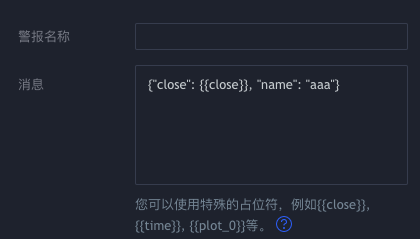 plaintext{"close": {{close}}, "name": "aaa"}
The live trading bot with ID
186515will receive the interactive command string:{"close": 39773.75, "name": "aaa"}. -
Text format:
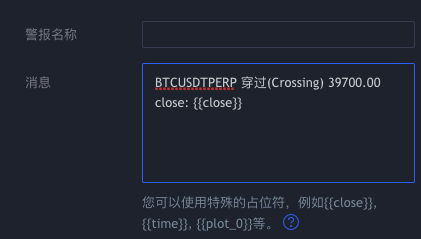 plaintextBTCUSDTPERP Crossing 39700.00 close: {{close}}
The live trading bot with ID
186515will receive the interactive command string:BTCUSDTPERP Crossing 39700.00 close: 39739.4.
Python, Golang language call examples:
            python

            #!/usr/bin/python
# -*- coding: utf-8 -*-

import json
import ssl

ssl._create_default_https_context = ssl._create_unverified_context

try:
    import urllib2
except:
    import urllib.request as urllib2

accessKey = 'your accessKey'
secretKey = 'your secretKey'

def api(method, *args):
    return json.loads(urllib2.urlopen(('https://www.fmz.com/api/v1?access_key=%s&secret_key=%s&method=%s&args=%s' % (accessKey, secretKey, method, json.dumps(list(args)))).replace(' ', '')).read().decode('utf-8'))

# If the API KEY doesn't have permission for this interface, calling print(api('RestartRobot', 186515)) will fail, returning data: {'code': 4, 'data': None}
# print(api('RestartRobot', 186515))

# Print detailed information of the live trading bot with ID: 186515
print(api('GetRobotDetail', 186515))
            mylang

            package main

import (
    "fmt"
    "encoding/json"
    "net/http"
    "io/ioutil"
    "net/url"
)

// Fill in your own FMZ platform api key
var apiKey string = "your access_key"

// Fill in your own FMZ platform secret key
var secretKey string = "your secret_key"
var baseApi string = "https://www.fmz.com/api/v1"

func api(method string, args ... interface{}) (ret interface{}) {
    jsonStr, err := json.Marshal(args)
    if err != nil {
        panic(err)
    }

    params := map[string]string{
        "access_key" : apiKey,
        "secret_key" : secretKey,
        "method" : method,
        "args" : string(jsonStr),
    }

    // http request
    client := &http.Client{}

    // request
    urlValue := url.Values{}
    for k, v := range params {
        urlValue.Add(k, v)
    }
    urlStr := urlValue.Encode()
    request, err := http.NewRequest("GET", baseApi + "?" + urlStr, nil)
    if err != nil {
        panic(err)
    }

    resp, err := client.Do(request)
    if err != nil {
        panic(err)
    }

    defer resp.Body.Close()

    b, err := ioutil.ReadAll(resp.Body)
    if err != nil {
        panic(err)
    }

    ret = string(b)
    return
}

func main() {
    method := "GetRobotDetail"
    fmt.Println("Calling interface:", method)
    ret := api(method, 186515)
    fmt.Println("main ret:", ret)
}
Implementing TradingView Alert Signal Trading Using FMZ Quant Trading Platform Extended API
Implementing TradingView Alert Signal Trading Using FMZ Quant Trading Platform Extended API, Bilibili Video Link