Direct Verification
Puts the secret_key into the request parameters instead of computing a signature. This produces a fixed URL that can be entered into webhooks such as TradingView that accept only a single URL.
**Security note**: a
secret_keyin a URL ends up in browser history, proxy and server access logs, and the webhook provider's configuration; anyone who obtains the URL can call the API with this key's permissions. Use direct verification only forCommandRobotwebhooks, and create a dedicated API KEY for it that is grantedCommandRobotonly (seeCreate ApiKey). If it leaks, delete that API KEY immediately.
The request parameters are access_key, secret_key, method and args (a JSON array, URL-encoded); version, nonce and sign are not needed. CommandRobot skips the nonce check; other methods are still checked: without a nonce the server uses the current time (to the second), so a second call within the same second returns a nonce error (code 3).
For example, with an API KEY whose AccessKey is xxx and SecretKey is yyy, opening the URL below sends the interactive command ok12345 to the robot with ID 186515:
plaintext
https://www.fmz.com/api/v1?access_key=xxx&secret_key=yyy&method=CommandRobot&args=%5B186515%2C%22ok12345%22%5D
Receiving a webhook body
When the command argument of CommandRobot is an empty string and the request is a POST, the server sends the request body to the robot as the interactive command. The body must be JSON or plain text, not form-encoded (a body sent with Content-Type: application/x-www-form-urlencoded is consumed as a form first and the command becomes an empty string). For example, set the TradingView webhook URL to:
            plaintext

            https://www.fmz.com/api/v1?access_key=xxx&secret_key=yyy&method=CommandRobot&args=%5B186515%2C+%22%22%5D
The args value %5B186515%2C+%22%22%5D decodes to [186515, ""] (+ is a URL-encoded space): 186515 is the robot ID and the command is an empty string.
Simulating a TradingView webhook alert:
javascript
function main() {
var options = {
method: "POST",
body: `{"test": 123}`,
headers: {"Content-Type": "application/json"}
}
// A webhook alert sends a POST request with the required headers automatically
var url = "https://www.fmz.com/api/v1?access_key=xxx&secret_key=yyy" +
"&method=CommandRobot&args=%5B186515%2C+%22%22%5D"
return HttpQuery(url, options)
}
The content of the TradingView alert message box is the request body:
-
JSON format:
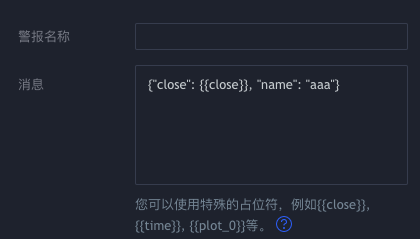 plaintext{"close": {{close}}, "name": "aaa"}
The robot with ID
186515receives the interactive command{"close": 39773.75, "name": "aaa"}. -
Text format:
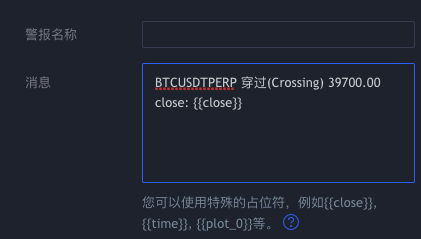 plaintextBTCUSDTPERP Crossing 39700.00 close: {{close}}
The robot with ID
186515receives the interactive commandBTCUSDTPERP Crossing 39700.00 close: 39739.4.
Python and Go examples
            python

            import json
import urllib.parse
import urllib.request

ACCESS_KEY = ''   # AccessKey of an API KEY granted CommandRobot only
SECRET_KEY = ''   # SecretKey

def api(method, *args):
    query = urllib.parse.urlencode({
        'access_key': ACCESS_KEY,
        'secret_key': SECRET_KEY,
        'method': method,
        'args': json.dumps(list(args)),
    })
    with urllib.request.urlopen('https://www.fmz.com/api/v1?' + query, timeout=10) as resp:
        return json.loads(resp.read().decode('utf-8'))

# Without permission for the method the result is {'code': 4, 'data': None}
print(api('CommandRobot', 186515, 'ok12345'))
            mylang

            package main

import (
    "encoding/json"
    "fmt"
    "io"
    "net/http"
    "net/url"
    "time"
)

const (
    accessKey = "" // AccessKey of an API KEY granted CommandRobot only
    secretKey = "" // SecretKey
    baseAPI   = "https://www.fmz.com/api/v1"
)

var client = &http.Client{Timeout: 10 * time.Second}

func api(method string, args ...interface{}) (string, error) {
    if args == nil {
        args = []interface{}{}
    }
    b, err := json.Marshal(args)
    if err != nil {
        return "", err
    }
    q := url.Values{
        "access_key": {accessKey},
        "secret_key": {secretKey},
        "method":     {method},
        "args":       {string(b)},
    }
    resp, err := client.Get(baseAPI + "?" + q.Encode())
    if err != nil {
        return "", err
    }
    defer resp.Body.Close()
    body, err := io.ReadAll(resp.Body)
    return string(body), err
}

func main() {
    ret, err := api("CommandRobot", 186515, "ok12345")
    fmt.Println(ret, err)
}
References: