

1. Python 단일 제품 전략을 다중 제품 전략으로 변환하는 방법을 알려드립니다.
이전 기사에서는 매우 간단한 Python 전략을 구현했습니다.「추격매수 전략의 파이썬 버전」이 전략은 특정 거래 쌍에 대한 프로그램 거래를 수행하기 위해 계정을 운영할 수 있습니다. 원리는 매우 간단합니다. 상승을 쫓고 하락을 매도하는 것입니다. 때로는 서로 다른 거래 쌍을 운영하기 위해 동일한 거래 로직을 사용하고 싶을 때가 있습니다. 여러 개의 로봇을 생성하고 다양한 거래 쌍을 설정하여 다양한 통화로 거래할 수 있습니다. 발명가의 양적 거래 플랫폼의 강력한 유연성을 고려하면 전략이 그다지 복잡하지 않은 경우입니다. 하나의 로봇을 생성하기만 하면 여러 거래 쌍을 운영할 수 있도록 전략을 다중 제품 전략으로 전환하는 것은 매우 쉽습니다.
변형된 전략 소스 코드:
'''backtest
start: 2019-02-20 00:00:00
end: 2020-01-10 00:00:00
period: 1m
exchanges: [{"eid":"OKEX","currency":"BTC_USDT"},{"eid":"OKEX","currency":"ETH_USDT","stocks":30},{"eid":"OKEX","currency":"LTC_USDT","stocks":100}]
'''
import time
import json
params = {
"arrBasePrice": [-1, -1, -1], # -1
"arrRatio": [0.05, 0.05, 0.05], # 0.05
"arrAcc": [], # _C(exchange.GetAccount)
"arrLastCancelAll": [0, 0, 0], # 0
"arrMinStocks": [0.01, 0.01, 0.01], # 0.01
"arrPricePrecision": [2, 2, 2], # 2
"arrAmountPrecision": [3, 2, 2], # 2
"arrTick":[]
}
def CancelAll(e):
while True :
orders = _C(e.GetOrders)
for i in range(len(orders)) :
e.CancelOrder(orders[i]["Id"], orders[i])
if len(orders) == 0 :
break
Sleep(1000)
def process(e, index):
global params
ticker = _C(e.GetTicker)
params["arrTick"][index] = ticker
if params["arrBasePrice"][index] == -1 :
params["arrBasePrice"][index] = ticker.Last
if ticker.Last - params["arrBasePrice"][index] > 0 and (ticker.Last - params["arrBasePrice"][index]) / params["arrBasePrice"][index] > params["arrRatio"][index]:
params["arrAcc"][index] = _C(e.GetAccount)
if params["arrAcc"][index].Balance * params["arrRatio"][index] / ticker.Last > params["arrMinStocks"][index]:
e.Buy(ticker.Last, params["arrAcc"][index].Balance * params["arrRatio"][index] / ticker.Last)
params["arrBasePrice"][index] = ticker.Last
if ticker.Last - params["arrBasePrice"][index] < 0 and (params["arrBasePrice"][index] - ticker.Last) / params["arrBasePrice"][index] > params["arrRatio"][index]:
params["arrAcc"][index] = _C(e.GetAccount)
if params["arrAcc"][index].Stocks * params["arrRatio"][index] > params["arrMinStocks"][index]:
e.Sell(ticker.Last, params["arrAcc"][index].Stocks * params["arrRatio"][index])
params["arrBasePrice"][index] = ticker.Last
ts = time.time()
if ts - params["arrLastCancelAll"][index] > 60 * 5 :
CancelAll(e)
params["arrLastCancelAll"][index] = ts
def main():
global params
for i in range(len(exchanges)) :
params["arrAcc"].append(_C(exchanges[i].GetAccount))
params["arrTick"].append(_C(exchanges[i].GetTicker))
exchanges[i].SetPrecision(params["arrPricePrecision"][i], params["arrAmountPrecision"][i])
for key in params :
if len(params[key]) < len(exchanges):
raise "params error!"
while True:
tblAcc = {
"type" : "table",
"title": "account",
"cols": ["账户信息"],
"rows": []
}
tblTick = {
"type" : "table",
"title": "ticker",
"cols": ["行情信息"],
"rows": []
}
            for i in range(len(exchanges)):
    process(exchanges[i], i)
for i in range(len(exchanges)):
tblAcc["rows"].append([json.dumps(params["arrAcc"][i])])
tblTick["rows"].append([json.dumps(params["arrTick"][i])])
LogStatus(_D(), "\n`" + json.dumps([tblAcc, tblTick]) + "`")
Sleep(500)
2. 차이점을 찾아보세요
코드를 비교해보니 이전 기사의 코드와 매우 다르다는 걸 알 수 있나요?
사실, 거래 논리는 전혀 바뀌지 않고 정확히 동일합니다. 단지 전략을 여러 종류로 변경했기 때문에 "단일 변수를 전략 매개변수로 사용"이라는 이전 형식을 사용할 수 없습니다. 더 합리적인 해결책은 다음과 같습니다. 매개변수 배열을 만들려면 배열의 각 위치 인덱스를 추가된 거래 쌍에 맞게 지정해야 합니다.
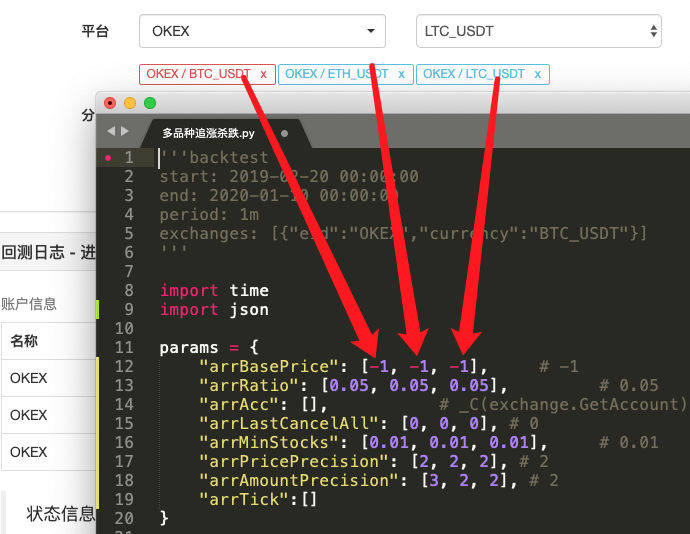
그런 다음 트랜잭션 로직 코드를 함수로 캡슐화합니다.process전략의 메인 루프에서 이 함수는 추가된 거래 쌍에 따라 반복적으로 호출되므로 거래 로직 코드는 각 거래 쌍에 대해 한 번씩 실행됩니다.
-
반복(순회) 호출:
for i in range(len(exchanges)): process(exchanges[i], i) -
전략 매개변수:
            params = {
    "arrBasePrice": [-1, -1, -1],           # -1
    "arrRatio": [0.05, 0.05, 0.05],         # 0.05
    "arrAcc": [],                           # _C(exchange.GetAccount)
    "arrLastCancelAll": [0, 0, 0],          # 0
    "arrMinStocks": [0.01, 0.01, 0.01],     # 0.01
    "arrPricePrecision": [2, 2, 2],         # 2
    "arrAmountPrecision": [3, 2, 2],        # 2
    "arrTick":[]
}
이러한 설계는 각 거래 쌍이 자체 매개변수를 가질 수 있도록 허용합니다. 각 거래 쌍의 가격은 크게 다를 수 있고 매개변수도 다를 수 있으므로 때로는 차별화된 설정이 필요하기 때문입니다.
-
CancelAll 기능
이 기능의 변경 사항을 비교할 수 있습니다. 이 기능은 단지 코드를 조금만 수정한 뒤, 이러한 수정의 의도에 대해 생각해 봅니다.
-
상태 표시줄 차트 데이터
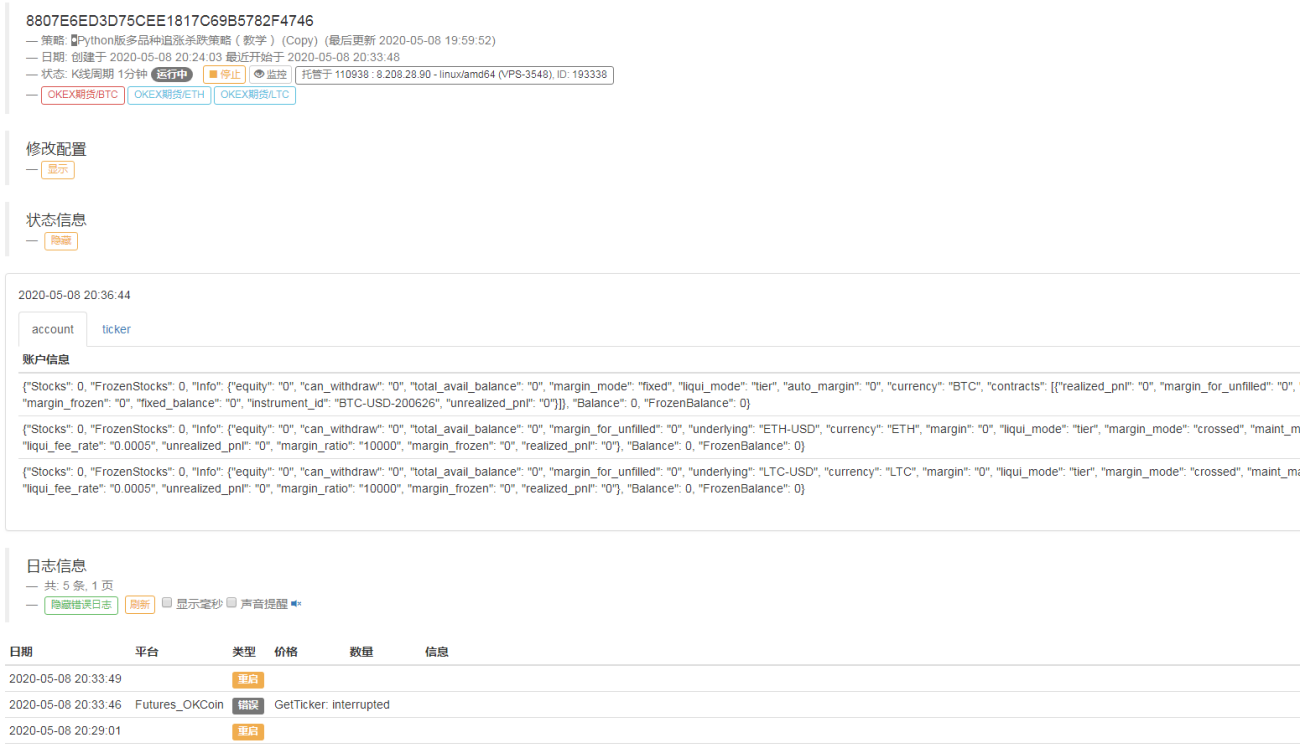
각 거래소 객체에 해당하는 자산 및 시장 데이터를 실시간으로 표시할 수 있도록 상태 표시줄에 시장 데이터와 계정 자산 데이터를 표시하는 차트를 추가했습니다.
위의 디자인 아이디어를 숙지한 후 Python 전략을 다양한 유형의 전략으로 수정하는 것이 매우 쉽지 않을까요?
3. 백테스팅
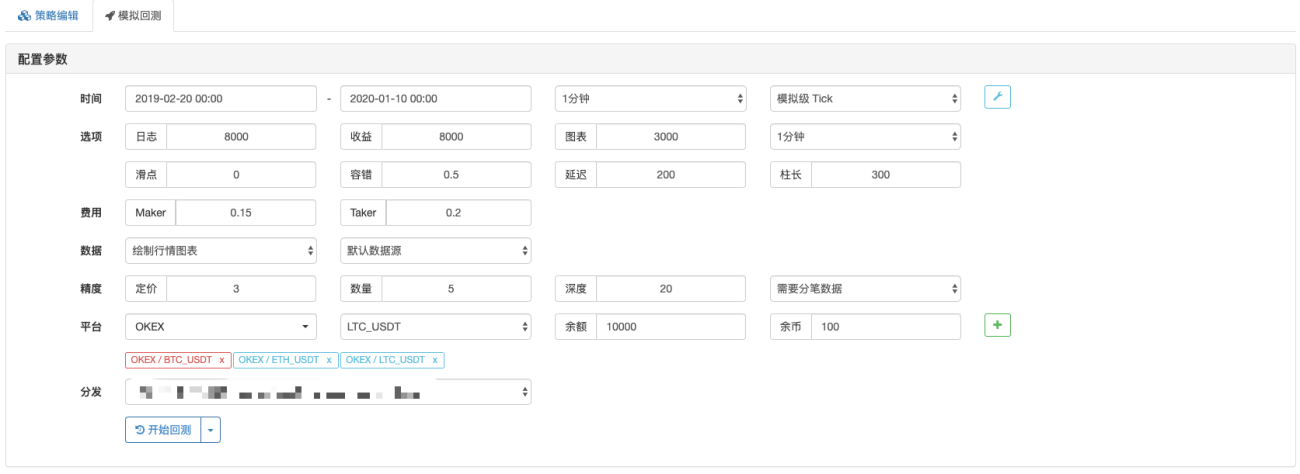
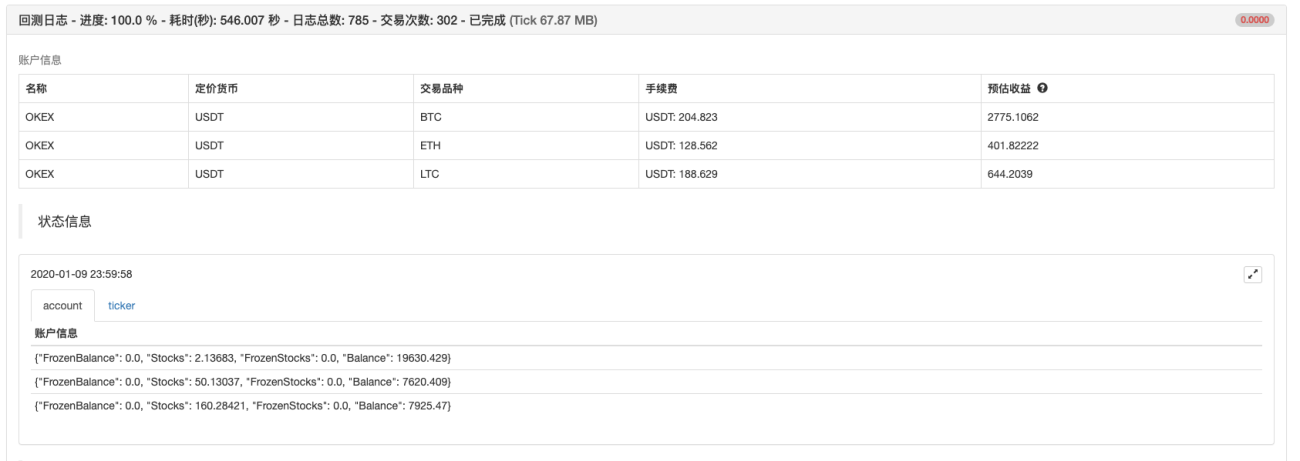
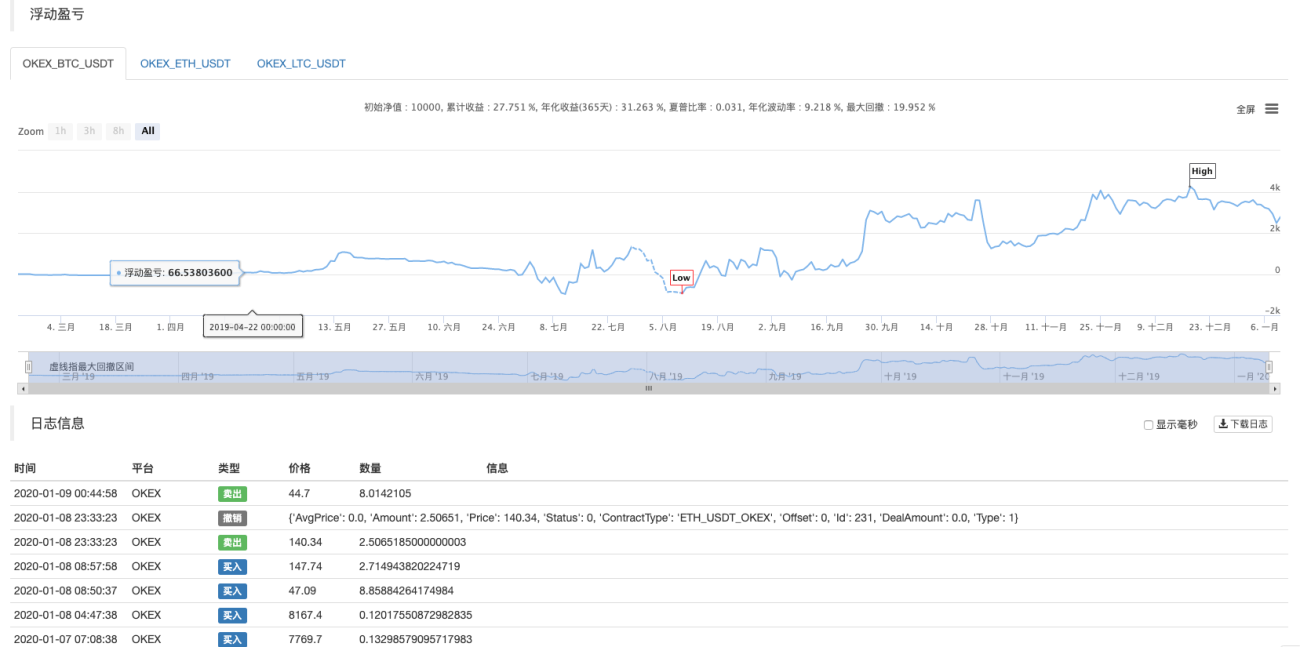
이 전략은 참조용, 백테스팅 및 테스트용일 뿐입니다. 관심이 있다면 최적화하고 업그레이드할 수 있습니다.
정책 주소

孟总,请问为什么,你这个策略下单不用设置exchange.SetDirection("buy")方向,还有个e. 不是exchange.吗,我最近在学习策略


- 1