
Summary
With the rapid growth in digital currency trading volumes, the efficiency and stability of real-time data push services have become crucial. MEXC Exchange's latest WebSocket push solution based on Protocol Buffers (protobuf) offers higher transmission efficiency and lower latency compared to traditional JSON format. This article will provide a detailed introduction on how to implement access and data processing for MEXC's newly added WebSocket protobuf interface on the FMZ quantitative trading platform.
1. Technical Background
1.1 Introduction to Protocol Buffers
Protocol Buffers is a language-neutral, platform-neutral method for serializing structured data developed by Google. Compared to JSON format, protobuf offers the following advantages:
- Smaller data size: Binary encoding saves 30-50% space compared to text format
- Faster parsing speed: Binary parsing is 3-10 times faster than JSON parsing
- Strong type checking: Compile-time type checking reduces runtime errors
- Backward compatibility: Supports field addition and deletion without affecting existing code
1.2 MEXC WebSocket Interface Overview
MEXC's newly added WebSocket protobuf push interface primarily provides the following data streams:
https://www.mexc.com/zh-MY/api-docs/spot-v3/websocket-market-streams
-
Private
PrivateAccountV3Api
PrivateDealsV3Api
PrivateOrdersV3Api -
Public
PublicAggreBookTickerV3Api
PublicAggreDealsV3Api
PublicBookTickerV3Api
...
2. FMZ Platform Integration Solution
2.1 Environment Setup
To implement the MEXC protobuf WebSocket interface on the FMZ platform, the following preparations are required:
- Obtain MEXC API Keys: Apply for API Key and Secret Key from the MEXC official website (only required for private interfaces)
- Prepare protobuf definition files: Obtain the .proto files provided by MEXC
2.2 Connection Establishment Process
Taking the establishment of a PublicAggreDealsV3Api channel connection as an example:
javascript
function main() {
var payload = {
"method": "SUBSCRIPTION",
"params": [
"[email protected]@100ms@BTCUSDT"
]
}
var conn = Dial("wss://wbs-api.mexc.com/ws|payload=" + JSON.stringify(payload))
while (true) {
var ret = conn.read()
if (ret) {
Log(ret)
}
}
}
2.3 Protobuf Data Parsing
Locate the required .proto files:
https://github.com/mexcdevelop // You can find the exchange's .proto files here
            .proto

            syntax = "proto3";


option java_package = "com.mxc.push.common.protobuf";
option optimize_for = SPEED;
option java_multiple_files = true;
option java_outer_classname = "PushDataV3ApiWrapperProto";

message PublicAggreDealsV3Api {

  repeated PublicAggreDealsV3ApiItem deals  = 1;
  string eventType = 2;
}

message PublicAggreDealsV3ApiItem {
  string price = 1;
  string quantity = 2;
  int32 tradeType = 3;
  int64 time = 4;
}

message PushDataV3ApiWrapper {
  string channel = 1;
  oneof body {
    PublicAggreDealsV3Api publicAggreDeals = 314;
  }

  optional string symbol = 3;
  optional string symbolId = 4;
  optional int64 createTime = 5;
  optional int64 sendTime = 6;
}
Since the FMZ platform is based on JavaScript, we need to use the protobuf.js library to handle binary data:
JS library loading address:
https://cdnjs.cloudflare.com/ajax/libs/protobufjs/7.5.3/protobuf.js
2.4 Data Subscription and Processing
The data pushed by the WebSocket interface is binary data that needs to be decoded:
            javascript

            while (true) {
    var ret = conn.read()
    if (ret) {
        const uint8arrayData = new Uint8Array(ret)
        const message = PushDataV3ApiWrapper.decode(uint8arrayData)

        data = PushDataV3ApiWrapper.toObject(message, {
          longs: String,
          enums: String,
          bytes: String,
          defaults: true,
          arrays: true,
          objects: true
        })
        Log("data:", data)
    }
    LogStatus(_D(), data)
}
3. Specific Implementation Examples
3.1 Subscribing to PublicAggreDealsV3Api Channel Data
            javascript

            let strPushDataV3ApiWrapper = `syntax = "proto3";


option java_package = "com.mxc.push.common.protobuf";
option optimize_for = SPEED;
option java_multiple_files = true;
option java_outer_classname = "PushDataV3ApiWrapperProto";

message PublicAggreDealsV3Api {

  repeated PublicAggreDealsV3ApiItem deals  = 1;
  string eventType = 2;
}

message PublicAggreDealsV3ApiItem {
  string price = 1;
  string quantity = 2;
  int32 tradeType = 3;
  int64 time = 4;
}

message PushDataV3ApiWrapper {
  string channel = 1;
  oneof body {
    PublicAggreDealsV3Api publicAggreDeals = 314;
  }

  optional string symbol = 3;
  optional string symbolId = 4;
  optional int64 createTime = 5;
  optional int64 sendTime = 6;
}`

let code = HttpQuery("https://cdnjs.cloudflare.com/ajax/libs/protobufjs/7.5.3/protobuf.js")
let exports = {}
let module = { exports }
new Function("module", "exports", code)(module, exports)
let protobuf = module.exports

function main() {
    const PushDataV3ApiWrapper = protobuf.parse(strPushDataV3ApiWrapper).root.lookupType("PushDataV3ApiWrapper")

    var payload = {
        "method": "SUBSCRIPTION",
        "params": [
            "[email protected]@100ms@BTCUSDT"
        ]
    }

    // proxy=socks5://x.x.x.x:xxxx
    var conn = Dial("wss://wbs-api.mexc.com/ws|payload=" + JSON.stringify(payload))

    var data = null
    while (true) {
        var ret = conn.read()
        if (ret) {
            const uint8arrayData = new Uint8Array(ret)
            const message = PushDataV3ApiWrapper.decode(uint8arrayData)

            data = PushDataV3ApiWrapper.toObject(message, {
              longs: String,
              enums: String,
              bytes: String,
              defaults: true,
              arrays: true,
              objects: true
            })
            Log("data:", data)
        }
        LogStatus(_D(), data)
    }
}
3.2 Live Trading Test
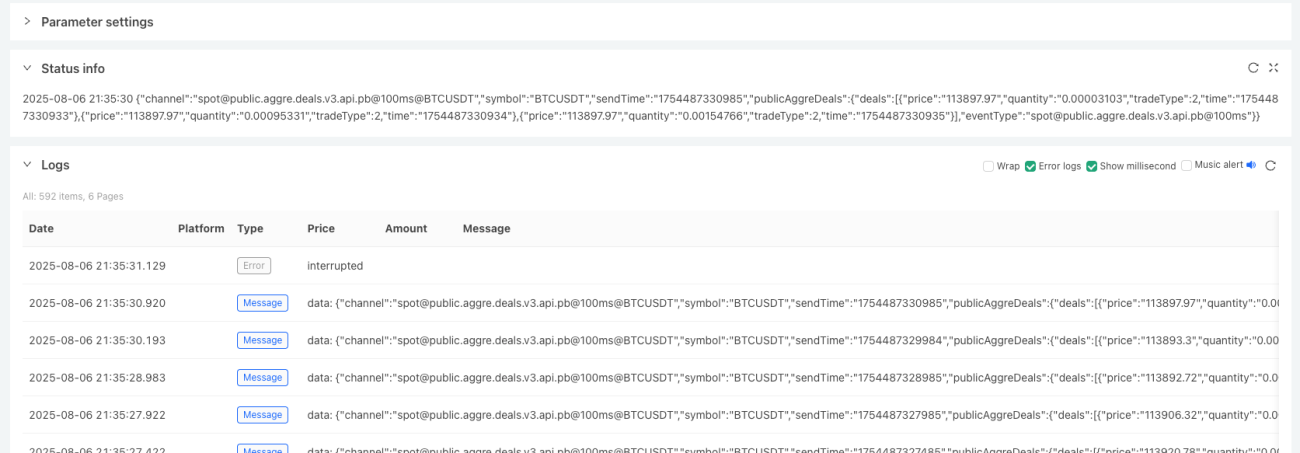
As we can see, the binary data pushed by the interface has been received, and after decoding, readable data has been printed:
            json

            {
    "channel":"[email protected]@100ms@BTCUSDT",
    "symbol":"BTCUSDT",
    "sendTime":"1754487330985",
    "publicAggreDeals":{
        "deals":[
            {"price":"113897.97","quantity":"0.00003103","tradeType":2,"time":"1754487330933"},
            {"price":"113897.97","quantity":"0.00095331","tradeType":2,"time":"1754487330934"},
            {"price":"113897.97","quantity":"0.00154766","tradeType":2,"time":"1754487330935"}
        ],
        "eventType":"[email protected]@100ms"
    }
}
4. Conclusion and Outlook
4.1 Implementation Results
By implementing MEXC's protobuf WebSocket interface on the FMZ platform, we have achieved the following advantages:
- Improved data transmission efficiency: Significantly reduced bandwidth usage compared to JSON format
- Reduced latency: Faster binary parsing speed, reducing processing time
- Optimized resource utilization: Lower CPU and memory consumption
4.2 Application Scenarios
This solution is particularly suitable for:
- High-frequency trading strategies
- Real-time arbitrage systems
- Market data analysis
- Risk monitoring systems
4.3 Future Optimization Directions
- Support for more data types: Expand support for more MEXC data streams
References
- MEXC Official API Documentation
- Protocol Buffers Official Documentation
- FMZ Quantitative Platform Development Guide
This article is written based on MEXC Exchange's latest WebSocket protobuf interface specifications, and the code examples have been tested and verified on the FMZ platform.
- 1