Types of Interactive Controls
There are 5 types of interactive control. When the control's button is clicked, GetCommand in the strategy receives a string message. The variable names in the table are only examples:
| Type | Example variable | Default value | Message received by GetCommand() |
|---|---|---|---|
| Number (number) | cmdNum | Optional, may be empty | Enter 123 and click: cmdNum:123 |
| Boolean (true/false) | cmdBool | Required, on or off | Click with the switch on: cmdBool:true |
| String (string) | cmdStr | Optional, may be empty | Enter abc and click: cmdStr:abc |
| Dropdown (selected) | cmdCombox | Optional, may be empty | Pick option 2 and click: cmdCombox:1 (index from 0) |
| Button (button) | cmdBtn | No input | Click: cmdBtn |
The message format is variable:value; a button sends only its variable name. Description, remarks and component configuration of interactive controls work as for strategy parameters; see Interface Parameter Types and Component Configuration.
Example: changing a strategy parameter with an interactive control
On the strategy editing page, add a string interactive control named changeSymbol under "Strategy Interaction". The settings of the interactive control:
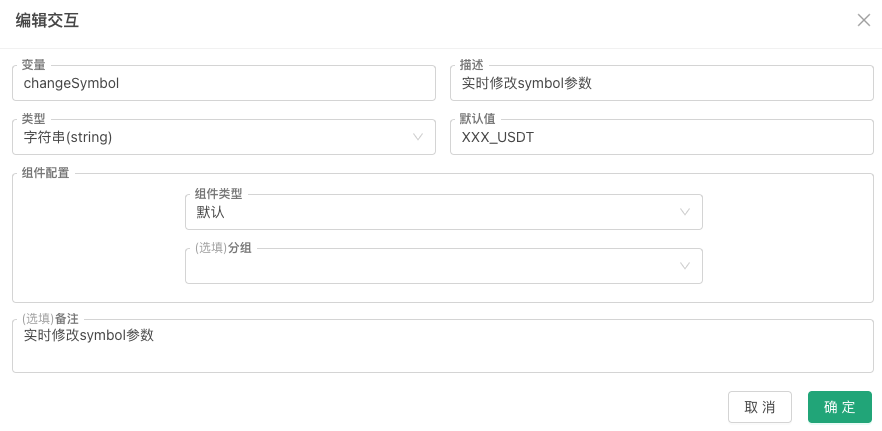
While the strategy runs live, enter ETH_USDT in the control's input box and click its button; GetCommand() receives the message changeSymbol:ETH_USDT. The strategy detects the message and updates the corresponding variable (parameters set in the strategy interface are global variables too; a global variable in the code is used here for demonstration):
javascript
// strategy parameter
var symbol = "BTC_USDT"
function main() {
while (true) {
var cmd = GetCommand()
if (cmd) {
var arr = cmd.split(":")
if (arr.length == 2 && arr[0] == "changeSymbol") {
// the changeSymbol control was triggered: update the parameter
Log("Changed symbol parameter to:", arr[1])
symbol = arr[1]
}
}
LogStatus(_D(), ", Current symbol parameter value:", symbol)
Sleep(3000)
}
}