Programming Languages
What programming languages can I use to write my strategies on the FMZ Quant trading platform?
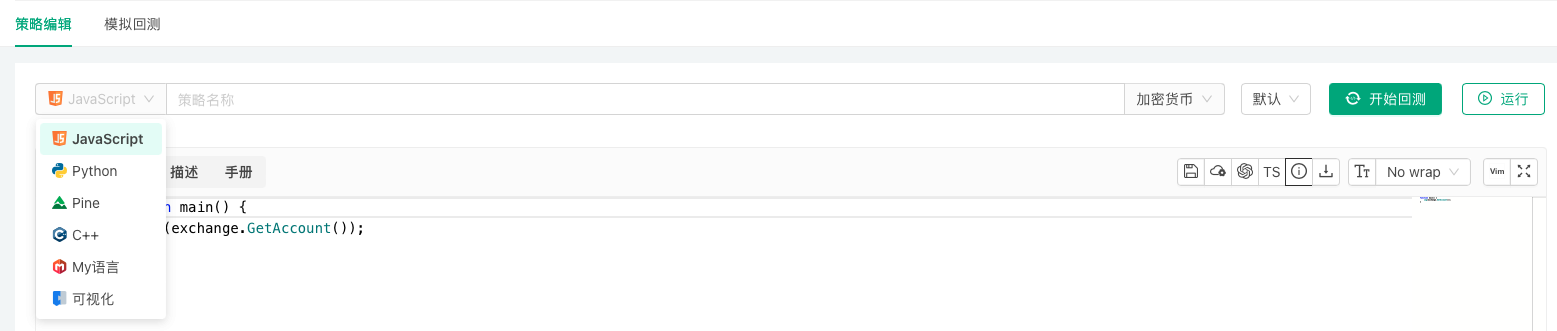
The FMZ Quant trading platform supports writing and designing trading strategies using JavaScript, TypeScript, Python, Rust, PINE, My Language, Blockly visual programming, and the Workflow workflow tool.
JavaScript
Strategies can be written in JavaScript. The runtime is based on the QuickJS engine and supports modern syntax such as async/await, class and BigInt. In live trading the strategy runs on the docker; in backtesting it runs in the browser-side backtesting system. Adding // @ts-check to the code switches to TypeScript (see Programming Languages → TypeScript).
Structure and parameters
The entry point is function main(). The optional init(), onexit() and onerror(msg) are called automatically by the docker (see Writing Strategies → Strategy Structure). Interface parameters are global variables with the same names; they can be read directly and also modified in code (see Writing Strategies → Strategy Parameters).
Errors and return values
When an API call fails (the exchange returns an error, a network problem, etc.) it returns null and writes the error to the log. Check the return value before using it, or retry with _C:
javascript
function main() {
var ticker = exchange.GetTicker()
// null when the call fails
if (ticker) {
Log(ticker)
}
// retry until valid data is returned
var account = _C(exchange.GetAccount)
Log(account)
}
For program exceptions (for example reading a property of undefined) and API business errors, the log shows the line number in the strategy code where the error occurred, which makes debugging easier.
Strings and ArrayBuffer
JavaScript strings are UTF-16. If text returned by a platform API is not a valid UTF-8 byte sequence, an ArrayBuffer (the raw bytes) is returned instead so that no data is lost. Every API parameter that accepts a string also accepts an ArrayBuffer.
            javascript

            function stringToHex(str) {
    let hex = ''
    for (let i = 0; i < str.length; i++) {
        const charCode = str.charCodeAt(i).toString(16)
        hex += charCode.length === 1 ? '0' + charCode : charCode
    }
    return hex
}

function main() {
    // the code point of "𠮷" exceeds 16 bits; it takes two UTF-16 code units in a JavaScript string
    const inputString = "abc𠮷123"

    // Encode outputs the UTF-8 bytes as hex
    const encodedHex = Encode("raw", "string", "hex", inputString)
    Log(encodedHex)                       // 616263f0a0aeb7313233

    // charCodeAt returns UTF-16 code units, so "𠮷" becomes d842, dfb7 - not UTF-8
    const manuallyEncodedHex = stringToHex(inputString)
    Log(manuallyEncodedHex)               // 616263d842dfb7313233

    // valid UTF-8 bytes decode back to a string
    const decodedString = Encode("raw", "hex", "string", encodedHex)
    Log(decodedString)                    // abc𠮷123

    // bytes that are not valid UTF-8 come back as an ArrayBuffer
    // (with inputString = "abcG123" both encodings are identical and this is a string)
    const outputD = Encode("raw", "hex", "string", manuallyEncodedHex)
    Log(outputD instanceof ArrayBuffer)   // true

    // inspect the raw bytes in the ArrayBuffer
    const bufferD = new Uint8Array(outputD)
    let hexBufferD = ''
    for (let i = 0; i < bufferD.length; i++) {
        hexBufferD += bufferD[i].toString(16).padStart(2, '0')
    }
    Log(hexBufferD)                       // 616263d842dfb7313233
}
Asynchrony and threads
setTimeout/clearTimeout: callbacks run while the main thread is waiting inSleep(). Whenmain()returns, timers that have not fired yet run first, thenonexit()is called.fetch(url): returns aPromisethat resolves to a response object (ok,status,headers;text()andjson()return the content directly). On the docker,fetchcompletes the request synchronously when called and returns an already settledPromise, so combining severalfetchcalls withPromise.alldoes not make them concurrent.- Exchange APIs (such as
exchange.GetTicker()) are synchronous blocking calls; wrapping them in aPromiseor anasyncfunction does not make them concurrent either. - For concurrency use
exchange.Go,HttpQuery_Go, or create threads withThread(see Advanced Topics → JavaScript Multithreading).
            javascript

            async function main() {
    let resp = await fetch("https://www.okx.com/api/v5/market/books?instId=BTC-USDT")
    if (resp.ok) {
        Log(resp.json())
    } else {
        Log("status:", resp.status)
    }
}
Libraries and dependencies
JavaScript strategies can use the built-in TA and talib indicator libraries directly; see Writing Strategies → Built-in Libraries for what each language provides. Other third-party JavaScript libraries can be downloaded at run time and loaded with eval; the same page has an example.
TypeScript
TypeScript is not a separate language option. Create the strategy as JavaScript and add a // @ts-check line to the code (or click the "TypeScript" button at the top right of the editor); the platform then treats it as TypeScript and compiles it to JavaScript before backtesting or live trading. When a strategy is saved through the AI/MCP tools, the language can be given as typescript: the platform saves it as a JavaScript strategy and adds //@ts-check at the top automatically (see External Interfaces → AI Access).
Static type checking catches mistakes such as wrong argument counts, property names or types while you write, and makes editor completion more accurate.
A minimal example:
            ts

            // @ts-check
interface Signal {
    side: "buy" | "sell"
    price: number
}

function getSignal(ticker: ITicker, ma: number): Signal | null {
    if (ticker.Last > ma) {
        return {side: "buy", price: ticker.Last}
    }
    if (ticker.Last < ma) {
        return {side: "sell", price: ticker.Last}
    }
    return null
}

function main() {
    while (true) {
        const records = exchange.GetRecords()
        const ticker = exchange.GetTicker()
        if (records && ticker && records.length > 20) {
            const ma = TA.MA(records, 20)
            const signal = getSignal(ticker, ma[ma.length - 1])
            if (signal) {
                Log(signal.side, signal.price)
            }
        }
        Sleep(60 * 1000)
    }
}
Type declarations for the platform API are built into the strategy editor; nothing needs to be referenced in the code. They cover the global functions, the exchange object, data structure interfaces such as ITicker, IRecord, IOrder and IPosition, and TA, talib and so on. Language features, APIs and libraries at run time are the same as for JavaScript strategies (see Programming Languages → JavaScript).
Python
Strategies can be written in Python 3; Python 2 is not supported. Live trading, and backtests that run on a docker, use the Python interpreter installed on the docker's machine.
Interpreter
The docker looks for an interpreter in this order and uses the first program that starts and is Python 3:
- the interpreter given by the environment variable
PYTHON_BIN; python3;python.
To use a specific interpreter (for example the Python of a virtual environment), set the environment variable before starting the docker:
            bash

            export PYTHON_BIN=/opt/venv/bin/python3
A first line such as #!python3 or #!python2 in the strategy is no longer used to choose the interpreter.
Structure and parameters
The entry point is def main(). The optional init() and onexit() are called automatically by the docker (Python does not support onerror()); see Writing Strategies → Strategy Structure. Interface parameters are global variables with the same names; to assign a new value to one inside a function, declare it with global first.
Errors and return values
When an API call fails it returns None and writes the error to the log. Check the return value before using it, or retry with _C(). An uncaught exception ends the strategy, and the error is recorded in the log.
Output
The output of print() goes to the docker process's standard output and does not appear in the live trading log. Use Log for anything that should show up in the log.
Third-party packages
A strategy can import any package installed in the interpreter. Install packages with the same interpreter the docker uses, for example:
            bash

            python3 -m pip install numpy
# when PYTHON_BIN is set
$PYTHON_BIN -m pip install numpy
To use talib, install TA-Lib (the talib package) and numpy on the docker's machine.
Your own modules
While a strategy runs, its current directory and PYTHONPATH are a temporary directory created by the docker for that run and deleted afterwards; .py files placed under the docker's directory (for example logs/storage/<live trading ID>/) are not found automatically. There are two ways to import your own modules:
- install the module into the interpreter's
site-packages(for example package it and install it withpip install, or copy it into thesite-packagesdirectory); - in the strategy, append the absolute path of the module's directory to
sys.path, then import it.
For example, with the module file /home/user/fmz_modules/mymath.py:
            python

            # mymath.py
def add(a, b):
    return a + b
the strategy code is:
            python

            import sys
sys.path.append("/home/user/fmz_modules")   # absolute path of the module's directory

import mymath

def main():
    Log("mymath.add(1, 2):", mymath.add(1, 2))
Keeping the core logic in a module on your own docker, with only the calling code in the strategy, is also a way to avoid uploading that logic to the platform.
Rust
Strategies can be written in Rust. Rust strategies are compiled before they run: for backtesting the platform server compiles them and they run in the browser-side backtesting system; in live trading they run on the docker once compiled. The strategy editor integrates rust-analyzer for Rust, with code completion and live diagnostics.
Structure
A strategy only needs a fn main(). The platform API (exchange, exchanges, TA, Log!, _C! and so on) is imported automatically; no use or mod declarations are needed.
The optional fn init() and fn onexit() are called automatically by the docker; just define them, no registration is needed. init() runs before main(); onexit() runs when main() returns normally, when the live trading is stopped, and when the strategy panics. Rust does not support onerror(). See Writing Strategies → Strategy Structure.
            rust

            fn init() {
    Log!("initializing");
}

fn main() {
    // APIs that can fail return Result<T>; the _C! macro retries until the call succeeds
    let ticker = _C!(exchange.GetTicker(None));
    Log!("Last:", ticker.Last);
}

fn onexit() {
    Log!("strategy exiting, cleaning up");
}
Some functions are macros (note the exclamation mark): Log!(), LogStatus!(), Panic!(), _G!(), _C!(). LogProfit(), Sleep(), _D(), _N(), HttpQuery() and others are ordinary functions.
Parameter types
Interface parameters are injected as global constants with the same names. They can only be read, not modified in code (copy a value into a local variable if it needs to change). The type depends on the kind of parameter:
| Parameter kind | Rust type |
|---|---|
| Number | f64 |
| Boolean | bool |
| String | &str |
| Dropdown (single choice) | f64 (option index); &str when the options are bound to string data |
| Dropdown (multiple choice) | &[i64], &[f64] or &[&str]; JSON text as &str when the option values have mixed types |
| Encrypted string | &str or Decrypted (dereferences to str) |
- Convert explicitly where an integer is needed, for example
let n = Period as usize;. - An optional parameter that is left empty has the zero value of its type:
0.0,"",false, or an empty list for a multiple-choice dropdown. - When the server cannot decrypt an encrypted-string parameter in advance (for example on a private docker), it is injected as a
staticof typeDecryptedand decrypted on first use. It implementsDisplay, so it can be used directly withformat!; when passing it toLog!or anywhere a&stris needed, write&*ParamName(this also works for&strparameters):
            rust

            fn main() {
    let key: &str = &*ApiKey;   // ApiKey is an encrypted-string parameter
    Log!("key length:", key.len());
}
- If a parameter name clashes with another name in the code, refer to the parameter as
args::ParamName.
Errors and return values
API calls that can fail return Result<T>; handle it the usual Rust way (in JavaScript a failed call returns null):
            rust

            fn main() {
    // option 1: pattern matching
    if let Ok(ticker) = exchange.GetTicker(None) {
        Log!(ticker);
    }

    // option 2: the _C! macro retries until the call succeeds
    let ticker = _C!(exchange.GetTicker(None));
    Log!(ticker);
}
Optional arguments (such as the symbol argument of GetTicker) are passed as None when omitted, or given directly, for example exchange.GetTicker("BTC_USDT").
JSON
Raw JSON text returned by the platform API (for example the return value of exchange.IO() or the Info field of each structure) is parsed with the built-in JSONParse(), which returns an Option<JsonValue>. Navigate with v["key"] and v[0] and read values with methods such as as_f64(), as_str() and as_bool(). JsonValue implements Display, so v.to_string() or format!("{}", v) gives compact JSON text. The SDK has no convenient API for building JSON; build JSON text with format!, or use serde_json.
Third-party crates
The strategy source is the only code file (there is no separate Cargo.toml). Declare dependencies in a frontmatter block wrapped in --- at the very top of the source; it is merged into Cargo.toml at build time:
            rust

            ---
[dependencies]
serde_json = "1"
---
/*backtest
start: 2024-01-01 00:00:00
end: 2024-02-01 00:00:00
period: 1h
*/
fn main() {
    let v: serde_json::Value = serde_json::from_str(r#"{"a": 1}"#).unwrap();
    Log!("a:", v["a"].to_string());
}
- The frontmatter must be at the start of the source, with only blank lines before it; the
/*backtest ... */backtest configuration block goes after the closing---. If the strategy has no backtest configuration block yet, "Save Backtest Settings" inserts one at the very top of the source; move it below the frontmatter (later saves update it in place). - Between a strategy and the template libraries it references, the dependency block may appear in only one place; declaring it in both fails the build.
- The build environment has no system OpenSSL. For crates that need TLS (HTTP/WebSocket clients and the like), choose the pure-Rust
rustlsimplementation (for exampletokio-tungstenitewith therustls-tls-webpki-rootsfeature) and avoidnative-tls/openssl-sys. For WebSocket connections prefer the built-inDialfunction, which needs no third-party crate.
Built-in libraries
Rust strategies can use the TA indicator library; talib is not supported. See Writing Strategies → Built-in Libraries.
MyLanguage
The platform supports MyLanguage for writing and designing strategies, compatible with most syntax, instructions and functions of Wenhua MyLanguage. MyLanguage encourages modular programming, breaking down complex algorithms into function modules. Through concise syntax, dedicated data structures and powerful financial function libraries, it supports the implementation of complex financial logic. Building applications in a modular way improves development efficiency and code maintainability.
MyLanguage Strategy Example: System Based on Displaced Bollinger Bands
            mylang

            M := 12;          // Parameter range 1, 20
N := 3;           // Parameter range 1, 10
SDEV := 2;        // Parameter range 1, 10
P := 16;          // Parameter range 1, 20

// This strategy is a trend-following trading strategy, suitable for larger timeframes such as daily charts.
// This model is only used as a model development case. Trading based on this carries your own risk.

////////////////////////////////////////////////////////

// Displaced BOLL channel calculation
MID:=MA(C,N);                 // Calculate middle band
TMP:=STD(C,M)*SDEV;           // Calculate standard deviation
DISPTOP:=REF(MID,P)+TMP;      // Displaced BOLL channel upper band
DISPBOTTOM:=REF(MID,P)-TMP;   // Displaced BOLL channel lower band

// System entry
H>=DISPTOP,BPK;
L<=DISPBOTTOM,SPK;
AUTOFILTER;
PINE Language
The platform supports and is compatible with Trading View's PINE language scripts. PINE is a lightweight yet powerful strategy programming language for creating technical indicators and strategies that can be backtested and traded live. The active community has created over 100,000 PINE scripts.
Users can easily access and apply various technical analysis tools and trading strategies; leverage community scripts to quickly implement trading ideas without writing code from scratch, significantly reducing development cycles; help both beginners and experienced traders learn and understand different technical indicators, strategies, and programming concepts.
PINE Language Strategy Example: Supertrend Strategy
            pine

            strategy("supertrend", overlay=true)

[supertrend, direction] = ta.supertrend(input(5, "factor"), input.int(10, "atrPeriod"))
plot(direction < 0 ? supertrend : na, "Up direction", color = color.green, style=plot.style_linebr)
plot(direction > 0 ? supertrend : na, "Down direction", color = color.red, style=plot.style_linebr)

if direction < 0
    if supertrend > supertrend[2]
        strategy.entry("entry long", strategy.long)
    else if strategy.position_size < 0
        strategy.close_all()
else if direction > 0
    if supertrend < supertrend[3]
        strategy.entry("entry short", strategy.short)
    else if strategy.position_size > 0
        strategy.close_all()
Blockly Visual Programming
The platform supports Blockly visual programming. With the Blockly editor, users can express code concepts such as variables, logical expressions, and loops by connecting graphical blocks (similar to building blocks). This approach allows the programming process to focus less on tedious syntax details and instead operate directly according to programming principles. Through the arrangement and combination of graphical blocks, users can easily understand programming logic and implement creative ideas, making it ideal for cultivating interest in strategy design and quickly getting started with programmatic and quantitative trading.
Workflow
The platform supports writing strategies using the Workflow approach. Workflow is a visual strategy design method that builds trading logic through node connections and configurations, enabling strategy implementation without writing code.
Workflow Features:
- Visual drag-and-drop design, WYSIWYG
- Rich preset functional nodes (data retrieval, indicator calculation, conditional judgment, trade execution, etc.)
- Lower programming barrier, suitable for rapid strategy building and validation
- Supports backtesting functionality with visual node execution status viewing
Learning Resources: