Getting Started
Platform Basics
Writing Strategies
Development Tools
Backtesting System
Advanced Topics
Data and Research
Integrations
Welcome to FMZ Quant Trading Platform
FMZ Quant is a quantitative trading platform: write strategies in the browser, backtest them online, then run them as live robots on a docker you deploy yourself or rent. You can also learn from, share and rent out strategies in the strategy square, or show your own live robots publicly.
Supported markets
- Crypto: spot, futures and perpetual contracts on the major centralized exchanges, plus some on-chain exchanges.
- Securities and futures: Futu Securities, Interactive Brokers and others.
- Exchanges the platform has not integrated yet can be connected yourself through the general protocol (see Platform Basics → Exchange → General Protocol).
Strategy languages
JavaScript, TypeScript, Python, Rust, PINE, MyLanguage, Blockly visual programming and Workflow; see Writing Strategies → Programming Languages.
AI assistance
- The strategy editor has a built-in AI assistant that generates, explains and edits strategy code and analyzes backtest results (see Development Tools → Strategy Editor → AI Assistant).
- You can also connect the external AI assistant you already use to the platform and manage strategies, backtests and live robots through conversation (see Integrations → AI Integration).
Dashboard
After signing up and logging in, open the dashboard:
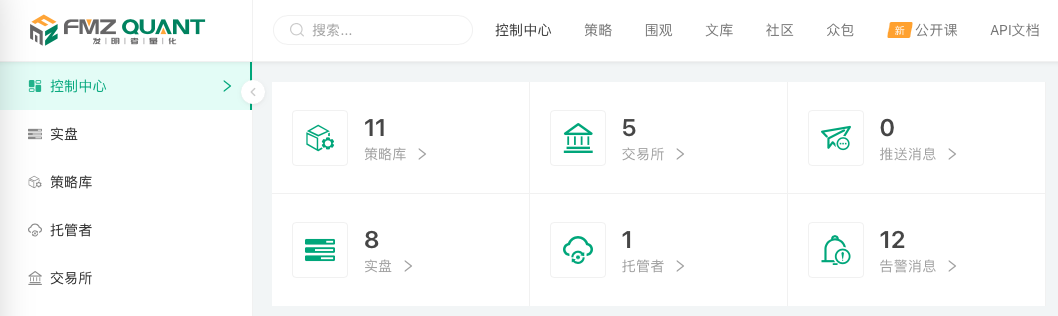
- Control Center: account overview and shortcuts. Running a live robot takes three things: an online docker, a strategy and a configured exchange account.
- Live Trading: create, manage and control live robots. A live robot is a running instance of a strategy program.
- Strategy Library: write, save and group strategies in any supported language.
- Docker: deploy and manage the docker programs that run strategies.
- Exchange: add and manage exchange accounts.
Public resources
- Strategy Square: strategies shared publicly or listed for rent, good for learning and reference.
- Live: live robots that users show publicly.
- Digest: original articles by the platform.
- Community: the forum for discussing quantitative trading.
- Crowdsourcing: post and take on strategy development requests.
- Classes: video tutorials.
- API Docs: the API syntax manual for writing strategies.
Getting help
Post in the community, submit a ticket from the dashboard, or contact the administrators in the Telegram group.