Getting Started
Platform Basics
Writing Strategies
Development Tools
Backtesting System
Advanced Topics
Data and Research
Integrations
Common Causes of Live Trading Errors and Abnormal Exits
The robot cannot start
- No online docker
A robot cannot start while its docker is offline. Check on the docker page that the docker is online, or pick another online docker. - Insufficient balance
Starting a robot prepays its first hour, so it cannot start without enough balance; if the balance runs out while it runs, the platform stops it. Top up and start it again (see Platform Basics → Account and Billing → Live Robot Billing and Top-up). - Rented strategy expired or concurrency limit reached
When a rented strategy expires, robots using it are stopped and cannot be started again; once the rental's maximum number of concurrent robots is reached, no further robot can start. - Key decryption failed
The error containssecret key decrypt failed (wrong password). The FMZ account password was changed, so the exchange keys configured earlier can no longer be decrypted. To fix it:- Re-enter the exchange keys, passwords and similar fields on the Exchange management page.
- Stop all dockers and start them again with the new password.
- Credential file not found
The exchange configuration uses afile:///xxx.txtcredential file that is missing from the robot directory; the error containsread key file. An invalid path fails withkey file path must be relative and cannot contain '..'orkey file path escapes the robot directory. See Platform Basics → Exchange → Local Credential Files.
Errors caused by strategy code
-
Static syntax errors
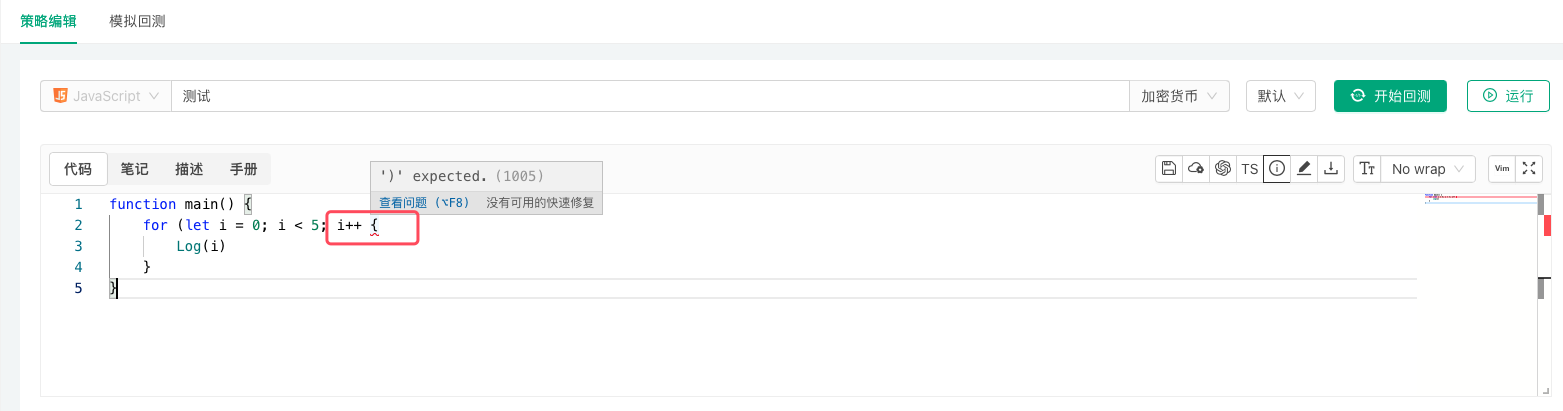
These are obvious: the strategy editing page usually marks them, and a backtest reveals them too.
-
Runtime errors
The most common one is using a function's return value without checking that it is valid. -
Excessive memory usage
Keeping too much data that cannot be garbage-collected in global variables. -
Improper use of
exchange.Gofor concurrent requests
Calling the asynchronousexchange.Gowithout callingwaitfor the results in time, so that too many concurrent tasks pile up. -
Recursion too deep
Too many levels of recursion exceed the call stack size.
Other errors
- API business errors and network request errors
These show the exchange object name, the function name, the error message and the reason, and do not stop the robot by themselves. They are usually the trigger rather than the direct cause, which is typically a program exception from using an API return value without checking it. interrupterror
Logged when the user clicks the Stop button on the robot page while the program is in the middle of an operation (such as an exchange API call) and the stop interrupts it. It is harmless, just a log entry.
See the FAQ collection for more.