Manual Deployment of Bot
You can deploy the bot to various devices, such as: personal computers, servers, Raspberry Pi, etc., supporting multiple mainstream operating systems.
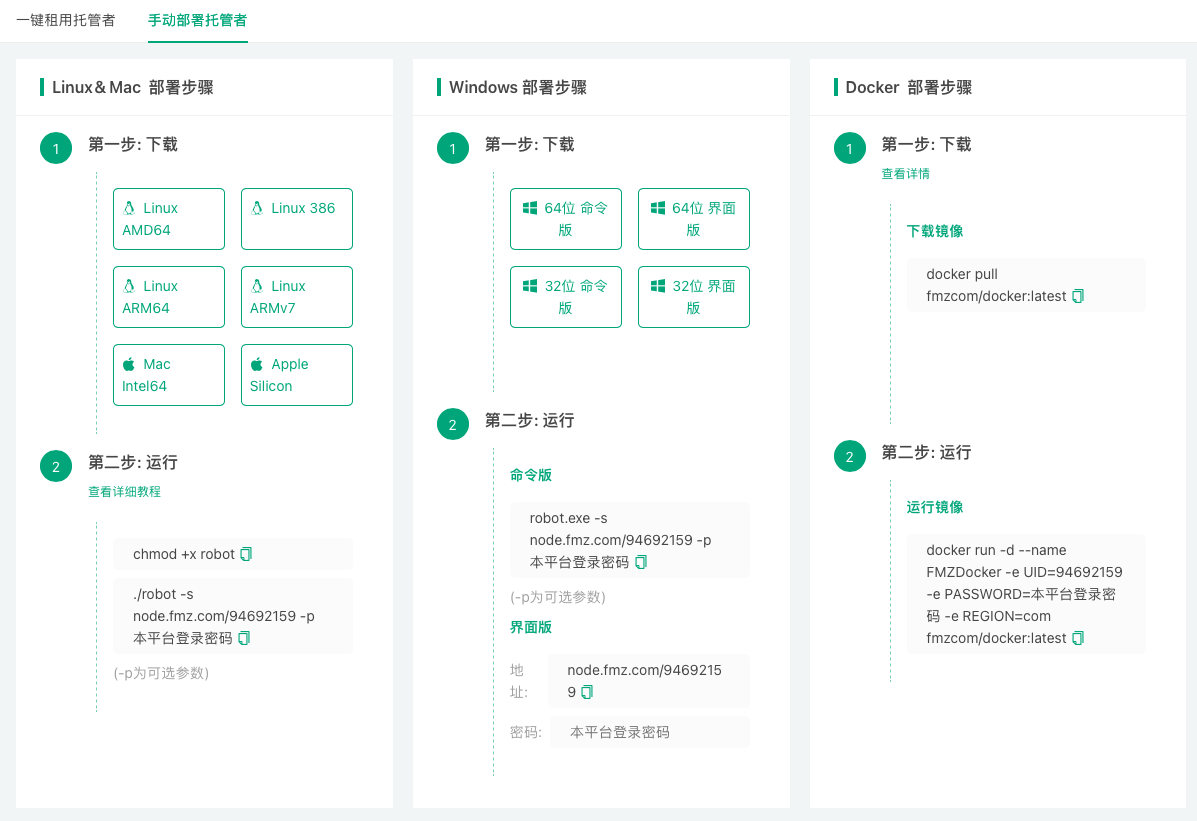
- Linux command-line version: Linux AMD64 / Linux 386 / Linux ARM64 / Linux ARMv7
- Mac command-line version: Mac Intel64 / Apple Silicon
- Windows command-line version, GUI version: 64-bit / 32-bit
- Docker image
After logging into the device where you need to deploy the bot program, download the corresponding bot program according to the device's operating system. The download link can be found in the content displayed after clicking the Manual Bot Deployment tab on the Bot Deployment Page.
Deploying the bot program requires setting 2 parameters:
- Communication address containing the FMZ Quant Trading Platform UID.
- Password for the FMZ Quant Trading Platform account corresponding to the UID.
Configuring "Communication Address" and "FMZ Quant Trading Platform Account Password" when deploying the bot:
-
Windows GUI version bot
The Windows GUI version bot can directly fill these two parameters into the corresponding input box controls on the bot interface. -
Command-line version bot
For other command-line version bot programs, different operating systems have different commands. Taking Linux & Mac as an example, use the command:./robot -s node.fmz.com/123456 -p 654321, the following explains each part of the command:./robotmeans running the robot executable program (i.e., the bot program), where123456is the UID, and654321is the password for the FMZ Quant Trading Platform account corresponding to the UID.
-sparameter represents "Communication address with FMZ Quant Trading Platform UID", the parameter value can be filled in, for example:node.fmz.com/123456.
-pparameter represents "Password for the FMZ Quant Trading Platform account corresponding to the UID", the parameter value can be filled in, for example:654321.Please note that the parameters here are only examples. The actual parameters can be viewed after logging into FMZ.COM and clicking the Manual Bot Deployment tab on the Bot Deployment Page. The
-pparameter does not necessarily need to be written in plain text in the bot deployment command. You can use the./robot -s node.fmz.com/123456command to run, then it will prompt for password input, and you can manually enter the password. Also, please pay attention to issues such as program execution permissions, you need to grant the bot program sufficient permissions and remove running restrictions.