Welcome to FMZ Quant Trading Platform
Programming Languages
Key Security
Live Trading
Strategy Library
Docker
Exchange
Strategy Editor
Backtesting System
Backtesting System Modes
Impact of Backtest Data Granularity on Backtesting
The backtesting system supports multiple programming languages
Exchanges Supported by Backtesting System
Backtest System Parameter Optimization
Save Backtest Settings
Custom Data Source
Local Backtesting Engine
Backtest Page Shortcuts
Backtest Data Download
Backtest System Sharpe Ratio Algorithm
Strategy Entry Functions
Strategy Framework and API Functions
Template Library
Strategy Parameters
Interactive Controls
Options Trading
Rust Strategy Development Guide
C++ Strategy Writing Guide
JavaScript Strategy Writing Guide
Web3
Built-in Libraries
Extended API Interface
MCP Service
Trading Terminal
Data Explorer
Alpha Factor Analysis Tool
General Protocol
Debugging Tool
Remote Editing
Import and Export of Complete Strategies
Multi-language Support
Live Trading and Strategy Grouping
Live Trading Display
Strategy Sharing and Renting
Live Trading Message Push
Common Causes of Live Trading Errors and Abnormal Exits
Exchange-Specific Notes
Types of Interactive Controls
| Variable (naming example) | Description | Type | Default Value (description) | Component Configuration (description) | Notes |
|---|---|---|---|---|---|
| cmdNum | Description of interactive control cmdNum | Number type (number) | Default value is optional, can be left empty | Used to set the component type, minimum value, maximum value, grouping, etc. of the interface control bound to the current interactive item | Notes for interactive control cmdNum |
| cmdBool | Description of interactive control cmdBool | Boolean type (true/false) | Default value is required, on or off | Same as above | Notes for interactive control cmdBool |
| cmdStr | Description of interactive control cmdStr | String type (string) | Default value is optional, can be left empty | Same as above | Notes for interactive control cmdStr |
| cmdCombox | Description of interactive control cmdCombox | Dropdown (selected) | Default value is optional, can be left empty | Same as above | Notes for interactive control cmdCombox |
| cmdBtn | Description of interactive control cmdBtn | Button (button) | Button control does not bind input items | Same as above | Notes for interactive control cmdBtn |
Messages (strings) sent to the strategy after interactive control is triggered:
- Number type
After entering interactive data123in the input box of interactive controlcmdNum, click the button of interactive control cmdNum. TheGetCommand()function in the strategy program will receive the message:cmdNum:123. - Boolean type
After setting the switch control of interactive controlcmdBoolto on, click the button of interactive control cmdBool. TheGetCommand()function in the strategy program will receive the message:cmdBool:true. - String type
After entering interactive dataabcin the input box of interactive controlcmdStr, click the button of interactive control cmdStr. TheGetCommand()function in the strategy program will receive the message:cmdStr:abc. - Dropdown
After selecting the second option in the dropdown of interactive controlcmdCombox, click the button of interactive control cmdCombox. TheGetCommand()function in the strategy program will receive the message:cmdCombox:1, where 1 represents the index of the selected option, the first option has index 0, the second option has index 1. - Button
Click the button of interactive controlcmdBtn. TheGetCommand()function in the strategy program will receive the message:cmdBtn.
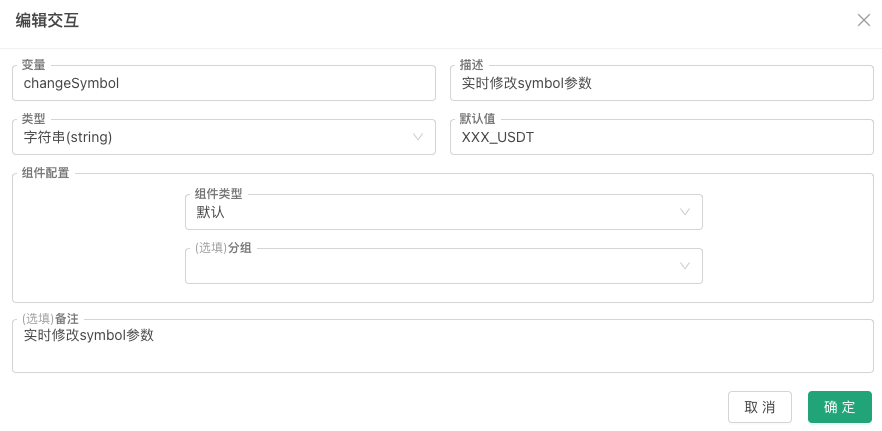
Application of interactive controls: Dynamically modify strategy parameters
For example, the strategy has a parameter called symbol. The strategy parameters added on the strategy interface are also global variables, so global variables in the code are used here for demonstration.
javascript
// Strategy parameters
var symbol = "BTC_USDT"
function main() {
while (true) {
var cmd = GetCommand()
if (cmd) {
var arr = cmd.split(":")
if (arr.length == 2 && arr[0] == "changeSymbol") {
// When changeSymbol control is triggered, parameter update operation will be executed
Log("Changed symbol parameter to:", arr[1])
symbol = arr[1]
}
}
LogStatus(_D(), ", Current symbol parameter value:", symbol)
Sleep(3000)
}
}
Setting up interactive controls: