Strategy Sharing and Renting
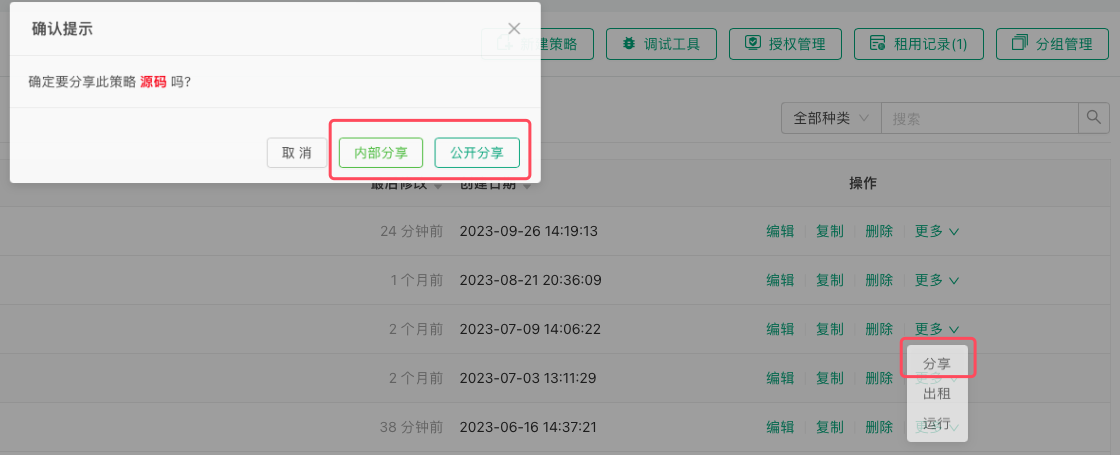
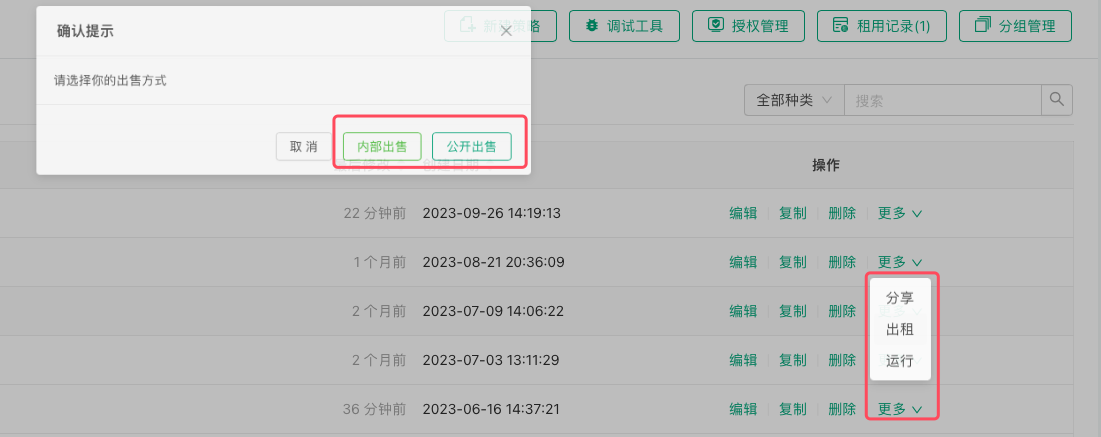
On the Strategy Library page, click the "Actions" button on the right side of a strategy to display a menu containing sharing and renting options.
Important Notice: When creating and distributing strategy registration codes, please carefully confirm whether it is a "Registration Code" or "Copy Code" to avoid accidentally leaking your strategy.
Strategy Sharing
-
Public Sharing
After clicking the "Share" button, a dialog box will pop up where you can select "Public Sharing". The strategy will be fully shared to the platform's Strategy Square, where any user can copy the strategy. -
Private Sharing
After clicking the "Share" button, a dialog box will pop up where you can select "Private Sharing". After selecting the sharing validity period and sharing limit, a copy page URL and copy code for the strategy will be generated. These can be distributed to designated FMZ platform users. Users who need the strategy can simply use the copy page URL link, log in to the copy page and enter the copy code to obtain the strategy. Once obtained, the strategy will automatically appear in their strategy library.
Strategy Rental
-
Public Sale
After clicking the "Rent" button, a dialog box will pop up where you can select "Public Sale". The strategy can then be submitted for listing (requires approval). -
Internal Sale
After clicking the "Rent" button, a dialog box will pop up where you can select "Internal Sale". After selecting the number of days, maximum concurrent instances, and number of registration codes, the system will generate a registration page URL and registration codes for this strategy. You can distribute these to designated FMZ platform users. Users who need this strategy only need to visit the registration page URL link, log in to the registration page, and enter the registration code to obtain access to the strategy. The strategy will also appear in the strategy library, but users will only have backtesting and live trading permissions, and cannot view the strategy source code or other information. When the number of concurrent live trading instances is set to 0, it means there is no limit on concurrent instances, allowing unlimited creation of live trading bots.