Programming Languages
What programming languages can I use to write my strategies on the FMZ Quant trading platform?
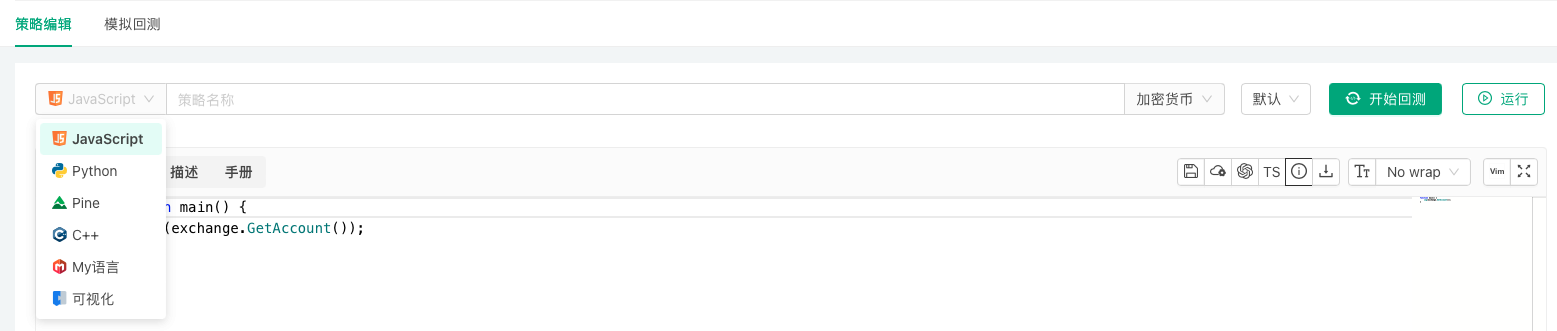
The FMZ Quant trading platform supports writing and designing trading strategies using JavaScript, TypeScript, Python, Rust, C++, PINE, My Language, Blockly visual programming, and the Workflow workflow tool.
JavaScript
Supports JavaScript language with the following integrated JavaScript libraries:
Program exceptions and API business errors
In JavaScript language strategies, when program exceptions or API business errors occur, the error log will display the specific line number where the error occurred in the strategy code, facilitating strategy debugging and bug tracking.
Supports JavaScript asynchronous programming features:
-
setTimeout / clearTimeout
javascriptfunction main() { let symbol = "ETH_USDT" let delay = 10 let depth = exchange.GetDepth(symbol) let callback = function(e, id, msg) { Log(msg + ", canceling order.") e.CancelOrder(id) } let ordersLen = 3 let arrTimerId = [] for (let i = 1 ; i <= ordersLen ; i++) { let orderId = exchange.CreateOrder(symbol, "buy", depth.Bids[i * 3].Price, i * 0.1) let timerId = setTimeout(callback, delay * 1000, exchange, orderId, `Delayed ${delay} seconds`) Log("i:", i, ", timerId:", timerId) arrTimerId.push(timerId) } // clearTimeout let clearTimeoutIdx = 1 Log("clearTimeoutIdx:", clearTimeoutIdx, `, arrTimerId[clearTimeoutIdx]:`, arrTimerId[clearTimeoutIdx]) clearTimeout(arrTimerId[clearTimeoutIdx]) Sleep(60 * 1000) } -
fetch
Thefetchfunction is an asynchronous version overload of theHttpQueryfunction.Using the
awaitkeyword to handle asynchronous operations with synchronous syntax:javascriptfunction main() { let url = "https://www.okx.com/api/v5/market/books?instId=BTC-USDT" const promiseBooks = new Promise(async function(resolve, reject) { Log("Start execution") let data = await fetch(url) Log("data.ok:", data.ok, ", data.text():", data.text()) if (data.ok) { Log("Successfully retrieved data:", data) return resolve(data.text()) } else { return reject(new Error("data invalid")) } }) promiseBooks.then(function(ret) { Log("ret:", ret) }).catch(function(err) { Log("err.name:", err.name, "err.stack:", err.stack, "err.message:", err.message) }) } -
Using
Promise.allto execute multiple asynchronous network requests concurrently:javascriptasync function main() { // let symbols = ["BTC-USDT", "ETH-USDT", "LTC-USDT"] // Request waiting time: 99ms let symbols = ["BTC-USDT", "ETH-USDT", "LTC-USDT", "SOL-USDT", "BNB-USDT", "ADA-USDT"] // Request waiting time: 99ms let arr = [] let beginTs1 = new Date().getTime() for (let symbol of symbols) { let url = `https://www.okx.com/api/v5/market/books?instId=${symbol}` arr.push(fetch(url).then(function(resp) { if (resp.ok) { return {"symbol": symbol, "json": resp.json()} } else { throw "req failed" } })) } let endTs1 = new Date().getTime() let beginTs2 = new Date().getTime() const ret = await Promise.all(arr) for (let data of ret) { Log(data) } let endTs2 = new Date().getTime() Log("Request creation time:", endTs1 - beginTs1, "ms") Log("Request waiting time:", endTs2 - beginTs2, "ms") LogStatus(_D(), ret) } -
Using
Promise.raceto get the firstresolvedorrejectedresult from multiple asynchronous requests:javascriptasync function getTicker(e) { return Promise.resolve().then(function() { /* Test if (e.GetName() == "Huobi" || e.GetName() == "Binance") { Sleep(1000) } */ let ret = e.GetTicker("BTC_USDT") return {"name": e.GetName(), "ret": ret} }) } async function main() { Log("begin") let arrPromise = [] for (let e of exchanges) { arrPromise.push(getTicker(e)) } let ret = await Promise.race(arrPromise) Log(ret) } -
Using
setTimeout()function inthreading.Thread:javascriptfunction test() { Log("Test function started") // step 3. Test function started let timerId1 = setTimeout(function() { Log("Timeout callback executed after 5 seconds") // step 5. Timeout callback executed after 5 seconds }, 5000) Log("Test function completed") // step 4. Test function completed } function main() { Log("Main function started") // step 1. Main function started let t1 = threading.Thread(test) Log("Worker thread created successfully") // step 2. Worker thread created successfully t1.join() Log("Main function completed") // step 6. Main function completed } -
Example of asynchronous processing for multi-threaded concurrent
tickerdata retrieval:
Sinceexchange.GetTicker()is a synchronous blocking operation, even when wrapped in a Promise, the internal execution is still synchronous; JavaScript is single-threaded, and synchronous operations will block the event loop; callback functions in the microtask queue are still executed serially.javascriptasync function getTicker(symbol) { Log("getTicker symbol:", symbol) return Promise.resolve().then(function() { // Note the difference from fetch request data let ret = exchange.GetTicker(symbol) Log(ret) return ret }) } async function main() { let symbols = ["BTC_USDT", "ETH_USDT", "SOL_USDT"] let t1 = threading.Thread(async function(symbols, func) { let arrPromise = [] for (let symbol of symbols) { arrPromise.push(func(symbol)) } let ret = await Promise.all(arrPromise) Log("ret:", ret) }, symbols, getTicker) t1.join() }
TypeScript
TypeScript language is supported. When creating a strategy, still set it as a JavaScript strategy, then write // @ts-check at the beginning of the strategy code or click the "TypeScript" button in the upper right corner of the strategy editing area to switch to TypeScript. The platform will automatically recognize the code as TypeScript and provide corresponding compilation and type checking support:
-
Type Safety: TypeScript's static type checking helps you discover potential errors while writing code, improving code quality.
-
Code Auto-completion: TypeScript's type system enables you to find required properties and methods faster when writing code, improving development efficiency.
-
Clearer Code Structure: Using TypeScript, you can better organize and maintain code, making it easy to read and understand.
-
Powerful Object-Oriented Programming Features: TypeScript provides powerful object-oriented programming features such as interfaces, classes, and generics, helping you write more robust and reusable strategy code.
Python
-
Setting the Python interpreter for Python strategy programs
For strategies written in Python, during backtesting or live trading, if the host system has both Python2 and Python3 installed, you can set the Python version to launch at runtime in the first line of the strategy. For example:#!python3,#!python2, the system will automatically find the corresponding interpreter. You can also specify an absolute path, for example:#!/usr/bin/python3. -
Security of Python-based strategies
Strategies developed on the FMZ Quant Trading Platform are only visible to the holder of the FMZ Quant Trading Platform account. Additionally, complete localization of strategy code can be achieved on the FMZ Quant Trading Platform, such as packaging the strategy into a Python library and loading it in the strategy code, thus achieving strategy code localization.
Python code security:
Since Python is an open-source and easily decompilable language, if the strategy is not for personal use but for rental, and you are concerned about strategy leakage, you can run the strategy on your own deployed host and rent it out in the form of sub-account or fully managed management.Python strategy code encryption:
By default, Python strategy code is not encrypted when used by the author themselves, but encrypted when rented to others. By writing the following code at the beginning of the Python strategy, you can specify whether to encrypt the strategy code when running for personal use or rental. Python versions that support strategy code encryption are: Python 2.7, Python 3.5, Python 3.6.- Encrypt strategy code both when the strategy author runs it themselves and when providing it to others via registration code:
Use code#!pythonto specify the Python interpreter version, then use comma,as separator, and input the encryption commandencrypt. If you don't specify the Python version, you can directly add#!encrypt.
orpython#!python,encryptpython#!encrypt - Do not encrypt strategy code when the strategy author runs it themselves or provides it to others via registration code:
orpython#!python,not encryptedpython#!not encrypted
To check if Python strategy code encryption is effective, use code
os.getenv('__FMZ_ENV__'), which returns the string"encrypt"to indicate it's effective. Only valid in live trading, backtesting will not encrypt Python strategy code.python#!encrypt def main(): ret = os.getenv('__FMZ_ENV__') # Printing variable ret as string encrypt or ret == "encrypt" being true means encryption is effective Log(ret, ret == "encrypt") - Encrypt strategy code both when the strategy author runs it themselves and when providing it to others via registration code:
-
Python custom module import functionality
The FMZ platform supports importing custom modules in Python strategies, enabling modular development and code reuse.For example, if we need to design a module:
mymath, savemymath.pyas a separate file.python# mymath.py - save as a separate file """ Simple math utility module """ def add(a, b): """Addition""" return a + bDeploy the module file by placing
mymath.pyin the specified location under the host program directory (the folder name in the storage directory is the live trading Id, using live trading Id123456as an example):Host program directory/logs/storage/123456/mymath.py
Finally, directly import the
mymathmodule in the Python strategy on the FMZ platform.pythonimport mymath def main(): Log("mymath.add(1, 2):", mymath.add(1, 2))The strategy bound to the live trading instance (strategy instance) with Id
123456can then call methods from themymathmodule.
Rust
The platform supports writing strategies using the Rust programming language. Rust strategies run on a compile-first, then-execute basis: during backtesting, the strategy code is compiled by the platform server and runs in the backtesting system on the browser side; in live trading, Rust strategies run on the docker host after passing compilation.
Leveraging Rust's ownership model and static type system, you can write trading strategies that are both memory-safe and high-performance on the FMZ Quant trading platform.
- Automatic injection of platform APIs
The strategy code only needs a singlefn main()entry function. All platform APIs (exchange,exchanges,TA,Log!/LogStatus!,_G!/_C!, etc.) are automatically injected via the prelude and can be called directly without anyuse/moddeclarations. API calls that may fail return aResult<T>type, which can be combined with the_C!macro for automatic retries.rustfn main() { // GetTicker returns Result<Ticker>; use the _C! macro to retry until the call succeeds let ticker = _C!(exchange.GetTicker(None)); Log!("Last:", ticker.Last); } - Strategy parameters injected as global constants
Strategy parameters configured in the interface are injected into the strategy as global constants, whose Rust types are determined by the actual value of the parameter (numbers map tof64, booleans tobool, strings/passwords to&str, etc.), and can be referenced directly by parameter name; you can also use theparams()function to obtain the parameter set as JSON text and parse it yourself. - Third-party crate support
The strategy source is the only code file (there is no separate Cargo.toml). You can declare dependencies at the top of the source using cargo-script-style frontmatter, which is automatically merged into Cargo.toml at build time:
Note: the compilation sandbox does not provide system OpenSSL, so for crates that require TLS (such as HTTP/WebSocket clients), please choose the pure-Rustrust--- [dependencies] serde_json = "1" --- fn main() { let v: serde_json::Value = serde_json::from_str(params()).unwrap(); Log!("Parameters:", v.to_string()); }rustlsimplementation (for example, enable therustls-tls-webpki-rootsfeature fortokio-tungstenite) and avoid depending onnative-tls/openssl-sys; for WebSocket connections, it is recommended to prefer the built-inDial()function, which requires no third-party crate. - Editor support
The strategy editor integratesrust-analyzerfor Rust strategies, providing code completion and real-time diagnostics.
C++
The platform supports C++ programming language, compatible with C++ 11 standard. C++ strategies need to be pre-compiled before execution. In the backtesting system, C++ strategies run on dedicated C++ backtesting servers; in live trading environments, C++ strategies run on the docker after compilation.
Leveraging the C++ programming language and C++ 11 standard, you can develop high-performance trading strategies on the FMZ Quant Trading Platform. Using modern C++ features, you can build flexible and scalable trading algorithms to implement automated trading.
The following C++ libraries are integrated:
MyLanguage
The platform supports MyLanguage for writing and designing strategies, compatible with most syntax, instructions and functions of Wenhua MyLanguage. MyLanguage encourages modular programming, breaking down complex algorithms into function modules. Through concise syntax, dedicated data structures and powerful financial function libraries, it supports the implementation of complex financial logic. Building applications in a modular way improves development efficiency and code maintainability.
MyLanguage Strategy Example: System Based on Displaced Bollinger Bands
            mylang

            M := 12;          // Parameter range 1, 20
N := 3;           // Parameter range 1, 10
SDEV := 2;        // Parameter range 1, 10
P := 16;          // Parameter range 1, 20

// This strategy is a trend-following trading strategy, suitable for larger timeframes such as daily charts.
// This model is only used as a model development case. Trading based on this carries your own risk.

////////////////////////////////////////////////////////

// Displaced BOLL channel calculation
MID:=MA(C,N);                 // Calculate middle band
TMP:=STD(C,M)*SDEV;           // Calculate standard deviation
DISPTOP:=REF(MID,P)+TMP;      // Displaced BOLL channel upper band
DISPBOTTOM:=REF(MID,P)-TMP;   // Displaced BOLL channel lower band

// System entry
H>=DISPTOP,BPK;
L<=DISPBOTTOM,SPK;
AUTOFILTER;
PINE Language
The platform supports and is compatible with Trading View's PINE language scripts. PINE is a lightweight yet powerful strategy programming language for creating technical indicators and strategies that can be backtested and traded live. The active community has created over 100,000 PINE scripts.
Users can easily access and apply various technical analysis tools and trading strategies; leverage community scripts to quickly implement trading ideas without writing code from scratch, significantly reducing development cycles; help both beginners and experienced traders learn and understand different technical indicators, strategies, and programming concepts.
PINE Language Strategy Example: Supertrend Strategy
            pine

            strategy("supertrend", overlay=true)

[supertrend, direction] = ta.supertrend(input(5, "factor"), input.int(10, "atrPeriod"))
plot(direction < 0 ? supertrend : na, "Up direction", color = color.green, style=plot.style_linebr)
plot(direction > 0 ? supertrend : na, "Down direction", color = color.red, style=plot.style_linebr)

if direction < 0
    if supertrend > supertrend[2]
        strategy.entry("entry long", strategy.long)
    else if strategy.position_size < 0
        strategy.close_all()
else if direction > 0
    if supertrend < supertrend[3]
        strategy.entry("entry short", strategy.short)
    else if strategy.position_size > 0
        strategy.close_all()
Blockly Visual Programming
The platform supports Blockly visual programming. With the Blockly editor, users can express code concepts such as variables, logical expressions, and loops by connecting graphical blocks (similar to building blocks). This approach allows the programming process to focus less on tedious syntax details and instead operate directly according to programming principles. Through the arrangement and combination of graphical blocks, users can easily understand programming logic and implement creative ideas, making it ideal for cultivating interest in strategy design and quickly getting started with programmatic and quantitative trading.
Workflow
The platform supports writing strategies using the Workflow approach. Workflow is a visual strategy design method that builds trading logic through node connections and configurations, enabling strategy implementation without writing code.
Workflow Features:
- Visual drag-and-drop design, WYSIWYG
- Rich preset functional nodes (data retrieval, indicator calculation, conditional judgment, trade execution, etc.)
- Lower programming barrier, suitable for rapid strategy building and validation
- Supports backtesting functionality with visual node execution status viewing
Learning Resources: