Type/to search
Welcome to FMZ Quant Trading Platform
Programming Languages
JavaScript
TypeScript
Python
C++
MyLanguage
PINE Language
Blockly Visual Programming
Workflow
Key Security
Live Trading
Strategy Library
Docker
Deploy Docker
One-Click Docker Rental
Manual Deployment of Bot
Docker Operation Precautions
Global IP Address Specification
Command Line Parameters for Bot Program
Live Trading Data Migration
Docker Monitor
Exchange
Strategy Editor
Backtesting System
Strategy Entry Functions
Strategy Framework and API Functions
Template Library
Strategy Parameters
Interactive Controls
Options Trading
C++ Strategy Writing Guide
JavaScript Strategy Writing Guide
Web3
Built-in Libraries
Extended API Interface
MCP Service
Trading Terminal
Data Explorer
Alpha Factor Analysis Tool
General Protocol
Debugging Tool
Remote Editing
Import and Export of Complete Strategies
Multi-language Support
Live Trading and Strategy Grouping
Live Trading Display
Strategy Sharing and Renting
Live Trading Message Push
Common Causes of Live Trading Errors and Abnormal Exits
Exchange-Specific Notes

Strategy Rental

  • Public Sale
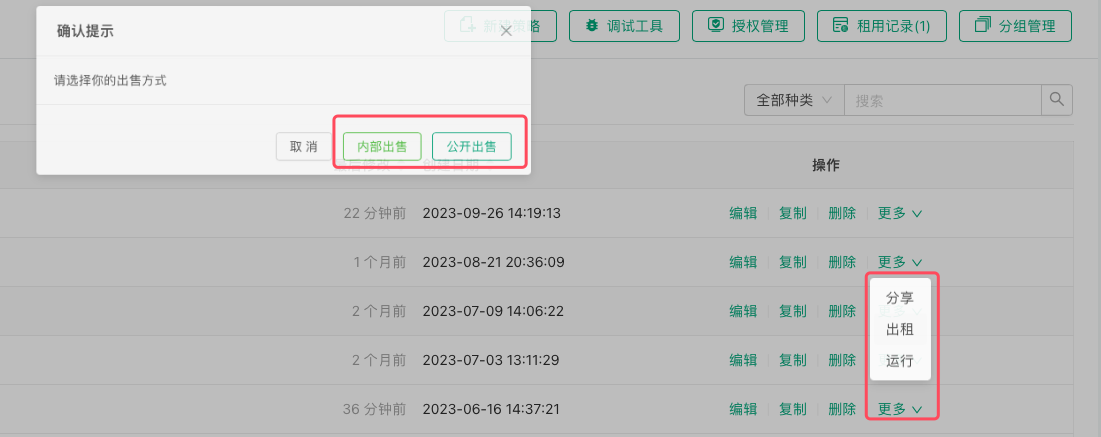
    After clicking the "Rent" button, a dialog box will pop up where you can select "Public Sale". The strategy can then be submitted for listing (requires approval).

  • Internal Sale
    After clicking the "Rent" button, a dialog box will pop up where you can select "Internal Sale". After selecting the number of days, maximum concurrent instances, and number of registration codes, the system will generate a registration page URL and registration codes for this strategy. You can distribute these to designated FMZ platform users. Users who need this strategy only need to visit the registration page URL link, log in to the registration page, and enter the registration code to obtain access to the strategy. The strategy will also appear in the strategy library, but users will only have backtesting and live trading permissions, and cannot view the strategy source code or other information. When the number of concurrent live trading instances is set to 0, it means there is no limit on concurrent instances, allowing unlimited creation of live trading bots.