Welcome to FMZ Quant Trading Platform
Programming Languages
Key Security
Live Trading
Strategy Library
Docker
Exchange
Strategy Editor
Backtesting System
Backtesting System Modes
Impact of Backtest Data Granularity on Backtesting
The backtesting system supports multiple programming languages
Exchanges Supported by Backtesting System
Backtest System Parameter Optimization
Save Backtest Settings
Custom Data Source
Local Backtesting Engine
Backtest Page Shortcuts
Backtest Data Download
Backtest System Sharpe Ratio Algorithm
Strategy Entry Functions
Strategy Framework and API Functions
Template Library
Strategy Parameters
Interactive Controls
Options Trading
Rust Strategy Development Guide
C++ Strategy Writing Guide
JavaScript Strategy Writing Guide
Web3
Built-in Libraries
Extended API Interface
MCP Service
Trading Terminal
Data Explorer
Alpha Factor Analysis Tool
General Protocol
Debugging Tool
Remote Editing
Import and Export of Complete Strategies
Multi-language Support
Live Trading and Strategy Grouping
Live Trading Display
Strategy Sharing and Renting
Live Trading Message Push
Common Causes of Live Trading Errors and Abnormal Exits
Exchange-Specific Notes
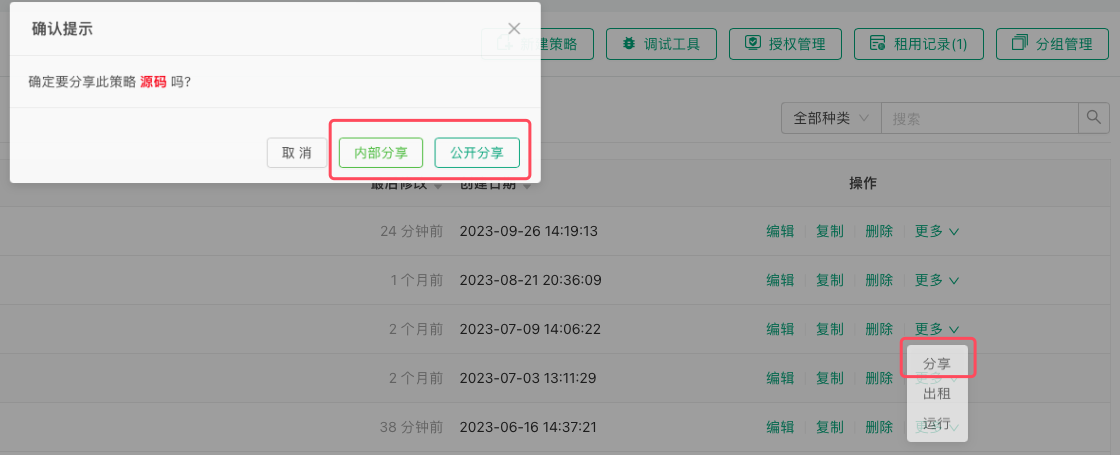
Strategy Sharing
-
Public Sharing
After clicking the "Share" button, a dialog box will pop up where you can select "Public Sharing". The strategy will be fully shared to the platform's Strategy Square, where any user can copy the strategy. -
Private Sharing
After clicking the "Share" button, a dialog box will pop up where you can select "Private Sharing". After selecting the sharing validity period and sharing limit, a copy page URL and copy code for the strategy will be generated. These can be distributed to designated FMZ platform users. Users who need the strategy can simply use the copy page URL link, log in to the copy page and enter the copy code to obtain the strategy. Once obtained, the strategy will automatically appear in their strategy library.